Expression Studio opens up a new world of creative possibility. Its professional design tools give you the freedom to make your vision real—whether you’re designing for standards-based websites, rich desktop experiences, or Silverlight. Includes Expression Web + SuperPreview, Expression Blend, SketchFlow, Expression Encoder Pro and Expression Design. For more information about what else is new in this release, see Expression Studio 4 Ultimate Overview. Help us improve Expression Studio by reporting any technical issues. For more insight into Expression Studio, please see the Expression team blog. Read more: MS Download

Deploying USB Redirection with Microsoft RemoteFX Step-by-Step Guide
|
This step-by-step guide walks you through the process of setting up USB redirection with RemoteFX in a test environment. Upon completion of this step-by-step guide, you will have a personal virtual desktop with RemoteFX assigned to a user account that can connect by using RD Web Access. Read more: MS Download

NVIDIA Parallel Nsight
|
NVIDIA Parallel Nsight brings GPU Computing into Microsoft Visual Studio. Debug, profile and analyze GPGPU or graphics applications using CUDA C, OpenCL, DirectCompute, Direct3D, and OpenGL.NVIDIA® Parallel Nsight™ software is the industry's first development environment for massively parallel computing integrated into Microsoft Visual Studio, the world's most popular development environment. Parallel Nsight is a powerful plug-in that allows programmers to develop for both GPUs and CPUs within Microsoft Visual Studio. Massively Parallel ComputingNVIDIA's Parallel Nsight allows you to leverage the CPU for course grained parallelism and the GPU for massively parallel computingWhat could you do with your application running 5 - 50X faster? Earlier detection of breast cancer? Real-time financial options pricing? Discover hidden oil reserves? Award winning game physics? Or process HD video to allow your customers to meet deadlines? Our partners have done all of the above The power of GPU Computing already is delivering game changing performance increases to the Medical, Finance, Energy, Consumer and Research fields. For a view of 1,000 more customer stories visit www.nvidia.com/cuda Read more: NVidia
A COOL WINDBG/SOS HIDDEN FEATURE
|
Every once in a while you run across an undocumented trick that totally and completely makes your day. A great example of that is the ability to debug MSBuild scripts in Visual Studio. Today I ran across another amazingly useful feature in WinDBG and SOS for .NET 4.0 that will save you countless hours of typing when analyzing minidumps. If you thought using .cmdtree to click your way to SOS happiness was amazing, you're going to love this one. The next time you start a WinDBG debugging session with SOS 4.0, issue the following undocumented command before you run any SOS commands:.prefer_dml 1If you've been using WinDBG for a while, you might have heard of DML (Debugger Mark Up Language). It's a feature of WinDBG where you can get hyperlinks in specific command output, such as LM (Loaded Modules) where you can click on a module to get more information about that module. Read more: JOHN ROBBINS' BLOG
Programming Windows Phone 7 LOB Applications – Part I
|

In these post series, I’ll demonstrate how to develop LOB applications for the Windows Phone 7. This series will provide an easy start for iPhone, Android and .NET Programmers.Introduction
Windows Phone is almost here, and it’s a great timing to learn how to develop applications which target the Windows Phone 7 device. From my point of view, there are at least three reasons for doing so:1. Microsoft introduces a market place, so it’s a good opportunity for making easy money :)2. Develop LOB Applications for Windows Phone, which is part of my job. 3. Just for Fun!Where to Start
If you’re a .NET Programmer, you’ve already made half of the way. All you have to do is to learn Silverlight and/or XNA for gaming.If you’re an iPhone programmer and you know Cocoa Touch and Objective C, you’ve to learn: Silverlight, C# and/or XNA for gaming. If you’re an Android programmer and you know Java or C++, you’ve to learn: Silverlight, C# and/or XNA for gaming.Whatever kind of programmer you’re, both C# and Silverlight are easy to learn. Just for clarification, C# is a programming language (comparing to Objective C, C++ and Java), where Silverlight is the framework for developing UI and client logic (comparing to Cocoa Touch and Java). Windows Phone SDK
Before we start, we have to install the free Windows Phone Developer Tools Beta from here.The Windows Phone Developer Tools Beta includes the following
- Visual Studio 2010 Express for Windows Phone Beta (Development Environment such as Xcode and Eclipse)
- Windows Phone Emulator Beta (Emulator if you don’t have a real device)
- Silverlight for Windows Phone Beta (UI and client logic framework)
- Microsoft Expression Blend for Windows Phone Beta (Great UI design environment)
- XNA Game Studio 4.0 Beta (Platform for game programming)Note that Visual Studio 2010 Express won’t be installed if you already have Visual Studio 2010.Windows Phone SDK
After installing the development environment, you can easily create a new Windows Phone project from both Visual Studio and Blend for Windows Phone. So feel free to launch Visual Studio or Blend for Windows Phone from the start menu, then click File –> New Project. Read more: Essential WPF
SMSToolkit - .NET SMS server
|
The SDK allows any Windows Mobile 5 phone to be used in conjunction with a PC to act as an SMS Server, allowing developers to easily write SMS applications, using just their phone and a PC. Additionally, it provides a collection of samples that among other things, allow non-programmers to use Excel to send bulk SMSs and to build simple information lookup applications. This project is actively developed by Microsoft India Research team. Read more: BestOpenSource
My "Extending Visual Studio 2010" course is live
|
I mentioned I've been recording videos. That's because I'm doing another Pluralsight course. This one is on Customizing and Extending Visual Studio. About half of it is live already:Overview of Visual Studio 2010 Extensibility
Why write extensions for Visual Studio?
Visual Studio Macros
Visual Studio Snippets
Getting and installing extensions for Visual Studio
The Visual Studio 2010 SDK
Visual Studio Start Page
The VSIX Format There's more to come, of course - I'm about half done. I'm really enjoying this material. You can get your work done a lot faster if you tweak Visual Studio to meet your needs.Read more: Kate Gregory's Blog
Why write extensions for Visual Studio?
Visual Studio Macros
Visual Studio Snippets
Getting and installing extensions for Visual Studio
The Visual Studio 2010 SDK
Visual Studio Start Page
The VSIX Format There's more to come, of course - I'm about half done. I'm really enjoying this material. You can get your work done a lot faster if you tweak Visual Studio to meet your needs.Read more: Kate Gregory's Blog
Read more: PluralSight
FluentIL
|
Helper class and methods to IL EmittingFluentIL helps to build faster applications. To use it, please download the lastest source code in download section.Read more: Codeplex
How To Send and Receive SMS using GSM Modem
|
IntroductionSMS client and server is an application software which is used for sending and receiving messages(SMS). It listens for incoming messages to arrive, processes the message if it's in a valid format. Note the processing of arrived messages depends on the application which will be discussed later. I am going to explain the following things: Communication Port Settings
Receive Incoming Message
Send Messages
Read All Messages (Sent by the users)
Delete Messages (One or All)
I have used the GSMComm Library for Sending and Receiving SMS. You require a GSM modem or phone for sending an SMS. Using the code1) Communication Port SettingsCommSetting class is used for storing comm port settings:public class CommSetting
{
public static int Comm_Port=0;
public static Int64 Comm_BaudRate=0;
public static Int64 Comm_TimeOut=0;
public static GsmCommMain comm; public CommSetting()
{
// // TODO: Add constructor logic here // }
} Comm is an object of type GsmCommMain which is required for sending and receiving messages. We have to set the Comm port, Baud rate and time out for our comm object of type GsmCommMain. Then try to open with the above settings. We can test the Comm port settings by clicking on the Test button after selecting the Comm port, baud rate and Time out. Sometimes if the comm port is unable to open, you will get a message "No phone connected". This is mainly due to Baud rate settings. Change the baud rate and check again by clicking the Test button until you get a message "Successfully connected to the phone." Read more: Codeproject
Receive Incoming Message
Send Messages
Read All Messages (Sent by the users)
Delete Messages (One or All)
I have used the GSMComm Library for Sending and Receiving SMS. You require a GSM modem or phone for sending an SMS. Using the code1) Communication Port SettingsCommSetting class is used for storing comm port settings:public class CommSetting
{
public static int Comm_Port=0;
public static Int64 Comm_BaudRate=0;
public static Int64 Comm_TimeOut=0;
public static GsmCommMain comm; public CommSetting()
{
// // TODO: Add constructor logic here // }
} Comm is an object of type GsmCommMain which is required for sending and receiving messages. We have to set the Comm port, Baud rate and time out for our comm object of type GsmCommMain. Then try to open with the above settings. We can test the Comm port settings by clicking on the Test button after selecting the Comm port, baud rate and Time out. Sometimes if the comm port is unable to open, you will get a message "No phone connected". This is mainly due to Baud rate settings. Change the baud rate and check again by clicking the Test button until you get a message "Successfully connected to the phone." Read more: Codeproject
TSQL Challenge 34 - Search for two keywords within the maximum distance of one word between them
|
This challenge is all about searching for two keywords in a string with a maximum distance of 'one word' between them.For example, if 'sql' and 'server' are the keywords, a match will be found on 'Microsoft SQL Server 2008' as well as on 'I like sql and server'. The second phrase matches because there is only one word between 'sql' and 'server' which is acceptable. Note also that the search keywords can occur in any order within the string. If you search for 'sql' and 'server' a match can be found in 'Exchange Server runs SQL' because both the keywords occur in the string within the distance of one word ('runs'). Source data:
ID Data
-- -------------------------------------------------------------------------------------
1 Modern technology Owes ecology An apology
2 It has become appallingly obvious that our technology has exceeded our humanity
3 If it keeps up man will atrophy all his limbs but the push button finger
4 Our Technology presumes there is just one right way to do things and there never is
5 Technology is the knack of so arranging the world that we do have to experience it
6 Do you realize if it were not for Edison we would be watching TV by candlelight
7 Simply put have we covered all our basesRead more: Beyond relational
ID Data
-- -------------------------------------------------------------------------------------
1 Modern technology Owes ecology An apology
2 It has become appallingly obvious that our technology has exceeded our humanity
3 If it keeps up man will atrophy all his limbs but the push button finger
4 Our Technology presumes there is just one right way to do things and there never is
5 Technology is the knack of so arranging the world that we do have to experience it
6 Do you realize if it were not for Edison we would be watching TV by candlelight
7 Simply put have we covered all our basesRead more: Beyond relational
Flickr API for Silverlight
|
C# Wrapper for the Flickr API built for use in Silverlight.Overview
Accessing the Flickr API from Silverlight has never been easier. Unlike the existing Flickr.Net wrapper, which relies on a lot of custom serialization and request issuing/response processing code, the Flickr API for Silverlight harnesses the built in capabilities of WCF to perform requests. And it is designed specifically for Silverlight. Status
This project is still in early stages and only has a small number of methods tested. Contributions are welcome!Read more: Codeplex
Accessing the Flickr API from Silverlight has never been easier. Unlike the existing Flickr.Net wrapper, which relies on a lot of custom serialization and request issuing/response processing code, the Flickr API for Silverlight harnesses the built in capabilities of WCF to perform requests. And it is designed specifically for Silverlight. Status
This project is still in early stages and only has a small number of methods tested. Contributions are welcome!Read more: Codeplex
Video Chat for Android in 30 Lines of Code
|
Sunday, July 25, 2010
Here is a simple Video Chat application I built with Flex 4 and deployed on AIR for Android. The Application is just 30 lines of code and allows multiple users to join a chat room and “video chat”.Video streaming is powered by LiveCycle Collaboration Services, a set of hosted Flash Services that enable developers to easily add real-time collaboration and social capabilities to their applications. This application is obviously a bare-bones proof of concept. However, it is fully operational, and the same code can run on different runtime environments: AIR for Android, AIR on the Desktop, and Flash Player in the Browser. Users can participate in the same collaboration session regardless of the runtime environment they use. Read more: Christophe Coenraets
Microsoft Expression Encoder Screen Capture Codec
|
This installer will install and register the Expression Encoder Screen Capture codec that will allow you to playback the Expression Encoder Screen Capture output (XESC) on machines that do not have Expression Encoder installed. Read more: MS Download
User Management using ADSI
|
The listing demonstrates how to use Active Directory Service to manage the users on WinNT and Windows 2000.IADsContainer interface lets you crawl through the active directory. To manage users, you need to get ADS object with pathWinNT://DomianName/MachineName. IADsWinNTSystemInfo interface provides this information. Once we have a container, we enumerate through the container and if the object supports IADsUser interface, we add it as the user in the ListView. IADsUser then lets you manage properties for individual users. Collapse//Get the Information about system name and domain name
IADsWinNTSystemInfo *pNTsys;
HRESULT hr = CoCreateInstance(CLSID_WinNTSystemInfo,
NULL,CLSCTX_INPROC_SERVER,
IID_IADsWinNTSystemInfo, (void**)&pNTsys);
pNTsys->AddRef();
BSTR bstrCompName;
pNTsys->get_ComputerName(&bstrCompName);
CString cscompName=bstrCompName;
SysFreeString(bstrCompName);
BSTR bstrDomainName;
pNTsys->get_DomainName(&bstrDomainName);
CString CSDomainName=bstrDomainName;
SysFreeString(bstrDomainName);
pNTsys->Release();//Form ADSPathADSPath.Format("WinNT://%s/%s",CSDomainName,cscompName);//Get the container object hr=ADsGetObject(ADSPath.AllocSysString(),IID_IADsContainer,(void **)&pUsers);
IADsWinNTSystemInfo *pNTsys;
HRESULT hr = CoCreateInstance(CLSID_WinNTSystemInfo,
NULL,CLSCTX_INPROC_SERVER,
IID_IADsWinNTSystemInfo, (void**)&pNTsys);
pNTsys->AddRef();
BSTR bstrCompName;
pNTsys->get_ComputerName(&bstrCompName);
CString cscompName=bstrCompName;
SysFreeString(bstrCompName);
BSTR bstrDomainName;
pNTsys->get_DomainName(&bstrDomainName);
CString CSDomainName=bstrDomainName;
SysFreeString(bstrDomainName);
pNTsys->Release();//Form ADSPathADSPath.Format("WinNT://%s/%s",CSDomainName,cscompName);//Get the container object hr=ADsGetObject(ADSPath.AllocSysString(),IID_IADsContainer,(void **)&pUsers);
Read more: Codeproject
NetworkDirect Service Provider Interface Version 2
|
The NetworkDirect service provider interface (NetworkDirect SPI) defines an interface that networking hardware vendors can implement to expose the advanced capabilities of their devices, such as remote direct memory access (RDMA) between computers, and that allows applications to leverage networking technologies such as iWARP and InfiniBand. This document describes version 2 of the NetworkDirect SPI, and it describes the NetworkDirect SPI include file (ndspi.h), implementation requirements and suggestions, and usage of the NetworkDirect interface. Read more: MS Download
Google Engineer Decries Complexity of Java, C++
|
Google distinguished engineer Rob Pike ripped the use of Java and C++ during his keynote at OSCON, saying that these 'industrial programming languages' are way too complex and not adequately suited for today's computing environments. 'I think these languages are too hard to use, too subtle, too intricate. They're far too verbose and their subtlety, intricacy and verbosity seem to be increasing over time. They're oversold, and used far too broadly,' Pike said. 'How do we have stuff like this [get to be] the standard way of computing that is taught in schools and is used in industry? [This sort of programming] is very bureaucratic. Every step must be justified to the compiler.' Pike also spoke out against the performance of interpreted languages and dynamic typing. Read more: Slashdot
Read more: InfoWorld
Read more: InfoWorld
PostgreSQL Tutorial – Creating Your First Database
|
Once you’ve installed PostgreSQL (OS X Instructions) (other platforms), you’ll probably want to get started with a new database. Unfortunately PostgreSQL does not include a sample database by default. You can download the pagila sample database from the pgFoundry (direct download link). Pagila is a simple movie rental database, sort of like what you would get if you ran a video rental store. It is also a port of a sample MySQL database with changes made to take advantage of PostgreSQL’s features – you can read about the differences in the README file. Installing pagila is easy: createdb -U jeremiah pagila
psql -U jeremiah -f pagila-schema.sql pagila
# There will be a great deal of text here about creating tables and other database
# objects. You can read through the create file if you'd like, but we're going to be
# taking a look around so you can hold off for a minute
psql -U jeremiah -f pagila-insert-data.sql pagila
# You should see a lot of output from psql again talking about inserting rows
# and altering seqvals. Once again, we'll be looking at this data over Read more: Jeremiah Peschka
psql -U jeremiah -f pagila-schema.sql pagila
# There will be a great deal of text here about creating tables and other database
# objects. You can read through the create file if you'd like, but we're going to be
# taking a look around so you can hold off for a minute
psql -U jeremiah -f pagila-insert-data.sql pagila
# You should see a lot of output from psql again talking about inserting rows
# and altering seqvals. Once again, we'll be looking at this data over Read more: Jeremiah Peschka
Calculate Age from Date Of Birth using SQL Server
|
Here’s a query to calculate the Age in Years, Months, Days, Hours and Minutesdeclare @birth_day datetime
set @birth_day ='19660527 12:34:22'
select
(
set @birth_day ='19660527 12:34:22'
select
years,
months,
case
when day(@birth_day)>day(getdate())then day(getdate()) + datediff(day,@birth_day,dateadd(month,datediff(month,0,@birth_day)+1,0))-1else day(getdate())-day(@birth_day)
end as days,from
datepart(hour,convert(varchar(10),dateadd(minute,minutes,0),108)) as hours,
datepart(minute,convert(varchar(10),dateadd(minute,minutes,0),108)) as minutes
(
select
years,datediff(month,dateadd(year,years,@birth_day),getdate())+case
when day(getdate())>=day(@birth_day)then 0else -1
end as months,datediff(minute,convert(varchar(8),@birth_day,108),convert(varchar(8),getdate(),108)) as minutes
from
(
select
Read more: SQL Server currydatediff(year,@birth_day,getdate()) +
Mono 2.8 Trick: tracing exceptions
|
Mono has an strace-like feature built into the runtime. This is useful to see which methods are being called by your application, just invoke Mono with --trace.Our upcoming version has a neat new feature, when you use --trace=E:ExceptionName or --trace=E:all you get a stack trace of where the exception was thrown from: $ gmcs.exe
mono$ gmcs missing.cs
error CS2001: Source file `missing.cs' could not be found
Compilation failed: 1 error(s), 0 warningsAnd now with tracing enabled, we do it setting the MONO_ENV_OPTIONS variable Read more: Miguel de Icaza's web log
mono$ gmcs missing.cs
error CS2001: Source file `missing.cs' could not be found
Compilation failed: 1 error(s), 0 warningsAnd now with tracing enabled, we do it setting the MONO_ENV_OPTIONS variable Read more: Miguel de Icaza's web log
A Complete ActiveX Web Control Tutorial
|
This article is intended to help you get up to speed quickly with developing an ActiveX control. It will show you the basic concepts you need to know about ActiveX, such as methods, properties, and events, and how to communicate between an ActiveX control and a web page. ActiveX is a Microsoft technology developed in the mid 90s, that allows for the creation of applet-like applications that can be downloaded and run within Microsoft's Web browser. This article is intended for Visual C++ developers who are trying to learn how to develop their first ActiveX control for a web application but finding it difficult. While trying to learn this technology myself, I found much of the information available on ActiveX was either no longer available, out of date, or missing critical information, making it extremely difficult for me to create an ActiveX control necessary for my development project. This article is intended to help you get up to speed quickly with developing an ActiveX control. It will show you the basic concepts you need to know about ActiveX, such as methods, properties, and events, and how to communicate between an ActiveX control and a web page. You will learn how to implement the control for use with default security settings in Internet Explorer on Windows XP, without getting unsigned or unsafe control warning messages. For this tutorial, we will create an ActiveX control that displays a progress bar animated GIF when the control is loaded as a way to indicate to users that the control is loading and processing information. The control will contain functionality to demonstrate how to pass information between the control and the web page. You will be guided step by step on creating the control using Microsoft Visual Studio 2005. Creating an ActiveX ControlTo create an ActiveX control, use Microsoft Visual Studio 2005 to perform the following steps:From File menu, select New, then Project.
Read more: Codeproject
- In the New Project dialog, as shown in Figure 1, under Project types, select Visual C++, MFC. Under Templates, select MFC ActiveX Control.
- Name the project MyActiveX; for Location, enter the working folder for the project's source code, and then click the OK button.
Read more: Codeproject
Writing an ActiveX control in C#
|
An ActiveX control is an object that supports a customizable programmatic interface. Using the methods, events and properties exposed by the control, web developers can automate their web pages to give the functionality which is equivalent to that of a desktop application. Introduction
As web application developers, we want to give our users a highly functional application. We want to provide our users with functionality like printing streams, local socket programming ,local threading, cross domain scripting etc., but as we know that due to the disconnected architecture of the Internet and security restrictions of any standard browser, this task becomes difficult. That’s when the ActiveX comes to the rescue. This is mostly for web applications where the users would not be apprehensive about doing a one time installation of the component. Also, in an intranet application these components can be a big boost to the functionality of the application. Writing ActiveX Class in C#
We will first write an interface called ASignatures which holds the signatures of the methods and properties. These methods and properties can then be accessed via JavaScript at the browser level. By default all members of an interface are abstract and public. The main ActiveX class AClass will inherit from this interface. Above the main ActiveX class we will mention the ClassInterfaceType as AutoDual. This will indicate the type of the interface generated for the main class which will automatically be generated and exposed to the COM. Normally AutoDual is not recommended because it has some versioning limitations. We will use the ClassIntrefaceType as AutoDual because the purpose of this code is instructional. In the main class we will write two methods FName(), and SName() and one property Age. In our example we will return the basic datatypes but this can be implemented for complex datatypes too. Read more: dotNetSlackers
As web application developers, we want to give our users a highly functional application. We want to provide our users with functionality like printing streams, local socket programming ,local threading, cross domain scripting etc., but as we know that due to the disconnected architecture of the Internet and security restrictions of any standard browser, this task becomes difficult. That’s when the ActiveX comes to the rescue. This is mostly for web applications where the users would not be apprehensive about doing a one time installation of the component. Also, in an intranet application these components can be a big boost to the functionality of the application. Writing ActiveX Class in C#
We will first write an interface called ASignatures which holds the signatures of the methods and properties. These methods and properties can then be accessed via JavaScript at the browser level. By default all members of an interface are abstract and public. The main ActiveX class AClass will inherit from this interface. Above the main ActiveX class we will mention the ClassInterfaceType as AutoDual. This will indicate the type of the interface generated for the main class which will automatically be generated and exposed to the COM. Normally AutoDual is not recommended because it has some versioning limitations. We will use the ClassIntrefaceType as AutoDual because the purpose of this code is instructional. In the main class we will write two methods FName(), and SName() and one property Age. In our example we will return the basic datatypes but this can be implemented for complex datatypes too. Read more: dotNetSlackers
Sending an sms from C# in 3 steps
|
שליחת הודעות SMS מאפליקציה ב-3 שלבים פשוטים
חיי המתכנת קלים מאוד בתקופתנו בהשוואה לחצי עשור אחורה. היום אפשר לבנות אפליקציות שלמות המבוססות על אינטגרציות למערכות ייעודיות, מקצועיות ובוגרות בתחומן. אחד האפליקציות שפיתחתי דרשה יכולת שליחה של הודעות SMS ללקוחות.
ההודעות מיועדות להשלח בארצנו בלבד ולכן חיפשתי פתרונות מקומיים העונים על הדרישות הבסיסיות הבאות:
התממשקות למערכת שליחת הודעות SMS באמצעות webservice.
אפשרות לשליחת הודעה למספר נמענים בו-זמנית וקבלת חיווי על הצלחה/כשלון.
ממשק ניהול נוח ליצירת דוחות מעקב.
זמינות של תמיכה ושירות.
מגיגול שעשיתי איתרתי 3 חברות רלוונטיות:
Simple SMS
Smart SMS
שמיר מערכות – inforU
בחרתי לנסות את “Simple Sms” היות והאתר שלהם מכיל את מלוא האינפורמציה הנדרשת. מדפדוף באתר אפשר לדעת עלויות, פרטים על דרך ההתממשקות, טפסים אלקטרונים לרכישת חבילת הודעות. אז רכשתי חבילת הודעות, הורדתי קוד לדוגמא, הקלדתי את הפרטים הרלוונטים ו… השליחה נכשלה בתואנה שאין לי חבילת הודעות. לימים גיליתי כי הצד החלש שלהם הוא השירות. כשמתקשרים ב-90% מהפעמים מגיעים למוקדנים חיצוניים לחברה וכל מה שאפשר זה להשאיר הודעה ולהמתין. אך היות וכבר רכשתי חבילת הודעות החלטתי לתת להם צ’אנס ולהמשיך בהתממשקות. תמיד אפשר להחליף בקלות בהמשך אם רוצים.
לפני שנמשיך רציתי לציין כי “שמיר מערכות” עשו עלי את הרושם הרציני ביותר עם סל המוצרים עשיר מבין שלושת החברות. ייתכן ובזמן הקרוב אדרש לממשק אפליקציה לשירותי SMS. במידה וזה יקרה אעדכן בפוסט את חווית העבודה מולם.
במאמר זה נראה איך ב-3 שלבים פשוטים ניתן להוסיף יכולות שליחה של הודעות SMS מאפליקציות .net.
שלב 1 – פתיחת חשבון
בשלב זה נקים חשבון בחברה, נרכוש חבילת הודעות SMS, ונפעיל את התמיכה בAPI מצד SimpleSMS.
הרשמה לאתר
הכנסו לאתר החברה וצרו משתמש חדש (פעולה זו לא עולה כסף).
בחרו את חבילת ההודעות המתאימה (מחיר הודעה משתנה בהתאם לחבילה שבוחרים ונע בין 0.29 ל 0.15 אג).
בצעו רכישה דרך האתר של החבילה שבחרתם.
יצירת חשבון לשימוש ב-webservice
בשלב זה צריכים ליצור משתמש נוסף שישמש אותנו להתממשקות לwebservice. לצערי אין אפשרות ליצור את המשתמש הנ”ל דרך האתר וחייבים לעשות זאת בשיחה מול נציג החברה או באמצעות מייל. לא קל לתפוס אותם אז היו סבלנים ואל תתביישו ל"נדנד" מספר פעמים ביום עד שזה יבוצע.
Read more: Eran Sakal's Blog Modifying ASP.Net Providers at Runtime
|
How to add providers at runtime programmatically
So if you are like me, you are a fan of not reinventing the wheel. This is especially true of components like Membership, Roles, Authentication, Personalization and whatnot. While I take some issue with the choice of API and can think of many improvements that should be made, the benefits of leveraging what work has already been done instead of reinventing my own way of getting things done far outweighs any issues I find with the Provider model. One area that I cannot abide is the reliance on configuration files however. Don't get me wrong, the .Net web.config file is a great thing provided it isn't the only way to get stuff done. This holds true of configuration in general IMHO. You mustalways supply a programmatic API for configuration but if you so desire, supply an XML configuration API and in turn supply a component that understands how to interact with the specifically the System.Configuration subsystem in .Net framework. Go take a look at how the Castle team tackled configuration in Windsor. That's how you should get it done. The issue is that while the approach that the ASP.Net team took for configuration of the Provider system works for basic use cases, it totally lacks for any ability to modify or manage the Provider model at runtime. What this means is that you must set up ALL Providers in your web.config file ahead of time! This clearly doesn't work for systems wherein you need to add Providers at runtime or are unable to know the Providers at deployment time. You might be tempted to think that "hey Jimmy, yeah I get that you have to configure all these Providers in the config file but haven't you noticed that the static provider specific API class has a collection of the providers?". Yes it does. Let me show you using the Membership system one of these collections: var allProviders = Membership.Providers;
allProviders.ForEach(provider => Trace.Write(provider.GetType().Name);Yuppers there's a big fat collection of them. And you might be thinking that because this is a collection then you can simply call the Add() method and be done with it. You would think; and it woudl be wrong. You see the collection happens to be read only. Try it out yourself: Debug.Assert(Membership.Providers.IsReadOnly);But never fear, you CAN get around this, albeit in a totally unsupported fashion leveraging a wee bit of reflection, get around this problem (with 1 caveat to be explained later). So if you want to build these guys up at runtime you totally can as nothing stops you from creating new instances of a provider class. The catch is that the Provider infrastructure doesn't know anything about your newly created instance. So the question is, if I can create them and I somehowget these instances into the Provider runtime, will they work? The pleasant answer is Yes they will. Read more: Objects, Services, and the rants of a lunatic operating
So if you are like me, you are a fan of not reinventing the wheel. This is especially true of components like Membership, Roles, Authentication, Personalization and whatnot. While I take some issue with the choice of API and can think of many improvements that should be made, the benefits of leveraging what work has already been done instead of reinventing my own way of getting things done far outweighs any issues I find with the Provider model. One area that I cannot abide is the reliance on configuration files however. Don't get me wrong, the .Net web.config file is a great thing provided it isn't the only way to get stuff done. This holds true of configuration in general IMHO. You mustalways supply a programmatic API for configuration but if you so desire, supply an XML configuration API and in turn supply a component that understands how to interact with the specifically the System.Configuration subsystem in .Net framework. Go take a look at how the Castle team tackled configuration in Windsor. That's how you should get it done. The issue is that while the approach that the ASP.Net team took for configuration of the Provider system works for basic use cases, it totally lacks for any ability to modify or manage the Provider model at runtime. What this means is that you must set up ALL Providers in your web.config file ahead of time! This clearly doesn't work for systems wherein you need to add Providers at runtime or are unable to know the Providers at deployment time. You might be tempted to think that "hey Jimmy, yeah I get that you have to configure all these Providers in the config file but haven't you noticed that the static provider specific API class has a collection of the providers?". Yes it does. Let me show you using the Membership system one of these collections: var allProviders = Membership.Providers;
allProviders.ForEach(provider => Trace.Write(provider.GetType().Name);Yuppers there's a big fat collection of them. And you might be thinking that because this is a collection then you can simply call the Add() method and be done with it. You would think; and it woudl be wrong. You see the collection happens to be read only. Try it out yourself: Debug.Assert(Membership.Providers.IsReadOnly);But never fear, you CAN get around this, albeit in a totally unsupported fashion leveraging a wee bit of reflection, get around this problem (with 1 caveat to be explained later). So if you want to build these guys up at runtime you totally can as nothing stops you from creating new instances of a provider class. The catch is that the Provider infrastructure doesn't know anything about your newly created instance. So the question is, if I can create them and I somehowget these instances into the Provider runtime, will they work? The pleasant answer is Yes they will. Read more: Objects, Services, and the rants of a lunatic operating
I’ve been programming for X years … now what?
|
You’ve been a programmer for some number of years.You are stuck in a rut and bored.You still like programming but you need to do something new.Is this you?Career development for programmers has always been a sticky subject. The most traditional path is into management, even if the programmer doesn’t have any management skills or interest in management. This leads to disgruntled and bad managers which only aggravates the career development cycle for future programmers. Some (usually larger) companies offer a senior level technical track, often titled “Technical Lead” or “Software Architect”. The duties are different than that of a manager, but still involves leading other programmers in some manner. There is a good reason for pushing senior programmers into management rolesWhen you’re a good junior programmer, your value steadily increases over the years. You’re learning new technical skills and also more subtle nontechnical skills related to software building. As a good senior programmer, you’ve already achieved a good value in your work, and can potentially translate that into more value by identifying time and cost saving solutions and setting an example for junior developers. But then, your value starts to level off. There is only so much code you can write as a senior programmer and only a certain level of quality it can attain (especially without a huge time-sink trade off). Sure you may continue to learn and even branch out your skills, but you’re really not becoming more valuable than the other senior programmer who is just hitting his plateau. Presumably, you don’t want your salary to level off as well. In order for you to be worth more to the company, then you must provide greater value somehow.Read more: <code_anthem />
I/O port sniffer
|
This program can be used to intercept PC I/O port activities. It uses X86 hardware debug registers as its ears, and eavesdrops at the lowest level. The readers are assumed to be familiar with windows device driver development and some knowledge about operating system and Intel X86 architecture. I once wanted to analyze a program and find out the data it sends and receives from some I/O ports. I was surprised to find little resources about an I/O port sniffer over the web. I thought it should be a common utility. So I had to write my own. At first, I wrote a driver to hook the original HAL routines such as READ_PORT_UCHAR. Though it worked mostly, it failed on the wanted program. I guess the programmer must have used assembly opcodes like “in” and “out” directly in his code. So what can I do? Is there any method to intercept I/O port accesses from the bottom (the hardware level)? Of course there is. At least windbg can do it. Windbg can set breakpoints on I/O port accesses. It uses X86 hardware registers as the deadly weapon. Brief introduction of X86 debug registersIntel X86 contains eight 32-bit debug registers to facilitate setting hardware breakpoints, DR7 ~ DR0, among which DR4 and DR5 are commonly not used. DR7 acts as the control register, DR6 as the status register and DR3 ~ DR0 are used to save breakpoint addresses. Only four different hardware breakpoints can be set at the same time. We can set hardware breakpoints either on memory or I/O port access. When a hardware breakpoint is hit, CPU will set according bits in DR6, raise a debug exception (#DB) and jump to the OS installed ISR handler, just as it does with a common exception. Hardware breakpoint exception is a “trap” which means the #DB ISR handler is fired after the CPU have executed the code which triggers the exception. Read more: Codeproject
Implementing the web services MVC pattern
|
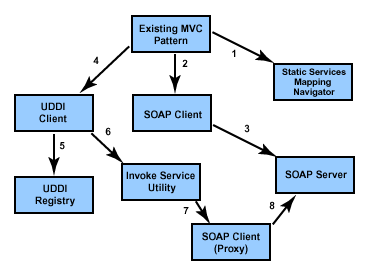
In my previous blog, I had provided the architecture pattern for calling static and dynamic web services using MVC Pattern. In this blog, I would go a bit deeper on the implementation and construct and show how you can apply this to existing MVC pattern and key components of the architecture. The key components you need to implement are the static services navigator file, the SOAP client, the UDDI client, the services utility, and the interaction with the MVC pattern, as you can see in Figure below.
Figure 1. Key components of the Web services architecture
Figure 1. Key components of the Web services architecture
Terabyte-sized Java apps now possible
|
The new version of the Terracotta distributed Java caching software is able, for the first time, to aggregate more than a terabyte of pooled memory for a single application and its data, the company announced this week. The software, Ehcache 2.2, can also hold up to several hundred million Java objects in a single cache, according to Terracotta's CEO, Amit Pandey. He added that this terabyte of memory can be run from as few as 10 servers. The update also features a new management console, intra-data center communications capability and a new common runtime library that the company claims will help reduce memory and bandwidth usage.Memory caching software such as Ehcache can be used to host large applications and their data entirely within the working memory of a set of servers, which speeds the response time because no calls to disk need to be made during operations. Read more: PC World
WCF service with custom username password authentication
|
Windows communication foundation comes with rich set of security such as transport level, message and transport with message; each of security type has its own advantages plus overheads as well For my application which has lots of diverse clients use to connect with the service and they have to be authenticated from Database, so the best possible solution to this problem was Message level security using custom Username - password authentication, After digging in to the net I found pieces of information and with some effort I implemented a concrete solution which will be helpful for others in terms of technical as well as for knowledge. Creating the serviceThe solution is are created using VS2010 contains three projects WCF service , website and desktop application which is client applicationRead more: Codeproject
Debugging services startup in Svchost from a kernel mode debug session
|
Windows shared services allow us to run system services together in a single service by having multiple DLLs run in a single process called Svchost. This allows Windows to have many services to run with the overhead of a single process. You can find more information about shared services here and here. I like to do a lot of my user mode debugging from a kernel mode debugger. I can just attach to a Hyper-V VM though a virtual serial port and all my tools are available to me without having to set up a user mode debugger on the target, plus if my application calls into kernel mode I’m all set. The Svchost process won’t load the DLL until it’s time to start the service, so it can be tricky to set the correct breakpoint to catch the service starting up. This is complicated by the fact that the dll entry point will usually be <module>!ServiceMain, however this is not necessarily the case. We can leverage the fact that svchost.exe exists in the same shared memory across all the Svchost processes, and a change to this shared memory will affect all of the svchost process. When you set a user mode breakpoint from a kernel mode debugger the debugger changes the user mode code by inserting an int 3 (the debugger changes the code back when it is executed). We can take advantage of this functionality to set one breakpoint that will fire from any svchost process. If we can get past the Svchost process loading the service dll, we can find the host process main function or any other function we want to set a breakpoint on. First, find the process address of any Svchost. I’m just showing the first of a long list of processes: kd> !process 0 0 svchost.exe
PROCESS fffffa80098c5970
SessionId: 0 Cid: 0270 Peb: 7fffffd8000 ParentCid: 0204
DirBase: 35986000 ObjectTable: fffff8a001115b20 HandleCount: 343.
Image: svchost.exe Now let’s get into the context of this Svchost (it doesn’t matter which one) and set a breakpoint. .process –i sets an invasive breakpoint so we can get into the active context of the process. kd> .process -i fffffa80098c5970
You need to continue execution (press 'g' <enter>) for the context
to be switched. When the debugger breaks in again, you will be in
the new process context. Then go the debugger to enter the active process. Read more: NTDebugging
PROCESS fffffa80098c5970
SessionId: 0 Cid: 0270 Peb: 7fffffd8000 ParentCid: 0204
DirBase: 35986000 ObjectTable: fffff8a001115b20 HandleCount: 343.
Image: svchost.exe Now let’s get into the context of this Svchost (it doesn’t matter which one) and set a breakpoint. .process –i sets an invasive breakpoint so we can get into the active context of the process. kd> .process -i fffffa80098c5970
You need to continue execution (press 'g' <enter>) for the context
to be switched. When the debugger breaks in again, you will be in
the new process context. Then go the debugger to enter the active process. Read more: NTDebugging
TCP Port ReRouter
|
TCP PortReRouter is a basic network service that proxies TCP sockets to/from an alternate IP and/or an alternate port. For example, you can redirect traffic targeting SERVER-A on Port 992 to SERVER-B on port 2282. SSL is not supported as SSL implements IP validation.To configure TCP Port ReRouter, you must edit the TcpPortReRouterService.exe.config file if running as a Windows service or the TcpPortReRouter.exe.config file if running the console application. <?xml version="1.0" encoding="utf-8" ?>
<configuration>
<configSections>
<section name="portRerouter" type="TcpPortReRouter.RouteMapConfiguration, TcpPortReRouter"/>
</configSections> <portRerouter>
<routes> <!-- listen on the primary IP on port 89, redirect to www.google.com on port 80 -->
<add name="www.google.com on port 89" listenPort="89" targetHost="www.google.com" targetPort="80"></add> <!-- listen on the loopack adapter, redirect to www.google.com's IP address on port 80 -->
<add name="www.google.com on loopback @ port 89" listenIP="127.0.0.1" listenPort="89" targetHost="74.125.19.99" targetPort="80"></add>
</routes>
</portRerouter>
</configuration>To run the console application just start TcpPortReRouter.exe.Read more: Codeplex
<configuration>
<configSections>
<section name="portRerouter" type="TcpPortReRouter.RouteMapConfiguration, TcpPortReRouter"/>
</configSections> <portRerouter>
<routes> <!-- listen on the primary IP on port 89, redirect to www.google.com on port 80 -->
<add name="www.google.com on port 89" listenPort="89" targetHost="www.google.com" targetPort="80"></add> <!-- listen on the loopack adapter, redirect to www.google.com's IP address on port 80 -->
<add name="www.google.com on loopback @ port 89" listenIP="127.0.0.1" listenPort="89" targetHost="74.125.19.99" targetPort="80"></add>
</routes>
</portRerouter>
</configuration>To run the console application just start TcpPortReRouter.exe.Read more: Codeplex
How to pass values to Silverlight application from ASPX page using InitParameter ?
|
Neither the Silverlight is new nor the init params. But, I found various people in different forums asking for the logic on the implementation part for passing value to Silverlight application from ASP.Net application. In this post, I will describe about it. Here I will discuss on the InitParams and tell you how to use it to pass value from your .aspx page to your Silverlight application. Read the complete post and if you have any queries, don’t hesitate to ask me. InitParams is one of the param name of the Silverlight plug-in object. Generally it is a dictionary object of type string. It contains a set of user defined key/value pairs. By default it is set as null or empty string and initializes at the time of first instance. Later it becomes readonly and hence you will not be able to modify it. If you have more than one string values to pass, use comma separated key/value pairs. Have a look into it: <param name="initparams" value="a=10,b=20" /> Here, I am passing 10 & 20 as two string value to the key names a & b respectively. Now you can retrieve the value in backend code by using the Key a & Key b. I will discuss it later part. Let us discuss about it in more depth. Your Silverlight application hosts in either HTML or ASPX page. In that page you will find the following code snippet where you have an tag. There are several <param /> tags inside it. Create one more param tag as mentioned above and set the value to that. Read more: Kunal's Blog
Database Development with Visual Studio 2010: Database Projects and Database Server Projects
|
In last article Database Development with Visual Studio 2010: Overview of SQL Server Data-Tier Application (DACPAC) we discussed what Data-Tier (DAC) applications are and how to create and deploy it using Visual Studio 2010. DAC applications are targeted towards SQL Server 2008 R2 and meant for small applications. In this article, we will discuss various components of Database projects and Server projects. Database projects or Database Server projects are targeted towards various versions of SQL Server like 2005, 2008 as well as 3rd party databases.
Database project can be used to define user database whereas Server projects can be used to define server level objects as well as modifications to master database.
With Database project and Server Project types, you can manage the scripts for database by using Visual Studio 2010. With Visual Studio 2010, you have additional features as build and deployment process. With this Build and Deployment, the changes can be applied to actual database. Both of these projects contain Build settings and deployment settings. Database Project contains Database settings whereas Server Project contains server settings.
Database project or Server projects are used to create schema for several objects and for doing changes to existing schemas by using .sql files. You can keep the objects in Visual Studio 2010 till you are satisfied with the schemas and then later deploy the database. These objects can also be stored in the source control, with multiple versions of the database schemas. You can decide which version needs to be actually deployed and only that version from the source control can be used.
Structure of project for Database or Server Data Generation Plans: These plans contain information about how to generate test data for the database which you will deploy later. This test data can be used to do the unit testing of stored procedures which are designed with database project.
Schema comparisons: These contain information about comparison between the current project related schema and some other schema. It has a file extension `.scmp’ which can be used when required.
Schema Objects: These are .sql files which have various objects stored. Mostly these objects are declared in different files. These objects can be tables, stored procedures, functions etc.
Scripts: These can be used for pre and post deployment of database.
Property files: There are 4 property files namely `Database.sqlcmdvars’ , `Database.sqldeployment’, `Database.sqlpermissions’, `Database.sqlsettings’. These files are in the Properties folder in Database Project and can be viewed from Solution Explorer. · Database.sqlcmdvars: SQL CMD variables like Default data path, database name and default log path
· Database.sqldeployment: Deployment related settings like whether to re-create database, whether to backup database before deployment etc.
· Database.sqlpermissions: GRANT or DENY statements to provide permissions of the objects with xml based file
· Database.sqlsettings: Settings related to database like backup policy or collation, default filegroup or filestream filegroup, compatibility level , state of database (online/offline) etc. Read more: net curry
Database project can be used to define user database whereas Server projects can be used to define server level objects as well as modifications to master database.
With Database project and Server Project types, you can manage the scripts for database by using Visual Studio 2010. With Visual Studio 2010, you have additional features as build and deployment process. With this Build and Deployment, the changes can be applied to actual database. Both of these projects contain Build settings and deployment settings. Database Project contains Database settings whereas Server Project contains server settings.
Database project or Server projects are used to create schema for several objects and for doing changes to existing schemas by using .sql files. You can keep the objects in Visual Studio 2010 till you are satisfied with the schemas and then later deploy the database. These objects can also be stored in the source control, with multiple versions of the database schemas. You can decide which version needs to be actually deployed and only that version from the source control can be used.
Structure of project for Database or Server Data Generation Plans: These plans contain information about how to generate test data for the database which you will deploy later. This test data can be used to do the unit testing of stored procedures which are designed with database project.
Schema comparisons: These contain information about comparison between the current project related schema and some other schema. It has a file extension `.scmp’ which can be used when required.
Schema Objects: These are .sql files which have various objects stored. Mostly these objects are declared in different files. These objects can be tables, stored procedures, functions etc.
Scripts: These can be used for pre and post deployment of database.
Property files: There are 4 property files namely `Database.sqlcmdvars’ , `Database.sqldeployment’, `Database.sqlpermissions’, `Database.sqlsettings’. These files are in the Properties folder in Database Project and can be viewed from Solution Explorer. · Database.sqlcmdvars: SQL CMD variables like Default data path, database name and default log path
· Database.sqldeployment: Deployment related settings like whether to re-create database, whether to backup database before deployment etc.
· Database.sqlpermissions: GRANT or DENY statements to provide permissions of the objects with xml based file
· Database.sqlsettings: Settings related to database like backup policy or collation, default filegroup or filestream filegroup, compatibility level , state of database (online/offline) etc. Read more: net curry
CSLA 4 release
|
CSLA .NET is a software development framework that helps you build a powerful, maintainable business logic layer for Windows, Web, service-oriented and workflow applications. There are many frameworks in the world. Most of them focus on the common issues of getting data into and out of the database or creating a flexible UI. What is typically missing is a focus on managing or implementing business logic. This puzzles me, because business logic is the centerpiece of a business application. Helping to manage and implement this business logic is the purpose of my CSLA .NET framework and is the focus of my Expert Business Objects books. CSLA .NET enables you to create an object-oriented business layer that abstracts and encapsulates your business logic and data. The framework ensures your business objects fully support data binding in WPF, Silverlight, ASP.NET Web Forms and Windows Forms. It also supports ASP.NET MVC, Windows Workflow Foundation, WCF and web services interfaces. CSLA .NET simplifies and standarizes implementation of business logic, validation and authorization logic within your objects. The goal is to provide an easy and consistent coding pattern by which you can encapsulate all your business logic within your object-oriented business layer. The result is a business layer that can support all the interface types listed above, while remaining decoupled from any specific interface technology. CSLA .NET includes a technology-neutral client/server abstraction, allowing you to build your application and then decide at deployment whether to use 2-tier or 3-tier client/server (and 4-tier with Silverlight). If you opt for 3-tier deployment, you can choose between WCF, .NET Remoting, Web Services or Enterprise Services as a network protocol. The key point here is that you can switch between 2-tier and any of these 3-tier networking options without changing your UI, business logic or data access code; all that changes is a configuration file (and of course deployment to both client and server). Read more: ROCKFORD LHOTKA
Enabling cross-domain calls for SL apps on self-hosted TCP services
|
On a post a couple of years back, I showed a solution to enable cross-domain calls for Silverlight apps on self-hosted WCF services. In Silverlight 4, we added a new transport (net.tcp), which needs its own policy file as well (see more details at http://blogs.msdn.com/b/silverlightws/archive/2010/04/09/policy-file-for-nettcp.aspx). If you are running IIS (or some other web service) on port 80 the machine on which the TCP service is running, the easiest way to deploy the appropriate policy file is to simply copy the file to its root directory (in IIS it would be something like c:\inetpub\wwwroot), and you're ready to go. If you don't have IIS, however, you can use a similar solution than the one I had for "normal" (i.e., HTTP-based) WCF services to serve the policy file for the TCP service. Essentially, the code will act as a web server and serve the "policy file" to SL apps when requested. The base address for the WCF REST service would be listening at port 80 on the machine, and its endpoint would be listening at the "" address. Here's the code: using System;
using System.IO;
using System.ServiceModel;
using System.ServiceModel.Description;
using System.ServiceModel.Web;
using System.Text;namespace SelfHostedTcpAndSilverlight
{
[ServiceContract]
public interface ITest
{
[OperationContract]
string Echo(string text);
}
[ServiceContract]
public interface ITcpPolicyRetriever
{
[OperationContract, WebGet(UriTemplate = "/clientaccesspolicy.xml")]
Stream GetSilverlightPolicy();
}
public class Service : ITest, ITcpPolicyRetriever
{
public string Echo(string text)
{
return text;
}
public Stream GetSilverlightPolicy()
{
string result = @"<?xml version=""1.0"" encoding=""utf-8""?>
<access-policy>
<cross-domain-access>
<policy>
<allow-from http-request-headers=""*"">
<domain uri=""*""/>
</allow-from>
<grant-to>
<socket-resource port=""4504"" protocol=""tcp"" />
</grant-to>
</policy>
</cross-domain-access>
</access-policy>";
WebOperationContext.Current.OutgoingResponse.ContentType = "application/xml";
return new MemoryStream(Encoding.UTF8.GetBytes(result));
}
} Read more: Carlos' blog
using System.IO;
using System.ServiceModel;
using System.ServiceModel.Description;
using System.ServiceModel.Web;
using System.Text;namespace SelfHostedTcpAndSilverlight
{
[ServiceContract]
public interface ITest
{
[OperationContract]
string Echo(string text);
}
[ServiceContract]
public interface ITcpPolicyRetriever
{
[OperationContract, WebGet(UriTemplate = "/clientaccesspolicy.xml")]
Stream GetSilverlightPolicy();
}
public class Service : ITest, ITcpPolicyRetriever
{
public string Echo(string text)
{
return text;
}
public Stream GetSilverlightPolicy()
{
string result = @"<?xml version=""1.0"" encoding=""utf-8""?>
<access-policy>
<cross-domain-access>
<policy>
<allow-from http-request-headers=""*"">
<domain uri=""*""/>
</allow-from>
<grant-to>
<socket-resource port=""4504"" protocol=""tcp"" />
</grant-to>
</policy>
</cross-domain-access>
</access-policy>";
WebOperationContext.Current.OutgoingResponse.ContentType = "application/xml";
return new MemoryStream(Encoding.UTF8.GetBytes(result));
}
} Read more: Carlos' blog
NET Micro Framework
|
Wednesday, July 21, 2010
.NET Micro Framework 4.1 SDK
The .NET Micro Framework is a .NET implemenation for very small, resource constrained devices. With version 4.1, we have added VS 2010 compatibility with multi targeting to support development for NETMF versions 3.0, 4.0, and 4.1. We have also added support for Big Endian processors. In addition, we have included ports for the Following Renesas processors and development boards: SH7216 RSK, SH7264 M3A HS64, SH7264 RSK, SH7619 EVB. We have added new applications diagnostics and DPWS custom bindings and additional samples. Finally, we have added the Hashtable type and enhanced the SPI type. Read more: MS Download.NET Micro Framework 4.1 Cryptography Companion Libraries
The Microsoft® .NET Micro Framework is a platform that enables developers to more quickly develop embedded systems that are smart, securely connected, and easier to manage. With the version 4.1 release, the .NET Micro Framework enables developers to create powerful embedded systems that are more securely connected through a variety of wired and wireless protocols. Read more: MS Download
.NET Micro Framework 4.1 TCP/IP and SSL Libraries for Thumb Instruction Set
The Microsoft® .NET Micro Framework is a platform that enables developers to more quickly develop embedded systems that are smart, securely connected, and easier to manage. With the version 4.1 release, the .NET Micro Framework enables developers to create powerful embedded systems that are more securely connected through a variety of wired and wireless protocols. Read more: MS Download.NET Micro Framework 4.1 TCP/IP and SSL Libraries for SH2/A Instruction Set
The Microsoft® .NET Micro Framework is a platform that enables developers to more quickly develop embedded systems that are smart, securely connected, and easier to manage. With the version 4.1 release, the .NET Micro Framework enables developers to create powerful embedded systems that are more securely connected through a variety of wired and wireless protocols. Read more: MS Download.NET Micro Framework 4.1 TCP/IP and SSL Libraries for ARM Instruction Set
The Microsoft® .NET Micro Framework is a platform that enables developers to more quickly develop embedded systems that are smart, securely connected, and easier to manage. With the version 4.1 release, the .NET Micro Framework enables developers to create powerful embedded systems that are more securely connected through a variety of wired and wireless protocols. Read more: MS Download
The .NET Micro Framework is a .NET implemenation for very small, resource constrained devices. With version 4.1, we have added VS 2010 compatibility with multi targeting to support development for NETMF versions 3.0, 4.0, and 4.1. We have also added support for Big Endian processors. In addition, we have included ports for the Following Renesas processors and development boards: SH7216 RSK, SH7264 M3A HS64, SH7264 RSK, SH7619 EVB. We have added new applications diagnostics and DPWS custom bindings and additional samples. Finally, we have added the Hashtable type and enhanced the SPI type. Read more: MS Download.NET Micro Framework 4.1 Cryptography Companion Libraries
The Microsoft® .NET Micro Framework is a platform that enables developers to more quickly develop embedded systems that are smart, securely connected, and easier to manage. With the version 4.1 release, the .NET Micro Framework enables developers to create powerful embedded systems that are more securely connected through a variety of wired and wireless protocols. Read more: MS Download
.NET Micro Framework 4.1 TCP/IP and SSL Libraries for Thumb Instruction Set
The Microsoft® .NET Micro Framework is a platform that enables developers to more quickly develop embedded systems that are smart, securely connected, and easier to manage. With the version 4.1 release, the .NET Micro Framework enables developers to create powerful embedded systems that are more securely connected through a variety of wired and wireless protocols. Read more: MS Download.NET Micro Framework 4.1 TCP/IP and SSL Libraries for SH2/A Instruction Set
The Microsoft® .NET Micro Framework is a platform that enables developers to more quickly develop embedded systems that are smart, securely connected, and easier to manage. With the version 4.1 release, the .NET Micro Framework enables developers to create powerful embedded systems that are more securely connected through a variety of wired and wireless protocols. Read more: MS Download.NET Micro Framework 4.1 TCP/IP and SSL Libraries for ARM Instruction Set
The Microsoft® .NET Micro Framework is a platform that enables developers to more quickly develop embedded systems that are smart, securely connected, and easier to manage. With the version 4.1 release, the .NET Micro Framework enables developers to create powerful embedded systems that are more securely connected through a variety of wired and wireless protocols. Read more: MS Download
NET 4 is on windows update !
|
Today I was running windows update on some virtual machines, and noticed that .NET 4 Client Profile is available via windows update. Seems it was released to windows update in June. For Windows XP the update is optional. For Windows 7 and Vista the update is recommended. What this basically means is for XP users they will typically need to run windows update and select .NET 4 from the optional updates:

Build a WPF Interactive Animation Application
|
IntroductionThis article describes how to make a basic game – a window where bomb user controls drop from the top – to prompt the user to intercept them. To do this we are going to use Expression Blend 4, as anyone who has ever used this developer tool knows that the Design space is easily switched to an Animation space. WPF applications are sometimes easier to build using Expression Blend. Todd Miranda has a plethora of educational videos about how to use Expression Blend, found at expression.microsoft.com/en-us/cc197141.aspx . I am writing this article to show both the importance of C# in two code-behind files: one for the Main Window, and the other for the bomb, which is a UserControl, an added new item. If you are unfamiliar with how this application derives its output, do not be intimidated. Expression Blend 4 functions as a superior vector-based design tool used to gain a stronger hold on both of the Windows Presentation Foundation technology and Silverlight. Here is a look at the WPF application. Many beginners, me included, develop WPF applications to implement the powerful graphics, animations, and media facilities. This application serves as an amusing little game, or it can serve as a skeleton application for the reader to expand on. Read more: Codeproject
How to execute a TSQL statement for all databases
|
I wanted a quick way to execute a TSQL command against all databases. I was having hard time getting the sp_MSforeachdb to work and didn’t want to write a cursor, so I instead built a TSQL command which makes the commands I need to execute. Not fancy, but it got the job done. --Command to be exeuted on all databases
SELECT DATABASEPROPERTY( 'Northwind' ,'IsFulltextEnabled')
--undocumented command, but hard to get syntax correct with imbedded ' (quotes)
sp_MSforeachdb "SELECT DATABASEPROPERTY( ? ,'IsFulltextEnabled')"
--Use statement below to build the TSQL commands to be executed
--Set Output-to-Text before running.
select 'SELECT DATABASEPROPERTY( ' + char(39) + name + char(39) + ',' + char(39)
+ 'IsFulltextEnabled' + char(39) + ')'
from sysdatabasesRead more: REPLTalk covers Using and Tuning SQL Replication
SELECT DATABASEPROPERTY( 'Northwind' ,'IsFulltextEnabled')
--undocumented command, but hard to get syntax correct with imbedded ' (quotes)
sp_MSforeachdb "SELECT DATABASEPROPERTY( ? ,'IsFulltextEnabled')"
--Use statement below to build the TSQL commands to be executed
--Set Output-to-Text before running.
select 'SELECT DATABASEPROPERTY( ' + char(39) + name + char(39) + ',' + char(39)
+ 'IsFulltextEnabled' + char(39) + ')'
from sysdatabasesRead more: REPLTalk covers Using and Tuning SQL Replication
Системные переменные MySQL сервера.
|
auto_increment_increment
Устанавливает приращение для механизма AUTO_INCREMENT. Возможные значения: 1 - 65 535. Значение по умолчанию: 1. При установке значения 0,получает значение 1, при попытке присвоить значение меньше нуля или больше 65 535, принимает значение 65 535. Если например, присвоить данной переменной значение 10, то значения счетчика автоинкремента, будет увеличиваться не на 1, а на 10.Введена с версии 5.0.2. auto_increment_offset
Устанавливает начальное значение счетчика для механизма AUTO_INCREMENT. Возможные значения: 1 - 65 535. Значение по умолчанию: 1. При установке значения 0, получает значение 1, при попытке присвоить значение меньше нуля или больше 65 535, принимает значение 65 535. Если присвоить этой переменной значение 7, счетчик автоинкремента, начнет увеличиваться не с 1, а с 7. Введена с версии 5.0.2. back_log
Размер очереди запросов на подключение клиентов. При получении вхлдящего запроса на соединение, основной поток MySQL сервера, после проверки запроса, запускает новый поток. Если запросов на соединение пришло слишком много за короткий промежуток времени, на их обслуживание потребуется некоторое время. Данная переменная устанавливает количество запросов, которые могут быть помещены в стек, на время, пока не освободится основной поток для их обслуживания. Все соединения выше данного значения - отбрасываются, клиенту выдается соответствующее сообщение. По сути, данная переменная устанавливает длину очереди, входящих TCP соединений, и не может привышать значение, установленной операционной системой. basedir
Содержит путь к базовому каталогу установки. Может быть установлена с помощью параметра командной строки: --basedirRead more: BSDADMIN.RU
Устанавливает приращение для механизма AUTO_INCREMENT. Возможные значения: 1 - 65 535. Значение по умолчанию: 1. При установке значения 0,получает значение 1, при попытке присвоить значение меньше нуля или больше 65 535, принимает значение 65 535. Если например, присвоить данной переменной значение 10, то значения счетчика автоинкремента, будет увеличиваться не на 1, а на 10.Введена с версии 5.0.2. auto_increment_offset
Устанавливает начальное значение счетчика для механизма AUTO_INCREMENT. Возможные значения: 1 - 65 535. Значение по умолчанию: 1. При установке значения 0, получает значение 1, при попытке присвоить значение меньше нуля или больше 65 535, принимает значение 65 535. Если присвоить этой переменной значение 7, счетчик автоинкремента, начнет увеличиваться не с 1, а с 7. Введена с версии 5.0.2. back_log
Размер очереди запросов на подключение клиентов. При получении вхлдящего запроса на соединение, основной поток MySQL сервера, после проверки запроса, запускает новый поток. Если запросов на соединение пришло слишком много за короткий промежуток времени, на их обслуживание потребуется некоторое время. Данная переменная устанавливает количество запросов, которые могут быть помещены в стек, на время, пока не освободится основной поток для их обслуживания. Все соединения выше данного значения - отбрасываются, клиенту выдается соответствующее сообщение. По сути, данная переменная устанавливает длину очереди, входящих TCP соединений, и не может привышать значение, установленной операционной системой. basedir
Содержит путь к базовому каталогу установки. Может быть установлена с помощью параметра командной строки: --basedirRead more: BSDADMIN.RU
Xaps Minifier. Дополнение для Visual Studio 2010, позволяющее уменьшать размер Silverlight приложений
|
Я постоянно работаю с Silverlight приложениями и выкладываю релизы регулярно. Как правило, я использую паттерн MVVM и его реализацию Prism. В результате создаётся несколько XAP файлов, содержащих сборки приложения и манифест. Каждый, кто работает в соответствии с таким подходом, замечает, что большинство XAP файлов содержат дублирующиеся сборки. Например, при использовании библиотеки Prism, практически каждый XAP файл будет содержать все сборки из этой библиотеки. Prism добавляет порядка 300 Кб к каждому XAP файлу, что может увеличить размер приложения более чем на 1 Мб (при наличии 4-5 XAP файлов). Кроме того, дополнительные библиотеки (в первую очередь UI элементов) могут ещё более увеличить размер приложения. Все эти факты заставили меня начать поиск пути уменьшения размеров XAP файлов.ИдеяЯ работал над одной проблемой, когда наткнулся на заметку в блоге Jeff Prosise. Он упоминал, что сборка может быть добавлена в приложение, но не в XAP файл. Для этого достаточно установить параметр CopyLocal=false для каждой требуемой сборки, которая находится в списке References. В этом случае проект будет ссылаться на нужную сборку, но не будет добавлять её в папку bin при компиляции. Это натолкнуло меня на мысль, что всем дублирующимся сборкам в приложении можно проставить CopyLocal=false не изменяя только параметры сборок главного XAP файла. Именно главный XAP файл должен содержать все дублирующиеся сборки, которые будут автоматически загружаться в Application Domain, и будут доступны для всех сборок из остальных XAP файлов. Read more: Habrahabr.ru
NET Hidden Gems - Memory fail points
|
I am embarking in a series of mini post called .NET hidden gems, not necessarily new bits but usually unknown. They are dedicated to those small features and components that are not commonly used but can deliver interesting value in certain scenarios.
Today I am going to show you some functions that can help you to understand the memory state of your application when you need to store large objects.
The first hidden gem is the MemoryFailPoint object, this can be accessed through the System.Runtime namespace.
The main function of it is validating that there is enough memory to perform an operation.[SecurityCritical]
public MemoryFailPoint(int sizeInMegabytes);
It is very easy to use it, just create an instance when you need the memory:
//
// Do I have enough memory to run this method?
//
System.Runtime.MemoryFailPoint CheckForMemory = new System.Runtime.MemoryFailPoint(1000);Internally, it checks the global memory status of the process; if it does not have enough it will perform a full collection. Read more: MSDN Utopia
Today I am going to show you some functions that can help you to understand the memory state of your application when you need to store large objects.
The first hidden gem is the MemoryFailPoint object, this can be accessed through the System.Runtime namespace.
The main function of it is validating that there is enough memory to perform an operation.[SecurityCritical]
public MemoryFailPoint(int sizeInMegabytes);
It is very easy to use it, just create an instance when you need the memory:
//
// Do I have enough memory to run this method?
//
System.Runtime.MemoryFailPoint CheckForMemory = new System.Runtime.MemoryFailPoint(1000);Internally, it checks the global memory status of the process; if it does not have enough it will perform a full collection. Read more: MSDN Utopia
Community Goodies: Silverlight for PC
|
Tools and Enviroment
Read more: Community Goodies
Enviroment
Visual Studio 2008Visual Studio 2008 SP1Visual Studio 2010Expression Studio 3Expression Blend 4 RC
Tools
Silverlight ToolkitSilverlight3 Tools for Visual Studio 2008 SP1Silverlight4 Tools RC2 for Visual Studio 2010WCF RIA RC2WCF RIA Services ToolkitWCF RIA Hotfix(For WCF RIA Beta)
Features
Application and Programming ModelsManaged API for SilverlightDynamic Languages in SilverlightCommunication Between Local Silverlight-Based ApplicationsOut-of-Browser SupportAlternative HostingLayout, Text, and InputControlsGraphics, Animation, and MediaXAMLIntegrating Silverlight with a Web PageTypes, Properties, Methods, and EventsData Access and Data StructuresNetworking and CommunicationDebugging, Error Handling, and ExceptionsDeployment and LocalizationPerformanceSecurity
Read more: Community Goodies
Debugging an OOB Silverlight Business Application
|
Recently, we came across a bug with the Silverlight Business Application with respect to an Out of Browser application. In the RTM bits for Silverlight 4 Tools a new feature was added to enable a better debugging experience with Out of Browser application. The feature basically launched the app in OOB window when run with the debugger attached. If you have tried that with the business application template, you will notice that the app does not run. It crashes with an exception, that the URI path is not valid. We realize this is an issue most folks are running into and we have fixed this template and we are looking ways to get you access to it. However, there is a relatively easy workaround to fix this issue.The steps involved are :- Create a new or open up an existing application that was created using the BusinessApplicationTemplate
Once the project is open, go to the Project Properties page for the Silverlight Application.
In that, first uncheck the OOB option which is enabled by default
Save the project
Close the Project Property Page
Open the Project Property page again
Then go ahead and check the OOB option.Read more: @deepeshm
Once the project is open, go to the Project Properties page for the Silverlight Application.
In that, first uncheck the OOB option which is enabled by default
Save the project
Close the Project Property Page
Open the Project Property page again
Then go ahead and check the OOB option.Read more: @deepeshm
Ubuntu Kung-Fu – 10 Best Tricks (and some even work on Macs)
|
If your vision of a great vacation is laying down with a laptop on your belly, banging away on new bash commands and scripts, then this is the book for you.Now here are my favorite 10 tips.1. Command History Search with Ctrl+R – In a terminal, the up and down arrow shuffles through recent commands on almost any operating system. I had been using grep to search my history (history | grep something) until I found out about Ctrl+R. When you type Ctrl+R, the terminal goes into a matching mode where it tries to guess the entry from your history based on what you type. So type the first few letters of a recent command and the entire thing comes up. This is great, and I use it regularly to expand out “git pu” into a full “git pull origin master”. But don’t get the wrong idea! I still think git is awful. 2. Running jobs with & and nohup – I discovered & long ago. If you run a program from the command line then the terminal is frozen until the program completes. But if you append & (for instance, “gedit &”) then it launches as a job and you can use the terminal again while your program runs simultaneously. The problem is if you close the terminal then your other program closes as well. Instead use nohup (”nohup gedit”) so that your program does not hang up when the terminal closes. 3. Use Trash for Command Line File Deletes – There are a bunch of safe alternatives to deleting files using “rm -rf”, and this type lists yet another one. However, I prefer to use the “trash” package. Just run:
sudo apt-get install trash Read more: canoo
sudo apt-get install trash Read more: canoo
Knights, Knaves, Protected and Internal
|
When you override a virtual method in C# you are required to ensure that the stated accessibility of the overridden method - that is, whether it is public, internal, protected or protected internal(*) – is exactly re-stated in the overriding method. Except in one case. I refer you to section 10.6.4 of the specification, which states: an override declaration cannot change the accessibility of the virtual method. However, if the overridden base method is protected internal and it is declared in a different assembly than the assembly containing the override method then the override method’s declared accessibility must be protected. What the heck is up with that? Surely if an overridden method is protected internal then it only makes sense that the overriding method should be exactly the same: protected internal.I’ll explain why we have this rule, but first, a brief digression. A certain island is inhabited by only knights and knaves. Knights make only true statements and only answer questions truthfully; knaves make only false statements and only answer questions untruthfully. If you walk up to an inhabitant of the (aptly-named) Island of Knights and Knaves you can rapidly ascertain whether a particular individual is a knight or a knave by asking a question you know the answer to. For example “does two plus two equal four?” A knight will answer “yes” (**), and a knave will answer “no”. Knaves are prone to saying things like “my mother is a male knight”, which is plainly false. It might seem at first glance that there is no statement which could be made by both a knight and a knave. Since knights tell the truth and knaves lie, they cannot both make the same statement, right? But in fact there are many statements that can be made by both. Can you think of one? Read more: Fabulous Adventures In Coding
Fresh Mono Baked
|
Andrew just announced Mono 2.6.7, the version that is replacing our long-term maintenance release of Mono with plenty of bug fixes as well as the following new features:Microsoft's ASP.NET MVC2 is now bundled with Mono.
Upgraded xbuild tool (Mono's msbuild)
Upgraded our LINQ to SQL (DbLinq)
Upgraded our Soft Debugger
We now publish CentOS/RHEL packages.Our CentOS/RHEL packages install on /opt/novell/mono, just like our packages for SUSE Linux Enterprise and should not conflict with your own packages of Mono that you might have from some other sources. Read more: Miguel de Icaza's web log
Upgraded xbuild tool (Mono's msbuild)
Upgraded our LINQ to SQL (DbLinq)
Upgraded our Soft Debugger
We now publish CentOS/RHEL packages.Our CentOS/RHEL packages install on /opt/novell/mono, just like our packages for SUSE Linux Enterprise and should not conflict with your own packages of Mono that you might have from some other sources. Read more: Miguel de Icaza's web log
Import Data from Excel to DataGridView in C#
|
First need to add the reference "Microsoft ADO Ext. 2.8". You can easily add it from COM components.Add an open Dialog box control on form Put the following code on Browser button click events….. private void button1_Click_1(object sender, EventArgs e)
{
OpenFileDialog fdlg = new OpenFileDialog();
fdlg.Title = "Select file";
fdlg.InitialDirectory = @"c:\";
fdlg.FileName = txtFileName.Text;
fdlg.Filter = "Excel Sheet(*.xls)|*.xls|All Files(*.*)|*.*";
fdlg.FilterIndex = 1;
fdlg.RestoreDirectory = true;
if (fdlg.ShowDialog() == DialogResult.OK)
{
txtFileName.Text = fdlg.FileName;
Import();
Application.DoEvents();
}
}This will filter only Excel file from your Machine. This Excel file can contains more than one Sheet. You need to add another form to all excel sheets name so that user can select any one excel sheet which he want to import.Write the following code on Page Load even of this form private void Select_Tables_Load(object sender, EventArgs e)
{
if (!DataTables)
{
if (Tables != null)
{
for (int tables = 0; tables < Tables.Length; tables++)
{
try
{
ListViewItem lv = new ListViewItem();
lv.Text = Tables[tables].ToString();
lv.Tag = tables;
lstViewTables.Items.Add(lv);
}
catch (Exception ex)
{ }
}
}
}
elseRead more: C# Corner
{
OpenFileDialog fdlg = new OpenFileDialog();
fdlg.Title = "Select file";
fdlg.InitialDirectory = @"c:\";
fdlg.FileName = txtFileName.Text;
fdlg.Filter = "Excel Sheet(*.xls)|*.xls|All Files(*.*)|*.*";
fdlg.FilterIndex = 1;
fdlg.RestoreDirectory = true;
if (fdlg.ShowDialog() == DialogResult.OK)
{
txtFileName.Text = fdlg.FileName;
Import();
Application.DoEvents();
}
}This will filter only Excel file from your Machine. This Excel file can contains more than one Sheet. You need to add another form to all excel sheets name so that user can select any one excel sheet which he want to import.Write the following code on Page Load even of this form private void Select_Tables_Load(object sender, EventArgs e)
{
if (!DataTables)
{
if (Tables != null)
{
for (int tables = 0; tables < Tables.Length; tables++)
{
try
{
ListViewItem lv = new ListViewItem();
lv.Text = Tables[tables].ToString();
lv.Tag = tables;
lstViewTables.Items.Add(lv);
}
catch (Exception ex)
{ }
}
}
}
elseRead more: C# Corner
Mono's Git Migration
|
Mono's source code is being migrated to GitHub on July 22nd, starting at 9am Boston time.We are psyched that Github was kind enough to host Mono's large repositories for free on their system. We are also taking advantage of their new Organizations functionality. Gonzalo posted the following details about the migration:We are moving our source code repository to GitHub.On July 22nd ~9am EDT (1300 GMT) the subversion repository at "svn+ssh://mono-cvs.ximian.com/source" will be set to read-only mode and kept that way forever. We estimate that the process of migrating all the projects and moving them to GitHub will take more than 3 and less than 8 hours. Once it is completed we will send an email to this list with URLs to the new repositories, FAQs,... Read more: Miguel de Icaza's web log
How to be a Cool C# Programmer
|
There are many C# programmers out there… but you probably want to be the coolest… it’s not enough to just call a bunch of methods, invoke some delegates, etc. You need to write it cool.Here are some ways you can make yourself a cool C# programmer (and pick up geeky chicks at your local C# party): 1. Use anonymous delegates whenever possible (or lambda expressions, see 2):var nums = new List<int>();
//...
var nums2 = nums.FindAll(delegate(int n) {
return n % 2 == 0;
}); 2. Use lambda expressions when delegates are required (this is super-cool): button1.Click += (s, e) => {
MessageBox.Show("This is super-cool!");
};
3. If you’re using a lambda expression that accepts one argument and you don’t need it, provide its name as underscore: ThreadPool.QueueUserWorkItem((_) => {
Console.WriteLine("This is way too cool!");
}); 4. When raising events, the event should be checked to be non-null, but the cool thing to do is always register an empty handler so the check is unnecessary: class Printer {
public event EventHandler PagePrinted = delegate { };
//...
protected virtual void OnPagePrinted() {
PagePrinted(this, EventArgs.Empty); // look ma, no check!
}
} 5. Use LINQ whenever possible, using complex operators if you can:var procs = from p in Process.GetProcesses()
where p.Threads.Count > 15
orderby p.ProcessName
group new {
Name = p.ProcessName,
Id = p.Id,
Threads = p.Threads.Count
} by p.BasePriority into g
orderby g.Key descending
select g; foreach(var g in procs) {
Console.WriteLine("Priority {0}", g.Key);
foreach(var p in g)
Console.WriteLine(" {0}", p);
}Read more: Pavel's Blog
//...
var nums2 = nums.FindAll(delegate(int n) {
return n % 2 == 0;
}); 2. Use lambda expressions when delegates are required (this is super-cool): button1.Click += (s, e) => {
MessageBox.Show("This is super-cool!");
};
3. If you’re using a lambda expression that accepts one argument and you don’t need it, provide its name as underscore: ThreadPool.QueueUserWorkItem((_) => {
Console.WriteLine("This is way too cool!");
}); 4. When raising events, the event should be checked to be non-null, but the cool thing to do is always register an empty handler so the check is unnecessary: class Printer {
public event EventHandler PagePrinted = delegate { };
//...
protected virtual void OnPagePrinted() {
PagePrinted(this, EventArgs.Empty); // look ma, no check!
}
} 5. Use LINQ whenever possible, using complex operators if you can:var procs = from p in Process.GetProcesses()
where p.Threads.Count > 15
orderby p.ProcessName
group new {
Name = p.ProcessName,
Id = p.Id,
Threads = p.Threads.Count
} by p.BasePriority into g
orderby g.Key descending
select g; foreach(var g in procs) {
Console.WriteLine("Priority {0}", g.Key);
foreach(var p in g)
Console.WriteLine(" {0}", p);
}Read more: Pavel's Blog
Dokan.Mem, a filesystem prototype
|
IntroductionHiroki Asakawa created a device driver that enables an application in user-mode to simulate a file-system, and distributed it under a MIT-style license. This post shows how that's used in C# to create the functionality of a RAM-Disk, with some tips on rolling your own file-system application. Before you can run the code, you have to run the installer to install a proxy driver (dokan.sys). This driver then acts as an intermediate between the kernel and our custom .NET solution. The installer for the proxy driver is also included with the sourcecode here, but I'd recommend downloading the package from the original website as they contain two cool examples; The first implements a mirror of your C-drive, and the second makes the Registry available as a readonly drive. This article briefly explains how the Dokan-libraries are used to build something that resembles a RAM-disk in functionality Having the option to expose data as a file-system has several advantages. It makes your data instantaneous available for other applications, without the need for a complicated UI.Download the basic installer and .NET bindings to Dokan here[^]. Using the codeLog in as administrator, run the installer (it's just 513 Kb), open the project and hit F5; a trayicon should appear, and on doubleclick it should open the Windows-Explorer, pointing to a simulated harddisk. It'll mount on the first available free drive-letter. Paste a zipfile on there and extract it :) I choose to implement a basic RAM-Disk to test the library (version 0.5.3), with the results documented here.There's three projects in the solution;DokanNet - these are the .NET bindings to the Dokan libraries
Buffers - used to replace the MemoryStream
Dokan.Mem - example-implementation of the Dokan-interface, simulating a RAM-DiskRead more: Codeproject
Buffers - used to replace the MemoryStream
Dokan.Mem - example-implementation of the Dokan-interface, simulating a RAM-DiskRead more: Codeproject
Install LAMP with just one command line on Debian/Ubuntu
|
I'm so tired of install Apache with MySQL and PHP. I always have to make lots of "apt-get"s tto get all the packages installed just because I don't remember all of them at the first "apt-get". Here is the line to install all you (probably) need:apt-get install mysql-client mysql-common mysql-server mysql-server php5-mysql php-apc php-db php-pear php5 php5-cli php5-common php5-curl php5-gd php5-imagick php5-mcrypt php5-memcache php5-memcache php5-mysql php5-sqlite php5-suhosin apache2 apache2-doc apache2-mpm-prefork apache2-suexec apache2-utils apache2.2-common libapache2-mod-php5 Now we have to do some fine tunning. I know... it brokes the "Just One Command" that I was promising, but it's for a good cause :)Read more: diogomelo.net
Deploying Microsoft RemoteFX for Virtual Desktop Pools Step-by-Step Guide
|
This step-by-step guide walks you through the process of setting up a working virtual desktop pool that uses RemoteFX in a test environment. Upon completion of this step-by-step guide, you will have a virtual desktop pool with RemoteFX that users can connect to by using RD Web Access. Read more: MS Download
BUG: .NET 4.0 (System.Net.Mail) Unable to send emails with large attachments (more than 3MB)
|
This is probably the first bug reported by customer so far for System.Net.Mail Class in .NET 4.0 Framework, or at least the first one I worked on. This was pretty straight forward repro and I did not had to do much to reproduce the issue locally. static void Main(string[] args) { SmtpClient client = new SmtpClient("contoso_smtp_server");
client.Credentials = new System.Net.NetworkCredential("User1", "Password", "contoso");
MailMessage msg = new MailMessage("user1@contoso.com", "user2@contoso.com", "Large Attachment Mail", "Large Attachment - Test Body"); Attachment attachment = new Attachment(@"d:\3mb.dat");
msg.Attachments.Add(attachment); client.Send(msg);
}
That was the simplest code you could possibly write to send out email using SNM but the problem is it Fail with an “Error in sending email” message. So I looked around what was happening and found that the problem was not directly related to SNM but its underlying classes and specifically the Base64Encoding class which was used as default method of encoding emails attachments while sending. That saved me more troubleshooting and I changed the way the attachments were being encoded from Base64 to 7Bit and it worked like charm.So all you need to do is add any of the following line to your code to make it work. // Any "one" of those two code section will work
attachment.TransferEncoding = System.Net.Mime.TransferEncoding.QuotedPrintable;
attachment.TransferEncoding = System.Net.Mime.TransferEncoding.SevenBit; Read more: Jive into Messaging world
client.Credentials = new System.Net.NetworkCredential("User1", "Password", "contoso");
MailMessage msg = new MailMessage("user1@contoso.com", "user2@contoso.com", "Large Attachment Mail", "Large Attachment - Test Body"); Attachment attachment = new Attachment(@"d:\3mb.dat");
msg.Attachments.Add(attachment); client.Send(msg);
}
That was the simplest code you could possibly write to send out email using SNM but the problem is it Fail with an “Error in sending email” message. So I looked around what was happening and found that the problem was not directly related to SNM but its underlying classes and specifically the Base64Encoding class which was used as default method of encoding emails attachments while sending. That saved me more troubleshooting and I changed the way the attachments were being encoded from Base64 to 7Bit and it worked like charm.So all you need to do is add any of the following line to your code to make it work. // Any "one" of those two code section will work
attachment.TransferEncoding = System.Net.Mime.TransferEncoding.QuotedPrintable;
attachment.TransferEncoding = System.Net.Mime.TransferEncoding.SevenBit; Read more: Jive into Messaging world
Back in business
|
I've been off for some time but now I'm back in business. A lot of material will be uploaded in this and next week.
Subscribe to:
Posts (Atom)

 Posts
Posts

