This is a mirror of official site: http://jasper-net.blogspot.com/

Behind the Windows 8 build hash

| Wednesday, April 27, 2011
With early builds of Windows 8 leaking, increased attention has been focused on understanding a new 16 character string affixed to the end of the build watermark. Some have speculated the characters identify the original installer (Microsoft employee) while others have dismissed the importance altogether.

7950_desktop_watermark_thumb1.png

After installing the leaked Windows 8 7955 build, in plain sight are the characters a1b6210f837a32cf. Digging through shell32.dll, housing code to paint the desktop watermark, I found code that sources from HKLM\SYSTEM\WPA\478C035F-04BC-48C7-B324-2462D786DAD7-5P-9. More specifically, the Default value, comprising of 128 bytes, is read and run through a XOR-based function producing a 64-bit (8 byte) hash. I’ve included a rough translation of the algorithm (from assembly to C++) for review. (If this is an implementation of a well-known algorithm, I’d love to know.)

Read more: Within windows

Posted via email from Jasper-net

Various Clients and Forms Authentication

|
Scenarios

In each of the below scenarios, forms authentication is used to secure access to the ASP.NET MVC endpoints and WCF services.

WPF accessing WCF services
WPF accessing MVC endpoints
Windows Phone 7 accessing WCF services
Desktop and mobile browsers accessing ASP.NET MVC website pages
jQuery accessing MVC endpoints
While I have not included the code for a Windows Phone 7 to access MVC endpoints that is a supported scenario as well.

Requirements

Visual Studio 2010
SQL Express 2008
Windows Phone 7 tools
If you don’t have these and don’t want to see this project, you can just remove the Windows Phone 7 project from the solution.
Background

I’ve been working on Stuff v2; a movie, game, and books application. Its primary use case is, "I’m at the store and don’t remember if I have a particular movie, game, or book. I need to determine if I have it; if not, then check the online price and ratings before making the purchase."

Given the varied application clients and devices, ASP.NET forms authentication seemed like the natural choice for authentication for the website, MVC3 JSON endpoints, and WCF services.

The reason I have varied client software and devices is more of a learning experience than an application requirement. I have other applications I want to write that will need to access the application from all my devices.

When I started programming the WPF client, I ran into a stone wall with respect to WPF accessing WCF services that are secured by forms authentication. This blog post is about getting over that stone wall.

Identifying the Problem Space

At the end of the day, the problem that needs solving is managing the forms authentication cookie or ticket.

Managing means, that after authenticating, the client must be able to retrieve the ticket returned in the response and include it in future requests to secured resources.

As you will see, client API’s vary across scenarios not only in coding patterns but in complexity as well.

Regardless of which client is accessing resources that require forms authentication, the following steps outline the required workflow:

Log in
Cache the ticket returned in the response
Include the ticket in subsequent requests
Setting up Forms Authentication

When I created the ASP.NET MVC3 application, VariousClients.Web, I used the MVC3 Internet template with the Razor view engine. This template sets up forms authentication and provides a pretty good out-of-box SQL Express membership system for you.

The below snippet from the web.config shows a few required changes:

<authentication mode="Forms">
    <!-- cookieless="UseCookies" is required by non-browser clients
                to authenticate using forms authentication-->

    <!-- production applications, change to requiresSSL="true"-->
    <forms timeout="2880" cookieless="UseCookies" loginUrl="~/Account/LogOn"
            requireSSL="false" />
</authentication>
Setting up the AuthenticationService

The System.Web.ApplicationServices.AuthenticationService is a built-in service that you can expose as a service endpoint on your website. This service exposes log in, log out methods for clients that access WCF endpoints requiring forms authentication. This service uses the membership provider defined in the web.config. After logging in, the service returns a ticket in the response, similar to forms authentication log in.

Adding the service is easy. First add a folder to the root of the website named, "Services". Into that folder, add a WCF service named Authentication.svc. Delete the generated service contract and code-behind files. Next replace the contents of the Authentication.scv file with the below code snippet.

<%@ ServiceHost Language="C#" Service="System.Web.ApplicationServices.AuthenticationService" %>
Now add the following to your web.config:

<system.web.extensions>
    <scripting>
        <webServices>
            <!-- for production applications, change to requiresSSL="true"-->
            <authenticationService enabled="true" requireSSL="false"/>
        </webServices>
    </scripting>
</system.web.extensions>
Rebuild your web application.

The Authentication.svc will now appear in the Add Service Reference dialog when adding service references in your client applications.

Read more: Karl on WPF

Posted via email from Jasper-net

Babylon engine on code.msdn.microsoft.com

|
1832.image_5F00_thumb_5F00_7A01C4C3.png

For my first post on my new blog, I’m proud to annonce the availability of a new sample on code.msdn.microsoft.com:

You can now get the full source of Babylon, the 3D engine I wrote to demonstrate the power of Silverlight 3D.

In a near future, I will create a new Codeplex entry for Babylon to allow the community to develop on it.

Read more: Eternal Coding

Posted via email from Jasper-net

Silverlight 4, UserControls and the dreaded “name already exists in the tree”

|
I was doing some work with Silverlight the other week which involved using UserControls where the control named itself. That is, a situation such as;

<UserControl x:Name=”foo”>

<!—Content of control –>

</UserControl>

and, under unpredictable circumstances I was finding that I kept hitting a semi-random error when running my code which was something along the lines of;

“The name already exists in the tree: foo”

I spent an awfully long time on this and hence the blog post to try and perhaps save you some time in the future. I took long enough on it to come up with a simple repro scenario which looks something like this;

image_thumb.png

and so in words I have a ListBox which displays instances of UserControl1 and that control is just a StackPanel which contains 2 instances of UserControl2 and that control happens to name itself in its definition.

I found that if I ran this application a few times then sometimes it would work fine and sometimes it would fail with the dreaded exception and so I asked internally whether that was expected and it was confirmed as a bug in the Silverlight 4 runtime which has been fixed in Silverlight 5.

Read more: Mike Taulty's Blog

Posted via email from Jasper-net

CloudCrack

|
CloudCrack is an NVIDIA GPU-accelerated cryptanalysis suite written in CUDA, NVIDIA's massively parallel concurrent programming language. CloudCrack contains custom CUDA multiprecision math libraries for storing a large target RSA modulus n in shared GPU memory, with each GPU core working as a parallel factoring process to break the target modulus.

There are currently two versions of CloudCrack: REVA, which implements the Greatest Common Denominator (gcd) function on the GPU itself; currently there is a bug in the Montgomery math routines in the REVA gcd however. REVB includes reduction sieve performance enhancements but with the gcd function implemented on the host CPU, which requires about 25% of the PCIe bus bandwidth to shuffle targets from the GPU to the host CPU for the gcd test. Although functional, this split GPU/CPU configuration is suboptimal for highly dense GPU clustering hardware that utilizes a shared PCIe bus across multiple GPU cards such as the Dell C410x PCIe Expansion Chassis. Ideally REVC will include all of the performance enhancements inherent to the REVB fork, with a GPU-localized gcd like the architecture of REVA..

Read more: CloudCrack

Posted via email from Jasper-net

How SSL Works Using Public Key Cryptography

|
Everyone has been to a webpage where the page is secured using some sort of SSL encryption and the beginning of the URL has https instead of http. Most people have a basic idea of how it works and that the data you enter in a form is encrypted when sent to the server (e.g. Your credit card information). But how can the server decrypt this encrypted information if we can’t just blatantly send the encryption key to server with the risk of an intruder stealing the key and then decrypting our information? This is the problem that began the study of public key cryptography.

Public key cryptography is the exchange of a secret key from one party to another through public transactions when the secret key isn’t exchanged. So how does it work? Say we have two people, Bob and Sally, and Bob would like to send Sally a secret box that is protected by a combination lock. If Bob sends the box to Sally with his lock on it, he will have to send Sally the combination along with the box. Anyone can read the combination and unlock the box before Sally even receives the box. This will not work. But what if Sally sends Bob her lock, Bob locks the box and sends Sally the box with her lock on it. This would work and be secure because Bob does not know the combination to her lock and once he locks the box, he can not open it. Sally is the only one who knows combination and she will safely receive her box.

So how does this work when entering your credit card information on a webpage and clicking “Buy Now”? What is the algorithm behind all of this? Well SSL uses an algorithm called Diffie Hellman Key Exchange. This algorithm works as the following.

Say we have a client and a server trying to decide on an encryption key. The client and the server share two public values p and i. The value p is a prime number, only divisible by itself and one, that is a large number greater then 1000 and the value i is an integer that is less than p. The client and the server generate a private value r that is a large number greater then 1000 and is secret to only itself. Now the server will generate a key value a using the formula a = (i^r) mod p where mod is represented as modulus division. The server will send the value a to the client where the client will use the same formula to calculate its encryption key k. k = (a^r) mod p Now the client will do the same thing by calculating the key a using a = (i^r) mod p with its values and sending the a value to the server where the server uses the a value to calculate the encryption key using the formula k = (a^r) mod p . The value of k for both the server and the client will be the same. What the best part is is that it is almost impossible to generate the encryption key value k from using all of the public transfered values.

Read more: Shawn Janas

Posted via email from Jasper-net

XAML И DATA BINDING: РАСШИРЕННЫЕ ВОЗМОЖНОСТИ РАЗМЕТКИ И СВЯЗЫВАНИЯ ДАННЫХ В SILVERLIGHT

|
КОММЕНТАРИИ В XAML
Начнем с самого простого, но не менее полезного. Комментарии – помогают читать код, отключать/включать временно куски кода при отладке.

<!-- Это простой комментарий -->
Это тоже простой комментарий, но только внутри закомментирован некий код:
<!--<Image Margin="0,0,0,0" Source="Untitled-2.png" Stretch="Fill" x:Name="BackgroundPng"/>—>
Однако, учтите, что вложенные комментарии сделать не получится. Например, в данном примере внутрь тега Grid вложен комментарий, такая разметка выдаст ошибку:

<Grid>
       <!-- <TextBlock Text="{Binding Path=Name}" /> -->
</Grid>

На заметку
Для того чтобы закомментировать выделенный фрагмент кода, можно нажать сочетание клавиш CTRL+K+C, а для обратного эффекта нужно нажать CTRL+K+U.

ОПРЕДЕЛЕНИЕ КОНСТАНТ В XAML
В разметку XAML можно определять константы некоторых простых типов, например, string, int, bool. Для того чтобы можно было сделать требуется добавить namespace System в документ:

xmlns:sys="clr-namespace:System;assembly=mscorlib"

Теперь в разметке можно задать константы в Resources :

<UserControl.Resources>
<sys:String x:Key="OKText">OK</sys:String>
</UserControl.Resources>

Теперь это значение можно использовать по такому же принципу как и StaticResource:

<Button Content="{StaticResource OKText}" />

На заметку
Однако, по такому принципу нельзя определить в XAML константу типа DateTime.

ПЕРЕЧИСЛЕНИЕ В XAML
Довольно часто приходится применять в XAML перечисления (enum), которые в code-behind должны выглядеть следующим образом. Есть такое перечисление:

public enum MyLovelyEnum
{
Normal, Super, Simple
}

В code-behind использование было бы таким образом:

MyLovelyEnum Lovely = MyLovelyEnum.Normal | MyLovelyEnum.Super;

Так вот, в XAML данное определение будет выглядеть так:

Lovely="Normal,Super"

DATACONTEXT VS SOURCE (DATA BINDING)
В первую очередь хотелось бы показать применение свойства Source у объекта Binding. Дело в том, что можно использовать и свойство Source и DataContext.

<TextBox DataContext="{StaticResource productResource}" Text="{Binding Name}" />

Или вот второй вариант:

<TextBox Text="{Binding Name, Source={StaticResource productResource}}" />

Эффект от применения того или иного способа будет одинаковым, за исключением некоторого нюанса. Если используется DataContext, то его “действие” распространяется на все контролы расположенные ниже по иерархии в визуальном дереве (VisualTree). Такого не происходит, если использовать Source, то есть привязка, таким образом, происходит “точечно” или “целенаправленно”. Это оправдано, когда в контексте одной формы требуется использовать несколько поставщиков данных.

ELEMENTNAME BINDING
Название параметра ElementName в классе Binding говорит само за себя. Привязка осуществляется к именованному контролу. Вот простой пример привязки:

<StackPanel>
<TextBox Name="FirstTextBox" />
<TextBox Name="SecondTextBox" Text="{Binding Text, ElementName=FirstTextBox}" />
</StackPanel>

Такая привязка приведет к тому, что при изменении текста в поле TextBox с именем FirstTextBox незамедлительно изменится текст в у контрола с именем SecondTextBox. Обратного действа не произойдет, потому что по умолчанию такой важный параметр как Mode у Binding имеет значение OneWay (в одну сторону). Но если установить значение этого параметра TwoWay, то при изменении текста в любом из контролов, второй тут же получит измененное значение.

Еще одним немаловажным свойством, которое чаще всего пишется, но подразумевается по умолчанию – это свойство Path. Разметка типа:

Text="{Binding Text, ElementName=FirstTextBox}"

и

Text="{Binding Path=Text, ElementName=FirstTextBox}"

Posted via email from Jasper-net

Tornado

|
tornado.png

Tornado is an open source version of the scalable, non-blocking web server and tools that power FriendFeed. The FriendFeed application is written using a web framework that looks a bit like web.py or Google's webapp, but with additional tools and optimizations to take advantage of the underlying non-blocking infrastructure.

The framework is distinct from most mainstream web server frameworks (and certainly most Python frameworks) because it is non-blocking and reasonably fast. Because it is non-blocking and uses epoll, it can handle thousands of simultaneous standing connections, which means it is ideal for real-time web services. We built the web server specifically to handle FriendFeed's real-time features — every active user of FriendFeed maintains an open connection to the FriendFeed servers. (For more information on scaling servers to support thousands of clients, see The C10K problem.)

See the Tornado documentation for a detailed walkthrough of the framework.

Download and install
Automatic installation: Tornado is listed in PyPI and can be installed with pip or easy_install. If you do not already have libcurl installed you may need to install it separately; see the prerequisites section below. Note that the source distribution includes demo applications that are not present when Tornado is installed using pip or easy_install

Read more: Tornado

Posted via email from Jasper-net

What is difference between jQuery and Microsoft Ajax? When do you use Ajax and When do you use jQuery? What is the significance of each?

|
jQuery is like the ASP.NET AJAX Client Framework (MicrosoftAjax.js), with selectors, DOM selections/ manipulations, plug-ins, and better animation support.  jQuery is more powerful than MS AJAX on the client side due to its light weight nature .  This is the reason Microsoft integrated jQuery with Visual Studio. JQuery is integrated for post  VS versions 2008, no explicit download of jQuery file is required for the versions above VS2010.  

Ajax is a Technology for Asynchronous Data Transferring. AJAX is a technique to do an XMLHttpRequest  from a web page to the server and send or receive data to be used on the web page.

jQuery can be used

If you love and comfortable with JavaScript

Most interaction is client-side only

If a custom solution is required

For stunning look and feel of client side UI

If animations ,DOM Selection are required

Ajax can be used

If you are using ASP.NET & VS

When server side Integration is required.

If you need json and WCF Support

Posted via email from Jasper-net

כיצד לדבג קוד שרץ תחת IIS - צעד אחר צעד

|
במידה ואתם מריצים קוד ב – Visual Studio זה לא משנה מה בחרתם במאפיינים של הפרויקט האם לעבוד עם ה – server של visual studio או לעבוד מול IIS, תוכלו לדבג את הקוד.

אבל במידה והאפליקציה נמצא ב – IIS והרצתם אותה דרך גלישה בדפדפן ועדיין אתם רוצים לדבג, זה אפשרי בכמה שלבים פשוטים. (לקריאה על Remote Debugging)

ראשית פתחו visual studio. ופתחו את הפרויקט (אם יש לכם אותו – אם אין לכם עדיין אפשר לדבג אם יש לכם את קבצי ה – pdb אבל זה כבר נושא לפוסט אחר)

בחרו ב – Attach to Process (בדרך כלל תחת tools או לחיצה של ctrl + alt + p)

תקבלו את החלון הבא

image_thumb_18EDA4F4.png

Posted via email from Jasper-net

Sony: All PSN users may have been hacked

|
Security alert as millions of PlayStation Network users are told of ‘malicious’ attack
An illegal hack into the PlayStation Network may have exposed the personal data of every single user, Sony has warned.
In an admission of the sheer enormity of the security alert, Sony said “our investigation indicates that all PlayStation Network/ Qriocity accounts may be affected”.
Earlier, the company said a “malicious” hack has compromised key info of PlayStation Network users – including credit card data.
Now the platform holder has revealed the attack could put every single account at risk.
In a notice pubished on the PlayStation Blog, the company was asked if all user information had been compromised.
“In terms of possibility, yes,” the company said.
Sony announced in January this year that over 69 million people have registered a PlayStation Network account.

Read more: Develop

Posted via email from Jasper-net

SwitchSvnVersion

|
SwitchSvnVersion created by Steve Dunn.

A command-line tool to modify Visual Studio projects.  You can use to change the target platforms and target .NET Frameworks.  You can also use it to target different versions of Visual Studio, e.g. from 2008 to 2010.

Released by Steve under the WTFPL license: http://sam.zoy.org/wtfpl/COPYING

Read more: GitHub

Posted via email from Jasper-net

Using the Tika Java Library In Your .Net Application With IKVM

|
This may sound scary and heretical but did you know it is possible to leverage Java libraries from .Net applications with no TCP sockets or web services getting caught in the crossfire? Let me introduce you to IKVM, which is frankly magic:

IKVM.NET is an implementation of Java for Mono and the Microsoft .NET Framework. It includes the following components:
  • A Java Virtual Machine implemented in .NET
  • A .NET implementation of the Java class libraries
  • Tools that enable Java and .NET interoperability
Using IKVM we have been able to successfully integrate our Dovetail Seeker search application with the Tika text extraction library implemented in Java. With Tika we can easily pull text out of rich documents from many supported formats. Why Tika?  Because there is nothing comparable in the .Net world as Tika.
This post will review how we integrated with Tika. If you like code you can find this example in a repo up on Github.

Compiling a Jar Into An Assembly

First thing, we need to get our hands on the latest version of Tika. I downloaded and built the Tika source using Maven as instructed. The result of this was a few jar files. The one we are interested in is tika-app-x.x.jar which has everything we need bundled into one useful container.
Next up we need to convert this jar we’ve built to a .Net assembly. Do this using ikvmc.exe.

tika\build>ikvmc.exe -target:library tika-app-0.7.jar

Unfortunately, you will see tons of troublesome looking warnings but the end result is a .Net assembly wrapping the Java jar which you can reference in your projects. 

Using Tika From .Net

IKVM is pretty transparent. You simply reference the the Tika app assembly and your .Net code is talking to Java types. It is a bit weird at first as you have Java versions of types and .Net versions. Next you’ll want to make sure that all the dependent IKVM runtime assemblies are included with your project. Using Reflector I found that the Tika app assembly referenced a lot of IKVM assemblies which do not appear to be used. I had to figure out through trial and error which assemblies where not being touched by the rich document extractions being done. If need be you could simple include all of the referenced IKVM assemblies with your application. Below I have done the work for you and eliminated all references to all the IKVM assemblies which appear to be in play.

Posted via email from Jasper-net

Real World Mapping with the Kinect

|
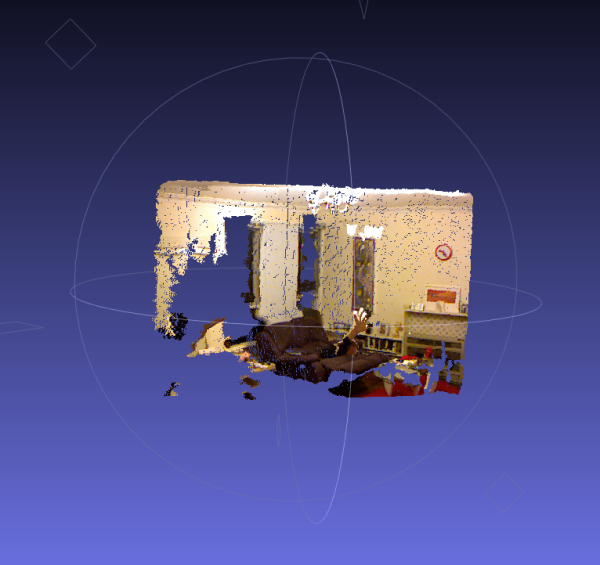
   A real-time data capture application for generating real-world coloured point clouds with the Xbox Kinect and GPS capable Android phone.
This is very immature and hacky - done entirely as a proof-of-concept. Please don't expect anything at all from this. No warranty of any kind is expressed or implied.
Some of the initialisation code used in the application is courtesy of a tutorial on the C# libfreenect wrapper at SwitchOnTheCode.

The project uses libfreenect and the .NET wrapper for same, along with OpenTK for the Matrix maths and Proj.NET for the spatial transforms.

...
...
Putting those together, one can take the depth image from the Kinect and turn it in to a metric point cloud with real distances. Then, those points can be projected back to the RGB camera centre to determine which RGB pixel corresponds to each depth point, and hence arrive a colour for each point in the cloud. This lets the surfaces captured in the image appear textured. With a bit of coding I came up with this:

screen-shot-2011-01-20-at-10-19-09-pm.png?w=600&h=565

Read more: KinectMapper

Posted via email from Jasper-net
SimpleBrowser

|
SimpleBrowser is a lightweight, yet highly capable browser automation engine designed for automation and testing scenarios. It provides an intuitive API that makes it simple to quickly extract specific elements of a page using a variety of matching techniques, and then interact with those elements with methods such as Click(), SubmitForm() and many more. SimpleBrowser does not support JavaScript, but allows for manual manipulation of the user agent, referrer, request headers, form values and other values before submission or navigation.

Requirements
.Net Framework 4.0

Features

Multiple ways of locating and interacting with page elements
A highly permissive HTML parser that converts any HTML, no matter how badly formed, to a valid XDocument object
Automatic cookie/session management
Extensive logging support with attractive and comprehensive html log file output to make it easy to identify problems loading and automating browsing sessions

Read more: SimpleBrowser
Read more: XBrowser

Posted via email from Jasper-net

OutlookGnuPG

|
GnuPG addin for Outlook 2007

Welcome to the OutlookGnuPG wiki!
OutlookGnuPG is a fork of the original GPG in Outlook 2007 – OutlookGnuPG by David Cumps.
Given David had no time to pursue the development we, a colleague and myself, decided to put our hands in the source code to solve minor issues we encountered in our configuration:

- better parsing of gpg —list-key to support multiple UIDs and subkeys
- support for a default domain name for X.400 addresses
- fix overflow issue for large gpg output (e.g. public keyring is sth like > 160 keys)

See also the ChangeLog file.
Please note, the visual studio project is downgraded to Visual Studio 2005 (version 9.0) and makes use of the Visual Studio 2005 Tools for the Office System SE Solutions

Read more: GitHub

Posted via email from Jasper-net

Advanced.NHibernate

|
Samples of advanced NHibernate usage

Read more: GitHub

Posted via email from Jasper-net

MonoTorrent

|
MonoTorrent is a cross platform and open source implementation of the BitTorrent protocol. It supports many advanced features such as Encryption, DHT, Peer Exchange, Web Seeding and Magnet Links.

Notable features include:
  • Encryption
  • Dht
  • Peer Exchange (uTorrent style)
  • Local Peer Discovery
  • Web Seeding (getright style)
  • Magnet Links / Metadata download
  • IPV6
  • FAST Extensions
  • Sparse files (NTFS file system)
  • Multi-tracker torrents
  • Compact tracker responses
  • IP Address white listing / black listing
  • Fast Resume
  • Initial Seeding (super seeding)
  • Selective downloading
  • Prioritised downloading
  • Full bittorrent tracker
  • Dynamic request queue size
  • Memory Cache
  • Endgame mode
  • Per torrent and global rate limiting
  • Individual file relocation

Read more: MonoTorrent

Posted via email from Jasper-net

Android NDK

|
The Android NDK is a companion tool to the Android SDK that lets you build performance-critical portions of your apps in native code. It provides headers and libraries that allow you to build activities, handle user input, use hardware sensors, access application resources, and more, when programming in C or C++. If you write native code, your applications are still packaged into an .apk file and they still run inside of a virtual machine on the device. The fundamental Android application model does not change.

Using native code does not result in an automatic performance increase, but always increases application complexity. If you have not run into any limitations using the Android framework APIs, you probably do not need the NDK. Read What is the NDK? for more information about what the NDK offers and whether it will be useful to you.

The NDK is designed for use only in conjunction with the Android SDK. If you have not already installed and setup the Android SDK, please do so before downloading the NDK.

Posted via email from Jasper-net
jni4net

|
bridge between Java and .NET (intraprocess, fast, object oriented, open-source)

How it works
jni4net-overview.png

Using reflection we grab public method signatures for core classes of .NET and Java and generated proxy classes for the other side.
We have .NET version of JNI API. 
We use JNI to forward the call from .NET proxies to methods on real Java objects. 
We use JNI to register .NET implementation of native methods of Java proxies to forward call to methods on real .NET objects.

Features

Intraprocess - it means that both VMs are in same process. Any call uses same thread and same stack for both environments. It's relatively fast.
Proxies - we use proxies which look like and behave like the real/original object. Marshaled by reference except for primitive types and arrays.
Garbage collected - if you don't create cycle between VMs heaps, the proxies and instances are collected and released properly.
Proxygen - tool to wrap your own library. Works with reflection, so you need just .jar or .dll, and proxygen config file. You could wrap most CLR or JVM classes.
Core - core classes of JDK and .NET framework are already included in jni4net. Using that for reflection and invocation across the boundary is possible.
Samples - are included with the binaries. See ReadMe.txt in directories
Troubleshooting - use knowledge base or ask people
Platforms - at the moment only Windows 32 and 64 bits. CLR 2.0 and CLR 4.0. JRE 1.5 and above.
License - opensource, GPL tools and LGPL runtime
Status - currently Alpha quality. Lot of work ahead, lot of ideas, lot of missing features, looking forward to community feedback.
Contact - use mailing group or talk to pavel.savara@gmail.com

.NET/C# to Java Hello World -> Full sample

using net.sf.jni4net;
public class Program
{
    private static void Main()
    {
        Bridge.CreateJVM(new BridgeSetup());
        java.lang.System.@out.println("Greetings from C# to Java world!");
    }
}

Read more: jni4net

Posted via email from Jasper-net

Psscor4 Managed-Code Debugging Extension for WinDbg

|
Overview
Psscor4 can help you diagnose high-memory issues, high-CPU issues, crashes, hangs and many other problems that might occur in a .NET application; in scenarios involving live processes or dump files.If you are familiar with SOS.dll, the managed-debugging extension that ships with the .NET Framework, Psscor4.dll provides a superset of that functionality. Most of the added functionality helps you identify issues in ASP.NET.For example, Psscor4 provides the ability to view:•managed call stacks (with source mappings)•managed exception information•what types are in the managed heap and their reference chain•which ASP.NET pages are running on which thread•the contents of the ASP.NET cache•and much more.

Read more: MS Download

Posted via email from Jasper-net

Попробуй Ubuntu без установки

|
«Попробуй прежде чем купить» – это отличное предложение которое понравится любому человеку который только собирается попробовать что то новое. Canonical пошла на встречу новым пользователям, которые только задумываются о переходе на Ubuntu и дает им возможность «попробовать прежде чем загрузить».

Canonical предлагает всем желающим тест-драйв Ubuntu 11.04 в своем облаке без необходимости загружать и инсталлировать систему себе на компьютер. Используя аккаунт на launchpad вы сможете авторизироваться и попробовать новую версию уже сейчас. Каждый пользователь получает в свое распоряжение 15 минут, это конечно немного, но что бы оценить основные преимущества и недостатки вполне достаточно.

Read more: Technovzor
Read more: Ubuntu online

Posted via email from Jasper-net

Burp Suite

|
Burp Suite is an integrated platform for performing security testing of web applications. Its various tools work seamlessly together to support the entire testing process, from initial mapping and analysis of an application's attack surface, through to finding and exploiting security vulnerabilities.

Burp gives you full control, letting you combine advanced manual techniques with state-of-the-art automation, to make your work faster, more effective, and more fun.

Burp Suite contains the following key components:
  • An intercepting proxy, which lets you inspect and modify traffic between your browser and the target application.
  • An application-aware spider, for crawling content and functionality.
  • An advanced web application scanner, for automating the detection of numerous types of vulnerability.
  • An intruder tool, for performing powerful customized attacks to find and exploit unusual vulnerabilities.
  • A repeater tool, for manipulating and resending individual requests.
  • A sequencer tool, for testing the randomness of session tokens.
  • The ability to save your work and resume working later.
  • Extensibility, allowing you to easily write your own plugins, to perform complex and highly customized tasks within Burp.
Burp is easy to use and intuitive, allowing new users to begin working right away. Burp is also highly configurable, and contains numerous powerful features to assist the most experienced testers with their work.

Read more: Burp Suite

Posted via email from Jasper-net

New in Labs: Background Send

| Tuesday, April 26, 2011
We’re always looking for ways to make Gmail faster. One of the most common delays happens after you hit that “Send” button, when you’re waiting patiently for a couple seconds for Gmail to send your message. If you send a lot of email, that can add up to a lot of lost time. 

To help give you that time back, there’s a new feature in Gmail Labs called Background Send. Once you turn it on from the Labs tab in Settings, you can get on with what you’re doing while Gmail quietly sends off your mail in the background. You can keep reading your inbox, compose new messages, chat with people — all the things you’d usually do. You can even send more than one message in the background at the same time.

Sending.png

Read more: GMail blog

Posted via email from Jasper-net

JSPP – Morph C++ Into Javascript

|
C++ has a new standard called C++0x (Wikipedia, Bjarne Stroustrup) that includes many interesting features such as Lambda, For Each, List Initialization ... Those features are so powerful that they allow to write C++ as if it was Javascript.
The goal of this project is to transform C++ into Javascript. We want to be able to copy & paste Javascript into C++ and be able to run it. While this is not 100% feasible, the result is quite amazing.
This is only a prototype. In about 600 lines of code we manage to make the core of the Javascript language.

Read more: Vjeux

Posted via email from Jasper-net

Google offers $2.05 mn for Modu’s patents

|
Google is offering US$2.05 million for the patents of failed mobile phone developer Modu.

Google submitted the offer to the Tel Aviv District Court, which is handling Modu’s liquidation.

Google topped the previous offer of US$1.46 million made by Kensington Technology in late March. In December 2010, the court appointed a receiver for Modu, founded by Dov Moran, and the company’s employees petitioned for its liquidation.

The company registered over 100 patents in its three years of operations, and they constitute its main asset.

Posted via email from Jasper-net

Steve Jobs on iOS Location Issue: 'We Don't Track Anyone'

|
There has obviously been a lot of discussion about last week's disclosure that iOS devices are maintaining an easily-accessible database tracking the movements of users dating back to the introduction of iOS 4 a year ago. The issue has garnered the attention of U.S. elected officials and has played fairly heavily in the mainstream press.

One MacRumors reader emailed Apple CEO Steve Jobs asking for clarification on the issue while hinting about a switch to Android if adequate explanations are not forthcoming. Jobs reportedly responded, turning the tables by claiming both that Apple does not track users and that Android does while referring to the information about iOS shared in the media as "false".
Q: Steve,

Could you please explain the necessity of the passive location-tracking tool embedded in my iPhone? It's kind of unnerving knowing that my exact location is being recorded at all times. Maybe you could shed some light on this for me before I switch to a Droid. They don't track me.

A: Oh yes they do. We don't track anyone. The info circulating around is false. 

Sent from my iPhone

As is Jobs' usual style, his brief comments provide little detail or information to support his claims, and his vagueness leaves things rather open to interpretation.

Read more: MacRumors.com

Posted via email from Jasper-net

Теория цвета для web дизайна и не только

|
colorwheel.jpeg   colors-3d1f36d1.jpg

Цветовая палитра всегда оказывала мощное воздействие на восприятие человека. Одни цвета могут успокаивать, другие наоборот, побуждать к действию. Долгие годы ученые занимаются исследованиями в этой области. И никто не будет возражать, что многие вещи и предметы мы воспринимаем в зависимости от окраски.

Сайт - это своего рода произведение искусства. А по этому его цветовое решение очень важно. Как и художнику, вэб-дизайнеру нужно знать основные принципы по которым строятся цветовые гаммы. Ведь от понимания этого вопроса, может зависеть восприятие людьми той информации, которую нужно преподать.

В этой статье мы постараемся объяснить некоторые важные моменты в подборе цветов. Приведем примеры эффективного использования цвета и дадим полезные советы, которые, надеемся, вам пригодятся в работе.

Цветовая теория и умение сочетать цвета
Для некоторых дизайнеров создать цветовую палитру сайта очень просто. Эти люди отличаются отличным вкусом и хорошо чувствуют цвет. Но таких людей не много. Для большинства, это очень сложная задача, требующая сил и времени. Для тех, кому трудно в подборе, будет полезно узнать о цветовом круге.

Еще в 1666 году Исаак Ньютон обосновал теорию света, которая является основополагающей в развитии всего, что связанно с оптикой. И тогда же он изобрел цветовой круг. Эти открытия он сделал после того как сумел доказать сложность света, который состоит из спектра. А мы видим его таким благодаря явлению дисперсии. Чтобы повторить опыт Ньютона достаточно взять стеклянную призму и сквозь нее посмотреть. Тогда весь спектр станет хорошо различим.

Read more: fresh2L

Posted via email from Jasper-net

Silverlight 5.0: Custom Markup Extensions and Roles

|
Starting from Silverlight 5.0 you can create custom Markup Extensions and this is an interesting feature to easily encapsulate some logic and make it easy to be applied to properties in the XAML markup. Until now you could only use a few extensions to apply resources (StaticResource), make databinding (Binding) and connect properties with parts of a template (TemplateBinding) but now, implementing a really simple interface you can build your own.

public interface IMarkupExtension<out T> where T: class
{
T ProvideValue(IServiceProvider serviceProvider);
}

Using this interface you can specify the type to which the markup extension can be applied (the generic type T) but if you do not need a control about this type you can extend the MarkupExtension abstract class that is like you are extending IMarkupExtension<object>.

Inside the ProvideValue method there is the whole logic of the extension and using the IServiceProvider passed by the runtime you can get access to three services that let you get some informations about the markup where the extension is located.

IRootObjectProvider: provide a reference to the Root object of the VisualTree which the element is part of
IXamlTypeResolver : is able to resolve the name of the tags in the markup to the corresponding type.
IProvideValueTarget : gets a reference to the property and the elements which the markup extension is assigned

To retrieve an instance of this services you can use the GetService method on the IServiceProvider instance.

IProvideValueTarget target = (IProvideValueTarget)serviceProvider.GetService(typeof(IProvideValueTarget));

Posted via email from Jasper-net

Transparency using Alpha Channel in XAML Silverlight

|
Introduction
 
In Silverlight we can apply transparency either by using Alpha Channel or Opacity. In this post you will learn how to apply trnsparency using Alpha Channel.
 
As I have discussed in my previous post titled 'Alpha Channels in XAML Silverlight' about the Alpha Chennel. Take a little look here too.
 
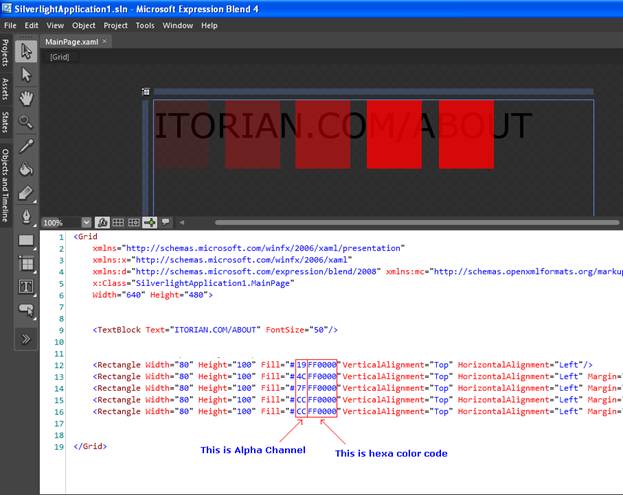
In Alpha Channel we just add additional code as first element in existing hexadecimal color code. The additional element specifies the transparency of a color from 0 (full transparent) to 255 (full opaque). For example, if we wish to apply 'Blue' color then we'll use its hexadecimal color code as '#0000FF'. Now to apply the transcarency in this color we add additional element (from 0 to 255 (FF). FF is default means no transparency) as '#FF0000FF' (no transparency). Let's take a look at program.

image002.jpg

In above screenshot, I marked out the Alpha Channel and normal HTML based hexa color code.
 
In above example, I have used a textblock and 5 rectangles overlapped on text but to show the transparency I have used alpha channel there.
 
XAML Code
 
<Grid
          x:Class="SilverlightApplication1.MainPage"
          Width="640" Height="480">
         
          <!--TextBlock with text-->
          <TextBlock Text="ITORIAN.COM/ABOUT" FontSize="50"/>
         
          <!--4 circle with partially transparent background-->
          <Rectangle Width="80" Height="100" Fill="#19FF0000" VerticalAlignment="Top" HorizontalAlignment="Left"/>
          <Rectangle Width="80" Height="100" Fill="#4CFF0000" VerticalAlignment="Top" HorizontalAlignment="Left" Margin="104,0,0,0"/>

Read more: C# Corner

Posted via email from Jasper-net

Forget 42, –1 is My New Answer to Life

|
I’ve just stumbled upon the next code statement – Thread.Sleep(-1). It left me wondering what was happening there since MSDN tells you nothing about a –1 value for the milliseconds parameter:

“The number of milliseconds for which the thread is blocked. Specify zero (0) to indicate that this thread should be suspended to allow other waiting threads to execute. Specify Infinite to block the thread indefinitely.“ – System.Threading.Thread.Sleep, MSDN

To check that out, I opened the IronRuby interactive console and filled in System::Threading::Thread.Sleep(-1) and hit Enter just to find out that this call blocks the thread indefinitely. Could it be? –1 is Infinite?

Reflector to our aid! oh wait, RedGate now charges money for it and had planted a time bomb inside the free version which made it stop working. grrrr 
ILSpy to our aid! (I highly recommend ILSpy as a Reflector alternative… very similar, free, oss… great community effort!)

Anyway, ILSpy proved my concerns:

image_3DD78701.png

Read more: Ironshy

Posted via email from Jasper-net

AppLocker – Application Locker–חלק ראשון

|
שלום לכולם,

כאן דן ויזנפלד מצוות התמיכה של Microsoft.

לאלו מאתנו שאוהבים להישאר בשליטה מלאה, השיקה Microsoft את בקרת הורים (Parental Controls) שמאפשרת לנו לנטר ולבקר את הפעילויות שעושים משתמשים אחרים (לרוב הילדים) במחשב, ובין היתר לאפשר או לאסור הפעלת תוכנות ומשחקים.

עם זאת, למשתמשים בגרסאות Ultimate ו-Enterprise של מערכת ההפעלה Windows 7, מוצעת אפשרות נוספת, מתקדמת יותר, הנוגעת לעולם בקרת השימוש במחשב – כלי ה-AppLocker.

זהו חלקו הראשון של הפוסט בנושא AppLocker. מדובר בכלי חדש למניעת התקנה וטעינה של יישומים ותוכנות, המגיע מובנה במערכת ההפעלה. ב-AppLocker משתמשים לרוב מנהלי רשת, מאחר והוא מציע אפשרויות מתקדמות שאינן נדרשות למשתמש הביתי (שכאמור ייהנה ממנגנון בקרת ההורים או Live Family Safety).

"אז דן.., ספר מה חדש"

בשמחה. בעוד שבבקרת ההורים יכולנו לחסום את היכולת של תכנית מסוימת להיטען, נדרשנו בכל פעם להוסיף כללי חסימה חדשים בעת התקנת תכנית חדשה.

לדוגמא (וסביר מאוד להניח שתזדהו איתה):

הבן התקין את GTA 3 (Grand Theft Auto) במחשב המשפחתי. לאחר שבוע או שניים הבחנתם כי לא ניתן להפריד אותו מן המחשב. במסדר בושה שערכתם, גיליתם כי בזמנו החופשי – הבן גונב מכוניות (במשחק כמובן). אז הפעלתם את מנגנון בקרת ההורים, ומנעתם ממנו לאלתר כניסה נוספת למשחק.

אבל מה יקרה כאשר הוא יתקין גרסה אחרת של אותו המשחק (GTA 4 )? הכלל שיצרתם לגבי GTA 3 כבר לא יהיה תקף לגביו.

בדוגמאות בעלות אותו רעיון (אם כי בנסיבות אחרות - אני מקווה) נתקלים גם מנהלי רשת בחברות וארגונים גדולים.

הפתרון שמציע ה-AppLocker הוא פשוט: חסימת תכניות על פי מפתח (יצרן) המוצר. מה הכוונה? בדוגמתנו, לא רק שלא ניתן יהיה להפעיל את GTA 3, לא ניתן גם יהיה להפעיל שום גרסה של המשחק שיצאה או שתצא אי פעם (רק לשם הבהרה, מדובר במשחק מצוין ששימש אותי רק לצרכי הדגמה).

יותר מזה - ה-AppLocker מאפשר גם למנוע מלכתחילה את ההתקנה של אותן תכניות.

"אז איך עושים את זה?"

אסביר כיצד ניתן להגיע לממשק הניהול של AppLocker (כמובן שחייבים להיות ברמת הרשאות של מנהל המחשב), ומהן האפשרויות העומדות בפניכם:

1. לוחצים על Start (התחל) ולאחר מכן בוחרים ב-Control Panel (לוח בקרה).

1_thumb_0D003AC8.png

Posted via email from Jasper-net

SQL SERVER – How to ALTER CONSTRAINT

|
After reading my earlier blog post SQL SERVER – Prevent Constraint to Allow NULL. I recently received question from user regarding how to alter the constraint.

No. We cannot alter the constraint, only thing we can do is drop and recreate it.

Here is the CREATE and DROP script.

CREATE DATABASE TestDB
GO
USE TestDB
GO
CREATE TABLE TestTable (ID INT, Col1 INT, Col2 INT)
GO
-- Create Constraint on Col1
ALTER TABLE TestTable ADD CONSTRAINT CK_TestTable_Col1
CHECK (Col1 > 0)
GO
-- Dropping Constraint on Col1
ALTER TABLE TestTable DROP CONSTRAINT CK_TestTable_Col1
GO

Posted via email from Jasper-net

FxCop Integrator for Visual Studio 2010

|
New Feature

Code Analysis on Build
This is like "Code Analysis on Build" of Visual Studio 2010 Ultimate or Premium. This feature allow you to perform code analysis automatically when you build a project.

FxCop Dictionary Support
FxCop contains some naming rules and supports "Custom Dictionary" to allow you to customize them. Ver1.3.0 supports to pass a dictionary file to FxCop. In addition, ver1.3.0 contains FxCop dictionary editor.

Bug Fix

Silverlight Project Support
Ver1.2.0 couldn't analyze a Silverlight project because silverlight assemblies are located in %PROGRAMFILES%\Reference Assemblies\Microsoft\Framework\Silverlight\vx.x not GAC and FxCop Integrator cound't specify reference assemblies to FxCop. This problem was solved in ver1.3.0.

FxCop 1.36 Support
In ver1.2.0, you can't analyze your code with FxCop 1.36 if you specify Ruleset. Because FxCop Integrator 1.2.0 passes /rs option to FxCop whether it is ver10.0 or not. /rs is the command line option to specify Ruleset path. It is supported from FxCop 10.0. So if you specify FxCopCmd.exe of FxCop 1.36 to "FxCopCmd Path", FxCopCmd.exe fails to analyze. This problem was solved in ver1.3.0.

Read more: Codeplex

Posted via email from Jasper-net

ViewModel INotifyPropertyChanged Code Generation

|
This blog post describes a novel method of generating boiler-plate MVVM code using codesnippet automation. You simply add attributes to your view model classes and the code is generated for you!

Model-View-ViewModel (MVVM) has become the de facto pattern for Silverlight, WPF and WP7 applications, providing code that is easily tested and couples cleanly to the view via databinding. However, one small problem with MVVM is that it relies on the INotifyPropertyChanged (INPC) interface and the boiler-plate code which this entails.

This blog post describes a technique for implementing INPC and adding properties to your view model as easily as this:

[SnippetINotifyPropertyChanged]
[SnippetPropertyINPC(field = "_surname", type = "string", property = "Surname")]
[SnippetPropertyINPC(field = "_forename", type = "string", property = "Forename")]
public partial class PersonViewModel : INotifyPropertyChanged
{
}

There are hundreds of blog posts that describe solutions to the problem of implementing INPC including simple options like a base-class that implements the INPC interface, the popular approach of using lambda expressions and more complex solutions involving Intermediate Language Weaving (AOP), or dynamic proxies. However, for the sake of simplicity, most of the projects I have worked on have opted for a manual approach – with individual developers using codesnippets if they so wish.

There are a couple of problems with codesnippets, firstly they are not refactor friendly, secondly they do not reduce boiler-plate code, they simply provide a method for adding this code more quickly!

Yesterday I published an article on codeproject which describes a technique for ‘automating’ code snippets, where you indicate the use of a codesnippet declaratively via an attribute, with the resultant code being generated in a partial class. Here I am going to show how it can be used to streamline the creation of ViewModels and results in the removal of boiler-plate code.

Read more: ScottLogic

Posted via email from Jasper-net

.NET Character Classifications

|
CharControl DigitLetterLetter Or Digit LowerNumber PunctuationSeparatorSymbol UpperWhite Space
0 �True FalseFalseFalse FalseFalseFalse FalseFalseFalse False
TrueFalseFalse FalseFalseFalse FalseFalseFalse FalseFalse
TrueFalse FalseFalseFalse FalseFalseFalse FalseFalseFalse
TrueFalse FalseFalse FalseFalseFalse FalseFalseFalse False
True FalseFalse FalseFalseFalse FalseFalseFalse FalseFalse
TrueFalseFalse FalseFalseFalse FalseFalseFalse FalseFalse
(more...)

Read more: Black Belt coder

Posted via email from Jasper-net

Android: Как работать с mp3-файлами

|
В данной статье описан процесс получения всей основной информации о аудиотреках в устройстве с Android, основы работы с плейлистами и проигрывания аудиофайлов.

Общие принципы работы с провайдерами данных

Источники данных ( Content Providers, Провайдеры данных ) в Android предоставляют интерфейс общего доступа к любому источнику данных путем отделения уровня доступа к данным от уровня приложения. Источники данных предлагают стандартный API, с помощью которого приложения могут обмениваться своими данными между собой, и использовать различные системные базы данных.

Типичный запрос к провайдеру данных выглядит следующим образом. Сначала запрашивается системный объект класса ContentResolver, который позволяет подключаться к провайдерам данных. Затем необходимо настроить параметры запроса и вызвать метод ContentResolver.query, в который передаются параметры запроса и который в случае успешного выполнения возвращает объект класса Cursor, предоставляющий интерфейс для работы с данными, возвращаемые в результате запроса к базе данных.

String[] projection = new String[] {
People._ID,
People.NAME,
People.NUMBER,
};

Uri mContactsUri = People.CONTENT_URI;
ContentResolver resolver = appContext.getContentResolver();

Cursor managedCursor = resolver.query( mContactsUri,
          projection,.
          null, 
          null,
          People.NAME + " ASC"); 

for( int i=0;i<managedCursor.getCount();i++)
{
      managedCursor.moveToPosition(i);
      String nameOfContact =  managedCursor.getString(1);
      ….    
}

Подробнее о работе с провайдерами данных можно посмотреть на сайте разработчиков - http://developer.android.com/guide/topics/providers/content-providers.html.

Провайдер данных MediaStore.Audio

Провайдер данных MediaStore представляет собой централизованную базу данных мультимедиа, размещенных в памяти устройства или на сменном носителе ( SD карте ), включая аудио-, видеофайлы и изображения. Данные в MediaStore записываются автоматически при сканировании системой внутренней или сменной памяти, при этом рассылаются сообщения ACTION_MEDIA_SCANNER_STARTED и ACTION_MEDIA_SCANNER_FINISHED. Любая программа может уведомить сканер о наличии нового файла вызовом
sendBroadcast(new Intent(Intent.ACTION_MEDIA_SCANNER_SCAN_FILE, newFilePath));
Примечание: чтобы запретить сканеру обрабатывать определенный каталог на диске, поместите туда пустой файл с именем .nomedia.

При сканировании анализируются ID теги и другая информация, которая становится доступна в пользовательских приложениях. Доступ к данным аудиофайлов осуществляется через провайдер MediaStore.Audio, который также дает возможность работать с плейлистами ( списками воспроизведения ). 

В примерах этой статьи будет использоваться вызов myquery, который утилизирует получение курсора по URI провайдера данных и других параметров запроса.

Read more: PlainCodeSource

Posted via email from Jasper-net

SSL Verification for Android Applications

|
Introduction
When we try to access a Web Service hosted on HTTPS and is secured over SSL, Host Verification and/or Peer Verification are to be handled in our application.

Background
Android supports the java.net and org.apache packages to access Web Services. I use Apache packages as I find them more useful and easier than using Java packages.

To Start

Host and Peer Verification are shown here. Each Android application has its own trusted store called KeyStore. In the KeyStore, we can store our self-signed SSL certificates that will be used for the verification purposes of our Web Service. Android trusts a couple of Trust Certificates, but if our signed certificate is not signed among those, then we need to add our certificate to the trusted store of the application.

Assuming you already have a self-signed certificate (if not, kindly use the key tool of Java to create one), let's add the certificate to a keystore using Bouncy Castle that we can access in our application. Like keytool is used in Java to create certificates, Bouncy Castle is the only way to add certificates to the Android keystore.

1. Creating the KeyStore

Download and unzip Bouncy Castle in a proper location and add the .jar file to the class path. Open cmd, go to the application folder, and type the following command:

 Collapse
keytool -import -v -trustcacerts -alias 0 -file mycertificate.crt 
  -keystore res/raw/mystore.bks -storetype BKS -provider 
  org.bouncycastle.jce.provider.BouncyCastleProvider -storepass mypassword
file parameter points to your certificate file that you want to add
keystore => gives the store name that you want to give
storepass => password to access the keystore
On successful execution of the command, the mystore.bks file will be generated successfully.

2. Create a class to use our store for HTTPS connections

To use the store that we created above, we have to create a custom Apache DefaultHttpClient that knows to use the store for HTTPS requests.

public class MyHttpClient extends DefaultHttpClient {

    final Context context;
    public MyHttpClient(Context context) {
        this.context = context;
    }

    @Override
    protected ClientConnectionManager createClientConnectionManager {
        SchemeRegistry registry = new SchemeRegistry();
        registry.register("http", PlainSocketFactory.getSocketFactory(), 80));
        registry.register("https", newSslSocketFactory(), 443));
        return new SingleClientConnManager(getParams(), registry);
    }

    private SSLSocketFactory newSslSocketFactory() {
        try {
             KeyStore trusted = KeyStore.getInstance("BKS");
             InputStream in = context.getResources().openRawResource(R.raw.mystore);
             try {
                 trusted.load(in, "mypassword".toCharArray());
             }
             finally {
                  in.close();
             }

             SSLSocketFactory mySslFact = new SslFactory(trusted);
             //mySslFact.setHostNameVerifier(new MyHstNameVerifier());
             return mySslFact;
         } catch(Exception e) {
         throw new AssertionError(e);
        }
    }
}

This code helps us to accept a server certificate and sets the certificate for verification. You can see how we are using our -storename parameter "BKS" to get the instance of the KeyStore, loading the certificate file mystore from R.raw, and setting its password that was used while adding it to the store.

3. Copy mystore file

Import the generated mystore.bks file to the res/raw folder. So our above class can access it from there.

With this, SSL Peer Verification is taken care of. We just have to create an instance of MyHttpClient in place of DefaultHttpClient and Peer Verification will be handled by itself.

Read more: Codeproject

Posted via email from Jasper-net

Управление сессиями NHibernate в приложениях ASP.NET MVC

|
Здравствуйте, уважаемые читатели!

В этой статье я хочу ответить на типичный вопрос разработчика, начинающего использовать NHibernate в web-приложениях, разрабатываемых на основе ASP.NET MVC - как управлять сессиями и конфигурацией NHibernate в рамках веб-приложения. Это первая проблема, которая встречается разработчику, и для того, чтобы не потерять производительность, и не получить странных трудновоспроизводимых ошибок необходимо корретно реализовать этот механизм. В сети я находил несколько разных версий, и в этой статье я приведу ту, которая показалась мне наиболее удобной.

Итак, сначала немного теории. Как говорит вся документация на NHibernate - создавать конфигурацию и фабрику сессий затратная по времени операция, в то время как создавать сессию операция относительно быстрая. Таким образом, необходимо, чтобы в нашем приложении, конфигурация создавалась как можно реже, и была одна фабрика сессий, а сессии создавались для каждого HTTP запроса. Создавать больше одной сессии для HTTP запроса не имеет особого смысла.

Таким образом, самое подходящее место для конфигурирования и создания фабрики сессий - это обработчик Application_Start. Я использую DI-контейнер LinFu, но он может быть с легкостью заменен любым другим. Я думаю семантика выполняемых действий будет ясна из приведенного кода.

protected void Application_Start()
{
 AreaRegistration.RegisterAllAreas();

 var serviceContainer = new ServiceContainer();
 serviceContainer.AddService(CreateNhSessionFactory());
 ServiceContainerProvider.Init(serviceContainer);
 
 RegisterGlobalFilters(GlobalFilters.Filters);
 RegisterRoutes(RouteTable.Routes);
}

protected ISessionFactory CreateNhSessionFactory()
{
 var sessionFactory = Fluently.Configure()
  .Database(
   MsSqlConfiguration.MsSql2008.ConnectionString(
    x => x.FromConnectionStringWithKey("ApplicationServices"))
  )
  .Mappings(x => x.FluentMappings.AddFromAssemblyOf<Issue>())
  .BuildSessionFactory();
 return sessionFactory;
}

Думаю из кода видно, что в Application_Start конфигурируется NHibernate, создается фабрика сессий и помещается в DI контейнер. По умолчанию LinFu использует поведение типа Singleton (единственный объект на все приложение), если при регистрации сервиса передается конкретный объект. Итак, я добился того, что у меня будет одна фабрика сессий для всего ASP.NET MVC приложения. Замечу, что приложение ASP.NET - это отдельная тема для обсуждения, но как минимум следует знать, что в одном приложении могут обрабатываться тысячи запросов, создает и уничтожает приложение IIS в соответствии с настройками. Теперь нужно сделать так, чтобы у нас на один запрос была только одна сессия, которая будет использоваться всеми классами слоя доступа к данным.

Read more: Brain IT!

Posted via email from Jasper-net

תהליך Svchost.exe – מהו, ולמה יש לי כמה עותקים ממנו?

|
שלום לכולם,

כאן דן ויזנפלד מצוות התמיכה של Microsoft.

בין אם פתחתם את מנהל המשימות ב-Windows XP, ב-Windows Vista או ב-Windows 7, ודאי הבחנתם בתהליך ששמו הוא Svchost.exe. למען האמת, סביר יותר להניח שנתקלתם במספר תהליכים ששמם הואSvchost.exe.

לפני שנתחיל בניתוח, בואו נראה עם מה יש לנו עסק:

במנהל המשימות, בלשונית Processes (תהליכים) תמצאו את תהליכי Svchost.exe*.

* משתמשי Windows Vista/7 יצטרכו קודם לכן ללחוץ על Show Processes from all users (הצג תהליכים מכל המשתמשים) על מנת לצפות בתהליכים.

1_thumb_128159ED.png

"אז מה זה בעצם?"

תהליכי Svchost.exe, ראשי תיבות של Service Host, הינם חלק אינטגרלי וחשוב מאין כמוהו במערכת ההפעלה. התהליכים ממוקמים בתיקיית %SystemDrive%\Windows\System32, והם שמאפשרים את ההפעלה של שירותי מערכת ההפעלה המאוחסנים כקבצי DLL**.

Posted via email from Jasper-net

Free CryEngine 3 to be released in August

|
Crytek takes on Unity and Epic Games with new SDK policy; No costs for non-commercial use
A free edition of CryEngine 3 will be available in August, vendor Crytek has announced.
The Frankfurt-based studio said the new SDK will be free to download for non-commercial purposes.
CryEngine 3 is the high–end multi-platform game engine that powered the FPS blockbuster Crysis 2. In making it free to play with, Crytek is following the path of rival engine firms Unity and Epic Games.
Company CEO Cevat Yerli said the new SDK would reignite the modding community. In an open letter to his fans, he admitted that Crytek recently had few resources to support this area of its business. 
“In recent times our focus has been heavily on the development of Crysis 2, however our modding community has been, and remains, very important to us,” Yerli said.

Read more: Develop

Posted via email from Jasper-net

Play AVI files in Silverlight 4 using MediaElement and MediaStreamSource

|
Introduction

This article tries demostrate the power of the MediaElement and the MediaStreamSource class that is available to Developers. In this article we shall try to write some code to play an avi video located locally on your computer.

Background

With the new features introduced into Silverlight 4, I had wanted to try and write a simple Application to play an AVI video file. To do this I had to sacrifice quite some time to do research on the subject. Initially I played around with the WriteableBitmap but later discovered the powerful capabilities and features provided by the MediaStreamSource Class.

This article barely touches the surface of those capabilities provided by the MediaStreamSource Class to developers. This article therefore does not delve into decoding video files, it only demonstrates how to buffer samples and provide them to MediaElement control using a custom class derived from MediaStreamSource class. The decoding is handled by a dll (AVIDll.dll) which is also included in the sample which we shall use to return video samples as byte array. The source of this dll is not included in this article. It is only a simple wrapper for the methods using P/Invoke and was written in VB6 as an ActiveX dll. There are a good number of articles out there including some from codeproject that deal with opening avi files (using avifil32.dll and other dlls) such as http://www.codeproject.com/KB/audio-video/avifilewrapper.aspx and a very old yet still very useful website http://www.shrinkwrapvb.com/avihelp/avihelp.htm

In our sample code, we need to first derive our custom class from System.Windows.Media.MediaStreamSource. This will require us to override a number of methods. Without going into too much detail the methods are OpenMediaAsync, GetSampleAsync, CloseMedia, SeekAsync, GetDiagnosticsAsync and SwitchMediaStreamAsync. I will not dig deep into defining these methods but the ones we shall use in our example code are:

OpenMediaAsync: We override this method and an in it we initialize and report some metadata about the media by calling ReportOpenMediaCompleted() method.

GetSampleAsync: We override this method and retrieve the next requested Sample by the MediaElement. MediaElement will call this method every time it needs a Sample. To report back to MediaElement that the Sample is ready, we call ReportGetSampleCompleted() method.

Some good books to read on the subject include 'Silverlight 4 in Action' and 'Silverlight Recipes - A problem Solution Approach'.

Our main objective in this article is to write a simple Silverlight Application that plays back an avi video. Well, for the video (.avi) to play you must have the relevant codec on your machine first.

Read more: Codeproject

Posted via email from Jasper-net

Stored Procedure in WCF Data Service

|
In this article we will explore, how could we use Stored Procedure with WCF Data Service?

You can read Introduction to WCF Data service and ODATA here

To use Stored Procedure, at time of creation of Data Model, select Stored Procedure as part of Data Model.

Now open EDMX file and right click on that. Select Add and then select Function Import.

Popup window will be open.
  1. Give Function import name
  2. Choose Stored procedure from drop down
  3. Choose the Entity type Stored Procedure is returning.

Stored Procedure we are selecting is GetStudentGrades and it is returning one or more entities of StudentGrade.

After clicking OK you can see columns are mapped

You can see in model browser that GetStudentGrades has been listed in Function Imports section and it is having one input parameter StudentD.

We can see now that Stored Procedure has been mapped to Entity model and can be exposed as WCF Data Service.

Next step we need to create a function in DataService class. This function will return list of entities.Client will call this function to execute Stored Procedure.

[WebGet]
public List<StudentGrade> GetStudentGrade(string studentId)
{
    SchoolEntities entities = new SchoolEntities();
    return entities.GetStudentGrades(Convert.ToInt32(studentId)).ToList();
}

Posted via email from Jasper-net

More dump forensics, understanding !locks, in this case a filter driver problem

|
Written by Jeff Dailey: 
 
Hello NTDebuggers, one of the most important things to understand in kernel debugging hung servers is the output of !locks.  There can be a lot of data and it’s not always clear what is going on.  One of the things I like to do in order to better understand the output is to use a visual representation of the resources involved and the threads that are blocking on those resources.   Before we can do that we need to understand what to look for so we can document it in our diagram. 
 
It’s a good idea to understand ERESOURCEs in general l before jumping into !locks.  The following MSDN article goes into lots of great detail.  http://msdn2.microsoft.com/en-us/library/aa490224.aspx
 
Simply put, you will typically see threads either with access to or trying to gain access to resources.   If a thread has access to a resource it will be marked by <*>.   Threads that have access to a resource can block other threads from gaining access to said resource.
 
You will see threads waiting for shared access.  These threads do not have the <*> and listed above the threads that are Waiting on Exclusive Access.
 
You will also see threads that are Waiting on Exclusive Access.  These threads are typically blocked waiting for the threads that have access or ownership of the resource to release it.
 
Let’s take a look at one section of !locks output and annotate each thread section...
 
Resource @ 0x896d2a68    Shared 1 owning threads  << This info is the ERESOURCE in question.      Contention Count = 15292  << The amount of contention for the object.
    NumberOfSharedWaiters = 1  << This is self explanatory
    NumberOfExclusiveWaiters = 39 << Number of exclusive waiters in the Ex Waiter List
     Threads: 89bd1234-01<*> 896d2020-01   << We have two threads here.  The owner, or shared owner <*>89bd1234 and the shared Waiter 896d2020
     Threads Waiting On Exclusive Access:
              888ed020       87c036f8       885dc7a0       8bc538b0  << All of these threads are waiting on exclusive access.    
              88e8cda0       88796988       8905fda0       8974dc10      
 
 
Note the following output is completely fabricated, so alignment and variable names may not be valid.
 
The following is some sample output from !locks.  In this scenario I document any ERESOURCE that has any threads waiting on exclusive access.  I also document the ERESOURCES as nodes and show the relationship to the Threads.  The key point is to show the threads involved, the resources they own, and the resources they are blocked on or trying to get exclusive access to.  Ultimately you need to work your way toward the head of the blocking chain of events to figure out what is holding up the entire chain of execution from moving forward.

Read more: Ntdebugging

Posted via email from Jasper-net

Getting Fiddler to See you WCF Traffic

|
There are lots of articles on the internet if you search for WCF Fiddler however it’s not clear what the simplest path to follow is. For me, it turns out that just sprinkling a couple lines of code at the bottom of my windows forms app’s app.config file is all it took.  I got the tip from this post:  http://www.fiddler2.com/fiddler/help/hookup.asp
The magic lines are as follows:

    <defaultProxy> 
      <proxy bypassonlocal="false" usesystemdefault="true" /> 
    </defaultProxy> 
  </system.net
</configuration>

That’s it!  Now, Fiddler just sees the traffic.  I’m a happy camper.

image_thumb2.png

Read more: PeterKellner.net

Posted via email from Jasper-net