IntroductionThis article describes how Strong Signing works in .NET Framework 1.1 and 2.0. In particular, it is about how Strong Signing is implemented at file level - I mean, bytes in an assembly EXE or DLL. Knowing this allows me to best understand how security should and can be implemented in managed code. Lastly, we must be aware that Strong Signing assemblies is not a definitive way against hackers, as official Microsoft documentation says too. BackgroundI'm going to explain how ideas in this article came to life using a particular (imaginary) scenario. John is a developer just been hired in a new company. His first task is to fix some typos in an application developed by his company. Some employee previously working there was not a native English speaker, so there were a lot of them (and that employee resigned some time ago). Anyway, he is asked to complete his assigned task by the next day. He first thinks it is a really easy job, but soon understands that the previous employee had not checked-in the latest application version to the source control. So, he only has the compiled application bits available, a hex editor, and some hours left (OK, this is a very bad situation, but this is just imaginary, so try to stay with me). He opens the executable and tries to find out the typos - he gets them and he fixes them, at least the worst ones, where the customer name is incorrect (yes, he can only overwrite existing bytes, but consider this enough for this scenario). At last, he starts the application, discovering it was a signed assembly (Sign an Assembly with a Strong Name on MSDN) and it won't load anymore. John has already read many articles on the assembly internal file format, like those by Matt Pietrek (part 1 and part 2) or Kevin Burton (here), and he knows ILDASM and Asmex, and obviously, he has a CLI Reference downloaded and waiting. With all that documentation available, he changes 6 bytes (!) in the file header, removing or disabling strong signing from the assembly, and getting a fully working application with no typos (but he has to complain about the lost source code to his boss...). Now, the article and the code... it's about those 6 bytes.Points of InterestQuestions are: what are the differences between a signed assembly and a normal one? Can a signed assembly be brought back to unsigned status simply by patching it at bytes level, without recompiling the source code? The answer to the second question is yes, it's possible. The answer to the first question would reveal how. I would not deal with the complete .NET header specifications here, there are a lot of articles explaining them (those already noted above and others like this). For a complete Assembly Metadata reference, look at ECMA-335: CLI Partition II - Metadata (Word format) - this is referred in the next discussion. What follows are particular data structures and values related to assembly metadata. Patching (modifying) or removing (overwriting with zeroes) them restores an assembly to the unsigned status. Read more: Codeproject
Removing Strong-Signing from assemblies at file level (byte patching)
|
Wednesday, November 17, 2010

Secret Debug registers in AMD processors
|
Hidden password-protected debug registers in the Athlon XP is enough to make any hardware-oriented programmer more paranoid about what could be lurking between the registers. If you work with assembler you slowly grow to understand the architecture of the machine and to know its registers and operations as if they were your own. So it comes as a shock to discover that there is something hidden that the manufacturers built in but didn't bother to tell you about. It is even worse when you discover that they went to active lengths to stop you finding the extra hardware by password-protecting the access. Apparently this is exactly what AMD has done with its processors from the Athlon XP on. A reverse engineer going by the name Czernobyl (Czerno for short) has discovered that the Athlon XP series has included firmware-based debugging features that go well beyond the standard facilities. Four new register each password protected are involved and you can only gain access to them if the EDI register holds 9C5A203A otherwise an exception results.
The facilities provided are still under investigation but the registers seem to implement a conditional hardware breakpoint. You can arrange a breakpoint to occur on a block of memory specified by an address mask and data mask. Even this facility would make reverse engineering of some types of system much easier. More probably remains to be discovered. Read more: I Programmer
The facilities provided are still under investigation but the registers seem to implement a conditional hardware breakpoint. You can arrange a breakpoint to occur on a block of memory specified by an address mask and data mask. Even this facility would make reverse engineering of some types of system much easier. More probably remains to be discovered. Read more: I Programmer
F# MonoDevelop Add-In Available
|
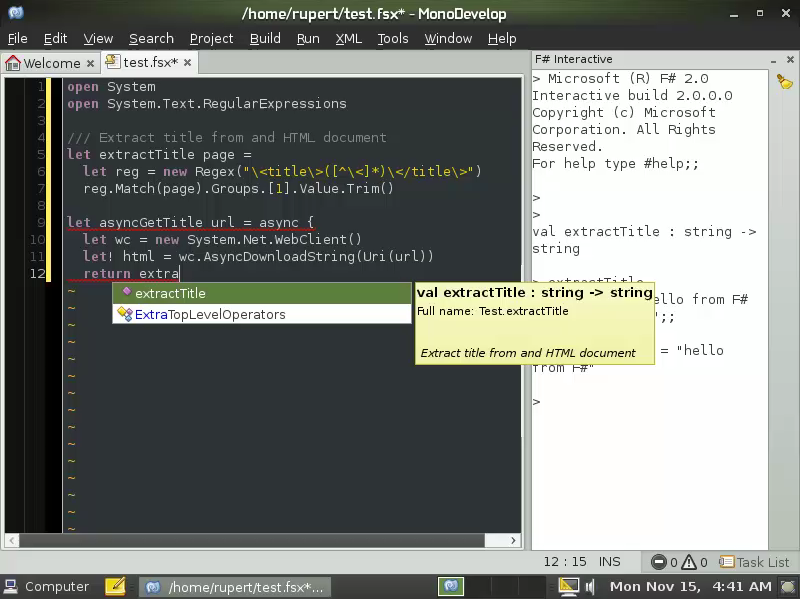
Tomas Petricek has announced the availability of the F# MonoDevelop Add-In.The add-in provides intellisense for MonoDevelop, inline documentation and access to the F# interactive shell. Most of the heavy lifting is done by the F# compiler itself which is used directly by the Add-In as a service:
Visual Studio 2010 Feature Pack 2 released–new set of Testing capabilities
|
I am very happy to announce that we have just released Visual Studio 2010 Feature Pack 2 – which extends the Visual Studio 2010 product with a great set of capabilities – this time in the area of Testing. As you know, we have adopted a concept of feature pack releases which enhance and complement the capabilities we released with the Visual Studio 2010 product earlier in the year. These feature packs are available to MSDN subscribers only, and can now be downloaded from the MSDN accounts. The first feature pack we had released was focused on code visualization and modeling feature. Feature Pack 2 is focused on enhancing the testing capabilities! The feature packs are cumulative – so, Feature Pack 2 will also include the modeling capabilities from Feature Pack 1. The Feature pack setup will ask you to install a pre-requisite QFE that contains the product changes necessary for the new capabilities. There are three capabilities included in this release:
Testing Silverlight Applications
Testing of Silverlight 4 applications has now become much easier with Visual Studio 2010 Feature Pack 2. From Microsoft Test Manager, you can now capture action recording of your manual tests of Silverlight 4 applications and fast forward it in future iterations of the test case. When a developer is creating a Silverlight 4 application, he needs to ensure that it is test-ready. He can do this by adding a conditional reference to the Silverlight UI Automation Helper assembly. The new Silverlight 4 Test Package then establishes a connection between the Silverlight application hosted in Internet Explorer and the Visual Studio UI Test Framework. This connection is used to identify properties of Silverlight Controls. Using this infrastructure, Microsoft Test Manager can now capture intent aware action recording on Silverlight applications. Read more: Amit Chatterjee's Blog
- Testing Silverlight Applications
- Recorded test playback on Firefox
- A Coded UI Test editor
Testing Silverlight Applications
Testing of Silverlight 4 applications has now become much easier with Visual Studio 2010 Feature Pack 2. From Microsoft Test Manager, you can now capture action recording of your manual tests of Silverlight 4 applications and fast forward it in future iterations of the test case. When a developer is creating a Silverlight 4 application, he needs to ensure that it is test-ready. He can do this by adding a conditional reference to the Silverlight UI Automation Helper assembly. The new Silverlight 4 Test Package then establishes a connection between the Silverlight application hosted in Internet Explorer and the Visual Studio UI Test Framework. This connection is used to identify properties of Silverlight Controls. Using this infrastructure, Microsoft Test Manager can now capture intent aware action recording on Silverlight applications. Read more: Amit Chatterjee's Blog
Memory mapped IO for fun and profit
|
What I am going to describe below is a fairly straightforward application of memory mapped IO to get huge benefits versus normal IO when loading static, but large, data structures. You can find the code for it here (note: linux only, though it would be an easy windows port). For our face recognition SDK, our model files are large binary files that are full of various bits of (odd-sized) data. We recently flattened everything out and made our initialization, effectively, zero-copy. This is a write-up of that process on a contrived example to make it a bit simpler. If you’ve ever used mmap to persist a large static data structure, you’ll probably find nothing of value here, but for the rest, read on. For this example, consider a very large list of strings (and their lengths) that we need to persist to disk. Or, a very large array of these:typedef struct {
char *data;
int len;
} data_t;
To make the problem non-trivial, we will consider the case of different length strings (in my tests I was using a million strings around 150 bytes in length — plus or minus a few to keep them from all being the same size). Let’s get startedHere is a naive read/write for this data structure:void naive_write(char* filename, data_t* data, int n)
{
FILE *f;
int i;
f = fopen (filename, "wb" );
fwrite(&n, sizeof(n), 1, f);
for (i=0;i<n;i++)
{
fwrite(&data[i].len, sizeof(data[i].len), 1, f);
fwrite(data[i].data, sizeof(char), data[i].len, f);
}
fclose(f);
}data_t* naive_read(char* filename)
{
data_t* answer;
FILE *f;
int i, n;
f = fopen (filename, "rb");
fread(&n, sizeof(n), 1, f);
answer = malloc(n * sizeof(data_t));
for (i=0;i<n;i++)
{
fread(&answer[i].len, sizeof(answer[i].len), 1, f);
answer[i].data = malloc(sizeof(char) * answer[i].len);
fread(answer[i].data, sizeof(char), answer[i].len, f);
}
return answer;
}
We first write the number of strings, and then for each string we write its length followed by the string data. When reading, we read the number of strings (and malloc the array of strings) and then for each string we read its length (to malloc the string data itself) and then read the string. This implementation does many mallocs() and it does many freads(). It is, consequently, fairly slow. With this data format on disk, though, this would be difficult to (easily) optimize much more. So, let’s change the layout.Read more: { on programming and the internets }
char *data;
int len;
} data_t;
To make the problem non-trivial, we will consider the case of different length strings (in my tests I was using a million strings around 150 bytes in length — plus or minus a few to keep them from all being the same size). Let’s get startedHere is a naive read/write for this data structure:void naive_write(char* filename, data_t* data, int n)
{
FILE *f;
int i;
f = fopen (filename, "wb" );
fwrite(&n, sizeof(n), 1, f);
for (i=0;i<n;i++)
{
fwrite(&data[i].len, sizeof(data[i].len), 1, f);
fwrite(data[i].data, sizeof(char), data[i].len, f);
}
fclose(f);
}data_t* naive_read(char* filename)
{
data_t* answer;
FILE *f;
int i, n;
f = fopen (filename, "rb");
fread(&n, sizeof(n), 1, f);
answer = malloc(n * sizeof(data_t));
for (i=0;i<n;i++)
{
fread(&answer[i].len, sizeof(answer[i].len), 1, f);
answer[i].data = malloc(sizeof(char) * answer[i].len);
fread(answer[i].data, sizeof(char), answer[i].len, f);
}
return answer;
}
We first write the number of strings, and then for each string we write its length followed by the string data. When reading, we read the number of strings (and malloc the array of strings) and then for each string we read its length (to malloc the string data itself) and then read the string. This implementation does many mallocs() and it does many freads(). It is, consequently, fairly slow. With this data format on disk, though, this would be difficult to (easily) optimize much more. So, let’s change the layout.Read more: { on programming and the internets }
Fix Windows 7 AutoPlay Dialog Box Missing or Not Appear, Display and Pop Up
|
When inserting a memory card (such as CompactFlash, CF-I, CF-II, Secure Digital, microSD, miniSD, Memory Stick, MS Duo, MS PRO Duo, MS Micro M2, xD, MMC and etc) into a memory card reader, or when putting in a CD, DVD or Blu-Ray disc media into a CD-ROM, DVD-ROM, CD-RW, DVD-RW or Blu-Ray optical drive, or when plugging in a USB or FireWire (IEEE 1394) removable mass storage device such as USB flash memory key drive or portable external hard disk drive, Windows 7 will always pop-up and display an AutoPlay dialog box (also known as AutoRun) that allows user to contextually select actions or actions that can be performed on the audio, video, pictures or mixed contents on the newly connected drive such as import pictures, play music media files, transfer videos, or open folder to browser files, together with some general options such as activate ReadyBoost caching to speed up computer or use the drive for backup. 1. Ensure that AutoPlay is used for all media type and devicesGo to Control Panel -> Programs -> Default Programs, and select Change AutoPlay settings, or Control Panel -> Hardware and Sound -> AutoPlay. Read more: My Digital Life
Shiny! Sysinternals Process Explorer v14 released…
|
This major update to Process Explorer adds a slew of enhancements and new functionality including network and disk monitoring, an improved multi-tab system information dialog, additional memory statistics, a new column that shows aggregate CPU usage for a tree of processes, improved DLL scanning performance and accuracy, command-lines in process tree tooltips, support for more than 64 CPU systems, and more. Read more: Greg's Cool [Insert Clever Name] of the Day
Read more: Process Explorer
Read more: Process Explorer
Using ASP.net Output Caching with WCF Data Services
|
We all know hitting the database is an expensive operation, adding the cost of serialization on top of that means that caching the output makes even more sense. The fact that WCF Data Services is built on top of the ASP.net platform means you can utilize all of its power to help you build a better service. This post examines the ASP.net output caching and how one would use it on WCF Data Service. Cache Variation and Static Service Caching
ASP.net applications has the ability to cache the generated output on the server side. When a next matching request comes in, the output will then be delivered straight from the cache, rather than invoking the handler (calling data service). Note that this behavior applies to GET requests only. Note the word “matching” requests. How we match an request to a cached item is essential to delivering correct data to the customers. For a static (non-updating, we’ll take a look at caching for writable services too) WCF data service endpoint, the output will change depending on the URI path, all of the query parameters, and headers as well (accept, charset, etc.). ASP.net output caching has this notion of “VaryBy…”, which essentially means how we match incoming requests to items in the cache table (of course, non-matching items are added to the table). MSDN has an article that discusses asp.net caching in detail, so I won’t repeat what the parameters are here. Let’s setup our example using a standard Northwind service over Entity Framework, everything is very standard at this point:namespace DataServiceCache
{
[ServiceBehavior(IncludeExceptionDetailInFaults=true)]
public class NorthwindService : DataService<NorthwindEntities>
{
public static void InitializeService(DataServiceConfiguration config)
{
config.DataServiceBehavior.MaxProtocolVersion = DataServiceProtocolVersion.V3;
config.SetEntitySetAccessRule("*", EntitySetRights.All);
config.SetServiceOperationAccessRule("*", ServiceOperationRights.All);
config.UseVerboseErrors = true;
}
}
}
Next, we override the OnStartProcessingRequest method to set the cache policy:protected override void OnStartProcessingRequest(ProcessRequestArgs args)
{
base.OnStartProcessingRequest(args); HttpContext context = HttpContext.Current; // set cache policy to this page
HttpCachePolicy cachePolicy = HttpContext.Current.Response.Cache; // server&private: server and client side cache only
cachePolicy.SetCacheability(HttpCacheability.ServerAndPrivate); // default cache expire: never
cachePolicy.SetExpires(DateTime.MaxValue); // cached output depends on: accept, charset, encoding, and all parameters (like $filter, etc)
cachePolicy.VaryByHeaders["Accept"] = true;
cachePolicy.VaryByHeaders["Accept-Charset"] = true;
cachePolicy.VaryByHeaders["Accept-Encoding"] = true;
cachePolicy.VaryByParams["*"] = true; cachePolicy.SetValidUntilExpires(true);
}
We assume that this service is static here, (never changes shape), so we set the expire date to never expire (although ASP.net should auto adjust this back to expire in 1 year). Fire up the service now to test the cache – one indicator of whether the feed is cached is by examining the “Updated” timestamp.
Read more: public Blogger SPQ;
ASP.net applications has the ability to cache the generated output on the server side. When a next matching request comes in, the output will then be delivered straight from the cache, rather than invoking the handler (calling data service). Note that this behavior applies to GET requests only. Note the word “matching” requests. How we match an request to a cached item is essential to delivering correct data to the customers. For a static (non-updating, we’ll take a look at caching for writable services too) WCF data service endpoint, the output will change depending on the URI path, all of the query parameters, and headers as well (accept, charset, etc.). ASP.net output caching has this notion of “VaryBy…”, which essentially means how we match incoming requests to items in the cache table (of course, non-matching items are added to the table). MSDN has an article that discusses asp.net caching in detail, so I won’t repeat what the parameters are here. Let’s setup our example using a standard Northwind service over Entity Framework, everything is very standard at this point:namespace DataServiceCache
{
[ServiceBehavior(IncludeExceptionDetailInFaults=true)]
public class NorthwindService : DataService<NorthwindEntities>
{
public static void InitializeService(DataServiceConfiguration config)
{
config.DataServiceBehavior.MaxProtocolVersion = DataServiceProtocolVersion.V3;
config.SetEntitySetAccessRule("*", EntitySetRights.All);
config.SetServiceOperationAccessRule("*", ServiceOperationRights.All);
config.UseVerboseErrors = true;
}
}
}
Next, we override the OnStartProcessingRequest method to set the cache policy:protected override void OnStartProcessingRequest(ProcessRequestArgs args)
{
base.OnStartProcessingRequest(args); HttpContext context = HttpContext.Current; // set cache policy to this page
HttpCachePolicy cachePolicy = HttpContext.Current.Response.Cache; // server&private: server and client side cache only
cachePolicy.SetCacheability(HttpCacheability.ServerAndPrivate); // default cache expire: never
cachePolicy.SetExpires(DateTime.MaxValue); // cached output depends on: accept, charset, encoding, and all parameters (like $filter, etc)
cachePolicy.VaryByHeaders["Accept"] = true;
cachePolicy.VaryByHeaders["Accept-Charset"] = true;
cachePolicy.VaryByHeaders["Accept-Encoding"] = true;
cachePolicy.VaryByParams["*"] = true; cachePolicy.SetValidUntilExpires(true);
}
We assume that this service is static here, (never changes shape), so we set the expire date to never expire (although ASP.net should auto adjust this back to expire in 1 year). Fire up the service now to test the cache – one indicator of whether the feed is cached is by examining the “Updated” timestamp.
Read more: public Blogger SPQ;
pfSense
|
pfSense is a free, open source customized distribution of FreeBSD tailored for use as a firewall and router. In addition to being a powerful, flexible firewalling and routing platform, it includes a long list of related features and a package system allowing further expandability without adding bloat and potential security vulnerabilities to the base distribution. pfSense is a popular project with more than 1 million downloads since its inception, and proven in countless installations ranging from small home networks protecting a PC and an Xbox to large corporations, universities and other organizations protecting thousands of network devices. This project started in 2004 as a fork of the m0n0wall project, but focused towards full PC installations rather than the embedded hardware focus of m0n0wall. pfSense also offers an embedded image for Compact Flash based installations, however it is not our primary focus. Read more: pfSense
Finalization Uncovered
|
Tuesday, November 16, 2010
I’ve talked about finalization before but based on seeing questions related to it it appears that it deserves some clarification. First of all, finalization is a mechanism we provide in the CLR wheras Dispose is a programming pattern. See Clearing up some confusion over finalization and other areas in GC for an explanation why we provide finalization. Inside of the GC, it’s completely not aware of Dispose. People often call GC.SuppressFinalize in their Dispose implementation but that’s just a choice they make when they write code. I will explain exactly what GC.SuppressFinalize does in a bit. Oh and I am not the owner of the “Dispose pattern” J So what happens when you allocate an object with a finalizer? GC’s allocator will get called and it’s told this object is finalizable. So if GC can successfully allocate this object it will then record that this is a finalizable object. GC maintains a list to record finalizable objects so a new object will be in the gen0 part of that list. Recording just means writing the object address X to an entry in the gen0 part. When GC promotes a finalizable object to another generation, it’ll move its address to the part of the list for that generation. Of course when the object is compacted we also need to update the entry in the finalize list with the new address. When GC finishes marking objects, ie, it has determined which ones should be live, it will look at the list for the generation it’s collecting see if those objects are dead. For the dead ones it will then promote that object and move the address to the part of the list that’s for “ready for finalization” objects. If any of such objects are found, GC will signal to the finalizer thread that there’s work to do. When the managed threads are restarted after GC is done, since the finalizer thread is also a managed thread, it also gets restarted and starts to do its work – running finalizers. It does this by asking for the entries in the “ready for finalization” part of the list. Those entries are removed from the list as the objects’ finalizers are run. If you do a !finalizequeue you will see output like this:0:015> !finalizequeue
SyncBlocks to be cleaned up: 0
MTA Interfaces to be released: 0
STA Interfaces to be released: 0
----------------------------------
------------------------------
Heap 0
generation 0 has 971 finalizable objects (000000000e31b958->000000000e31d7b0)
generation 1 has 346 finalizable objects (000000000e31ae88->000000000e31b958)
generation 2 has 139 finalizable objects (000000000e31aa30->000000000e31ae88)
Ready for finalization 0 objects (000000000e31d7b0->000000000e31d7b0)
------------------------------
Heap 1
generation 0 has 2686 finalizable objects (000000000d41aa10->000000000d41fe00)
generation 1 has 473 finalizable objects (000000000d419b48->000000000d41aa10)
generation 2 has 129 finalizable objects (000000000d419740->000000000d419b48)
Ready for finalization 0 objects (000000000d41fe00->000000000d41fe00)
------------------------------
Heap 2
generation 0 has 319 finalizable objects (000000000d298298->000000000d298c90)
generation 1 has 302 finalizable objects (000000000d297928->000000000d298298)
generation 2 has 241 finalizable objects (000000000d2971a0->000000000d297928)
Ready for finalization 0 objects (000000000d298c90->000000000d298c90)
------------------------------
Heap 3
generation 0 has 147 finalizable objects (000000000c982998->000000000c982e30)
generation 1 has 432 finalizable objects (000000000c981c18->000000000c982998)
generation 2 has 147 finalizable objects (000000000c981780->000000000c981c18)
Ready for finalization 0 objects (000000000c982e30->000000000c982e30) As you can see, there are “Finalizable” objects and “Ready for finalization” objects, as we talked about above.Read more: Maoni's WebLog
SyncBlocks to be cleaned up: 0
MTA Interfaces to be released: 0
STA Interfaces to be released: 0
----------------------------------
------------------------------
Heap 0
generation 0 has 971 finalizable objects (000000000e31b958->000000000e31d7b0)
generation 1 has 346 finalizable objects (000000000e31ae88->000000000e31b958)
generation 2 has 139 finalizable objects (000000000e31aa30->000000000e31ae88)
Ready for finalization 0 objects (000000000e31d7b0->000000000e31d7b0)
------------------------------
Heap 1
generation 0 has 2686 finalizable objects (000000000d41aa10->000000000d41fe00)
generation 1 has 473 finalizable objects (000000000d419b48->000000000d41aa10)
generation 2 has 129 finalizable objects (000000000d419740->000000000d419b48)
Ready for finalization 0 objects (000000000d41fe00->000000000d41fe00)
------------------------------
Heap 2
generation 0 has 319 finalizable objects (000000000d298298->000000000d298c90)
generation 1 has 302 finalizable objects (000000000d297928->000000000d298298)
generation 2 has 241 finalizable objects (000000000d2971a0->000000000d297928)
Ready for finalization 0 objects (000000000d298c90->000000000d298c90)
------------------------------
Heap 3
generation 0 has 147 finalizable objects (000000000c982998->000000000c982e30)
generation 1 has 432 finalizable objects (000000000c981c18->000000000c982998)
generation 2 has 147 finalizable objects (000000000c981780->000000000c981c18)
Ready for finalization 0 objects (000000000c982e30->000000000c982e30) As you can see, there are “Finalizable” objects and “Ready for finalization” objects, as we talked about above.Read more: Maoni's WebLog
Clearing up some confusion over finalization and other areas in GC
|
In the WinDev conference that I just went to, there seems to be some confusion over finalization (such as why it even exists and etc) and other areas. I hope the following will clear up that confusion. If not, let me know. Finalization 1) Why we have finalization Finalization is necessary because you want to make your component robust. You might have no control over your clients of your component in which case if you are seeing an issue (for example, opening a file handle in the exclusive mode before the finalizer closes it) you won’t be able to say “Oh, look this is a bug, go fix it” to whoever wrote the client (heck, the company that wrote the client might already went out of business!). Obviously you want people to call Dispose on your object so the object doesn’t need to be promoted to a higher generation but you are not always in control of people calling Dispose, and very often you are not. 2) What you can do in finalizers Finalizers are only there so you can release your native resources. It’s by design not to do stuff with other managed objects because they would be taken care of by GC. Releasing native resources should be all you do in your objects’ finalize method and that’s a very important thing to do because we are not in a completely managed world – if that were the case, we wouldn’t need finalization at all. 3) When the finalizer thread runs the finalizers Each time we do a GC, we would see if there are any objects whose finalize method needs to run, if so we add it to the freachable queue and set an event to wait up the finalizer thread. Generally if a managed app is doing work, it will trigger GCs so this means whenever you trigger a GC, the finalizer thread, if it’s not already working, will immediately be aware that there are finalizers to run. The finalizer thread doesn’t wake up at “some random point of time in the future”. When it’s waken up is well defined. So what if a finalizer takes a long time to run? Yes it would block the finalizers behind it from running. But remember we said you should only release native resources in your finalize method which should be fast. If it takes days to run a finalizer then there’s a problem in how you implemented the finalize method and you should look into that. Read more: Maoni's WebLog
Android App Developers GUI Kits, PSD Templates and Tools
|
Android is an operating system, created by Google, that has taken over many mobile devices, such as cell phones, tablets, and netbooks. As mobile devices have become more popular, Android has become one of the leading players in the world of mobile development. In recent years, we’ve also seen a rise beyond cell phones, into even more advanced SmartPhones, reading tablets, and mini-computer tablets (such as the iPad). In this post we have a list of some very useful Android GUI kits, icons, fonts, .psd templates, tools, and tutorials. Any developer, beginner to advanced, can get started with Android development easily and in the right direction. Read more: tutslist
Windows Phone 7 – Full file system access anyone?
|
I’ll be posting the code in a couple of days, need to clean it all up. And yes, it’s a managed app running unmanaged code. You’ve got FULL access, create, delete, browse files etc. Just can’t delete system ROM files, IE coredll.dll (obviously). PS, yes I know the video quality is average, that’s what you get for recording it on a Desire HD. Here is another video, showing the root, navigating to an Application that has been installed, back to the root, and into the Windows folder to find the magical coredll.dll Read more: Chris Walsh
atomo
|
the programmer's programmable programming languageatomo is a small, simple, insanely flexible and expressive programming language. its design is inspired by Scheme (small, simple core), Slate (multiple dispatch, keywords), Ruby (very DSL-friendly), and Erlang (message-passing concurrency). it is written in and piggybacks on the Haskell runtime, permitting access to all of its power (and libraries!) through a thin layer. Examples:Greeter = Object clone
Greeter new: n :=
Greeter clone do: {
name = n
}(g: Greeter) say-hi :=
(g name .. ": Hi!") print(Greeter new: "Alex") say-hi
with-output-to: "out-file" do: {
"Hello, world!" print
}Read more: atomo
Greeter new: n :=
Greeter clone do: {
name = n
}(g: Greeter) say-hi :=
(g name .. ": Hi!") print(Greeter new: "Alex") say-hi
with-output-to: "out-file" do: {
"Hello, world!" print
}Read more: atomo
Stackoverflow Desktop Notifier
|
Project Description
TweshStack is a stackoverflow desktop client, which keeps notifying you about new questions, your reputation score etc.Read more: Codeplex
TweshStack is a stackoverflow desktop client, which keeps notifying you about new questions, your reputation score etc.Read more: Codeplex
50 websites with creative and unique design
|
When you decided to create new website, you may be choose create a Creative or Unique layouts. There are 50 websites with creative and unique layouts which give you some idea on the way to accomplish your project. Many of them have background images, different content situation and different style but same people feeling is strange. 
Read more: webdesign14
Read more: webdesign14
Writing a Managed Internet Explorer Extension
|
I’ve recently had the pleasure of writing an Internet Explorer add on. I found this to somewhat difficult for a few reasons and decided to document my findings here.Managed vs Native
One difficult decision I had to make even before I had to write a single line of code was what do I write it with? I am a C# developer, and would prefer to stay in that world if possible. However, this add-on had the intention of being use commercially, and couldn’t make the decision solely based on preference. Add-on’s to Internet Explorer are called Browser Helper Objects, often documented as BHOs as well. They are COM types, thus if we were going to do this managed, we will be doing some COM Interop. I’ve done this before, but mostly from a level of tinkering or deciding to go back to native. The .NET Framework had another benefit to me, and that was WPF. My BHO requires an user interface, and doing that natively isn’t as easy or elegant as using native libraries. Ultimately I decided to go with .NET Framework 4.0, and I can only recommend the .NET Framework 4. Previous versions of the CLR has a serious drawback when exposing the types to COM: They always used the latest version of the CLR on the machine. If you wrote a BHO in the .NET Framework 1.1, and 2.0 was installed, it would load the assembly using the .NET Framework 2.0. This can lead to unexpected behavior. Starting in the .NET Framework 4, COM Visible types are guaranteed to run against the CLR they were compile with. The Basics of COM and IE
Internet Explorer uses COM as it’s means of extending its functionality. Using .NET, we can create managed types and expose them to COM and Internet Explorer would be non-the-wiser. COM heavily uses Interfaces to provide functionality. Our BHO will be a single class that implements a COM interface. Let’s start by making a single C# Class Library in Visual Studio. Before we can start writing code, we need to let the compiler know we will be generating COM types. This is done by setting the “Register Assembly for COM Interop” in our project settings on the “Build” tab. While you are on the Build tab, change the Platform target to “x86” as we will only be dealing with 32-bit IE if you are running a 64-bit OS. Now that’s out of the way, let’s make our first class. We’ll call our class BHO. namespace IeAddOnDemo
{
public class BHO
{
}
}By itself, this class is not useful at all, and nor can COM do anything with it. We need to let COM know this type is useful to it with a few key attributes. The first is ComVisibleAttribute(true). This attribute does exactly what it looks like. The next is GuidAttribute. This is important because all COM types have a unique GUID. This must be unique per-type per application. Just make your own in Visual Studio by clicking “Tools” and “Create GUID”. Finally there is the ClassInterfaceAttribute which will be set to None. Optionally, you can set the ProgIdAttribute if you want. This allows you to specify your own named identifier that will be used when the COM type is registered. Otherwise it’s your class name. Here is what my class looks like now: [ComVisible(true),
Guid("9AB12757-BDAF-4F9A-8DE8-413C3615590C"),
ClassInterface(ClassInterfaceType.None)]
public class BHO
{
}Read more: vcsjones
One difficult decision I had to make even before I had to write a single line of code was what do I write it with? I am a C# developer, and would prefer to stay in that world if possible. However, this add-on had the intention of being use commercially, and couldn’t make the decision solely based on preference. Add-on’s to Internet Explorer are called Browser Helper Objects, often documented as BHOs as well. They are COM types, thus if we were going to do this managed, we will be doing some COM Interop. I’ve done this before, but mostly from a level of tinkering or deciding to go back to native. The .NET Framework had another benefit to me, and that was WPF. My BHO requires an user interface, and doing that natively isn’t as easy or elegant as using native libraries. Ultimately I decided to go with .NET Framework 4.0, and I can only recommend the .NET Framework 4. Previous versions of the CLR has a serious drawback when exposing the types to COM: They always used the latest version of the CLR on the machine. If you wrote a BHO in the .NET Framework 1.1, and 2.0 was installed, it would load the assembly using the .NET Framework 2.0. This can lead to unexpected behavior. Starting in the .NET Framework 4, COM Visible types are guaranteed to run against the CLR they were compile with. The Basics of COM and IE
Internet Explorer uses COM as it’s means of extending its functionality. Using .NET, we can create managed types and expose them to COM and Internet Explorer would be non-the-wiser. COM heavily uses Interfaces to provide functionality. Our BHO will be a single class that implements a COM interface. Let’s start by making a single C# Class Library in Visual Studio. Before we can start writing code, we need to let the compiler know we will be generating COM types. This is done by setting the “Register Assembly for COM Interop” in our project settings on the “Build” tab. While you are on the Build tab, change the Platform target to “x86” as we will only be dealing with 32-bit IE if you are running a 64-bit OS. Now that’s out of the way, let’s make our first class. We’ll call our class BHO. namespace IeAddOnDemo
{
public class BHO
{
}
}By itself, this class is not useful at all, and nor can COM do anything with it. We need to let COM know this type is useful to it with a few key attributes. The first is ComVisibleAttribute(true). This attribute does exactly what it looks like. The next is GuidAttribute. This is important because all COM types have a unique GUID. This must be unique per-type per application. Just make your own in Visual Studio by clicking “Tools” and “Create GUID”. Finally there is the ClassInterfaceAttribute which will be set to None. Optionally, you can set the ProgIdAttribute if you want. This allows you to specify your own named identifier that will be used when the COM type is registered. Otherwise it’s your class name. Here is what my class looks like now: [ComVisible(true),
Guid("9AB12757-BDAF-4F9A-8DE8-413C3615590C"),
ClassInterface(ClassInterfaceType.None)]
public class BHO
{
}Read more: vcsjones
Extending Explorer with Band Objects using .NET and Windows Forms
|
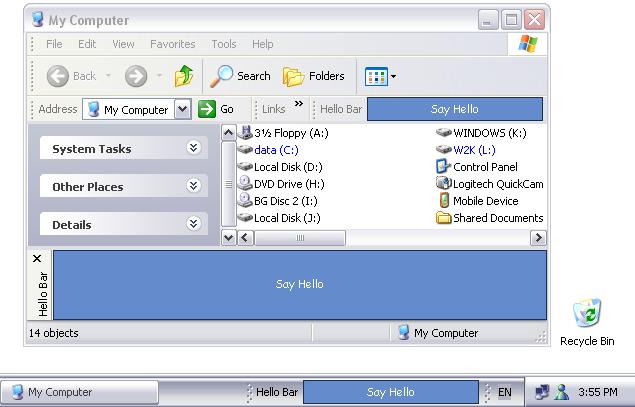
IntroductionA lot has been already said about extending Windows and Internet Explorer with Band Objects, Browser Bands, Toolbar Bands and Communication Bands. So if you are familiar with COM and ATL you even might have implemented one yourself. Well, in case your were waiting for an easy way to impress your friends with something like Google Toolbar here it is - the .NET way (or should I say Windows Forms and COM Interop way?). In this tutorial I am going to show how to create any of the mentioned above Band Object types with the help of the BandObject control. Later I will also talk about some implementation details of the BandObject. Hello World Bar step by step1.Build a Release version of BandObjectLib and register it in the Global Assembly Cache. The easiest way to do this is to open BandObjectLib.sln in Visual Studio, set the active configuration to Release and select 'Rebuild Solution' from the 'Build' menu. The second project in the solution - RegisterLib - is a C++ utility project that performs the 'gacutil /if BandObjectLib.dll' command that puts assembly into GAC. As you probably already know, Band Objects are COM components. And for the .NET framework to find an assembly that implements a COM component it must be either be registered in the GAC or located in the directory of the client application. There are two possible client applications for Band Objects - explorer.exe and iexplorer.exe. Explorer is located in the windows directory and IE somewhere inside 'Program Files'. So GAC is actually the only one option in this case. Thus .NET assemblies that implement Band Objects should be registered in GAC and all libraries they depend on - like BandObjectLib.dll - should also be there. Assemblies in the GAC must have strong names and thus key pairs are required. I have provided the BandObjects.snk file with a key pair but I encourage you to replace it with your own. See the sn.exe tool for more details. 2.Create a new Windows Control Library project and call it SampleBars. We are going to rely on the base functionality of BandObjectLib so we have to add a reference to BandObjectLib\Relase\bin\BandObjectLib.dll. As we are developing a 'Hello World Bar', rename UserControl1.cs and the UserControl1 class inside it appropriately - into HelloWolrdBar.cs and HelloWorldBar. Also put the following lines at the beginning of HelloWorldBar.cs: using BandObjectLib;
using System.Runtime.InteropServices;3.Make HelloWorldBar class inherit BandObject instead of System.Windows.Forms.UserControlRead more: Codeproject
Integrating WCF Services with COM+
|
February 2007
Revised August 2007Applies to:
Microsoft .NET Framework 3.0
Windows Vista
Microsoft Internet Information Services
Microsoft Visual Studio 2005Summary: This article will detail step by step instructions to consume COM+ application services from WCF clients. We will also discuss how legacy applications can use applications that expose WCF services built on .NET 3.0. The content for this article is based on Chapter 10 of Pro WCF : Practical Microsoft SOA Implementation by APress. This book is targeted towards beginner to intermediate readers and part of Apress series that discusses WPF, WCF and WF. (30 printed pages) Contents
.NET Enterprise Services and COM+ Components Consuming WCF Services from COM+
Introduced in 1993, Component Object Model (COM) was the basis for other emerging technologies from Microsoft such as Object Linking and Embedding (OLE), ActiveX, and Distributed COM (DCOM). COM was initially introduced to compete with Common Object Request Broker Architecture (CORBA), a language-independent and cross-platform distributed system technology. They did share some core principles, but they were not compatible. Concepts and techniques such as Interface Definition Language (IDL) are present in both technologies. However, binary interoperability didn’t exist.
Read more: MSDN
Revised August 2007Applies to:
Microsoft .NET Framework 3.0
Windows Vista
Microsoft Internet Information Services
Microsoft Visual Studio 2005Summary: This article will detail step by step instructions to consume COM+ application services from WCF clients. We will also discuss how legacy applications can use applications that expose WCF services built on .NET 3.0. The content for this article is based on Chapter 10 of Pro WCF : Practical Microsoft SOA Implementation by APress. This book is targeted towards beginner to intermediate readers and part of Apress series that discusses WPF, WCF and WF. (30 printed pages) Contents
- Integrating WCF Services with COM+
- Running a COM+ Application as a WCF Service
- COM+ Application WCF Service Wrapper
- Using SvcConfigEditor.exe Utility
- Using ComSvcConfig.exe Utility
- Client Proxy Generation
- Visual Basic 6 COM+ Hiding Interfaces
- Client Proxy generation
- Typed Contract Service Moniker
- Metadata Exchange Contract Service Moniker
- WSDL Contract Service Moniker
Introduced in 1993, Component Object Model (COM) was the basis for other emerging technologies from Microsoft such as Object Linking and Embedding (OLE), ActiveX, and Distributed COM (DCOM). COM was initially introduced to compete with Common Object Request Broker Architecture (CORBA), a language-independent and cross-platform distributed system technology. They did share some core principles, but they were not compatible. Concepts and techniques such as Interface Definition Language (IDL) are present in both technologies. However, binary interoperability didn’t exist.
Read more: MSDN
Subscribe to:
Posts (Atom)

 Posts
Posts

