This is a mirror of official site: http://jasper-net.blogspot.com/

Perfect Viewing of PerfView - Links, Videos and More

| Tuesday, July 31, 2012

Vance Morrison, Performance Architect on the Common Language Runtime (CLR) team writes and maintains a very powerful tool called PerfView that harnesses the power of Event Tracing for Windows (ETW) data produced by the CLR. The tool can be download here.

Although he had previously published some tutorial videos as a ZIP download on his blog, those videos have now been published in a more accessible way as a PerfView tutorial series here on Channel 9.

Ben Watson has also just published a very nice article on PerfView following on from his previous article outlining 4 essential tips for high performance GC on servers.

...

PerfView is a performance-analysis tool that helps isolate CPU- and memory-related performance issues.

Quick details
Version: 1.0.29 
Date published: 6/20/2012

Language: English

PerfView.zip, 6.4 MB

PerfView is a performance analysis tool focusing on ETW information (ETL files) as well as CLR memory information (heap dumps). It can collect and view ETL files as well as XPERF CSV files. Powerful grouping operators allow you to understand performance profiles in ways other tools can't. PerfView is used internally at Microsoft by a number of teams and is the primary performance investigation tool on the .NET Runtime team. Features include:

Non-invasive collection - suitable for use in live, production environments
Xcopy deployment - copy and run
Memory
Support for very large heaps (gigabytes)
Snapshot diffing
Dump files (.dmp)
CPU Performance
Support for managed, native, and mixed code
Can read XPerf logs
Profile diffing

Updates in the 1.0.29 version include:
Improved view for analyzing blocked time (thread time view)
Support for .NET 4.5 EventSources
Support for writing extensions

Read more: Dzone
QR: Inline image 1

Posted via email from Jasper-net
30 More Questions About Windows 8 That I Get Asked All The Time

|
As a developer evangelist, I interact with a lot of developers. Many developers are just meeting Windows 8 for the very first time. Some developers have started to tinker. And, others are deep into their first application – on target for the store. The common thread between them are a set of recurring questions that I get over and over. I thought I would document a few of them.
  1. Should all desktop apps be migrate to metro? No
  2. Will the Windows 8 store support trials? Yes
  3. Will the Windows 8 store support subscriptions? No
  4. Will enterprise apps deliver through the Windows 8 store? No
  5. Can enterprises disable the Windows 8 store? Yes
  6. Can enterprises disable side-loading of apps? Yes
  7. Can apps in the Windows 8 store access desktop apps & services? No
  8. Can side-loaded apps access desktop apps & services? Yes
  9. Can parents disable the Windows 8 store for kids? Yes
  10. Can parents limit the hours in the day their kids can log in? Yes
  11. Can parents limit the cumulative time in a day kids can use the PC? Yes
  12. Can parents filter available web sites? Yes
  13. Can parents disable games based on their rating? Yes
  14. Can Visual Studio 2010 be used to build Metro apps? No
  15. Can Visual Studio 2012 be used to build Windows 7 apps? Yes
  16. Can Visual Studio 2010 access Team Foundation Server 2012? Yes
  17. Can Visual Studio 2012 open 2010 projects without altering them? Yes
  18. Can Visual Studio 2010 open 2012 projects? No
  19. Does the .Net 4 async keyword work in WinRT? Yes

Read more: DZone
QR: Inline image 1

Posted via email from Jasper-net

Tools released at Defcon can crack widely used PPTP encryption in under a day

| Monday, July 30, 2012
July 29, 2012 — IDG News Service — Security researchers released two tools at the Defcon security conference that can be used to crack the encryption of any PPTP (Point-to-Point Tunneling Protocol) and WPA2-Enterprise (Wireless Protected Access) sessions that use MS-CHAPv2 for authentication.

MS-CHAPv2 is an authentication protocol created by Microsoft and introduced in Windows NT 4.0 SP4. Despite its age, it is still used as the primary authentication mechanism by most PPTP virtual private network (VPN) clients.

MS-CHAPv2 has been known to be vulnerable to dictionary-based brute force attacks since 1999, when a cryptanalysis of the protocol was published by cryptographer Bruce Schneier and other researchers.

However, the common belief on the Internet is that if you have a strong password then it's ok, said Moxie Marlinspike, the security researcher who developed ChapCrack, one of the tools released at Defcon. "What we demonstrated is that it doesn't matter. There's nothing you can do."

ChapCrack can take captured network traffic that contains a MS-CHAPv2 network handshake (PPTP VPN or WPA2 Enterprise handshake) and reduce the handshake's security to a single DES (Data Encryption Standard) key.

This DES key can then be submitted to CloudCracker.com -- a commercial online password cracking service that runs on a special FPGA cracking box developed by David Hulton of Pico Computing -- where it will be decrypted in under a day.

Read more: Data protection
QR: Inline image 1

Posted via email from Jasper-net

The Truth About .NET Objects And Sharing Them Between AppDomains

|
I have written already some time ago how big a .NET object is. John Skeet as also made a very detailed post about object sizes in .NET. I wanted to know if we can deduce the object size not by experiments (measuring) but by looking at the Rotor source code. There is indeed a simple definition in the object headers how big a .NET object minimally can be. A CLR object is still a (sophisticated) structure which is at an address that is changed quite often by the garbage collector.

Inline image 1

The picture above shows that every .NET object contains an object header which contains information about which thread in which AppDomain has locked the object (means called Monitor.Enter). Next comes the Method Table Pointer which defines a managed type for one AppDomain. If the assembly is loaded AppDomain neutral this pointer to the type object will have the same value in all AppDomains. This basic building block of the CLR type system is also visible in managed code via Type.TypeHandle.Value which has IntPtr size.


\sscli20\clr\src\vm\object.h

//
// The generational GC requires that every object be at least 12 bytes
// in size.   
#define MIN_OBJECT_SIZE     (2*sizeof(BYTE*) + sizeof(ObjHeader))
A .NET object has basically this layout:

class Object
{
  protected:
    MethodTable*    m_pMethTab;

};
class ObjHeader
{
  private:
    // !!! Notice: m_SyncBlockValue *MUST* be the last field in ObjHeader.
    DWORD  m_SyncBlockValue;      // the Index and the Bits
};
 

For x86 the minimum size is therefore 12 bytes = 2*4+4. And for x64 it is 24 bytes = 2*8+8. The ObjectHeader struct is padded with another 4 bytes in x64 which does add up to 24 bytes for every object instance. The MIN_OBJECT_SIZE definition has actually a factor two inside it whereas we would expect 8 as minimum empty object size. The previous sentence does contain already the answer to it. It makes little sense to define empty objects. Most meaningful objects have at least one member variable of class type which is indeed another pointer sized member hence the minimum size of 12 bytes (24) bytes in x86/x64.

It is interesting to know that the garbage collector does not know anything about AppDomains. For him the managed heap does only consist of objects which have roots or not and does clean up everything which is not rooted anymore. I found this during the development of WMemoryProfiler which uses DumpHeap of Windbg to get all object references from the managed heap. When I did access all objects found this way I got actually objects from other AppDomains as well. And they did work! It is therefore possible to share objects directly between AppDomains.

Why would you want to do that? Well it is fun and you can do really dirty stuff with that. Do you remember that you cannot unload assemblies from an AppDomain? Yes that is still true but why would you ever want to unload an assembly? Mostly because you were doing some dynamic code generation which will at some point in time dominate your overall memory consumption if you load generated assemblies into your AppDomain. I have seen this stuff many times for dynamic query generation. The problem is that if you load the dynamically created code into another AppDomain you need to serialize the data to the other AppDomain as well because you cannot share plain objects between AppDomains. To serialize potentially much data across AppDomain is prohibitively slow and therefore people live with the restriction that code gen will increase the working set quite a lot.  With some tricks you can now share plain objects between AppDomain and get unloadable code as well.

 
Warning: This following stuff well beyond the specs but it does work since .NET 2.0 up to 4.5.

Do not try this at work!

Read more: Alois Kraus
QR: Inline image 2

Posted via email from Jasper-net

Defend Your Code with Top Ten Security Tips Every Developer Must Know

|
Security is a multidimensional issue. Security risks can come from anywhere. You could write bad error handling code or be too generous with permissions. You could forget what services are running on your server. You could accept all user input.

1. Trust User Input at Your Own Peril

2. Protect Against Buffer Overruns

3. Prevent Cross-site Scripting

4. Don't Require sa Permissions

5. Watch that Crypto Code!

6. Reduce Your Attack Profile

7. Employ the Principle of Least Privilege

8. Pay Attention to Failure Modes

9.Impersonation is Fragile

10. Write Apps that Non-admins Can Actually Use


1.     Trust User Input at Your Own Peril

Always remember one thing: "don't trust user input." If you always assume that data is well formed and good, then your troubles are about to begin. Most security vulnerabilities revolve around
the attacker providing malformed data to the server machine. Trusting that input is well formed can lead to buffer overruns, cross-site scripting attacks, SQL injection attacks, and more.

2. Protect Against Buffer Overruns

A buffer overrun occurs when the data provided by the attacker is bigger than what the application expects, and overflows into internal memory space. Buffer overruns are primarily a C/C++ issue. The overflow causes corruption of other data structures in memory, and this corruption can often lead to the attacker running malicious code. There are also buffer underflows and buffer overruns caused by array indexing mistakes, but they are less common. Take a look to the following source code example:

void DoSomething(char *cBuffSrc, DWORD cbBuffSrc) {

    char cBuffDest[32];

    memcpy(cBuffDest,cBuffSrc,cbBuffSrc);

}

If the data comes from an untrusted source and has not been validated, then the attacker (the untrusted source) could easily make cBuffSrc larger than cBuffDest, and also set cbBuffSrc to be larger than cBuffDest. When memcpy copies the data into cBuffDest, the return address from DoSomething is clobbered because cBuffDest is next to the return address on the function's
stack frame, and the attacker makes the code perform malicious operations.

The way to fix this is to distrust user input and not to believe any data held in cBuffSrc and cbBuffSrc:

void DoSomething(char *cBuffSrc, DWORD cbBuffSrc) {

    const DWORD cbBuffDest = 32;

    char cBuffDest[cbBuffDest];

Read more: Sharing SharePoint
QR: Inline image 1

Posted via email from Jasper-net

WPF 4.5 – Part 1 : Asynchronous Data Validation

|
Here is the first post of a series about the new features of WPF 4.5. Validation of data is often if not always necessary in modern applications. From a long time, WPF provided the IDataErrorInfo interfaces which permitted the automatic validation of your properties.

Silverlight, with is asynchronous philosophy provided the INotifyDataErrorInfo which performed the same thing but asyncrhonously.

It is a newinterface of WPF 4.5 and we will discover it in this post.

What’s inside ?
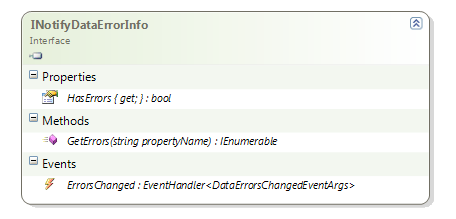
Here is the definition of it:

Inline image 1

As you can see there is only 3 things inside:

HasErrors: a read-only boolean property which tells if the object as a whole have any validation errors;
GetErrors: a method which returns validation errors for a given property;
ErrorsChanged: an event which must be raised when new errors – or the lacks of errors – is detected. You have to raise this event for each property.
As a note, if you return false in the HasErrors property, the binding will act as if there were no errors, even if they exists.

How to use it ?
With the traditionnal IDataErrorInfo, you have to set to true the ValidatesOnDataErrors property on each binding to your object. There is nothing really new under the sun because this time you have to set the ValidatesOnNotifyDataErrors property to true.

In the linked demo project I create a form which display the properties of an object named ‘Person’. Here is how the validation with INotifyDataErrorInfo is enabled in the Binding:

<TextBox Text="{Binding Name,Mode=TwoWay,ValidatesOnNotifyDataErrors=True}"/>

Read more: DZone
QR: Inline image 2

Posted via email from Jasper-net

Simple Instant Messenger with SSL Encryption in C#

|
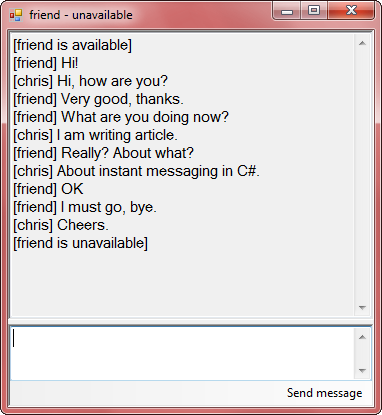
Inline image 1

Introduction

Did you ever want to write your own instant messenger program like Skype? OK, not so advanced... I will try to explain how to write a simple instant messenger (IM) in C#.NET.

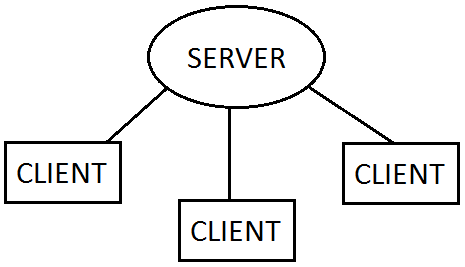
First, some theory. Our instant messenger will work on a client-server model.

Inline image 2

Users have client programs which connect to the server application. Client programs know the server's IP or hostname (e.g., example.com).

The most popular internet protocols are TCP and UDP. We will use TCP/IP, because it is reliable and it has established connection. .NET offers TcpClient and TcpListener classes for this protocol. TCP/IP doesn't offer encryption. It is possible to create own encryption protocol over TCP, but I recommend using SSL (used in HTTPS). It authenticates server (and optionally client) and encrypts connection.

SSL is using X.509 certificates for authenticating. You can buy real SSL certificate (trusted) or generate self-signed certificate (untrusted). Untrusted certificates allow encryption, but authentication isn't safe. We can use them for testing. I made batch script, which generates self-signed certificate in PFX package. My script requires OpenSSL installed in system. I included also one in server application project.

At the end there is your higher-level protocol, which sends messages to specified users and does other IM stuff. I will explain my protocol during article.

You can debug your server and client on the same computer: hostname of server will be localhost or 127.0.0.1 (local IP - same computer).

Background

You should know something about SSL protocol, certificates, and networking.

Preparing

Create two projects: server and client. Server will be a console application, client - Windows Forms (or WPF). You will need to debug two projects at once, so don't place them in one solution.

Read more: Codeproject
QR: Inline image 3

Posted via email from Jasper-net

Converting Hex String To Corresponding Byte Array Using C#

|
I came across an issue where I needed to convert a string representing HEX value into corresponding byte array. I know that there are various solutions that all accomplish the same task: Take A String And Convert It To Equivalent Byte Array.

For example a string value: 0x0123456789ABCDEF would be 0x01, 0x23, 0x45, 0x67, 0x89, 0xAB, 0xCD and 0xEF represented in a byte array. The basic .NET functions would give you the byte array of the actualy ASCII characters, and not the binary value that they represent. There was all kind of solutions out there. Some declared to be faster than other, or simply the fastest. I am sure the solution that I came up with is not prettiest or the most effcient. But, it is my solution that I came up with. I am sure that it has been thought before but have not seen any post that are quite a like it. I think that it is pretty good solution for what I wanted to accomplish. That said. I love learning. So, if you find a problem or have an idea to improve it. Please! All feedback is welcomed: The Good, The Bad and The Ugly.

The Problem

Convert a string it to a byte array representing the actual text values of each byte.

Considerations

I spent some time thinking about different things that I would have to take into consideration when doing the conversion of the string to the byte array.

Special Cases: Input is valid, and expected but it creates special handling conditions.

Is the input string null or empty
The string starts with the HEX indicator string '0x'.
Is the leading '0' dropped from the string.
The casing of the letter, they can be upper, lower or mixed casing.
Error Checking: We live in a World where we can't trust any, not even our input string. So, I need to have some type of validation in place for the input.

Does the string contain characters that are not valid alphanumeric values: 0-9 and A-F.
Approach

Taking into account the factors that I came up with, I came up with the following approach.

To handle the case of null or empty input, I would return an empty array. To avoid, unnecessary allocations I created a static, readonly empty byte array that I would return to the caller.

private static readonly byte[] Empty = new byte[0];
Once I have determined that I actually have some type of string. I would handle rest of conditions during the conversion, except the 'dropped' leading zero ('0') which I would handle before the actual conversion.

Read more: Heikki Ritvanen
QR: Inline image 1

Posted via email from Jasper-net

LINQ interview questions

|
In this post we will review a bunch of small and simple LINQ interview questions to get you started. Once you understand these standard query expressions, it should be a breeze for you to answer LINQ questions.

Question: Given an array of numbers, find if ALL numbers are a multiple of a provided number. For example, all of the following numbers - 30, 27, 15, 90, 99, 42, 75 are multiples of 3.

The trick here is to use the Enumerable.All<TSource> method which determines whether all elements of a sequence satisfy a condition.

static void Main(string[] args)
{
    int[] numbers = { 30, 27, 15, 90, 99, 42, 75 };

    bool isMultiple = MultipleTester(numbers, 3);
}

private static bool MultipleTester(int[] numbers, int divisor)
{
    bool isMultiple =
        numbers.All(number => number % divisor == 0);
    
    return isMultiple;
}

Question: Given an array of numbers, find if ANY of the number is divisible by 5. For example, one of the following numbers - 30, 27, 18, 92, 99, 42, 72 is divisible by 5. 

Again, the key fact here is to use Enumerable.Any<TSource> method which determines whether any element of a sequence satisfies a condition. The code is very similar to the ALL case. 


static void Main(string[] args)
{
    int[] numbers = { 30, 27, 18, 92, 99, 42, 72 };
        
    bool isDivisible = IsDivisible(numbers, 3);
}

private static bool IsDivisible(int[] numbers, int divisor)
{
    bool isDivisible =
        numbers.Any(number => number % divisor == 0);
    
    return isDivisible;
}

Another way to present a similar question that utilizes Enumerable.Any<TSource> method is shown below. 

Question: Given a GPSManufacturer and GPSDevice data structure as defined below, find all the manufacturers that have at least 1 or more active GPS devices. 

class GpsDevice
{
    public string Name;
    public bool IsActive;
}

QR: Inline image 1 Inline image 2

Posted via email from Jasper-net

NHibernate Mapping Samples – 50 Samples of NHibernate Mapping

|
NHibernate is a widely used open-source ORM solution for .NET Framework. It is well-known for its great flexibility in mapping .NET classes to database tables, because it supports most kinds of such mapping ever needed by developers. However, its is also well-known for its complex mapping both fluent and XML. To help beginner developers to get acquainted with NHibernate mapping, Devart releases NHibernate Mapping Samples application, which demonstrates 50 different mapping cases and how they are mapped using both fluent and XML mapping.

How to Use
NHibernate Mapping Samples application does not require any third-party tools except for the .NET Framework. Simply launch the application and explore our NHibernate mapping samples. You can study the classes and mapping in the application window or open a Visual Studio project for each sample to check how it works in a real application. Database creation script is available for each sample. You can also easily access NHibernate documentation page relevant to the opened sample. If you have Entity Developer, you may also open Entity Developer models that were used for generating mapping and classes for samples.

The window of the NHibernate Mapping Samples application consists of four parts.

Inline image 1

  1. The Samples tree lists all the available mapping cases.
  2. The Mapping box contains the sample of mapping for the selected mapping case. It has two tabs – XML and Fluent, containing the corresponding mapping code.
  3. The Code box contains the code of the classes, that are mapped.
  4. The Description box contains the short description of the selected mapping case and links that allow you to open the sample in Visual Studio, open model in Entity Developer, view the database script for this sample, or open the corresponding page in NHibernate documentation.

QR: Inline image 2

Posted via email from Jasper-net

Loading Win32 DLLs "manually" without LoadLibrary()

|
Introduction 

Sooner or later many people (OK, maybe not so many) start thinking about loading a DLL without LoadLibrary(). It has only a few advantages and lots of inconvenience problems compared to a normal DLL so it has limited use. Still this tip can make good service as a tutorial if you want to understand what's going on behind the curtains...

Implementation 

The most important steps of DLL loading are:

Mapping or loading the DLL into memory. 
Relocating offsets in the DLL using the relocating table of the DLL (if present). 
Resolving the dependencies of the DLL, loading other DLLs needed by this DLL and resolving the offset of the needed functions.
Calling its entrypoint (if present) with DLL_PROCESS_ATTACH parameter.

I wrote the code that performed these steps but then quickly found out something is not OK: This DLL doesn't have a valid HMODULE/HINSTANCE handle and many windows functions expect you to specify one (for example GetProcAddress(), CreateDialog(), and so on...). Actual the HINSTANCE handle of a module is nothing more than the address of the DOS/PE header of the loaded DLL in memory. I tried to pass this address to the functions but it didn't work because windows checks whether this handle is really a handle! This makes using manually loaded DLLs a bit harder! After this I wrote my own GetProcAddress() as well. Later I found out that I want to use dialog resources in the DLL and CreateDialog() also requires a module handle to get the dialog resources from the DLL. For this reason I invented my custom FindResource() function that works with manually loaded DLLs and it can be used to find dialog resources that can be passed to the CreateDialogIndirect() function. You can use other types of resources as well in manually loaded DLLs if you find a function for that resource that cooperates with FindResource(). In this tip you get the code for the manual DLL loader and GetProcAddress(), but I post here the resource related functions in another tip.
Limitations

The load DLL doesn't have a HMODULE so it makes life harder especially when its about resources.
The DllMain() doesn't receive DLL_THREAD_ATTACH and DLL_THREAD_DETACH notifications so don't use compiler supported TLS variables because they won't work! 

If your DLL imports other DLLs, then the other DLLs are loaded with the WinAPI LoadLibrary(). This is actually not a limitation, just mentioned it for your information. Actually it would be useless to start loading for example kernel32.dll with manual dll loading, most system DLLs would probably disfunction/crash!

I've written my DLLs with /NODEFAULTLIB linker option that means you can't reach CRT functions and it reduces your DLL size considerably (like with 4K intros :-D). But then you have to go with pure WinAPI! Actually I haven't tried linking such DLLs with CRT lib because I was afraid that its initialization code would fail. Actually it might work, you should give it a try! This depends on your compiler version and its CRT! I think that CRT linking with dynamic library has more chances to succeed because then the dependency CRT DLL will be loaded with LoadLibrary()!  
Using the code  

Write your DLL in C/C++ without using CRT (link with /NODEFAULTLIB). Load your DLL with the LoadLibrary() code I provided. You can use my custom GetProcAddress() on the loaded DLL. If you want to use dialog resources then you can use the FindResource() function I provided in one of my other tips.  

Sources:   

Note that my sources were compiled with VC++6. most of these sources should compile with newer versions by issueing minor modifications. 

load_dll.h

/*****************************************************************************/
/* load_dll.h                                              (c) XeNotRoN 2002 */
/*---------------------------------------------------------------------------*/
/* Use these functions to load simple DLL files that have only data and code */
/* in their sections and do not take any advantage of other DLL              */   
/* functionality (TLS, resources) that require a windows HMODULE. You can    */
/* import and export functions. Use the MyGetProcAddress() function to       */
/* get the function addresses of a DLL that was loaded by these functions.   */
/*****************************************************************************/

#ifndef load_dll_h
#define load_dll_h

#include <windows.h>
#include <stdio.h>

Read more: Codeproject
QR: Inline image 1

Posted via email from Jasper-net

StyleCop 4.7.35.0 has been released

| Sunday, July 29, 2012
StyleCop 4.7.35.0 has been released has been released at http://stylecop.codeplex.com/releases/view/79972

Here are the release notes:

Compatible with the Visual Studio 2012 RC (with updates to 11.0.50706).

Install order should be :
VS2008
VS2010
VS2012 RC
R#7.0 RTM
StyleCop

This version is now compatible with R# 5.1 (5.1.3000.12), R# 6.0 (6.0.2202.688), R# 6.1 (6.1.37.86), R# 6.1.1 (6.1.1000.82) and R# 7.0 (7.0.97.60).

Read more: Tatworth
QR: Inline image 1

Posted via email from Jasper-net

Google Fiber запущен в Канзас-Сити — стоимость и условия молниеносного интернета

|
Как и было обещано ранее, сегодня, 26 июля поисковый гигант официально запустил проект ультра-быстрого интернета Google Fiber в городе Канзас-Сити с населением в 145 000 жителей ( ascending указывает, что суммарно число жителей города Канзас-Сити в Миссури и Канзасе — граница штатов идёт прямо через город — составляет 600 000 человек), присовокупив к самому подключению довольно много привлекательных особенностей.

Прежде всего Google позаботился о жёстких дисках подключившихся пользователей — им предоставляется 1 Тб на Google Drive, причём по достижении лимита использования квоты она будет бесплатно автоматически увеличена (как указывается, бесплатно и столько раз, сколько владелец аккаунта сумеет выкачать). 

В дополнение к интернету пользователям предлагается услуга кабельного телевидения, в том числе и «по запросу», которая уже включает в себя около 500 часов HD-видео различных программ и шоу. Технически это обеспечивается Google Fiber Network Box — устройством, представляющим из себя кабельный модем и одновременно гигабитный роутер, способный прямо раздавать получаемый контент по Wi-Fi или через один Ethernet-порт.

В качестве дистанционного пульта управления этим мультимедиа-центром пользователям предлагается свободно приобрести по заявленной цене одну из самых горячих новинок от Google — планшет Nexus 7; однако же, владельцев обычных смартфонов на Android и iOS тоже не забыли — ПО для управления Network Box можно свободно скачать и на них.

Остаётся самый любопытный вопрос — какова стоимость всего этого удовольствия от Google?

Само подключение дома к сети Fiber будет стоить для подписчиков $300, что включает в себя прокладку оптики, подключение через NetWork Box, первоначальная настройка и тестирование. Сама услуга включает в себя два пакета: первый называется Gigabit+TV, который включает в себя описанные выше радости и который будет стоить $120 в месяц; второй пакет включает в себя только подключение к интернету и его цена характерно меньше — $70 в месяц. При этом если подписчик первого пакета заключит контракт на обслуживание на два года, а второго на один год, то с них платы за подключение не возьмут.

Read more: Habrahabr.ru
QR: Inline image 1

Posted via email from Jasper-net

Creating a Shared & RefCounted Observable

|
We had an interesting requirement for an observable in work recently. We want to wrap an MSMQ with an IObservable. It’s an interesting problem, especially if you are reading off a transactional queue.

We’re using transactional queues to guarantee delivery, so we need to make sure we have at least 1 recipient for a message: We never want to do a transactional read of a message off the queue, only to find that there’s no one to handle it.

How we wanted our observable to behave:
  • Only start reading messages from MSMQ if we have at least 1 subscriber
  • Multiple subscribers should not cause multiple calls to read messages from the queue – they should all share the same subscription
  • If all subscribers have unsubscribed, stop reading from the queue
At first, I was thinking a combination of Observable.Defer (to lazily create an observable that reads from MSMQ) with Observable.Publish (to share the same subscription amongst multiple subscribers). But, that didn’t quite work out.

Then I came across the very useful RefCount operator. Unlike most other RX operators, this one is an extension over IConnectableObservable<T>, as opposed to just IObservable<T>. From the docs:

Returns an observable sequence that stays connected to the source as long as there is at least one subscription to the observable sequence.

This seems to be exactly what we need. We can now set up our observable as follows:

var o = Observable.Create(observer =>
{
// TODO: work to start pulling messages off queue.

return () =>
{
// TODO: Work to disconnect from queue
};
})
.Publish()
.RefCount();

Read more: Nascent Code
QR: Inline image 1

Posted via email from Jasper-net

The .NET Framework 4.5 includes new garbage collector enhancements for client and server apps

| Tuesday, July 24, 2012
What makes managed code, “managed”? Most people would point to the garbage collector. Automatic memory management makes a tremendous difference in programmer productivity. And when garbage collection improves, all .NET applications benefit. Abhishek Mondal, the program manager for GC on the Common Language Runtime, and Maoni Stephens, the developer for GC on the CLR, authored this article. -- Brandon

In this post, we will look at how the CLR garbage collector (GC) has been changed in the .NET Framework 4.5 to meet the needs of large client and server apps. These improvements are in response to requests from developers who use the .NET Framework to build large-scale commercial apps. Some of these customers have already reported significant wins after deploying the .NET Framework 4.5 (currently available as an RC release) into production.

The needs of large-scale apps

Ever since the .NET Framework was introduced, developers have been using this technology to build client and server apps of increasing size and complexity. The larger an app gets, the more resources it will consume, and memory is one of the major resources. For example, some developers have built massive-scale websites and services that are used by millions of end-users. These sites typically need to deliver some combination of high throughput and low latency, and have to provide access to data in huge databases. Each year, the traffic to these sites grows and so does the amount of data they serve up. At the same time, these developers also strive to deliver increasingly better end-user experiences, which are sometimes defined by formal service level agreements (SLA). We have seen similar examples on the client.

Developers adopt new approaches and architectures in their apps to meet the increasing demands of customers. Newer .NET Framework features such as the async pattern can sometimes help. However, developers of large-scale apps have told us that they need changes in the GC to continue to grow the scale of apps effectively, particularly on the server. We have many partners within Microsoft, such as Exchange Server, SQL Server, Bing, Microsoft Dynamics CRM, and SharePoint, who build sites that serve millions of visitors and who have the engineering experience to help validate the changes that we made to the CLR GC. We used the combination of customer requests that we received and the partner experience within Microsoft to determine a set of important improvements in the GC for the .NET Framework 4.5.

We are happy to report that we’ve improved the GC to handle the latest trend of workloads we are seeing, with heap sizes in the tens of gigabytes, running on machines with ever increasing memory and cores, and using configurations such as non-uniform memory access (NUMA).

Key customer scenarios for the .NET Framework 4.5 GC

After we collected feedback from developers and our Microsoft partners, we determined a set of GC improvements that would satisfy a broad set of the requests and that would benefit both server and client apps. I’ve listed the requests below, described in terms of app requirements.

Server apps

My app requires shorter pauses.
My app requires higher throughput.
My app should scale on modern hardware.
Client and server apps

My app cannot tolerate pauses during a certain time window.
The large object heap takes up too much space.
My app works on large datasets (uses objects> 2 GB).

Read more: .NET Framework Blog
QR: Inline image 1

Posted via email from Jasper-net

NHibernate Cascade Options Explained

|
NHibernate offers several cascading options.  Consider the behaviour of each, and choose the best option for your app.
  • delete – If an object is deleted, delete all associated objects.
  • delete-orphans – If an object is deleted, delete all objects associated to it.  Also when an object is no longer associated with another object, delete it.
  • all-delete-orhpans - If an object is saved, deleted, or updated, check associated objects and save, delete, or update them.  Also when an object is no longer associated with another object, delete it.
  • save-update – When an object is saved or updated, save or update any associated objects that are now dirty
  • all – If an object is saved, deleted, or updated, check related objects and save, delete, or update them
  • none – Let’s developers handle cascades by themselves.

Read more: <MCGUIRE::code>
QR: Inline image 1

Posted via email from Jasper-net

SharpKit

| Tuesday, July 17, 2012
Inline image 2

Develop large and complex web apps in teams, harnessing design-time features of Visual Studio, and the power of C# language.

Use classes, enums, interfaces, delegates, lambda expressions, extension methods, generics, ref and out parameters, anonymous objects, collection and object initializers, basically anything!

SharpKit is a powerful cross-compiler, that adapts any JavaScript syntax, to any library using simple and powerful metadata.

Read more: SharpKit
QR: Inline image 1

Posted via email from Jasper-net

IntroToRx.com

|
Inline image 2

IntroToRx.com is the online resource for getting started with the Reactive Extensions to .Net. Originally starting life as a blog series, it has now flourished into an online book. You can read it online here via the website, or get a copy of the Kindle edition for reading offline.

While the content is complete, save some changes from my editor, the site is still under construction. Feel free however to start reading what is ready now. The targeted version is 1.0.10621.0 (NuGet: Rx-Main v1.0.11226). Note that Rx has a v2.0 Beta, which has some new cool features. Those features are largely an addition to the v1 functionality, so you are still best off learning v1 before getting too carried away with the v2 features.

While the site is getting its finishing touches, you can be assured that we are busily working away on getting content for the soon to be released version 2.0 of Rx.

If you have any comments or requests, feel free to add them on the official Rx forums at this post.

Read more: IntroToRx.com
QR: Inline image 1

Posted via email from Jasper-net

Reactive Extensions – Simple asynchronous repository

| Monday, July 16, 2012
In Silverlight, all webservices calls are asynchronous. Therefore, when implementing a repository in Silverlight we have to do things a little bit differently as we would have done in Asp.Net or WPF.

Let’s take an example. We have a website exposing a list of customers through a WCF service. We want our Silverlight application to list all these customers inside a ListBox. The service can return tenth of thousands of customers. Because of that we cannot retrieve all of them within a single call.

Let’s see the definition of the Service :

[ServiceContract(Name = "CustomerService")]
public interface ICustomerService {
    [OperationContract]
    int Count();
 
    [OperationContract]
    IEnumerable<Customer> Get(int start, int count);
}

...
...

public class CustomerReactiveRepository {
    public IObservable<Customer> GetAll()
    {
        return Observable.Create<Customer>(observer => OnSubscribe(observer));
    }
 
    private static Action OnSubscribe(IObserver<Customer> observer)
    {
        try {
            var client = new CustomerServiceClient();
            client.CountCompleted += (sender, e) =>
            {
                if (e.Result > 1000)
                {
                    var state = new GetState { Count = e.Result, Offset = 0, Step = 500 };
                    ((CustomerServiceClient)sender).GetAsync(state.Offset, state.Step, state);
                }
                else ((CustomerServiceClient)sender).GetAsync(0, e.Result);
            };
 
            client.GetCompleted += (sender, e) =>
            {
                foreach (var c in e.Result)
                    observer.OnNext(c);
 
                var state = e.UserState as GetState;
 
                if (state != null && state.Offset + state.Step < state.Count)
                {
                    state.Offset += state.Step;
                    ((CustomerServiceClient)sender).GetAsync(state.Offset, state.Step,
                                                                state);
                }
                else {
                    ((CustomerServiceClient)sender).CloseAsync();
                    observer.OnCompleted();
                }
            };
 
            client.CountAsync();
        }
        catch (Exception e)
        {
            observer.OnError(e);
        }
 
        return () => { };
    }
 
    private class GetState {
        public int Offset { get; set; }
        public int Step { get; set; }
        public int Count { get; set; }
    }
}

Posted via email from Jasper-net

Metro Revealed: Building Windows 8 apps with XAML and C#

| Sunday, July 15, 2012

The key features for developing on Microsoft’s eagerly anticipated Windows 8 operating system are unveiled in this fast-paced 80-pageprimer. Windows 8 contains the revolutionary Metro application framework for building dynamic and responsive touch-enabled applications that target both desktops and mobile devices.

With the official release of Windows 8 looming ever closer, experienced author Adam Freeman invites you to take a crash course in Metro development. Using XAML and C#, he ensures you understand the changes that are being made to Windows development practices and puts you on the right course to creating innovative and elegant applications for this latest evolution of the world’s most successful operating system.

What you’ll learn
Create and configure Metro applications
Implement a touch-enabled user interface
Store data and application state using the Metro persistence model
Access remote data using Metro networking
Package and deploy your Metro application to the app store
Who this book is for
This book is for early-adopters of the Windows 8 operating system working with the Consumer Preview in order to be ahead of the curve in understanding the new ways of working that the operating system introduces.

Table of Contents
Creating the UI
Responding to the User
Storage and Persistence
NetworkingPackaging and Deployment
These chapters are supported by a substantial stand alone code sample.

-------
This email message and any attachments thereto are intended only for use by the addressee(s) named above, and may contain legally privileged and/or confidential information. If the reader of this message is not the intended recipient, or the employee or agent responsible to deliver it to the intended recipient, you are hereby notified that any dissemination, distribution or copying of this communication is strictly prohibited. If you have received this communication in error, please immediately notify the jjasper22@gmail.com and destroy the original message.


Apress.Metro.Revealed.XAML.and.Csharp.Jun.2012.pdf Download this file

0Apress.Metro.Revealed.XAML.and.pdf Download this file

Posted via email from Jasper-net