This is a mirror of official site: http://jasper-net.blogspot.com/

Windows 8 ToDo Demo Walkthrough - Part 1

| Thursday, September 13, 2012
Inline image 3

The Windows Azure Mobile Services (WAMoS) Preview’s initial release enables application developers targeting Windows 8 to automate the following programming tasks:
  • Creating a Windows Azure SQL Database (WASDB) instance and table to persist data entered in a Windows 8 Modern (formerly Metro) UI application’s form
  • Connecting the table to the generated data entry front end app
  • Authenticating application users
  • Pushing notifications to users
This walkthrough explains how to obtain a Windows Azure 90-day free trial, create a C#/XAML WASDB instance for a todo application, add a table to persist todo items, and generate and use a sample oakleaf-todo Windows 8 front-end application. During the preview period, you can publish up to six free Windows Mobile applications.

Prerequisites: You must perform this walkthrough under Windows 8 RTM with Visual Studio 2012 Express or higher. Downloading and installing the Mobile Services SDK Preview from GitHub also is required.

Note: The WAMoS abbreviation for Mobile Services distinguishes them from Windows Azure Media Services (WAMeS).

Inline image 1

2. Log in with your Windows Live or Office 365 ID and sign up for a 90-day free trial if you don’t have an account:

Read more: DZone
QR: Inline image 2

Posted via email from Jasper-net

Using C# types from C++/CX in Windows 8 Store Apps

|
Inline image 1

One of the best things happened to Windows 8 Store Apps (aka Metro apps) is the option to write apps and games with pure, native C++, with the help of CX extensions.

Aside from performance gained by using C++, being able to develop with C++ in Windows 8 Apps addresses one of the most requested scenarios: Porting and Code Sharing.

Lets say that you’re the creator of a famous Mobile Application, developed using C++ for Android and other platforms, and you may want to port this great app, or pieces of it to run under Windows 8.

Before running and picking C++ as the main project for your application, first thing to ask: Is it really necessary to develop the UI using C++?

Read more: Essential WPF
QR: Inline image 2

Posted via email from Jasper-net

Visual Studio 2012 Update 1: bugfixes, improve Store app profiling, targeting, more colored icons

|
Inline image 2

At the purple-everything Visual Studio 2012 launch event on Seattle’s waterfront today, Corporate Vice President of Microsoft’s Developer division Soma Somasegar announced the first update to the Visual Studio 2012 development suite coming before the end of the year.

In an interview with Jason Zander, CVP of Visual Studio, I learned a bit more about what’s in the update and the CTP preview coming at the end of this month.

First and foremost, the update will bring forth a range of post-RTM bugfixes from the long backlog of changes and requests the team has been compiling and actioning from internal and external feedback from emails, UserVoice and Microsoft Connect.

To help Windows Store app developers, there will be improvements to memory profiling tools. This will be aimed to make it easier for developers of “Windows Store apps/WinRT apps” better analyze memory problems and hopefully manage leaks. This will be quite an important tool since Windows Store apps can have a long memory lifecycle with the suspend/resume state.

To improve compatibility, the update will also improve targeting to current and upcoming platforms like Windows Phone 8 and browsers which has since changed since Visual Studio 2012 went “gold” a couple of months ago.

Last but not least, the UI critics (myself included) might also welcome some minor user interface changes. It won’t be any major revamps of the UI though. Expect only subtle things like adding color to more icons that didn’t make the RTM release.

QR: Inline image 1

Posted via email from Jasper-net

Celebrating the Visual Studio 2012 launch with the release of a popular App

|
Inline image 1

Today, we’re happy to announce the launch of Visual Studio 2012 and the .NET Framework 4.5. You can read more about the Visual Studio 2012 launch on Jason Zander’s blog.

We’ve been using the new version of Visual Studio for several months now to build .NET Framework apps for Windows, Windows Store, Windows Azure, and Window Server. The Visual Studio team has made many improvements throughout the product that I’m sure you’ll love. We’ve certainly found quite a few.

Many of you have asked for the “.NET Feature Catalog” app that we’ve been demonstrating at recent conferences such as TechEd. To celebrate the launch of Visual Studio 2012, we’re very happy to release the source code for this app. More on that below, but let’s first look at one of my favorite features in Visual Studio 2012 for .NET developers.

NuGet Integration

Everyone has a favorite Visual Studio 2012 feature. I’d like to introduce you to one that you may not have noticed yet, which has become a favorite of mine. It’s the NuGet integration in Visual Studio. NuGet is a growing web library of code libraries and tools that use the .NET Framework. There are thousands of libraries available on NuGet that have been downloaded millions of times. NuGet is already popular, but I’m guessing that it’s about to become an even bigger hit now that the NuGet client is part of Visual Studio 2012. Let’s take a look at this new feature.

Using NuGet in Visual Studio 2012

NuGet is exposed in a couple of ways in Visual Studio 2012. The primary way that I use it is via the context (right-click) menu on the project node in Solution Explorer. You can see the Manage NuGet Packages option at the bottom of the menu in Figure 1. The same option is available on the context menu of the references node. Additional NuGet functionality is available under Tools, Library Package Manager.

QR: Inline image 2

Posted via email from Jasper-net

Ninja IDE – открытая среда разработки для Python

|
Inline image 2

Оказывается, существует «ещё одна IDE» питоническая IDE: написана на Python (с использованием Qt) для Python, распространяемая по GPL. Удивительно, что не все разработчики знают о её существовании (и сам не знал), хотя проект активно зреет уже 2 года и сделано много интересного. Встречайте: Ninja IDE.

Read more: Habrahabr.ru
Read more: Ninja IDE
QR: Inline image 1

Posted via email from Jasper-net

Get Hands On with Raspberry Pi via Free OS-Building Course

| Wednesday, September 12, 2012
Inline image 1

Cambridge University is now offering a free 12-segment course that will guide you through building an OS from scratch for the tiny Raspberry Pi development board–learn the ins and outs of basic OS design on the cheap.

You’ll need a Raspberry Pi board, a computer running Windows, OS X, or Linux, and an SD card, as well as a small amount of free software. The 12-part tutorial starts you off with basic OS theory and then walks you through basic control of the board, graphics manipulation, and, finally, creating a command line interface for your new operating system.

Read more: How-to geek
QR: Inline image 2

Posted via email from Jasper-net

Jumpshare Makes It Dead Simple To Drag, Drop, and Share 150+ File Formats

|
Inline image 1

If you’re looking for a super simple way to share files with friends and coworkers Jumpshare offers drag and drop file transfer with a powerful built in file viewer.

You don’t need to register, install any software, or do anything but drag the file, drop it onto the Jumpshare interface, and share the link with your friend. Share the link and your friend can watch the real-time progress of the file upload as well as download or view the completed files within the Jumpshare file viewer. Files are hosted for two weeks before deletion.

Read more: How-to geek
Read more: Jumpshare
QR: Inline image 2

Posted via email from Jasper-net
Modern UI Icons

|
Handcrafted pixel perfect icons tailored for the Modern UI style. Each and every icon is carefully crafted in Expression Design with vector in mind. Now hosted on GitHub finding new icons and tracking your requests is easier than ever.

Premium Icons
  • Coming Soon...

What's Included
  • 753 Handcrafted Icons
  • .design Source for Expression Design
  • 48x48 App Bar Icons for Windows Phone
  • XAML vectors

Read more: Modern UI Icons
QR: Inline image 1

Posted via email from Jasper-net

TinyXML-2

|
TinyXML-2 is a simple, small, efficient, C++ XML parser that can be easily integrating into other programs.

TinyXML-1 served my needs for many years; but it uses memory inefficiently, and doesn't perform as well as desired for mobile devices. I wanted an XML parser that was a little more modern, a little simpler (the "tiny" had been lost a little over the years), and was a good fit for Android.

This led to TinyXML-2.

Online Documentation: general information and an API reference.

TinyXML-2 is available on github, where you can send feedback, get source, share, and submit changes.

TinyXML-1 or TinyXML-2?

Both parsers:

Simple to use with similar APIs.
DOM based parser.
UTF-8 Unicode support. http://en.wikipedia.org/wiki/UTF-8

Read more: TinyXML 2
QR: Inline image 1

Posted via email from Jasper-net

Snips for the Store... Here's a boat load of code snippets to help you when building Windows Store (aka Modern UI) Apps

|
Inline image 1

This project contains around 60 commonly used code snippets for any Windows Store app. The snippets are available in the following programming languages: C#, VB, Javascript and C++. 
For more information:

Installation
List of Snippets

QR: Inline image 2

Posted via email from Jasper-net

Alibaba's New Goal: Taking On Android

|
HANGZHOU, China—While the technology industry is closely watching Apple Inc.'s patent war against rivals using Google Inc.'s Android mobile operating system, China already has homegrown software that is trying to take on Android in the country's fast-growing smartphone market.

Alibaba Group, China's largest e-commerce company by transactions, is seeing stronger demand from handset makers for its Aliyun mobile operating software it launched last year, Chief Strategy Officer Zeng Ming said in an interview with The Wall Street Journal.

QR: Inline image 1

Posted via email from Jasper-net

How to Create / Debug a Background Task in Windows 8 – Part 1

|
Inline image 1

Finally, after many tries, I’ve been able to find which is the correct way to create, configure and debug a background task in Windows 8. Let’s make a little step backward: like in the Windows Phone world, Windows 8 apps can’t run in the background. In fact, they are automatically suspended after 10 seconds that the app is not in foreground anymore. To override this limitation, Windows 8 has introduced background tasks, that are operations that can be executed in background when a criteria is satisfied: a timer is expired, a push notification is received, the computer status is changed and so on.

The concept should be familiar to Windows Phone developers: Windows Phone 7.5 has introduced the same way to support background operations. The biggest difference is that Windows 8 background tasks are more powerful: in Windows Phone there are only a few background tasks categories (mainly, based on timer events), while in Windows 8 you can create tasks that are executed when many different conditions are satisfied.

The downside is that, in Windows 8, background tasks are not so easy to implement and debug, mainly because a dedicated Visual Studio template is missing (unlike in Windows Phone), so it’s a bit tricky to understand how they work.

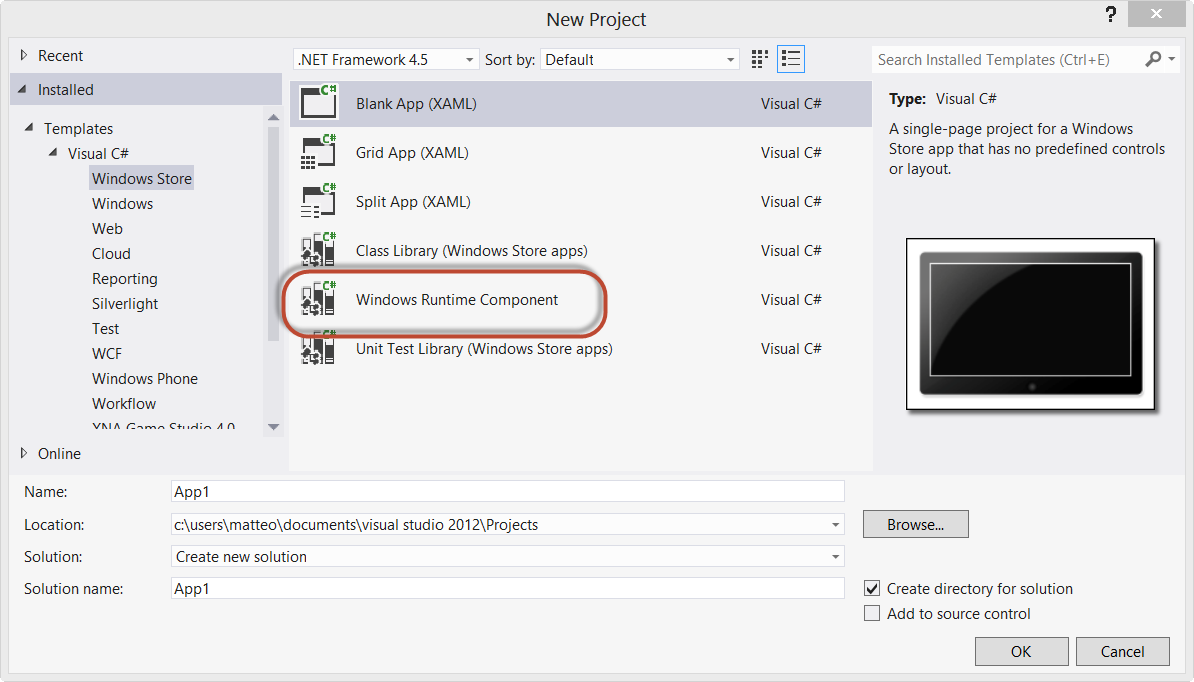
The first important thing to keep in mind is that a background task is a separate Visual Studio project, that is part of the same solution that contains the main application. So, the first step is to create a new project, by right clicking on the solution and choosing Add – New project. The template you’re going to use is Windows Runtime Component, inside the Windows Store category.

Read more: DZone
QR: Inline image 2

Posted via email from Jasper-net

How to Access a Named Control Inside a XAML DataTemplate (using C#)

|
Let me summarize the problem
In XAML, the ItemsControl, ListBox, ListView, FlipView, or GridView are the repeater controls. To define how each item is displayed in the UI, the developer defines a DataTemplate which he assigns to the ItemsControl’s ItemTemplate property. The ItemTemplate is like this:


<ItemTemplate>
<DataTemplate>
<TextBox x:Name=”TextBox1” />

So far, so easy. This is a common scenario and necessary for any repeater control in XAML. Rendering the ItemsControl, the ItemTemplate is repeated (see below) for every item in the ItemsSource (which has been assigned to some enumerable value like IList, ObservableCollection or even an Array).

How do you access controls inside a Template?
There is more than one approach. One approach, and my least favorite, is using the Loaded RoutedEvent on the TextBox control itself. In this approach you store the resulting (sender) in some dictionary. The up-side is that this event is handled on the page. The downside is how unmanageable it becomes if there are many objects or many different objects.

Spelunking with the Visual Tree
The preferred approach, to me, is navigating through the visual tree of the  individual item. With this you are effectively changing your scope into the individual item. From there you interact with it like you expect. I realize it’s not as simple as Loaded, but ‘tis far more repeatable, understandable and maintainable, and cleaner. Here’s how you do it:

...
...

Inline image 1

Read more: DZone
QR: Inline image 2

Posted via email from Jasper-net

Binding To Enum (wpf)

|
Inline image 1

בפוסט זה אדגים  איך לבצע Binding To Enum  ע"י שימוש בזאמל .

ניצור תונית שיש בה ComboBox  פשוט אחד . כמו זאת  :

public enum Days
        {
            ראשון ,
            שני ,
            שלישי,
            רביעי,
            חמישי,
            שישי,
            שבת
        }

אנו יודעים את הדרך המסורתית לבצע את המשימה ע"י קוד C# .

comboBox1.ItemsSource = Enum.GetValues(typeof(Days));

כעת נרצה להדגים שימוש ע"י זאמל . ובאמצעות ObjectDataProvider .   הוא למעשה גורם לEnum להיות נגיש ל Binding  .

<Window x:Class="WpfApplication1.MainWindow"
        xmlns:System="clr-namespace:System;assembly=mscorlib"
        xmlns:WpfApplication1="clr-namespace:WpfApplication1"
     בשני השורות למעלה אנו מוסיפים את שני ה ניימספיס שאנחנו צריכים לעבוד איתם , הראשון זה כדי להגדיר את
שלנו.     ENUM    כלומר ספריית המערכת שלו , והשני זה כדי לטעון  את  ה ENUM  
  Title="MainWindow" Height="84" Width="199" Loaded="Window_Loaded">
    <Grid>
        <Grid.Resources>
       
    <ObjectDataProvider x:Key="dataFromEnum"
       MethodName="GetValues" ObjectType="{x:Type System:Enum}">
                <ObjectDataProvider.MethodParameters>
                    <x:Type TypeName="WpfApplication1:Days"/>
                </ObjectDataProvider.MethodParameters>
            </ObjectDataProvider>
 
        </Grid.Resources>
        <ComboBox Height="25" HorizontalAlignment="Left" Margin="18,10,0,0" Name="comboBox1" VerticalAlignment="Top" Width="118" ItemsSource="{Binding Source={StaticResource dataFromEnum}}" />
    </Grid>
</Window>

QR: Inline image 2

Posted via email from Jasper-net
Looking inside your screenshots

|
Dear everyone

This post may have been moved to WoW General, but it still remains an exploit - one which is used against us...

1) Go somewhere where there aren't any (or a lot) of textures. I used the druid blink bug to go to the north end of the world but you should go below Dalaran in Crystalsong Forest, as bluesius suggested, because you will get a better screenshot if you stick your face in the pure white trees.

2) Type:

/console SET screenshotQuality "9"

Make sure you use 9, not 10.

3) Take a few screenshots of the clear, no textures, white area by zooming into a tree and hitting ALT Z, so that your entire screen is white.

4) Open this image in an image editing program like IrfanView (it's freeware), click CTRL+E, select the Sharpening filter, use the highest possible sharpening value (99) and click OK. Now do this two more times, again: CTRL+E, Sharpen 99, OK.

5) You are now looking at your character's WoW watermark / custom bar-code / qr code look-a-like / call it what you will:

Inline image 1

Apparently, each character has a different set of these repeatable patterns, which contain account and realm information, and it looks like if they are scanned by software that recognizes them, they can reveal our character's account name/id, the time of the screenshot and the the full information of the realm, including its IP address (think "private servers").

The pattern, which consists of approximately 88 bytes of data, repeats itself many times depending on the resolution of your screen. See below for a colored representation: the account id and realm information are depicted in red and the current time (seconds not included) is depicted in blue:

Inline image 2

The secret watermark which is being intentionally embedded inside WoW generated screenshots below top quality, DOES NOT CONTAIN the account password, the IP address of the user or any personal information like name/surname etc. It does contain the account ID, a timestamp and the IP address of the current realm. It can be used by hackers to link alt. characters to accounts and target specific spam or scam attacks, and it can be used by Blizzard to track down private WoW servers.

Based on Blizzard's ToS (http://us.blizzard.com/en-us/company/legal/wow_tou.html), Blizzard is allowed to communicate information about our hard drive, CPU, operating systems, IP addresses, running tasks, account name and current time and date. It never mentions anything though about embedding some of these data into every screenshot we capture using the WoW printscreen tool. The users assume that Blizzard will use a safe channel via battle.net, not our public screenshots that we share with the world, unaware of their secret contents. This unencrypted watermarking mechanism fails to protect our privacy, not from Activision employees (they already know everything about our computer systems), but from malicious hackers looking for something or someone to take advantage of.

Read more: OwnedCore
QR: Inline image 3

Posted via email from Jasper-net

UEFI Programming - First Steps

| Tuesday, September 11, 2012
In this article, I will describe steps needed to start on with development of real UEFI applications on x86 PC, and share some practical experiences with problems doing so. I will focus on 64-bit version of UEFI, because the 32-bit version isn't much used in this area (most likely due to Microsoft decision not to support UEFI in 32-bit Vista). So, to follow some of my steps here, you'll need a 64-bit CPU (but not 64-bit OS, you can use any 32-bit OS as well). We will finish this article with EFI Hello World application.

This article is continuation of my previous article Introduction to UEFI. Make sure to understand things described there, before reading on.

Of course, anything you try according to this article, you are doing at your own risk.

Getting the hardware

To start UEFI development, first of all you need to get a motherboard whose BIOS has UEFI support. (more precisely we should probably say "whose firmware has UEFI support", but I will use this form). Finding whether particular BIOS has UEFI support often turns out to be quite complicated task. Motherboard manufacturers license BIOS from other companies, usually from AMI (Aptio, AMIBIOS), Phoenix (SecureCore, TrustedCore, AwardCore) or Insyde (InsydeH20). Forget about determining UEFI support just by end-user stats you see in most shops. Since UEFI support is still only in somewhat experimental state, in many cases it isn't even listed in motherboard technical specification. In such case you are left to googling and asking on forums, where you often get only internal brand name that is often hard to match with end-user product designation.

One trick that I found out to work for Intel boards (but it may very well work for other boards as well) is to look at BIOS Update Release Notes, e. g. the document which lists changes and fixes of BIOS. If board has UEFI support, you will probably find UEFI mentioned there (and only there in case of Intel).

In short, determining UEFI support is much harder than it may seem. Some machines that have this technology are listed here. I use Intel DG33BU board (it was marketed as Intel DG33BUC for some reason).

You will also need some place to boot from. In theory just USB pen should be enough, but in practice none of 4 brands I tried worked with my board's UEFI implementation. So you may have to use harddrive. I strongly suggest IDE drive, because SATA drives may need some tweaking of BIOS settings, or they may not work at all. Like the USB pens, USB keyboard might be a problem too. I wouldn't fear this that much, but if you can use PS/2 keyboard, do so.

Getting the software

To go on with UEFI development, you will need two development packages: EFI Development Kit (EDK) and EFI Toolkit.

Read more: x86asm.net
QR: Inline image 1

Posted via email from Jasper-net

Attention Mobile Developers, Your Reading Assignments Are Up

|
September is now in full swing, and you’ve got homework. The Xamarin Developer Center has added mounds of amazing new material to our portal, and we can’t wait for you to start reading! Here are some of the new guides we’ve got for you:

Cross Platform

Introduction to Mobile Development - A fantastic way to get up to speed on the foundations of mobile development, the Xamarin toolkit, and the beauty of a cross-platform approach to developing your app.

Android

Intro to ContentProviders - Examines the Android Provider Pattern and illustrates how to use it to expose data in an agnostic way to the various UI controls in Android that expect a ContentProvider.
Java Integration Overview - Provides a solid foundation in understanding the various ways to integrate existing Java code and Libraries in your Android application.
Publishing an Application - Walks through the process of publishing your application to Google Play, Amazon, or just a file share, for wider distribution.

iOS

In-App Purchasing - Covers how to use the Apple Store Kit APIs to provide  in-app upgrades, and subscriptions. Illustrates how to verify transactions, secure store, and more.

Read more: Xamarin blog
QR: Inline image 1

Posted via email from Jasper-net

The New .NET 4.5 Feature Every XAML Developer Will Love

| Monday, September 10, 2012
If you develop using XAML and you are using .NET 4.5 (i.e. WPF or Windows 8) then there is a feature that will make you smile a bit, CallerMemberName. XAML developers often implement INotifyPropertyChanged to enable updating of data bound fields. If are smart, you often wrap the raising of the event into a simple method you can call, for example:

public void RaisePropertyChange(string propertyName)
{
    if (PropertyChanged != null)
    {
        PropertyChanged(this, new PropertyChangedEventArgs(propertyName));
    }
}

This leads to code that looks like this:

private int ticks;

public int Ticks
{
    get { return ticks; }
    set
    {
        if (ticks != value)
        {
            ticks = value;                    
            RaisePropertyChange("Ticks");
        }
    }
}

...
...

The solution: CallerMemberName
.NET 4.5 includes a new parameter attribute called System.Runtime.CompilerServices.CallerMemberName which will automatically place the name of the calling member (i.e. method or property) into the parameter. This enables us to change the method signature to:

public void RaisePropertyChange([CallerMemberName] string propertyName = "")

Read more: DZone
QR: Inline image 1

Posted via email from Jasper-net

Windows 8 Introduction to XAML

|
Hi All,

This particular blog article series aims to get readers understanding XAML on a functional level.  The primary focus will be Layout, Content, Control, Styling, Animation, Resources, a little theory and some code behind.  The assumption I am making of my readers is that you know how to open Visual Studio, create a project and navigate the IDE.  I am gearing this article specifically for people brand new to XAML and C#.


Part 1 covers just what you get out of the box in the Blank App and how it connects together.  Part 2 we will discuss Layout, Content and Control elements as well as many of their properties and attributes.  Part 3 we will discuss Styling and Resources in more depth, and Part 4 will be on Animation.

What is Xaml

Xaml is "Extensible Markup Language".  What it essentially is, is the presentation layer of WPF, Silverlight, and Windows 8 C# and C++ applications.  It is essentially an xml file with a .xaml extension.  It is "Extensible" because you can add extensions inline, this is a typical case when providing styles from resources, which we will discuss later in the series.  For more in depth information, feel free to use MSDN as a supplement: http://msdn.microsoft.com/en-us/library/ms752059.aspx

The Blank App

So go ahead and create a new Windows Store Blank App (XAML) under the visual C# tab.  What you get when you first look at it is MainPage.xaml, App.xaml, and under the Common folder, you get StandardStyles.xaml

Inline image 1

This basic template is a great starting point and provides some insight into how to create your own application.  So lets take a look at each file in a little bit of detail.


MainPage.xaml

To really demonstrate how these files connect to each other, we need to add an element to the application.  So locate the Grid Element and create a button between the two tags, like so.

QR: Inline image 2

Posted via email from Jasper-net

Делаем сами Single-Side Arduino c COM-портом на борту

|
Занимаясь электроникой и микроконтроллерами, я прекрасно осознаю, что было бы неплохо иметь под рукой готовую отладочную плату. С ее помощью можно быстро проверить какой-нибудь сервопривод, датчик и т.д., а то и собрать на ней целиком весь проект. Именно поэтому решил самостоятельно изготовить Arduino.

Создатели знаменитой платформы позаботились о любителях DIY и подготовили для этого специальную одностороннюю версию платы. Также в интернете есть весьма подробные инструкции о том, как изготовить ее в домашних условиях. К сожалению, у этой платы есть несколько недостатков, а именно: подключение только через COM-порт и питание исключительно от адаптера. Я решил устранить и получил в итоге вот такую, симпатичную плату:

Inline image 1

Конечно, идея не новая, и на просторах интернета не раз звучала идея прикручивания виртуального COM-порта к Single-Side Board, но готового проекта я нигде не встречал. 

Read more: Habrahabr.ru
QR: Inline image 2

Posted via email from Jasper-net

Проблема пиратства с точки зрения утилитаризма или когда выгодно использовать нелицензионный продукт

|
В последнее время всё больше внимания уделяется вопросу пиратства и борьбе с этим явлением. Однако большинство лиц, от которых, главным образом, и зависит выбор приоритетной стратегии решения данной проблемы, такие как медийные компании или государственные чиновники, склоняются просто к пути разработки более совершенного карательного механизма, абсолютно не допуская, что это может быть неоптимальным решением.
В данной статье проблема пиратства будет рассмотрена с позиции утилитаризма, что позволит продемонстрировать если и не полную несостоятельность наиболее популярной концепции, то, как минимум, её неоднозначность. Материал писался для широкой публики, поэтому с точки зрения строгой экономической теории имеет ряд существенных упрощений и неточностей. По этой причине, людям, сведущим в методологии микроэкономического анализа читать этот текст не рекомендуется во избежание справедливого негодования.

Сразу следует отметить, что в дальнейшем мы будем исходить из существующих правовых норм, то есть абстрактные рассуждения о несправедливости современной системы авторских прав будут оставлены за рамками данной статьи. Безусловно, есть довольно интересные доводы в пользу необходимости пересмотра всей этой системы, но наивно надеется, что власти большинства стран готовы принять такие радикальные идеи уже сегодня или завтра.
Прежде всего, примем за аксиому то, что пиратство является абсолютно рациональным видом деятельности, а не каким-то маргинальным поведением всех участников данного процесса. Конечно, наверняка существует некоторое количество людей, участвующих в этом из каких-то иррациональных соображений, но это абсолютное меньшинство. В конце концов, несмотря на существование клептомании, кража трактуется в обществе вполне однозначно.
Теперь выявим основную причину совершения любого противоправного действия, в том числе и пиратства.
В большинстве случаев, каждый индивид имеет вполне определённую информацию о выгоде, которую он получит от совершения противоправного действия, о примерном наказании, которое положено ему в случае поимки, и о приблизительной вероятности этой самой поимки. Не обязательно это знание может быть оформлено в виде конкретных чисел, но интуитивное понимание данных категорий и их относительных величин, как правило, присутствует у всех членов общества.
Обозначив эти три величины как Y, p и F, можно получить следующее неравенство:
Y > p*F
Данное неравенство является условием, необходимым для совершения осознанного преступления. То есть простыми словами, преступление происходит только тогда, когда потенциальная выгода от его совершения превышает риск потенциального наказания.
Некоторым может показаться, что всё слишком упрощено и преступлений в реальности намного меньше, чем случаев соблюдения данного условия.

Read more: Habrahabr.ru
QR: Inline image 1

Posted via email from Jasper-net

Build your own VoIP System

| Sunday, September 9, 2012
This blog post is the first part of a series of posts, which describe how VoIP works and how the Sipwise sip:provider Platform enables you to start various VoIP business models.

Part 1, which is provided in this post, gives you an introduction in how VoIP works.
Part 2 shows how you can set up a secure and self-hosted Skype-like VoIP system for free using the sip:provider Platform within 30 minutes.
Part 3 is dedicated to the sip:provider Platform acting as an SBC in front of existing VoIP systems.
Part 4 describes how you can operate a whole-sale business with the sip:provider Platform.
Part 5 shows how to enable Over-The-Top (OTT) services using Apple and Google Push Notification Services.
Introduction

VoIP Systems are seen as complex communication infrastructures even from a high level perspective, but they’re not. Well, VoIP is in fact complex in its details, but it has been abstracted by various projects in order to make it really straight-forward to use it, so it’s easy to start a compelling voice/video communication system or service (which I’ll name “VoIP system” or “VoIP service” throughout the document) from scratch, but it’s important to learn a few facts about it in order to choose the right base system for successfully running a VoIP service.

The Basics

VoIP just means “Voice over IP”, which is a generic term for transporting real-time voice sessions over the Internet. However, it doesn’t define HOW this is done, and even the term “Voice” is a bit misleading, because with the very same concept, you can transport also Video and Fax over an IP connection.

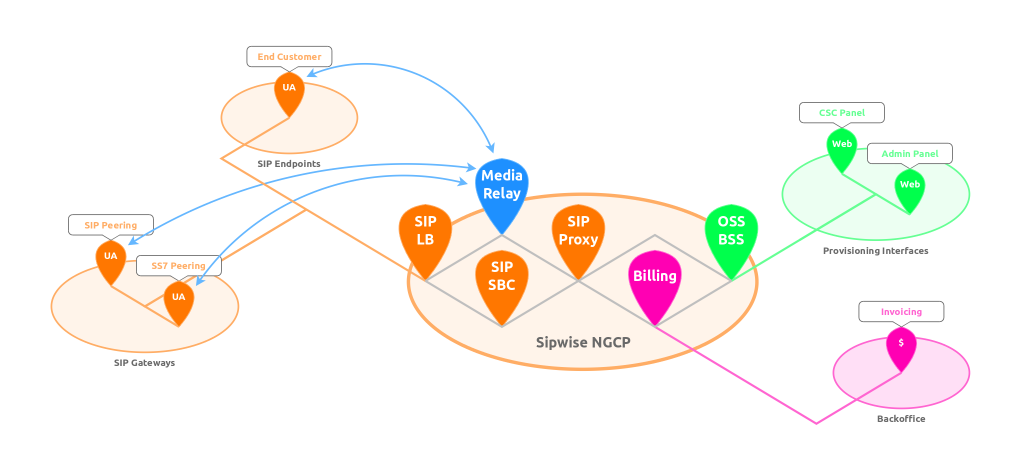
There are a couple of elements involved when you’re talking about a VoIP system:

Inline image 2

To sum it up, there are SIP Endpoints, which are the client instances of your customers. These could be software installed on your customer’s computers (popular software is Jitsi, an open source and cross-platform communications client, or Bria, a commercial multi-platform client for Windows, iOS and Android). Other possibilities are SIP phones like SNOM phones or Polycom Phones.

Read more: Sip:wise
QR: Inline image 1

Posted via email from Jasper-net

Completely Backup Android Devices To PC Without Root Or Bootloader Unlock

| Saturday, September 8, 2012
Inline image 1

Unlocking the bootloader and consequently rooting an Android device, means loosing all your apps, the data that followed along, and all your settings. This may not seem like a big deal to experienced Android users who will take a few minutes in setting up their phone as it was before, but if a user has build up quite some data on a completely stock Android device and now wishes to root it, it’s safe to to say, will be caught up in loads of trouble trying to get the apps back and obviously the data will be lost. Luckily for such users, XDA-Developers forum member Gigadroid has released a Windows based tool called Ultimate Backup Tool that lets you backup all data onto your PC, letting you restore it later. The specialty that Ultimate Backup holds over its peers is the ability to backup apps and data without root! The tool was tested by the developer on a Galaxy Nexus and is said to work for an Android device running Android 4.0 and up.

Read more: Addictive tips

Posted via email from Jasper-net

Xen-Based Secure OS Qubes Hits 1.0

| Friday, September 7, 2012
Joanna Rutkowska, CEO of Invisible Things Lab, today released version 1.0 of Qubes, a stable and reasonably secure desktop OS. It is the most secure option among the existing desktop operating systems — even more secure than Apple's iOS, which puts each application into its own sandbox and does not count on the user to make security decisions. Qubes will offer users the option of using disposable virtual machines for executing tasks they believe could harm their computer. These VMs will be lightweight, easily and extremely speedily created and booted, and would be just as easy to discard.

Read more: Slashdot
Read more: Qubes

Posted via email from Jasper-net

2012 Update: Running C# on the Browser

|
With our push to share the kernel of your software in reusable C# libraries and build a native experience per platform (iOS, Android, WP7 on phones and WPF/Windows, MonoMac/OSX, Gtk/Linux) one component that is always missing is what about doing a web UI that also shares some of the code.

Until very recently the answer was far from optimal, and included things like: put the kernel on the server and use some .NET stack to ship the HTML to the client.

Today there are two solid choices to run your C# code on the browser and share code between the web and your native UIs.

JSIL
JSIL will translate the ECMA/.NET Intermediate Language into Javascript and will run your code in the browser. JSIL is pretty sophisticated and their approach at running IL code on the browser also includes a bridge that allows your .NET code to reference web page elements. This means that you can access the DOM directly from C#.

You can try their Try JSIL page to get a taste of what is possible.

Saltarelle Compiler
The Saltarelle Compiler takes a different approach. It is a C# 4.0 compiler that generates JavaScript instead of generating IL. It is interesting that this compiler is built on top of the new NRefactory which is in turn built on top of our C# Compiler as a Service.

It is a fresh, new compiler and unlik JSIL it is limited to compiling the C# language. Although it is missing some language features, it is actively being developed.

This compiler was inspired by Script# which is a C#-look-alike language that generated Javascript for consuming on the browser.

Native Client
I left NativeClient out, which is not fair, considering that both Bastion and Go Home Dinosaurs are both powered by Mono running on Native Client.

Posted via email from Jasper-net

Running a Storyboard as a Task

| Thursday, September 6, 2012
Sometimes you have some code that needs to run after a storyboard has completed. In my case I'm working on a little board game, and after each move (which I animate using a Storyboard), I need to figure out the next move, and either start a new play-animation or pass the turn to the other player.

Therefore I run in a loop until the turn is over. You can detect when a storyboard has finished when the "Completed" event triggers, but that makes for some recursive spaghetti code. It's much easier if I could just "await" the storyboard using a task. So I created the little extension method below that makes this possible. All you have to do to start and wait for the storyboard to finish is:

    await myStoryboard.BeginAsync();

Below is the little extension method (which also serves as a general example on how you turn an event-based class into an awaitable Task using the TaskCompletionSource):

using System;
using System.Threading.Tasks;
using Windows.UI.Xaml.Media.Animation;

namespace SharpGIS
{
    public static class StoryboardExtensions
    {
        public static Task BeginAsync(this Storyboard storyboard)
        {
            System.Threading.Tasks.TaskCompletionSource<bool> tcs = new TaskCompletionSource<bool>();
            if (storyboard == null)
                tcs.SetException(new ArgumentNullException());

Read more: SharpGis
QR: Inline image 1

Posted via email from Jasper-net

Adventures in Windows 8: Understanding and debugging design time data in Expression Blend

|
Inline image 2

One of my favorite features in Expression Blend is the ability to attach a Visual Studio debugger to Blend. First let’s start by answering the question: why exactly do you want to do that?

Note: If you are familiar with the creation and usage of design time data, feel free to scroll down to the paragraph titled “When design time data fails”.

Creating design time data for your app
When a designer works on an app, he needs to see something to design. For “static” UI such as buttons, backgrounds, etc, the user interface elements are going to show up in Blend just fine. If however the data is fetched dynamically from a service (web, database, etc) or created dynamically, most probably Blend is going to show just an empty element.

The classical way to design at that stage is to run the application, navigate to the screen that is under construction (which can involve delays, need to log in, etc…), to measure what is on the screen (colors, margins, width and height, etc) using various tools, going back to Blend, editing the properties of the elements, running again, etc. Obviously this is not ideal.

The solution is to create design time data. For more information about the creation of design time data by mocking services, you can refer to two talks of mine “Deep dive MVVM” and “MVVM Applied From Silverlight to Windows Phone to Windows 8”. The source code for these talks is here and here.

Design time data in MVVM Light
One of the main reasons why I developed MVVM Light is to facilitate the creation of design time data. To illustrate this, let’s create a new MVVM Light application in Visual Studio.

Install MVVM Light from here: http://mvvmlight.codeplex.com (use the MSI in the Download section). After installing, make sure to read the Readme that opens up in your favorite browser, you will need one more step to install the Project Templates.
Start Visual Studio 2012.
Create a new MvvmLight (Win8) app.

QR: Inline image 1

Posted via email from Jasper-net

MVMC RTW's (Microsoft Virtual Machine Converter Solution Accelerator is now available)

| Wednesday, September 5, 2012
The Microsoft Virtual Machine Converter (MVMC) Solution Accelerator is a Microsoft-supported, stand-alone solution for the IT pro or solution provider who wants to convert VMware-based virtual machines and disks to Hyper-V®-based virtual machines and disks.

Quick details

Version: 1.0 
Date published:9/4/2012

Language: English

Microsoft Virtual Machine Converter Administration Guide.docx, 520 KB

Microsoft Virtual Machine Converter Solution Accelerator.msi, 4.3 MB

MVMC_ReleaseNotes.docx, 36 KB

The Microsoft Virtual Machine Converter (MVMC) Solution Accelerator is a Microsoft-supported, stand-alone solution for the IT pro or solution provider who wants to convert VMware-based virtual machines and disks to Hyper-V®-based virtual machines and disks. 
MVMC provides the following features:

Converts and deploys virtual machines from VMware hosts to Hyper-V hosts including Hyper-V on Windows Server® 2012. As part of the machine conversion MVMC converts the virtual disks attached to the source virtual machine. It also migrates configuration such as memory, virtual processor and so on from the source virtual machine to the converted virtual machine deployed on Hyper-V. It adds virtual network interface cards (NICs) to the converted virtual machine on Hyper-V.
Converts VMware virtual disks to Hyper-V based virtual hard disks (VHDs).
Supports conversion of virtual machines from VMware vSphere 4.1 and 5.0 hosts to Hyper-V.
Note MVMC also supports conversion of virtual machines from VMware vSphere 4.0 if the host is managed by vCenter 4.1 or vCenter 5.0. You have to connect to vCenter 4.1 or 5.0 through MVMC to convert virtual machines on vSphere 4.0.
Offers fully scriptable command-line interfaces for performing virtual machine and disk conversions that integrates well with data center automation workflows and Windows PowerShell scripts.
Has a wizard-driven GUI, making it simple to perform virtual machine conversion.
Uninstalls VMware tools prior to conversion to provide a clean way to migrate VMware-based virtual machines to Hyper-V.
Supports Windows Server guest operating system conversion, including Windows Server 2008 R2, Windows Server 2008 and Windows Server 2003 SP2.
Enables conversion of Windows® client versions including Windows 7.
Installs integration services on the converted virtual machine if the guest operating system is Windows Server 2003 SP2.

QR: Inline image 1

Posted via email from Jasper-net

UICloud: Самая большая база пользовательских интерфейсов

| Monday, September 3, 2012
Inline image 2

UICloud — это база бесплатных пользовательских интерфейсов с поисковой системой, рейтингом и каталогизатором в которой собрано все от исходников в формате PSD, до готовых решений на HTML, CSS или jQuery: формы, слайдеры, кнопки, календари, элементы и полноценные интерфейсы для мобильных и веб приложений. В проекте уже сейчас можно найти практически все что нужно для облегчения процесса разработки дизайнерам и разработчикам. 

На данный момент в базе 23586 элементов и почти тысяча UI-сэтов включающие в себя готовые решения в едином стиле. Проект создан Британской студией Double-J Design целью проекта является создание самой обширной UI базы.

Read more: Habrahabr.ru
Read more: UICloud
QR: Inline image 1

Posted via email from Jasper-net

I'm not calling a virtual function from my constructor or destructor, but I'm still getting a __purecall error

|
Some time ago, I described what __purecall is for: It's to detect the cases where you call a virtual method with no implementation (a so-called pure virtual method). This can happen during object constructor or destruction, since those are times when you can validly have a partially-implemented object.

Well, there's another case this can happen: If the object has already been destructed.

If you call a method on an object that has already been destructed, the behavior is undefined. In practice, what happens is that the method runs on whatever leftover values are in memory where the object used to be. Depending on how lucky or unlucky you area, this may resemble the actual object closely enough that the method doesn't notice, or at least doesn't notice for a while, or maybe it can't even get off the ground.

QR: Inline image 1

Posted via email from Jasper-net

Basics of Memory Addresses in C

|
Memory Addresses

It is helpful to think of everything in C in terms of computer memory. Let’s think of computer memory as an array of bytes where each address in memory holds 1 byte. If our computer has 4K of memory for example, it would have 4096 elements in the memory array. When we talk about pointers storing addresses, we are talking about a pointer storing an index to an element in the memory array. Dereferencing a pointer would be getting the value at that index in the array. All of this is of course a lie. How operating systems handle memory is much more complex than this. Memory is not necessarily contiguous and it is not necessarily handed out sequentially. But the analogy provides an easy way to think about memory in C to get started.
Confused about pointers, addresses and dereferencing? Take a look at this 5-Minute Guide to Pointers.
Say our computer has 4K of memory and the next open address is index 2048. We declare a new char variable i = ‘a’. When the variable gets declared memory is set aside for its value and the variable name is linked to that location in memory. Our char i has a value ‘a’ stored at the address 2048. Our char is a single byte so it only takes up index 2048. If we use the address-of operator (&) on our variable i it would return the address 2048. If the variable was a different type, int for instance, it would take up 4 bytes and use up elements 2048-2051 in the array. Using the address-of operator would still return 2048 though because the int starts at that index even though it takes up 4 bytes. Let’s look at an example.

Read more: Dennis
QR: Inline image 1

Posted via email from Jasper-net

Write Auto-Updating Apps with .NET and the Background Intelligent Transfer Service API

| Thursday, August 30, 2012
SUMMARY
Both the .NET Framework and Windows have some very interesting APIs for creating applications that are capable of updating themselves automatically over a network. There are many advantages to writing your application to update itself like Windows Update does, including convenience for your users, from easier maintenance to network administration. Automatic updates require attention to factors such as discovery, security, and file replacement. In this article, the author covers the BITS API as well as a number of features of the .NET Framework that take care of these facets of auto-updating using the same facilities that the Windows Update uses.

Read more: MSDN magazine
QR: Inline image 1

Posted via email from Jasper-net

Windows(R) API Code Pack for Microsoft(R) .NET Framework

| Wednesday, August 29, 2012
Windows® API Code Pack for Microsoft® .NET Framework provides a source code library that can be used to access some features of Windows 7 and Windows Vista from managed code. These Windows features are not available to developers today in the .NET Framework.

The individual features supported in this version (v1.1) of the library are:

Windows 7 Taskbar

Jump Lists, Icon Overlay, Progress Bar, Tabbed Thumbnails, and Thumbnail Toolbars

Windows Shell

Windows 7 Libraries
Windows Shell Search API support
Explorer Browser Control
A hierarchy of Shell Namespace entities
Windows Shell property system
Drag and Drop for Shell Objects
Windows Vista and Windows 7 Common File Dialogs, including custom controls
Known Folders and non-file system containers
Shell Object Watcher
Shell Extensions API support

DirectX

Direct3D 11.0, Direct3D 10.1/10.0, DXGI 1.0/1.1, Direct2D 1.0, DirectWrite, Windows Imaging Component (WIC) APIs

Windows Vista and Windows 7 Task Dialogs
Sensor Platform APIs
Extended Linguistic Services APIs
Power Management APIs
Application Restart and Recovery APIs
Network List Manager APIs
Command Link control and System defined Shell icons

Read more: MSDN code
QR: Inline image 1

Posted via email from Jasper-net

14 Windows Command Line Tricks

| Monday, August 27, 2012
Save A List of Files to a Text File by Extension

dir *.ext /s /b > files.txt

This command line will create a file called files.txt. When you open this file, there will be a complete list of all the files in that directory and all subdirectories with the .ext extension. You can then open up this text file in any text editor and work this the information.By changing the ext part, you can select different files. For example, if you wanted to list all of the PDF documents, you would type:

dir *.pdf /s /b > files.txt

Get Your IP Address Information

ipconfig /all

This will retrieve a pile of information about your network connection and IP information. From this command, you can get:
Host Name
Primary DNS Suffix
Node Type
IP Routing Enabled
WINS Proxy Enabled
DNS Suffix Search List
Connection-specific DNS Suffix
Network Adapter Description
Physical (MAC) Address
DHCP Enabled
IP Address
Subnet Mask
Default Gateway
DNS Servers

Get Installed Driver Information

driverquery

It can be very useful when troubleshooting to know what drivers are installed on a system. This command will give you a complete listing of the drivers and when they were installed.

Copy Files Via Infrared Port

irftp filename.ext

This will fire up the Wireless Link dialog so that you can copy the specified file via an infrared port.

Find Files Opened By Network Users

openfiles /query

If you are running a system and you want to know who has files open on your computer, this command will provide you a list of those users and the files that they have open.

Note: If you get an error saying The system global flag ‘maintain objects list’ needs to be enabled to see local opened files, you can fix this issue by typing openfiles /local on. You will have to reboot the system but it will resolve the issue.

Monitor Port Activity

netstat -a 30

This will show you all of the TCP/IP ports that are being used on your system and what they are connecting to (or being connected from). It will continue to monitor these ports and refresh the information every 30 seconds. You can change the refresh rate by changing the number at the end of the command.

Recover Information From A Corrupt File

recover filename.ext

If you have a disk with damaged sectors, you can attempt to recover as much information as possible from the damaged file. Data that is not damaged can be retrieved but data in damaged sectors will be lost.

Defragment Remote Computer

rexec remotePC defrag C: /F

This command used the rexec command to force a defragment of the C: drive on the computer named remotePC. You can use whatever you want to for the command (I just used defrag C: /F as an example). This is very useful for remote maintenance.

QR: Inline image 1

Posted via email from Jasper-net

Asynchronous Programming Patterns

|
The .NET Framework provides three patterns for performing asynchronous operations:

Asynchronous Programming Model (APM) pattern (also called the IAsyncResult pattern), where asynchronous operations require Begin and End methods (for example, BeginWrite and EndWrite for asynchronous write operations). This pattern is no longer recommended for new development. For more information, see Asynchronous Programming Model (APM).

Event-based Asynchronous Pattern (EAP), which requires a method that has the Async suffix, and also requires one or more events, event handler delegate types, and EventArg-derived types. EAP was introduced in the .NET Framework 2.0. It is no longer recommended for new development. For more information, see Event-based Asynchronous Pattern (EAP).

Task-based Asynchronous Pattern (TAP), which uses a single method to represent the initiation and completion of an asynchronous operation. TAP was introduced in the .NET Framework 4 and is the recommended approach to asynchronous programming in the .NET Framework. For more information, see Task-based Asynchronous Pattern (TAP).

Read more: MSDN
QR: Inline image 1

Posted via email from Jasper-net