הפצת מערכות הפעלה באמצעות הכלים החינמיים של מיקרוסופט
MDT - Microsoft Deployment Toolkit, הינה מערכת של כלי עזר וסקריפטים המאפשרת הפצה של מערכות הפעלה מבית מיקרוסופט. כיום אני בדעה שזו אחת המערכות הטובות שיש בשוק (עבור מערכות הפעלה של מיקרוסופט בלבד) ולמרבה הפליאה היא אף חינמית, אך כמו רומנים רבים אחרים, ההתחלה הייתה קשה, כמו כל פולניה טובה היא לא התמסרה בקלות . כאמור מדובר בערכה חינמית וככזו היא דורשת הרבה יותר התאמות והכנות, מאשר מוצרי מדף מסחריים מקבילים, אבל אל דאגה המערכת מגיעה עם תיעוד ענף. "נאלצתי" לקרוא ולקרוא ובסוף לקרוא עוד קצת, לפני שניגשתי למלאכה, אך לטעמי עבודת ההכנה בתחילת הקשר השתלמה מאוד (פירוט בהמשך)
פתרון חינמי. יתרון שאנו הישראלים אוהבים מאוד . בעוד שפתרונות מסחריים מקבילים עולים כסף רב, פתרון זה ניתן חינם אין כסף, בהסתייגות קלה, אם בוחרים ביישום של הפצה אוטומטית לחלוטין יש צורך להשתמש בבסיס נתונים. SQL כידוע לא ניתן חינם, אך ניתן להשתמש ב-SQL Express או ב-SQL אירגוני ובכך לחסוך גם בעלות זאת.
מערכת פתוחה. כאמור הפתרון מורכב מסט של כלים וסקריפטים ולכן ניתן להתאימו לדרישות האתר ביתר קלות. אפשר להוסיף למערך סקריפטים, אפליקציות, ושינוי הגדרות בהתאם לדרישות הלקוח. מסיבה זו ניתן למצוא תוספים רבים למוצר, ברחבי רשת האינטרנט. המוצר גם זוכה לשדרוגים תכופים של מיקרוסופט עצמה.
הפצה חצי אוטומטית (LTI - Lightwight installation) . הכוונה היא שניתן ליצר מנגנון הפצה שיתשאל , תוך כדאי התהליך, את המשתמש לגבי העדפותיו (באמצעות טפסי הזנת נתונים) כגון שם מחשב, רזולוציית מסך, הגדרות אזור וכ"ו.
Read more: MS Support blog
C# Silverlight WCF: Thread Safe Multiple Async Call Strategy With Final Operation To Join Data.
Posted by
jasper22
at
10:24
|
This article describes one way to handle asynchronous or async calls in .Net 3.5 or .Net 4.0 when using WCF in Silverlight in C#. The goal is to have a final operation wait for all the calls to finish so to combine all the data gathered, all in a thread safe way. A secondary goal is to minimize the consumer code required to perform this operation from what is currently available in straight WCF async calls.
This article has a short shelf life because after .Net 4 (see What’s Next in C#? Get Ready for Async!) one will use the built in Asynchrony methodology developed. Until that time if one is using any version of Silverlight and WCF then this article describes how to handle those multiple async calls and join the data in a final method call.
Final Result Example
Before delving into the solution, here is how the consumer will use the methodology. Below a user is getting account information of user requests, departments and accounts to join all the data on the view model in the final method for display on a Silverlight page. Thesee operations as shown are setup when the view model class (MyViewModel) is created and no blocking occurs keeping UI thread clear.
public MyViewModel()
{
DataContext = new MyServiceClient();
FinalAsync(CombineDataAndDisplay); // When all the data is retrieved, do this method to combine the data From the 3 async callls below
// Provide the operation as a lambda (could be a method call) to assign data to our target backing store property
// and if all has gone well (no errors in other async calls) and it is the final completing operation. Do the final
// Processing call automatically.
DataContext.GetUserRequestsCompleted += (s, e) => { AssignResultCheckforAllAsyncsDone(e, e.Result, ref _UserRequests, "Acquisition failure for User Requests");};
DataContext.GetAccountsCompleted += (s, e) => { AssignResultCheckforAllAsyncsDone(e, e.Result, ref _Accounts, "Acquisition Failure for Accounts"); };
DataContext.GetDepartments += (s, e) => { AssignResultCheckforAllAsyncsDone(e, e.Result, ref _Departments, "Failed to get Department Info."); };
// Start the Async processes
MultipleAsyncRun(DataContext.GetUserRequestsAsync);
MultipleAsyncRun(DataContext.GetAccountsAsync);
MultipleAsyncRun(DataContext.GetDepartmentsAsync);
// Exit out and return the UI thread to the user operations.
}
// Once all the data is done, combine and assign into our
// PagedCollectionView property for display on the screen.
public void CombineDataAndDisplay()
{
// Combine missing data on the calls
_UserRequests.ToList()
.ForEach(ur =>
{
ur.BillingName = _Accounts.First(ac => ur.AccountID == ac.AccountID).Name;
ur.DepartmentName = _Departments.First(dp => dp.DepartmentID == ur.DepartmentID).Name;
});
UserRequests = new PagedCollectionView( _UserRequests);
UserRequests.GroupDescriptions.Add(new PropertyGroupDescription("DepartmentName"));
}
Microsoft has magic iOS to WP7 conversion tool?
Posted by
jasper22
at
10:22
|
Microsoft has launched a free-to-download interoperability pack to help developers convert existing iOS applications to Windows Phone. But don't get too excited - the result is not as impressive as you might imagine.
If you think about it for even a few moments then it is obvious that one way that Microsoft can pick up some easy apps for its Windows Phone (WP) is to create a converter that reads in an iOS app and spits out a WP Silverlight/XNA app and this is exactly what they haven't done.
What they have done amounts more to encouragement than anything really helpful. The have put together a free to download package of things that might make it a bit easier to convert an iOS app to WP.
The items in the download include a 90-page guide to converting your iOS to WP and a series of "developer stories" - videos of developers talking about how they ported their iPhone apps to WP including why they did it.
The biggest and most useful item in the package is the API mapping tool. This simply takes iOS API calls and lists the nearest equivalents under WP - classes, events and methods are covered. This is undeniably useful but of course it doesn't provide a perfect or automatic solution simply because the structure of the frameworks involved is different. However there are plenty of simple, easy-to-devise, one-to-one mappings - and here is the problem. The mapping tool only does the easy bits and leaves the difficult reimplementation to the programmer. It's a welcome help but not a solution to anything and I doubt it is going to get iOS programmers to convert their programs any faster than they might already have done.

Read more: I Programmer
The Basics of Task Parallelism via C#
Posted by
jasper22
at
10:21
|
Preface
The trend towards going parallel means that .NET Framework developers should learn about the Task Parallel Library (TPL). But in general terms, data parallelism uses the input data to some operation as the means to partition into smaller pieces. The data is divvied up among the available hardware processors in order to achieve parallelism. It is then often followed by replicating and executing some independent operation across these partitions. It is also typically the same operation that is applied concurrently to the elements in the dataset.
Task parallelism takes the fact that the program is already decomposed into individual parts – statements, methods, and so on – that can be run in parallel. More to the point, task parallelism views a problem as a stream of instructions that can be broken into sequences called tasks that can execute simultaneously. For the computation to be efficient, the operations that make up the task should be largely independent of the operations taking place inside other tasks. The data-decomposition view focuses on the data required by the tasks and how it can be decomposed into distinct chunks. The computation associated with the data chunks will only be efficient if the data chunks can be operated upon relatively independently. While these two are obviously inter-dependent when deciding to go parallel, they can best be learned if both views are separated. A powerful reference about Tasks re Compute-bound asynchronous operations is Jeffrey Richter’s book, “CLR via C#, 3rd Edition.” It is a good read.
In this brief article we will focus on some of the characteristics of the System.Threading.Tasks Task object. To perform a simple Task, create a new instance of the Task class, passing in a System.Action delegate that represents the workload that you want performed as a constructor argument. You can explicitly create the Action delegate so that it refers to a named method, use an anonymous function, or use a lambda function. Once you have created an instance of Task, call the Start() method, and your Task is then passed to the task scheduler, which is responsible for assigning threads to perform the work. Here is example code:
using System;
using System.Threading.Tasks;
public class Program {
public static void Main() {
// use an Action delegate and named method
Task task1 = new Task(new Action(printMessage));
// use an anonymous delegate
Task task2 = new Task(delegate { printMessage() });
// use a lambda expression and a named method
Task task3 = new Task(() => printMessage());
// use a lambda expression and an anonymous method
Task task4 = new Task(() => { printMessage() });
task1.Start();
task2.Start();
task3.Start();
task4.Start();
Console.WriteLine("Main method complete. Press <enter> to finish.");
Console.ReadLine();
}
private static void printMessage() {
Console.WriteLine("Hello, world!");
}
}
To get the result from a task, create instances of Task, where T is the data type of the result that will be produced and return an instance of that type in your Task body. To read the result, you call the Result property of the Task you have created. For example, let's say that we have a method called Sum. We can construct a Task object, and we pass for the generic TResult argument the operation's return data type:
using System;
using System.Threading.Tasks;
public class Program {
private static Int32 Sum(Int32 n)
{
Int32 sum = 0;
for (; n > 0; n--)
checked { sum += n; }
return sum;
}
public static void Main() {
Task<int32> t = new Task<int32>(n => Sum((Int32)n), 1000);
t.Start();
t.Wait();
// Get the result (the Result property internally calls Wait)
Console.WriteLine("The sum is: " + t.Result); // An Int32 value
}
}
Produces:
The sum is: 500500
If the compute-bound operation throws an unhandled exception, the exception will be swallowed, stored in a collection, and the thread pool is allowed to return to the thread pool. When the Wait method or the Result property is invoked, these members will throw a System.AggregateException object. You can use CancellationTokenSource to cancel a Task. we must rewrite our Sum method so that it accepts a CancellationToken, after which we can write the code, creating a CancellationTokenSource object.
Read more: Codeproject
Widget Library for Windows Phone 7
Posted by
jasper22
at
10:19
|
Project Description
Create Windows Phone 7 apps using HTML, CSS and Javascript over the WebBroweser control inside the phone.
Widget Library for Windows Phone 7 allows you to build new applications for Windows Phone 7 in a easy way. You can migrate your widgets from iPhone or Android to Windows Phone 7 with this library. You have access to:
Play music on background
Show notifications
Navigate between pages
Play video
Download files
Save and load files from the IsolatedStorage
The communication between the WebBrowser Control and the Windows Phone 7 Apps is implemented using the script capabilities on the control.
Read more: Codeplex
The Factory Design Pattern in C#
Posted by
jasper22
at
10:18
|
I have recently started to create video clips that explain the classic design patterns (GOF) and their implementation in C#. You can find the video clips and the source code they use available for free at www.CSharpBook.co.il. The video clips were prepared in Hebrew. The following video clip explains the factory design pattern and its implementation in C#.
Read more: Life Michael
Private PGP keys
Posted by
jasper22
at
09:18
|
Just simple search in Google reveal some private PGP keys (it just simple search)
Rea more: Google
DataPager Using MVVM in Silverlight 4
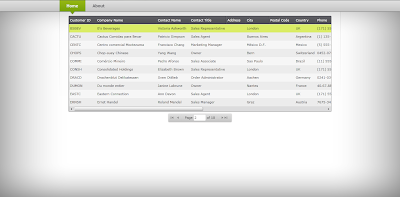
In this short post I will show you how to use the DataPager control using MVVM pattern in silverlight. I have develop navigation application for this example which you can see as shown in the Image 1. Here you can see that I have two control in the home screen one is the DataGrid and the second one is the DataPager control. 

In ViewModel I have only property with the name CustomerList of type PagedCollectionView. I have data store in the xml file with the name of customer which is store in the DataBase folder. I have read the xml file in the constructor of the ViewModel and then populate each record in the List.
public HomeViewModel()
{
XmlReaderSettings settings = new XmlReaderSettings();
settings.XmlResolver = new XmlXapResolver();
XmlReader reader = XmlReader.Create("DataBase/Customers.xml");
reader.MoveToContent();
string strXMLString = reader.ReadOuterXml();
XElement element = XElement.Parse(strXMLString);
IEnumerable<xelement> elements = element.Descendants("customer");
Collection<customer> customerList = new Collection<customer>();
foreach (XElement ele in elements)
{
customerList.Add(new Customer
{
CustomerID = ele.Attribute("CustomerID").Value,
City = ele.Attribute("City").Value,
CompanyName = ele.Attribute("CompanyName").Value,
ContactName = ele.Attribute("ContactName").Value,
ContactTitle = ele.Attribute("ContactTitle").Value,
Country = ele.Attribute("Country").Value,
Phone = ele.Attribute("Phone") != null ? ele.Attribute("Phone").Value : "Unkown",
Fax = ele.Attribute("Fax") != null ? ele.Attribute("Fax").Value : "Unkown"
});
}
CustomersList = new PagedCollectionView(customerList);
}
Read more: Asim Sajjad
Get a visual parent of an element in Silverlight
Posted by
jasper22
at
12:50
|
Remember that you don’t have a parent in your control’s constructor -- it hasn’t been added anywhere yet. Use the Loaded event when you look. From there, you can use the VisualTreeHelper.GetParent() method. Sometimes you are looking for a parent of a given name or type. To help out, here’s a quick method I threw together to help you find a parent of a given type:
T GetParentOfType<T>() where T : DependencyObject
{
DependencyObject p = this;
while( p != null && !(p is T))
{
p = VisualTreeHelper.GetParent(p);
}
Read more: Arian Kulp's Site
Fixing MaxItemsInObjectGraph quota Error in WCF Service
Posted by
jasper22
at
12:47
|
I have a WCF Service that occasionally yields a message like this one:
Maximum number of items that can be serialized or deserialized in an object graph is '65536'. Change the object graph or increase the MaxItemsInObjectGraph quota.
Today isn’t the first time I’ve run into this message – I’ve fixed this issue before – but since this is the 2nd or more time I’ve run into it, I thought I’d post a quick resolution here so I can find it again later myself, and perhaps help some others. There’s a rather long forum thread on this subject that ultimately includes the solution, but digging it out is a bit painful as is the case with so many forum threads, so I’ll sum up here and just give you what you need.
First, you need to realize that to resolve this issue you will need configuration elements to be specified on both the client and the server. In both cases, the configuration you are looking for is going to be in a named <behavior> as part of a <dataContractSerializer> element. Your service’s configuration might look like this:
<system.serviceModel>
<behaviors>
<serviceBehaviors>
<behavior name="DefaultBehavior" MaxItemsInObjectGraph="2147483647">
<dataContractSerializer maxItemsInObjectGraph="2147483647" />
<serviceMetadata httpGetEnabled="true" />
<serviceDebug includeExceptionDetailInFaults="true" />
</behavior>
</serviceBehaviors>
</behaviors>
<services>
<service behaviorConfiguration="DefaultBehavior" name="MyService">
<endpoint address="" binding="wsHttpBinding" bindingConfiguration="WSHttpBinding_MyService" contract="IMyService">
<identity>
<dns value="localhost" />
</identity>
</endpoint>
<endpoint address="mex" binding="mexHttpBinding" contract="IMetadataExchange" />
</service>
</services>
</system.serviceModel>
I notice that my <behavior /> specifies a MaxItemsInObjectGraph value but I don’t know that that is necessary. I’ve left it here since it’s what I actually have working in production, but the solution I found online only indicates the need for the dataContractSerializer maxItemsInObjectGraph (note case) value. For the client, the configuration should look like this:
<system.serviceModel>
<behaviors>
<endpointBehaviors>
<behavior name="ClientBehavior">
<dataContractSerializer maxItemsInObjectGraph="2147483647"/>
Read more: Steve Smith
WCF service that will push content into a Silverlight application [Push notification]
Posted by
jasper22
at
12:46
|
Introduction
Push notification is a term that has been around a lot. Almost every SmartPhone manufactured has an option for enabling push notification. The word 'PUSH' is a contrast to 'PULL'. It means rather than pulling the content from the server or requesting from the server, the server pushes the content or sends the response as soon as an update is available. On mobiles, this technology is a great battery saver. In web technologies, it saves a lot of server request traffic. There are tons of articles available on the internet about implementing this technique, but I found MSDN the best. Therefore, I went ahead and made the MSDN tutorial even easier for beginners. Remember, this is beginners article, but the idea of implementing a real life application stays around this. You can recode it as best as you can.
Over here, we are going to see a Silverlight application requesting for stock prices of Yahoo! The server will start pushing the latest stock prices. The stock prices are random numbers. The application is based on some assumptions.
Background
As a newbie, you must be aware of WCF, basic Silverlight, and terms like Push notification. Please refer to Wikipedia for the definitions.
Using the code
I have used .NET Framework 4.0 to develop the example. You might have to change some code if you are using an earlier version.
Go to the new project and create a WCF Service Application. The first thing to add is the reference to the Polling Duplex DLL. You need to browse in your Add References window to %Program Files%\Microsoft SDKs\Silverlight\v3.0\Libraries\Server\System.ServiceModel.PollingDuplex.dll. Please look carefully, we are referencing the polling duplex DLL from the libraries\server folder.
Right click the project and add a new item 'Interface'. You can name it IService1.cs.
You must include these in the header area--> using System.ServiceModel; and using System.ServiceModel.Web;.
Copy-paste the following code. Basically, we have defined two interfaces within this interface. IsOneWay=true is a messaging pattern which means 'call and forget' in contrast to 'request-response'.
Read more: Codeproject
"Group Policy for Beginners" from Microsoft
Posted by
jasper22
at
12:45
|
Introduces Group Policy, provides an overview of what you can do with Group Policy, describes essential concepts that you must know, and provides step-by-step instructions for the most common Group Policy tasks
File Name: GroupPolicyforBeginners.docx
Size: 836KB
Version: April 2011
Date Published: 4/28/2011
Group Policy is the essential way that most organizations enforce settings on their computers. This white paper introduces Group Policy, provides an overview of what you can do with Group Policy, describes essential concepts that you must know, and provides step-by-step instructions for the most common Group Policy tasks.
..."
Group Policy is one of those things that you either know or don't. You're either a victim of it (at the mercy of it being inflicted on you, etc, etc) or in control of it. And there's a good chance that someone in your organization can and will make changes that reach out and impact you. So, even as a developer or power user, the more you know the better off you'll be.
Read more: Greg's Cool [Insert Clever Name] of the Day
How to Add WPF to VSTO
Posted by
jasper22
at
12:01
|
שילוב WPF באפליקציית VSTO מעשיר מאוד את חוויית המשתמש. לדוגמא:

להלן השלבים לשילוב Control של WPF באפליקציית VSTO ב-Visual Studio 2010:
1. יצירת פרוייקט Office Add-in לדוגמא Word Add-in
2. Add Item ובחירה של
Ribbon (Visual Designer)
3. Add Item ובחירה של
Windows Form
4. Add Item ובחירה של
User Control (WPF)
5. הוספת רכיב Button ל-Ribbon
6. הקוד של הכפתור, לדוגמא:
WindowsForm form = new WindowsForm();
form.Show();
7. מה-ToolBox, הוספת Control בשם ElementHost מתוך קבוצה בשם WPF Interoperability לתוך ה-Windows Form
8. נפתח Design לבחירת User Control של ה-WPF בפרוייקט.
Read more: Dudi Nissan's Blog
ASP.NET 4.0 Chart Control
Posted by
jasper22
at
11:59
|
The Visual Studio 2010 provides us with a Chart control we can use for creating more than 30 different types of charts. We can easily add is to our web page. The Chart control is available within the toolbox data category.
The data can be easily added into the *.aspx document. The following video clip shows that possibility.
Read more: Life Michael
ASP.NET Forms Authentication
Posted by
jasper22
at
11:58
|
The Forms Authentication is a token based system that takes care of users authentication through a log-in form. When a user requests an ASP.NET web page that is not available for anonymoujs users the ASP.NET runtime verifies that the form authentication tocken is available.
Read more: Life Michael
Microsoft Expression Blend Preview for Silverlight 5
Posted by
jasper22
at
10:12
|
Overview
Expression Blend Preview for Silverlight 5 provides support for creating Silverlight 5 Beta projects, including Silverlight 5 Beta SketchFlow projects. Expression Blend Preview for Silverlight 5 installs side-by-side with Expression Blend 4.
Expression Blend Preview for Silverlight 5 supports only Silverlight 5 Beta projects. For Silverlight 3 and 4 projects or WPF 3.5 and 4, please use Expression Blend 4.
Help us improve Expression Studio by reporting any technical issues.
For more insight into Expression Studio, please see the Expression team blog.
Read more: MS Download
Microsoft Silverlight 5 Beta Tools for Visual Studio 2010 Service Pack 1
Posted by
jasper22
at
10:11
|
Overview
This package is an add-on for Visual Studio 2010 Service Pack 1 to provide tooling for Microsoft Silverlight 5 Beta and Microsoft WCF RIA Services V1.0 SP2 Preview (April 2011). It can be installed on top of either Visual Studio 2010 Service Pack 1 or Visual Web Developer 2010 Express Service Pack 1. It extends existing Silverlight 4 features and multitargeting capabilities in Visual Studio 2010 Service Pack 1 to also create applications for Silverlight 5 Beta using C# or Visual Basic.
This download will install all components necessary for Silverlight 5 Beta and Microsoft WCF RIA Services V1 SP2 Preview (April 2011) development:
Silverlight 5 Beta Developer Runtime
Silverlight 5 Beta SDK (software development kit)
Update for Visual Studio 2010 Service Pack 1 and Visual Web Developer Express 2010 Service Pack 1 (KB2502836)
Microsoft WCF RIA Services V1.0 SP2 Preview (April 2011)
Read more: MS Download
3 dirty little cloud computing secrets
Posted by
jasper22
at
10:07
|
Every overhyped technology has good and bad aspects. The trouble is that few are willing to fill you in on the bad aspects. Doing so is often met with several dozen rounds of being called a hater. Cloud computing is no exception.
Here are the three major cloud computing secrets:
Some public cloud computing providers are falling and will fail.
Public clouds don't always save you money.
Using clouds can get you fired.
Now to the details.
Dirty cloud secret 1: Some public cloud computing providers are falling and will fail. Many of the smaller cloud computing providers are not getting the traction they anticipated and are closing their doors, including some of the older firms. This is largely due to providing a far too tactical solution in a world where strategic solutions are sought. Moreover, newer providers have learned to use other clouds, such as IaaS and PaaS clouds, as their platform, whereas the older providers built their services from scratch and are paying for their own private data center spaces. The new generation of cloud providers based on cheaper back ends is pushing them out of business.
Dirty cloud secret 2: Public clouds don't always save you money. I've covered this topic before. The fact is public clouds are not cheap. If you've already invested in internal infrastructure, public clouds don't always make financial sense. You need to run the numbers.
Read more: Cloud computing
A Tale of Two Compilers
Posted by
jasper22
at
10:06
|
In previous posts, I have hinted at the fact that there is more than one C# compiler on a machine with Visual Studio and .NET Framework installed. Sometimes there are several.
Simply put, when we release Visual Studio we release a compiler referred to as the in-process compiler, or in-proc compiler. We generally also release a new version of the .NET Framework at the same time. In the .NET Framework we also ship a separate compiler: the framework compiler, CSC.EXE. The in-proc compiler is tucked away in a Visual Studio DLL containing a bunch of other code as well. The presence of multiple compilers can result in an awkward servicing story and general confusion.
Why two compilers? Well, that wasn't the original plan, but late in the Visual Studio 2005 cycle, the plan changed. The reason that Visual Studio doesn't just use the framework compiler is for performance. Using the in-proc compiler avoids the cost of spinning up another process, and it also reuses a database of interned strings. These issues may not seem significant today, but at one time they had a real performance impact.
The downside of using the in-proc compiler is that it limits scalability. The Visual Studio address space is pretty crowded, and compiling large projects takes up a lot of address space. This wouldn't be a concern if Visual Studio spawned CSC.EXE for the build. So if you run into build scalability issues with a Visual Studio full build, you can often work around them by invoking MSBUILD.EXE from the command line supplying the .SLN file.
I hear you saying, "But my Visual Studio is spawning CSC.EXE. I see a message saying so in the output window." When the output window of Visual Studio tells you the command-line it is invoking CSC.EXE with, don't believe it. Visual Studio is calling the in-proc compiler with the equivalent switches, not the framework compiler. This may change for future versions of Visual Studio, but in Orcas, you're getting the in-proc compiler.
The presence of two compilers per release can pose a problem for servicing. Visual Studio and .NET Framework generally have two different servicing schedules. This means that sometimes users may see a fix in Visual Studio but not in CSC.EXE or vice versa. For service packs to Visual Studio 2005 and .NET Framework 2.0 this is definitely the case. Several more bugs were fixed in CSC.EXE in .NET Framework 2.0 SP1 (and SP2) than were in Visual Studio 2005 SP1. Thankfully, servicing of .NET Framework 3.5 and Visual Studio 2008 is happening at almost the same time. Right now we're working on .NET Framework 3.5 SP1 and Visual Studio 2008 SP1 and all fixes made so far have been made to both compilers.
Read more: I'm just sayin'
Comparing the MVC and MVVM patterns along with their respective ViewModels
Posted by
jasper22
at
10:05
|
It won't take long in your quest to find more information on ASP.NET MVC through internet searches, with bing.com of course, before you'll stumble across the notion of a ViewModel. Mixed within those search results are links to articles on ViewModels in Silverlight/WPF, or other technologies that also use the MVC or MVVM patterns or ViewModels, which can be quite confusing. Having said that, it's no wonder in every presentation I give concerning MVC or ViewModels, a few folks frequently ask these two, quite reasonable, questions:
"What's the difference between MVC and MVVM ?" (in general)
"What's the difference between ViewModels in MVC and ViewModels in MVVM?"
The elevator pitch: MVC is a web UI pattern, and ASP.NET MVC is Microsoft's implementation of it. MVVM is Microsoft's implementation of a desktop UI pattern in WinForms, SilverLight or WPF.
MVC is an old pattern, in use for decades in non-Microsoft platforms, and MVVM is a pattern similar to Martin Fowler's Presentation Model (PM) pattern, as it has taken many of its concepts from PM.
It's all about the patterns
Both MVC and MVVM are patterns, meaning that they are solutions to recurring design problems in software development. Patterns can show interactions between objects in various ways, as the few listed below will demonstrate:
General interactions
Interaction through inheritance and OOP principles
UI interactions
Interaction between models, views, and controllers or models, views, and ViewModels
Data access patterns
ORM mappings, Active Record pattern, POCOs in DALS
Once you're aware of patterns, you can then apply them in software to make your code more stable, consistent, and maintainable. A variety of tools and frameworks exist that can easily help find the best pattern and/or implementation for your specific business problem/domain. In particular, the MVC and MVVM patterns are both UI interaction patterns with MVC being the web UI pattern and MVVM being a desktop UI pattern. You can implement either pattern in Visual Studio, and the ASP.NET MVC project template in particular guides developers to use the MVC pattern.
In addition to MVC & MVVM there are many patterns that are worth reading up on.
Comparing MVC and MVVM: the patterns.
Since MVC and MVVM are geared towards different application paradigms altogether, i.e., ASP.NET MVC for web and MVVM desktop, they need to behave in distinctly different ways, with the most noticeable distinction being the controller from MVC...
Read more: Rachel Appel
10 Must-Have Android Tools for Developers
Posted by
jasper22
at
10:05
|
The Android SDK comes with a robust set of tools to help developers design, develop, test, and publish quality Android applications. In this article, we discuss 10 of the most common tools you should know about and learn to use.
Android Tool #1: Eclipse w/ADT
Although Eclipse is not the only Java development environment that can be used to develop Android applications, it is by far the most popular. This is partially due to its cost (free!) but mostly due the strong integration of the Android tools with Eclipse. This integration is achieved with the Android Development Tools (ADT) plug-in for Eclipse, which can be downloaded from the Android website.
Android Tool #2: The SDK and AVD Manager
This tool serves a number of important functions. It manages the different versions of the Android SDKs (build targets) that you can develop for, as well as third-party add-ons, tools, devices drivers, and documentation. Its second function is to manage the Android Virtual Device configurations (AVDs) you use to configure emulator instances.
Android Tool #3: Android Debug Bridge
The Android Debug Bridge (adb) connects other tools with the emulator and devices. Besides being critical for the other tools (most especially the Eclipse ADT plug-in) to function, you can use it yourself from the command line to upload and download files, install and uninstall packages, and access many other features via the shell on the device or emulator.
Android Tool #4: Dalvik Debug Monitor Server
The Dalvik Debug Monitor Server (DDMS), whether it's accessed through the standalone application or the Eclipse perspective with the same name, provides handy features for inspecting, debugging, and interacting with emulator and device instances. You can use DDMS to inspect running processes and threads, explore the file system, gather heap and other memory information, attach debuggers, and even take screenshots. For emulators, you can also simulate mock location data, send SMS messages, and initiate incoming phone calls.
Read more: developer.com
Silverlight 5 3D Housebuilder Project Shown at MIX11
Posted by
jasper22
at
09:52
|
I presented this application during the MIX11 Day 2 keynote to demonstrate the new 3D features in Silverlight 5 along with a few other new Silverlight 5 features including RelativeSource Ancestor, Data Binding Debugging, Implicit DataTemplates, and Binding in Style Setters.
Download it now
You can download the source for the 3D Housebuilder on the MSDN Code Sample Gallery
Read more: John Papa
Creating a Single-Instance Application in C#
Posted by
jasper22
at
09:51
|
In Visual Basic, there is a checkbox on the application settings form for “Make single instance application”. If this checkbox is checked, then subsequent attempts to launch your application are ignored.
If you hit the “View Application Events” button, you can add a function StartupNextInstance, which is called when the user attempts to launch a second instance of your application.

Unfortunately, in C#, there is no intrinsic capability for single-instance applications. But you can manually add the VB application framework to your C# application. This framework is contained in Microsoft.VisualBasic.dll, so you will need to add a reference to it to your project.
Next, we need to create a class derived from Microsoft.VisualBasic.ApplicationServices.WindowsFormsApplicationBase. This class will replace the “Application” instance normally used by C#.
using Microsoft.VisualBasic.ApplicationServices;
class CSApp : WindowsFormsApplicationBase
{
public CSApp(){
EnableVisualStyles = true;IsSingleInstance = true;
}protected override void OnCreateMainForm(){
MainForm = new Form1();
}protected override void OnStartupNextInstance(StartupNextInstanceEventArgs eventArgs){
base.OnStartupNextInstance(eventArgs);
}
Read more: JASE Digital Media blog
NXCOMPAT and the C# compiler
Posted by
jasper22
at
09:48
|
The C# compiler in Visual Studio 2008 and the .NET 3.5 Framework (csc.exe) is now generating PE files with the NXCOMPAT bit set. What is that bit and who cares, you ask? You may very well care if your application interops with native binaries or exposes a plugin model to 3rd parties. First, some background...
DEP is short for Data Execution Prevention. It is a technology that exists in Microsoft operating systems which prevents execution of code from memory pages which are not marked as executable. DEP exists to reduce the attack surface available to malicious software that is trying to hijack a process, and it has been acknowledged to be very helpful in that regard. In Windows Vista, the set of processes and applications to which DEP is applied is configurable by administrators, but there is also a role for application developers.
In the header of a PE file there is a flag called IMAGE_DLLCHARACTERISTICS_NX_COMPAT. This flag affects whether or not the OS enables DEP for a process. Setting this flag tells the OS that the image is compatible with DEP. For executable images, if this flag is set, the process is run with DEP enabled unless the machine is configured with the DEP policy set to AlwaysOff. If the image is a DLL and the flag is set, the OS skips checking the DLL against a compatibility database which results in a small performance improvement. All of this applies to x86, 32-bit processes only. On a 64-bit OS, DEP is always enabled for 64-bit processes, but 32-bit processes are configured by the PE flag and system policy as described above. So how does one control the flag in the PE header?
Since the C# compiler emits PE files which are MSIL only and therefore compatible with DEP, the output binaries from the VS 2008 and .NET 3.5 C# compilers have this flag set. Our expectation is that the vast majority of C# executables produced by these compilers will be part of a DEP-compatible application. For that reason we did not surface a compiler switch to configure the NXCOMPAT setting. Of course you can write a C# application that uses a native or mixed binary which is not compatible with DEP. Some ATL types in 7.1 and earlier used to do simple code generation into data pages which is a DEP no-no. If your application is generating IP_ON_HEAP exceptions, then you may need to clear the IMAGE_DLLCHARACTERISTICS_NX_COMPAT flag for your executable. To do this you can use EDITBIN.EXE from the VC toolset like so:
editbin.exe /NXCOMPAT:NO <your binary>
Read more: I'm just sayin'
Why does this query consumes so much CPU?
Posted by
jasper22
at
09:20
|
Recently I worked with a customer who reported a slow running query. Let me simplify this to illustrate the problem.
There are two tables t1 (pk int identity primary key, c1 int, c2 int, c3 int, c4 varchar(50)) and t2 (pk int identity primary key, c1 int, c2 int, c3 int, c4 varchar(50)). Each table has about 10000 rows.
But the following query is very slow.
select COUNT (*) from t1 inner join t2 on t1.c1=t2.c1 and t1.c2=t2.c2 and t1.c3=t2.c3 and t1.c4<>t2.c4
This query runs over 30 seconds and consumes over 30 seconds of CPU. The query actually returns 0 rows. With two tables of size of 10,000 each, this seems to be unreasonable.
When investigate CPU consumption by a query, we normally look at a few things. First, we look at how many logical reads this query has done. Secondly, we look at the plan to see how many rows are processed by each operator.
But when we track logical reads via profiler trace (reads column), we see very low logical reads (less than 60). When we look at the plan, the number of rows processes are not that many either. The partial execution plan is shown below.
Read more: CSS SQL Server Engineers
Getting Started with Script#
Posted by
jasper22
at
09:18
|
At MIX11, I presented a session on Script# titled "Script#: Compiling C# to JavaScript" ... and I did a follow up blog post highlighting the key points from the presentation.
This blog post covers the Hello World demo, which will show how you can get started with script#, and deploy scripts authored using this approach. It doesn't go into more advanced topics, but hopefully it will also demonstrate a couple of key principles at play:
- Script# doesn't introduce some new and odd abstractions. You're still very much authoring script against the DOM and standard APIs, and existing knowledge of web development carries forward.
- The generated script is similar to script you might have authored directly, and can be distributed or deployed into a web application like any other script library, without a dependency on the compiler at runtime.
Script# enables you to leverage Visual Studio, C# syntax and existing familiar and robust set of .NET tools to scripting. In my MIX talk, I demonstrated some of this. In this post, you'll see some basic benefits such as intellisense and compile errors.
Creating a Script# Project
I am going to start with a solution that contains an ASP.NET Web Application (DemoWeb), which is going to contain my pages and scripts. I can of course deploy script#-generated scripts into any server application.
Next I am going to add a Script Library project, named DemoScript. This is a project template that gets installed into Visual Studio when you install script#. The project template creates a C# project, with a custom msbuild target that invokes the script# compiler msbuild task after the C# compiler is done with its part to produce an assembly.
Read more: nikhilk.net
WCF Architecture
Posted by
jasper22
at
09:17
|

Contracts
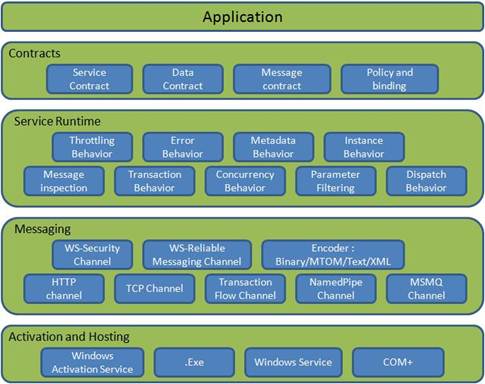
Contracts layer are next to that of Application layer. Developers will directly use this contract to develop the service. We are also going to do the same now. Let us see briefly what these contracts will do for us and we will also know that WCF is working on message system.
Service Contracts
Service contracts describe the operation that service can provide. Example, Service provided to know the temperature of the city based on the zip code. We call this service as Service contract. It will be created using Service and Operational Contract attribute.
Data Contract
It describes the custom data type which is exposed to the client. This defines the data types, and is passed to and from service. Data types like int, string are identified by the client because it is already mention in XML schema definition language document, but custom created class or datatype cannot be identified by the client, e.g., Employee data type. By using DataContract, we can make client aware that we are using Employee data type for returning or passing parameter to the method.
Message Contract
Default SOAP message format is provided by the WCF runtime for communication between Client and service. If it is not meeting your requirements, then we can create our own message format. This can be achieved by using Message Contract attribute.
Policies and Binding
Specify conditions required to communicate with a service, e.g., security requirement to communicate with service, protocol and encoding used for binding.
Service Runtime
It contains the behaviors that occur during runtime of service.
- Throttling Behavior- Controls how many messages are processed
- Error Behavior - Specifies what occurs, when internal error occurs on the service
- Metadata Behavior - Tells how and whether metadata is available to outside world
- Instance Behavior - Specifies how many instances of the service have to be created while running
- Transaction Behavior - Enables the rollback of transacted operations if a failure occurs
- Dispatch Behavior - Controls how a message is processed by the WCF Infrastructure
Messaging
Messaging layer is composed of channels. A channel is a component that processes a message in some way, for example, by authenticating a message. A set of channels is also known as a channel stack. Channels are the core abstraction for sending messages to and receiving messages from an Endpoint. Broadly, we can categories channels as:
Transport Channels
Handle sending and receiving messages from network. Protocols like HTTP, TCP, name pipes and MSMQ.
Protocol Channels
Implement SOAP based protocol by processing and possibly modifying message. E.g. WS-Security and WS-Reliability.
Read more: Codeproject
Automatic Decompression in WCF
Posted by
jasper22
at
09:16
|
WCF services that are hosted in IIS can take advantage of compression without making any special encoder changes. In Windows Server 2008 R2, IIS compression is actually turned on by default and WCF as of .Net 4.0 supports decompression by default. So if you've got a WCF web-hosted service on a W2K8R2 server using an HTTP transport, then you don't have to do anything to take advantage of compression. If your goal is to have compression on your services and you meet those criteria, then you can kick back now and don't even have to read the rest of this post.
For the rest of us though, there are many interesting details to consider. I figured a question and answer format would work best to explain the nuances.
Q: I'm using Silverlight. How can I take advantage of compression?
A: The good news is that you don't have to do much. Silverlight itself is not responsible for decompressing the messages from a service. The browser will do that for you. Since all requests are essentially going through the browser, the browser can stick in the Accept-Encoding header in the HTTP message. That signals the web server that the client can handle compressed messages and the web server can then decide to turn compression on or off.
Q: If compression is on by default in W2K8R2, how does that affect performance?
A: With IIS, compression is not just always on or off. IIS can choose to use compression based on a number of parameters. For instance, if the CPU usage on the web server is below a minimum threshold or above a maximum threshold, then compression will be turned off. To keep the response times from being too erratic, IIS only checks every 15 seconds or so (not sure on the exact number). So if you're running a performance test you might get some weird results. For instance, this is a 20 second test where the compression was on at first and the bottleneck was the CPU, so the network usage was low. Then IIS decided to turn off compression because the CPU usage was above the threshold and that sent the network usage to 100%.
Read more: Dustin Metzgar's blog
QuickCode .NET 2010
Posted by
jasper22
at
09:12
|
Project Description
The premier productivity boosting add-in for Visual Studio 2005, 2008, and 2010. A complete rewrite of QuickCode.NET 2005, QuickCode.NET 2010 is now freeware. It features an all-new user interface and much-improved ease of use.
For more information please visit QuickCode.NET 2010 on MOBZystems, Home of Tools.
Read more: Codeplex
How to sign a binary that you don't have the sources for?
Posted by
jasper22
at
09:11
|
Hi, it has been a long time since my last post here and that's not because I didn't bump into difficult problems that I wasn't able to solve, but rather due to me being too lazy to write.
So I decided to fix this. Also, the issue that I've found took me a long time to solve and it's a bit obscure so I think it's worth the trouble of a post.
Here's the problem: you are creating a dll that you share with other teams and they expect it to be signed (have a strong name). That's easy enough if you have control over all the dependencies... But what if you are using some dependencies that are not signed?
Here are the steps to sign the dependencies:
1. Get a cert. Here's a simple way generate a random key:
sn -k myKey.snk
2. Install this tool (ilmerge): http://www.microsoft.com/downloads/en/details.aspx?FamilyID=22914587-b4ad-4eae-87cf-b14ae6a939b0&displayLang=en
3. Run ilmerge like this:
ilmerge oldDll.dll /keyfile:mykey.snk /out:newDll.dll
4. Verify if this operation worked:
sn -T newDll.dll
......
Public key token is ea744189c88093ee
Read more: Ionutz's tech blog
Memory Leak Detector including CallStack Info for x86/x64 c++
Posted by
jasper22
at
09:11
|
Project Description
i have rewrited this sources which were by David A. Jones to run in x64 and x86 mode.
Read more: Codeplex
Ubuntu Linux 11.04, "Natty Narwhal," Now Available
Ubuntu Linux, easily one of the most popular Linux distributions available today, is out with what may be its most significant set of changes to date. 11.04 "Natty Narwhal" has brought with it not just major version jumps for nearly every core app and service, but also a completely revamped Unity interface.
Earlier this month, we took an extensive tour through the beta release of Ubuntu's latest, and things have mostly improved since then. The beta's may have been rough around the edges, but 11.04 is now stable and it feels the part.
Love it or hate it, Unity is clearly here to stay. It's been through a major update since 10.10. The interface still does sit atop the GNOME Desktop Environment, though—so things aren't so different once you get past the layout and some basic control maneuvers. It's worth noting, though, that users can select "Ubuntu Classic" from the login screen to switch to a possibly more familiar, more GNOME-like desktop.
Read more: Lifehacker
InfoStrat Motion Framework
Posted by
jasper22
at
13:43
|
Project Description
InfoStrat Motion Framework enables you to easily use motion tracking in your WPF applications with depth sensors such as Kinect and PrimeSensor.
Read more: Codeplex
Sony: Credit Card Data Exposed in PlayStation Network Hack
Posted by
jasper22
at
12:08
|
Foster City, Calif. - Sony (NYSE: SNE) has acknowledged that the now weeklong outage of its PlayStation Network online game service was due to a security breach, during which its 70 million users' credit card information may have been accessed. "While there is no evidence at this time that credit card data was taken, we cannot rule out the possibility," the company wrote in a blog post. "If you have provided your credit card data through PlayStation Network or Qriocity, out of an abundance of caution we are advising you that your credit card number (excluding security code) and expiration date may have been obtained."
The company said that data including users real names, birthdates, physical and email addresses, and usernames and passwords associated with their PlayStation Network and Qriocity accounts were accessed by the hackers.
As a result, Sony is encouraging users "to be especially aware of e-mail, telephone, postal mail or other scans that ask for personal or sensitive information."
The company is currently engaged in an investigation of the incident, and said access to some of the downed services could be restored within a week.
In a statement, Sen. Richard Blumenthal (D-Conn.) said he wrote to the president and CEO of Sony Computer Entertainment America, calling on the company "to provide PlayStation Network users with financial data security services, including free access to credit reporting services for two years, the costs of which should be borne by the company."
Read more: DigitalMedia wire
Slackware 13.37 is released!
Posted by
jasper22
at
10:58
|
It's true! Slackware 13.37 has been released. Nearly a year in the making, you will appreciate the performance and stability that can only come with careful and rigorous testing. Slackware 13.37 uses the 2.6.37.6 Linux kernel (hence our new $SLACKWARE_VERSION.$KERNEL_VERSION naming system used for this release ;-), and also ships with 2.6.38.4 kernels for those who want to run the latest (and also includes configuration files for 2.6.35.12 and 2.6.39-rc4). The long-awaited Firefox 4.0 web browser is included, the X Window System has been upgraded (and includes the open source nouveau driver for nVidia cards). The venerable Slackware installer has been improved as well, with support for installing to btrfs (for those who would like to try a new copy on write filesystem), a one-package-per-line display mode option, and alienBOB's big surprise: an easy to set up PXE install server that runs right off the DVD!
More details may by found in the official announcement and in the release notes. For a complete list of included packages, see the package list.
Please consider supporting the Slackware project by picking up a copy of the Slackware 13.37 release from the Slackware Store. The discs are off to replication, but we're accepting pre-orders for the official 6 CD set and the DVD. The CD set is the 32-bit x86 release, while the DVD is a dual-sided disc with the 32-bit x86 release on one side and the 64-bit x86_64 release on the other. And, we still have T-shirts (coming soon, a limited edition 13.37 release commemorative black T-shirt with the classic Slackware logo on the front, and a "leet" LILO bootscreen on the back) and other Slackware stuff there, so have a look around. Thanks to our subscribers and supporters for keeping Slackware going all these years.
Thanks are again due to the Slackware crew, the developers of slackbuilds.org, the community on linuxquestions.org, Slackware IRC channels, and everyone else who helped out with this release.
Read more: The Slackware Linux Project
Microsoft returning to its Windows versioning hell
Posted by
jasper22
at
10:58
|
Word is that even as early versions of Windows 8 is being leaked to the web and we head towards a possible fall public beta that Microsoft could be returning to its ridiculous versioning scheme for the new Windows.
Not only are they preparing for RM version but also versions that won’t include Internet Explorer. From The Next Web and WinRumors we get the full list of the different versions we can expect:
- ARM.Starter=00342
- ARM.StarterN=00345
- ARM.StarterE=00348
- ARM.HomeBasic=00346
- ARM.HomeBasicN=00358
- ARM.HomeBasicE=00349
- ARM.HomePremium=00359
- ARM.HomePremiumN=00362
- ARM.HomePremiumE=00351
- ARM.Professional=00371
- ARM.ProfessionalN=00376
- ARM.ProfessionalE=00352
- ARM.Enterprise=00392
- ARM.EnterpriseN=00403
- ARM.EnterpriseE=00355
- ARM.Ultimate=00426
- ARM.UltimateN=00432
- ARM.UltimateE=00356
Read more: Winextra
SILVERLIGHT SPY APRIL 2011 UPDATE
Posted by
jasper22
at
10:55
|
An update of Silverlight Spy is now available for download. This update adds support for Silverlight 5 Beta and Silverlight 4 GDR 4 (released a week ago). Furthermore this Silverlight Spy Update adds syntax highlighting to the DLR shell, Windows 7 Jump List support and full event monitoring for Popup and Silverlight 5 windows.
A word on Silverlight 5 Beta
Please note that Silverlight 5 Beta is really a beta, it's a bit rough around the edges and consequently you may see some unexpected behavior when running Silverlight Spy with Silverlight 5. This will be taken care of as soon as Silverlight 5 reaches RTM status.
Read more: First Floor Software
.NET Windbg Extension Development in Visual Studio
Posted by
jasper22
at
10:48
|

Introduction
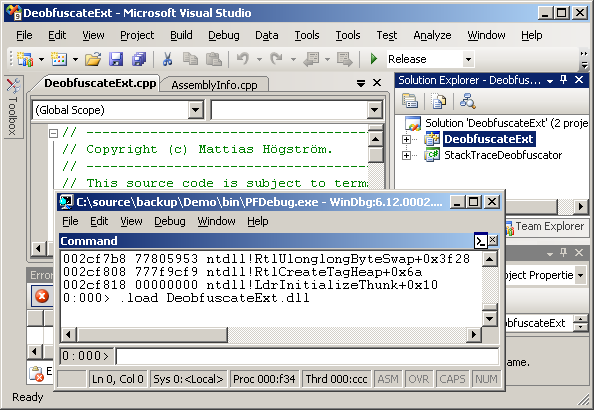
This article will show you how to develop Windbg extensions in Visual Studio, and to leverage the .NET platform through the C++/CLI technology.
Background
I was once assigned the task to evaluate the applicability of code obfuscation of .NET assemblies with respect to protection of intellectual property, but also its consequences for debugging and support.
Obfuscation is not without drawbacks. It makes debugging almost impossible, unless it is possible to reverse the obfuscation.
The Obfuscator I evaluated provided an external tool for deobfuscation with the use of map files. You had to manually copy and paste the text into this tool.
Read more: Codeproject
The Gang of Four patterns as everyday objects
Posted by
jasper22
at
10:48
|
A System Metaphor is what eXtreme Programming use to describe an architecture: for example you can think of particular application as production lines, or flying planes, or other kinds of machines. A metaphor has its limits in describing a concept, but it's really fast in being understood by programmers who are naive to the concept.
The original Gang of Four design patterns can be explained as real, everyday (and sometimes science-fictional) objects and actions. In this list, sometimes I use other software as the metaphor, as you will be already familiar with it if you are reading here. But I try to stick to physical objects and systems when possible.
Creation patterns
An Abstract Factory is a factory conforming to some specification, like a phone factory. The concrete phones you can buy are returned by this Factory. However, the standardization is not only in the interaction with the phones (each has 0-9 keys and a call button) but also in the interaction with the Factory (for example suppliers for large companies should follow standard supplier agreements).
A Builder is a very patient architect (the one that builds houses, not software): you tell him that you want the kitchen on this floor, and two bathroom and so on, but he cares about making it work and draw a complete design which accounts for electric wiring, pipes, structural integrity and so on.
A Factory Method is a cake mix; most of the work is already done and the recipe is written, but you may (or must) provide the missing ingredients when required by the recipe. The missing ingredient may also not be edible: the mold where you put the dough can be considered an abstract Factory Method.
A Prototype is a gremlin. Once you have it, you put it in the water and you can instantly create another one (beware not to feed your Prototype pattern after midnight.) Other metaphors are cell division, or any cloned animal like the sheep Dolly (actually only if you intervene on the genes it's a Prototype pattern: if you only create exact copies it's not very useful.)
A Singleton has no correspondence in real life, because it is in fact a bad idea. It will be like a sheet of paper that when written manages files in your pc, or a credit card that charges itself without a PoS. Some says titles such as the US president can only be held by one person, so they are Singleton. Yet there are many presidents (Clinton, Bush, Obama...) and if you ship products in Europe they don't really need a reference to the US president.
Structural patterns
An Adapter can be simply an AC adapter for laptops, but also any kind of electrical adapter between different outlet types. Every geek has lots of adapters in his house so this is the easiest pattern to explain.
A Bridge is an operating system which uses drivers (thus, every OS). The interface for the client (fopen() and similar functions) are evolved separately from drivers for hard-disks, optical devices, and Flash memories.
Continuing with the electrical metaphors, a Composite is a power strip, where you can plug in many devices with a single outlet. In mathematics instead, every arithmetic expressions is a Composite which can be combined with other ones to build a longer, more complex expression.
A Decorator is a layer of colored glass: in particular sunglasses and augmented reality (or 3D) glasses fit the pattern. They do not change your interface with the world (pair of eyes), but they are interchangeable, add some kind of behavior or filtering and can be overlapped in any order.
A Facade is a customer support desk, or even a wedding planner: he hides from you the complexity of a large subsystem. The wedding planner orders flowers, makes reservations, organizes everything for you.
A Flyweight: preforked processed on the web server, although that says nothing about the idiomatical implementation of flyweight we use in oo languages
A Proxy is each SSH client you run to access a shell on another machine. Also VNC and other graphical proxies are equivalent.
Behavioral patterns
A Chain of Responsibility can be thought of as a military chain of command, where each request may be escalated to the superior officer. Also some business are an example, at least the ones that let you say "Can I talk to your boss?"
Read more: Agile Zone
XNA RPG - Learning XNA while building a RPG, a 26 part tutorial series
Posted by
jasper22
at
10:44
|
E3 2011 is a little more than a month away, the expo where nearly all the cool gaming news comes out. There's rumors that there's news coming about development "stuff" for the XBox 360 and E3 seems like the logical time for that news to be released.
To give you a leg up and help you catch that wave, today's post is curtsey of Jamie McMahon and his very cool XNA Game Programming Adventures, XNA 4.0 RPG Tutorials series.
The series takes you from install to a playable 2D RPG with each in the series building on the last. The tutorial includes not only building the game but a game/level editor too.
Part 1 - Getting Stated
This first tutorial is about getting started with the role playing game, Eyes of the Dragon. I create the basic project, two class libraries, and some components that will be used through out the rest of the tutorials.
...
Part 4 - Tile Engine
The forth tutorial is about adding in a tile engine for the game. The tile engine is what you will use to draw the maps the player will use to explore your world. In the next tutorial I will add in more to the tile engine.
...
Part 10 - Character Classes
This adds in some basic classes for characters in the game and a class to represent the world the game takes place in.
Part 11A - Game Editor
In this tutorial I add in an editor for the game and move from a static character class system to a dynamic character class system. This is part one of a three part tutorial.
...
Read more: Channel9
AdMob Tutorial - Add ads to your application
Posted by
jasper22
at
10:41
|
Edit: The AdMob SDK has changed and is not fully backwards compatible. The tutorial was updated accordingly.
Using the new AdMob library you can earn money by displaying ads in your applications.
Installing AdMob libraries:
1. Go to AdMob - Register and register to AdMob.
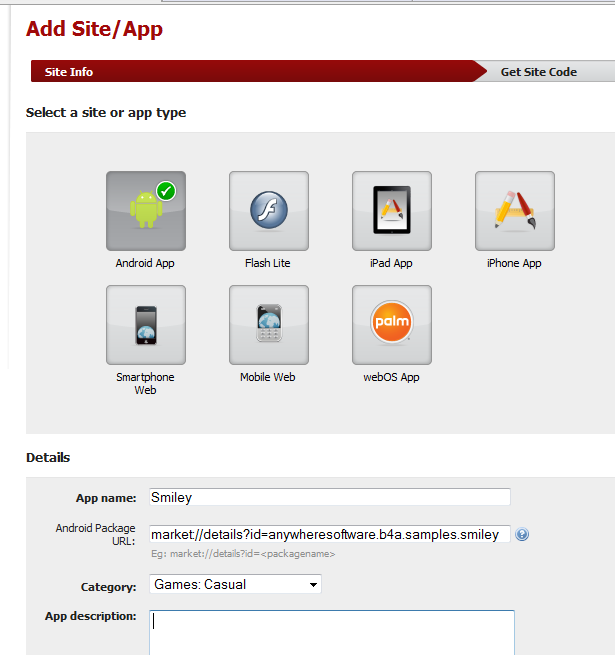
2. Add an application:

The url can be a placeholder for a future application.
3. After creating the application you should see a screen with your "Publisher ID" and a link to "get publisher code".
Later you will need to enter your publisher id in the program code. Now you should download AdMob SDK by pressing on "get publisher code".
You will download a zip file with a name similar to: GoogleAdMobAdsSdk-4.0.4.zip.
Inside the zip there is a folder with the same name. Inside this folder you will find the required jar file (GoogleAdMobAdsSdk-x.x.x.jar).
Note that you may have problems extracting the whole zip file because it contains a folder and a file with the same name. The solution is to just drag the required file.
Rename the jar file and change its name to GoogleAdMobAdsSdk.jar (removing the specific version suffix).
4. Download AdMob B4A library.
You should copy all files to the additional libraries path.
5. Copy GoogleAdMobAdsSdkAndroid.jar to the additional libraries path.
Adding AdMob to your application
1. Add a reference to AdMob and GoogleAdMobAdsSdk libraries.
2. Typical code should look like:
Code:
Sub Process_Globals
End Sub
Sub Globals
Dim AdView1 As AdView
End Sub
Sub Activity_Create(FirstTime As Boolean)
Activity.LoadLayout("1")
AdView1.Initialize("Ad", "YourPublisherId") 'publisher id that you received from AdMob.
Activity.AddView(AdView1, 0dip, 0dip, 320dip, 50dip) 'previously the height was 48dip. Now it is 50dip.
AdView1.LoadAd 'loads an ad
End Sub
'debugging only:
Sub Ad_FailedToReceiveAd (ErrorCode As String)
Log("failed: " & ErrorCode)
End Sub
Sub Ad_ReceiveAd
Read more: Anywhere software
Hiding data in disk fragmentation
Posted by
jasper22
at
10:39
|
How do you keep something secret?
If you encrypt it then the statistical properties of the stored data reveal that you have something to hide. Once the fact is out that you have something to hide then the process of revealing your secrets can begin. You could even be forced to reveal the encryption keys by law once it is known that you have encrypted data.
An alternative is to hide you secrets in plain sight - a technique called steganography. For example you can store data as part of an image by changing a few pixels by an amount that isn't detectable. As long as you do the job correctly and don't give yourself away by modifying the statistics of the steganographic medium then it is fairly difficult to detect.
The trick with steganography is to find something that you can use to hide the data without making it obvious. Now a team of researchers at University of Southern California in Los Angeles has found a novel steganographic technique, but not one without its problems.
The idea is to use the way data is stored on a hard disk. Operating systems allocate blocks of storage to any file that you create. Exactly how they do this varies and, for the sake of argument, the example uses the FAT filing system that is now mostly superseded by NTFS under Windows but it is still used on small storage devices such as memory cards and USB sticks. FAT allocates storage in "clusters" and these can be spread out all over the disk. In most cases you really want any file to be stored in a set of physically adjacent clusters, but files can become fragmented and stored all over the drive. Normally this is considered a bad thing and disk defragmenters are used to tidy up a disk and make it more efficient. Some operating systems - Windows 7 for example - even perform defragmentation automatically.
The steganographic system proposed simply uses the location of the clusters that make up a file to store the real data. There are lots of ways of hiding data in the cluster locations.
For example, a simple coding rule is:
if two storage blocks are physically next to each other then the next encoded bit is the same as the previous bit and if they are separated then the bit changes.
Read more: I Programmer
פונקציית If באקסל
Posted by
jasper22
at
10:35
|
שלום לכולם ,
כאן רותם כהן מצוות התמיכה של Microsoft .
בפוסטים הקודמים שלי למדנו כיצד להשתמש בפונקציות בסיסיות, טווחים וקיבועי נוסחאות בתוכנת אקסל .
היום נעלה רמה ונעבור ללמוד נושא מתקדם יותר והוא פונקציית If שהיא למעשה פונקציית התניה .
מהן פונקציות התניה ?
פונקציות התניה הן למעשה פונקציות המקיימות בדיקה לתנאי המוגדר בתוכן ועל ידי החזרת פלט במבנה של חיוב או שלילת התנאי מציגות את התוצאה .
נשמע מסובך ? אל חשש , במילים פשוטות יותר מדובר בפונקציה המבצעת בדיקה לתנאי שאנו נגדיר בה , בנוסף לתנאי זה נגדיר למעשה 2 תוצאות ; אחת במידה ותנאי אכן מתקיים ואחת במידה והתנאי אינו מתקיים .
בעת עבודה עם הפונקציה תתבצע בדיקה תמידית לתנאי ועל פי תוצאה זו יוצג הערך בתא .
בדוגמא הבאה למשל הגדרנו לפונקציה תנאי בו נבדוק האם תוצאת החיבור של התאים A1 ו A2 שווה למספר 3, במידה וכן הגדרנו להציג את המילה "נכון" ואילו במידה והתוצאה אינה שווה למספר 3 תוצג המילה "לא נכון".
שימו לב כי במידה ונשנה את אחד מהנתונים המוצגים כך שתוצאת התנאי תהיה שלילית והתנאי למעשה לא יתקיים תשתנה גם התוצאה בתא המציג את תוצאת פונקציית ההתניה
Read more: MS Support blog
IIS Transform Manager 1.0 (Beta)
Posted by
jasper22
at
10:34
|
Overview
IIS Transform Manager 1.0 Beta is an extensible media transform engine that enables "watch folder" job submission, queuing, management, integrated media transcoding/transmuxing, and batch-encryption of on-demand audio and video files. Windows Media-formatted and MP4-formatted files, or other encoder-supported file formats, to on-demand Smooth Streams for delivery to Smooth Streaming-compatible clients (such as Silverlight). Another example is transmuxing Smooth Streaming fragments encoded with H.264 (AVC) video and AAC-LC audio codecs to MPEG-2 Transport Stream (MPEG-2 TS) segments for delivery to Apple® mobile digital devices. Transform Manager can be integrated with the IIS Smooth Streaming feature in IIS Media Services, which delivers the "transformed" content.
Read more: IIS Transform Manager 1.0 (Beta) x86
Read more: IIS Transform Manager 1.0 (Beta) x64
Scapy
Posted by
jasper22
at
09:57
|
What is Scapy
Scapy is a powerful interactive packet manipulation program. It is able to forge or decode packets of a wide number of protocols, send them on the wire, capture them, match requests and replies, and much more. It can easily handle most classical tasks like scanning, tracerouting, probing, unit tests, attacks or network discovery (it can replace hping, 85% of nmap, arpspoof, arp-sk, arping, tcpdump, tethereal, p0f, etc.). It also performs very well at a lot of other specific tasks that most other tools can't handle, like sending invalid frames, injecting your own 802.11 frames, combining technics (VLAN hopping+ARP cache poisoning, VOIP decoding on WEP encrypted channel, ...), etc. See interactive tutorial and the quick demo: an interactive session (some examples may be outdated).
Read more: Scapy
Mausezahn
Posted by
jasper22
at
09:55
|
What is Mausezahn?
Mausezahn is a free fast traffic generator written in C which allows you to send nearly every possible and impossible packet. It is mainly used to test VoIP or multicast networks but also for security audits to check whether your systems are hardened enough for specific attacks.
- Mausezahn can be used for example:
- As traffic generator (e. g. to stress multicast networks)
- To precisely measure jitter (delay variations) between two hosts (e. g. for VoIP-SLA verification)
- As didactical tool during a datacom lecture or for lab exercises
- For penetration testing of firewalls and IDS
- For DoS attacks on networks (for audit purposes of course)
- To find bugs in network software or appliances
- For reconnaissance attacks using ping sweeps and port scans
- To test network behaviour under strange circumstances (stress test, malformed packets, ...)
...and more. Mausezahn is basically a versatile packet creation tool on the command line with a simple syntax and context help. It could also be used within (bash-) scripts to perform combination of tests. By the way, Mausezahn is quite fast; when started on my old PIII-Laptop (1.4 GHz, Gigabit Ethernet) I measured 755 Mbit/s using the interface packet counters of an HP ProCurve 5400 switch.
Read more: Mausezahn
Android tutorial: Dynamicaly load more items to the ListView ( Never Ending List! )
We pretty much all know the nice technique apps like GMail / Facebook use to dynamically load more items to the ListView then you scroll to the bottom. In this post i want to shed some light on how to make such a list ourselves!
We can approach this from a few sides:
The first option is to add a button to the footer of the view. when pressed it will load more content.
The second option is to check if the last item is visible and load more content when it is!
I really like the second one, because i think its more user friendly. Android makes checking is a item is in view very easy because they added a function with the following method signature:
public abstract void onScroll (AbsListView view, int firstVisibleItem, int visibleItemCount, int totalItemCount)
As you might have guessed: with these parameters we can easily figure out whats the last item on screen! Before we make this method we will first have to add a footer to the ListView.
More after the breaky break!
Read more: Programmer XR
NetTalk XMPP Messenger Server
Posted by
jasper22
at
15:02
|
Project Description
NetTalk is XMPP server based on AgsXmpp server component.
Web server running in Asp.net and no need to any service or other things to run.
Read more: Codeplex
Viewdle Releases SocialCamera For Android: Instant Photo Tagging, Sharing
Posted by
jasper22
at
14:58
|

Visual analysis company Viewdle this morning launched an Android app called SocialCamera that allows users to instantly tag photos, add captions and share them on Flickr or Facebook, by email or MMS. The demo video below explains how the app works in more detail.
The Android application, which is still in beta and not to be confused with Justin.TV’s Socialcam app, is free of charge and should be available through Android Market today.
Viewdle was founded back in 2007 and last October raised $10 million in Series B funding from a group of investors including Best Buy, BlackBerry Partners Fund and Qualcomm.
On a sidenote: I organized my first Plugg conference back in March 2008, and the fledgling company took home the top prize at the startup competition that year (it later went on to win the one at Le Web, too).
Read more: TechCrunch
TediOS Operating System
Posted by
jasper22
at
14:56
|
Project Description
A very simple OS with crude memory management, console interface and a partially implemented file system.
This OS was not intended to be used in any production environment or any particular purpose other than my personal education.
Enjoy!
Read more: Codeplex
Microsoft(R) SQL Server(R) 2008 R2 Service Pack 1 Community Technology Preview
Posted by
jasper22
at
14:48
|
Overview
SQL Server 2008 R2 Service Pack 1(SP1) Customer Technology Preview (CTP) is now available for download. SQL Server 2008 R2 service packs are cumulative updates and upgrade all service levels of SQL Server 2008 R2 to SP1 CTP. This service pack contains the cumulative updates up to SQL Server 2008 R2 SP1 cumulative update packages 6. You can use these packages to upgrade any of the following SQL Server 2008 R2 editions:
(1) SQL Server 2008 R2 Parallel Computing Edition
(2) SQL Server 2008 R2 Datacenter Edition
(3) SQL Server 2008 R2 Enterprise Edition and Developer Edition
(4) SQL Server 2008 R2 Standard Edition
(5) SQL Server 2008 R2 Web Edition
(6) SQL Server 2008 R2 Workgroup Edition
(7) SQL Server 2008 R2 Express Edition
Note : These packages are available for testing purposes only in a non-production environment. To upgrade SQL Server 2008 R2 Express Edition, obtain the SP1 version of Express Edition or Express Edition with Advanced Services.
Read more: MS Download
WCF BINDINGS NEEDED FOR HTTPS
Posted by
jasper22
at
14:47
|
I just finished writing my first production WCF application, which worked very well until I deployed it to our production environment. All of a sudden none of the WCF calls would work, and I would get a JavaScript "TestService is not defined" error. When I look inside the JS service reference (in debug mode), I got the following error:
Could not find a base address that matches scheme http for the endpoint with binding WebHttpBinding. Registered base address schemes are [https]
So apparently my WCF service registered itself as HTTPS (since it is over SSL), but my binding was only configured for HTTP. The solution is to define a custom binding inside your Web.Config file and set the security mode to "Transport". Then you just need to use the bindingConfiguration property inside your endpoint definition to point to your custom binding. The entire HTTPS-enabled system.serviceModel section is below:
<system.serviceModel>
<behaviors>
<endpointBehaviors>
<behavior name="TestServiceAspNetAjaxBehavior">
<enableWebScript />
</behavior>
</endpointBehaviors>
</behaviors>
<serviceHostingEnvironment aspNetCompatibilityEnabled="true" />
<services>
<service name="TestService">
<endpoint address="" behaviorConfiguration="TestServiceAspNetAjaxBehavior"
binding="webHttpBinding" bindingConfiguration="webBinding" contract="TestService" />
</service>
</services>
<bindings>
<webHttpBinding>
<binding name="webBinding">
<security mode="Transport">
Read more: SCOTT'S BLOG
Subscribe to:
Posts (Atom)