This is a mirror of official site: http://jasper-net.blogspot.com/

Google Calendar APIs and Tools

| Sunday, February 20, 2011
API Overview Guide
Google Calendar is a collaborative, web-based application designed to manage all of life's important events in one place. The Google Calendar APIs and Tools provide a framework for developers to programatically interface with and extend Google Calendar.
The Calendar Data API lets you perform most of the operations a normal Google Calendar user can on the Google Calendar website. CalDAV provides access to most Calendar data in an industry-standard format suitable for use in traditional calendar applications. The Gadget APIs allow developers to directly extend the Google Calendar web interface, while the Publishing Tools allow developers to extend their own websites with pieces of pre-built functionality from Google Calendar.

(+including .NET tutorial)

Read more: Google Calendar APIs and Tools

Posted via email from Jasper-net

Android Gingerbread 2.3 Vs Froyo 2.2

|
If you check out any news relating to mobile phones, there’s Android! Well, if you aren’t aware of what Android is, then it is a mobile operating system that is based on a modified version of Linux kernel. Android 2.3 (Gingerbread) is the latest version of Android. This post will point out some interesting differences between the latest Android 2.3 (Gingerbread) and the previous version 2.2 (Froyo).

Android-23-Gingerbread.jpg

Android Gingerbread 2.3 Vs Froyo 2.2
Gingerbread has an improved user interface. There are new themes, the keyboard is redesigned, better application management, new copy and paste functionality, etc.

Read more: BizzNTech

Posted via email from Jasper-net

Veracode Research Team Gives 5 Predictions for 2011

|
As we close out an security eventful 2010, the Veracode research team though it would be a good idea to think about what we are likely to see happen in 2011. Here are 5 predictions we believe will have a very good chance of coming true.

1. Sandboxing goes mainstream with adoption by Firefox and Internet Explorer
Sandboxing can prevent the exploitation of coding errors by preventing code running inside the sandbox from interacting with the operating system. Software companies with apps that are designed to render data and interpret script code downloaded from the Internet start to adopt sandboxing.

2. Microsoft follows Google and Mozilla and starts paying a bug bounty
Following Google’s and Mozilla’s lead, more companies offer to pay researchers for reporting bugs to them. Microsoft, which stated years ago that they wouldn’t ever pay for bugs, caves to industry pressure as they are hit with more uncoordinated disclosures than their peers.

3. A mobile app causes a major enterprise security breach
Rapid growth of mobile apps continues on enterprise-connected mobile devices. Inevitably, attackers leverage this juicy new attack vector to penetrate corporate perimeters and gain access to sensitive data. It also turns out that the malicious application that enabled the attack was downloaded through a well-known and trusted app store.

4. Government and corporations stock up on anti-leak security products to defend against insider attacks, but high profile leaks continue
The insider threat problem is so huge that a single security product category such as DLP coupled with new policies on removable media fails to make a dent on leaks. The comprehensive security programs focused on internal applications and internal networks take years to implement. New organizations copy the Wikileaks model to give more outlets for leaked information.

Read more: VeraCode

Posted via email from Jasper-net

Java 6 Update 24 Plugs 21 Security Holes

|
A new version of Java fixes at least 21 security flaws in the widely-distributed software bundle. Updates are available for Windows, Linux and Solaris users.

If you’re curious about the security updates included in Java 6 Update 24, see the release notes from Oracle. As I have shown in many stories on this blog, outdated Java installations can give bad guys and malware a foothold on your system, so if you use Java, please keep it updated. If you have Java installed but can’t remember why, you might consider simply uninstalling it altogether (you can always reinstall it later). I only keep Java installed on one system of mine, and I disable the Java plugin from within Mozilla Firefox (Tools, Add-ons, Plugins).

Read more: Krebs on security

Posted via email from Jasper-net

Data encryption with DPAPI

|
Windows Data Protection

DPAPI - Data Protection Application Programming Interface; most probably the smallest API available under Win32. It contains just two functions.

Beginning with Windows 2000, Microsoft introduced the DPAPI. It wasn't well known or documented until Windows XP came out.

The DPAPI is a pretty well thought-out mechanism to allow any application to do simple and yet powerful encryption for its data. It has good recovery methods - in case the password gets lost, fully supports enterprise or home use and is based on the Cryptographic Services available under Win32.

So, what does it actually do?? Simple - it encrypts or decrypts a block of data.

And it does it without asking much for settings, cryptographic keys, algorithms and other hocus-pocus. Sounds like a ideal function for securing sensitive data? Definitely. There are some options that you can set but it goes even without them.

Here are some highlights:

user bound encryption (using users credentials)
machine bound encryption (using the machines credentials)
application supplied pass phrase
optional user supplied password
transparent mode (no user-interface at all)
optional security auditing
operating on standards - PKCS#5v2, RFC-2404, RSA etc.
MSDN contains a very well written article explaining the guts of DPAPI and is for sure worth reading if you are into security.

While DPAPI isn't generally difficult to use it has some pitfalls which you can avoid with the CProtectedData class

The class makes all necessary conversions if needed (DPAPI takes only UNICODE strings) and handles filling the data structures, allocating/freeing memory and so on. But at the end its just a wrapper class.

It provides one function in many flavors to perform the encryption and another one for decryption. Sanity checks on parameters are performed.

User interface

As you can see on the pictures, the CryptoAPI provides some dialog boxes with information and options to the user. It allows the user to modify encryption strength, choose a custom password and view information about the data to be encrypted.

Its important to remember when the user is allowed to choose a password, he most probably will forget it. In this case there is no way to retrieve this lost password and the data is not recoverable.


Read more: Codeproject

Posted via email from Jasper-net

App Inventor

|
App Inventor lets you develop applications for Android phones using a web browser and either a connected phone or emulator. The App Inventor servers store your work and help you keep track of your projects.

AppInventor-Doc-Diagram.png

You build apps by working with:
  • The App Inventor Designer, where you select the components for your app.
  • The App Inventor Blocks Editor, where you assemble program blocks that specify how the components should behave. You assemble programs visually, fitting pieces together like pieces of a puzzle.
Your app appears on the phone step-by-step as you add pieces to it, so you can test your work as you build. When you're done, you can package your app and produce a stand-alone application to install.

If you don't have an Android phone, you can build your apps using the Android emulator, software that runs on your computer and behaves just like the phone.

The App Inventor development environment is supported for Mac OS X, GNU/Linux, and Windows operating systems, and several popular Android phone models. Applications created with App Inventor can be installed on any Android phone. (See system requirements.)

Read more: Google App Inventor

Posted via email from Jasper-net

Android App Developers GUI Kits, Icons, Fonts and Tools

|
android_gui_10.jpg

   Hot on the heels of our previous GUI article, iPhone and iPad Development GUI Kits, today we focus on Android development. The idea is the same: To help streamline your app design and development, with a fairly comprehensive collection of Android GUI kits, icons, fonts, .psds and tools, that will allow you to focus on developing rather than having to design everything from scratch.
In comparison to Apples iPhone, the Android interaction design guidelines are far from being extensive nor are they as regimental. Androids guidelines are comprehensive and clear enough, yet they do allow a little room for some original design creativity – which is good. Of course, there is a reason why there are design guidelines, and they should not be abused (nice to be original though), the guidelines will help you to create a polished and uniformed experience for the user. (You can read more about the Android design guidelines below).

Android GUI Guidelines
Android GUI Tools
Android Wireframe Templates
Android Full Gui Kits
Android GUI Icon-Sets

Read more: speckyboy

Posted via email from Jasper-net

New Interview Questions for Senior Software Engineers

|
UPDATE: I think we all agree (or at least we should) that if you go into an interview tomorrow and you look across the table and the interviewer has simply printed out this list and is reading from it, that you should excuse yourself and run. This isn't a "guide to how to interview" nor is this meant to me a "best practices for engineers" list. It's simply a collective brain-dump of stuff that someone who's been in the business of developing software for money for 10 or so years should have some passing familiarity with. Of course, it's assumed that the interviewer is able to detect BS. This isn't, and shouldn't be, a trivia contest. If you're going to get a job (or you're looking for hire someone for a job) it's ultimately more important to understand if someone can Solve Problems and if Their Head is Screwed on Straight. Take it with a grain of salt, friends, remember, you found it on the Internet. - @shanselman

Here's what I have so far.

  • What is something substantive that you've done to improve as a developer in your career?
  • Would you call yourself a craftsman (craftsperson) and what does that word mean to you?
  • Implement a <basic data structure> using <some language> on <paper|whiteboard|notepad>.
  • What is SOLID?
  • Why is the Single Responsibility Principle important?
  • What is Inversion of Control? How does that relate to dependency injection?
  • How does a 3 tier application differ from a 2 tier one?
  • Why are interfaces important?
  • What is the Repository pattern? The Factory Pattern? Why are patterns important?
  • What are some examples of anti-patterns?
  • Who are the Gang of Four? Why should you care?
  • How do the MVP, MVC, and MVVM patterns relate? When are they appropriate?
  • Explain the concept of Separation of Concerns and it's pros and cons.
  • Name three primary attributes of object-oriented design. Describe what they mean and why they're important.
  • Describe a pattern that is NOT the Factory Pattern? How is it used and when?
  • You have just been put in charge of a legacy code project with maintainability problems. What kind of things would you look to improve to get the project on a stable footing?
  • Show me a portfolio of all the applications you worked on, and tell me how you contributed to design them.
  • What are some alternate ways to store data other than a relational database? Why would you do that, and what are the trade-offs?
  • Explain the concept of convention over configuration, and talk about an example of convention over configuration you have seen in the wild.
  • Explain the differences between stateless and stateful systems, and impacts of state on parallelism.
  • Discuss the differences between Mocks and Stubs/Fakes and where you might use them (answers aren't that important here, just the discussion that would ensue).
  • Discuss the concept of YAGNI and explain something you did recently that adhered to this practice.
  • Explain what is meant by a sandbox, why you would use one, and identify examples of sandboxes in the wild.
  • (more...)

Read more:  Scott Hanselman Computer's Zen

Posted via email from Jasper-net

Porting that Android App to Windows Phone 7 ?

|
For Dave Glover of Microsoft Australia, Here are my favorite WP7 videos.  Check out these two videos. Challenge to readers! Do this with your Android dev tools this fast!

Read more: XAML Refugees Design Blog

Posted via email from Jasper-net

Moonlight 4 Preview 1 is out

|
Yesterday we released Moonlight 4, Preview 1.

This release of Moonlight completes the Moonlight 3 feature set and includes many features from Silverlight 4. Check out our release notes for the list of things that are currently missing from our Silverlight 4 support.

Rendering

Moonlight rendering system uses a painter's algorithm coupled with culling to reduce the amount of rasterization that needs to take place.

Read more: Personal blog of Miguel de Icaza

Posted via email from Jasper-net

Antarctica theme for Windows 7

|
3568.image_5F00_478465F9.png

“Life at the bottom of the world: Penguins frolic in this free Windows 7 theme featuring images of Antarctica and the South Atlantic's natural beauty.”

Read more: I'm PC
Read more: Antarctica theme for Windows 7

Posted via email from Jasper-net

Androidify App

|
lucy1.jpg

Google has created and made available for free a "fun" little app that allows you to create an Android avatar that you can use in all sorts of ways.
Starting from the familiar logo you can choose skin color, hair style and color, clothes, shoes, glasses. You can then alter the body shape - stretch the body or legs, make the head and body wider or narrower. There's also a randomise option for creating weird and wonderful characters.

Once you are pleased with your avatar you can save it with a name it and share it with your contacts - you can even use it as your Facebook profile picture.

Read more: I Programmer

Posted via email from Jasper-net

Обновляем приложение с MVC 2 до MVC 3

|
Уже год мой сайт (блог) живет на самописном движке, который я сделал при помощи ASP.NET MVC 2. Конечно же я мог пользоваться бесплатными площадками для блогов, но мне пока интересно развиваться по многим направлениям. И если моя основная специальность сейчас Silverlight/WPF, то я все равно стараюсь не забыть про старый добрый веб, без него никуда в нынешнее время. Ну и нужно быть на гребне волны, потому я и решил что пора бы проапгрейдить свой сайт с MVC2 до MVC3. Зачем? А просто, чтобы было. Чтобы в будущем, когда захочется что-то допилить или доделать, а у меня уже была последняя версия, и я мог использовать последние фичи технологии.
Обновляем проект с MVC2 до MVC3

Первое задание, которое нужно выполнить для обновления на новую версию – это обновить сам проект и библиотеки. Если еще сама платформа не скачена, тогда идем на официальный сайт ASP.NET MVC и качаем третью версию отсюда http://www.asp.net/mvc/mvc3. Дальше нам нужно просто поменять references с библиотек версии 2.0 на версию 3.0. Делается это очень просто, качаем ASP.NET MVC 3 Application Upgrader (все бы производители фреймворков так заботились о разработчиках), запускаем, указываем путь до sln файла проекта и ждем результата. Эта тулза так же положит последние версии файлов jQuery фреймворка вам на сайт, но так как я использую Google jQuery CDN (чего и вам советую), то я просто вынес эти файлы из своего проекта и просто поменял ссылку на версию jQuery файла с 1.4.2 на 1.4.4. Еще эта библиотека заменила references во всех моих проектах этого солюшена с MVC 2.0 на MVC 3.0 (и добавила ссылки на две дополнительные библиотеки), как и должна была, а так же обновила web.config файл, а именно добавила в appSettings пару параметров, предназначения которых я пока не знаю:

<add key="ClientValidationEnabled" value="false" />
<add key="UnobtrusiveJavaScriptEnabled" value="false" />

Потом разберемся, что это значит.

Read more: outcoldman

Posted via email from Jasper-net

КАК В TABCONTROL ПРИВЯЗАТЬ ЗАКЛАДКИ ИЗ VIEWMODEL?

|
Есть пример, давайте его разберем кратко. Есть главная страница MainPage.xaml:

<UserControl

x:Class="TabControlBinding.MainPage"
xmlns="http://schemas.microsoft.com/winfx/2006/xaml/presentation"
xmlns:x="http://schemas.microsoft.com/winfx/2006/xaml"
xmlns:d="http://schemas.microsoft.com/expression/blend/2008"
xmlns:mc="http://schemas.openxmlformats.org/markup-compatibility/2006"
xmlns:Controls="clr-namespace:System.Windows.Controls;assembly=System.Windows.Controls"
xmlns:local="clr-namespace:TabControlBinding"
mc:Ignorable="d"
d:DesignHeight="300"
d:DesignWidth="400">

<UserControl.DataContext>

<local:ViewModel />
</UserControl.DataContext>

<Grid

x:Name="LayoutRoot"
Background="White">
<Controls:TabControl
Grid.Row="1"
local:TabControlHelper.ItemsCollection="{Binding Path=Collection}">

</Controls:TabControl>
</Grid>
</UserControl>

Так же есть небольшой класс SuperTab (его-то и будем в закладки запихивать):

   public class SuperTab
   {
       public string Header { get; set; }
       public string SomeContent { get; set; }      
   }

И еще есть простенький ViewModel:

И, собственно говоря, звезда номера класс TabControlHelper, который и сделает всю "грязную работу":

   public class TabControlHelper
   {
       #region ItemsCollection

       /// <summary>
       /// свойство ItemsCollection
       /// </summary>
       public static readonly DependencyProperty ItemsCollectionProperty =
           DependencyProperty.RegisterAttached("ItemsCollection", typeof(IEnumerable), typeof(TabControl),
               new PropertyMetadata(null, new PropertyChangedCallback(OnItemsCollectionChanged)));

       /// <summary>
       /// Геттер свойства ItemsCollection.
       /// </summary>
       public static IEnumerable GetItemsCollection(DependencyObject d)
       {
           return (IEnumerable)d.GetValue(ItemsCollectionProperty);
       }

       /// <summary>
       /// Сеттер свойства ItemsCollection.
       /// </summary>
       public static void SetItemsCollection(DependencyObject d, IEnumerable value)
       {
           d.SetValue(ItemsCollectionProperty, value);
       }

Read more: МУСОРКА - НАЙДИ ЛУЧШЕЕ!

Posted via email from Jasper-net

Silverlight: Байндинг коллекции элементов на TabControl.ItemsSource

|
Раньше я как-то обходился без подобного в Silverlight. Всегда размещал TabItem в XAML коде, а не байндил коллекцию объектов, и при помощи DataTemplate настраивал вид того, что находится в TabItem.Content. Просто не было необходимости байндить коллекцию моих объектов (неких BindingModel) на TabControl.ItemsSource, а тут, буквально недавно, захотелось немного отрефакторить код, так как коллекция табов все росла, и управлять ею уже было сложно, и как раз придумал как это возможно сделать через описанный выше способ. Сказано – сделано. Потратил пару часов, переписал код, запускаю, и обнаруживаю такой вот exception:

System.ArgumentException: Unable to cast object of type 'SilverlightTabControl.Foo' to type 'System.Windows.Controls.TabItem'.

Быстро гуглю, нахожу на форумах Silverlight тему Databinding a TabControl (Я не одинок! Как показало более глубокое угугление, я совсем не одинок), а там

This is because currently TabControl doesn't override PrepareContainerForItemOverride, so it won't automatically wrap your data source in TabItems.

Ну и в качестве решения предлагается написать свой TabConverter. Microsoft, ну я точно помню, что в WPF байндинг на ItemsSource у TabControl’а работает прекрасно. Я это делал. Ладно, терпим, что в Silverlight контролах достаточно много багов, но тут-то просто ребята немного не доделали, а контрол зарелизили, да и сколько версий он уже живет? В реальности на первый взгляд нужно сделать 2 вещи:

  1. Переопределить метод ItemsControl.GetContainerForItemOverride, чтобы он возвращал TabItem.
  2. Переопределить метод ItemsControl.PrepareContainerForItemOverride, чтобы он тому созданному контейнеру из шага 1 выставлял нужный Header из DisplayMemberPath (там простая строка, путь до свойства), а так же выставил в Content элемент полученный из DataTemplate, указанный в ItemTemplate, а если не указан, то просто выставить туда элемент вашей байндинг модели.

И это все. И я даже подумал, что напишу сейчас TabControlEx, который бы наследовался от TabControl и выполнил два этих действия. Но ребята из Microsoft написали обработчик на изменение ItemsSource, который и ломает все мечты. К сожалению, код посмотреть не удалось, .NET Reflector почему-то не может дизасемблировать код TabControl.

В общем, ничего не оставалось, и я тоже написал конвертер из коллекции объектов в коллекцию TabItem.

/// <summary>
/// Convert collection ob objects to List of <see cref="TabItem"/>.
///  </summary>
public class CollectionToTabItemsConverter : IValueConverter
{
   /// <summary>
   /// Set <see cref="ControlTemplate"/> object to parameter
   /// to change view of <see cref="TabItem"/>'s <see cref="TabItem.Content"/>
   /// </summary>
   public object Convert(object value, Type targetType, object parameter, System.Globalization.CultureInfo culture)
   {
       IEnumerable source = value as IEnumerable;
       if (source != null)
       {
           var controlTemplate = parameter as ControlTemplate;

           List<TabItem> result = new List<TabItem>();

           foreach (object item in source)
           {
               PropertyInfo[] propertyInfos = item.GetType().GetProperties();

               // Reflection Magic: trying to get possible header properties
               PropertyInfo propertyInfo = propertyInfos.First(x => x.Name == "Header" || x.Name == "Name");

               string headerText = null;
               if (propertyInfo != null)
               {
                   object propValue = propertyInfo.GetValue(item, null);
                   headerText = (propValue ?? string.Empty).ToString();
               }

Read more: outcoldman

Posted via email from Jasper-net

Join on tables using Fluent NHibernate

|
I started using Fluent NHibernate about a year ago as I was experimenting with ORM's in general when a good friend introduced me to the framework.
First of all, I felt that learning Fluent NHibernate in the first place wasn't that easy. I eventually found everything I needed on the internet, but for some reason, it wasn't as easy for me as other frameworks i've dealt with in the past.

Enough said, there were some things that I couldn't find how to do on the internet, like how to join two different tables using Fluent NHibernate mappings. I even spotted some people thirsty for answers...
Check out this question on stackoverflow.com that I found as I was looking for the answer myself, and eventually ended up coming back to answer the question myself! :)

I'll show this using a simple example.

public class FormStructure
{
   public virtual Int32 FormId { get; private set; }
   public virtual Int32 FormType { get; set; }
   public virtual FormField FieldId { get; set; }
}

public class FormField
{
   public virtual int FieldId { get; private set; }
   public virtual String FieldName { get; set; }
   public virtual int? FieldType { get; set; }
   public virtual int? DisplayOrder { get; set; }
}

Now, I want to be able to create a query on the FormStructure entity, and have the results ordered by the matching DisplayOrder field in the FormField entity. I also want the DisplayOrder field to be available to me as a property of the FormStructure entity.

In order to accomplish this, I will need to create a Join between these two tables.
The first step is to add the DisplayOrder field as a property in the FormStructure entity :

public virtual int? DisplayOrder { get; set; }


Read more: [DebuggerStepThrough]

Posted via email from Jasper-net

Moonlight 4 Preview - coming to Android?

|
Is Moonlight running to catch up with Silverlight or has it plans to overtake it? Version 4 has some interesting graphics features and it is even easier to port it to other platforms - including Android and OSX.
Microsoft may not be 100% sure of Silverlight but the Mono project (sponsored by Novell) is pushing ahead with its Linux implementation of Silverlight - Moonlight. The latest is version 4 and while this isn't keeping up with the Silverlight version numbers if promises to support all Silverlight 3 features and a lot of Silverlight 4 features. Of course Microsoft has promised a version 5 some time later in the year. Probably in an effort to keep up the Moonlight developers have opted to skip a final release of version 3 and are planning to move directly to version 4.

Read more: I Programmer

Posted via email from Jasper-net

דרך נוחה לעיון בקוד של פרוצדורות ואובייקטים אחרים

|
לפני מספר חודשים כתבתי פוסט על דרכים לעיון בקוד של פרוצדורה (חוץ מאשר למצוא אותה בצד שמאל ב-SSMS ולהציג את הסקריפט על ידי קליק ימני), 
ומצאתי בינתיים עוד דרך נחמדה שמשלבת שליפה של כל האובייקטים (מה שמאפשר למיין ולסנן על פי הצורך) ומעבר נוח לתצוגה של הסריפט:

Select    id,
       Object_Name(id) Object,
       ObjectPropertyEx (id, N'BaseType') ObjectType,
       Cast((Select text As [text()]
           From        sys.syscomments T1
           Where        T1.ID=T.ID
           Order By colid
           For XML Path('')) As XML) SQL
From    sys.syscomments T
Group By ID
Order By ID;
Go

Read more: גרי רשף

Posted via email from Jasper-net

Unable to import a key into KeyNumber.Signature with RSACryptoServiceProvider

|
Hi all,

The other day a customer of mine was having an issue when importing key pairs with .NET's RSACryptoServiceProvider. When setting KeyNumber parameter to KeyNumber.Exchange everything seems to be fine. But when setting the KeyNumber parameter to KeyNumber.Signature the key pair is imported to the KeyNumber.Exchange slot just as if you haven’t set the KeyNumber parameter.

I could reproduce the issue with the following sample:

private void button1_Click(object sender, EventArgs e)
{
   // WORKS
   string keypair1 = GetKey(KeyNumber.Exchange);
   StoreKeyInContainer(KeyNumber.Exchange, keypair1);
   CheckKey(KeyNumber.Exchange, keypair1);

   // FAILS BUT IT SHOULD WORK
   string keypair2 = GetKey(KeyNumber.Signature);
   StoreKeyInContainer(KeyNumber.Signature, keypair2);
   CheckKey(KeyNumber.Signature, keypair2);

   // WORKS BUT IT SHOULD FAIL
   string keypair3 = GetKey(KeyNumber.Signature);
   StoreKeyInContainer(KeyNumber.Signature, keypair3);
   CheckKey(KeyNumber.Exchange, keypair3);
}

public static string GetKey(KeyNumber theKeyNumber)
{
   CspParameters parms;
   RSACryptoServiceProvider rsa;

   parms = new CspParameters(1);
   parms.Flags = CspProviderFlags.UseMachineKeyStore;
   parms.KeyNumber = (Int32)theKeyNumber;


Read more: Decrypt my World

Posted via email from Jasper-net

Subversion and Monodevelo

|
The nice thing about Monodevelop is that it has built in support for subversion. The bad thing is that getting that really to work is a real PITA. There is no documentation at all how to set up a Subversion repository and having MonoDevelop (for Mac)communicate without completely crashing over and over again. This is my public cheatsheet.

The scenario: I have Windows based network centered around a Server 2008. This server has redundant storage and is backed up on a regular scale. For building iPhone apps I have my Macbook. Anything could happen to that, like getting nicked. To preserve my work my Windows server runs VisualSVN server. Nice and easy tool, it takes two clicks and typing a name to set up a new repository. My work is safe, I have a good history and can share it with (potential) co-workers.

The hard part is linking this repository to a MonoDevelop project. There is no guidance and any error in the url or credentials will crash the complete IDE. The error log on that is not really helpful.

Read more: CodeBetter

Posted via email from Jasper-net

MARVELL’S PRESENTS KINOMA – COMPLETE CROSS PLATFORM FUNCTIONALITY FOR EVERY MOBILE OS

|
Have you ever sat there in the airport with your Android device, full internet access and everything, having a drink or a terrible pastry, just cursing the fact that Android doesn’t have that one perfect app you saw the other day on an Apple machine? Or perhaps it’s the other way around, you’ve seen the fabulous freewheeling things Android can do with their wild apps and you wish you could do it. Or maybe you’re on a Windows phone and don’t have either, or better yet, you’re using Symbian! What should you do, what CAN you do? Marvell has the answer. An answer that might very well shape the future of mobile OS, believe it or not.

Read more: Android community

Posted via email from Jasper-net

ANDROID COMMUNITY’S MOBILE WORLD CONGRESS 2011 MASSIVE WRAP-UP

|
Welcome ladies and gentlemen to the gigantically hefty wrap-up of our 2011 visit of Mobile World Congress in Barcelona. Even at a team size double that which we had last year, we were running ragged each and every day with meetings, photo snapping, an video capturing galore. In this post you’ll find a selection of some (but not nearly all) of the hands-on, first hand news, and keynote speech collection posts we collected whilst on our journey through the halls of modern technology. This guide will continue to be updated as we wring out all the news we’ve still got stacked up in our hard-drives just freaking out to be released unto the world. Behold the curated 2011 Mobile World Congress Android Community breakdown.

Read more: Android Community

Posted via email from Jasper-net

A Type-safe Generic Pointer

|
Introduction

Sometimes there comes the need to store a pointer to an object whose type is not known at compile-time. The common method to achieve this in C++ is to store it in a void pointer. The void pointer can then be cast back to the appropriate type and used when required. Call-back functions[1] in libraries are a well-known example of this method; the user-data pointer is often a void pointer. This works, but has a glaring problem: it’s not type-safe; it’s up to the programmer to interpret the void pointer in the appropriate manner.

Although programmers are quite used to taking care when dealing with void pointers, every once in a while a void pointer gets accidently cast to the wrong type of object. When this happens, the programmer is actually considered lucky if a crash occurs.

Enter any_ptr

The any_ptr smart pointer[2] can point to any type of object and provide type-safe access to it. In some sense, any_ptr is to pointers what boost::any[3] is to objects. There are no requirements to be fulfilled by the types of objects that any_ptr can point to. In fact, the performance and size penalty incurred by its use is so low, that it could potentially be used almost wherever a void pointer is required.

To start using any_ptr, we simply add a single header any_ptr.h (see source code accompanying this article) to our project. any_ptr has no dependencies on any library and can be used independently. any_ptr also does not require exceptions[5] or RTTI[6] to be enabled.

Type-safety

any_ptr behaves almost like a void pointer, except for when it is type-cast. A cast to the wrong type of pointer will yield a null pointer which the programmer can check for.
Example

int a = 10;
any_ptr pAny = &a;

int   *pA = pAny; // 'pA' will point to 'a'; type-compatible
float *pB = pAny; // 'pB' will point to null; type-incompatible

Const-correctness

any_ptr also takes care of const-correctness[4]; a cast to an incompatible type with respect to const-correctness will yield a null pointer.

Read more: Codeproject

Posted via email from Jasper-net

Payment Processors - What do I need to know if I want to accept credit cards on my website?

|
Answer:

I went through this process not to long ago with a company I worked for and I plan on going through it again soon with my own business. If you have some network technical knowledge, it really isn't that bad. Otherwise you will be better off using Paypal or another type of service.

The process starts by getting a merchant account setup and tied to your bank account. You may want to check with your bank, because a lot of major banks provide merchant services. You may be able to get deals, because you are already a customer of theirs, but if not, then you can shop around. If you plan on accepting Discover or American Express, those will be separate, because they provide the merchant services for their cards, no getting around this. There are other special cases also. This is an application process, be prepared.

Next you will want to purchase an SSL certificate that you can use for securing your communications for when the credit card info is transmitted over public networks. There are plenty of vendors, but my rule of thumb is to pick one that is a brand name in a way. The better they are known, the better your customer has probably heard of them.

Next you will want to find a payment gateway to use with your site. Although this can be optional depending on how big you are, but majority of the time it won't be. You will need one. The payment gateway vendors provide a way to talk to the Internet Gateway API that you will communicate with. Most vendors provide HTTP or TCP/IP communication with their API. They will process the credit card information on your behalf. Two vendors are Authorize.Net and PayFlow Pro. The link I provide below has some more information on other vendors.

Now what? For starters there are guidelines on what your application has to adhere to for transmitting the transactions. During the process of getting everything setup, someone will look at your site or application and make sure you are adhering to the guidelines, like using SSL and that you have terms of use and policy documentation on what the information the user is giving you is used for. Don't steal this from another site. Come up with your own, hire a lawyer if you need to. Most of these things fall under the PCI Data Security link Michael provided in his question.

If you plan on storing the credit card numbers, then you better be prepared to put some security measures in place internally to protect the info. Make sure the server the information is stored on is only accessible to members who need to have access. Like any good security, you do things in layers. The more layers you put in place the better. If you want you can use key fob type security, like SecureID or eToken to protect the room the server is in. If you can't afford the key fob route, then use the two key method. Allow a person who has access to the room to sign out a key, which goes along with a key they already carry. They will need both keys to access the room. Next you protect the communication to the server with policies. My policy is that the only thing communicating to it over the network is the application and that information is encrypted. The server should not be accessible in any other form. For backups, I use truecrypt to encrypt the volumes the backups will be saved to. Anytime the data is removed or stored somewhere else, then again you use truecrypt to encrypt the volume the data is on. Basically where ever the data is, it needs to be encrypted. Make sure all processes for getting at the data carries auditing trails. use logs for access to the server room, use cameras if you can, etc... Another measure is to encrypt the credit card information in the database. This makes sure that the data can only be viewed in your application where you can enforce who sees the information.

I use pfsense for my firewall. I run it off a compact flash card and have two servers setup. One is for fail over for redundancy.

Read more: StackOverflow

Posted via email from Jasper-net

Sanitizing SSDs

|
Sanitizing data from storage media is a critical component of data management, especially for governments and the enterprise. Sanitization is well-understood for traditional magnetic storage, such as hard drives and tapes. Newer Solid State Disks (SSDs), however, have a much different internal architecture, so it is unclear whether what has worked on magnetic media will work on SSDs as well.

At the Non-volatile Systems Laboratory we have designed a procedure to bypass the flash translation layer (FTL) on SSDs and directly access the raw NAND flash chips to audit the success of any given sanitization technique. Our results show that naïvely applying techniques designed for sanitizing hard drives on SSDs, such as overwriting and using built-in secure erase commands is unreliable and sometimes results in all the data remaining intact. Furthermore, our results also show that sanitizing single files on an SSD is much more difficult than on a traditional hard drive. We are working on designing new FTLs that correct these issues and also exploit properties of flash memory to maintain performance while sanitizing the flash drive.

We are actively seeking industrial partners for this project who can assist us in identifying parameters critical to particular applications and in acquiring small quantities of solid state disks for testing.


Read more: The Non-Volatile Systems Laboratory

Posted via email from Jasper-net

Secrets of the XAML Build Task

|
Motivated by some old, less old, and recent forum threads about allowing compositional workflows in a rehosted designer scenario, with the ability to reuse activities created in XAML, I have finally played through some options for building assemblies directly from rehosted designer XAML.

First though, let’s look at the standard option for compiling workflow assemblies.

What normally happens when you build XAML files in an Activity Library project in VS? Your XAML file is compiled, and a new Activity type is created in the output assembly.

XamlBuildTask is the name of the key msbuild task involved in generating classes and assemblies from workflow XAML. In the process of compiling simplest possible Activity Library project, a single XAML file results in the generation of many intermediate files.

We can see them in Solution Explorer if we turn on ‘show hidden items’.

7357.image_5F00_thumb_5F00_44505E3F.png

The hidden files are something I don’t normally look at, but if you have ever had something weird happen during workflow construction, you may have found yourself walking the stack and browsing through the InitializeComponent method in Activity1.g.cs. And thereby discovering at least that one file.

[System.Diagnostics.DebuggerNonUserCodeAttribute()]
public void InitializeComponent() {
   if ((this._contentLoaded == true)) {
       return;
   }
   this._contentLoaded = true;
   string resourceName = this.FindResource();
   System.IO.Stream initializeXaml = typeof(Activity1).Assembly.GetManifestResourceStream(resourceName);
   System.Xml.XmlReader xmlReader = null;
   System.Xaml.XamlReader reader = null;
   System.Xaml.XamlObjectWriter objectWriter = null;
   try {
       System.Xaml.XamlSchemaContext schemaContext = XamlStaticHelperNamespace._XamlStaticHelper.SchemaContext;
       xmlReader = System.Xml.XmlReader.Create(initializeXaml);
       System.Xaml.XamlXmlReaderSettings readerSettings = new System.Xaml.XamlXmlReaderSettings();
       readerSettings.LocalAssembly = System.Reflection.Assembly.GetExecutingAssembly();
       readerSettings.AllowProtectedMembersOnRoot = true;

Read more: The Activity Designer

Posted via email from Jasper-net

SilverMotion 1.2.0 has been released

|
An avantgarde graphics system control that delivers true realtime 3D graphics to the web. Its unique rendering engine, entity structure, shading system and other properties produce a complete and remarkably easy to use, yet fully customizable 3D environment with modern effects that have previously been seen in realtime exclusively in desktop applications outside the web browser.


3D power in your hands
Based on the cutting edge Microsoft Silverlight technology, SilverMotion is a reliable 3D control and requires only a web browser and Microsoft Silverlight in order to run - no additional custom plugins, third-party components, JAVA nor Flash required. SilverMotion provides reasonably fast realtime rendering with modern effects like bump mapping, refraction and reflection mapping, cell-shading, multi-texturing, dynamic lighting, fogging, smooth grouping, fully dynamical cameras and more.

With it's sophisticated rendering engine, SilverMotion utilizes multi-core CPU systems in order to extract the maximum performance of modern hardware. The goal of SilverMotion is to provide an easy to use, functional, compatible, visually appealing and practically applicable real-time 3D environment for the web, ready to cover any need.

Easy to use
Import entire 3D scenes with a variety of dynamic lights, cameras and meshes with materials and shaders applied with a single step. Simply put the SilverMotion component into the Silverlight development enviornment and import your .3DS file, exported directly from a 3D modelling environment (Blender, 3DS Max, Maya, MilkShape and etc.) into it. That's it. The scene will be rendered, ready to be interacted within your browser. Resource files can be put on a server and loaded dynamically or to be embedded as resources in your application. SilverMotion supports loading from a zip-packed 3DS models and textures to reduce loading times on slow Internet connection.

Read more: PostOffice

Posted via email from Jasper-net

Android: Generating an EAN13 Barcode

|
Introduction

The European Article Number, or EAN, is a standard European barcode which is designed to encode the identification of a product and its manufacturer and is a superset of the American standard, UPC. The format of the EAN13 barcode encodes a string of 12 characters followed by a 13th character which acts as the control number and is calculated through a formula based on the first 12 characters.

Nowadays, barcodes are used everywhere. If you earn a living as a programmer, sooner or later the need of support of barcodes in your applications will come up. For example, it may be supermarket bonus system, where user is identified by barcode from his phone to get discount, or such payment systems as Starbucks moble payment network. In this article will be explained how to generate EAN13 barcodes on Android screen.  

The Russian version of this article can be found at  http://plaincodesource.blogspot.com/2011/02/android-ean13.html

EAN13 calculation basics

EAN13 barcode uses  a 12 digits product code, the thirteenth digit is a control number, which is calculated on the basis of first 12 digits. Calculation of control number ( digits numbered from right to left ) looks like this:

P1 = the sum of even digits
P2 = the sum of odd digits
Z = P1 + 3 * P2
R = the number divisible by 10 immediately superior to Z
Control number = R - Z
Next, let's see on EAN13 encoding system:

The first digit is not encoded
Each 6 following digit is encoded according to the first digit
The 6 last digits are converted by the strict rule

Read more: Codeproject

Posted via email from Jasper-net

WM_NCHITTEST is for hit-testing, and hit-testing can happen for reasons other than the mouse being over your window

|
The WM_NC­HIT­TEST message is sent to your window in order determine what part of the window corresponds to a particular point. The most common reason for this is that the mouse is over your window.
  • The default WM_SET­CURSOR handler uses the result of WM_NC­HIT­TEST to figure out what type of cursor to show. for example, if you return HT­LEFT, then Def­Window­Proc will show the IDC_SIZE­WE cursor.
  • If the user clicks the mouse, the default WM_NC­LBUTTON­DOWN handler uses the result of WM_NC­HIT­TEST to figure out where on the window you clicked. For example, if you return HT­CLOSE, then it will act as if the user clicked on the Close button.
Although WM_NC­HIT­TEST triggers most often for mouse activity, that is not the only reason why somebody might want to ask, "What part of the window does this point correspond to?"
  • The Window­From­Point function uses WM_NC­HIT­TEST in its quest to figure out which window is under the point you passed in. If you return HT­TRANSPARENT, then it will skip your window and keep looking.
  • Drag/drop operations use the result of WM_NC­HIT­TEST to figure out what part of the window you are dragging over.
  • Accessibility tools use the result of WM_NC­HIT­TEST to help the user understand what's on the screen.
  • Anybody can use the result of WM_NC­HIT­TEST to see how your window is laid out. We used it a few years ago to detect a right-click on the caption button.

Read more: The old new thing

Posted via email from Jasper-net

CryptoAPI Tracer script

|
Hi, welcome back,

As I promised in my previous post, How to trace CryptoAPI calls, I'm posting the complete script I'm developing to trace all CryptoAPI calls being made by an application. This script shows the In & Out parameters being passed to the API, the result of calling the API, and in case of error, the error number and message that the API returned.

This script is a Beta version. I'm missing many APIs, and what I call in the script "DEFAULT TRACERS" are there to catch any API starting by Crypt* and Cert* and remind me which ones I'm missing in case I need them. Currently those default tracers are disabled. Additionally, when flags are passed to an API I try to show those flags in clear text, but I'm still missing many of them. MSDN and Platform SDK will help me complete the script. I just need time. A lot of time. There are many APIs, many parameters, many flags.

But with current version of the script I've solved many, many cases related to CryptoAPI issues very, very easily. The APIs I have already included are the most commonly used by my customers, .NET and CAPICOM.

Read more: Decrypt my World

Posted via email from Jasper-net

How to fetch HTTPS end point certificate chain via Shell ?

|
You can do it through the web browser - and download each and every certificate...

Following is the easy way via shell..

$ openssl s_client -showcerts  -connect www.amazon.com:443 > ssl.log

depth=1 C = US, O = "VeriSign, Inc.", OU = VeriSign Trust Network, OU = Terms of use at https://www.verisign.com/rpa (c)09, CN = VeriSign Class 3 Secure Server CA - G2
verify error:num=20:unable to get local issuer certificate
verify return:0

CtrL+C

$ sed -n  '/-----BEGIN CERTIFICATE-----/,/-----END CERTIFICATE-----/p' ssl.log  > cert.pem


The above will save the certificate chain corresponding to www.amazon.com in cert.pem file.

Read more: F A C I L E L O G I N

Posted via email from Jasper-net

Your First Step to the Silverlight Voice/Video Chatting Client/Server

|
Introduction

Comparing with the Adobe Flash Player, Microsoft has provided the first step to support the live voice/video chatting through the web By Supports dealing with the Microphone and the Camera in Silverlight 4. Yes it was a great step but still not enough, there is more of a problem that is still unresolved, and as a programmer you have to rely on yourself to make your own programming solutions if you decided to go ahead with working on Silverlight techniques to create your own live voice/video chatting software. It can be summarized as follows:

  1. There isn't any Managed Library for coding/decoding the Video/Audio data for compression to be suitable to send it via the Internet, comparing with Adobe technologies it supports dealing with the H.263 and H.264 to compress the audio and Video on high resolution, unfortunately it's still not available in Silverlight4.
  2. There isn't any support for the real time transport protocols, such as RTP. Therefore you just have two options, either through using the transport protocol TCP or UDP, or to program your own real time transport protocol. Comparing with Adobe, it supports transport through a custom protocol for this purpose in the RTMP.
  3. There isn't any real streaming server For Live Video/Audio streaming directly from Silverlight to the Media Server and from the media server to Silverlight clients, so you only have two solutions. You have to either use Microsoft Windows Media Server or use the Smooth Streaming through IIS, and will thus be obliged to renounce Silverlight, because Silverlight does not support dealing with these servers for sending and the only solution is also to create your own server. Compared to Adobe, they have a great product which is The Flash Media Server that deals perfectly with the Flash player.

Background

In general, all Voice/Video Chatting Systems must go through these phases:

  1. Connecting with a camera and/or microphone and then returning the output as Binary Data, then converting it to Bytes to make it easier to deal for the next step.
  2. The data will be returned as a Raw Format, therefore its size would be too large so we need first to code it into a compressed format. For example, coding the captured image into a JPEG format as well as the voice data can turn into a Wave Format or compress it into any well-known audio compression format such as G.711 ,GSM, speex or any other format standard. Also we can integrate the video/voice together using a special standard such as H.263 or H.264. This step is the most important thing we would be doing, it simply will determine the bandwidth requirements of your chatting system.
  3. Sending the compressed data using one of both transport protocols TCP, UDP or RTP/UDP transport protocol and this step is also important as it depends on the importance of data quality that is transferred on the one hand and the importance of the transfer in Real Time on the other hand. The goal of any system is to transfer the data in real time and in the best quality as possible.
  4. Receiving the sent data through the Server has specific functions depending on what you want from the application, as an example in the chatting software. The received data on the server side should send it back to the connected clients in the chat room. Usually if the software is working on the internet and if the clients are behind a NAT, the Server should be on a Public IP. Fortunately the Socket in Silverlight supports this process without any problem as you will see in this article.
  5. The Client would receive the data as a compressed format, so we need to decode it first and then display it on an output device.

Using the Code

The above phases can be achieved in the following steps:

Read more: Codeproject

Posted via email from Jasper-net

Open Clip Art Library v2.9 (Think "40K open, as in freely used, vector based clip art images")

|
Today, the Open Clip Art Librarians are Officially Releasing the Latest Version of their website: Open Clip Art Library 2.9. This newest iteration, the first of the new year, again focuses on the end-user experience, along with filling out the ever-expanding body of art the site contains.

Kicking things off, a long-standing bug has been fixed in a major way. One of OCAL’s leading contributors, johnny_automatic, has gone through a gigantic list of clip art that had been previously not been connected to the site in transition from Open Clip Art lIbrary’s upgrade to 2.0, last spring and brought all of it back to life. As a result, OCAL’s collection has been fully restored to it’s original glory and the current Clip Art Tally stands at nearly 40,000 images!

Longtime visitors will also notice a major menu-item change. A new section, Collections, has replaced Packages. Users will still find information and links to download their favorite packages in this new section, but the change reflects a long-gestating idea that will shift the direction of content from managers of the site to it’s users. With Collections, any user is able to save a Clip Art that they love to a group that they themselves have created. ...

...

New work continues to drive Open Clip Art Library’s progress. A new package has been made available with this release. ...


Read more: Greg's Cool [Insert Clever Name] of the Day
Read more: Open Clip Art Library Version 2.9 Hits the Web

Posted via email from Jasper-net

Converting UNIX timestamp (BIGINT) to DATETIME value using DATEADD function

|
Contrary to popular belief, offices can be fun – especially if you are faced with new challenges each day. Hence, this week, we will be taking a small break from discussing the “Underappreciated features of SQL Server”, and instead discuss something that happened at the office a few days ago. One of the project engineers asked me a seemingly very simple question.

“Can I represent a UNIX time value to a valid date using SQL Server? If yes, can you help me on how to achieve this?”

As always, I gladly agreed to assist him resolve his query. But before I could help him, I needed some help myself. The first question that came from me to him was “What is a UNIX time?”. The poor guy was petrified at the prospect of being helped by someone who doesn’t even know what the context of the discussion means. Anyway, this is what he explained to me:

UNIX time

UNIX time, or POSIX time is defined as the number of seconds elapsed since midnight of January 1, 1970 (in Coordinated Universal Time (UTC)), not counting leap seconds. The only reason why this does not consider leap seconds is because the Coordinated Universal Time (UTC) did not come into existence (in it’s current form) until 1972. UTC introduced the concept of adding and deleting leap seconds to keep the clock in synchronization with the Earth’s rotation.

Anyway, UNIX time is quite simple actually (simple is always good!). The UNIX epoch is the time 00:00:00 UTC on January 01, 1970. The Unix time number is zero at the Unix epoch, and increases by exactly 86400 seconds (24 hours * 60 minutes/hour * 60 seconds/minute) per day since the epoch.

Thus, a UNIX time of 1293840000 corresponds to the midnight of January 01, 2011 (the New Year!).

Once I was clear on this, I was able to help him out and here’s how. Immediately after starting, I landed up with a problem.

The Problem

Theoretically, simply adding the number of seconds to January 01, 1970 using the SQL DATEADD function should be sufficient to convert a UNIX timestamp to SQL Server DATETIME. And hence, I directly attempted the same, but the solution failed in basic unit testing. Here’s how:

For midnight, January 01, 2011 (UNIX time = 1293840000), the approach of directly adding the seconds to the UNIX epoch works fine. However, the moment I attempt to convert a timestamp value that is higher than the INTEGER data type limit (e.g. midnight January 01, 2050 = UNIX time 2524608000), I end up in an arithmetic overflow error. The source of the problem is the DATEADD function, which cannot accept a BIGINT interval value.

DECLARE @DateInt     INT
DECLARE @DateBigInt  BIGINT

SET @DateInt    = 1293840000 /* (UNIX time = 1293840000 => midnight, January 01, 2011) */
SET @DateBigInt = 2524608000 /* (UNIX time = 1293840000 => midnight, January 01, 2050) */

/**************** Building the Scenario *****************/
PRINT DATEADD(ss, @DateInt, '1970-01-01')
PRINT DATEADD(ss, @DateBigInt, '1970-01-01')


In today’s business world, not being able to handle dates as “close” as January 01, 2050 is not at all acceptable. This “limitation” has already been reported to Microsoft (refer the Connect link here). While I do not believe this to be a SQL Server defect (Why? read on…), we undoubtedly need something for applications being written today. Below are a few of my attempts to overcome this challenge.

The Solutions

I will be presenting two possible solutions before you – one today, and the other one later on in the week. Depending upon your preference, you may use either one in your application.

For today, let’s work our way backwards. We do not necessarily need to add the entire difference (in seconds) to the UNIX epoch time. DATEADD provides us the freedom to add years, months, and even days. Because we know that each day in the UNIX time is exactly 86400 seconds long, we can easily calculate the number of days elapsed based on the seconds information provided by performing a simple division.


Read more: Beyond Relational

Posted via email from Jasper-net

Examples to create your Conferencing System in .NET, C# VOIP & Video Conferencing Systems using H.323 and TAPI 3

|
Introduction

I noticed that there are many members who want to know how to create an Audio/Video Conferencing System using .NET. We know that there isn't any managed class that supports audio or video streaming in .NET, so I decided to write some applications that can help in writing your conferencing application. From time to time, you will find new examples and tutorials on VoIP, Video Conferencing and Network Programming on my site and also in our Forums that specialize in Network Programming and VoIP.

Introduction to H.323

H.323 is an umbrella recommendation from the ITU-T, that defines the protocols to provide audio-visual communication sessions on any packet network. It is currently implemented by various Internet real-time applications such as NetMeeting and Ekiga (the latter uses the OpenH323 implementation). It is a part of the H.32x series of protocols which also addresses communications over ISDN, PSTN or SS7. H.323 is commonly used in VoIP, Internet Telephony, or IP Telephony and IP-based videoconferencing. For more information about H.323, see Internet Telephony with H.323 on MSDN.

Introduction to TAPI 3 Telephony

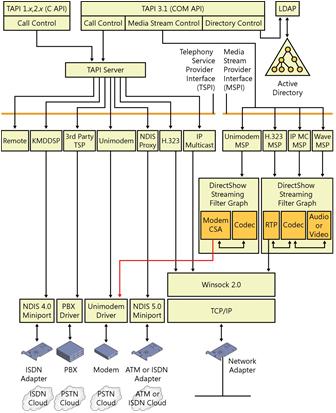
TAPI version 3 is a COM-based API that merges classic and IP telephony. Possible applications range from simple voice calls over the Public Switched Telephone Network (PSTN) to multicast multimedia IP conferencing with quality of service (QOS).

There are four major components to TAPI 3:

  • COM API
  • TAPI Server
  • Telephony Service Providers (TSPs)
  • Media Stream Providers (MSPs)
The API is implemented as a suite of Component Object Model (COM) objects. Moving TAPI to the object-oriented COM model allows developers to write TAPI-enabled applications in many languages, such as .NET, Java, or C++. Use of COM enables component upgrades of TAPI features.

The COM-based telephony API, TAPI 3.x, is available starting with Microsoft Windows X. TAPI 3.x provides greatly enhanced development tools for the modern world of communication programming, where a "call" may be a video stream on an IP-based network, and there is no phone set involved in the session.

f26zs03.jpg

Read more: Codeproject

Posted via email from Jasper-net

Invoke Web Services from Android

|
This is ongoing blog on Getting Started with Android. In earlier blog, I provided an architecture overview of android application, followed by setting up the development environment for Android and creating and running a simple application.

In this blog, I will describe how to invoke web services (soap based services) via Android. In my next blog, I will follow it up with how to invoke REST based services. For trying out the tutorial, you need to have the android development environment setup as mentioned in my previous blog.

There are two ways in which invoke web services

Raw APIs  : Use the HttpClient and XML parser to manually create a soap request and parse the soap response.
Using a soap client library : like KSOAP library which does the low level work for parsing and dealing with soap messages – For Android, there is library available at http://code.google.com/p/ksoap2-android/ . Its good to see some active development for KSOAP 2, I remembered I wrote the first article on KSOAP 2 way back in 2003 ( http://naveenbalani.com/index.php/2010/05/deliver-web-services-to-mobiles/)and good to see it back in development for android.
I would start development with the later approach, but I plan to use RAW APIs in the follow up post -

Download the KSOAP2 library , go to http://code.google.com/p/ksoap2-android/ , click on downloads link on the menu, and download the latest release artifact – http://code.google.com/p/ksoap2-android/source/browse/m2-repo/com/google/code/ksoap2-android/ksoap2-android-assembly/2.5.2/ksoap2-android-assembly-2.5.2-jar-with-dependencies.jar . In the release artifact page, click on “View raw file” and select “Save Link as” and download the jar file which has all the required dependencies.

Next we would create a sample android project which would invoke a .NET web service. I decided to host a simple .NET web service in my website , so it would easier for you all to try out the sample . The web service is available at http://naveenbalani.com/WassupAndroid.asmx

This is a simple .NET service, with one operation called todayMessage(), which display “Wassup Android from a .NET application “ as output.

To create an andrioid project.  Start eclipse.

Select File > New > Project.
Select Android > Android Project, Click Next.
Enter the following information for the project -
Project name –  AndroidClientService

Build Target – Android 2.3

Application name –  WasuppTodaysMessage

Package name – org.android.websevice.client.samples

Create Activity –  AndroidClientService

Min SDK Version –  9

Click Finish
This would create a Project called AndroidClientService in your workspace.

Next , add the ksoap2-andriod dependency to the project. Select the AndroidClientService, click properties , click on Java build path , click on Libraries , select Add External Jars and add the ksoap2 library (ksoap2-android-assembly-2.5.2-jar-with-dependencies.jar) and click Ok.

Next, open up the WasuppServiceClientAndroid class and replace the onCreate method with the following onCreate() method as shown in listing below. Following shows the complete code listing.


Read more: Javalobby

Posted via email from Jasper-net

Scripting the Linux desktop, Part 2: Scripting Nautilus

|
Summary:  This series of articles explores how to use Python to create scripts for the GNOME desktop, the screenlets framework, and Nautilus to deliver a highly productive environment. Scripts on the desktop enable drag-and-drop functionality and quick access to the information and services you commonly use. In this installment, learn how to use Python to add functionality to extend Nautilus on your desktop.

Read more: IBM

Posted via email from Jasper-net

Python is One of the Most Popular Programming Languages

|
Python is quickly taking the lead as one of the most popular programming language. You might be skeptical, but Python is growing at a faster rate than any other language. It received TIOBE Programming Language of the Year award twice, once in 2007, and again in 2010. Even now it still has the highest growth of any other language. What makes Python so great?

While statistical analysis always has its flaws, the trends are pretty clear. Java, C#, even PHP are losing popularity, Python, Ruby, Haskell, Ada are gaining popularity, and even Google Trends seems to agree.

Python is an interpreted language, like PHP, Ruby, and Perl. While PHP was very popular throughout the 2000s. Recently PHP and Python have become equally as popular. Now they are neck in neck. Both of them have enough features to be capable of anything. Some subtle differences however, make Python more amazing than PHP.

The Competition
PHP is one of the main competitors to Python's dominance, but mostly in the web development arena. PHP is very integrated with web development and can be used for it right out of the box like ASP. How does Python compete with that? Well Python has many web frameworks whose features so outperform PHP that it would be crazy to take on huge custom projects with PHP instead of Python and a framework like Django or Plone.

For example, Django's features allow for model generation using OO design philosophy and immediate database table generation based on your Python code.

I myself, am a Drupal PHP developer. Drupal is by far my favorite web framework. The modular-hook design and constant major updates (without backwards compatibility) were at first very attractive, but now I've become dissatisfied with it after being involved in a major custom-designed Drupal project. I find it superior to Wordpress in every way, but it's hard to customize it without some work.


Read more: Inferno development

Posted via email from Jasper-net

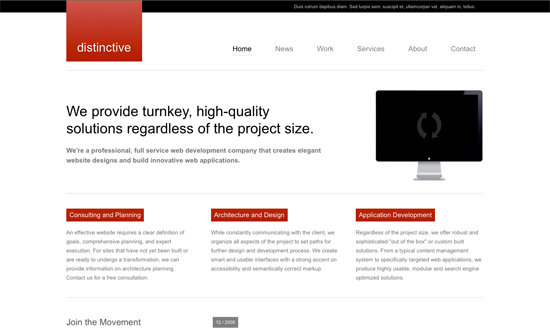
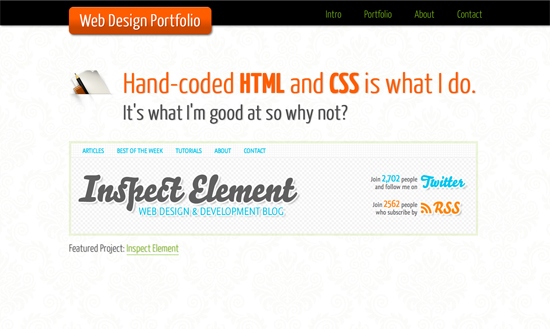
High Quality HTML and CSS Templates

|
Following the last two posts on forms, I’m now listing 10 fresh HTML and CSS templates. They are ideal for implementing a modern form, while not all templates listed here are HTML5, you can replace the old doctype for the newest, <!DOCTYPE html>, supporting HTML5. After all remember that the new doctype is backwards compatible.

Two of the HTML5 templates are part of a tutorial, which is perfect for adjusting more considering that they come with explanations on the how and why.

If you need a website online fast, it is a matter of picking out a template and implementing the latest tutorials on HTML5 and jQuery forms.

one-page-portfolio.jpg  distinctive.jpg

Read more: Devlounge

Posted via email from Jasper-net

Использование возможностей Windows в приложениях Silverlight

|
С выходом в свет Silverlight 4 у разработчиков появилась возможность создавать доверяемые приложения, которые могут делать вызовы к COM подсистеме Windows. Это позволяет расширять функциональности Silverlight приложений практически неограниченным образом. Все бы ничего, но примеров такого использования и реализаций немного, да и скорее всего они вызывают самые необходимые вещи в приложениях, в виде библиотек их не выпускают. Поэтому Microsoft выпустил в свет обертки Silverlight над наиболее интересными функциями COM.

Набор этих компонент называется Native Extensions for Microsoft Silverlight и опубликованы они по этому адресу: http://code.msdn.microsoft.com/nesl вместе с исходным кодом.


В основную часть этих компонент вошли следующие возможности:
  • Windows Sensor API Возможности по интеграции сенсоров поддерживаемых операционной системой Windows 7 Это например такие сенсоры как акселерометр, сенсор освещенности, компас, гироскоп, сенсор локации.
  • Windows Speech API Средства чтения текстов (TTS) и распознавания речи (SR).
  • Windows Portalbe Devices APIСредства работы с мобильными устройствам и контентом на них. Это камеры, телефоны, плееры, сканнеры и т.п.
  • Windows 7 Taskbar Integration Средства интеграции с панелью задач Windows. Пункты быстрых переходов, миниатюры, кнопки, в общем, все основные функции доступные приложениям Windows7.
  • Webcam Local Encoding and Window Capture Средства работы с веб-камерами. Запись потока веб камеры в файл а так же запись экранного видео.
  • Windows Message Interception Работа с низкоуровневыми оконными сообщениями Windows. Например, один из сценариев приведенных в документации к NESL это реализация реакции приложения на сообщение об изменении разрешения экрана.

Read more: Habrahabr.ru

Posted via email from Jasper-net

VsTortoise - a TortoiseSVN add-in for Microsoft Visual Studio

|
News
17th Feb 2011: VsTortoise Build 29 Beta released. Please see download and changelog for details.
27th Sep 2010: VsTortoise Build 28 Beta released.
7th July 2010: VsTortoise Build 27 stable released.


Project Description
VsTortoise is an add-in for Microsoft Visual Studio 2005/2008/2010RC standard and higher editions, that provides an interface to perform the most common revision control operations directly from inside the IDE. It uses TortoiseSVN to execute the Subversion commands. Every command can be binded to a shortcut inside the IDE. You can, of course, still perform every TortoiseSVN command from the Windows Explorer.

VsTortoise does not register as source control provider in the IDE and will not interfere (eg displaying a “check-out” etc dialog) when editing a document.


Read more: Codeplex

Posted via email from Jasper-net

Visual Studio: Remove Unused References and Assemblies from your Project

|
When you create a default project in Visual Studio, there are a couple of references and assemblies that get added by default. Just create any new Window, Web, Console or Silverlight project using Visual Studio and check the using directives (only in C# templates) as well as the assemblies that get added.

You may not need them all. So after you have finished coding, it’s a good idea to remove unused references as well as assemblies from your project to improve code readability, maintainability as well as gain a slight advantage in the applications load time. If you are using a C# code template (VS 2008 and 2010), you can do the following:

Right-click in your Code behind file > Organize Usings > Remove Unused Usings

image%5B12%5D.png?imgmax=800

Read more: DeVCURRY

Posted via email from Jasper-net

Building the Next-Generation Datacenter – A Detailed Guide / Stage 4

|
In parts one, two, and three of this article, we provided a brief overview of the CA Technologies virtualization maturity lifecycle, and focused on the server consolidation, infrastructure optimization, and automation & orchestration stages of the lifecycle. The capabilities described in each of those stages provide an essential foundation for a dynamic datacenter, which is an IT environment that not only supports the business but, at times, is part of the product delivered by the business. It is an agile IT environment, built on top of an optimized and automated virtual infrastructure, that is:
  • Service oriented: Delivering on-demand, standardized services to the business (internal customers, partners, etc).
  • Scalable: With the ability to span heterogeneous physical, virtual and cloud environments.
  • Secure: Providing security as a service to internal / external customers.

Agility Made Possible

The dynamic data center is neither a one-size-fits-all solution, nor an endless pit where CIOs should invest money and resources to obtain capabilities not needed for their business. However, IT organizations trying to build a dynamic data center face some fundamental challenges such as:
Delivering a standard set of tiered-services (with well defined SLAs) that are consumable by business users.
Service oriented automation and orchestration that spans heterogeneous physical, virtual and cloud environments.
Ensuring security, compliance and QoS for the entire service.
Providing a comprehensive service interface that serves as a visual communication tool between IT and the business.
The following section summarizes the basic tasks and capabilities required to build and maintain a dynamic data center that allows IT departments to serve as an agile service provider and drive competitive differentiation for the business.

Project Plan

Following is a high-level project plan for a sample scenario that would be part of achieving a dynamic data center. The timelines and tasks mentioned in Table 1 present a broad outline for a mid-tier IT project that is focused on supporting expanding business initiatives with agility. Forward Inc has identified a lucrative opportunity in offering one of its internal services (e.g. billing, shipping, order management, Electronic Medical Records, etc.) to a host of new local and international partners. This would not only allow Forward Inc to profit from its IT investments, but also provide valuable services to its partners - thus helping improve partner retention / expansion.


Read more: .NET Journal

Posted via email from Jasper-net

Harvester - Debug Monitor for Log4Net and NLog

|
Project Description
Harvester enables you to monitor all Win32 debug output from all applications running on your machine. Watch real time Log4Net and NLog output across multiple applications at the same time. Trace a call from client to server and back without having to look at multiple log files.

Inspired by tools such as Windows Sysinternals DbgView, DBMon.NET and Chainsaw. Harvester provides a simple .NET implementation that aims to merge the best of all aforementioned applications. Watch all OutputDebugString output from all application running on your local machine in a single view (Client/Server and everything in between). Great for monitoring websites during development to ensure that they are behaving as expected!

With Harvester there is no longer a need to monitor your applications log files during application development.

Read more: Codeplex

Posted via email from Jasper-net

ASP.NET & Visual Studio 2010 What’s New Quick Videos (35)

|

Garbage Collection Sample Code

|
Project Description
Garbage collection sample code demonstrates the differences between the large and small object heaps. This code supports the blog post at http://www.deepcode.co.uk

This project is the source code to the following blog post: http://www.deepcode.co.uk/2011/02/garbage-collection-in-net-large-and.html

Read more: Codeplex

Posted via email from Jasper-net
how to make your bash aliases available as a root in ubuntu

|
Create a ~/.bash_aliases file and put all your cute little aliases in there to use these as your own user, add the following into your local ~/.bashrc file:

if [ -f ~/.bash_aliases ]; then
. ~/.bash_aliases
fi

to use these as root, add the following into your /root/.bashrc file:

if [ -f ~/.bash_aliases ]; then    
. ~/.bash_aliases

Read more: Ruby Newbie

Posted via email from Jasper-net
YAML Parser in C#

|
Introduction

YAML is a human-friendly, cross language, Unicode based data serialization language designed around the common native data types of agile programming languages. It is broadly useful for programming needs ranging from configuration files to Internet messaging to object persistence to data auditing.

Visit the official YAML website for more information.

YAML Basics

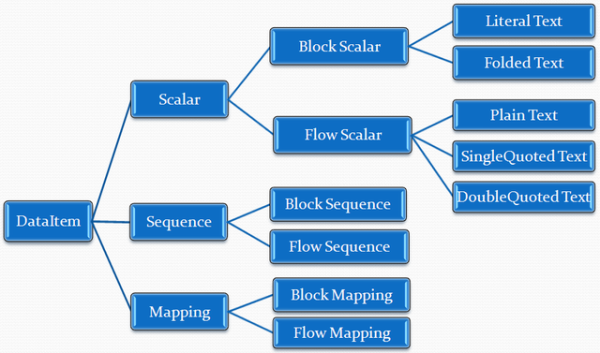
A YAML file may contain zero or more YAML documents, separated by document markers. A YAML document contains one root DataItem. There are three types of DataItems: Scalar, Sequence, and Mapping. DataItems may be nested to form structured data.

Each DataItem type has several formatting styles for good human readability.

yamlDataItem_small.png

Read more: Codeproject

Posted via email from Jasper-net