This is a mirror of official site: http://jasper-net.blogspot.com/

MonoDevelop 2.4.1 is out

| Tuesday, November 23, 2010
MonoDevelop 2.4.1 has been released. This release is focused mostly on bug fixes, but we still managed to add a few nice features:

we now support .NET 4.0 projects;
the Gtk# designer now works on OSX;
better native OS integration on Mac and Windows.
Improved support for XBuild projects


Read more: Miguel de Icaza's web log

Posted via email from .NET Info

Thumbnail Previews in the IDE Navigator

|
n vstipTool0023 (http://blogs.msdn.com/b/zainnab/archive/2010/05/17/using-the-ide-navigator-vstiptool0023.aspx)I showed you how to use the IDE Navigator.  This next tip comes from Paul Harrington on the Visual Studio Team.  In Visual Studio 2008 when you used the IDE Navigator you also were able to see thumbnail previews of the documents in the list.  However, this feature was removed from Visual Studio 2010.

The good news is that the feature is still there.  It requires you to add a value to the Registry so be warned that you do this at your own risk.  Okay, so here is what you do:

Open up the Registry and  navigate to HKEY_CURRENT_USER\Software\Microsoft\VisualStudio\10.0\General:

0310.image_5F00_thumb_5F00_3.png

Now you should have the thumbnail preview available:

7633.image_5F00_thumb_5F00_6.png

Read more: Visual Studio Tips and Tricks

Posted via email from .NET Info

Coded UI Editor – Guide

|
Feature Pack 2 is Available! and it’s Awesome!

The feature pack comes with some great features and the one I want to talk about in this post is – Coded UI Test Editor.

I’ve recorded a simple CUIT on Windows Calculator that adds to numbers and show the result.

Getting Started

After you install the Feature Pack 2 you will notice that Double Click or Right click on “UIMap.uitest” file will open a new window contains all CUIT Actions.

image_thumb_7F4A6742.png

Read more: Shai Raiten

Posted via email from .NET Info

Геолокация в Windows 7 без GPS

|
Много ли вы видели ноутбуков, которые оснащены GPS датчиком? Примерные оценки можно посмотреть тут, 58 штук из 4380, то есть 1.3%. Прямо скажем — не много. Трудно назвать все причины, по которым производители не оснащают портативные компьютеры, в общем-то, недорогим чипом, но наша заметка как раз о том, как ваш ноутбук снабдить функциональностью геолокации, даже если GPS датчика у вас нет. А заодно вы узнаете, как очень просто получить ваши координаты программным способом.

Поговорим о погоде?

Пользуетесь ли вы гаджетом погоды в Windows 7? До недавнего времени я не пользовался, так как вбивать в ручную очередной город (а путешествую я очень много) мне было лень. Опция автоматического определения моих координат не работала.

Все дело в том, что гаджет этот пытается определить ваши координаты через Windows7 Sensor API. И требует наличия драйвера сенсора. Недавно, подготавливая презентацию к Платформе 2011 я наткнулся на сенсор Geosense, который очень неплохо определяет координаты. Для сервиса погоды они годятся на 100%.

Windows 7 Sensor API реализован в том числе и в .NET Framework 4.0. Вам достаточно написать буквально 3 строчки кода, чтобы понять, где вы находитесь:

geo-code.png

Read more: habrahabr.ru

Posted via email from .NET Info

25 Fresh inspiration website design

|
Web designers always stay up to date on current trends, with seeing how to structure web layout, choose color palettes, work with usability, and understand the overall design process.  It’s important to frequently check out other inspirational designs to see how you can apply new trends to your own project and continue to go forward as a designer.

There are plenty of creative and beautiful website. This website can help you to learn and inspire you for website designing concepts. Have a look to these 25 beautiful website designs.

FreePeople.png

Read more: webdesign14.com

Posted via email from .NET Info

"Save To My Skydrive" Come True

|
GoogleCloudConnect.png

More than two years ago, I wrote a blog post of my view on Cloud Computing, titled "Save To My Skydrive". Back then both OfficeLive and Google Docs provided online Office applications and collaboration tools. But one thing missing in both offerings was the feature that allows one to easily save local docs to the cloud, by simply clicking "File"-->"Save To Skydrive" in MS Office software.

Today, Google announced Google Cloud Connect for Microsoft Office,  a tool that enables local MS office files to sync to Google Docs.

Update: Microsoft Office 2010 comes with Office Web Apps that allows file sharing and editing with Sharepoint or Skydrive. Windows Phone 7 has "Upload to Skydrive" for pictures and videos, and the Office OneNote app supports real-time sync with Skydrive.

Read more: Pei Zheng's Mobile Computing Blog

Posted via email from .NET Info

uClibc

|
uClibc (aka µClibc/pronounced yew-see-lib-see) is a C library for developing embedded Linux systems. It is much smaller than the GNU C Library, but nearly all applications supported by glibc also work perfectly with uClibc. Porting applications from glibc to uClibc typically involves just recompiling the source code. uClibc even supports shared libraries and threading. It currently runs on standard Linux and MMU-less (also known as µClinux) systems with support for alpha, amd64, ARM, Blackfin, cris, h8300, hppa, i386, i960, ia64, m68k, mips/mipsel, PowerPC, SH, SPARC, and v850 processors.
If you are building an embedded Linux system and you find that glibc is eating up too much space, you may want to consider using uClibc. If you are building a huge fileserver with 12 Terabytes of storage, then using glibc may make more sense. Unless, for example, that 12 Terabytes will be Network Attached Storage and you plan to burn Linux into the system's firmware...

uClibc is maintained by Erik Andersen and is licensed under the GNU LESSER GENERAL PUBLIC LICENSE . This license allows you to make closed source commercial applications using uClibc. (Please consider sharing some of the money you make ;-). You do not need to give away all your source code just because you use uClibc and/or run on Linux. See the list of Frequently Asked Questions for details.

Read more: uClibc

Posted via email from .NET Info

Kinect hack creates world's greatest shadow puppet (video)

| Monday, November 22, 2010
kinect-hack-creates-worlds-greatest-shadow-puppet-video----engadget.jpg

Hey Xbox 360 Kinect owners, want to spice up those family shadow puppet shows? Then check out the installation prototype created by Emily Gobeille and Theo Watson using an Xbox Kinect connected to a laptop using the libfreenect Kinect drivers and ofxKinect. The openFrameworks system tracks the elbow, wrist, thumb, and tips of the fingers to map a skeleton onto the movement and posture of an animated puppet. And get this: it was made in a day. So just imagine the Kinect homebrew we'll have around this time next year. See it in action after the break.

Read more: Engadget

Posted via email from .NET Info

Google Offered To Buy Twitter For $2.5-$4 Billion – Sources

|
Earlier this year, as part of an on-going dialogue between Google's corporate development team and Twitter, Google floated the idea of an acquisition with a price around $2.5 billion, we've heard from a source close to an executive involved in the talks. We'd caution that this was not a formal offer – more of a casual offer to offer. The overture was refused – even characterized as "insulting." A second source, a Twitter shareholder, tells us he was told Twitter turned down a $4 billion offer about three months ago. This source does not know who the buyer was.

Read more: Business insider

Posted via email from .NET Info

Razer Nostromo gaming keypad supplants Belkin's n52te Speedpad, does it proud

|
rzrnostromoisolatedleft-small.jpg

Think you've been gaming on the PC for awhile? If you can't vividly remember gushing over this thing (and scrounging up pennies from under the couch in order to finance one), move along. If, however, you're still the proud owner of an attic-bound Belkin Nostromo n52, you can definitely prepare yourself for a healthy dose of nostalgia here. After co-developing Belkin's n52te Speedpad a few years ago, it looks as if Razer has now fully taken over the gamepad by today introducing the Nostromo. Yeah, just Nostromo. The design is certainly a familiar one, boasting a 16-button keypad, a soft-touch rubberized wrist pad, 16 fully-programmable Hyperesponse gaming buttons and an eight-way directional thumb pad. As for improvements, you'll get the ability to switch instantly between eight keymaps (up from three), and the flexibility of storing up to twenty gaming profiles (up from the previous limit of ten). It's available to order now for $69.99 / €69.99, with an estimated ship date of November 29th worldwide. You know, in plenty of time to stuff your own stocking.

Read more: Engadget

Posted via email from .NET Info

zButterfly torrent client focuses on current movie releases

|
zbutterflytorrents.jpg

new Windows BitTorrent client called zButterfly has a twist that sets it apart from the competition: a menu of current movie releases, including the hottest flicks that are still running in theaters. zButterfly has an easy-to-use interface for searching and browsing the releases, and operates entirely on torrentless downloading via magnet links. Even the most clueless downloader can use zButterfly to get access to recent Hollywood fare.

Read more: DownloadSquad

Posted via email from .NET Info

Intel Talks 1000-Core Processors

|
An experimental Intel chip shows the feasibility of building processors with 1,000 cores, an Intel researcher has asserted. The architecture for the Intel 48-core Single Chip Cloud Computer (SCC) processor is 'arbitrarily scalable,' According to Timothy Mattson 'This is an architecture that could, in principle, scale to 1,000 cores,' he said. 'I can just keep adding, adding, adding cores

Read more:  Slashdot

Posted via email from .NET Info

Microsoft Lync: Ushering in a new generation of communications

|
Today, with our customers and partners in New York City, we are celebrating the launch of Microsoft Lync -- the next generation of Office Communications Server.  

Earlier this year, Exchange 2010, SharePoint 2010 and Office 2010 launched, delivering the best productivity experience across the PC, phone and browser. Together, these products provide the productivity backbone of modern businesses and help address the generational shifts impacting organizations of all sizes – shifts like the advent of the cloud, information overload, globalization and the consumerization of IT.

Microsoft Lync 2010 now delivers on our vision to transform communications by connecting people in new ways. Lync integrates enterprise voice, instant messaging and web, audio and video conferencing into a connected single communications experience.

If you’re not yet familiar with Lync, let me share with you some of my favorite new features:

  • Unified experience. Go from an instant message, to a voice call, to a video call, to a meeting, to a shared whiteboard session – all within the same Lync 2010 experience.
  • One-click web conference.  Use Outlook to set up a web conference with one-click of the mouse.
  • Connect with family. While you’re travelling, use Lync to start a high-definition voice and video conversation with any Windows Live Messenger user around the world.
  • Hush that annoying meeting participant.   When someone has poor audio on a conference call or lots of background noise, Lync will identify which phone to mute to improve quality – and productivity.
  • Device switching. Switch between your head-set and phone in the middle of a call with device switching.  Use that same head-set to make a phone call using WiFi on an airplane.

Read more: The Official Microsoft Blog

Posted via email from .NET Info

Useful SQL Server System Stored Procedures You Should Know

|
System Stored Procedures are useful in performing administrative and informational activities in SQL Server. Here’s a bunch of System Stored Procedures that are used on a frequent basis (in no particular order):


System Stored Procedure

Description

sp_help Reports information about a database object, a user-defined data type, or a data type
sp_helpdb Reports information about a specified database or all databases
sp_helptext Displays the definition of a user-defined rule, default, unencrypted Transact-SQL stored procedure, user-defined Transact-SQL function, trigger, computed column, CHECK constraint, view, or system object such as a system stored procedure
sp_helpfile Returns the physical names and attributes of files associated with the current database. Use this stored procedure to determine the names of files to attach to or detach from the server
sp_spaceusedDisplays the number of rows, disk space reserved, and disk space used by a table, indexed view, or Service Broker queue in the current database, or displays the disk space reserved and used by the whole database
sp_whoProvides information about current users, sessions, and processes in an instance of the Microsoft SQL Server Database Engine. The information can be filtered to return only those processes that are not idle, that belong to a specific user, or that belong to a specific session
sp_lock Reports information about locks. This stored procedure will be removed in a future version of Microsoft SQL Server. Use the sys.dm_tran_locksdynamic management view instead.
sp_configure Displays or changes global configuration settings for the current server
sp_tables Returns a list of objects that can be queried in the current environment. This means any object that can appear in a FROM clause, except synonym objects.
sp_columnsReturns column information for the specified tables or views that can be queried in the current environment
sp_depends Displays information about database object dependencies, such as the views and procedures that depend on a table or view, and the tables and views that are depended on by the view or procedure. References to objects outside the current database are not reported

Read more: SQL Server curry

Posted via email from .NET Info

One possible reason why ShellExecute returns SE_ERR_ACCESSDENIED and ShellExecuteEx returns ERROR_ACCESS_DENIED

|
(The strangely-phrased subject line is for search engine optimization.)

A customer reported that when they called ShellExecute, the function sometimes fails with SE_ERR_ACCESSDENIED, depending on what they are trying to execute. (If they had tried ShellExecuteEx they would have gotten the error ERROR_ACCESS_DENIED.)

After a good amount of back-and-forth examing file type registrations, a member of the development team had psychic insight to ask, "Are you calling it from an MTA?"

"Yes," the customer replied. "ShellExecute is being called from a dedicated MTA thread. Would that cause the failure?"

Why yes, as a matter of fact, and it's called out in the documentation for ShellExecute.

Because ShellExecute can delegate execution to Shell extensions (data sources, context menu handlers, verb implementations) that are activated using Component Object Model (COM), COM should be initialized before ShellExecute is called. Some Shell extensions require the COM single-threaded apartment (STA) type.
As a general rule, shell functions require STA. Recall that MTA implies no user interface. If you try to use an apartment-threaded object from your MTA thread, a marshaller is required, and if no such marshaller exists, the call fails.

Read more: The old new thing

Posted via email from .NET Info

Why do I recommend switching over from MyISAM to Innodb!

|
MyISAM has been the default storage engine for MySQL for years now. But that is soon going to change. With MySQL 5.5, Innodb is going to be the default storage engine (and I am pretty pleased about that, no more new users complaining about MySQL not being ACID compliant).

But why do I recommend Innodb over MyISAM. Following are the reasons:

I will start of with reasons not so obviously discussed during comparisons of Innodb and MyISAM storage engines. But these reasons are so compelling that I bet you would want to switch over to Innodb after reading the reasons.

Innodb is being constantly improved and worked upon

There hasn’t been much work put forth into improving the MyISAM storage engine, and with Oracle acquiring MySQL and owning Innodb, it has put its weight on the Innodb storage engine. While there hasn’t been much work done on MyISAM side, Innodb has seen improvements and work is being done aggressively. MySQL 5.5 will ship with a new version of Innodb – version 1.1, which has major performance improvements. Even if you are using MySQL 5.1, you can replace the built-in Innodb with the newer Innodb plugin – version 1.0.8, which has introduced major performance improvements.

Innodb supports row-level locking

Innodb not only supports table-level locking, but also supports row-level locking, making it the storage engine of choice for high concurrency applications.

Innodb supports hot backup

With MyISAM, backing up a live database, is pretty much an issue for many DBAs because of the way how MyISAM supports locking. MyISAM only supports table-level locks which pretty much means that the server must go down during the backup, for sometime depending upon the amount of data in the database. With Innodb this is no issue at all, Innodb supports row level locking which allows you to do hot backups.

Innodb is ideal for high-concurrency applications

Yet another big reason for using Innodb is that with Innodb you can achieve high-user-throughput and high-database-concurrency. That is again thanks to the row-level mechanism of Innodb, which makes it a big winner (compared to MyISAM) in cases where you need highly concurrent read-write operations.

Innodb is crash proof

What I essentially mean by being crash proof is the database, recovering back into a consistent state in case of a crash (be it an OS crash or a MySQL server crash). While in the case of MyISAM, a crash would mean that you would have to deal with recovering tables on the crash or partially executed statements, in the case of Innodb there would be essentially no data inconsistency and all the more its more of an automated recovery, where by Innodb would recover itself by replaying its logs.


Read more: Ovaistariq

Posted via email from .NET Info

MySQL Database Backup Utility

|
Introduction

One of the most frequent questions on forums is how to back up MySql databases directly from a .NET application. Unfortunately, unlike Access, SqlLite etc., it is not really a case of just copying a file and renaming it, you really have to get down and dirty and basically recreate the SQL that creates all tables and inserts all data back into tables from scratch. There are applications that do this for you, obviously, such as SqlDump, mysqlhotcopy etc., but these require some knowledge of MySQLl and relational databases in general. Unfortunately, in my experience, 99% of my clients do not even know what a relational database is; they just want a computer program that can do their invoices and manage their stock with pretty graphs to look at. When it comes to backing up, they just want to press a button that says Back-up and everything is taken care of. The obvious answer to this would be to use Process.Start("mysqldump", filename), and hey presto, you have a full backup. Sadly, I have never had much success with this. Let me tell you. I tried, but it would always stuff up, especially when it is the client trying to do a back up with no one else around to recover the process for them. Then you have an irate client on your hands, telling you that you have the programming skills of a twit, who couldn't even make a backup system that worked. So I set out to make a bulletproof, fully managed, backup class that I could use in my .NET apps.

I just thought, having completed most of what I set out to accomplish, that I would share the results of that effort with everyone else out there who needs something like this. First off though, I need to stress that I am in no way a database expert, rather I am just a humble application developer who has built up a business building custom business applications that just happen to have a database for the back-end. While I have fully tested this successfully on my own databases, those databases tend to be small and located on the machine that is doing the backup. For the database experts out there, I would really appreciate your comments and criticisms to optimise this and correct things that I have done incorrectly. I also need to apologise in advance if the code lines are too long to read without scrolling. I have widescreen monitors, and I hate line continuation characters in my code (except maybe to stress SQL - maybe), so there.

Prerequisites

Other than the fact that you need access to a MySQL server with a database to play around with, and the .NET connector for MySQL which can be found here: MySql Connector for .NET, you will only need Visual Studio (I have used VS 2008) to run the project and test the backups.

Project design

Obviously, the first thing to do once you have established what the project is setting out to do, is to figure out what is necessary to accomplish those goals. When it comes to backing up a database schema, the only things to make a decision on are:

1. What is the optimal way to recreate a database from scratch?

Having done the research, mainly studying the way other people and organisations have accomplished this, I came to the conclusion that recreating the SQL for the CREATEs and INSERTs for each table would be the most obvious way to go, especially as this was in our original conclusion. We also needed to make a decision as to how far in recreating the database we needed to go. Would we need to backup Stored Procedures, Functions, and Views? What about recreating Indexes? And Foreign Keys?

I decided that it would be better to start off with the aim of being able to recreate any database, complete with Stored Procedures, Functions, Views, and Foreign Keys. As far as Indexes go, I would rely on MySQL itself to create Indexes on Unique, Primary, and Foreign Keys automatically when the tables are recreated on restoration. Any other Indexes would have to be created manually once the restoration is complete, by the SysAdmin.


Read more: Codeproject

Posted via email from .NET Info

IIS Smooth Streaming HD Sample Content

|
Overview
The following high-definition (HD) Smooth Streaming video presentations are encoded with Microsoft Expression Encoder 4 into multiple bit rates that allow you to experience on-demand Smooth Streaming in action:
  • Big Buck Bunny H.264 720p.zip. A sample Smooth Streaming video presentation encoded with H.264 video and AAC audio codecs in 8 standard bit rates.
  • Elephants Dream H.264 720p.zip. A sample Smooth Streaming video presentation encoded with H.264 video and AAC audio codecs in 8 standard bit rates. In addition, this presentation includes an alternate language and director's commentary audio tracks, and a textstream track that contains caption text in Timed Text Markup Language (TTML) format.

Note
  • Big Buck Bunny images and content © copyright 2008, Blender Foundation | www.bigbuckbunny.org.
  • Elephants Dream images and content © copyright 2006, Blender Foundation / Netherlands Media Art Institute / www.elephantsdream.org.

Read more: MS Download

Posted via email from .NET Info

How to Detect if a Method is Overridden

|
Suppose you want to know if (the class of) a particular object overrides a virtual method. For an example of this see OpenJDK's Thread.isCCLOverriden() (line 1573).

In Java the obvious way to do this would be to use reflection. On the CLR there is another way that is both more accurate1 and more efficient.

Here's the MSIL method from IKVM's java.lang.Thread.isCCLOverridden() implementation:

.method private hidebysig static bool isCCLOverridden(class java.lang.Thread A_0) cil managed
{
 ldftn      instance class java.lang.ClassLoader java.lang.Thread::getContextClassLoader()
 ldarg.0
 ldvirtftn  instance class java.lang.ClassLoader java.lang.Thread::getContextClassLoader()
 ceq
 ldftn      instance void java.lang.Thread::setContextClassLoader(class java.lang.ClassLoader)
 ldarg.0
 ldvirtftn  instance void java.lang.Thread::setContextClassLoader(class java.lang.ClassLoader)
 ceq
 and
 ldc.i4.0
 ceq
 ret
}
Instead of running a zillion instructions and accessing a lot of cold data for reflection, this simply leverages the information the JIT already has about virtual methods.

Here's the x86 code this turns into:

 push        ebp
 mov         ebp,esp
 push        esi
 push        ebx
 mov         esi,ecx
 push        258F58h
 mov         ecx,esi
 mov         edx,259240h
 call        JIT_VirtualFunctionPointer
 mov         edx,25DCA0h
 cmp         eax,edx
 sete        bl
 movzx       ebx,bl
 push        2591A0h
 mov         ecx,esi
 mov         edx,259240h
 call        JIT_VirtualFunctionPointer
 mov         edx,25DCB0h
 cmp         eax,edx
 sete        al


Read more: IKVM.NET Weblog

Posted via email from .NET Info

Visual Studio Add-In For creating Vista Gadget

|
gadgettoolbarandmenu.png

Project Description
The absence of tools in Visual Studio that can help developers to create Vista gadgets is strange and disappointing, in my opinion. I hope it's a temporary state, but now, I want to show you some tools that can help you to develop Vista gadgets using only Visual Studio 2008 or 2010 IDE. These tools include Visual Studio template for creating Vista gadgets and Visual Studio add-in for creating a .gadget file from a project and run a gadget installation.

Read more: Codeplex

Posted via email from .NET Info

MSI Explorer - A quick and simple means to spelunk MSI’s

|
Most of us are quite familiar in creating MSI or Setup for our applications. By using a MSI, we can make sure all dependencies for running the application will be placed properly. MSI is the best option available on Windows OS for packaging and distributing our application. For .NET developers, Visual Studio presents lot of features in creating setup and deployment projects for our application. But, there are no built-in tools in Visual Studio to look into the MSI contents. And that too, to make a small change in MSI, it requires rebuilding the entire Setup Project. So, I think it's better to design an application that will analyze the MSI and give the details of it along with capability of updating it without rebuilding.

Features present in this application:

It allows us to look into the contents of the MSI.
It allows us to export the contents of the MSI.
It allows us to update commonly changing properties without rebuilding it.
Easy to use UI.
Now, Updating an MSI is quite simple

Read more: Greg's Cool [Insert Clever Name] of the Day
Read more: MSI Explorer

Posted via email from .NET Info

.NET LwVCL (visual components library)

|
Introduction

LwVCL (http://www.lwvcl.com) is fast, flexible, small visual components library that provides rich set of various UI components (~30) and is thrifty to system resources usage. We have been developing the project for more than two years. It grows fast, keeping its best features.

The next generation of the library is not just a components set - it's a solid GUI toolkit that adds transparent support for J2SE, J2ME and .NET platforms to your application. Our solution allows you to develop a user interface basing on the same concept, API, look and feels for different platforms and environments:

J2SE LwVCL http://www.lwvcl.com/j2se.php
J2ME Personal Profile (Personal Java) http://www.lwvcl.com/j2se.php
J2ME MIDP LwVCL (draft version) http://www.lwvcl.com/j2me.php
.NET LwVCL http://www.lwvcl.com/net.php
All the packages can be downloaded from our site http://www.lwvcl.com/download.php. The packages are supplied with the source code (Java and C#).

You are welcome to the site http://www.lwvcl.com

To understand what the library components set looks like start the demo applet http://www.lwvcl.com/online-demo.php or download the J2SE or .NET LwVCL package that provide 60 samples to demonstrate the library features.

Read more: Codeproject

Posted via email from .NET Info

OpenID Starter Kit for ASP.NET MVC

|
OpenID Starter Kit for ASP.NET MVC
Overview
OpenID Starter Kit for ASP.NET MVC is first and foremost it is a learning tool. I've learned a lot about OpenID while developing this and commented the code a lot. If you want to use it in this way I running the application and stepping through the code. Apart from it's education value you can also use it as a starter kit for your ASP.NET MVC based web applications.

Status and future plans
This project has just started so I will be adding more to it. Right now there is only the simple support for OpenID.

In the future I hope to implement:

Pop up window for signing in to you OpenID provider.
AJAX pop up for signing in to you OpenID provider.
Make all versions available for Razor and Web Froms view engines.
License
This project is licensed under Microsoft Public License (Ms-PL). See LICENSE.txt located in the source for more info.

Community
At Codeplex: http://mvcopenid.codeplex.com/discussions

Requirements
.NET Framework 4
Entity Framework 4.0
ASP.NET MVC 3 Release Candidate - Download here

Read more: Codeplex

Posted via email from .NET Info

WPF & Silverlight: Интерфейс ICommand и его назначение

|
"Для чего нужен интерфейс icommand wpf" – подобные запросы зачастили в последнее время, решил написать небольшую статью на эту тему.

Интерфейс ICommand представляет основу для команд в паттерне MVVM. Он реализует известный паттерн – Команда. Более подробно об паттерне MVVM есть здесь: http://msdn.microsoft.com/ru-ru/magazine/dd419663.aspx, да и я писал несколько раз на эту тему, воспользуйтесь поиском.

Вкратце объясню суть MVVM: Model – модель представляющая данные в нашем приложении, View – отображение этих данных, ViewModel (дальше VM) – модель, которая связывает наши данные и отображение посредством биндинга (привязки), содержит в себе всю логику работы нашего контрола (окна). VM не содержит прямой ссылки на отображение, все работает через биндинг – она "кладется" в DataContext нашего отображения. Это все возможно благодаря великолепной реализации биндинга в WPF. Команды в этом случае выполняют роль методов, которые мы раньше вызывали после нажатия на кнопку, смену выбранного элемента списка. К примеру, у кнопки есть свойство Command, в котором мы можем указать команду, описанную в нашей VM, которая вызовется после нажатия этой кнопки.

ICommand имеет 2 метода: Execute и CanExecute. Execute – основная логика команды – все, что должно произойти при вызове команды. CanExecute – может ли быть вызван метод Execute в текущем состоянии команды. Есть уже много реализаций этого интерфейса – базовые классы, которые инкапсулируют общую логику команд. Например, SimpleCommand или RoutedCommand. В общем-то каждый MVVM фреймворк содержит в себе свою реализацию этого интерфейса, хотя суть везде одинакова.


Read more: .NET разработка от devlanfear

Posted via email from .NET Info

Fxcop ASP.NET Security Rules

|
Project Description
Fxcop ASP.NET security rules

This is a set of code analysis rules aiming at analyzing ASP.NET and ASP.NET MVC security against best practices. The rules can be used by Visual Studio 10 Ultimate or FxCop v10 standalone.
Installation
Simply run the installer and specifiy the rules folder of your FxCop installation.
For Visual Studio it's normally C:\Program Files (x86)\Microsoft Visual Studio 10.0\Team Tools\Static Analysis Tools\FxCop\Rules
Available Rules

EnableEventValidationShouldBeTrue
Verifies if the EnableEventValidation directive is disabled on a certain page

ValidateRequestShouldBeEnabled
Verifies if the ValidateRequest directive is disabled on a certain page.

ViewStateEncryptionModeShouldBeAlways
Verifies if the ViewStateEncryptionMode directive is not set to Never on a certain page.

EnableViewStateMacShouldBeTrue
Verifies if the EnableViewStateMac directive is not set to false on a certain page.

EnableViewStateShouldBeTrue
Verifies if the EnableViewState directive is not set to false on a certain page.

ViewStateUserKeyShouldBeUsed
Verifies if the Page.ViewStateUserKey is being used in the application to prevent CSRF.


DebugCompilationMustBeDisabled
Verifies that debug compilation is turned off. This eliminates potential performance and security issues related to debug code enabled and additional extensive error messages being returned.
(more..)


Read more: Codeplex

Posted via email from .NET Info

Code-Signing Best Practices

|
This paper provides information about code signing for the Microsoft Windows family of operating systems. It provides guidelines for:

• Chief technology officers (CTOs) or chief security officers (CSOs) who deploy the code signing infrastructure.
• Test lab managers who manage the process of test signing and verifying applications.
• Build engineers who sign and verify applications for use with Windows.

Included in this white paper:

• Code Signing Basics
• Signing Technologies in Windows
• Digital Signatures in Windows
• Code Signing during Software Development
• Code Signing Service Best Practices
• Code Signing Service Example Topologies
• Code Signing for Managed Networks

Read more: Windows Hardware Developing Central

Posted via email from .NET Info

Building and Using Expression Blend Behaviors

|
Behaviors are a cool way of adding functionality to XAML design elements in Expression Blend. The idea is that some rich functionality that would be hard for a designer to do can be wrapped in a way that can then be used as a drag-and-drop feature to add that functionality to a XAML element in Expression Blend. A Behavior then is an ‘object’ that implements a certain base class and member(s) so that it can be easily consumed in Expression Blend as a drag-and-drop ‘behavior’ on the design surface. To build a new behavior you need to start in Visual Studio.

Implementing Behaviors

Implementing a Behavior is straightforward and can be as complicated or as simple as you like. To start with, you will need Expression Blend installed so you can test your behavior in Expression Blend. If you are already in Expression Blend, right-click the project and click "Open in Visual Studio," which this implies correctly that you need both Expression Blend AND Visual Studio installed to create and test a Behavior. Once the project is opened in Visual Studio, right-click and select "Add New." Then in the "Add New" dialog, select Class. Give the class a name, and then you need to get the Expression Blend Library into your project. To get the base class (and the associated name space), you must add a reference to the System.Windows.Interactivity name space that comes with the Silverlight 4 framework. Right click on references and select "Add Reference.” Once the namespace is included, you are ready to build out the class you created into a Behavior. You need to start by adding the namespace at the top like this:

using System.Windows.Interactivity;

This gets the base library (namespace) you need so you can inherit from the behavior base class. Next, of course, you need to set up your class to inherit from TargetedTriggerAction and make your class look in effect like this:

public class SomeBehavior : TargetedTriggerAction
{
}

TargetedTriggerAction is our base class, where you will be able to apply it to a class of type FrameworkElement. For the purposes of this example, the Behavior will also be targeted specifically at Shape objects. The next step is to implement Invoke, which is what is fired when the Behavior is applied to the target. Invoke needs to look like this block of code:

protected override void Invoke(object parameter)
{
}

From this point, you need to get a reference to the object that your behavior targets and do to the object whatever is necessary to make the object do what you want it to do (the ‘behavior’). In this case, you typically would add a member event handler to the targeted object event to the associated object, and you start be creating a location for the reference to the target object:

Shape TargetElementItem1;

Now when Invoke is called, you would get your reference, cast it to a Shape and place it into the member reference:

TargetElementItem1 = (Shape)(this.AssociatedObject);


Read more: HACKINGSILVERLIGHT

Posted via email from .NET Info

Goodbye Google App Engine (GAE)

|
Choosing GAE as the platform four our project is a mistake which cost I estimate in about 15000€. Considering it's been my money, it is a "bit" painful.
GAE is not exactly comparable to Amazon, Rackspace or any of this hosting services, because it is a PaaS (Platform as a Service) rather than just a cluster of machines. This means that you just use the platform and gain scalability, high availability and all those things we want for our websites, without any other software architecture. Cool, isn't it.
You do not pay until you get a lot of traffic to your site so it sounds very appealing for a small startup. I read about this in a book called "The web success startup guide" by Bob Walsh.
So yes, everything looked cool and we decided to go with this platform a couple of months ago.
It supports Python and Django (without the ORM) which we love so we tried it out. We made a spike, kind of 'hello world' and it was easy and nice to deploy.
When we started developing features we started realizing the hard limitations imposed but the platform:

1. It requires Python 2.5, which is really old. Using Ubuntu that means that you need a virtualenv or chroot with a separate environment in order to work with the SDK properly: Ok, just a small frustration.
2. You can't use HTTPS with your own domain (naked domain as they called) so secure connections should go though yourname.appspot.com: This just sucks.
3. No request can take more than 30 secons to run, otherwise it is stopped: Oh my god, this has been a pain in the ass all the time. When we were uploading data to the database (called datastore a no-sql engine) the uplaod was broken after 30 seconds so we have to split the files and do all kind of difficult stuff to manage the situation. Running background tasks (cron) have to be very very well engineered too, because the same rule applies. There are many many tasks that need to take more than 30 secons in website administration operations. Can you imagine?
4. Every GET or POST from the server to other site, is aborted if it has not finished within 5 seconds. You can configure it to wait till 10 seconds max. This makes impossible to work with Twitter and Facebook many times so you need intermediate servers. Again, this duplicates the time you need to accomplish what seemed to be a simple task
5. You can't use python libraries that are build on C, just libraries written in python: Forget about those great libraries you wanted to use.
6. There are no "LIKE" operator for queries. There is a hack that allows you to make a kind of "starts with" operator. So forget about text search in database. We had to work around this normalizing and filtering data in code which took as 4 times the estimated time for many features.
7. You can't join two tables. Forget about "SELECT table1, table2..." you just can't. Now try to think about the complexity this introduces in your source code in order to make queries.
8. Database is really slow. You have to read about how to separate tables using inheritance so that you can search in a table, get the key and then obtain its parent in order to avoid deserialization performance and all kind and weird things.
9. Database behavior is not the same in the local development server than in google servers. So you need some manual or selenium tests to run them against the cloud, because your unit and integration tests won't fail locally. Again this means more money.
10. If you need to query on a table asking for several fields, you need to create indexes. If those fields are big, it is easy to get the "Too many indexes" runtime exception.


Read more: El blog de Carlos Ble

Posted via email from .NET Info

Build Interactive Content Slider using Accordion Control in Silverlight 4

|
5.jpg
The Accordion is a web control that allows you to provide multiple panes and display them one at a time. It is like having several CollapsiblePanels where only one can be expanded at a time. The Accordion is implemented as a web control that contains AccordionPane web controls. Each AccordionPane control has a template for its Header and its Content. We keep track of the selected pane so it stays visible across postbacks.

Note: You need to add a reference to the System.Windows.Controls.Toolkit to your project.

In this code sample, I create an interactive user interface with the help of the Accordion control.

Here is an example of Accordion:

<UserControl x:Class="SilverlightApplication7.MainPage"  xmlns:layoutToolkit="clr-namespace:System.Windows.Controls;assembly=System.Windows.Controls.Layout.Toolkit"
                   xmlns="http://schemas.microsoft.com/winfx/2006/xaml/presentation"
                   xmlns:x="http://schemas.microsoft.com/winfx/2006/xaml"
                   xmlns:basics="clr-namespace:System.Windows.Controls;assembly=System.Windows.Controls"
                   xmlns:d="http://schemas.microsoft.com/expression/blend/2008"
                   xmlns:mc="http://schemas.openxmlformats.org/markup-compatibility/2006"
                   mc:Ignorable="d" xmlns:layoutPrimitivesToolkit="clr-namespace:System.Windows.Controls.Primitives;assembly=System.Windows.Controls.Layout.Toolkit" Height="293">
   <Grid x:Name="LayoutRoot" Width="800" Height="294" VerticalAlignment="Top" HorizontalAlignment="Left">
       <layoutToolkit:Accordion  VerticalAlignment="Stretch" HorizontalAlignment="Stretch" ExpandDirection="Right" Cursor="Arrow">
           <layoutToolkit:AccordionItem Header="CONSULTING AND STAFFING" FontSize="18.667" FontWeight="Bold" FontFamily="Segoe UI" Foreground="#FFFBF9F9">
               <layoutToolkit:AccordionItem.Background>
                   <LinearGradientBrush EndPoint="0.5,1" StartPoint="0.5,0">
                       <GradientStop Color="#FFF71717" Offset="0"/>
                       <GradientStop Color="#FFCC2D6E" Offset="1"/>
                   </LinearGradientBrush>
               </layoutToolkit:AccordionItem.Background>
               <Canvas Background="White" Height="290" Width="713">
                   <Rectangle Stroke="#FFFDF9FD" Height="290" Canvas.Left="0" Canvas.Top="0" Width="713" d:LayoutOverrides="VerticalAlignment">
                       <Rectangle.Fill>
                           <LinearGradientBrush EndPoint="0.5,1" MappingMode="RelativeToBoundingBox" StartPoint="0.5,0">
                               <GradientStop Color="#FFFDF9FD" Offset="0.883"/>
                               <GradientStop Color="#FFD22051" Offset="0.996"/>
                           </LinearGradientBrush>
                       </Rectangle.Fill>
                   </Rectangle>
                   <Image Source="1.jpg" Stretch="Fill" Height="225" VerticalAlignment="Top" Width="329" Canvas.Left="262" Canvas.Top="6" d:LayoutOverrides="HorizontalAlignment, Width"/>
                   <TextBlock TextWrapping="Wrap" Foreground="#FFF13421" LineHeight="21.333" FontSize="32" FontFamily="Sakkal Majalla" Text="Consulting And Staffing" FontWeight="Bold" Height="42" Width="266" TextAlignment="Center" Canvas.Top="3" Canvas.Left="-4">
                   <TextBlock.Effect>
                          <DropShadowEffect Color="#FFD0CECE"/>
                   </TextBlock.Effect>
                   </TextBlock>


Read more: C# Corner

Posted via email from .NET Info

Facebook Removing Gmail From List Of Third Party Email Providers

| Sunday, November 21, 2010
screen-shot-2010-11-20-at-4-19-04-pm1.png

Something is up on the Facebook vs. Google data reciprocity front. It looks like Facebook is removing Gmail from the list of third party email providers on  “Find Friends”, whereas we were seeing direct link downloads to Gmail contacts still offered as an option just a couple of days ago.

It gets stranger. Some new users who sign up with their Gmail accounts can still see the option to add friends from Gmail, but when I tried to import contacts I got the below “Everyone on this contact list is already on Facebook or has already been invited” message. In other words it didn’t work.

Read more: Techcrunch

Posted via email from .NET Info

Whoa, Google, That’s A Pretty Big Security Hole

|
Facebook would probably just consider this a feature, but the rest of us will definitely consider this a big security hole. The creator of http://guntada.blogspot.com (don’t visit that site just yet) emailed us this morning to explain.

If you’re already logged in to any Google account (Gmail, etc.), and visit that site, he’s harvested your Google email. And proves it by emailing you immediately.

emailms.jpg

Read more: Techcrunch

Posted via email from .NET Info

Interacting with javascript in Silverlight

|
ometimes you need to interact with javascript from your Silverlight application.  Sometimes you even need to have javascript manipulate the state of your Silverlight objects.  In this post I’m going to show you how you can pass an object created in Silverlight to a javascript prototype, which changes a value on that object, and then have the Silverlight application request that object back with the changed values.

Download the sample project and source for this post: Silverlight javascript Interop Demo Source

First we have a Data object.  This is a POCO object though it has one major difference – the ScriptableType attribute.  This attribute exposes all properties, methods, and events of the attributed object as scriptable endpoints.  You can selectively exclude items if you like by utilizing the ScriptableMember attribute.

[ScriptableType]
public class Data
{
   public string ID { get; set; }

   public string Status { get; set; }
}
Next we have the Application prototype in javascript.  This prototype exposes two methods, setObject and getObject.  The setObject method sets the Status of the passed in object to a specific string value.  It also holds onto the object so that other functions can have access to it.  We then also provide an app variable that can be accessed in Silverlight.

var Application = function () {
};

Application.prototype = {
   setObject: function (obj) {
       this.obj = obj;
       obj.Status = "from javascript";
   },

   getObject: function () {
       return this.obj;
   }
};

var app = new Application();

The Silverlight code is fairly straight forward.  I’m utilizing the dynamic keyword that was introduced in Silverlight 4.  This makes the code a lot cleaner and easier to read.  I’ve included some other aspects of converting dynamic javascript objects to Silverlight objects to show how the runtime is handling the objects.  In the SetData() method we’re getting the Window of the page, accessing the app instance in the window, then calling the setObject() and getObject() methods on the app prototype.

Read more: joe.mcbride

Posted via email from .NET Info

How many times did my database auto grow?

|
Today as I entered the Office, I came know that we were receiving alerts stating that the transaction log files of tempdb on one of the instances was almost full. This instance was running SQL Server 2000. I quickly looked at the transaction log file of tempdb and shocked to see that the initial size was set at 250 MB and auto growth of 100 MB! Also there were a lot of 833 errors in the Event Log. Everytime templog would take a lot of time to grow because of this and as a result the transaction which needed more tempdb transaction log space would get delayed/terminated. Even though I was able to diagonize the issue, I was not able to get the number of times the templog file tried to “Auto Grow”. I wish this instance was running SQL Server 2005 or above.

What changed in SQL Server 2005 in this regard? The Default Trace. Since SQL Server 2005 and above have the ability to run the Default Trace. This trace captures almost all the events that a DBA would need to torubleshoot.

Check if the Default Trace is running:
select name, value_in_use
from sys.configurations
where name='default trace enabled'

If value_in_use = 1 then the Default Trace is enabled.

Enable Default Trace if not running:
sp_configure 'default trace enabled', 1
go

reconfigure with override
go


Read more: SQL Server pedia

Posted via email from .NET Info

NHibernate: Complex relationships

|
I got an interesting question today (I am teaching my NHibernate course now).

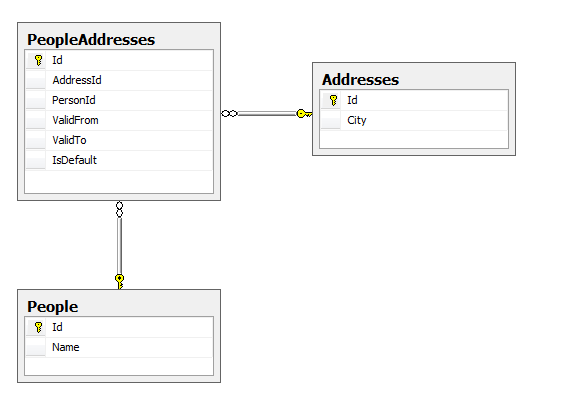
The tabular structure is similar to this:

image_thumb.png

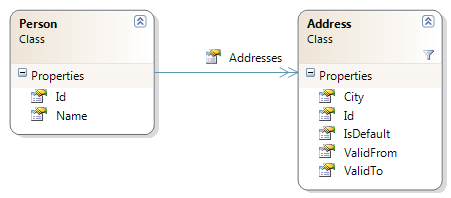
But the desired object structure is:

image_thumb_1.png

Read more: Ayende @ Rahien

Posted via email from .NET Info

How do I : Use Sql File Stream

|
Introduction

Sql Server 2008 has a file stream data type. This data type allows users to store content on the disk instead of the database as a real file.

There are many articles on this topic on the net however they are not all from a perspective of a developer. This article will just tell us enough on how to get started removing all the extra noise.

I will try to link more advanced concepts as they are required but this article will focus on getting a developer up and running with Sql server file stream data type.

Background

The audience of this article are expected to know how to use Sql server management studio, know about authentication mechanism available in SQL server, know how to create database and so on.

There are a whole bunch of articles which explain when to use and when not to use FileStream data type. http://msdn.microsoft.com/en-us/library/cc949109(SQL.100).aspx article on MSDN is an objective one for the same.

How do I configure the database server instance

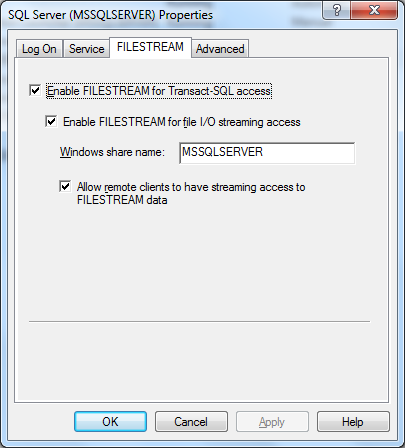
The first thing we need to do is enable the server instance to accept file stream data type. To do this the following steps need to be followed

1) Open Sql server Configuration manager
2) Right click on SQL Server Service and click on properties
3) Click on FileStream tab
    Enable all the check boxes. These enable file streaming both from with SQL server and clients.

image004.png

Read more: Codeproject

Posted via email from .NET Info

Miracle patch out-performed by four lines of bash

|
Well it’s nothing if not interesting. The ~200 line “miracle” patch promises a huge improvement in desktop responsiveness, but Lennart Poettering (from Red Hat) has replied to Linus’ praising comments with 4 lines of bash which out-perform it, on the current vanilla kernel. (And by the way, Lennart seems to agree with Con Kolivas about this patch, in that make -j is not a valid desktop use case.)

Lennart said:

Binding something like this to TTYs is just backwards. No graphical
session has a TTY attached anymore. And there might be multiple TTYs
used in the same session.

I really wonder why logic like this should live in kernel space at all,
since a) the kernel has no real notion of a session, except audit and b)
this is policy and as soon as people have this kind of group then they
probably want other kind of autogrouping as well for the other
controllers, which hence means userspace is a better, and configurable
place for this.

To which Linus then replied:

Numbers talk, bullshit walks.

Read more: the blog of Chris

Posted via email from .NET Info

Mono 2.8.1 is out

|
We have just released Mono 2.8.1. Mono 2.8.1 is a bug fix release for Mono 2.8 that contains the major fixes for bugs that were identified in Mono 2.8, it also contains a few security fixes.

You can download this version from our Download page

  • Fix DateTime's from binary representation #648252 (gonzalo)
  • Fixed Nullable's serialization in Remoting's binary serializer #646556 (gonzalo)
  • Logging profiler build fix (zoltan)
  • Fixed an assert for localalloc (long) when using LLVM (zoltan)
  • Disabled cardtables on SGen on 64bit configurations, will be re-enabled in Mono 2.10
  • Fixes a crash when using the embedded API
  • Add new mono-dl-fallback API for registering P/Invoke lookup hooks (mostly for PS3 and Wii, but useful for embedders in general) (miguel).
  • Allow ordinal entry points on Windows 636966 (gonzalo)
  • Fixes file system scanning for Linux systems 637078 (gonzalo)
  • Fixes GetLocalicalDriveString (gonzalo)
  • UDP sockets allow connections to Any 639098 (gonzalo)
  • GetProcessById now works on Mac (gonzalo)
  • Map SO_EXCLUSIVEADDRUSE to !SO_REUSEADDR 643475 (gonzalo)
  • Timers: fix collision handling code (gonzalo)
  • Support unloading System assemblies when sockets are used (zoltan)
  • Fix to utf8 to utf16 decoding (gonzalo)
  • Fix WCF proxy names (marek)
  • Fix WCF dispatchers (marek)
  • No longer closes WCF response prematurely (marek)
(more...)


Read more: Mono

Posted via email from .NET Info

HTML5 – Netscape/IE 3 all over again?

|
I attended two in-depth sessions on HTML5 at Oredev 2010 last week, which completely changed my perspective at it. After watching Giorgio Sardo present Microsoft’s plans for HTML5 and Robert Nyman present different HTML5 APIs, I feel that we’re moving ahead in technology but fear that we’re going back to the browser incompatibility horrors of a decade ago.

Microsoft is committed to HTML5
Giorgio Sardo, a senior technical evangelist at Microsoft, started by saying that “Microsoft is committed to HTML5, and this is not a marketing message”. On the many compatibility tests out there that measured Microsoft’s browser support for the new standards well below the competitors, he said that they want to ensure that “HTML5 needs to be done the right way”. Sardo compared that to IE6, which was “built listening to developers”, bringing many features that were not standard or “ready to be standardised”, and now causing lots of compatibility problems.

Sardo insisted that IE9 won’t have any HTML5 “specific markup that works only in IE”, and that they want to wait for specifications to be standardised before supporting them in IE9. That relates to about 150 specifications that are under development by W3C and ECMA working groups. “HTML5 is one of them, but the others are important as well – for example SVG. Some are already standardised, some are working drafts and recommendations”, said Sardo, adding that Microsoft doesn’t agree with all of the specifications. For example, they will not implement WebSQL, but prefer the IndexedDb specification.

But HTML5 isn’t just HTML5
Robert Nyman, an independent consultant, said that HTML5 is a “collection term for all the new things happening on the web“, and comes packed with different APIs. These different APIs are what Sardo referred as 150 specifications. Having the two presenters refer to HTML5 with completely different meanings, the former looking at it as just one of 150 specifications and the latter looking at it as an umbrella for all those APIs, wasn’t really encouraging.

Both presentations gave me a bit of a mixed message. Looking at the examples from a purely developer perspective, I see how these new APIs could help me build better web applications easier.

Read more: Gojko Adzic

Posted via email from .NET Info

The Linux Programming Interface

|
TLPI-front-cover.png

The Linux Programming Interface (published in October 2010, No Starch Press, ISBN 978-1-59327-220-3) is a detailed guide and reference for system programming on Linux and UNIX systems.

With 1552 pages, 115 diagrams, 88 tables, nearly 200 example programs, and over 200 exercises, TLPI is the most comprehensive description of Linux and UNIX system programming available. The author, Michael Kerrisk, is the maintainer of the Linux man-pages project, which documents the Linux kernel and glibc APIs. He has long been active in the documentation, testing, and design review of Linux kernel-userspace interfaces.

Ordering

If you have a good local technical bookstore, go browse and buy there. Otherwise, you can order the book online at:
amazon.com   amazon.co.uk   amazon.de   amazon.ca   amazon.fr
(If you're going to buy online, then using these links helps improve my income from online sales.)

Further information

You can find out more information about the book using the links below.

Read more: The Linux Programming Interface

Posted via email from .NET Info

Simple Apache Proxying

|
I was recently working with Apache and a service running on Kris Zyp's Persevere project (which is beyond awesome).  Persevere was pushing messages to my application which was running on Apache; the problem was that Persevere and Apache were running on different ports which technically made them cross-domain.  In order to make the server believe the web service was on the same domain/port, I needed to use Apache proxying.  I opened the conf/httpd.conf file and added the following magic to make that possible:

# Proxy requests to /data to persevere
ProxyPass /service http://localhost:8080/Status
ProxyPassReverse /service/ http://localhost:8080/Status
RewriteRule ^/service$ http://localhost:8080/Status$1 [P,L]

Now any reference to the directory "/Status" is proxied to the other port to receive the data!

Read more: David Walsh Blog

Posted via email from .NET Info
Black Duck KnowledgeBase

|
Black Duck continuously searches the internet for open source and downloadable code. The result is the industry’s most comprehensive database of open source software and associated license and other information, the Black Duck KnowledgeBase.

KnowledgeBase Contents

The Black Duck KnowledgeBase includes over 230,000 projects from more than 4,500 sites and is updated with thousands of new projects on a regular basis. In addition, the KnowledgeBase contains detailed data for over 1,900 unique software licenses (GPL, LGPL, Apache, etc) including not only the full license text, but dozens of encoded attributes and obligations for each license; enabling fast and accurate analysis and automated license compatibility notifications.

The Black Duck KnowledgeBase system has significant resources devoted to it, and supporting processes that have been developed over many years. Replicating the Black Duck KnowledgeBase would take several years and is virtually impossible as web sites, code and projects have disappeared over the years.

Black Duck has never thrown away code allowing you to match your code base with legacy code, even if the code has changed or disappeared from its original code repository.

Using the KnowledgeBase with Black Duck Protex

Black Duck Protex scans source code and binary files to discover unknown and unapproved software. Protex automatically compares any code base to the known universe of open source code and reports any matches. It does this by tapping into the Black Duck KnowledgeBase which offers hard data documenting the origin of your code. With this information, companies can enforce license, security, version control and other development policies. Visit our products section for more information on Protex, a platform that helps companies administer how their software assets are created, managed and licensed.

Using the KnowledgeBase with Black Duck Code Center

The Black Duck Code Center component search engine empowers developers to quickly find appropriate components for use within their projects. To do this, they search the Black Duck KnowledgeBase to find hundreds or thousands of open source and other components. Each component entry is populated with a rich set of information (including data from the National Vulnerability Database) which aids the developer in selecting the best available component that also matches an organization’s component usage policy. This allows developers to use approved components, eliminating the need to spend hours or days tracking down components to use. Visit our products section to find out how Black Duck Code Center streamlines the search, selection, approval and tracking of software components.


Read more: Black Duck

Posted via email from .NET Info
Making an Apple-style Splash Screen

|
The Beatles are on iTunes! Or, if you are like me and don’t care that much about it, you’ve probably noticed the awesome splash screen that Apple used to promote the event. Risking to start a trend, in this tutorial we are going to create a simple jQuery plugin that will display fancy Apple-style splash screens for us.

The HTML
Encapsulating the splash screen functionality into a jQuery plugin makes it portable and easy to incorporate into an existing website. But before starting work on the plugin files, we first need to lay down the HTML markup of a simple demonstration page, where the plugin is going to be used.

<!DOCTYPE html>
<html>
<head>
<meta http-equiv="Content-Type" content="text/html; charset=utf-8" />
<title>Apple-style Splash Screen | Tutorialzine Demo</title>

<link rel="stylesheet" type="text/css" href="css/styles.css" />
<link rel="stylesheet" type="text/css" href="css/splashscreen.css" />

<script src="http://ajax.microsoft.com/ajax/jQuery/jquery-1.4.4.min.js" ></script>
<script src="js/jquery.splashscreen.js"></script>
<script src="js/script.js"></script>

</head>
<body>

<div id="page">
   <div id="topBar"></div>

   <div id="promoIMG">
    <img src="img/available_now.png" alt="Available Now" />
   </div>

   <div id="contentArea">
       <p>... The textual content ...</p>
   </div>
</div>

</body>
</html>


Read more: TutorialZine

Posted via email from .NET Info
Stanford Engineering Courses online

|
SEE programming includes one of Stanford’s most popular engineering sequences: the three-course Introduction to Computer Science taken by the majority of Stanford undergraduates, and seven more advanced courses in artificial intelligence and electrical engineering.

Read more: Stanford Engineering Courses online

Posted via email from .NET Info

25 BEST SSH COMMANDS / TRICKS

|
OpenSSH is a FREE version of the SSH connectivity tools that technical users of the Internet rely on. Users of telnet, rlogin, and ftp may not realize that their password is transmitted across the Internet unencrypted, but it is. OpenSSH encrypts all traffic (including passwords) to effectively eliminate eavesdropping, connection hijacking, and other attacks. Additionally, OpenSSH provides secure tunneling capabilities and several authentication methods, and supports all SSH protocol versions.

SSH is an awesome powerful tool, there are unlimited possibility when it comes to SSH, heres the top Voted SSH commands

1) COPY SSH KEYS TO USER@HOST TO ENABLE PASSWORD-LESS SSH LOGINS.

ssh-copy-id user@host

To generate the keys use the command ssh-keygen

2) START A TUNNEL FROM SOME MACHINE’S PORT 80 TO YOUR LOCAL POST 2001

ssh -N -L2001:localhost:80 somemachine

Now you can acces the website by going to http://localhost:2001/

3) OUTPUT YOUR MICROPHONE TO A REMOTE COMPUTER’S SPEAKER

dd if=/dev/dsp | ssh -c arcfour -C username@host dd of=/dev/dsp

This will output the sound from your microphone port to the ssh target computer’s speaker port. The sound quality is very bad, so you will hear a lot of hissing.

4) COMPARE A REMOTE FILE WITH A LOCAL FILE

ssh user@host cat /path/to/remotefile | diff /path/to/localfile -

Useful for checking if there are differences between local and remote files.

5) MOUNT FOLDER/FILESYSTEM THROUGH SSH

sshfs name@server:/path/to/folder /path/to/mount/point

Install SSHFS from http://fuse.sourceforge.net/sshfs.html
Will allow you to mount a folder security over a network.

6) SSH CONNECTION THROUGH HOST IN THE MIDDLE

ssh -t reachable_host ssh unreachable_host

Unreachable_host is unavailable from local network, but it’s available from reachable_host’s network. This command creates a connection to unreachable_host through “hidden” connection to reachable_host.

7) COPY YOUR SSH PUBLIC KEY ON A REMOTE MACHINE FOR PASSWORDLESS LOGIN – THE EASY WAY

ssh-copy-id username@hostname


Read more: URFIX'S BLOG

Posted via email from .NET Info

INTEGRATE HTML5 FORM IN ASP.NET MVC

|
This article is divided into three parts. In the first, part I will show you how you can add Html5 forms in your ASP.NET MVC application with very minimum effort. In the second part, I will show you how to implement client side validation which will trigger automatically even when the browser does not have the html5 client side validation support and in the last part I will show widgetify the form in the client side with jQuery for the older browser that does not have support for Html5 form.

Let’s begin with the server side first. To add Html5 form I will utilize the ModelMetadata and DataAnnotation features that are available in ASP.NET MVC. The DataAnnotation has several attributes which we can use when generating the input types. Let’s say I have a dummy model which is fully decorated with the DataAnnotation attributes:

public class Html5FormModel
{
   [Display(Name = "String", Prompt = "Type a string"), Required]
   public string StringProperty { get; set; }

   [Display(Name = "Decimal", Prompt = "Type a decimal"), Range(1.0, 100.0), Required]
   public decimal? DecimalProperty { get; set; }

   [Display(Name = "Date", Prompt = "Type a date"), DataType(DataType.Date), Required]
   public DateTime? DateProperty { get; set; }

   [Display(Name = "Url", Prompt = "Type an url"), DataType(DataType.Url), Required]
   public string UrlProperty { get; set; }

   [Display(Name = "Email", Prompt = "Type an email"), DataType(DataType.EmailAddress), Required]
   public string EmailProperty { get; set; }

   [Display(Name = "Phone number", Prompt = "Type a phone number"), DataType(DataType.PhoneNumber), Required]
   public string PhoneProperty { get; set; }
}

And I am using the following code to generate the form:

@using (Html.BeginForm()) {
   @Html.ValidationSummary(true, "Validation errors. Please correct the errors and try again.")
   <div>
       <fieldset>

           <legend>Html5 form</legend>

           <div class="editor-label">
               @Html.LabelFor(m => m.StringProperty)
           </div>
           <div class="editor-field">
               @Html.EditorFor(m => m.StringProperty)
               @Html.ValidationMessageFor(m => m.StringProperty)
           </div>

           <div class="editor-label">
               @Html.LabelFor(m => m.DecimalProperty)
           </div>
           <div class="editor-field">
               @Html.EditorFor(m => m.DecimalProperty)
               @Html.ValidationMessageFor(m => m.DecimalProperty)
           </div>


Read more: KAZI MANZUR RASHID'S BLOG part1, Kazi Manzur Rashid Part 2

Posted via email from .NET Info

Prism v4 - VB Style and Training Kit too

|
Prism provides guidance designed to help you more easily design and build rich, flexible, and easy to maintain WPF desktop applications and Silverlight Rich Internet Applications (RIAs).

File Name: PrismV4_VB.Exe

Size: 30.4MB

Version: 4.0

Date Published: 11/19/2010

Language: English

Prism provides guidance designed to help you more easily design and build rich, flexible, and easy to maintain Windows Presentation Foundation (WPF) desktop applications and Silverlight Rich Internet Applications (RIAs) and Windows Phone 7 applications.

This download is provided to help the Visual Basic developer use the Prism Library. It includes reference implementations, QuickStarts, the Prism Library binaries, and documentation. The documentation includes:

  • Visual Basic Content for Prism4.chm: The documentation for the reference implementations, QuickStarts, and Hands-On Labs in Visual Basic.
  • Prism4.chm: Documentation in C#.
  • Prism4APIReference-{platform}.chm: Library reference API.

Read more: Greg's Cool [Insert Clever Name] of the Day
Read more: Visual Basic Prism 4 Reference Implementations, QuickStarts, and Hands-on Labs

Posted via email from .NET Info

Want to Make Your SQL Server Run Faster for Free?

|
I know I do!

The trick is to properly manage your VLFs.

What are VLFs? The short anser is that VLF stands for virtual log file. SQL Server database log files are made up of many smaller virtual log files that make it easier for SQL Server to manage the log files. For a much more in-depth answer see the Transaction Log section Paul Randal’s (Blog|Twitter) TechNet article.

The problem with virtual log files is that having too few or too many can slow your server down. I spoke to someone over the weekend that had to wait 30 hours for their database to complete recovery. When they checked they had 1.6 million virtual log files in their database. That is a lot by any standard. A more constant issue with having too many VLFs is that they can also slow down any log operation including logged statements like insert, update and delete. Check out this article by Linchi Shea (Blog) on the performance impact too many VLFs can have. Kimberly L. Tripp (Blog|Twitter) has a great article on how many VLFs you should have.

So if the trick to making your server run faster for free is to manage your VLFs, then how do you go about doing that? Great question. There are lots of great posts out there on how to do this. Here is an article that I wrote detailing the process that I use and some of the reasoning behind it.


Read more: Adventures in SQL

Posted via email from .NET Info

Taking Baby Steps with Node.js – Threads vs. Events

|
In a previous blog post, I provided a shallow introduction to Node.js. I also mentioned where you can find more information on how to get it installed on Windows as well as how to install a seemingly popular package manager in the JavaScript community called Npm.

In the mean time, I’ve started to get a more clearer view on the general concepts on which Node.js is based on, as well as the kind of applications that can be built using this server-side platform. The more I read and learn about Node.js, the more I come to the conclusion that it is very much targeted towards building real-time applications. Google Wave, Friendfeed and most recently Facebook are popular examples. You can also read this article to learn more about other examples of real-time web applications.

As I briefly mentioned in the previous blog post, Node.js makes heavy use of JavaScript’s event-based style of programming which lies at the heart of it’s capabilities for building real-time applications. This event-based model is a completely different way of thinking compared to the thread-based model that we’ve been so accustomed to over the past couple of years. ASP.NET Web Services or WCF services for that matter are excellent examples of the thread-based model. Every time a message comes in, these frameworks spawn a new thread or take one from the thread pool in order to handle this request. There’s nothing wrong with this approach. In fact, this thread-based model makes perfect sense for many of the scenarios out there. But generally not for real-time applications that usually require long-lived connections.

In the thread-based model, most of the threads spend a lot of their time being blocked; waiting for I/O operations like executing queries against a database, calling another service or writing to a file on disk. These are expensive operations that usually take longer to complete compared to in-memory operations. When having large amounts of traffic, you can’t afford to have threads blocking for long periods of time. Otherwise you’ll be hitting the maximum number of available threads rather sooner than later.

Read more: <elegantc*de>

Posted via email from .NET Info

VirtualPathProvider

|
In .Net 3.5, WF services were introduced making it easier to host workflows as services.  With the send and receive activities, a workflow can be used instead of coding a service by hand.  The common way to expose workflows as services is to place the .svc/.xoml or .xamlx files and supporting libraries in the host path.  This works well if you have the workflow definitions stored in files.  If you would like to store your definition in a database or generate the workflow from code, you have to do some of your own coding to make that happen.  By using a VirtualPathProvider, you can use the existing WF services constructs and reduce the amount of infrastructure code you have to write.

One of the reasons I like the VirtualPathProvider is that it provides me a simple way of testing many concurrent workflow definitions without having to code-generate a bunch of files, transfer them to different machines, etc.  When you're trying to memory test 1,000,000 workflow definitions of "average" size, it's best to avoid having a directory with one xamlx file before definition.  One nice part about a VirtualPathProvider is that it doesn't prevent you from creating and using xamlx files.

For this test code, I will walk through creating a VPP that hosts WF4 services.  The first step is to create a new project with the template "ASP.Net Empty Web Application".  I called mine Wf4VppTest.

Read more: dmetzgar

Posted via email from .NET Info

TSQL Challenge 43 – Identifying incomplete segments and missing elements

|
The problem presented in this challenge is related to a validation requirement needed as part of an electronic data exchange process. There are two applications involved in this process. The “Sender” sends a ASCII file in a predefined format to the “Receiver”. The “Receiver” application accepts the files and inserts the data into a staging table. The following illustration shows how the data looks like.

Sample Data

Here is the sample data for this challenge.

Sr          val
----------- -------------------------
1           BS*AB1
2           SH*ABC*123
3           NM*ABC*123
4           NM*ABC*123
5           RF*ABC*123
6           BE*
7           BS*AB2
8           SH*ABC*123
9           NM*ABC*123
10          BS*AB3
11          SH*ABC*123
12          BE*
13          BS*AB4
14          SH*ABC*123
15          RF*ABC*123
16          BS*AB5
17          SH*ABC*123
18          RF*ABC*123
19          ZZ*ABC*123
20          ZZ*ABC*123
21          YY*ABC*123
22          BE*


Read more: Beyond Relational

Posted via email from .NET Info

Introduction to SQL Server 2008

|
I have recently completed the development of a new fundamental course about SQL Server 2008. If you are doing your first steps this is the course you want to take. You will learn the basic SQL commands and you will learn how to execute them when using the SQL Server 2008. The course is available for free personal usage at www.abelski.com and it includes slides, video clips, forums and assignments.

Read more: Life Michael
Read more: YouTube

Posted via email from .NET Info