This is a mirror of official site: http://jasper-net.blogspot.com/

Microsoft(R) SQL Server(R) StreamInsight 1.1

| Tuesday, October 26, 2010
Overview

Microsoft® StreamInsight is a platform for the continuous and incremental processing of unending sequences of events (event streams) from multiple sources with near-zero latency. These requirements, shared by vertical markets such as manufacturing, oil and gas, utilities, financial services, health care, web analytics, and IT and data center monitoring, make traditional store and query techniques impractical for timely and relevant processing of data. The ability to monitor, analyze and act on the data in motion provides significant opportunity to make more informed business decisions in near real-time.

Further resources can be found on the StreamInsight Blog, its MSDN Portal, and on CodePlex.

These are the new features in StreamInsight 1.1:

  • .Net Sequence Support
With the new release, StreamInsight supports event sources and event sinks that implement the IObservable and IEnumerable interfaces. These interfaces are the dominant general-purpose contracts in the .NET Framework for pulling (IEnumerable) and pushing (IObservable) data among an application’s components. This new API is especially convenient for historical queries, where the full set of input events is known in advance, and ad-hoc queries over live data sources, where a query is short-lived and only needs to exist as long as the client app listens to the results. This new API also simplifies query testing.For the integration with IObservable, you need to have .NET 4.0 installed.
  • Side-by-Side Installation Support
The new version of StreamInsight installs without replacing a previous version. If you have an existing installation, 1.0 and 1.1 will co-exist on the same system. All existing and new StreamInsight applications will automatically link to the new libraries, unless specified otherwise by redirecting the assembly versions through the application’s configuration file. No recompilation of existing applications is necessary.
  • Performance and Stability Improvements
A number of bug fixes and performance improvements have gone into this release. Notable is the reduction of latency for hopping windows, where a certain pattern of CTIs would make the engine hold back window results longer than needed in previous versions. Another important fix drastically increases throughput for join operations on edge streams (produced by an edge adapter or the Clip operator), which is a common pattern when combining real-time with reference streams.

The Microsoft® StreamInsight Client package installs a subset of Microsoft® StreamInsight which lets you implement only the client side functionality: Connecting to an existing StreamInsight server, managing queries, and using the debugger tool. It does not support running an embedded server or creating a StreamInsight service. The license for the Microsoft® StreamInsight Client is free.


Microsoft® StreamInsight has two different methods to complete the installation process:
Attended Installation – an interactive user interface will guide you through the set-up process and obtain all of the information and consent required to complete the installation. This includes the displaying, acknowledgement, and archiving of the applicable SQL Server license terms.

Read more: MS Download

Posted via email from .NET Info

AJAXPRC

|
AJAXPRC : the JavaScript Remote Procedure Call, fast and easy .

It allows JavaScript to be able to call into the server-side methods synchronously or asynchronously, based on JSON, open-source license(LGPL).
Use AJAXRPC, you can develop as a traditional C / S procedures, to develop the WEB program that allows WEB development simpler and more efficient.
Languages Supported: Java, .Net, Php.

Browsers Supported: IE、FireFox、Opera、Safari、Chrome.
Downloads: Java   .Net   PHP
Developer Guide:English   Chinese   Japanese
Latest version: 1.0
Latest updated: 2010-10-10

AJAXRPC Quick Start

First,we have to define a class and a static method:

public class Test {
public static String sayHello(String name){
return "hello, " + name;
}
}

Note: The static methord must be a public method.
Then we can call the method on the server by the AJAXRPC client program.
Note:When we call the RPC methods,if there is no callback function, then the call is synchronous;if there is one, then the call is asynchronous.

Read more: AJAXPRC

Posted via email from .NET Info

An example of Strategy Design pattern for beginners

|
Introduction

Sometime we need to carry out several computation / algorithms depending on certain conditions. We go ahead in implementing those generally by applying either switch or ternary operator or if else. Though initially somehow we manage to write those program but if the program demands too complex then it is difficult to frame such as well as to maintain.

Moreover, writing all the logic at a single place is not at all advisable as it yields into tight coupling.

Background

In many situations we come across to write computational logic/ algorithms which we generally accomplish by using if else / switch or ternary operator. It becomes difficult at time to write such a program and later on adds a lot of cost while maintenance.

Rescuer

Strategy design pattern. It comes under the category of Behavioral Patterns

How

a)It decouples the client and the algorithm/ computation logic in separate classes

b)Helps to switch algorithms at any time

c)Easily allow to plug in a new algorithm.

Pattern Components

The strategy pattern comprises of the following components

a)Strategy Interface –

Interface common to all concrete strategies.

b)Concrete Strategies / Different algorithm classes-

Various concrete classes that implement the strategy interface for the sake of algorithm implementation specific to itself.

Read more: Codeproject

Posted via email from .NET Info

Output Caching in asp.net

|
Recently one of my friend ask about output cache so I decided to put a post about how output cache works and what is the advantages and disadvantage of using output cache. Output cache is a technique to cache generated response from the asp.net pages or controls. Output Caching increases the performance drastically by reducing server round trips. We can use @OutputCache directive to controls output caching for a page or controls.

The @OutputCache includes following attributes.

  • Duration: This attribute will explain how long output cache will be there for a page or control. It can be set in seconds. If you set 60 then it will not going to generate response from server until 60 second It will generate response from the cache it self. Here is example of duration where it will set 60 second for page.

<%@ OutputCache Duration="60" %>  

  • VaryByParam: This attribute will determine cache entries based on get or post parameters. It will vary cache based on get or post parameters suppose you set product Id query string as VaryByParam it will create a different cache based on product Id. Following is a example how you can set the VaryByParam based on Product Id.

<%@ OutputCache Duration="Seconds" VaryByParam="ProductId"%>

Read more: DOTNETJAPS ALL ABOUT .NET

Posted via email from .NET Info

A first look at the Windows Web Services API

| Monday, October 25, 2010
The article shows how to interop between a WCF service and a WWS client, and also how to rewrite the WCF service in WWS retaining compatibility with existing WCF clients.

Introduction

The Windows Web Services API is a native implementation of SOAP and can be used to interop transparently with existing WCF services and clients, in addition to offering the ability to completely achieve a client-server implementation in pure native code. I have been longing to play with it ever since I heard Nikola Dudar talk about it at the MVP Summit earlier this year. It’s natively included with Windows 7, but can also be installed and used from older OSes such as XP, Vista, 2003 and 2008. You can write pure native clients using WWS that can connect to an existing managed WCF service, and also write a WWS native service that can be consumed by a WCF client. It’s so compatible that you can replace either a WCF client or a WCF service with a WWS equivalent without the other party being aware of it. In this article, I'll talk about a simple WCF service and its WCF client, and then show how to use WWS to write a native client that can consume the WCF service. I'll then show how the WCF service itself can be replaced transparently with an equivalent WWS service, and how both the WCF and WWS clients can connect to this WWS service without any changes in code.

Note : The examples were written on a 64 bit Windows 7 RC machine running VS 2010 beta 1.

The example WCF service

The first thing to do is to create a very simple WCF service. For our example I'll use a string reversing service that exposes a single method that accepts a string and returns the reversed string.

Read more: Codeproject

Posted via email from .NET Info

gSOAP 2.8.0

|
1  Introduction

  The gSOAP tools provide an automated SOAP and XML data binding for C and C++ based on compiler technologies. The tools simplify the development of SOAP/XML Web services and XML application in C and C++ using autocode generation and advanced mapping methods. Most toolkits for Web services adopt a WSDL/SOAP-centric view and offer APIs that require the use of class libraries for XML-specific data structures. This forces a user to adapt the application logic to these libraries because users have to write code to populate XML and extract data from XML using a vendor-specific API. This often leads to fragile solutions with little or no assurances for data consistency, type safety, and XML validation. By contrast, gSOAP provides a type-safe and transparent solution through the use of compiler technology that hides irrelevant WSDL-, SOAP-, and XML-specific details from the user, while automatically ensuring XML validity checking, memory management, and type-safe serialization. The gSOAP tools automatically map native and user-defined C and C++ data types to semantically equivalent XML data types and vice-versa. As a result, full SOAP interoperability is achieved with a simple API relieving the user from the burden of WSDL/SOAP/XML details, thus enabling him or her to concentrate on the application-essential logic.
The gSOAP tools support the integration of (legacy) C/C++ codes (and other programming languages when a C interface is available), embedded systems, and real-time software in SOAP/XML applications that share computational resources and information with other SOAP applications, possibly across different platforms, language environments, and disparate organizations located behind firewalls.
The gSOAP tools are also popular to implement XML data binding in C and C++. This means that application-native data structures can be encoded in XML automatically, without the need to write conversion code. The tools also produce XML schemas for the XML data binding, so external applications can consume the XML data based on the schemas.

1.1  Getting Started

  To start building Web services applications or automate XML data bindings with gSOAP, you need:
The gSOAP package from http://www.genivia.com/Products/downloads.html (select gSOAP toolkit standard edition from the list of software packages)

A C or C++ compiler.

You may want to install OpenSSL and the Zlib libraries to enable SSL (HTTPS) and compression. These libraries are available for most platforms and are often already installed.

The gSOAP software is self-contained, so there is no need to download any third-party software (unless you want to use OpenSSL and the library is not already installed, or if you need to rebuild the soapcpp2 tool, see below).
The gSOAP packages available from SourceForge include pre-build tools in the gsoap/bin directory:
The wsdl2h WSDL/schema importer and data binding mapper tool.

The soapcpp2 stub/skeleton compiler and code generator.

Read more: gSOAP

Posted via email from .NET Info

Why Server-Side JavaScript?

|
Chris Nicola left this excellent comment on Justin Etheredge’s blog:

Even with a competitive way to do SSJS [(server-side JavaScript)] on the Windows platform, I just have to ask... why would anyone?

Server-side JavaScript means that the server portion of a web application is written in JavaScript. Personally, I believe that server-side JavaScript will be the next big advance in web development.

If I were Microsoft I would be looking to hit a touchdown out of the ball park with server-side JavaScript, to win back the respect of the more advanced web development community.

Here are some of the reasons why server-side JavaScript will win.

Homogenous Programming Experience

With server-side JavaScript (SSJS) you can use the same language on the server, on the client and over the wire (JSON). JavaScript is even deeply integrated into a number of database platforms. This lowers the concept count for web development and reduces the need for context switching.

JavaScript Runtime Engines

There is a large and ever expanding list of quality, cross-platform JavaScript engines. Every browser contains a JS runtime and there is currently a gold rush on JS performance improvements.

Performance

If you have ever seen IE6 I know you will have your doubts, but JavaScript is fast. Not fast relative to C, but fast relative to languages with comparable features, and it is getting faster.

Interpreted Language

You are too old for training wheels, and programming is too old for a compilation step. Now that we know the benefits of agile, and TDD, and rapid feedback loops, an interpreted language is a big advantage.

Read more: Liam McLennan

Posted via email from .NET Info

Developing a (very) Lookless Silverlight Radial Gauge Control

|
This blog post describes the development of a lookless radial gauge control. In this post I will explore the use of an attached view model in order to move view specific properties and logic out of the control code in order to give a truly lookless control.

Today I had to get up far too early in order to catch an early morning flight to Copenhagen with a connection in Amsterdam. What to do for the six hours I would be travelling? Armed with a netbook and Visual Studio 2010 Express I thought it would be fun to have a go at developing a Silverlight gauge control. I know that there are already one or two free ones out there, with a decent looking one available on codeproject, however, it still felt like a good way to pass the time!

In order to make things a little more challenging I wanted to create a control that was truly lookless. So, what do I mean by this? Firstly a gauge control in its simplest sense displays the location of some indicator between a maximum and minimum value. There is nothing inherently circular about a gauge, thermometers are a good example of a linear gauge. So, I don’t want any ‘circular’ logic in the control itself. Secondly, custom controls often have certain expectations about the presence of named elements within their template. By this I mean that the template must contain, for example, a Path element called ‘needle’ which the control code will manipulate (The gauge published in the codeproject article above requires the presence of four named elements in the template). This forces certain constraints regarding how the control can be templated, this isn’t really lookless is it?

Read more: ScottLogic

Posted via email from .NET Info

Windows Command Reference

|
Overview
  The Windows command-line tools are used to perform various tasks related to Windows Vista, Windows 7, Windows Server 2003, Windows Server 2008, and Windows Server 2008 R2. You can use the command reference to familiarize yourself with new and enhanced command-line tools, to learn about the command shell, and to automate command-line tasks by using batch files or scripting tools.

System Requirements
Supported Operating Systems:Windows 7;Windows Server 2003;Windows Server 2008;Windows Server 2008 R2;Windows Vista, Windows 7, Windows Server 2003, Windows Server 2008, or Windows Server 2008 R2

Read more: MS Download

Posted via email from .NET Info

Architecting WP7 - Part 6 of 10: Loosely Coupled Messaging

|
While I recognize my original schedule is slipping, let's continue the ten part Windows Phone 7 architecture discussion. In this sixth part of the article series, I want to discuss messaging in phone applications. When I say "Messaging", I don't mean SMS or IM, but instead I mean smart ways of being able to talk between different parts of the application.
As you build an application in a loosely coupled way (the way that the MVVM pattern and composition patterns help you do), you will find a point where you need X and Y to communicate in some way but creating a strong relationship between them is what you're trying to avoid. This is no different on the phone than in development in general. The usual solution for this is to use some sort of loosely couple messaging. The two common ones I've used in Silverlight are Laurent Bugnion's MVVM Light framework (which contains a very light Messenger class) and the Microsoft PnP folks' Prism project (which contains the EventAggregator).

Read more: Shawn Wildermuth

Posted via email from .NET Info

How to track an object which is Out of Scope while Debugging ?

|
In Mastering in Visual Studio 2010 Debugging article I have discussed about the basic of Object ID creation while debugging. I received some request from some readers to explain the use of “Make Object ID” in details. In this blog post I am going explain how we can track an Object which is already out of scope using by creating a Object ID while debugging.

By using “Make Object ID” option we are informing Visual Studio Debugger to keep track of that object no matter it’s within scope or out of scope for the current context.  We can create “Object ID” either from Locals, Autos or from Watch Windows. Object ID is a integer number followed by a pound (#) sign. When we create Object ID for an particular object, Visual Studio Debugger ( CLR Debugging Services )  use an integer value to uniquely identify the object. This “Object ID” allows you to get the object details even if it is out of scope.


Let’s explore this with the help of below code block
....
....
As per the above code we have a list of Student object. I will show you how we can create new object ID for any specific object and can track them even though went out of scope.

Creating Object ID
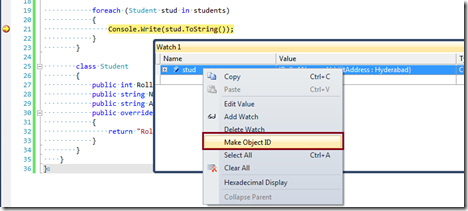
To make an Object Id, You have to view the object from Watch Window, then Right Click > Context Menu, select  “Make Object ID”.

1_thumb2.png?w=468&h=211

The watch window will display a number with the pound (#) sign .

2_thumb2.png?w=522&h=66

Read more: Abhijit's World of .NET

Posted via email from .NET Info

C# Enums - A bit of Extra Caution when working with Enums

|
Straight to a question for you.
Consider the following code, where you accept a caller key and a token request from a caller, to issue a security key for further requests? Note that we also have a minimal exclusion check, where we prevent certain callers from getting the admin permission. Now, the question. What is wrong with the code below?

public enum SecurityToken
   {
       Admin,
       Registered,
       Anon
   }

   public class SecurityGateway
   {
       public string GetSecurityKey(string callerKey,SecurityToken token)
       {

           //Prevent caller2 from getting the admin token
           if (callerKey.Equals("secretcallerkey2")
               && token == SecurityToken.Admin)
               return "Error: You can't request an admin token";

           //Issue the token
           switch (token)
           {
               case SecurityToken.Anon:
                   return "PermissionKeyForAnonymous";
               case SecurityToken.Registered:
                   return "PermissionKeyForRegistered";
               default:
                   return "PermissionKeyForAdmin";
           }
       }
   }

If you already found the issue, you may stop reading here. Otherwise, let us examine this in a bit detail.

Assume that a caller, let us sayCaller1, is requesting a security key for leveraging admin permissions.

SecurityGateway gateway = new SecurityGateway();
//Caller 1
var key = gateway.GetSecurityKey("secretcallerkey1", SecurityToken.Admin);
//key's value is PermissionKeyForAdmin for secretcallerkey1

Read more: amazedsaint's .net journal

Posted via email from .NET Info

Download Progress Bar for Silverlight Media Framework Player

|
One of my customers has been using the Microsoft Silverlight Media Framework player for their Business-to-Business media sharing portal and wanted to add a download progress bar behind the scrub bar.  I was able to show them how to do this with a combination of template binding, re-templating the SMFPlayer and Timeline classes and subclassing the Timeline class.
  1. Since the Timeline bar is a custom control embedded in the SMFPlayer custom control, you need to modify the control template of both the SMFPlayer control and the Timeline control. 
  2. I created a new class DownloadProgressTimeline derived from Timeline so that I could add a DownloadProgress Dependency Property and a new default control template.
  3. I used template binding to connect the SMFPlayer.DownloadProgress property to the DownloadProgressTimeline.DownloadProgress
  4. I used template binding to connect the SMFPlayer.Foreground color to the color of the download progress
  5. I bound the DownloadProgress value (0.0-1.0) to the Scale Transform of the progress bar rectangle

The Download Progress bar in the DownloadProgressTimeline control template
Notice how the X scale of the rectangle is bound to the download progress (both are values from 0-1).

<Rectangle x:Name="DownloadProgressBar" Grid.ColumnSpan="3"
   Fill="{TemplateBinding Foreground}" Margin="0,6"
   Stroke="{TemplateBinding BorderBrush}" Opacity="0.5"
   RenderTransformOrigin="0,0" IsHitTestVisible="False">
   <Rectangle.RenderTransform>
       <CompositeTransform
           ScaleX="{Binding DownloadProgress, RelativeSource={RelativeSource TemplatedParent}}"/>
   </Rectangle.RenderTransform>
</Rectangle>

Read more: Synergist

Posted via email from .NET Info

Show External Code

|
I thought it would be a good idea to talk about working with the Call Stack some more.  Specifically, the option to show external code.  Let's start with the basics.  When you are in break mode and you look at a "normal" call stack, this is what you will see:

7220.image_5F00_thumb.png

Let's define what "normal" is in this case.  Essentially, what you see here is determined by the "Enable Just My Code" setting in Tools -> Options -> Debugging -> General:

8306.image_5F00_thumb_5F00_1.png

This setting is on by default and it is the reason you see the "[External Code]" sections in your Call Stack:

7416.image_5F00_thumb_5F00_2.png

The reason for this is simple:  Just My Code means you only want to see your code without any extra stuff to get in the way.  If you WANT to see the "[External Code]" just right click anywhere in the Call Stack and choose "Show External Code":

5672.image_5F00_thumb_5F00_3.png

Read more: Visual Studio Tips and Tricks

Posted via email from .NET Info

SUSER_SNAME

|
שלום רב,

כידוע פלטפורמת sql server מכילה פונקציות מערכות שימושיות מאוד. בטיפים הקרובים אסקור מספר פונקציות שימושיות ומעניינות.

שאלה:
ברצוני להוסיף בפרוצדורה תנאים לביצוע ע"פ המשתמש אשר מריץ את הפרוצדורה – האם זה אפשרי?
האם ניתן לקבוע ערך DEFAULT לעמודה בטבלה שמשמעו "מי ביצע את הפעולה" ?

תשובה:
פלטפורמת SQL SERVER 2005 מכילה פונקציות מערכת רבות ומגוונות, אחת הפונקציות השימושיות הינה : SUSER_SNAME. 

להלן מספר יכולות הפונקציה :
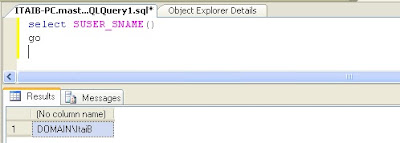
1. הפונקציה מחזירה את ה- log in שמריץ את הפונקציה , לדוגמא:
1.jpg

Read more: Itai Binyamin

Posted via email from .NET Info

Транзакции в Mysql

|
Добрый день!
Сегодня хотел бы рассказать о механизме транзакций в mysql.

И так давайте разберемся с самим механизмом транзакций. Для начала надо сказать, что транзакции – последовательность операторов, которые выполняются. Если хотя бы один из операторов не будет выполнен, будет произведен откат. Данный механизм очень удобен при работе интернет-магазина и т.д. В Mysql не все типы таблиц поддерживают механизм транзакций. Только InnoDB, BDB – поддерживают данный механизм. Как по мне, то лучше использовать InnoDB. И так давайте разберемся с синтаксисом самой простой транзакции

START TRANSACTION;
//sql operators
COMMIT;

Транзакция начинается с ключевых слов:”START TRANSACTION”, потом идут операторы, которые нужно выполнить и надо ж завершить транзакцию. Завершение транзакции может произвести с помощью двух способов – 1) Явное завершение транзакции, 2) Откат. Явное завершение транзакции можно произвести с помощью COMMIT, а откат – ROLLBACK
Вот так вот, правда я описал самый простой способ реализации транзакции, без блокировок и т.д.

Read more: Cava blog::Блог начинающего вебмастера

Posted via email from .NET Info

TFS vs. Subversion fact check

|
I spotted a good comparison of TFS vs. Subversion by Jarosław Dobrzański on DZone (you can also read the original post) but I feel that a couple of the points were either out of date, or borne out of a lack of knowledge of the product, or even more likely I just missed the point. This article was taken from the perspective of an SVN user who has moved to TFS, and I am not in that category.

I want to take a look at each of the “Weak points” mentioned and see if there is anything in them. There are numerous things that TFS does that are not even possible in SVN as SVN is just a source control system and not a full ALM platform. The goal of this post is specifically to dispel myths and target issues that users have moving from SVN to TFS.

#1 – Branch confusion
>>Subversion promotes a very clear view (similar to CVS) on the files tree on the server: trunk, branches, tags. In TFS everything is in one bag – branches are simple directories among the other content of ‘the trunk’. It still looks messy to me.
-Jarosław Dobrzański

Fixed in TFS 2010: This was the case in versions prior to TFS 2010, but with the new branching features it is easy to both see where your branches are and what change sets have been merged to which branches.

Read more: Martin Hinshelwood (MrHinsh) on Visual Studio ALM

Posted via email from .NET Info

Recovering Your Work After an Expression Web Crash

|
I am getting a little tired of Expression Web 4 crashing on me.

I'm not sure why I'm repeatedly encountering issues with the latest version of Expression Web, but I suspect -- given the frequency at which it is crashing -- it may have something to do with the TFS integration. Note that this is purely a guess on my part, but I find it hard to believe that the memory corruption bug I'm experiencing would not have been caught by one of the SDETs (a.k.a. Testers) on the Expression Web team.

Perhaps the source of my woes is not the TFS integration at all, but rather something to do with the fact that I use a non-trivial ASP.NET master page when creating/editing pages. I guess it really doesn't matter -- I just want it to stop crashing regardless.

As I noted in a previous post, I've been using Expression Web for a number of years to manage content on my MSDN blog. While I'm obviously a little irritated this morning with the tool, overall I'm still satisfied with my method of creating and editing HTML content. It sure beats using the Web-based editing features in the Telligent Community platform. [That's not meant to bash the Telligent functionality; for many people -- heck, perhaps thousands and thousands of folks out there -- the "WYSIWYG" editors provided by Telligent are probably more than sufficient to address their needs. I simply prefer much tighter control over the HTML content...but, alas, I digress.]

[Ugh...the application just crashed again on me (second time this morning). Thankfully I had just pressed CTRL+S about a minute ago -- so the "damage" wasn't nearly as bad as it was earlier this morning.]

A few hours ago I was authoring a new blog post (not this one -- a different one that hopefully more people will find valuable than this one) and after about 45 minutes of typing, revising, and typing some more, Expression Web suddenly crashed:

Problem signature:
 Problem Event Name: BEX
 Application Name: ExpressionWeb.exe
 Application Version: 4.0.1165.0
 Application Timestamp: 4bfaf4bc
 Fault Module Name: StackHash_0a9e
 Fault Module Version: 0.0.0.0
 Fault Module Timestamp: 00000000
 Exception Offset: 00000000
 Exception Code: c0000005
 Exception Data: 00000008
 OS Version: 6.1.7600.2.0.0.256.1
 Locale ID: 1033
 Additional Information 1: 0a9e
 Additional Information 2: 0a9e372d3b4ad19135b953a78882e789
 Additional Information 3: 0a9e
 Additional Information 4: 0a9e372d3b4ad19135b953a78882e789
At first, I was horrified. Almost an hour's worth of work down the drain!

In hindsight, I can't believe I didn't save my work-in-progress. [That "auto-save/auto-recover" functionality in the various Microsoft Office apps (that everyone is now accustomed to -- including me) really should be mandatory for all "desktop" applications created by Microsoft.]

After resisting the temptation to curse something I won't type here -- or, even worse, slam my fist into the keyboard (come on, we've all had those moments) -- I took a deep breath and decided to actually try to do something constructive for a change. In the past couple of months, when Expression Web crashed, I would simply click the link to send my crash info to Microsoft (a.k.a. the Watson bucket) and restart the application. Then I would open my Web site again and start typing the lost work as best I could from memory. [Sending crash reports to Microsoft is definitely constructive -- in that it helps identify problematic code -- but it certainly doesn't address your immediate desire to recover your lost work.]

Read more: Random Musings of Jeremy Jameson

Posted via email from .NET Info

SSH.NET Library

|
Project Description
SSH.NET is client library to connect to SSH servers written in C# with multitasking support.

This project was inspired by Sharp.SSH library which was ported from java and it seems like was not supported for quite some time.

I wanted to address some issues in this library.

1. To avoid any third party dependencies other then .NET.
2. To utilize parallelism as much as possible, therefore this library runs on .NET 4.0.
3. To allow work in multithreaded environment

Currently supports command execution and SFTP operation only.

Read more: Codeplex

Posted via email from .NET Info

Managed DirectX via F#

|
Referencing DirectX Libraries in an F# Application

Despite the fact that WPF has a more powerful graphics engine that Windows Forms, developing commercial game software is accomplished via DirectX or, in some cases, the OpenGL. Microsoft provides a high-level interface to DirectX from the .NET Framework: Managed DirectX. Even though this a high-level interfaces, programs using Managed DirectX contain a significant amount of "boiler plate" code that is required to get anything working. This article will focus on writing F# code to draw from that Managed DirectX reusable libraries. When using Visual Studio, F# code is normally tested by highlighting that code to the press Alt-Enter to send the code into the F# interactive. The directory that contains these DLLs is C:\Windows\Microsoft.NET\DirectX for Managed Code\1.0.2902.0. Therefore if we use F#, a functional programming language that is said to have significant future, we could load the libraries to an include by doing this :

#I @"C:\WINDOWS\Microsoft.NET\DirectX for Managed Code\1.0.2902.0"
#I @"C:\WINDOWS\Microsoft.NET\DirectX for Managed Code\1.0.2903.0"
#I @"C:\WINDOWS\Microsoft.NET\DirectX for Managed Code\1.0.2904.0"
#I @"C:\WINDOWS\Microsoft.NET\DirectX for Managed Code\1.0.2907.0"
Those lines specify the include path and are the equivalent of the -I switch to the F# compiler. Now having specified those paths, we would then reference the appropriate DLLs:

#r @"Microsoft.DirectX.dll"
#r @"Microsoft.DirectX.Direct3D.dll"
#r @"Microsoft.DirectX.Direct3Dx.dll"
Those specify the DLL reference, the equivalent to the -r command line option. As with any Visual Studio managed code solution container, we would also right-click the references, browse to the folder containing those DLLs, and add them to the references section. The program we are going to examine is user interactive, having mouse-clicks perform some basic adjustments in the position of the graphical display. This collection of shapes will work to exhibit motion depicts animation, but is normally not documented that way. But how to managed source code files to execute the F# file that contains the above specification for referencing the DLLs? We use the load command:

#load @"BindAsLegacyV2Runtime.fs"
#load @"dxlib.fs"
These two files are contained in the solution to load into the interactive upon executing the Script.fsx file. Normally it would not sense to highlight lines or blocks one at a time in order to build an executable, but doing this results in a remarkable graphics display DirectX style.

This sample contains a script that begins by guiding the user through setting up a DirectX enabled window suitable for rendering 3D functions. Then the user is shown how to plot and animate several functions of varying complexity. Finally, physics routines are provided that allow the user to simulate objects sliding around the surface of the plotted curves. Some helpful utility functions that help setup the window, perform some of the matrix calculations, and handle vertex coloring are provided in a module outside of the script file.

Read more: Codeproject

Posted via email from .NET Info

Mapping Virtual Address Space in T-SQL

|
The Dynamic Management Views (DMVs) introduced in  SQL Server 2005 provide a comprehensive window into the state of the SQL engine and also the machine it is running on. This post will look at how the SQL Server process uses DMVs to keep track of its own Virtual Address Space (VAS).

Querying the sys.dm_os_virtual_address_dump DMV results a map of SQL Server VAS by allocation, effectively returning the same information as a VirtualQuery Windows API call.

Here's a query (tested on SQL Server 2008 R2) which reads the address space and interprets the region state, protection and type flags for each allocated/unallocated region of the SQL Server process VAS. I'm sure there are better ways to translate the protection flags (for example this version won't handle combinations of flags, should they be present, but is sufficient for the protection types I see in my memory map), suggestions are very welcome:

/* Map the process virtual address space by querying sys.dm_os_virtual_address_dump */
SELECT
 region_base_address 'Base addr'
,region_size_in_bytes / 1024 size_kb
,case (region_state) when CONVERT(int, 0x1000) then 'COMMITTED'
   when CONVERT(int, 0x2000) then 'RESERVED'
   when CONVERT(int, 0x10000) then 'FREE'
 end State
,case
   when (region_current_protection = 0) then 'NONE'
   when (region_current_protection = CONVERT(int, 0x104)) then 'READ/WRITE/GUARD'
   when (region_current_protection ^ 1 = 0) then 'NO ACCESS'
   when (region_current_protection ^ 2 = 0) then 'READ'
   when (region_current_protection ^ 4 = 0) then 'READ/WRITE'
   when (region_current_protection ^ 8 = 0) then 'WRITE/COPY'
   when (region_current_protection ^ CONVERT(int, 0x20) = 0) then 'EXECUTE/READ'
   when (region_current_protection ^ CONVERT(int, 0x40) = 0) then 'EXECUTE/READ/WRITE'
   when (region_current_protection ^ CONVERT(int, 0x80) = 0) then 'EXECUTE/WRITE/COPY'
 end Protection
,case (region_type)
   when 0 then 'FREE'
   when CONVERT(int, 0x20000) then 'PRIVATE'
   when CONVERT(int, 0x40000) then 'MAPPED'
   when CONVERT(int, 0x1000000) then 'IMAGE' end 'Region Type'
FROM sys.dm_os_virtual_address_dump
order by  region_base_address
GO

The output from this query will look like:

Read more: SQLOS Team Blog

Posted via email from .NET Info

Microsoft Remote Desktop Connection Client for Mac 2.1.0

|
Overview
Remote Desktop Connection Client for Mac 2.1.0 lets you connect from your Macintosh computer to a Windows-based computer or to multiple Windows-based computers at the same time. After you have connected, you can work with applications and files on the Windows-based computer.

To learn about what's new in Remote Desktop Connection Client for Mac 2.1.0, please visit the Microsoft Web site.

System Requirements

Supported Operating Systems:Apple Mac OS X
Operating System Versions: Mac OS X version 10.5.8 or a later version of Mac OS
Note  To verify that your computer meets these minimum requirements, on the Apple menu, click About This Mac.

To connect to a Windows-based computer, you must have network access and permissions to connect to a Windows-based computer that is running Terminal Services or Remote Desktop Services. These services are included with the following Windows products:

Windows Vista Business
Windows Vista Enterprise
Windows Vista Ultimate
Windows XP Professional
Windows XP Media Center
Windows Server 2008 Datacenter

Read more: MS Download

Posted via email from .NET Info

Virtualbox hidden gems, VBoxManage

|
Virtual box has this little secret, the Command Line interface (CLI), this is very useful for users who wants to manage their virtual boxes on headless servers.

Question is why using command line while you have a nice easy to use GUI, the answer is POWER. you can do anything with the virtual box command line, you can create virtual machines, modify their settings, take snapshots, start and shutdown them.

VBoxManage supports everything the graphical user interface does, and much more.

Read more: PHP Architect blog

Posted via email from .NET Info

Native Javascript Ninjutsu: Window object methods & properties

|
Javascript used to be a dark and ancient art, looked down upon by many web developers as a dishonorable – even malicious – ‘copy and paste’ language. Macromedia’s Shockwave – which later became Macromedia Flash, which even later became Adobe Flash – pushed audio, video, and interactive motion graphics onto the web in a cross-browser compatible format that all but decimated the need and appeal for Javascript. What little Javascript community there was began to seriously dwindle and die out.

And then the frameworks came to rise: Dojo, Yahoo! UI Library, Google Web Toolkit, jQuery, Prototype, MooTools, and many more. With these powerful armies by its side, the Javascript community quickly grew and regained its honor, competing heavily with the fluid animation and complex, real-time interactivity that Flash had delivered for years.

Javascript now seems to be a strong, healthy, and widely accepted language, frequently used and relied upon by web developers across the land. Yet how many of today’s programmers can write pure native Javascript without the aid of a framework? How many can perform AJAX requests without a framework? And most importantly, how many can craft fully cross-browser compatible code without a framework? In order to not become dependent on the frameworks – and thus risk sliding backwards into the dark ages – we must maintain a wide variety of practices: these are the native Javascript disciplines.

Discipline 8: Sui-ren (water training)

NOTE: This article was written with the JS beginner in mind, so it will likely bore the rest of you!

Last week’s article covered the most useful properties and methods of the document object, so this week I’d like to zoom out a bit and explore the window object. Just like the document object, the window object has a variety of its own properties, objects, and methods, though we’ll only go over the most useful and interesting ones. Here’s a quick list of what we’ll discuss:

Properties/Objects:

window.document
window.frames
window.length
window.location
window.name
window.navigator
window.parent
window.self
window.top

Methods:

alert
confirm
prompt
setInterval
clearInterval
setTimeout
clearTimeout
window.open
window.close
window.focus
window.blur

Let’s take a look at some of the most useful (and cross-browser compatible) properties first:

Read more: sociomantic.com

Posted via email from .NET Info

Writing Minidumps in C#

|
This is the first in what I intend to be a group of related posts, about exceptions and error handling in C#.

Minidumps are a mechanism for "post-mortem debugging" - debugging your application after it is "dead".  A minidump is a snapshot of the memory of your application, typically taken when it is has encountered a fatal error.  Various debuggers support loading minidumps and "debugging" with them, which really means just exploring them, since you can't do things like single-step or change the value of variables when the program isn't running any longer.  The .Net Framework 4.0 and Visual Studio 2010 finally bring easy minidump debugging to C# code.

In Windows, a minidump is created through the MiniDumpWriteDump API http://msdn.microsoft.com/en-us/library/ms680360(VS.85).aspx.  Since that is a native API, we need some interop code in order to write minidumps from C#.  Jochen Kalmbach has done the hard work in his short but excellent post http://blog.kalmbach-software.de/2008/12/13/writing-minidumps-in-c/.  I've taken his example and only made some minor changes, resulting in this...

using System;
using System.Diagnostics;
using System.Runtime.InteropServices;


public static class MiniDump
{
   // Taken almost verbatim from http://blog.kalmbach-software.de/2008/12/13/writing-minidumps-in-c/
   [Flags]
   public enum Option : uint
   {
       // From dbghelp.h:
       Normal = 0x00000000,
       WithDataSegs = 0x00000001,
       WithFullMemory = 0x00000002,
       WithHandleData = 0x00000004,
       FilterMemory = 0x00000008,
       ScanMemory = 0x00000010,
       WithUnloadedModules = 0x00000020,
       WithIndirectlyReferencedMemory = 0x00000040,
       FilterModulePaths = 0x00000080,
       WithProcessThreadData = 0x00000100,
       WithPrivateReadWriteMemory = 0x00000200,
       WithoutOptionalData = 0x00000400,
       WithFullMemoryInfo = 0x00000800,
       WithThreadInfo = 0x00001000,
       WithCodeSegs = 0x00002000,
       WithoutAuxiliaryState = 0x00004000,
       WithFullAuxiliaryState = 0x00008000,
       WithPrivateWriteCopyMemory = 0x00010000,
       IgnoreInaccessibleMemory = 0x00020000,
       ValidTypeFlags = 0x0003ffff,
   };

   public enum ExceptionInfo
   {
       None,
       Present
   }

   //typedef struct _MINIDUMP_EXCEPTION_INFORMATION {
   //    DWORD ThreadId;
   //    PEXCEPTION_POINTERS ExceptionPointers;
   //    BOOL ClientPointers;
   //} MINIDUMP_EXCEPTION_INFORMATION, *PMINIDUMP_EXCEPTION_INFORMATION;
   [StructLayout(LayoutKind.Sequential, Pack = 4)]  // Pack=4 is important! So it works also for x64!
   public struct MiniDumpExceptionInformation
   {
       public uint ThreadId;
       public IntPtr ExceptionPointers;
       [MarshalAs(UnmanagedType.Bool)]
       public bool ClientPointers;
   }

Read more: DonDu's Blog

Posted via email from .NET Info

Beginning Silverlight - PlaneProjection

| Sunday, October 24, 2010
In a way this could be a continuation of my look into transitions in Silverlight because what this post is going to cover is a perspective transform.

Silverlight does not have a toolkit for 3-D drawing but this perspective transform gives you the opportunity to simulate 3-D.  Like the other transforms it takes the existing element and changes how it is drawn only this one makes it look like it is on a 3-D surface.

1.  Setting up the Project.

For this project I have created a Silverlight 3 application hosted in an ASP.NET web site and added a small image to the ClientBin directory.
The silverlight application itself consists of a 400x400 point UserControl with a Grid as its root layout container.  In the middle of the Grid I have placed the image.

2.  The PlaneProjection.

Similar to how you add a Transform to an Element you must put the planeprojection inside the projection property.

3554.07BeginningSilverlightPlaneProjection.jpg

Once you have added opening and closing tags for the property, you can define the planeprojection.

3324.08BeginningSilverlightPlaneProjection.jpg

The planeprojection class lets you rotate an element along three axes*.  The x, y and z.

(* I will admit that I did have to look up what the plural of axis was.  Axes still doesn’t look right but I know it is.)

The way the element rotates around the axis gives the illusion of 3-D space.  I have used and image in this example, but you can apply a planeprojection to any element.

The x-axis runs horizontally through the middle of the element which makes the top of the element seem close or further away depending on the rotation angle.

Read more: vbcity

Posted via email from .NET Info

Late Binding - Myths and Reality

|
The concepts of late and early binding can be confusing, mainly because they aren’t really as different as they might first seem.
There is also a general belief that late binding in C# is sophisticated but hard work and in VB .NET less sophisticated but much easier.
There is a sense in which late binding is really isn’t any different from early binding – you could say it’s more a state of mind of the programmer, but it’s high time to look in more detail at how it all works.

What is late about late binding?

When you work with a strongly typed language then early binding is the norm – indeed it might even be the only type of binding allowed.
The basic idea is that you declare the type of every variable you use within the code and this allows the compiler to check what you are writing for correctness. It can also allow the IDE to provide help by listing the methods and properties that you can use as in the Intellisense feature of Visual Studio.
Where early binding starts to show its limitations is when you need to write some code that deals with a range of data types. If at this point you are thinking “generics” then yes but it’s still, in concept, early bound. If you express an algorithm as generic code all that happens is that early binding is deferred until you specify, at design time, the types to be used with the template.
Late binding implies that the type of an object isn’t known until run time and this goes beyond generic templates. It is useful to change from thinking about variables or instantiated classes to “pointers” or more properly references to instances.
The idea is that you have a pointer or reference to an instance of an unknown type – unknown that is at design time. To make use of the unknown type you have to discover its type at run time using some sort of dynamic type information.

Read more: I Programmer

Posted via email from .NET Info

Security Identity propagation for WCF Ajax endpoints in ASP.NET

|
A UI driven service is usually a service implementation that only makes sense in the context of the UI for solving an specific use case, and not something that you might want to share or expose to third parties. Typical examples of UI driven services are AJAX endpoints, which you build for supporting partial updates in a page. The implementation of this kind of services can take the form of a simple http endpoints, which could adhere to the REST principles or not, or SOAP web services.  

As the AJAX endpoints are consumed by the web browser on behalf of the user, you will typically want to propagate the web browser security context to this service, and not a new one, so the web pages and the services both run under the same user identity.

If the web pages and the services are both running in the same hosting stack like ASP.NET, this does not represent a problem at all, as they both share the security context of the host. For example, if you implement the services as ASMX web services, or Http Handlers, or MVC controller actions, they will all share the ASP.NET security context with the pages.

WCF runs by default in its own hosting space, which is not dependant of ASP.NET, so here is where the problem begins. Message security is obviously discarded for this scenario, as a client script does not know how to handle cryptographic material for doing all the message signing and encryption. In addition, it would add some unnecessary complexity to the solution, which is not need for the scenarios that an AJAX endpoint tries to achieve. Therefore, transport security is the right choice for WCF Ajax endpoints if you want to encrypt the traffic with SSL, and none if the information does not need to be encrypted because it is not sensitive. In both cases, the right choice for a binding is “basicHttpBinding” for SOAP services and “webHttpBinding” for any other Http endpoint that does not use soap envelopes.

For example, the following binding configures a SOAP service with “basicHttpBinding” and no security.

<basicHttpBinding>
       <binding name="AjaxEndpoints">
         <security mode="None"></security>
       </binding>
</basicHttpBinding>

In addition, as you want to propagate the user identity from ASP.NET to the WCF services. You need to enable the ASP.NET compatibility mode in the service, so ASP.NET and the WCF Ajax services both share the same user identity, no matter which security mechanism was configured in ASP.NET (forms, claims, or any http authentication mechanism).

Read more: Pablo M. Cibraro (aka Cibrax)

Posted via email from .NET Info

Data-as-a-Service: Factual, InfoChimps & Google Squared

|
In 2004, Tim O’Reilly’s famous Web 2.0 manifesto suggested that “data would be the next Intel Inside,” and that any Internet service of significance would be underpinned by specialized datasets, such as Amazon’s product database or Foursquare’s places.

However, although we’ve seen online office suites added to the portfolio of web worker productivity tools, database apps have been curiously absent from the mix. Even suites like Google Apps lack a dedicated application for managing, publishing and sharing specialized data, leaving users creating crude spreadsheet-based approximations. The average web worker may not have as much need for an online equivalent of Access as they would of Excel, but it seems strange that a collaborative database tool is missing from online apps suites like Google Apps and Microsoft’s Office Web Apps.

Fortunately, a new generation of tools are providing just that kind of functionality. “Data-as-a-service” providers are emerging that are enabling users to create, manage and publish specialized datasets, providing both authoring tools and opportunities to participate in a web of data, not just of pages.

FACTUAL

When Factual launched a few months ago, I wondered if it was a “Flickr for data.” Indeed, the company pitches itself as an “open data repository” where users can upload and create datasets, as well as add data hosted by Factual to their own sites and apps.

Factual currently hosts datasets as diverse as videogame cheats, hiking trails and U.S. presidents. Interestingly, each dataset also includes a history of changes, which provides a level of accountability.

User can create new datasets by importing files, parsing web pages or using Factual’s extraction tools. Data can be accessed manually through a browser or via a public API.

INFOCHIMPS

InfoChimps is similar to Factual in many respects, but positions itself as a “data marketplace” that enables publishers and owners of datasets to charge for their usage. Publishers can offer free and paid datasets, charging either for API access or for making them downloadable.

Read more: GIGAOM

Posted via email from .NET Info

מה זה DEPENDENCY PROPERTY ?!?

|
 Dependency Property הוא דוגמא לנושא שכולם מתעסקים איתו ועובדים איתו אבל לא כך כך מבינים איך הוא עובד או מה הקטע שלו..

Dependency property הוא Property מתקדם שבמצבים מסוימים בא להחליף את ה Property הפשוט שאנחנו רגילים אליו.

מה הרעיון של Property רגיל ?

Property רגיל בא לשמש בצורה פשוטה את עיקרון ה Encapsulation.

העיקרון מנחה אותנו לא להגדיר בכלל שדות כ Public אלא אך ורק כ Private ולכן אנחנו צריכים Property על מנת לחשוף את השדות הזה החוצה כדי לקבל את ערך המשתנה או לבצע השמה של ערך אל המשתנה.

הצורך שמנחה את Encapsulation הוא שינויים עתידיים. Encapsulation  מאפשר לי לשנות את המבנה הפנימי של המחלקה בלי שזה ויוביל לשינויים נוספים במחלקות אחרות.

מה קרה ל Property במהלך השנים?

ככל שעובר הזמן הבינו שיש יותר כוח ב Property ממימוש עיקרון Encapsulation:

  • Validation – אם יש קוד שפועל כל פעם שעושים השמה למשתנה ניתן לבצע במיקום זה (Set Section) בדיקות וולידציה ולזרוק שגיאות בהתאם.
  • NotifyPropertyChanged – אחד העקרונות המשמעותיים שנכנסו לעולם התכנות בשנים האחרונות הוא הDataBinding, על מנת להשתמש ב DataBinding בצורה נכונה על המחלקה לדווח על כל שינוי שחל בה. באותו Section של ה Set ניתן לזרוק Event שמודיע על השינוי (לפרטים נוספים : http://msdn.microsoft.com/en-us/library/ms229614.aspx)
Default value - בפיתוח ב WinForms יכול להיות לנו מסך שמכיל 40 תיבות טקסט. כל תיבות הטקסט במסך הם בדיוק באותו גודל ועדיין יהיה לנו בזיכרון 40 אובייקטים מסוג size. המאפיין  של הגודל  הוא רק דוגמא אחת. יש לא מעט מאפיינים כאלה שאנחנו לא נוגעים בערך שלהם ועדיין הם קיימים עבור כל אובייקט בנפרד בזיכרון.

Read more: SHIMON DAHAN

Posted via email from .NET Info

Для чего нужен DOCTYPE в HTML документах

|
Как я заметил в посте Основы HTML. Структура документа, первой строкой в документе HTML, должно идти объявление DOCTYPE. Этим постом, я расскажу что это такое и с чем его едят.

Определение DOCTYPE - это не тег HTML, а инструкция веб-браузеру, указывающая, на какой версии языка HTML написан документ (веб страничка).

DOCTYPE ссылается на определение типа документа (DTD — Document Type Definition). DTD задает правила для языка разметки, для того чтобы браузеры могли правильно отобразить содержание веб странички.

Рассмотрим все доступные варианты DOCTYPE по рекомендации W3C.


HTML 4.01 Strict

Этот DTD содержит все HTML элементы и атрибуты, но не включает презентационные или устаревшие элементы (например: тег font). Использование фреймов не допускается.

<!DOCTYPE HTML PUBLIC "- / / W3C / / DTD HTML 4.01 / / EN" "http://www.w3.org/TR/html4/strict.dtd">

HTML 4.01 Transitional

Данный DTD содержит все HTML элементы и атрибуты, включая презентационные и устаревшие элементы (например: тег font). Использование фреймов в документе объявленном с таким DOCTYPE также не допускается.

<!DOCTYPE HTML PUBLIC "- / / W3C / / DTD HTML 4.01 Transitional / / EN" "http://www.w3.org/TR/html4/loose.dtd">

Read more: Генеральский чай

Posted via email from .NET Info

SQL Tips: MS SQL Copy Table with Data and Structure

|
3.gif

Introduction

This article series is about the various SQL tips/techniques that I came across in my professional work. It will be very silly to someone who is an expert in SQL Server. But this article discusses some of the tips/techniques that I encountered when I tried to solve problems in SQL in my day-to-day programming life. I will be updating this series whenever I come across various problems which may not be easily accessible in the internet or you may not find the result in google search!

Copying Table to New Table

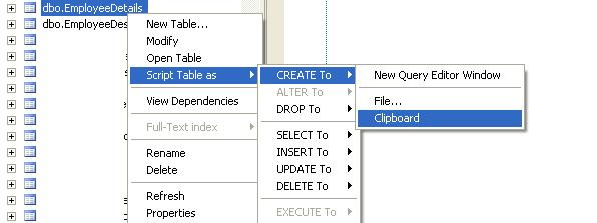
In our very first tip we will discuss creating a replica of a table in SQL with data and constraint/keys. Often we come across situation in which we may be working on enhancements/technical bugs/improvements in our products which may need to alter/change table data/table structures. Apart from us, many other developers may be working on the same table. Sometimes, we may do trial and error of changing the table data/structure. We may wish that other developers are not affected with the changes. We can copy the content/structure of the table to a new one and experiment in the new table, do whatever changes we want and finally make change to the original table.

A Brief Example

We have a table named as EmployeeDetails and EmployeeDesignation. The content of the tables are as shown below.

Read more: C# Corner

Posted via email from .NET Info

Installing Ubuntu Server 10.10 on Hyper-V

|
Now that the Hyper-V integration services are included in the official Linux builds – I wanted to try out a Linux distribution that is not officially supported by Microsoft and see what was involved in getting it all working.  With the recent release of Ubuntu 10.10 I thought I would try out their server version.  After downloading the bits from http://www.ubuntu.com/server I created a quad-processor virtual machine with a non-legacy network adapter.
Installation was fairly straight forward:

2350.UbuntuServer10_2D00_4_5F00_thumb_5F00_38008744.png7485.UbuntuServer10_2D00_46_5F00_thumb_5F00_331DA959.png

Read more: Virtual PC Guy's Blog

Posted via email from .NET Info

Enhanced MFC Message Boxes

|
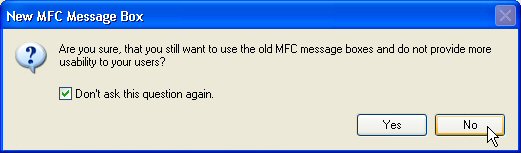
MessageBoxDialog.jpg

The Problem

Windows applications often use message boxes for asking the user for some actions or for displaying information messages. From week to week, more applications are getting published, which contain nice message boxes with checkboxes like "Do not display this message again" or "Do not ask this question" again, with which the user is able to customize the application behavior and to get rid of message boxes, which he always wants to answer in the same way.

I also wanted to offer this to the users of my applications. What features should be supported?

The message boxes should support some new style (the MB_??? flags used in a call of AfxMessageBox).
Such message boxes should be entirely written in MFC to enable other MFC developers to make quick and easy customization without having to know much about Windows API calls, just by using the standard MFC classes.
The new message boxes should support the checkboxes mentioned above and should manage automatically to save the state of the checkbox and the answer of the user and not to display the message box again, if the user didn't want it to appear again.
The message boxes should also be easy to integrate into existing applications. In existing applications, I didn't want to change every line of code containing a call to AfxMessageBox to something else. I'd just like to add a few lines of code and all messages boxes should appear in the new way.
Existing Solutions

At CodeProject, there are currently two different interesting solutions for modifying and enhancing the standard Windows message boxes, which can be invoked from MFC based applications by using the AfxMessageBox method:

XMessageBox by Hans Dietrich
TCX Message Box by Thales P. Carvalho
Although these solutions work fine, there were a few problems, because of which I was forced to offer a third solution:

  • Both solutions can be used in MFC based applications, but offer only little or even no support for the standard MFC classes. For example, in one application, all dialogs are not derived from the MFC CDialog class directly, but from another class, which draws a custom skin for the dialog instead of the standard skin. If I want to use the message boxes provided by the two solutions mentioned above in this case, I have to apply many changes in the source code. My solution is entirely based upon MFC classes. It can therefore be easily modified and is for people like me, who enjoy using MFC and do not want to get deep into Windows API calls and is more easy to understand.
  • The XMessageBox class supports "Do not ask again" or "Do not display again" checkboxes in the displayed message boxes. This feature is also supported by my CMessageBoxDialog class. The problem with the XMessageBox class from my point of view has been, that the state of the checkboxes, which has been stored in the registry, was stored there in a way, which is not the standard way by using the WriteProfileInt or GetProfileInt methods of the CWinApp class. This might seem to be only a little problem, but I'd like to get the values stored in the same places as all other profile values are stored automatically by the MFC framework.
  • At last, the layout of the message boxes generated by the two classes mentioned above didn't seem to me quite the way I'd like it to be, therefore I changed it a little bit.

How to Use CMessageBoxDialog

Read more: Codeproject

Posted via email from .NET Info

DLL Injection

|
In a previous post, I was discussing the idea of adding more events to Excel by adding a window hook.

Under the hood, the idea is that we can load a DLL in the Excel process simply by transforming that DLL into a COM add-in, which is automatically loaded by Excel.

This post covers the situation of programs that don’t implement an add-in mechanism so loading a DLL into their process requires DLL injection.

The topic of DLL injection has been covered in various other articles [1][2], so this post is mainly a summary and a sample of the basic mechanism for DLL injection.

We need to create a DLL that attaches a Windows hook when loaded. We then need to load this DLL through DLL injection in the address space of the target program.

So the basic steps are:

Create a DLL

  1. In the DllMain method of the DLL attach a windows hook which will log some CBT messages
  2. Start the target process
  3. Allocate some memory in the address space of the target process
  4. Write the path to the DLL in the allocated memory
  5. Call the LoadLibrary function from the kernel32 library in the target process passing the allocated memory as an argument. This will load the library specified by the written path.

Notes:

Step 4: Uses VirtualAllocEx
Step 5: Uses WriteProcessMemory
Step 6: Uses CreateRemoteThread with the address of the LoadLibrary function taken from GetProcAddress

Read more: Windows and .NET Programming

Posted via email from .NET Info

CrossNet

|
CrossNet is a cross platform .NET runtime.
It parses .NET assemblies and generates unmanaged C++ code that can be compiled on any standard C++ compiler.

More than 95% of the .NET 2.0 features are actually "emulated" in C++. CrossNet does not produce managed C++, the generated code is pure ANSI C++.
Even if that's only an emulation of .NET, the performance and memory usage are usually in the same range as C++ / .NET.
It is important to note that CrossNet's parser is a Reflector Add-In.

CrossNet is not the same thing as Mono:

CrossNet emulates the .NET runtime but the goal is not to write the full .NET API. Some very rarely used features might not be emulated correctly.
Some tiny portions of the BCL (Base Class Library) have been implemented in C++, but the purpose was mostly for the development of unit-tests.
When using CrossNet, one must provide some BCL implementation (or at least for the classes / methods used).
One can either augment the CrossNet emulation of BCL by using CrossNetSystem (not recommended yet), use Mono's or write own implementation.

CrossNet can be used where .NET / Mono might not be the best fit:

  • The platform is not standard and doesn't support .NET or Mono.
  • JIT cannot be implemented on the platform.
  • The platform has some memory constraints.
  • Best performance is needed and interpretation is not an option (i.e. Mint or MicroFramework might be too slow).
  • A simple code that can be customized and facilitate user's policy is a plus (memory tracking for example...).
  • There is a need for direct interaction with C++ code / compiler.
  • The code needs to be easily understandable and maintainable (or could be used to learn how .NET behavior can be emulated).

Read more: Codeplex

Posted via email from .NET Info

Writing a .net debugger (part 2) – handling events and creating wrappers

|
In this part I will describe which events the debugger has to deal with and how it should respond to them. Additionally we will create few COM wrappers for ICorDebug* interfaces. Let’s first examine the ICorDebugManagedCallback interface (imported from COM object – more in part 1). You may notice that each event handler has its own set of parameters, but the first parameter is always of type either ICorDebugAppDomain or ICorDebugProcess. Both ICorDebugAppDomain and ICorDebugProcess implement ICorDebugController which allows you to control the debuggee.

In part 1 we ended with an application that could start a new process or attach to the running one and then stop it. We will now find a way to make the process running and log all events coming from it. Let’s introduce a simple HandleEvent method which will be called from all other event handlers (except ICorDebugManagedCallback.ExitProcess):

void HandleEvent(ICorDebugController controller)
{
   Console.WriteLine("event received");
   controller.Continue(0);
}

All events handlers bodies (except ICorDebugManagedCallback.ExitProcess) will now look as follows:

{
   HandleEvent(pAppDomain); // or HandleEvent(pProcess) if first parameter is pProcess
}

If we now execute our application it will print few “event received” messages and then stop. Under the debugger we will see that the debugging API throws a COM exception:

System.Runtime.InteropServices.COMException crossed a native/managed boundary
 Message=Unrecoverable API error. (Exception from HRESULT: 0x80131300)
 Source=mindbg
 ErrorCode=-2146233600
 StackTrace:
      at MinDbg.NativeApi.ICorDebugController.Continue(Int32 fIsOutOfBand)
      at ...


Read more: Low Level Design

Posted via email from .NET Info

CAS (Code access security) & .NET 4.0 Security model FAQ (With Full Video demonstration)

|
Introduction
What is CAS?
What is evidence in CAS?
What is a permission and permission set?
What is code group?
So how does CAS work on runtime?
Can we see a quick demo of CAS?
What is CASPOL.exe?
When I open a .NET 4.0 DLL/Assembly using CASPOL it throws an error?
Can you throw some more light on the security transparent model?
A demo of security transparent model can really make things clear?
What is the concept of sandboxing?
Security transparent is good when we control the code what about external DLL?
But why this change, what was the problem with CAS?
So how can we give code access after .NET 4.0 and later?
What if I still want to use CAS in .NET 4.0?
References

This video talks about CAS, evidence, permission set and code groups.

Introduction

Many developers understand the concept of CAS (Code access security) but very few know how to implement the same. This article will discuss and demonstrate practically all those aspects of CAS which you have ready only in theory till today.

This article first starts with the basic concepts of CAS like evidence, permission, code groups and caspol.exe. It then moves ahead to demonstrate how CAS can be implemented in real world. This article further talks about ground up changes made in .NET 4.0 for CAS. In those regards it discusses about security transparent model and sandboxing.

Bet me this article is your last chance to see CAS in actual action....enjoy.

This is a small Ebook for all my .NET friends which covers topics like WCF, WPF, WWF, AJAX, Core .NET, SQL etc you can download the same from SampleDotNetTrainingBook

or else you can catch me on my daily free trainings


What is CAS?

Code Access security is a security model which grants or denies permission to your assembly depending on evidences like from where the code has emerged, who the publisher is? , strong names etc.


What is evidence in CAS?

When you want to execute any code in your environment you would first like to know from where the code came from. Depending from where it came from, you would then would like to give him access rights. For instance a code compiled from your own computer would have greater rights than code downloaded from the internet.

In order to know the same we need to probe the assembly / exe / dll and get evidences like who is the publisher of the code , from which site has this code from , from which zone has it come from ( internet , intranet etc) etc.


What is a permission and permission set?

Read more: Codeproject

Posted via email from .NET Info

Load a .NET Assembly into a Separate AppDomain So You Can Unload It

|
There may be times when you wish to temporarily load a .NET assembly to inspect it, but you don’t want the assembly to remain in your program’s memory taking up resources.  Unfortunately, once your program loads an assembly, there is no way to unload it.  The best way is to create a separate AppDomain, load the assembly into that AppDomain, then unload the AppDomain when you are finished.
The following sample code loads a .NET assembly from disk, displays the name of every type defined in the assembly, then unloads the assembly:

AppDomain appDomain = null;
try
{
   string path = @"C:\myAssembly.dll";
   byte[] buffer = File.ReadAllBytes( path );

   appDomain = AppDomain.CreateDomain( "Test" );
   Assembly assm = appDomain.Load( buffer );

   Type[] types = assm.GetTypes();
   foreach (Type type in types)
   {
       Console.WriteLine( type.FullName );
   }
}
catch (Exception ex)
{
   Console.WriteLine( ex.Message );
}
finally
{
   if (appDomain != null)
       AppDomain.Unload( appDomain );
}

Read more: C# 411

Posted via email from .NET Info

Different Kinds of Operator Overloading

|
What is Operator Overloading?

We know that standard data types supplied by languages are well known and there will be operators like +,* ,% operates on these data types. But, what is the case if it is user-defined types say a 3dpoint class, which is the combination of three integers. Well, all languages that supports operator overloading says, “It is your Type. Please you say how the operator + should work”.

If you say “How the Operator + should work for 3point class”, then the you are overloading the + operator. Because, it will now know how to add two integer and how to add two 3dpoint.

Below are the types of overloading that I will demonstrate in this article:

Implicit Conversion Operator
Explicit Conversion Operator
Binary Operator

Let us start with TimeHHMMSS class

Before we move on to the Overloading, first let me explain what this class will do. The class is used to store the time in Hour, Minute and Seconds. There are three members defined for that. The class Looks Like:

class TimeHHMMSS
{

//001: Parts of the time class
public int m_hour;
public int m_minute;
public int m_sec;

The default constructor will set all the members to zero. And a overloaded version will accept hour, minute and Seconds. Below is the code for Constructors:


//002: Default constructor for the class
public TimeHHMMSS()
{

m_hour = 0;
m_minute = 0;
m_sec = 0;
}

//003: Overloaded Construtor
public TimeHHMMSS(int hr, int min, int sec)
{

m_hour = hr;
m_minute = min;
m_sec = sec;
}

All classes in C# have Object as their base class. We will override the ToString method our own way.

//004: Every class that we create has Object as the base class. Override the ToString
public override string ToString()
{

return string.Format("{0}:{1}:{2}", m_hour, m_minute, m_sec);
}

Implicit Conversion – (A) Integer to TimeHHMMSS

Below is the Syntax for Implicit conversion:

public static implicit operator ( Variable)

We will get the integer as parameter. So the time is specified in smaller units say in seconds passed as an integer parameter. 1 Hour, 10 minutes, 15 Seconds can be specified in seconds as 4215. These “seconds” taken as an integer parameter is processed to split into Hour,Minutes,and Seconds. After the Split, we have all the member variable of the class is ready to return back. Below is the Conversion operator:

//005: Implicit Conversion Operator. Coversion from int to TimeHHMMSS
public static implicit operator TimeHHMMSS(int totalSeconds)
{

//005_1 : Declarations
int hour, min, seconds;
int RemainingSeconds;
TimeHHMMSS returnobject = new TimeHHMMSS();

//005_2: Calculate Seconds
seconds = totalSeconds % 60;
returnobject.m_sec = seconds;

Read more: Codeproject

Posted via email from .NET Info

DLR using Reflection.Emit (In Depth) Part 1

|
Well, lets put it in other words, " The more I see the framework, the more I discover in .NET". Yes, after putting my efforts with Reflection classes, I thought I could make some research on code generation. I took the CodeDom being the best alternative to generate code. Sooner or later, I found out, CodeDom actually allows you to build your assembly but it is does not allow you to dynamically compile a part of the assembly at runtime, but rather it invokes the compiler to do that. So rather than CodeDom, I thought there must be something else which fruits my needs.

Next I found out one, using Expression Trees. If you are already following me, I think you know, few days back I have already written about Expression Trees and Lamda Decomposition. So it is not a good time to recap the same. Later on, I did some research on MSIL, and found it worth learning. If you are going to grow with .NET, it would be your added advantage if you know about MSIL. Hence I started looking at the MSIL. Finally I found out a number of classes which might help you to build a Type dynamically. Let me share the entire thing with you.

Introduction

Reflection.Emit like CodeDom allows you to build your custom assembly and provides you a number of Builder classes which might be compiled during Runtime, and hence invoke DLR capabilities of C#. The library also exposes one ILGenerator which might be used later to produce the actual MSIL by putting efforts to emit Operation codes.  So finally after you write your OpCodes correctly, you could easily able to compile the type dynamically during runtime. In this post,  I would use ILDASM to see the IL generated from our own class, that I define, and later on I would try to build the same class dynamically.

What is Reflection ?

If you are struck with Reflection, then you need to really gear yourself a bit to go further. Let me give a brief explanation of Reflection. Reflection is actually a technique to read a managed dll which is not being referenced from the application and call its types. In other words, it is a mechanism to discover the types and call its properties at runtime. Say for instance, you have an external dll which writes logger information and sends to the server. In that case, you have two options.
You refer to the assembly directly and call its methods.
You use Reflection to load the assembly and call it using interfaces.
If you want to build really a decoupled architecture for your application, something like which could be plugged in later in the application, it is always better to choose the 2nd option. Let me clarify a bit more, say you want your customer to download the logging dll from your server and plugin to the application when needed. Believe me, there is no other alternative than using Reflection. Reflection classes allows you to load an external assembly to your application and call its types at run time.

Read more: DOT NET TRICKS

Posted via email from .NET Info

Silverlight Tip of the Day #36 – Creating Smooth Tile Transitions using Opacity Masks

|
This tutorial will look into using the Opacity property on the tiles to create smooth, natural looking transitions between tiles. For example, blending a dirt tile into a grass tile, a grass tile into a rock tile, etc.

Below, on the left, is a screen shot of a grass and dirt tile without the use of an opacity mask. As you can see, the straight line does not make for a very real looking transition! On the right is the result with an opacity mask applied, making for a much more realistic transition.

image_6.png

Read more: Silverlight Tip of the Da

Posted via email from .NET Info

15 Things I’ve discovered about Silverlight.

|
I love Silverlight and have written / talked about it a lot. I can’t help but notice that a lot of people are new to Silverlight or may have played with it a few times. Well this post is for you. It is a list of 15 things that I’ve discovered since I started developing for Silverlight. If you are a full-time Silverlight developer than I would hope you know most of these. I promise not to scare off anyone with talks of MVVM, Prism or MEF.

1) The line highlighted below represents the MIME type and it is not the runtime version of Silverlight. Many developers are at first confused about this because they think it is referring to the Silverlight version (example: Silverlight 4).  

HTML/ASPX markup of a Silverlight Hosted Application

image_thumb_1.png

2) You can’t use .GIF images with Silverlight. Use .PNG files if you need images in a Silverlight application. If you must use .gif’s then you should consider using the .NET Image Tools Library for Silverlight. Many people are also building web services that will convert the .gif files to .PNG. I would recommend converting the images to .PNG with a tool like Paint.NET.

image61_thumb.png

Read more: Michael Crump

Posted via email from .NET Info

How to Develop MVVM Silverlight applications with Prism

|
I’ve got some criticism from Alex Golesh in a comment on one of my latest Posts (Managing Silverlight resources contained in external assemblies), First I would like to thank him for taking his time and writing this comment, I would like to reply him with this post.

First let’s see Alex’s Comment:

I have to comment it, because the code lead to bad practice...

First, it heavily assumes you have all you assemblies in single XAP package - which is a bad practice for "heavy" Silverlight applications and especially real MVVM based applications.

Second, XamlReader will throw an exception if you resource (XAML) have a refernces to external resource dictionaries.

Last, but not least, this code will not work in SL3 and Silverlight for Windows Phone 7.

Regards,

Alex

Alex’s first point is what really made me write this following post, but I will get to it later. His second point is just plain wrong, I’ve created a small sample proving it, it is not very interesting sample as it self in my opinion but I just don’t want you, dear reader, to refrain from this solution on basis of Alex’s false assumption. You can download it here.

About Alex’s last point, It might be that it will not work in SL3, I’ve not tried to test it on that SL version,  Even how I wouldn’t recommend you developing RIA in SL3. About Windows Phone, I reckon that on the Phone platform a different approach is needed to be used, the code to manage resources is used when writing decoupled modules should be tuned to the platform specific needs. Anyway it is out of scope from this post, I will leave it for future post.

Now, let’s talk about Alex’s first point, it really boiled my blood , an assumption so wrong, I’ve not heard for a long time, the whole purpose of that post was to allow you writing separate modules (which every module comes as his own XAP package) by keeping resources separate as well in order to refrain from tight coupling it in the first place. Now what really made me laugh is that each resource dictionary usually contains DataTemplates which pair a view and its ViewModel, an essential phase for maintaining MVVM .

Read more: Ariel's Remote Data Center

Posted via email from .NET Info