This is a mirror of official site: http://jasper-net.blogspot.com/

Forcing an executable to run in 32bit mode

| Wednesday, March 24, 2010
Since i am not a OS expert I would normally not write about this, but i was trying to run the BizTalk Documenter tool and always got startup errors.

The customer environment is:

   * BizTalk 2006 R2 SP1 64 bits
   * Windows 2003 server R2 64Bits
   * SQL Server 2005 SP3 64 Bits

In my case the error was due that it seems Documenter Tool it is not able to run on 64bits on the detailed environment. So how literally force the tool to run on 32 bit mode? Just running a tool called CorFlags.exe

Syntax

corflags.exe Microsoft.Services.Tools.BiztalkDocumenter.exe /force /32BIT+


Great… but  I do not see the tool, where is it?

As far as i know it is installed by:

   * Microsoft Windows 200X SDK   (C:\Program Files\Microsoft SDKs\Windows\v7.0\Bin\x64>)  (note: this path is from a Windows 7 SDK)
   * Visual Studio 2005 and above  (C:\Program Files\Microsoft Visual Studio\SDK\v 2.0\Bin)

Read more: BizTalk Tips & Things

Posted via email from jasper22's posterous

מציאת קובץ שבה מוגדר מחלקה

|
עד היום (עד המעבר ל - Visual Studio 2010) כשהיינו בוחרים ב - Go To Definition על מחלקה מסויימת - היינו רואים באיזה Namespace המחלקה מוגדרת, אבל לא היה דרך הגיונית למצוא באיזה dll זה יושב (כדי לדעת למה לעשות AddReference)

ב - VS2010 כשמגיעים ל - Go To Definition בחלק העליון מופיע הקוד הבא:


#region Assembly mscorlib.dll, v4.0.30128
// C:\Program Files (x86)\Reference Assemblies\Microsoft\Framework\.NETFramework\v4.0\mscorlib.dll

Posted via email from jasper22's posterous

Server.Transfer Vs. Response.Redirect

|
לאחרונה שאלו אותי כמה אנשים על ההבדל בין Server.Transfer לבין Response.Redirect? מתי משתמשים בכל אחד מהם? ומדוע כדאי להשתמש ב Server.Transfer?
אז הגיע זמן לענות על השאלות :)
Response.Redirect

הפקודה הזאת אומרת לדפדפן לעבור לעמוד המבקש:

Response.Redirect("http://one-v.co.il/");

Server.Transfer

גם הפקודה אומרת לדפדפן לעבור לעמוד המבוקש:

Server.Transfer(http://one-v.co.il);

אז מה ההבדל?

Server.Transfer  שומרת על הנתיב הנוכחי של העמוד ומעבירה רק את בקשה. אחד היתרונות של הפעולה היא חיסכון בבקשות של HTTP.

החסרון בזה הוא שניתן להשתמש Server.Transfer רק כשרוצים להעביר באותו דומיין, Server.Transfer  לא יעבוד במידה ונרצה להעביר לדומיין אחר.

Server.Transfer ("http://one-v.org");     //won't work

Server.Transfer  מאפשר לנו גם לשמור את הנתונים של העמוד הקודם:

Server.Transfer("send.aspx", true");

Read more: Arnold Simha

Posted via email from jasper22's posterous

Is your MySQL Server Loaded ?

|
So you're running the benchmark/stress test - how do you tell if MySQL server is really loaded ? This looks like the trivial question but in fact, especially when workload consists of simple queries I see the load generation and network really putting a lot less load on MySQL than expected. For example you may have 32 threads (or processes) running queries as fast as they can... does it really mean there is an 32 concurrent queries ran all the time ? It may be the case or it may be not...

Read more: DZone

Posted via email from jasper22's posterous

Web Test Authoring and Debugging Techniques for Visual Studio 2010

|
A New Name, But Under the Covers Still the Same

In this release we renamed "Web Test” to “Web Performance Test” to highlight the primary scenario for Web tests, which is using them as scripts in a load test to model user actions. Load tests are used to drive load against a server, and then measure server response times and server response errors. Because we want to generate high loads with a relatively low amount of hardware, we chose to drive Web performance tests at the protocol layer rather than instantiating a browser. While Web performance tests can be used as functional tests, this is not their primary focus (see my post Are Web Tests Functional Tests?). You will see that I still refer to “Web Performance Tests” as “Web Tests” for short.

If you really want to test the user experience from the browser, use a Coded UI test to drive the browser.

In order to be successful working with Web Performance Tests, it is important you understand the fundamentals about how they work.
Web Performance Tests Work at the HTTP Layer

The most common source of confusion is that users do not realize Web Performance Tests work at the HTTP layer. The tool adds to that misconception. After all, you record in IE, and when running a Web test you can select which browser to use, and then the result viewer shows the results in a browser window. So that means the tests run through the browser, right? NO! The Web test engine works at the HTTP layer, and does not instantiate a browser. What does that mean? In the diagram below, you can see there are no browsers running when the engine is sending and receiving requests

Read more: Ed Glas's blog on VSTS load testing
Read more: VS 2005: Web Test Authoring and Debugging Techniques
Read more: VS 2008: Web Test Authoring and Debugging Techniques for VS 2008

Posted via email from jasper22's posterous

SQL SERVER – Fix : Error : 8501 MSDTC on server is unavailable. Changed database context to publisherdatabase

|
During configuring replication on one of the server, I received following error. This is very common error and the solution of the same is even simpler.

MSDTC on server is unavailable. Changed database context to publisherdatabase. (Microsoft SQL Server, Error: 8501)

Solution:

Enable “Distributed Transaction Coordinator” in SQL Server.

Method 1:

  1. Click on Start–>Control Panel->Administrative Tools->Services
  2. Select the service “Distributed Transaction Coordinator”
  3. Right on the service and choose “Start”

Method 2:

Read more: Journey to SQL Authority with Pinal Dave

Posted via email from jasper22's posterous

Visual Dumpbin - A C# Visual GUI for Dumpbin

|
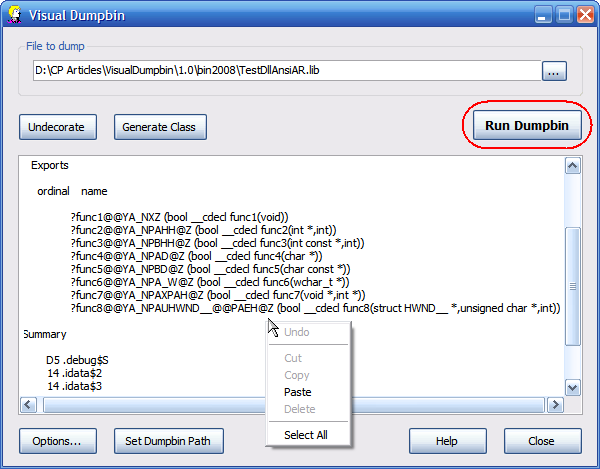
VisualDumpbin3.png

Since I started working with .NET, I use dumpbin  frequently, since some of my work involves integrating unmanaged C++ DLLs, most of which I do not have source code for. It is very tedious to find the file I want to dump, open a command prompt, run dumpbin, open the output file, and finally copy the information I want. For .lib files this is bad enough, but for .dll  files it is even worse; .lib files contain undecorated function prototypes, but .dll files do not. I put together Visual Dumpbin to help with this.

After you select the file you want to dump, you see the exported functions with just one click

Read more: Codeproject

Posted via email from jasper22's posterous

Implementing the IAsyncResult interface and calling functions asynchronously

|
One of the interesting features in .NET framework programming is the ability to easily use asynchronous programming and multi threading. .NET offers a wide variety of methods for asynchronous programming and for working with threads, but this was made very much easier with .NET 2.0. Building multithreaded applications in .NET 1.0 and .NET 1.1 has been made very convenient with classes like Thread and ThreadStart delegates. The ThreadPool class is useful in managing threads in multithreaded applications.

In a quick glance, we can see that the addition of the BackgroundWorker class has added to the Windows application tool set.

We can do an asynchronous callback for ASP.NET pages by adding the attribute:

<%@ Page Async="true" ... %>

This has made it very easy for users (even beginners) to use these facilities.

I will not talk about how to use multithreading in .NET, this is out of the scope of this article and the internet is full of such articles.

I will be talking about how to make your methods callable asynchronously by creating begin/end pair stems, in a similar way that the WSDL.exe tool generates the contract files for a Web Service. You will need this when you make a service or something like that and you want others to use it in an asynchronous way, to make it easy for them to implement it and enhance the performance without the need for them to create more threads and manage them etc.

Background

I got really interested in the subject when I was developing a Smart Client application from scratch. In the beginning, I made a Web Service and coded all its functionality. Then, I built up a Windows client application which consumed the functionality of the service, and in order to enhance performance, I consumed the service in its Begin/End pair of methods, asynchronously.

Read more: Codeproject

Posted via email from jasper22's posterous

Creating a Performance Baseline

|
You'll often hear that you should monitor the performance of SQL Server. You may read a little about performance monitoring, and you may turn on a few counters or perform a query against a dynamic management view that you know about. But, you may still wonder "Are these numbers good or bad?"

To determine if something is bad, you need to know what it looks like when it is good. Sounds obvious doesn't it? By creating a performance baseline, you can learn what your numbers are when your system is performing well. A performance baseline includes a single performance chart that is accompanied by an interpretation of the results, based on your environment.

To establish your performance baseline against Windchill, you'll need to find a time when the performance of your SQL Server environment is considered normal. For example, no users are complaining about slow responses, no backups or large jobs are running, and no "special" processing is taking place. Once you find that time, you'll need to collect a range of Windows Performance Monitor (perfmon) counters, information from dynamic management views, and maybe even a small SQL Server Profiler trace. Then, you can use the results of your collection as the starting point for subsequent performance collections. How do the new numbers compare to the baseline numbers, when everything was fine? Did one counter go up or down? Did several numbers change? Having something to compare the current numbers with can help you identify the source of new performance bottlenecks.

What Should You Monitor?

The actual counters, dynamic management views, or SQL Server Profiler trace events that you should collect are based on your system setup. But, the counters that we list below are a good place to start. If you capture these counters, you should have enough information to determine if you are having a performance issue—and if you are having an issue, which area is the source.

Note: Many of the counters that we list below list a threshold. These threshold numbers are not written in stone, and your actual values may be different. It is important to note that a standard threshold number is a starting point—if your value is a little higher or a little lower, the values that you see during your performance baseline collection become your new thresholds.

Monitoring the Disk Subsystem

There are several methods to monitor the disk subsystem. Since the disk subsystem is getting more and more complex each year, we recommend that database administrators monitor the following Performance Monitor counters to understand the latency of their disk I/O requests.

Read more: PTC Windchill on SQL Server

Posted via email from jasper22's posterous

NET StarCraft II Replay Parser

|
Project Description
A .NET 3.5 Library used to parse StarCraft II replays.

Developed in C# 3.5.

Read more: Codeplex

Posted via email from jasper22's posterous

Использование SQLCLR для увеличения производительности

| Tuesday, March 23, 2010
Начиная c MS SQL Server 2005 в распоряжение разработчиков баз данных была добавлена очень мощная технология SQL CLR.

Эта технология позволяет расширять функциональность SQL сервера с помощью .NET языков, например C# или VB.NET.

Используя SQL CLR можно создавать написанные на высокопроизводительных языках свои хранимые процедуры, триггеры, пользовательские типы и функции, а также агрегаты. Это позволяет серьезно повысить производительность и расширить функциональность сервера до немыслимых границ.

Рассмотрим простой пример: напишем пользовательскую функцию разрезания строки по разделителю используя SQL синтаксис и SQL CLR на базе C# и сравним результаты.

Пользовательская функция, возвращающая таблицу

   CREATE FUNCTION SplitString (@text NVARCHAR(max), @delimiter nchar(1))
   RETURNS @Tbl TABLE (part nvarchar(max), ID_ORDER integer) AS
   BEGIN
     declare @index integer
     declare @part  nvarchar(max)
     declare @i   integer
     set @index = -1
     set @i=1
     while (LEN(@text) > 0) begin
       set @index = CHARINDEX(@delimiter, @text)
       if (@index = 0) AND (LEN(@text) > 0) BEGIN
         set @part = @text
         set @text = ''
       end else if (@index > 1) begin
         set @part = LEFT(@text, @index - 1)
         set @text = RIGHT(@text, (LEN(@text) - @index))
       end else begin
         set @text = RIGHT(@text, (LEN(@text) - @index))
       end
       insert into @Tbl(part, ID_ORDER) values(@part, @i)
       set @i=@i+1
     end
     RETURN
   END
   go


Эта функция разрезает входную строку используя разделитель и возвращает таблицу. Применять такую функцию очень удобно, например, для быстрого заполнения временной таблицы записями.

   select part into #tmpIDs from SplitString('11,22,33,44', ',')

Read more: habrahabr.ru

Posted via email from jasper22's posterous

Running Groovy on the Nokia N900

|
My favorite gadget for the last few months is definitely the Nokia N900. It’s a geeky device with a real Linux OS aboard. In opposite to it’s locked down competitors, the N900 runs Maemo, a platform consisting (mostly) of open source software. So I wonder if it’s possible to use Groovy on that. And yes, it is possible!Unfortunately the Maemo platform doesn’t contain a JVM by itself. Some days ago, I saw a tweet that there a OpenJDK port for ARM. All you have to do, is downloading the JDK and JRE from this page, bunzip it and move the directory to the N900. The next step is downloading Groovy and setting the envionment variables

Read more: Armbruster IT Blog

Posted via email from jasper22's posterous

Contributing to open source projects

|
Amit has written from India asking how to start participating in open source projects.

   I am a software developer from India and recently came through your article on "How improved hardware changed programming". It was good reading it. I wanted to know more about open source projects & how to get involved in it. I read that you contribute to a couple of them so thought of asking you about your experience and how did it help from a developer's perspective.

My experience with code contributions to open source projects is mainly in the field of Php libraries and frameworks. This is not a coincidence as I am more stimulated to make contributions to projects I personally use: if I had to give one advice to choosing an open source project to participate in, I would recommend selecting a project you actually use at the Api level (interfacing with their source code or with their binary interface with your own code).
It's not an egoistic choice, although you would clearly benefit from your improved knowledge of the project internals, bugs that have been fixed and new features that have been introduced thanks to your work. It's more a synergistic approach.
Employing an open source project at the user level (in the case of standard applications) gives you a picture of its overall features and maybe an involvement with the supporting community, which is not a deep vision of the project goals and inner workings. But your contribution will be by far more valuable and simple if you start with contributions to codebases you already know "intimately". I would never try to contribute to Pidgin with code, because even if I run it all the time for instant messagging, the time I would spend in a field not related to my work it's probably not worth very much, as there is a steep learning curve and the learning process is limited to a field I'm not interested into (and thus am likely not to enjoy.)

Read more: Invisible to the eye

Posted via email from jasper22's posterous

RIP Google.cn: Google Closes Its Search Operations in China

|
Google has announced a moment ago in their blogpost that they are closing down all of their search operations in China. From now onwards Google.cn  will redirect to Google.com.hk. This is a black day for the open web and China. Google has stopped censoring their search services Google Search, News and Images on Google.cn and it will redirected to Google.com.hk where all the uncensored results will come in Chinese language. In simple words Google is just shifting their servers from China to Hong Kong. Google’s map and music search will remain live in China domain as of now. Google will continue to have their R&D center in China and also a sales team if and only if China doesn’t start blocking Google.com.hk.

Read more: TechDust
Official blog: Google

Posted via email from jasper22's posterous

Ingenious new USB cable

|

Creating a rogue CA certificate

|
We have identified a vulnerability in the Internet Public Key Infrastructure (PKI) used to issue digital certificates for secure websites. As a proof of concept we executed a practical attack scenario and successfully created a rogue Certification Authority (CA) certificate trusted by all common web browsers. This certificate allows us to impersonate any website on the Internet, including banking and e-commerce sites secured using the HTTPS protocol.

Our attack takes advantage of a weakness in the MD5 cryptographic hash function that allows the construction of different messages with the same MD5 hash. This is known as an MD5 "collision". Previous work on MD5 collisions between 2004 and 2007 showed that the use of this hash function in digital signatures can lead to theoretical attack scenarios. Our current work proves that at least one attack scenario can be exploited in practice, thus exposing the security infrastructure of the web to realistic threats.

This successful proof of concept shows that the certificate validation performed by browsers can be subverted and malicious attackers might be able to monitor or tamper with data sent to secure websites. Banking and e-commerce sites are particularly at risk because of the high value of the information secured with HTTPS on those sites. With a rogue CA certificate, attackers would be able to execute practically undetectable phishing attacks against such sites.

Read more: Security Research

Posted via email from jasper22's posterous

Windows Research Kernel

|
Overview

The WRK packages core Windows XP x64 and Windows Server 2003 SP1 kernel source code with an environment for building and testing experimental versions of the Windows kernel for use in teaching and research.

The WRK includes the source for:

   * Processes
   * Threads
   * LPC
   * Virtual memory
   * Scheduler
   * Object manager
   * I/O manager
   * Synchronization
   * Worker threads
   * Kernel heap manager
   * Other core Windows (NTOS) kernel functionality

The WRK is useful in design projects that allow your students to explore operating system (OS) principles using the Windows kernel sources. It facilitates the building of experiments and projects based on modifying the Windows kernel, enabling advanced teaching and research that promote better understanding of the Windows architecture and implementation.

WRK Details

The Windows Research Kernel contains the sources for the core Windows (NTOS) kernel.

NTOS implements the basic OS functions for:

   * Processes
   * Threads
   * Virtual memory and cache managers
   * I/O management
   * The registry
   * Executive functions, such as the kernel heap and synchronization
   * Object manager
   * Local procedure call mechanism
   * Security reference monitor
   * Low-level CPU management (thread scheduling, Asynchronous and Deferred Procedure calls, interrupt/trap handling, exceptions)

The NT Hardware Abstraction Layer, file systems, network stacks, and device drivers are implemented separately from NTOS and loaded into kernel mode as dynamic libraries. Sources for these dynamic components are not included in the WRK. However, some are available in various development kits published by Microsoft, such as the Installable File System Kit and the Windows Driver Development Kit.

Read more: MS Research

Posted via email from jasper22's posterous

Approaching Parallelism

|
Reed Copsey has written a series of blog postings on how to look at your application to make it run on multi-core processors. He approaches the issue by focusing on what you are trying to accomplish. This is an indepth series that shows code and details in how you can

Here’s a list of his posts so far:

   * Parallelism in .NET – Introduction
   * Parallelism in .NET – Part 1, Decomposition
   * Parallelism in .NET – Part 2, Simple Imperative Data Parallelism
   * Parallelism in .NET – Part 3, Imperative Data Parallelism: Early Termination
   * Parallelism in .NET – Part 4, Imperative Data Parallelism: Aggregation
   * Parallelism in .NET – Part 5, Partitioning of Work
   * Parallelism in .NET – Part 6, Declarative Data Parallelism
   * Parallelism in .NET – Part 7, Some Differences between PLINQ and LINQ to Objects
   * Parallelism in .NET – Part 8, PLINQ’s ForAll Method
   * Parallelism in .NET – Part 9, Configuration in PLINQ and TPL
   * Parallelism in .NET – Part 10, Cancellation in PLINQ and the Parallel class
   * Parallelism in .NET – Part 11, Divide and Conquer via Parallel.Invoke
   * Parallelism in .NET – Part 12, More on Task Decomposition

Each post is a short, concise, thought-provoking way to look at your application to run in parallel.
See Also

See also my screencast series on Channel 9 which serves as an introduction to Parallel Computing on Windows

Read more: ISV Developer Community

Posted via email from jasper22's posterous

Comparing Memcache and Ehcache Server Performance

|
Ehcache Server provides a RESTful API for cache operations. I am working on v0.9 and have been doing some performance benchmarks. I thought it would be interesting to compare it with the performance of that other over-the-network cache, Memcache. Now I already knew that Ehcache in-process was around 1,000 times faster than Memcache. But what would the over-the-network comparison be.

Here are the results:

Memcache and SpyMemcache Client

10000 sets: 3396ms

10000 gets: 3551ms

10000 getMulti: 2132ms

10000 deletes: 2065ms

Ehcache 0.9 with Ehcache 2.0.0

10000 puts: 2961ms

10000 gets: 3841ms

10000 deletes: 2685ms

So, the results are a wash. Memcache is slightly slower on put, maybe because the JVM does not have to malloc, it already has the memory in heap. And very slightly faster on get and delete.

A few years ago there was a raging thread on the Memcache mailing list about Memcache versus MySQL with in-memory tables. They were also a wash. I think the point is that serialization and network time is more significant than the server time, provided the server is not that much different.

Read more: Greg Luck's Blog

Posted via email from jasper22's posterous

Using SystemParametersInfo to access user interface settings

| Monday, March 22, 2010
The SystemParametersInfo function gives you access to a whole slew of user interface settings, and it is the only supported method for changing those settings.

I'm not going to list every single setting; go read the list yourself. Here are some highlights:

   * SPI_GETICONTITLELOGFONT lets you query the font that is used for icon labels; SPI_SETICONTITLELOGFONT lets you change it.
   * SPI_GETNONCLIENTMETRICS lets you query the fonts that are used for window captions, menus, status bars, and message boxes; SPI_SETNONCLIENTMETRICS lets you change them.

Here are some control panel settings.

   * SPI_SETKEYBOARDDELAY and SPI_SETKEYBOARDSPEED let you set the keyboard autorepeat parameters.
   * SPI_SETDOUBLECLICKTIME lets you set the mouse double-click speed.
   * SPI_SETMENUFADE lets you enable or disable the menu fade animation. [Typo fixed, 4pm.]
   * There is a whole series of SPI_SETxxxANIMATION settings that let you control which screen elements animate.

Notice that when using the SPI_SET* commands, you also have to choose whether the setting changes are temporary (lost at logoff) or persistent. The historically-named SPIF_UPDATEINIFILE flag causes the changes to be saved to the user profile; if you leave it off, then the changes are not saved and are lost when the user logs off. You should also set the SPIF_SENDCHANGE flag so that programs which want to refresh themselves in response to changes in the settings can do so.

The fact that there exist both temporary and persistent changes highlights the danger of accessing the registry directly to read or write the current settings. If the current settings are temporary, then they are not saved in the registry. The SystemParametersInfo function retrieves the actual current settings, including temporary ones. For example, if you want to query whether menus are being animated, and the user has temporarily disabled animation, reading the registry will tell you that they are being animated when in fact they are not.

Also, changes written to the registry don't take effect untll the next logon, because that is the only time the values are consulted. To make a change take effect immediately, you must use SystemParametersInfo.

It still puzzles me why people go to the undocumented registry keys to change these settings when there is a perfectly good documented function for doing it. Especially when the documented function works and the undocumented registry key is unreliable.

Read more: The old new thing

Posted via email from jasper22's posterous

Scaling writes in MySQL

|
We use MySQL on most of our projects. One of these projects has a an access pattern unlike any other I've worked on. Several million records a day need to be written to a table. These records are then read out once at the end of the day, summarised and then very rarely touched again. Each record is about 104 bytes long (thre's one VARCHAR column, everything else is fixed), and that's after squeezing out every byte possible. The average number of records that we write in a day is 40 million, but this could go up.

A little bit about the set up. We have fairly powerful boxes with large disks using RAID1/0 and 16GB RAM, however at the time they only had 4GB. For BCP, we have a multi-master set up in two colos with statement level replication. We used MySQL 5.1.

My initial tests with various parameters that affect writes showed that while MyISAM performed slightly better than InnoDB while the tables were small, it quickly deteriorated as the table size crossed a certain point. InnoDB performance deteriorated as well, but at a higher table size. The table size turned out to be related to the innodb_buffer_pool_size, and that in turn was capped by the amount of RAM we had on the system.

I decided to go with InnoDB since we also needed transactions for the summary tables and I preferred not to divide my RAM between two different engines. I stripped out all indexes, and retained only the primary key. Since InnoDB stores the table in the primary key, I decided that rather than use an auto_increment column, I'd cover several columns with the primary key to guarantee uniqueness. This had the added advantage that if the same record was inserted more than once, it would not result in duplicates. This small point was crucial for BCP, because it meant that we did not have to keep track of which records had already been inserted. If something crashed, we could just reinsert the last 30 minutes worth of data, possibly into the secondary master, and not have any duplicates at the end of it. I used INSERT IGNORE to get this done automatically.

Read more: The other side of the moon

Posted via email from jasper22's posterous

CASPOL Tool in .NET

|
Suppose a developer creates an assembly that requires access to a resource or action that is typically available to users or clients requesting that assembly. Sometimes, for maintenance or other purposes, the administrator may need to restrict the action or resource required by the developer's assembly. This restriction could cause the assembly to function improperly or fail altogether when security exceptions are thrown. Viewing the requirements of the assembly could help you identify the problem and determine whether security issues are involved.

CASPOL (Caspol.exe), a command-line tool included with the .NET runtime SDK, is used to administer policy changes as well as to view existing permissions and the code group hierarchy. Let's look at a few examples of viewing code groups and permissions with CASPOL.

Your default view in CASPOL is determined by your current access permissions (enterprise, machine, or user). If you do not currently have administrative permissions, your default view is the Users view. The examples below explicitly specify either the machine or the user policy level. When code groups from both levels should be displayed together, as in the first example, the -all option is used.

Running the following command from the command line shows the code groups to which a specific assembly file belongs.

CASPol-all-resolvegroup hello.dll

Although this example uses a library called hello.dll, the library could be replaced with any assembly-even caspol.exe itself.

Read more: C# Corner

Posted via email from jasper22's posterous

Anti Patterns Catalog

|
"Catalog" is a technical term in the PatternCommunity: a list of patterns is called a catalog. This catalog lists AntiPatterns.

   * AbstractionInversion
   * AccidentalComplexity
   * AccidentalInclusion
   * AcmePattern
   * AlcoholFueledDevelopment
   * AmbiguousViewpoint
   * AnalogyBreakdownAntiPattern
   * AnalysisParalysis
   * AnAthena
   * AnchoredHelper?
   * AppointedTeam
   * ArchitectsDontCode
   * ArchitectureAsRequirements
   * ArchitectureByImplication
   * AsynchronousUnitTesting
   * AutogeneratedStovepipeAntiPattern
   * BearTrap
   * BigBallOfMud
(more..)


Read more: Anti Patterns Catalog

Posted via email from jasper22's posterous

Silverlight 4 RC – Socket Security Changes

|
I’ve been reading the SL4 RC docs and noticed that aspects of security have changed since the beta and since I made these screencasts  on networking.

I think these are positive changes and, from what I’ve seen so far both TCP and UDP sockets drop their security limitations for an elevated application.

That is – a non-trusted application (whether in the browser or out of browser) has restrictions imposed on it;

  1. TCP sockets can only be opened to ports 4502 to 4534.
  2. TCP sockets can only be opened once a security policy allowing the opening has been downloaded via either;
        1. TCP over port 943 on the target server
        2. HTTP from port 80 on the target server ( this is new in the RC )
  3. UDP multicast sockets can only be opened to ports above 1024.
  4. UDP multicast groups can only be joined once a security policy allowing the joining has been downloaded via either;
        1. UDP unicast to port 9430 on the target server ( for a single source multicast group )
        2. UDP multicast to port 9430 on the multicast group ( for an any source multicast group )

and all those restrictions go away if you’re running trusted.

Read more: Mike Taulty's Blog

Posted via email from jasper22's posterous

Silverlight 4: How to use the new Printing API ?

|
Silverlight 4 now supports printing functionality using the Printing APIs. Using the API’s you can now print your whole application screen or a portion of the application. Also, you can customize the look while you printing your part/full application. In this post I will step you guys to the depth of the printing API.

Prerequisite

Before you start working with the Silverlight 4 printing API, your environment should match the following prerequisite:

   * You are using Windows XP SP2 or higher version of operating system
   * You already installed Visual Studio 2010 RC
   * Latest Silverlight 4 Tools for Visual Studio 2010

If you meet the above prerequisite, we are ready to go to the next step.

Setting up the Silverlight 4 Project

Let us start with a new blank Silverlight application project. Open Visual Studio 2010 and click on File –> New –> Project or just press CTRL + SHIFT + N to open up the new project dialog. Now expand the “Visual C#” section and select “Silverlight”. From the right pane select “Silverlight Application”, chose the location to create the project and give a proper name (here I am using “Silverlight4.PrintingAPI.Demo” as the project name). Click “ok” which will bring up another dialog. Select “Silverlight 4” & hit ok to create the blank Silverlight application.

XAML Design

Visual Studio will automatically create a “MainPage.xaml” for you and display inside your Visual Studio IDE. You can now design your application as per your need. Let us add some contents inside the page:

<Canvas x:Name="cnvContainer">
   <Border BorderBrush="#FFC7851A" BorderThickness="1" Height="118" HorizontalAlignment="Left" Margin="12,26,0,0" Name="border1" VerticalAlignment="Top" Width="376" Background="#42F5E0A7" />
   <TextBlock Text="Silverlight 4 Printing API Demo" FontWeight="Bold" HorizontalAlignment="Left" FontSize="20" Margin="26,41,0,225" Width="353" />
   <ProgressBar Height="18" HorizontalAlignment="Left" Margin="26,108,0,0" Name="progressBar1" Value="75" VerticalAlignment="Top" Width="353" />
</Canvas>
<Button Content="Print" Height="23" HorizontalAlignment="Left" Margin="166,244,0,0" Name="btnPrint" VerticalAlignment="Top" Width="75" Click="btnPrint_Click" />

Here I am adding a “Border”, a “TextBlock” a “ProgressBar” and a “Button” inside the main Grid panel “LayoutRoot” inside the “MainPage.xaml”. We will start our printing job once we click on the button. Hence, added the Click event with the button.

Read more: .net Funda

Posted via email from jasper22's posterous

Working with Sybase Databases using ADO.NET

|
You can access a Sybase database using the OleDb data adapter provider. The only thing you need to do is to set up an ASO OLE DB provider data source. As you can see from listing 11-12, I created a data source called sydev with the user ID tiraspr and the password tiraspr. After creating a connection, you use the same steps to access the database as described previously. I selected data from the user_tree_start table and used it to create a command object. After that I called ExecuteReader to execute the string and fill data in a reader.

Listing 11-12: Accessing a Sybase database

using System;
using System.Data;
using System.Data.OleDb;

namespace AccessSybase
{
   class Class1
   {
       static void Main(string[] args)
       {
           string connectionString, sql;
           OleDbConnection conn;
           OleDbDataReader rdr;
           OleDbCommand cmd;
           connectionString =
           "Provider=Sybase ASE OLE DB Provider;Datasourcce=sydev;" + "User ID=tiraspr;Password=tiraspr";
           conn = new OleDbConnection(connectionString);
           conn.Open();

           sql = "Select * from user_tree_start";
           cmd = new OleDbCommand(sql, conn);

Read more: C# Corner

Posted via email from jasper22's posterous

Speed Up Windows 7 Taskbar Navigation with a Registry Hack

| Sunday, March 21, 2010
I've been frustrated as of late with the Windows 7 taskbar (which led me to try hot-dogging it on the left-hand side as detailed here—by the way GREAT and useful tips in the 331 comments!). The fundamental problem was that you needed two clicks to navigate to your document if you have two instances of a program running. Or you're stuck with hovering for what feels like an eternity.

At Windows 7 Forums I finally found a nice step in the right direction. Full post is here, but summarized below. In short, this hack causes an applications last active window to activate when you click the taskbar icon, and the next window in the second click, etc. The hover preview still works if you hover to begin with, but if you want the preview after you've click on an app's icon in the taskbar, you can Ctrl+Click to bring it back. The current default settings are the exact opposite (that is, Ctrl+Click cycles through the last active windows of an application).

Launch regedit.exe (Win+R, then paste regedit.exe)
Navigate in the left tree control to HKEY_CURRENT_USER\Software\Microsoft\Windows\CurrentVersion\Explorer\Advanced
Go to Edit->New->DWORD (32-bit) Value
Name the value LastActiveClick
Hit enter to assign the value and change it to 1
Restart Explorer and you're good to go.

To restart Explorer without rebooting, open the Task Manager (Ctrl+Shift+Esc) and end the Explorer.exe process. Then create a new task (under "File") and paste "explorer.exe".

Thanks Richard!

Read more: Lifehacker

Posted via email from jasper22's posterous

Google Launches 3D Driver Project For Chrome

|
Google has launched a new project for Chrome that will let the browser run a wider range of 3D graphics content without downloading additional drivers. The open-source project, called ANGLE (Almost Native Graphics Layer Engine), seeks to let Chromium run WebGL content on Windows computers, wrote product manager Henry Bridge on the Chromium blog. WebGL is still-developing a cross-platform Web standard for accessing low-level 3D graphics hardware based on the OpenGL ES 2.0 API (application programming interface) that can be implemented directly in a browser without a plugin. 'ANGLE will allow Windows users to run WebGL content without having to find and install new drivers for their system,' Bridge wrote. Because ANGLE aims to use most of the OpenGL ES 2.0 API, it may help developers working on mobile and embedded devices, Bridge wrote. 'ANGLE should make it simpler to prototype these applications on Windows and also gives developers new options for deploying production versions of their code to the desktop.

Read more: Slashdot

Posted via email from jasper22's posterous

Internet Explorer 9 Will Not Support Windows XP

|
As it turns out, news this week is that the same features that made IE9's hardware-acceleration possible probably aren't compatible with Windows XP. Microsoft initially dodged giving a straight answer to the question of XP support but has since admitted that the new browser won't be XP-compatible when it launches. This has created a small tempest of protest from those users still using XP, but this is less of an arbitrary decision than some appear to think. It's literally impossible to port Windows Vista/Win 7-style hardware acceleration backwards to XP. Microsoft would have to either develop a workaround from scratch or create a CPU-driven 'software mode.

Read more: Slashdot

Posted via email from jasper22's posterous

Mastering structs in C#

|
Structs are a fundamental data type in C# and most other modern programming languages. They are inherently simple, but you might be surprised at how fast things can become more complicated. The problems mostly arise when you have to work with structures created in other languages, either saved on disk or when calling functions in DLLs or COM. In this article I’m going to assume that you know what a struct is, how to define one and the basics of using one. I’m also going to assume that you have a rough idea of how to call an API function using p/Invoke, and what marshalling is all about. If you are unsure of any of this the standard documentation will give you the basics. Many of the techniques described in this article can be extended to any data type.
Layout
In many situations you can simply declare and use a struct without worrying about how it is implemented – specifically how its fields are laid out in memory. If you have to provide structs for consumption by other programs, or use such “foreign” structs, then memory layout matters. What do you think the size of the following struct is?

public struct struct1
{
public byte a; // 1 byte
public int b; // 4 bytes
public short c; // 2 bytes
public byte d; // 1 byte
}

A reasonable answer is 8 bytes, this being the sum of the field sizes. If you actually investigate the size of the struct using:

int size = Marshal.SizeOf(test);

…you will discover (in most cases) that the struct takes 12 bytes. The reason is that most CPUs work best with data stored in sizes larger than a single byte and aligned on particular address boundaries. The Pentium likes data in 16-byte chunks, and likes data to be aligned on address boundaries that are the same size as the data. So for example, a 4-byte integer should be aligned on a 4-byte address boundary, i.e. it should be of the form 4n-1. The exact details aren’t important. What is important is that the compiler will add “padding” bytes to align the data within a struct. You can control the padding explicitly, but notice that some processors throw an exception if you use data that isn’t aligned, and this creates a more complicated problem for .NET Compact users.

To control the layout of a struct you need to use InteropServices, so add:

using System.Runtime.InteropServices;

The struct’s layout is controlled by a StructLayout attribute. For example:

[StructLayout(LayoutKind.Sequential)]
public struct struct1
{
public byte a; // 1 byte
public int b; // 4 bytes
public short c; // 2 bytes
public byte d; // 1 byte
}

…forces the compiler to assign the structure sequentially as listed in the definition, which is what it does by default. Other values of LayoutKind are Auto, which lets the compiler determine the layout, and Explicit, which lets the programmer specify the size of each field. Explicit is often used to create sequential memory layouts with no packing, but in most cases it is simpler to use the Pack field. This tells the compiler exactly how to size and align the data that makes up the fields. For example, if you specify Pack=1 then the struct will be organised so that each field is on a byte boundary and can be read a byte at a time – i.e. no packing is necessary. If you change the definition of the struct to:

[StructLayout(LayoutKind.Sequential,
Pack=1)]
public struct struct1

Read more: VSj

Posted via email from jasper22's posterous

Where Should I Store my Data and Configuration Files if I Target Multiple OS Versions ?

|

Over the past few releases of Windows, you may have noticed common folder locations have moved around a bit.  What should you do if you want your code to target multiple OS’s? Perhaps you are updating an application from XP to Windows 7 and wondering where those old directories went. Hopefully, this post will answer those questions and help you design your application to continue to work with future OS releases.

What’s the Recommended Location for Application Files?

Where to store application files depends on how that data is used by the application and the user. Here is a table to outline the recommended locations for user documents and configuration data.  I’ve mapped the locations across OS’s in this giant table for comparison.

Type of Data Example Windows 7 Vista XP Environment Variable Known Folder ID /
System.Environment.SpecialFolder /
CSIDL
Per user configuration files synchronized across domain joined machines via Active Directory Roaming MyAppSettings.xml %USERPROFILE%\AppData\Roaming \<MyCompany>\<MyApp> %USERPROFILE%\AppData\Roaming
\<MyCompany>\<MyApp>
%USERPROFILE%\Application Data
\<MyCompany>\<MyApp>
%APPDATA% FOLDERID_RoamingAppData
System.Environment.SpecialFolder.ApplicationData
CSIDL_APPDATA
Local Per user configuration files. Files remain local to the machine. MyMachineSpecificData.xml %USERPROFILE%\AppData\Local
\<MyCompany>\<MyApp>
%USERPROFILE%\AppData\Local
\<MyCompany>\<MyApp>
%USERPROFILE%\Local Settings
\Application Data
\<MyCompany>\<MyApp>
%LOCALAPPDATA%

Note: Does not exist on XP

FOLDERID_LocalAppData
System.Environment.SpecialFolder.LocalApplicationData
CSIDL_LOCAL_APPDATA
Per machine Configuration data AppConfigDatabase.xml %SystemDrive%\ProgramData
\MyCompany\MyApp
%SystemDrive%\ProgramData
\MyCompany\MyApp
%SystemDrive%\Documents and Settings\All Users\Application Data Vista/Win7: %PROGRAMDATA%

XP: %ALLUSERSPROFILE%

FOLDERID_ProgramData
System.Environment.SpecialFolder.CommonApplicationData
CSIDL_COMMON_APPDATA
(more..)

Read more: Pat's Application Compatibility Blog

Posted via email from jasper22's posterous

Accessing a Text File using ADO.NET

|
Figure-11.29.gif


You can access a text file using the ODBC data provider. There are two ways to access text files. Either you can create a DSN from the ODBC Data Source Administrator or you access the text file directly in your application. To create a data source for a text file, you go to the ODBC Source Admin, click the New button (or the Add button if you're using Windows XP), and select the Microsoft Text Driver (*.txt,*.csv) option

Read more: C# Corner

Posted via email from jasper22's posterous

Explaining Microsoft RemoteFX

|
Just to be clear, RemoteFX is not a new standalone product from Microsoft. Rather, it describes a set of RDP technologies - most prominently graphics virtualization and the use of advanced codes - that are being added to Windows Server 2008 R2 Service Pack 1; these technologies are based on the IP that Microsoft acquired and continued to develop since acquiring Calista Technologies. So think of Microsoft RemoteFX as the ‘special sauce’ in Remote Desktop Services that users will be able to enjoy when they connect to their virtual and session-based desktops and applications over the network. With Microsoft RemoteFX, users will be able to work remotely in a Windows Aero desktop environment, watch full-motion video, enjoy Silverlight animations, and run 3D applications – all with the fidelity of a local-like performance when connecting over the LAN. Their desktops are actually hosted in the data center as part of a virtual desktop infrastructure (VDI) or a session virtualization environment (formerly known as Terminal Services). With RemoteFX, these users will be able to access their workspace via a standard RDP connection from a broad range of client devices – rich PCs, thin clients and very simple, low-cost devices.

Also today, we announced a collaboration agreement with Citrix, which will enable Citrix to integrate and use Microsoft RemoteFX within its XenDesktop suite of products and HDX. Microsoft RemoteFX is designed to integrate with partner solutions, and we expect solutions from Citrix and other partners to enable the fidelity of a RemoteFX-accelerated user experience for a broad range of environments.

Read more: Windows Virtualization Blog

Posted via email from jasper22's posterous

Building a Windows Phone 7 Twitter Application using Silverlight

|
image_thumb_69DFB019.png

During my talk I did two quick Windows Phone 7 coding demos using Silverlight – a quick “Hello World” application and a “Twitter” data-snacking application.  Both applications were easy to build and only took a few minutes to create on stage.  Below are the steps you can follow yourself to build them on your own machines as well.

[Note: In addition to blogging, I am also now using Twitter for quick updates and to share links. Follow me at: twitter.com/scottgu]

Building a “Hello World” Windows Phone 7 Application

First make sure you’ve installed the Windows Phone Developer Tools CTP – this includes the Visual Studio 2010 Express for Windows Phone development tool (which will be free forever and is the only thing you need to develop and build Windows Phone 7 applications) as well as an add-on to the VS 2010 RC that enables phone development within the full VS 2010 as well.

After you’ve downloaded and installed the Windows Phone Developer Tools CTP, launch the Visual Studio 2010 Express for Windows Phone that it installs or launch the VS 2010 RC (if you have it already installed), and then choose “File”->”New Project.”  Here, you’ll find the usual list of project template types along with a new category: “Silverlight for Windows Phone”. The first CTP offers two application project templates. The first is the “Windows Phone Application” template - this is what we’ll use for this example. The second is the “Windows Phone List Application” template - which provides the basic layout for a master‑details phone application

Read more:  ScottGu's Blog

Posted via email from jasper22's posterous

How to: Install SQL Server 2008 from the Command Prompt

|
Installing a new instance of SQL Server at the command prompt enables you to specify the features to install and how they should be configured. You can also specify silent, basic, or full interaction with the Setup user interface.

 When installing through the command prompt, SQL Server supports full quiet mode by using the /Q parameter or Quiet Simple mode by using the /QS parameter. The /QS switch only shows progress, does not accept any input, and displays no error messages if encountered. The /QS parameter is only supported when /Action=install is specified.

Command prompt installation is supported in the following scenarios:

   * Installing, upgrading, or removing an instance and shared components of SQL Server 2008 on a local computer by using syntax and parameters specified at the command prompt.
   * Installing, upgrading, or removing a failover cluster instance.
   * Upgrading from one SQL Server 2008 edition to another edition of SQL Server 2008.
   * Installing an instance of SQL Server 2008 on a local computer by using syntax and parameters specified in a configuration file. You can use this method to copy an installation configuration to multiple computers, or to install multiple nodes of a failover cluster installation.

When you install SQL Server at the command prompt, specify Setup parameters for your installation at the command prompt as part of your installation syntax.

 For local installations, you must run Setup as an administrator. If you install SQL Server from a remote share, you must use a domain account that has read and execute permissions on the remote share. For failover cluster installations, you must be a local administrator with permissions to login as a service, and to act as part of the operating system on all failover cluster nodes.

Read more: MSDN

Posted via email from jasper22's posterous

Why am I receiving errors about hardware-assisted virtualization (HAV) when I try to use Windows XP Mode and Windows Virtual PC ?

|
So if you are seeing errors with HAV (Hardware assisted virtualisation)then this article may be of help. Why am I receiving errors about hardware-assisted virtualization (HAV) when I try to use Windows XP Mode and Windows Virtual PC ?  Which points out the following updates that you should download.

       *          Get the update for supported 32-bit versions of Windows 7
       *          Get the update for supported 64-bit versions of Windows 7

   If your computer supports HAV, but HAV is turned off, we recommend that you turn it on in your computer's basic input/output system (BIOS), instead of installing the update. The steps for doing this vary depending on the BIOS manufacturer. For sample instructions on how to do this, go to the Windows XP Mode and Windows Virtual PC support website.”

Rob

Read more: The blog of Rob Margel - Windows Help

Posted via email from jasper22's posterous

What is DLL import binding ?

|
Last time, we saw how hinting is used to speed up the resolving of imported functions. Today, we'll look at binding.

Recall that the module loader resolves imports by locating the function in the export table of the linked-to DLL and recording the results in the loaded module's table of imported function addresses so that code from the module can jump indirectly through the table and reach the target function.

One of the consequences of this basic idea is that the table of imported function addresses is written to at module load time. Writeable data in a module is stored in the form of copy-on-write pages. Copy-on-write pages are a form of computer optimism: "I'm going to assume that nobody writes to this page, so that I can share it among all copies of the DLL loaded into different processes" (assuming other conditions are met, not important to this discussion; don't make me bring back the nitpicker's corner). "In this way, I can conserve memory, leaving more memory available for other things." But once you write to the page, that assumption is proven false, and the memory manager needs to make a private copy of the page for your process. If two processes load your DLL, they each get their own copy of the memory once they write to it, and the opportunity to share the memory between the two DLLs is lost.

What is particularly sad is when the copy-on-write page is forced to be copied because two processes wrote to the pages, even if the processes wrote the same value. Since the two pages are now once again identical, they could in principle be shared again. (The memory manager doesn't do memcmps of every potentially-shared page each time you write to it, on the off chance that you happened to make two pages coincidentally identical. Once a copy-on-write page is written to, the memory manager makes the copy and says, "Oh well, it was good while it lasted.")

One of the cases where two processes both write to the page and write the same value is when they are resolving imports to the same DLL. In that case, the call to GetProcAddress will return the same value in both processes (assuming the target DLL is loaded at the same base address in both processes), and you are in the sad case where two processes dirty the page by writing the same value.

Read more: The old new thing

Posted via email from jasper22's posterous

Просмотр памяти .NET приложений при помощи Crack.NET

|
annotatedmemoryexplorer_selectedobject_v11.png

Программа позволяет сделать injection в любую запущенную программу на .NET и просматривать ее память, встроенный скриптовый язык (python, вернее его .NET версию IronPython) позволит подписываться на любые события, манипулировать данными, и т.д., и т.п. Есть поддержка Reflector'a

Read more: habrahabr.ru
Official site:  Crack.NET

Posted via email from jasper22's posterous

Few step(s) to remove SQL Server database user(s)

|
Database security is one of the significant concerns for most of the DBA. DBAs are frequently restore or backup the database, this is a very common scenario, But the thing is after successfully restore a new version of your database and you want to remove the current users, probably you thought just expand the user node and delete the desire user in that sense you are somewhat correct, But if you face an error like:

Msg 15421, Level 16, State 1, Line 1
The database principal owns a database role and cannot be dropped.

What will you do?

Microsoft SQL Server provides quite a lot of way to maintain the security of database. This article is not about the security of Microsoft SQL server.

In this article I will try to explain how to resolve the following issues:

  1. The database principal owns a database role and cannot be dropped.
  2. The database principal owns a schema and cannot be dropped.

Solution

I try to categorize into two sections, section-A; we will discuss to find out the list of roles in which the user exists and the section-B; we will discuss on how to resolve it.
Section-A

In this section, our primary goal is to find out the list of existing roles of our target database. For this purpose we use a simple transact-sql with the help of SQL Server SYS.DATABASE_PRINCIPALS table. A sample sql script and the required step(s) are listed below:

  1. Open SQL Server Management Studio and login as an admin user.
  2. Select the database, set the user name & execute the following transact-sql for getting the database role and user detail.    

Read more: Codeproject

Posted via email from jasper22's posterous

A Fully Featured Windows HTTP Wrapper in C++

|
This is a fully featured Windows HTTP Wrapper in C++. It is wrapper in C++ class. It is fully featured and easy to use. You only need to include one single header file to use the wrapper.
Background

Several months ago, I posted my first article A Simple Windows HTTP Wrapper Using C++ in CodeProject, I continued to update it in the last several months and finally got the fully featured Windows HTTP Wrapper based on WinHTTP APIs in C++.
Features

   * Cookies supported
   * Proxy supported
   * GET, POST method supported
   * Request headers customization supported
   * Disable automatic redirection supported
   * https supported
   * Receive progress supported
   * Some other features

Read more: Codeproject

Posted via email from jasper22's posterous

Maintaining High Availability for the Microsoft.com site

|
Microsoft.com is a large and heavily visited site, yet it maintains high availability ratings because of a carefully planned infrastructure, team collaboration, and use of technology for maintenance, monitoring, and change management.

Read more: MS Download

Posted via email from jasper22's posterous

Mapping VolumeID to Disk partition Using the DeviceIOControl API

|
To map a volume with drive letter to disk partition, one may use some combination of WMI classes like

Win32_LogicalDisk,Win32_LogicalDiskToPartition,Win32_DiskPartition, Win32_DiskDriveToDiskPartition and Win32_DiskDrive.

Unfortunately WMI does not provide a way to map a disk partition that does not have a drive letter associated with it.  There is no WMI class  to associate a disk volume to disk partition directly.  However, one can use the low level DeviceIoControl API to request disk partition information directly from the disk device driver.

Below is a sample program to list all the volumeIDs with corresponding partitions and steps to build the sample using WDK.

1) Download and install the WDK from http://www.microsoft.com/downloads/details.aspx?displaylang=en&FamilyID=36a2630f-5d56-43b5-b996-7633f2ec14ff
2) Start a command prompt and go to the bin directory in WinDDK installtion folder and run setenv.bat for whatever system you are building for, for example:

setenv C:\WinDDK\7268.0.0 chk WNET

3)  At this point you have a build environment pointing to the WDK install folders created within the CMD window.
4)  Create a folder named 'mounts'  in the build environment folder created in step 3 (in this example C:\WinDDK\7268.0.0) and create following files in it

               * A Header file named 'enumvol.h' using the code snippet given below under enumvol.h header
               * A 'C' source file named 'mounts.c' using code snippet given below under 'mounts.c'header
               * A 'MakeFile' file named 'MakeFile'using the text given under header 'MakeFile' header
               * A 'Source' file named 'Source'using the text given under 'Source'header

5) Navigate to the folder created in step 4  and run “bcz”, this will create an executable file that will display the disk partition information.

Read more: Developer Support ADSI, WMI, Powershell Team Blog

Posted via email from jasper22's posterous

SQL Server Data Compression

|
If you haven't looked into SQL Server 2008, and you have a large database, we suggest that you get an evaluation copy. You'll want to explore one of the best features Microsoft has added to SQL Server in a long time: data compression.

Data compression can help you keep the hardware costs for RAID and hard drives under control when you run Teamcenter.

SQL Server 2008 actually has two types of compression in it, data compression and backup compression. Although backup compression can be a good thing, most of us who maintain very large databases mostly use third-party backup tools or take our backups using a SAN snapshot, which provides backup compression.
What is Data Compression?

Data compression provides a solution to the challenges of managing very large databases. Using this feature, a DBA can selectively compress any table, table partition, or index, resulting in a smaller on-disk footprint, smaller memory working-set size, and reduced I/O.

SQL Server 2008 supports two types of compressions:

· Row compression, which compresses the individual columns of a table

· Page compression, which compresses data pages using row, prefix, and dictionary compression

Although the amount of compression that is achieved is highly dependent on the data types and data contained in the database, row compression generally results in lower overhead on the application throughput with marginal space savings. Page compression has a higher impact on application throughput and processor utilization but results in much larger space savings.

Read more: Siemens Teamcenter on SQL Server

Posted via email from jasper22's posterous

COM Shim Wizards for VS 2010

|
About a month ago I wrote a post  on compiling the COM shim for 64-bit where I was hoping to have a version of COM Shim Wizards working with Visual Studio 2010. Today I am announcing the coming out of COM Shim Wizards for VS 2010 … I am calling it "coming out" and not a binding word "release" simply because it is not a release. All I am going to do is attach an MSI package to this blog post and explain what you will get when you install this file on your machine. I am not promising any support - although I am not denying that, as long as I am interested in this area, I will try to fix issues if they are reported in the comments to this post. Again, this is not an official release from Microsoft but just something I have done in my spare time because long time ago I was fortunate enough to work with Andrew Whitechapel and Siew Moi Khor to start it all.

For the information on why it is important to isolate shared add-ins using COM shim please refer to this article. You can find here all the details why and how you need to digitally sign the shim and also how shim provides certain level of isolation for the managed add-in by placing it in a separate AppDomain.

There is a separate article explaining the architecture of the shimmed solution and also shows how to use the COM Shim Wizards to easily create shim around your existing managed add-in.

So, let's start enumerating the changes the COM Shim Wizards went through when compared to the one we had in the last release:

   * The MSI package attached to this post will install project templates for Visual Studio 2010 only. Notice that VS 2010 should be installed on the machine first. There is no option to install to VS 2008 / VS 2005.
   * Only the project template for AddIn Shim is now installed. Shims for RealTimeData and SmartTags were dropped – neither I or Andrew saw a lot of demand for these and we decided to not invest the required time into the required support.
   * When harvesting information from the assembly we have a new data field called "Image Version". This data is important. In particular if the image's version v2.0.50727 – the generated shim will use CLR 1.0 hosting interfaces, if the image's version is different – the generated shim will use CLR 4.0 hosting interfaces. I explain the nuances about hosting interfaces below.
   * Fixed the bugs in ManagedAggregator.cs and CLRLoader.cpp that could cause host application to not property shutdown (see the comment in the MSDN article regarding these bugs)
   * As in the last release, the created shim is a 32-bit native DLL. Please follow the steps outlined in the "Taking COM Shim Wizards to 64-bit" to compile a 64-bit version

CLR Hosting Interfaces

The way we host CLR is the only significant change in the code that is being generated by the AddIn Shim template. In the previous version of the shim we used what is called CLR 1.0 Hosting Interfaces – i.e. these are the hosting interfaces that were available in the initial release of .NET Framework 1.0

Read more: Misha Shneerson

Posted via email from jasper22's posterous

Is “Google Go” Going to be the Next “C” Language?

|
Google launched an open-source experimental programming language GO. The language combines the performance and security benefits that we get by using a compiled language like C++ with the speed of a dynamic language like Python. Now a days, libraries are getting bigger due to lots of recent development. Internet, networking and multi-core processing have become the key areas of the latest technology. However, most of the system programming languages have been developed three decades back. That's why they can not serve the purpose of the above mentioned properties.

Although, there are many changes during last decade, but, no major developing language has been developed during that period. That's where Google GO plays a role which is created by Robert Griesemer, Ken Thompson and Rob Pike. This is a dynamic language that has a clean syntax, where you can separate interface and implementation, and Goroutines is based on CSP (Cache Server Pages). Some experienced developers think that it is safer than lock-based Java.

Read more: Simple Thoughts

Posted via email from jasper22's posterous

MSDTC Woes With NServiceBus And NHibernate

|
I’ve spent about 3 days trying to get something working that should’ve just worked.  I basically wanted some .NET code to use a distributed transaction to update some data in a database, and then publish a message on the service bus.  I want to do this in a distributed transaction because if something goes wrong, i want to roll back both transactions (the database change and the published message).  Normally, this should just work if you have MS DTC configured correctly.  On my machine, i enabled Network DTC Access, and allowed outbound transaction communication.  On the database server, Network DTC Access was already enabled and both outbound and inbound communication was allowed.

Now the thing is, i’d either expect DTC to fail outright or to just work.  But it shouldn’t fail in one situation, and work in another.  On my machine, it failed in the following situation (which i’ll further refer to as Situation A):

  1. open a transaction scope
  2. open an nhibernate session
  3. hit the db
  4. publish a message through nservicebus
  5. close the nhibernate session
  6. complete and close the transaction scope

Step 4 and 5 could be switched around but it didn’t make a difference.  In Situation A, i always got a TransactionManagerCommunicationException with the following message:

   Network access for Distributed Transaction Manager (MSDTC) has been disabled. Please enable DTC for network access in the security configuration for MSDTC using the Component Services Administrative tool.

Everyone who’s worked with MSDTC before probably knows that exception since it usually takes some fiddling with the settings to make things work.  The thing is, i was pretty sure that my settings, as well as the ones on the database server were correct.  Unfortunately, DTCPing didn’t confirm that since that too failed.

Read more: The Inquisitive Coder – Davy Brion's Blog

Posted via email from jasper22's posterous

Различия между Silverlight на Windows и Windows Phone

|
Данный топик описывает различия реализации между Silverlight 3 на Windows и Silverlight на Windows Phone. Советую ознакомиться, что поддерживает Silverlight на Windows Phone, а также более детально ознакомиться с информацией о не поддерживаемых типах и членах.

Элементы управления

Для просмотра списка поддерживаемых элементов управления лучше прочитать отдельную статью.

Медиа

В данном случае, опять советую обратится к первоисточнику Media on Mobile Phone.

Deep Zoom

Silverlight для Windows Phone всегда использует аппаратное ускорение в MultiScaleImage, если это возможно. В результате, любые изменения в свойстве CacheMode игнорируются.

Делегаты

Асинхронные делегаты, особенно методы BeginInvoke и EndInvoke, не поддерживаются в .NET Compact Framework. Если вы попытаетесь вызвать делегаты асинхронно, то приложение выкинет TargetInvocationException вместо NotSupportedException.

Финализаторы

Области с ограничением управления (CER) не поддерживаются в Silverlight для Windows Phone.
(more..)

Read more: MS User Group

Posted via email from jasper22's posterous

Ubuntu 10.04 LTS Lucid Lynx beta1 Screenshots tour

|

VS2010 RC, TFS2010 RC Virtual Machines are here…

|
Microsoft Visual Studio 2010 Ultimate simplifies solution development, lowering risk and increasing return. The virtual machine image in this download contains both Microsoft Visual Studio 2010 Release Candidate and Team Foundation Server 2010 Release Candidate and the requisite trial software. Designed to be run from Microsoft® Virtual PC 2007 SP1.

his virtual machine is pre-configured with Visual Studio 2010 Ultimate and Visual Studio Team Foundation Server 2010. It is designed to provide an easy way to evaluate and learn the Visual Studio 2010 family of technologies. A set of hands-on-labs / demo scripts are also available and provided a guided experience through many of the new application lifecycle management capabilities of Visual Studio 2010. For more information on this release, along with instructions on how to use a download manager for more efficiently downloading the files required to use this virtual machine, please click here. This post also contains links to download this virtual machine for the virtualization platform of your choice (Hyper-V, Virtual PC 2007, or Windows Virtual PC). For more information on Visual Studio 2010 and the .NET Framework 4 visit http://www.microsoft.com/visualstudio/products/2010/default.mspx. This virtual machine does not have anti-virus software installed. It should not be connected to any network until it has anti-virus software installed. In addition, the operating system and programs installed were patched with all updates as of March 18, 2010. This virtual machine will stop working on June 30, 2010, when the Visual Studio 2010 Release Candidate expires.

Read more: Greg's Cool [Insert Clever Name] of the Day
Download: Microsoft® Visual Studio® 2010 and Team Foundation Server® 2010 Release Candidate for Microsoft® Virtual PC 2007 SP1 Image
Download: Microsoft® Visual Studio® 2010 and Team Foundation Server® 2010 Release Candidate for Windows Server 2008 Hyper-V
Download: Microsoft® Visual Studio® 2010 and Team Foundation Server® 2010 Release Candidate virtual image for Windows Virtual PC

Posted via email from jasper22's posterous

C#-Constructors,Static Constructors and Destructors Execution in Inheritance

|
While taking interview for .NET Technologies i often ask about the execution sequence of the constructor and destructor in inheritance But from the my experience i have found that lots of people are still confused with execution sequence of constructor and destructors. Lets create a simple example and learn some basic things that is very important while using inheritance in C#.

   * Constructors will be executed in from parent to child sequence means first parent class constructor will be executed then after that child class constructor will be executed.
   * Destructors execution order is reverse then constructors first it will execute child class destructor and then it will execute the parent class destructor.
   * Static constructors are different then the normal constructors and its executes when first object of class is created it will be executed. Most of people are very confused this kind of scenario in inheritance. Here scenario will be like when the first object of child class created then it will execute the child class static constructor and then after the parent class static constructor is executed. After that it will never got executed.

Lets create a simple class which will illustrate the above worlds. First lets create a class A with constructor,destructor and a static constructor.

public class A  
{  
static A()  
{  
System.Console.WriteLine("A Static Constructor");  
}

public A()  
{  

System.Console.WriteLine("A public constructor");  
}  

~A()  
{  

System.Console.WriteLine("A Destructor");  
}  
}  

Read more: DotnetJaps

Posted via email from jasper22's posterous

Watch (30 удивительных часов)

|

Justin.tv's Live Video Broadcasting Architecture

|
The future is live. The future is real-time. The future is now. That's the hype anyway. And as it has a habit of doing, the hype is slowly becoming reality. We are seeing live searches, live tweets, live location, live reality augmentation, live crab (fresh and local), and live event publishing. One of the most challenging of all live technologies is that of live video broadcasting. Imagine a world in which everyone becomes a broadcaster and a consumer of video streams, all in real-time (< 250 msec latency), all so you can talk and interact directly without feeling like you are in the middle of a time shift war. The resources and the engineering needed to make this happened must be substantial. How do you do that?

To find out I talked to Kyle Vogt, Justin.tv Founder and VP of Engineering. Justin.tv certainly has the numbers. Their 30 million unique monthly visitors even outshine YouTube in the video upload game, reportedly uploading nearly 30 hours per minute of video compared to YouTube's 23. I asked for an interview after listening to an interview with Justin Kan, another Founder of the eponymously named Justin.tv. Justin talked about how live video was fundamentally different than YouTube's batch video approach, where all the video is stored on disk and replayed later on demand. Live video can't be made by pushing video faster, it takes a completely differently architecture. Since the YouTube Architecture article is the most popular article ever on this site, I thought people might also enjoy learning about live side of the video world. Kyle was unbelievably generous with his time and insight into how Justin.tv makes all this live video magic happen, going way beyond the call, providing a tremendous number of juicy details. Anyone building a system can learn something from how they run their business. I can't thank Kyle enough for putting up with my never ending prodding.

Read more: High Scability

Posted via email from jasper22's posterous

1 Billion Reasons Why Adobe Chose HBase

|
Cosmin Lehene wrote two excellent articles on Adobe's experiences with HBase: Why we’re using HBase: Part 1  and Why we’re using HBase: Part 2. Adobe needed a generic, real-time, structured data storage and processing system that could handle any data volume, with access times under 50ms, with no downtime and no data loss. The article goes into great detail about their experiences with HBase and their evaluation process, providing a "well reasoned impartial use case from a commercial user". It talks about failure handling, availability, write performance, read performance, random reads, sequential scans, and consistency.

One of the knocks against HBase has been it's complexity, as it has many parts that need installation and configuration. All is not lost according to the Adobe team:

   HBase is more complex than other systems (you need Hadoop, Zookeeper, cluster machines have multiple roles). We believe that for HBase, this is not accidental complexity and that the argument that “HBase is not a good choice because it is complex” is irrelevant. The advantages far outweigh the problems. Relying on decoupled components plays nice with the Unix philosophy: do one thing and do it well. Distributed storage is delegated to HDFS, so is distributed processing, cluster state goes to Zookeeper. All these systems are developed and tested separately, and are good at what they do. More than that, this allows you to scale your cluster on separate vectors. This is not optimal, but it allows for incremental investment in either spindles, CPU or RAM. You don’t have to add them all at the same time.


Read more: High Scability

Posted via email from jasper22's posterous

Google Analytics in Depth: Goals and Funnels

|
In this article, we’re going to delve into Google Analytics and start to tailor your account settings so you can get information you need much more easily. Google Analytics in Depth is my series of Google Analytics articles where we will explore Google Analytic’s beneficial features to help you get the most out of this powerful and free web tool.

In this first installment, we’ll be covering Goals and Funnels. For a general overview of site analytics revolving around Google Analytics, read Unleashing the Power of Website Analytics.

Read more: Six Revisions

Posted via email from jasper22's posterous

skipfish

|
skipfish - web application security scanner

   * Written and maintained by Michal Zalewski <lcamtuf@google.com>.
   * Copyright 2009, 2010 Google Inc, rights reserved.
   * Released under terms and conditions of the Apache License, version 2.0.

What is skipfish?

Skipfish is an active web application security reconnaissance tool. It prepares an interactive sitemap for the targeted site by carrying out a recursive crawl and dictionary-based probes. The resulting map is then annotated with the output from a number of active (but hopefully non-disruptive) security checks. The final report generated by the tool is meant to serve as a foundation for professional web application security assessments.
Why should I bother with this particular tool?

A number of commercial and open source tools with analogous functionality is readily available (e.g., Nikto, Nessus); stick to the one that suits you best. That said, skipfish tries to address some of the common problems associated with web security scanners.

Read more: Google code

Posted via email from jasper22's posterous

Technology as unique fingerprint

|
A scanner with a low power focused laser beam scans across the surface of the item to be identified. The document or card is placed flat on the top of the scanner and pushed by hand until two of its edges press against guide rails. This ensures that the same part of the document is scanned each time. During the scan, the scanner records a large number of details of the way the laser light is reflected off the surface of the paper or plastic.

Microscopic irregularities on the surface due to the structure of the paper fibres or the setting of the plastic result in complex scattering of the laser beam, through the optical phenomenon of 'speckle'. This forms the basis of a signature which is unique to any given sheet of paper or plastic. The scanner is sufficiently sensitive to detect surface irregularities of less than a few hundred nanometers in size.

Genuine documents, cards and packaging would have their fingerprint read on the way out of the issuing agency or factory. The fingerprint is then stored either in a central database or is written onto the item using an encrypted barcode. In order to check the validity of the item later in the field, the fingerprint would be re-read and compared against the database or against the barcode.

The time required to acquire a fingerprint depends on whether the item to be scanned is already moving, as in a printing press or on a production line. In this case, linear speeds of up to 4 metres per second can be accommodated. If the item is static, then the scanning time is approximately 1 second.

Each fingerprint occupies between 125 and 750 bytes of storage space. The user can set the fingerprint size, according to how much redundancy against item damage is required.

Read more: Ingenia technology

Posted via email from jasper22's posterous