
CAcert - FREE digital certificates for everyone.
|
Wednesday, June 16, 2010

How can you change Network settings (IP Address, DNS, WINS, Host Name) with code in C#
|
sing System;
using System.Management;namespace WindowsFormsApplication_CS
{
class NetworkManagement
{
/// <summary>
/// Set's a new IP Address and it's Submask of the local machine
/// </summary>
/// <param name="ip_address">The IP Address</param>
/// <param name="subnet_mask">The Submask IP Address</param>
/// <remarks>Requires a reference to the System.Management namespace</remarks>
public void setIP(string ip_address, string subnet_mask)
{
ManagementClass objMC = new ManagementClass("Win32_NetworkAdapterConfiguration");
ManagementObjectCollection objMOC = objMC.GetInstances(); foreach (ManagementObject objMO in objMOC)
{
if ((bool)objMO["IPEnabled"])
{
try
{
ManagementBaseObject setIP;
ManagementBaseObject newIP =
objMO.GetMethodParameters("EnableStatic"); newIP["IPAddress"] = new string[] { ip_address };
newIP["SubnetMask"] = new string[] { subnet_mask }; setIP = objMO.InvokeMethod("EnableStatic", newIP, null);
}
catch (Exception)
{
throw;
}
}
}
}
/// <summary>
/// Set's a new Gateway address of the local machine
/// </summary>
/// <param name="gateway">The Gateway IP Address</param>
/// <remarks>Requires a reference to the System.Management namespace</remarks>
public void setGateway(string gateway)
{
ManagementClass objMC = new ManagementClass("Win32_NetworkAdapterConfiguration");
ManagementObjectCollection objMOC = objMC.GetInstances(); foreach (ManagementObject objMO in objMOC)
{
if ((bool)objMO["IPEnabled"])
{
try
{
ManagementBaseObject setGateway;
ManagementBaseObject newGateway =
objMO.GetMethodParameters("SetGateways"); newGateway["DefaultIPGateway"] = new string[] { gateway };
newGateway["GatewayCostMetric"] = new int[] { 1 }; setGateway = objMO.InvokeMethod("SetGateways", newGateway, null);
}
catch (Exception)
{
throw;
}
}
}
}
/// <summary>
/// Set's the DNS Server of the local machine
/// </summary>
/// <param name="NIC">NIC address</param>
/// <param name="DNS">DNS server address</param>
/// <remarks>Requires a reference to the System.Management namespace</remarks>
public void setDNS(string NIC, string DNS)
{
ManagementClass objMC = new ManagementClass("Win32_NetworkAdapterConfiguration");
ManagementObjectCollection objMOC = objMC.GetInstances(); foreach (ManagementObject objMO in objMOC)
{
if ((bool)objMO["IPEnabled"])
{
if (objMO["Caption"].Equals(NIC))
{
try
{
ManagementBaseObject newDNS =
objMO.GetMethodParameters("SetDNSServerSearchOrder");
newDNS["DNSServerSearchOrder"] = DNS.Split(',');
ManagementBaseObject setDNS =
objMO.InvokeMethod("SetDNSServerSearchOrder", newDNS, null);
}
catch (Exception)
{
throw;
}
}
}
}
}
/// <summary>
/// Set's WINS of the local machine
/// </summary>
/// <param name="NIC">NIC Address</param>
/// <param name="priWINS">Primary WINS server address</param>
/// <param name="secWINS">Secondary WINS server address</param>
/// <remarks>Requires a reference to the System.Management namespace</remarks>
public void setWINS(string NIC, string priWINS, string secWINS)
{
ManagementClass objMC = new ManagementClass("Win32_NetworkAdapterConfiguration");
ManagementObjectCollection objMOC = objMC.GetInstances(); foreach (ManagementObject objMO in objMOC)
{
if ((bool)objMO["IPEnabled"])
{
if (objMO["Caption"].Equals(NIC))
{
try
{
ManagementBaseObject setWINS;
ManagementBaseObject wins =
objMO.GetMethodParameters("SetWINSServer");
wins.SetPropertyValue("WINSPrimaryServer", priWINS);
wins.SetPropertyValue("WINSSecondaryServer", secWINS); setWINS = objMO.InvokeMethod("SetWINSServer", wins, null);
}
catch (Exception)
{
throw;
}
}
}
}
}
}
}Read more: StackOverflow
using System.Management;namespace WindowsFormsApplication_CS
{
class NetworkManagement
{
/// <summary>
/// Set's a new IP Address and it's Submask of the local machine
/// </summary>
/// <param name="ip_address">The IP Address</param>
/// <param name="subnet_mask">The Submask IP Address</param>
/// <remarks>Requires a reference to the System.Management namespace</remarks>
public void setIP(string ip_address, string subnet_mask)
{
ManagementClass objMC = new ManagementClass("Win32_NetworkAdapterConfiguration");
ManagementObjectCollection objMOC = objMC.GetInstances(); foreach (ManagementObject objMO in objMOC)
{
if ((bool)objMO["IPEnabled"])
{
try
{
ManagementBaseObject setIP;
ManagementBaseObject newIP =
objMO.GetMethodParameters("EnableStatic"); newIP["IPAddress"] = new string[] { ip_address };
newIP["SubnetMask"] = new string[] { subnet_mask }; setIP = objMO.InvokeMethod("EnableStatic", newIP, null);
}
catch (Exception)
{
throw;
}
}
}
}
/// <summary>
/// Set's a new Gateway address of the local machine
/// </summary>
/// <param name="gateway">The Gateway IP Address</param>
/// <remarks>Requires a reference to the System.Management namespace</remarks>
public void setGateway(string gateway)
{
ManagementClass objMC = new ManagementClass("Win32_NetworkAdapterConfiguration");
ManagementObjectCollection objMOC = objMC.GetInstances(); foreach (ManagementObject objMO in objMOC)
{
if ((bool)objMO["IPEnabled"])
{
try
{
ManagementBaseObject setGateway;
ManagementBaseObject newGateway =
objMO.GetMethodParameters("SetGateways"); newGateway["DefaultIPGateway"] = new string[] { gateway };
newGateway["GatewayCostMetric"] = new int[] { 1 }; setGateway = objMO.InvokeMethod("SetGateways", newGateway, null);
}
catch (Exception)
{
throw;
}
}
}
}
/// <summary>
/// Set's the DNS Server of the local machine
/// </summary>
/// <param name="NIC">NIC address</param>
/// <param name="DNS">DNS server address</param>
/// <remarks>Requires a reference to the System.Management namespace</remarks>
public void setDNS(string NIC, string DNS)
{
ManagementClass objMC = new ManagementClass("Win32_NetworkAdapterConfiguration");
ManagementObjectCollection objMOC = objMC.GetInstances(); foreach (ManagementObject objMO in objMOC)
{
if ((bool)objMO["IPEnabled"])
{
if (objMO["Caption"].Equals(NIC))
{
try
{
ManagementBaseObject newDNS =
objMO.GetMethodParameters("SetDNSServerSearchOrder");
newDNS["DNSServerSearchOrder"] = DNS.Split(',');
ManagementBaseObject setDNS =
objMO.InvokeMethod("SetDNSServerSearchOrder", newDNS, null);
}
catch (Exception)
{
throw;
}
}
}
}
}
/// <summary>
/// Set's WINS of the local machine
/// </summary>
/// <param name="NIC">NIC Address</param>
/// <param name="priWINS">Primary WINS server address</param>
/// <param name="secWINS">Secondary WINS server address</param>
/// <remarks>Requires a reference to the System.Management namespace</remarks>
public void setWINS(string NIC, string priWINS, string secWINS)
{
ManagementClass objMC = new ManagementClass("Win32_NetworkAdapterConfiguration");
ManagementObjectCollection objMOC = objMC.GetInstances(); foreach (ManagementObject objMO in objMOC)
{
if ((bool)objMO["IPEnabled"])
{
if (objMO["Caption"].Equals(NIC))
{
try
{
ManagementBaseObject setWINS;
ManagementBaseObject wins =
objMO.GetMethodParameters("SetWINSServer");
wins.SetPropertyValue("WINSPrimaryServer", priWINS);
wins.SetPropertyValue("WINSSecondaryServer", secWINS); setWINS = objMO.InvokeMethod("SetWINSServer", wins, null);
}
catch (Exception)
{
throw;
}
}
}
}
}
}
}Read more: StackOverflow
VS REMOTE DEBUGGING ACROSS WORKGROUPS OR DOMAINS
|
Remote debugging in Visual Studio works great if both machines are on the same domain and/or workgroup. It also works dreamily if you're doing straight native C++ where you can use the TCP/IP as the debugging transport. The problem comes in when you need to do remote debugging for managed code across domains or workgroups. It doesn't work because .NET remote debugging relies on DCOM, which as a transport protocol does not jump workgroup or domain boundaries. When I have to remote debug across domain/workgroup boundaries, here's what works for me. It's not an ideal solution but until Microsoft allows us to debug .NET code with pure TCP/IP this will get you at least started. Again, your mileage may vary and your network admins may not let you perform the following so you're on your own with these steps. Finally, I'm assuming you know how to set up remote debugging for the supported same domain/workgroup scenarios. If you don't you should read the documentation to understand what I'm talking about here. The issue with DCOM is there's a security ramification where an account one domain does not have rights on the other workgroup or domain. The big trick is to do your remote debugging with local machine accounts. DCOM first attempts to make the connection with machine\username account and if that does not work, it falls back to the username using the hashed password. As long as the username and password on the both machines is the same, DCOM can make the connection. On the machine where Visual Studio runs, called the local machine, open up an elevated command shell or PowerShell window with administrator rights and execute the following command. Yes, you can do the same through the GUI but this is much faster. Don't fear the command line! net user username password /add That creates the user account you're going to use for Visual Studio.On the machine where your application runs, called the remote machine, open up an elevated command shell or PowerShell window with administrator rights and execute the following commands. Obviously you'll be using the same user name and password you entered on the local machine. net user username password /addnet localgroup administrators remotecomputername\username /addRead more: JOHN ROBBINS' BLOG
Vulnerability in Help Center could allow remote code execution - Microsoft Security Advisory (2219475)
|
You may have heard about a current exploit of Windows XP and some versions of Windows Server 2003 with the Windows Help and Support Center. Read the official security advisory at Vulnerability in Help Center could allow remote code execution. There is a Fix it available for this (follow the link below, or click the image)

Read more: Fix It
How Orchard works
|
Building a Web CMS (Content Management System) is unlike building a regular web application: it is more like building an application container. When designing such a system, it is necessary to build extensibility as a first-class feature. This can be a challenge as the very open type of architecture that's necessary to allow for great extensibility may compromise the usability of the application: everything in the system needs to be composable with unknown future modules, including at the user interface level. Orchestrating all those little parts that don't know about each other into a coherent whole is what Orchard is all about. This document explains the architectural choices we made in Orchard and how they are solving that particular problem of getting both flexibility and a good user experience.Read more: Orchard
simple Linux
|
Simple Linux (Malaysian) A new wave of Linux Distro, simple, and small in size. Lets use simpleLinuxRead more: simple Linux
Read more: Codeplex
Net Interview questions
|
This morning a colleague of mine asked me for a list of questions to prepare for a .Net technical interview. I thought it would be useful to share this list with everyone.
A) Developer 1) OO
Read more: Geoffrey Vandiest
A) Developer 1) OO
- Explain principles of Object Orientation?
- Can you use abstract classes in place of Inheritance ? What are the differences between these two concepts?
- Explain polymorphism and write an example in code (C#).
- What are Patterns?
- List some patterns you’ve already used.
- Explicit one pattern by writing a small example.
- Explain following patterns: Repository, Factory, Root Aggregate.
- What are the most useful UML diagrams? (list & explain at least 5) .
- What is .Net? (Managed Code - CLR - Runtime) ?
- Explain concepts as JIT, CLR, GAC, GC?
- Explain series of processing steps an ASP.NET page goes through (= page lifecycle of ASP.NET) ?
- Explain following c# keywords: Static, ReadOnly, Const?
- What is: a Webservice,WCF, WPF, Silverlight and how do these technologies/concepts relate to each other?
- Write simple query that joins 2 tables via a 1-to-N relation that contains a filter and a group by clause.
- Explain what is a Transaction.
- What are the properties of a transaction (-> ACID)
- Explain concepts as Primary Key & Clustered Index and how these concepts relates?
- Is a GUID a good Clustered index, explain why?
Read more: Geoffrey Vandiest
Hide and seek
|
Another interesting question from StackOverflow. That thing is a gold mine for blog topics. Consider the following:class B
{
public int X() { return 123; }
}
class D : B
{
new protected int X() { return 456; }
}
class E : D
{
public int Y() { return X(); } // returns 456
}
class P
{
public static void Main()
{
D d = new D();
Console.WriteLine(d.X());
}
}There are two possible behaviours here. We could resolve X to be B.X and compile successfully, or resolve X to be D.X and give a "you can't access a protected method of D from inside class Program" error. [UPDATE: I've clarified this portion of the text to address questions from the comments. Thanks for the good questions.]We do the former.To compute the set of possible resolutions of name lookup, the spec says"the set consists of all accessible members named N in T, including inherited members" but D.X is not accessible from outside of D; it's protected. So D.X is not in the accessible set. The spec then says "members that are hidden by other members are removed from the set". Is B.X hidden by anything? It certainly appears to be hidden by D.X. Well, let's check. The spec says "A declaration of a new member hides an inherited member only within the scope of the new member." The declaration of D.X is only hiding B.X within its scope: the body of D and the bodies of declarations of types derived from D. Since P is neither of those, D.X is not hiding B.X there, so B.X is visible, so that's the one we choose. Inside E, D.X is accessible and hides B.X, so D.X is in the set and B.X is not.Read more: Fabulous Adventures In Coding
{
public int X() { return 123; }
}
class D : B
{
new protected int X() { return 456; }
}
class E : D
{
public int Y() { return X(); } // returns 456
}
class P
{
public static void Main()
{
D d = new D();
Console.WriteLine(d.X());
}
}There are two possible behaviours here. We could resolve X to be B.X and compile successfully, or resolve X to be D.X and give a "you can't access a protected method of D from inside class Program" error. [UPDATE: I've clarified this portion of the text to address questions from the comments. Thanks for the good questions.]We do the former.To compute the set of possible resolutions of name lookup, the spec says"the set consists of all accessible members named N in T, including inherited members" but D.X is not accessible from outside of D; it's protected. So D.X is not in the accessible set. The spec then says "members that are hidden by other members are removed from the set". Is B.X hidden by anything? It certainly appears to be hidden by D.X. Well, let's check. The spec says "A declaration of a new member hides an inherited member only within the scope of the new member." The declaration of D.X is only hiding B.X within its scope: the body of D and the bodies of declarations of types derived from D. Since P is neither of those, D.X is not hiding B.X there, so B.X is visible, so that's the one we choose. Inside E, D.X is accessible and hides B.X, so D.X is in the set and B.X is not.Read more: Fabulous Adventures In Coding
Custom Bitmap Effects - HLSL
|
In the article Custom Bitmap Effects - Getting started we discovered how to work with HLSL in WPF. Now we are in a position to write more sophisticated shaders and this means learning some more HLSL. In general shaders can work on vertices - i.e. the basic geometry of a 3D object - or the pixels that are about to be displayed. That is HLSL is a language that has commands that are about manipulating geometry and pixels.
In WPF and Silverlight you can only use HLSL to write pixel shaders and the rest of this article concentrates on writing a pixel shader. If you lookup HLSL in the help or a manual you will encounter lots of commands that you can't use to create an effect.
The same ideas, however, apply to vertex shaders and you can use this as an introduction to shaders in general - but you will have to use DirectX to make use of a compiled vertex shader.
Basic syntaxIn the previous article on getting started with custom bitmap effects a very simple shader was used as an example and it is now time to examine it in closer detail.
The shader simply returned the color red every time it was called: float4 main(float2 uv:TEXCOORD):COLOR
{
vector<float,4>color={1,0,0,1};
return color;
}This may be a very simple shader but it illustrates several important ideas. The first is that HLSL is much like C or C# but it is much simpler. You can lookup the syntax in the DirectX help file (installed with the SDK). Read more: I-Programmer
In WPF and Silverlight you can only use HLSL to write pixel shaders and the rest of this article concentrates on writing a pixel shader. If you lookup HLSL in the help or a manual you will encounter lots of commands that you can't use to create an effect.
The same ideas, however, apply to vertex shaders and you can use this as an introduction to shaders in general - but you will have to use DirectX to make use of a compiled vertex shader.
Basic syntaxIn the previous article on getting started with custom bitmap effects a very simple shader was used as an example and it is now time to examine it in closer detail.
The shader simply returned the color red every time it was called: float4 main(float2 uv:TEXCOORD):COLOR
{
vector<float,4>color={1,0,0,1};
return color;
}This may be a very simple shader but it illustrates several important ideas. The first is that HLSL is much like C or C# but it is much simpler. You can lookup the syntax in the DirectX help file (installed with the SDK). Read more: I-Programmer
HeinanOS
|
Tuesday, June 15, 2010
HeinanOS is an operating system developed mainly in C++.HeinanOS is a light OS (1.44 MB image) with a lot of capabilites and many more are being developed each and every day for the final release. Currently HeinanOS has the following features:
Read more: Codeplex
- FAT12 File System.
- Text reader supporting .txt files
- FAT16/FAT32 File System
- Text Editor (Writer & Reader)
- File Explorer
Read more: Codeplex
Manipulate Docx with C# without Microsoft Word installed with Open XML SDK
|
With the Open XML SDK you can edit docx without having Microsoft Word installed.In this particular situation, I'm editing the custom properties of the docx, which are commonly used to store some application's info to further use, or even some add-in that we developed as well. Using the code This article is really simple, it's purpose is to spread the word, is just showing you what to do based on MSDN.For starters, the discovery was when I found the Open XML SDK that allows me to manipulate my Word document without having office installed on the server running my application, which is a major breakthrough!
The code I used to add custom properties was taken from MSDN and I show it to you here: public bool WDSetCustomProperty(string docName, string propertyName, object propertyValue, PropertyTypes propertyType)
{
const string documentRelationshipType =
"http://schemas.openxmlformats.org/officeDocument/" +
"2006/relationships/officeDocument";
const string customPropertiesRelationshipType =
"http://schemas.openxmlformats.org/officeDocument/" +
"2006/relationships/custom-properties";
const string customPropertiesSchema =
"http://schemas.openxmlformats.org/officeDocument/" +
"2006/custom-properties";
const string customVTypesSchema =
"http://schemas.openxmlformats.org/officeDocument/" +
"2006/docPropsVTypes"; bool retVal = false;
PackagePart documentPart = null;
string propertyTypeName = "vt:lpwstr";
string propertyValueString = null; // Calculate the correct type.
switch (propertyType)
{
case PropertyTypes.DateTime:
propertyTypeName = "vt:filetime";
// Make sure you were passed a real date,
// and if so, format in the correct way. The date/time
// value passed in should represent a UTC date/time.
if (propertyValue.GetType() == typeof(System.DateTime))
{
propertyValueString = string.Format("{0:s}Z",
Convert.ToDateTime(propertyValue));
}
break; case PropertyTypes.NumberInteger:
propertyTypeName = "vt:i4";
if (propertyValue.GetType() == typeof(System.Int32))
{
propertyValueString =
Convert.ToInt32(propertyValue).ToString();
}
break; case PropertyTypes.NumberDouble:
propertyTypeName = "vt:r8";
if (propertyValue.GetType() == typeof(System.Double))
{
propertyValueString =
Convert.ToDouble(propertyValue).ToString();
}
break;Read more: Codeproject
The code I used to add custom properties was taken from MSDN and I show it to you here: public bool WDSetCustomProperty(string docName, string propertyName, object propertyValue, PropertyTypes propertyType)
{
const string documentRelationshipType =
"http://schemas.openxmlformats.org/officeDocument/" +
"2006/relationships/officeDocument";
const string customPropertiesRelationshipType =
"http://schemas.openxmlformats.org/officeDocument/" +
"2006/relationships/custom-properties";
const string customPropertiesSchema =
"http://schemas.openxmlformats.org/officeDocument/" +
"2006/custom-properties";
const string customVTypesSchema =
"http://schemas.openxmlformats.org/officeDocument/" +
"2006/docPropsVTypes"; bool retVal = false;
PackagePart documentPart = null;
string propertyTypeName = "vt:lpwstr";
string propertyValueString = null; // Calculate the correct type.
switch (propertyType)
{
case PropertyTypes.DateTime:
propertyTypeName = "vt:filetime";
// Make sure you were passed a real date,
// and if so, format in the correct way. The date/time
// value passed in should represent a UTC date/time.
if (propertyValue.GetType() == typeof(System.DateTime))
{
propertyValueString = string.Format("{0:s}Z",
Convert.ToDateTime(propertyValue));
}
break; case PropertyTypes.NumberInteger:
propertyTypeName = "vt:i4";
if (propertyValue.GetType() == typeof(System.Int32))
{
propertyValueString =
Convert.ToInt32(propertyValue).ToString();
}
break; case PropertyTypes.NumberDouble:
propertyTypeName = "vt:r8";
if (propertyValue.GetType() == typeof(System.Double))
{
propertyValueString =
Convert.ToDouble(propertyValue).ToString();
}
break;Read more: Codeproject
NET FX 4 is now available in 10 additional languages
|
fter successfully getting all VS languages out the door, we released 10 additional languages for .NET Framework 4 (and 7 of those additional languages for VS 2010 Tools for the Office System 4.0 Runtime) the other day. .NET Framework 4 (Standalone Installer)
(more...)
Read more: <dw:daniel_walzenbach runat="server" />
ARA | http://www.microsoft.com/downloads/details.aspx?FamilyID=0a391abd-25c1-4fc0-919f-b21f31ab88b7&displaylang=ar |
DAN | http://www.microsoft.com/downloads/details.aspx?FamilyID=0a391abd-25c1-4fc0-919f-b21f31ab88b7&displaylang=da |
NLD | http://www.microsoft.com/downloads/details.aspx?FamilyID=0a391abd-25c1-4fc0-919f-b21f31ab88b7&displaylang=nl |
FIN | http://www.microsoft.com/downloads/details.aspx?FamilyID=0a391abd-25c1-4fc0-919f-b21f31ab88b7&displaylang=fi |
ELL | http://www.microsoft.com/downloads/details.aspx?FamilyID=0a391abd-25c1-4fc0-919f-b21f31ab88b7&displaylang=el |
HEB | http://www.microsoft.com/downloads/details.aspx?FamilyID=0a391abd-25c1-4fc0-919f-b21f31ab88b7&displaylang=he |
HUN | http://www.microsoft.com/downloads/details.aspx?FamilyID=0a391abd-25c1-4fc0-919f-b21f31ab88b7&displaylang=hu |
NOR | http://www.microsoft.com/downloads/details.aspx?FamilyID=0a391abd-25c1-4fc0-919f-b21f31ab88b7&displaylang=no |
PTG | http://www.microsoft.com/downloads/details.aspx?FamilyID=0a391abd-25c1-4fc0-919f-b21f31ab88b7&displaylang=pt-PT |
Read more: <dw:daniel_walzenbach runat="server" />
Шпаргалка "Гимн России". Подглядываем через nslookup
|
Всем привет. Только что увидел твит от @diverofdark и решил ним с вами поделится.Выполните в PowerShell следующий скрипт:for ($i=200; $i -le 223; $i++)
{
(nslookup 62.76.96.$i)[3].ToString().Replace('.', ' ').Substring(9)
}Результатом такого опроса будет вот такой вот текст:Rossija svjashhennaja nasha derzhava
Rossija ljubimaja nasha strana
Moguchaja volja velikaja slava
Tvojo dostojanie na vse vremena
(more..) Read more: Александр Гончарук
{
(nslookup 62.76.96.$i)[3].ToString().Replace('.', ' ').Substring(9)
}Результатом такого опроса будет вот такой вот текст:Rossija svjashhennaja nasha derzhava
Rossija ljubimaja nasha strana
Moguchaja volja velikaja slava
Tvojo dostojanie na vse vremena
(more..) Read more: Александр Гончарук
Ring (computer security)
|
In computer science, hierarchical protection domains,[1][2] often called protection rings, are a mechanism to protect data and functionality from faults (fault tolerance) and malicious behaviour (computer security). This approach is diametrically opposite to that of capability-based security.
Computer operating systems provide different levels of access to resources. A protection ring is one of two or more hierarchical levels or layers of privilege within the architecture of a computer system. This is generally hardware-enforced by some CPU architectures that provide different CPU modes at the firmware level. Rings are arranged in a hierarchy from most privileged (most trusted, usually numbered zero) to least privileged (least trusted, usually with the highest ring number). On most operating systems, Ring 0 is the level with the most privileges and interacts most directly with the physical hardware such as the CPU and memory.
Special gates between rings are provided to allow an outer ring to access an inner ring's resources in a predefined manner, as opposed to allowing arbitrary usage. Correctly gating access between rings can improve security by preventing programs from one ring or privilege level from misusing resources intended for programs in another. For example, spyware running as a user program in Ring 3 should be prevented from turning on a web camera without informing the user, since hardware access should be a Ring 1 function reserved for device drivers. Programs such as web browsers running in higher numbered rings must request access to the network, a resource restricted to a lower numbered ring. Read more: Wikipedia
Computer operating systems provide different levels of access to resources. A protection ring is one of two or more hierarchical levels or layers of privilege within the architecture of a computer system. This is generally hardware-enforced by some CPU architectures that provide different CPU modes at the firmware level. Rings are arranged in a hierarchy from most privileged (most trusted, usually numbered zero) to least privileged (least trusted, usually with the highest ring number). On most operating systems, Ring 0 is the level with the most privileges and interacts most directly with the physical hardware such as the CPU and memory.
Special gates between rings are provided to allow an outer ring to access an inner ring's resources in a predefined manner, as opposed to allowing arbitrary usage. Correctly gating access between rings can improve security by preventing programs from one ring or privilege level from misusing resources intended for programs in another. For example, spyware running as a user program in Ring 3 should be prevented from turning on a web camera without informing the user, since hardware access should be a Ring 1 function reserved for device drivers. Programs such as web browsers running in higher numbered rings must request access to the network, a resource restricted to a lower numbered ring. Read more: Wikipedia
Yersinia
|

Cisco Discovery Protocol (CDP)
Dynamic Trunking Protocol (DTP)
Dynamic Host Configuration Protocol (DHCP)
Hot Standby Router Protocol (HSRP)
IEEE 802.1Q
IEEE 802.1X
Inter-Switch Link Protocol (ISL)
VLAN Trunking Protocol (VTP)
Read more: Yersinia
WHAT IS NEW IN POSTGRESQL 9.0
|
PostgreSQL 9.0 beta 2 just got released this week. We may see another beta before 9.0 is finally released, but it looks like PostgreSQL 9.0 will be here probably sometime this month. Robert Treat has a great slide presentation showcasing all the new features. The slide share for those on Robert Treat's slide share page. We'll list the key ones with our favorites at the top:Our favorites
Runner ups
Read more: Postgres OnLine Journal
- The window function functionality has been enhanced to support ROWS PRECEDING and FOLLOWING. Recall we discussed this in Running totals and sums using PostgreSQL 8.4 a hack for getting around the lack of ROWS x PRECEDING and FOLLOWING. No more need for that. This changes our comparison we did Window Functions Comparison Between PostgreSQL 8.4, SQL Server 2008, Oracle, IBM DB2. Now the syntax is inching even closer to Oracle's window functionality, far superior to SQL Server 2005/2008, and about on par with IBM DB2. We'll do updated compare late this month or early next month. Depesz has an example of this in Waiting for 9.0 – extended frames for window functions
- Ordered Aggregates. This is extremely useful for spatial aggregates and ARRAY_AGG, STRING_AGG, and medians where you care about the order of the aggregation. Will have to give it a try. For example if you are building a linestring using ST_MakeLine, a hack you normally do would be to order your dataset a certain way and then run ST_MakeLine. This will allow you to do ST_MakeLine(pt_geom ORDER BY track_time) or ARRAY_AGG(student ORDER BY score) This is very very cool. Depesz has some examples of ordered aggregates.
- Join removal -- this is a feature that will remove joins from the execution plans where they are not needed. For example where you have a left join that doesn't appear in a where or as a column in select. This is important for people like us that rely on views to allow less skilled users to be able to write meaningful queries without knowing too much about joins or creating ad-hoc query tools that allow users to pick from multiple tables. Check out Robert Haas why join removal is cool for more use cases.
- GRANT/REVOKE ON ALL object IN SCHEMA and ALTER DEFAULT PRIVILEGES. This is just a much simpler user-friendly way of applying permissions. I can't tell you how many times we get beat up by MySQL users who find the PostgreSQL security management tricky and tedious to get right. Of course you can count on Depesz to have an example of this too Waiting for 9.0 - GRANT ALL
Runner ups
- pg_upgrade is now included in contrib and much improved we hear. Can't wait to try this out. This will allow for in-place migration from PostgreSQL 8.3+ -> 9.0
- Streaming replication, Hot standby more details Built-in replication in PostgreSQL 9.0
- STRING_AGG -- this is a nice to have so you don't need to do array_to_string(ARRAY_AGG(somefield), '\') and with the ORDER BY feature its even better.
Read more: Postgres OnLine Journal
BIOS Will Be Dead In Three Years
|
Stoobalou writes with news that MSI is planning a big shift towards UEFI (universal extensible firmware interface) at the end of 2010, possibly spelling the beginning of the end of the BIOS as we know it. "It's the one major part of the computer that's still reminiscent of the PC's primordial, text-based beginnings, but the familiarly clunky BIOS could soon be on its deathbed, according to MSI. The motherboard maker says it's now making a big shift towards point-and-click UEFI systems, and it's all going to kick off at the end of this year. Speaking to Thinq, a spokesperson for the company in Taiwan who wished to remain anonymous said, 'MSI will start to phase in UEFI starting from the end of this year, and we expect it will be widely adopted after three years Read more: Slashdot
New LLVM Debugger Subproject Already Faster Than GDB
|
The LLVM project is now working on a debugger called LLDB that's already faster than GDB and could be a possible alternative in the future for C, C++, and Objective-C developers. With the ongoing success of Clang and other LLVM subprojects, are the days of GNU as the mainstream free and open development toolchain passé? Read more: Slashdot
Read more: LLDB
Read more: LLDB
Google researcher gives Microsoft 5 days to fix XP zero-day bug
|
A Google engineer today published attack code that exploits a zero-day vulnerability in Windows XP, giving hackers a new way to hijack and infect systems with malware.But other security experts objected to the way the engineer disclosed the bug -- just five days after it was reported to Microsoft -- and said the move is more evidence of the ongoing, and increasingly public, war between the two giants. Microsoft said it is investigating the vulnerability and would have more information on its next steps later today.According to Tavis Ormandy, a security engineer who works for Google in Switzerland, hackers can leverage a flaw in Windows' Help and Support Center, which lets users easily access and download Microsoft help files from the Web and can be used by support technicians to launch remote support tools on a local PC. Read more: ComputerWorld
Mass SQL Injection Attack Hits Sites Running IIS
|
There's a large-scale attack underway that is targeting Web servers running Microsoft's IIS software, injecting the sites with a specific malicious script. The attack has compromised tens of thousands of sites already, experts say, and there's no clear indication of who's behind the campaign right now. The attack, which researchers first noticed earlier this week, already has affected a few high-profile sites, including those belonging to The Wall Street Journal and The Jerusalem Post. Some analyses of the IIS attack suggest that it is directed at a third-party ad management script found on these sites Read more: Slashdot
Varnish
|
Varnish is a state-of-the-art, high-performance HTTP accelerator. It uses the advanced features in Linux 2.6, FreeBSD 6/7 and Solaris 10 to achieve its high performance.Some of the features include A modern design
VCL - a very flexible configuration language
Load balancing with health checking of backends
Partial support for ESI
URL rewriting
Graceful handling of "dead" backends
more features... Varnish is free software and is licenced under a modified BSD licence. Please read the introduction to get started with Varnish.Read more: Varnish
VCL - a very flexible configuration language
Load balancing with health checking of backends
Partial support for ESI
URL rewriting
Graceful handling of "dead" backends
more features... Varnish is free software and is licenced under a modified BSD licence. Please read the introduction to get started with Varnish.Read more: Varnish
Microsoft Application Compatibility Toolkit 5.6
|
Monday, June 14, 2010
The Microsoft Application Compatibility Toolkit (ACT) 5.6 helps customers understand their application compatibility situation by identifying which applications are compatible with the Windows 7® and Windows Vista® operating system and which require further testing. ACT helps customers lower their costs for application compatibility testing, prioritize their applications, and deploy Windows more quickly. You can use the ACT features to:
Verify an application's compatibility with a new version of the Windows operating system, or a Windows Update, including determining your risk assessment.
Become involved in the ACT Community, including sharing your risk assessment with other ACT users.
Test your Web applications and Web sites for compatibility with new releases and security updates to the Windows Internet Explorer® Internet browser.Read more: MS Download
Verify an application's compatibility with a new version of the Windows operating system, or a Windows Update, including determining your risk assessment.
Become involved in the ACT Community, including sharing your risk assessment with other ACT users.
Test your Web applications and Web sites for compatibility with new releases and security updates to the Windows Internet Explorer® Internet browser.Read more: MS Download
Detecting Processes that are not Responding
|
If you are developing software that monitors other programs or services, it can be useful to detect when a process has stopped responding to the user. This can easily be achieved using members of the .NET framework's Process class. Process ClassThe Process class can be found in the System namespace. This class provides a series of static and instance members that allow you to connect to running processes on the local machine or remote machines. Once connected, you can interrogate, start and stop those processes. The Process class can be used to determine whether a process is still responding or whether it has "hung". This is useful when you are developing software that monitors other processes, programs or services. Read more: BlackWasp
How ASP.NET PostBacks and Redirects Work
|
Last week I got the following two questions from one of our clients
The important thing to understand is that a PostBack – as the name implies – POSTs data back to the current url. This allows ASP.NET Developers to implement PostBack code similar to event handlers in rich UI’s where you even get access to before/after values of controls.
In the sample application I use I have a MainForm.aspx page that displays a login control with a username and password field and a login button. When the user clicks the login button the data of the form elements is POSTed back to the server which ultimately calls the Login Button Click event handler. When a user therefore opens a browser and browses to my MainForm.aspx page and then clicks the login button we end up having 2 HTTP Requests to the same MainForm.aspx page. The second request responds with a different page, e.g.: Yes you are logged in or Authentication failed even though it goes to the same URL. Read more: dynaTrace
- “We use ASP.NET PostBacks but can’t find the PurePath for the request triggering the PostBack handler – any hints?”
- “We see many ThreadAbortExceptions in our ASP.NET Application and we are not sure why they happen – are they expected?”
The important thing to understand is that a PostBack – as the name implies – POSTs data back to the current url. This allows ASP.NET Developers to implement PostBack code similar to event handlers in rich UI’s where you even get access to before/after values of controls.
In the sample application I use I have a MainForm.aspx page that displays a login control with a username and password field and a login button. When the user clicks the login button the data of the form elements is POSTed back to the server which ultimately calls the Login Button Click event handler. When a user therefore opens a browser and browses to my MainForm.aspx page and then clicks the login button we end up having 2 HTTP Requests to the same MainForm.aspx page. The second request responds with a different page, e.g.: Yes you are logged in or Authentication failed even though it goes to the same URL. Read more: dynaTrace
Migration From Oracle to MySQL
|
This talk will cover what a few Oracle experts (but MySQL newbies) learned in a recent migration at NPR.org. It discusses how we separated our previously monolithic database into smaller, more functionally cohesive databases and some of the criteria we used to decide what tables ended up where. This architecture allowed for better load balancing and fault tolerance but it was outside our budget before we move to MySQL. There will be a discussion of some specific differences in SQL to be aware of between Oracle and MySQL. My team put together a cheat sheet of changes in function names or signatures that I will share. We also found equivalents for sequences and Oracle Text indexes and other Oracle specific functionality in MySQL. A few free tools we found helpful when writing code and debugging issues will be demoed and Ill explain some differences between how these tools work verses some of the Oracle tools you might be used to. Finally Ill describe a few of the test cases we used that revealed issues with our MySQL server configuration and our own code. This will touch on some of the challenges we encountered with concurrency and encoding. Read more: softdevtube.com
Using Windows Error Reporting (WER) API in managed code to generate memory dump
|
The WER is a pretty cool technology from Microsoft for collecting memory dumps on process crash/ hang. This can be extended to generate on demand when the application needs to. The usual reason for getting a memory dump could be based on certain conditions, for example, the customer feels the application is slow and would want to send the information to WinQual (WER server). If the application happens to be installed on hundreds / thousands of boxes then its not going to be possible to get from individual customers, the best bet is WER. To do this here is an API. But this is unmanaged API and I didn’t see one for managed code. FYI this would work only on Vista + systems, it will not work on XP. Here is the basic PInvoke for creating dump and submitting a report. I am also using it along with the watsonbuckets that I had blogged about.internal enum WER_CONSENT
{
internal enum WER_DUMP_TYPE
{
internal enum WER_REPORT_TYPE
{
{
WerConsentAlwaysPrompt = 4,}
WerConsentApproved = 2,
WerConsentDenied = 3,
WerConsentMax = 5,
WerConsentNotAsked = 1
internal enum WER_DUMP_TYPE
{
WerDumpTypeHeapDump = 3,WerDumpTypeMax = 4,WerDumpTypeMicroDump = 1,WerDumpTypeMiniDump = 2
}
internal enum WER_REPORT_TYPE
{
WerReportNonCritical,WerReportCritical,WerReportApplicationCrash,WerReportApplicationHange,WerReportKernel,WerReportInvalid
} internal static class Unmanaged
{
{
[DllImport("wer.dll", CharSet = CharSet.Unicode, SetLastError = true)]internal static extern int WerReportAddDump(IntPtr hReportHandle,IntPtr hProcess,IntPtr hThread,WER_DUMP_TYPE dumpType,IntPtr pExceptionParam,IntPtr pDumpCustomOptions,int dwFlags);[DllImport("wer.dll", CharSet = CharSet.Unicode, SetLastError = true)]internal static extern int WerReportCreate(string pwzEventType,WER_REPORT_TYPE repType,IntPtr pReportInformation,ref IntPtr phReportHandle);[DllImport("wer.dll", CharSet = CharSet.Unicode, SetLastError = true)]internal static extern int WerReportSetParameter(IntPtr hReportHandle, int dwparamID, string pwzName, string pwzValue);[DllImport("wer.dll", CharSet = CharSet.Unicode, SetLastError = true)]internal static extern int WerReportSubmit(IntPtr hReportHandle, WER_CONSENT consent, int dwFlags, ref IntPtr pSubmitResult);
}Read more: Naveen's Blog
Introducing Microsoft RemoteFX USB Redirection
|

In April, Max Herrmann posted a blog article announcing our newest device redirection feature for Remote Desktop Virtualization Host: RemoteFX USB redirection. In this three-part series, we’ll take a closer look at the feature and how it helps close the gap between the user experience of a local user sitting at their physical desktop and that of a remote user connected to a virtual desktop. The first part of the series gives an overview of the feature and what it can do, and how to set up a basic deployment of the feature. Feature Overview
The goal of RemoteFX USB redirection is simple: the user should be able to use any device they want, and have it just work. RDP has numerous high-level redirections that allow specific types of devices to be used effectively in a remote session, such as: Easy Print, which allows users to print to local printers in remote sessions
Drive Redirection, which allows users to access the file system on any local drive in a remote session, including USB drives
Smart Card Redirection, which allows users to authenticate to and in a remote session by using smart cards/e-tokens
Plug-and-Play Device Redirection, which allows users to access PTP digital cameras, MTP music players, and POS for .NET devices in a remote session, among others
Input Redirection, which allows the use of keyboards/mice in remote sessions
Audio Redirection, which allows recording and playback of audio in remote sessions
Port Redirection, which allows the use of serial and parallel ports in remote sessions
However, there are many devices which are not covered by these redirections, such as scanners, multifunction printers, webcams, and more. RemoteFX USB redirection acts as a catch-all mechanism that redirects these USB devices! Unlike high-level redirections such as drive redirection, RemoteFX USB redirection happens at the port protocol (USB request block or URB) level, and is similar to how one can redirect serial or parallel ports via RDP. This provides some unique advantages, as you’ll see below. However, RemoteFX USB redirection is meant to supplement high-level redirections, not to supplant them. Read more: Remote Desktop Services (Terminal Services) Team Blog Part1
VMM Frequently Asked Questions
|
All questions answered here. OK, many questions you run into on a daily basis but seem to have a tough time finding an answer to… Whether you are new to the product or have been a master of all things VMM for years, I bet you’ll learn something you didn’t know. The link below takes you to a TechNet section devoted to questions from many different categories. And for those of you who think TechNet is d-r-y and b-o-r-i-n-g … take this as a dare. ;) Many of these are answers to TechNet forums questions, so they are definitely real world scenarios. Enjoy, and keep the site bookmarked! VMM Frequently Asked Questions
Updated: February 4, 2010
Applies To: Virtual Machine Manager 2008, Virtual Machine Manager 2008 R2
This section answers frequently asked questions about key features of VMM 2008 and VMM 2008 R2. If you do not see the answer to your questions here, you can post questions on the System Center Virtual Machine Manager forums (http://go.microsoft.com/fwlink/?LinkId=85919).
FAQs
Frequently Asked Questions: Accessibility in VMM
Frequently Asked Questions: VMM Setup
Frequently Asked Questions: Managing Virtual Machine Hosts in VMM
Frequently Asked Questions: Virtual Networks in VMM
Frequently Asked Questions: Clustering and High Availability in VMM
Frequently Asked Questions: Creating Virtual Machines in VMM
Frequently Asked Questions: P2V and V2V Conversions in VMM
Frequently Asked Questions: VMM Library
Frequently Asked Questions: Managing VMware Environments in VMM
Frequently Asked Questions: Performance and Resource Optimization (PRO) in VMM
Frequently Asked Questions: Data Refreshes
Frequently Asked Questions: VMM Cmdlets Read more: Jonathan's Virtual Blog
Updated: February 4, 2010
Applies To: Virtual Machine Manager 2008, Virtual Machine Manager 2008 R2
This section answers frequently asked questions about key features of VMM 2008 and VMM 2008 R2. If you do not see the answer to your questions here, you can post questions on the System Center Virtual Machine Manager forums (http://go.microsoft.com/fwlink/?LinkId=85919).
FAQs
Frequently Asked Questions: Accessibility in VMM
Frequently Asked Questions: VMM Setup
Frequently Asked Questions: Managing Virtual Machine Hosts in VMM
Frequently Asked Questions: Virtual Networks in VMM
Frequently Asked Questions: Clustering and High Availability in VMM
Frequently Asked Questions: Creating Virtual Machines in VMM
Frequently Asked Questions: P2V and V2V Conversions in VMM
Frequently Asked Questions: VMM Library
Frequently Asked Questions: Managing VMware Environments in VMM
Frequently Asked Questions: Performance and Resource Optimization (PRO) in VMM
Frequently Asked Questions: Data Refreshes
Frequently Asked Questions: VMM Cmdlets Read more: Jonathan's Virtual Blog
Managing various network settings in Windows Server 2008 R2 Core
|
Have you ever run into a problem where you are attempting to troubleshoot a network connectivity issue or configuring network settings on a Windows Server 2008 R2 Core machine?While working on an issue, I found myself asking the question, “How do I manage network settings on a Core machine?” Assign/Set the server with a static IP address:netsh interface ipv4 set address name="<Network Adapter Name" source=static address=<IP Address> mask=<Subnet Mask> gateway=<Gateway Address> <Default Gateway Metric> Example: netsh int ip set address "Local Area Connection" static 192.168.0.101 255.255.255.0 192.168.0.254 1Configure the server to use a DHCP assigned IP address:netsh interface ipv4 set address name="<ID>" source=dhcp Example: netsh int ip set address "Local Area Connection" source=dhcpAssign/Change the DNS Server IP address:netsh interface ipv4 add dnsserver name="<Network Adapter Name>" address==<IP address of the Primary DNS server> index=1 netsh interface ipv4 add dnsserver name=”<Network Adapter Name>” address=<IP address of the Secondary DNS server> index=2
Restart the server:
shutdown /r /t 0Install the DNS Server role:
start /w ocsetup DNS-Server-Core-Role
Note: Using /w switch prevents the command prompt from returning until the installation completes. Without /w, there is no indication that the installation completed.
To un-install the DNS Server role, execute the following command at a command prompt: start /w ocsetup DNS-Server-Core-Role /uninstallRead more: Microsoft Enterprise Networking Team
Restart the server:
shutdown /r /t 0Install the DNS Server role:
start /w ocsetup DNS-Server-Core-Role
Note: Using /w switch prevents the command prompt from returning until the installation completes. Without /w, there is no indication that the installation completed.
To un-install the DNS Server role, execute the following command at a command prompt: start /w ocsetup DNS-Server-Core-Role /uninstallRead more: Microsoft Enterprise Networking Team
Linus Torvalds: C++ productivity
|
Name: Linus Torvalds (torvalds@linux-foundation.org) 6/8/10anon2 (anon@anons.com) on 6/8/10 wrote:
>But productivity is a difference thing when it comes to kernel code. Linux devs are working practically for free. So the same amount of budget can get you whole lot work done. Actually, this is wrong.People working for free still doesn't mean that it's fine to make the work take more effort - people still work for other compensation, and not feeling excessively
frustrated about the tools (including language) and getting productive work done is a big issue. So if a language change were to make people much more productive, that would be a good thing regardless of how much people end up getting paid. It's definitely not about the money.But the thing is, "lines of code" isn't even remotely close to being a measure of productivity, or even the gating issue. The gating issue in any large project is pretty much all about (a) getting the top people and (b) communication. In the kernel, we have roughly a thousand people being attributed for each and every kernel release (at about three months apart). Now, there's a long tail, and
the hundred (or even fifty) top contributors do most of the bulk work, but even then, the biggest issue that I end up worrying about is not even the code, but the "flow" of code and development. For example, I personally don't even write much code any more, and haven't for years. I mainly merge (and to a large degree - don't merge: a large portion of what
I do is telling people "No, I won't take this, because of xyz". Even if rejection ends up being the rare case, it's actually the main reason for me existing. Anybody can say "yes". Somebody needs to say "no"). Read more: Real world technologies
>But productivity is a difference thing when it comes to kernel code. Linux devs are working practically for free. So the same amount of budget can get you whole lot work done. Actually, this is wrong.People working for free still doesn't mean that it's fine to make the work take more effort - people still work for other compensation, and not feeling excessively
frustrated about the tools (including language) and getting productive work done is a big issue. So if a language change were to make people much more productive, that would be a good thing regardless of how much people end up getting paid. It's definitely not about the money.But the thing is, "lines of code" isn't even remotely close to being a measure of productivity, or even the gating issue. The gating issue in any large project is pretty much all about (a) getting the top people and (b) communication. In the kernel, we have roughly a thousand people being attributed for each and every kernel release (at about three months apart). Now, there's a long tail, and
the hundred (or even fifty) top contributors do most of the bulk work, but even then, the biggest issue that I end up worrying about is not even the code, but the "flow" of code and development. For example, I personally don't even write much code any more, and haven't for years. I mainly merge (and to a large degree - don't merge: a large portion of what
I do is telling people "No, I won't take this, because of xyz". Even if rejection ends up being the rare case, it's actually the main reason for me existing. Anybody can say "yes". Somebody needs to say "no"). Read more: Real world technologies
Using Forms Authentication in ASP.NET
|
Classic ASP developers often had to "roll their own" authentication scheme, however, in ASP.NET much of the grunt work has been taken out. This article outlines how things have changed and how FormsAuthentication can be used to secure a Web site with a minimal amount of code. In classic ASP, authentication was pretty much all or nothing. Either you were using integrated security (often referred to as the Microsoft Windows NT LAN Manager [NTLM] challenge/response authentication protocol ), Basic (referred to as clear text), or you had created your own type of authentication. This was often an arduous task. Forms Authentication allows developers to store the authentication information, such as username and password, in the Web.config file, or you can still use your own method, such as a database, eXtensible Markup Language (XML) file, or text file. The great thing about forms authentication is you no longer have to program the state-tracking portion. ASP.NET does it for you! download source code
view demo
Forms Authentication Background
Forms authentication uses cookies to allow applications to track users throughout their visit. The way ASP.NET handles forms authentication is probably very similar to the methods you have used in classic ASP. When a user logs in via forms authentication, a cookie is created and used to track the user throughout the site. If the user requests a page that is secure and has not logged in, then the user will be redirected to the login page. Once the user has been successfully authenticated, he/she will be redirected to their originally requested page. Standard Forms Authentication Setup
Pages used: Default.aspx, Login.aspx, Web.configIn the standard method of Forms Authentication, all user information is stored in the Web.config.Create a folder named standardForms under your webroot. Make this folder an application inside the Internet Services Manager. (This should be familiar territory if you ever used the Global.asa in ASP.)Web.config Overview
The Web.config contains all of the configuration settings for an ASP.NET application. The idea is to put the control of the Web application in the hands of the developer rather than the system administrator. There are lots of options you can use here. This article details only the ones specific to Forms Authentication today. Read more: 15 seconds
view demo
Forms Authentication Background
Forms authentication uses cookies to allow applications to track users throughout their visit. The way ASP.NET handles forms authentication is probably very similar to the methods you have used in classic ASP. When a user logs in via forms authentication, a cookie is created and used to track the user throughout the site. If the user requests a page that is secure and has not logged in, then the user will be redirected to the login page. Once the user has been successfully authenticated, he/she will be redirected to their originally requested page. Standard Forms Authentication Setup
Pages used: Default.aspx, Login.aspx, Web.configIn the standard method of Forms Authentication, all user information is stored in the Web.config.Create a folder named standardForms under your webroot. Make this folder an application inside the Internet Services Manager. (This should be familiar territory if you ever used the Global.asa in ASP.)Web.config Overview
The Web.config contains all of the configuration settings for an ASP.NET application. The idea is to put the control of the Web application in the hands of the developer rather than the system administrator. There are lots of options you can use here. This article details only the ones specific to Forms Authentication today. Read more: 15 seconds
6 Great Ways To Suck At C++
|
Because who wants to be good anyway?Without any ado whatsoever, here are 6 devastatingly effective ways to absolutely suck at C++:1. Overrun your buffersBuffer overruns are a delicious cornucopia of destructive possibility. They occur when you access past the bounds of an array – say, by writing into array[10] when array is only 10 elements long. The results of such an operation are what the C++ standard likes to call undefined behavior – which is a nice way of saying that your shit is probably going to explode, but you’ve got no idea when or why or where or how. How amazing is that?Buffer overruns really maximize your destruction-per-keystroke. They’re simple to code, and maddeningly subtle to fix. It could take coworkers days to find a cleverly misplaced ++loopVar that blows up your crafting system when green Ogres hit red Goblins at midnight. Read more: Virtual Reality
How strong name assemblies keep you out of DLL Hell
|
while using Microsoft .NET framework for creating any application we are previously facing same problem with the DLL Hell. it arises a problem while updating a components so it breaks the other application which are depend on it. to overcome such a issues developer needs to implement the concept of Strong name .In this article you can through with how and why to use strong name . Strong Name :
what is strong name? A Strong name is of information used to identify the assembly which may consist of Text-name , four part of version number , culture information , public key and the digital signature which may stored in a assembly manifest that get embedded on the file of the assembly. By using the Strong name the CLR can assured that two assembly can be there with the same name. by the way strong name is basically provided the unique identification of the assembly. there are two scenarios in which the strong name can included in the assembly 1. Shared Assemblies
2. Serviced Components.Read more: Coding Stuffs
what is strong name? A Strong name is of information used to identify the assembly which may consist of Text-name , four part of version number , culture information , public key and the digital signature which may stored in a assembly manifest that get embedded on the file of the assembly. By using the Strong name the CLR can assured that two assembly can be there with the same name. by the way strong name is basically provided the unique identification of the assembly. there are two scenarios in which the strong name can included in the assembly 1. Shared Assemblies
2. Serviced Components.Read more: Coding Stuffs
Coolest Silverlight Sound Library for Games I’ve Seen Yet
|
Quite amazing demo: http://prefix.teddywino.com/post/SilverlightMediaKitLiveDemo.aspx The library has a lot of potential for Silverlight games. It does MP3 decoding in managed code and exposes some cool controls like Pitch, Echo. Duet is my favorite. I’m also a Transformers fan and like how Duet makes explosion and swoosh sounds sound “Transformerish”. I believe it should solve the “short sound” and “looping music” issues with Silverlight without any problem :). The biggest coolness though is that you can now simulate doppler effects and have more “rich” sound in smaller package (for example, by keeping only one explosion.mp3 and varying the pitch slightly). Read more: You had me at 'Hello World'
Creating Windows Services in C#
|
Unlike standard Windows applications, services run in the background and don’t have a GUI, unless managed by another application that can be considered the controller. A service can perform almost anything – it can be a server, a web service host or a web hardware management layer. It has access to pretty much the same system features a regular application has, however it has to be managed in the code-behind only. To create a Windows service, start Visual Studio, select the Visual C# projects section and select Windows Service as the project type:
Creating a Port Scanner with C# Windows Forms Application
|
This simple application will allows you scan Open port of your PC.And this small application will help to to check the security of your PC.here we are going to use TCPClient to check whether port is open or not.That means if TCPClient connected with the port then port is Opened.Other wise port is closed. First We will design the Interface.Read more: C# PROGRAMMING FOR BEGINNERS
Install Android 2.2 Froyo on iPhone
|
Last month we published tutorial on HowTo Install android on iPhone 2g, Install Android on iPhone 3G. The work has progressed further and now its possible to have latest Android 2.2 Froyo on iPhone.Here’s a Video demo of Android 2.2 running on iPhone Read more: TaranFX
The Performance of Arrays
|
Stop me if you’ve heard this one, but here’s some information about how arrays perform, and a neat trick you can do to (possibly) get some performance back.Some background
In .NET, arrays of reference types are covariant in their element type, but not safely. Eric, as always, has a post that goes into this more deeply if you want to refresh your memory. The upshot is that if you have a Derived[], you can convert it to a Base[] and use it that way. For instance, class Base { }
class Derived : Base { } class Program
{
static void Main()
{
Derived[] derivedArray = new Derived[10];
// This is the covariant conversion
Base[] baseArray = derivedArray; for (int i = 0; i < baseArray.Length; ++i)
{
// Putting a Derived into our Base[] is ordinary polymorphism
baseArray[i] = new Derived();
}
}
} Read more: Chris Burrows' Blog
In .NET, arrays of reference types are covariant in their element type, but not safely. Eric, as always, has a post that goes into this more deeply if you want to refresh your memory. The upshot is that if you have a Derived[], you can convert it to a Base[] and use it that way. For instance, class Base { }
class Derived : Base { } class Program
{
static void Main()
{
Derived[] derivedArray = new Derived[10];
// This is the covariant conversion
Base[] baseArray = derivedArray; for (int i = 0; i < baseArray.Length; ++i)
{
// Putting a Derived into our Base[] is ordinary polymorphism
baseArray[i] = new Derived();
}
}
} Read more: Chris Burrows' Blog
[GW]ammu - Talk to any phone
|
Gammu is the name of the project as well as name of command line utility, which you can use to control your phone. Gammu command line utility provides access to wide range of phone features, however support level differs from phone to phone and you might want to check Gammu Phone Database for user experiences with various phones. To name a few, Nokia, Samsung, Apple, Siemens, Motorola, LG, Alcatel are using this product. Its features include:
Call listing, initiating and handling
SMS retrieval, backup and sending
MMS retrieval
Phonebook listing, export and import (also from standard formats such as vCard)Read more: [GW]ammu
Call listing, initiating and handling
SMS retrieval, backup and sending
MMS retrieval
Phonebook listing, export and import (also from standard formats such as vCard)Read more: [GW]ammu
How to run IE only sites from Linux
|
Sounds stupid ? Why would you want to run IE from Linux ? Why not use Firefox or Chrome ?But that is not always the scenario.Reason no 1 : Web designers who use Linux need to test their site on IE . Do not forget IE still commands majority of browser market 59.95%. Can you afford to ignore IE . Obviously not !Reason no 2 : Organizations who have created IE only applications 7-10 years back and are now switching to Linux platform , do not want to spend time and money porting the application to new browsers. So when confronted with this problem what can be done ?Solution 1 :If you have windows as your OS then you can use this fantastic plugin IE Tab for Firefox. I have tried this and our UI was pretty heavy bit worked perfectly fine with plugin. I think as of date, the developers are not supporting this plugin so you might not be able to find upgrade for latest version of Firefox. There are other plugins similar to IE tab in firefox which you wanna try out. Drawback : This does not work on Linux.Solution 2:On linux environment, you can usea) IE View on Linux This can be achieved by installing WINE.Read more: Skill Guru
Install Android OS on your PC with VirtualBox
|
Google's Android is an operating system and software stack for mobile devices. Under the hood, it uses a customized version of the Linux kernel. Android is currently the fastest growing mobile operating system and is generating quite the buzz. If you are curious about it, you can give it a try without having to buy an Android smartphone. Let me tell how to do it. (You can also check our introductory article on Android here)LiveAndroid is a project that provides a LiveCD for Android running on x86 platforms. With a Live CD (or Live Distribution) you are able to test an operating system without altering the already installed OS or any files existing on the computer's storage devices. The user can return his PC to its previous state when he is done with the LiveCD. LiveAndroid does not fully support the Android OS, but the most important stuff are included in the distribution (with more added with each release). LiveAndroid can also be used with a virtualization application. I will show you how to install it on VirtualBox. You can find the ISO files in the downloads section of the project, the current version being 0.3. There are two distinct ISO files for that version:
liveandroidv0.3.iso.001
liveandroidv0.3.iso.002The two ISO files have to be joint before proceeding with the installation.Read more: Java code geeks
liveandroidv0.3.iso.001
liveandroidv0.3.iso.002The two ISO files have to be joint before proceeding with the installation.Read more: Java code geeks
Simple Mapping of WndProc to your Specific Class' WndProc
|
This is my first article, so please excuse any newbie-ness you might find.I have been reading many articles on message mapping from the WndProc function to your own message handlers, and all articles required something either complex or just plain stupid. So, I went about finding a way to implement this in a very easy manner and with as little code as possible. What I came up with satisfies me greatly, and I hope it will satisfy you as well. The SetupFirst off, we need to create the window. I am not going to get into all the code required to do this since there are many other good articles describing each step and giving much better advice on this than I can. What you need to do is just put a simple line of code into your creation function to allow this whole process to work.if (hwnd == NULL) {
MessageBox("CreateWindowEx() Failed!", "Debug", NULL, MB_OK);
return false;
}
// Adds a pointer to your current class to the WndClassEx structureSetWindowLongPtr(hwnd, GWLP_USERDATA, (LONG_PTR)this);ShowWindow(hwnd, SW_NORMAL);
UpdateWindow(hwnd);
The important line here is:SetWindowLongPtr(HWND hWnd, int nIndex, LONG_PTR dwNewLong);All we do is pass in the handle to the window we just created (hwnd, in this case), give it the flag of the parameter we want to change (GWLP_USERDATA, in this case), and finally, the pointer of the class ((LONG_PTR)this - the type cast is required because of the function prototype). This function will allow us to retrieve the pointer to the class at a later time. Read more: Codeproject
MessageBox("CreateWindowEx() Failed!", "Debug", NULL, MB_OK);
return false;
}
// Adds a pointer to your current class to the WndClassEx structureSetWindowLongPtr(hwnd, GWLP_USERDATA, (LONG_PTR)this);ShowWindow(hwnd, SW_NORMAL);
UpdateWindow(hwnd);
The important line here is:SetWindowLongPtr(HWND hWnd, int nIndex, LONG_PTR dwNewLong);All we do is pass in the handle to the window we just created (hwnd, in this case), give it the flag of the parameter we want to change (GWLP_USERDATA, in this case), and finally, the pointer of the class ((LONG_PTR)this - the type cast is required because of the function prototype). This function will allow us to retrieve the pointer to the class at a later time. Read more: Codeproject
InstallShield in the wrong language
|
I've been putting up with automatic installers installing programs in Japanese, Korean, etc when I really didn't want it to for a few years now. It really seems like it happens every time I install a program which has an InstallShield installer. I like to imagine the world ten or fifteen years ago in some early version of InstallShield was something like this.[Jim, the manager] Hey Dave (the Dev), I keep getting these hard to read emails from foreign addresses complaining about setup installing in English. Even on their foreign oprating system installs. Why do you think this could be happening?
...
For example, I really wanted it to install in US English so I used 'setup.exe /L1033' (look up your own locale ID here)
You can pass the parameter by either creating a shortcut to the setup.exe, and modifying the shortcut's command line, or running setup.exe from a command prompt. Read more: The Activity Designer
...
For example, I really wanted it to install in US English so I used 'setup.exe /L1033' (look up your own locale ID here)
You can pass the parameter by either creating a shortcut to the setup.exe, and modifying the shortcut's command line, or running setup.exe from a command prompt. Read more: The Activity Designer
Ref Keyword for Reference Types
|
The Ref keyword is well known. It indicates that you are passing a reference, not a value, to a method. That means that if the method modifies the value, the changes will be apparent to the calling method as well. Where I see a lot of confusion, however, is what happens when dealing with reference types. It is common to say that methods pass objects by reference, but that's not entirely true.First, a pop quiz. Without actually running the code, what do you think this code snippet will produce? Read more: Codeproject
python-on-a-chip
|
Welcome to the Python-on-a-Chip Project!This project's goals are to develop the PyMite virtual machine, device drivers, high-level libraries and other tools to run a significant subset of the Python language on microcontrollers without an OS. Please join the python-on-a-chip google group to discuss this project Read more: Google code
Understanding Datetime column
|
There are N number of questions asked in the forums about handling dates in query
Most of the people who ask questions dont understand how datetime column works in SQL Server
Some of the questions frequently asked are about 1 using dates in the WHERE caluse
2 formatting dates using SQL
3 inserting dates to the table with specific date format
etcIn this series of blog posts, I would explain them with examples
These example are for versions prior to 2008 Internal StorageMany people think that dates are actually stored with specific formats like MM/DD/YYY, DD/MM/YYYY, etc in the table.
Some may think they are stored in YYYY-MM-DD HH:MM:SS format becuase when they select date columns Query analyser display them in such a format But SQL Server stores datetime values as a two 4-byte integers
First 4-byte for Date value (number of days from base date 1900-01-01)
Second 4-bytes for time value (number of milliseconds after midnight) Let us see an exampledeclare @mydate datetime
set @mydate='2009-12-10 18:32:55:873'
select
@mydate as source_date,
datediff(day, '1900-01-01',@mydate) as no_of_days,
convert(char(15),@mydate,114) as time_part,
datediff(millisecond, '1900-01-01',convert(char(15),@mydate,114)) as number_of_millisecondsRead more: Beyond Relational Part 1, Part 2
Most of the people who ask questions dont understand how datetime column works in SQL Server
Some of the questions frequently asked are about 1 using dates in the WHERE caluse
2 formatting dates using SQL
3 inserting dates to the table with specific date format
etcIn this series of blog posts, I would explain them with examples
These example are for versions prior to 2008 Internal StorageMany people think that dates are actually stored with specific formats like MM/DD/YYY, DD/MM/YYYY, etc in the table.
Some may think they are stored in YYYY-MM-DD HH:MM:SS format becuase when they select date columns Query analyser display them in such a format But SQL Server stores datetime values as a two 4-byte integers
First 4-byte for Date value (number of days from base date 1900-01-01)
Second 4-bytes for time value (number of milliseconds after midnight) Let us see an exampledeclare @mydate datetime
set @mydate='2009-12-10 18:32:55:873'
select
@mydate as source_date,
datediff(day, '1900-01-01',@mydate) as no_of_days,
convert(char(15),@mydate,114) as time_part,
datediff(millisecond, '1900-01-01',convert(char(15),@mydate,114)) as number_of_millisecondsRead more: Beyond Relational Part 1, Part 2
Downloading Youtube Videos C# WinForm
|
The dll that works with my Downloader is open an opensource download made available through http://videodownloader.codeplex.com/ there is documentation available on the site. I use an http downloader to access the http download link supplied by the dll. I can not remember where this download came from but I believe it was here on codeproject. If you believe it is your project please let me know so I can give proper Acknowledements. Upcoming AdditionsI will be working on the program in vb and will post it as soon as it is completed. Have been having a slight problem with one of the codes, since it is near completion except one code issue I may submit it to get a better understanding of the issue. I do know that it is a runtime error according to msdn. Using The CodeNow to the coderight after the form initallization we will ad two lines of code. These two lines will do two things (1) private byte[] download data; prepares the downloader to download our video and the private Video_downloader_DLL.VideoDownloader = new Video_Downloader.DLL.VideoDownloader(); Read more: Codeproject
Using Named Pipe and self-elevation feature of Vista in a console application
|
Project Description
NPipeWithElevatedProc, make it easier for console application users, running programs with administrator privileges. The processing messages are always shown on the calling console window. The comunication is via named pipe. It is developed in C++, with VisualStudio 2010.
Where you can use it
Suppose you have to realize a console application, that requires administrator privileges for doing something and the user need run it indifferently from a console window (running or not as administrator).
If a user run the application in a normal window, using only the self-elevation, you can execute the program in an other elevated console window... but when it starts, likely the calling's windows remains opened and you will have to write something to user... the new one, when the program shall be over, probably shall close itself. Moreover, if the user starts the application in console running as administrator, the behaviour shall be different.
Target of this project is supply a solution at this problem: using a named pipe, the new elevated application instance, sends processing phase messages to the calling program, that display them as it was doing the operation by itself; the real process doing the privileged operations shall do it in background, with an hidden console; and the user will not notice nothing else the "Yes", he will have eventually given to the Consent UI of the UAC of Vista and earlier version of Windows. The code description
At the entry point, the application checks the arguments for knowing if the user execute it or that is the elevated one. In the first case, it proceeds, checking the privileges (it runs as administrator?). If so, nothing to do, besides the normal operations. If the application needs to be elevated, the following steps are done:
1) a named pipe is created;
2) the application is re-executed with an argument "child", to signal that it shall be the elevated instance;
3) after this, the main process application, waits for a client connected to the named pipe; when it shall succeed, it display on screen the messages it shall have received.
4) The elevated instance, for the "child" argument, knows what it is, and the first thing it does is connecting to the named pipe that the calling program has created; after this, it continues with the privileged operations, sending back to the caller, the messages signaling the processing phase it has done.
5) When all is done, this elevated instance disconnects from the pipe and close; the main program instance notices this disconnection and close the pipe and itself.
6) As already written, the user can only see the "Yes", he will have eventually given to the Consent UI of the UAC of Vista and earlier version of Windows. This is all ..
If you have questions, suggestions, .. please contact me or post a message.Read more: Codeplex
NPipeWithElevatedProc, make it easier for console application users, running programs with administrator privileges. The processing messages are always shown on the calling console window. The comunication is via named pipe. It is developed in C++, with VisualStudio 2010.
Where you can use it
Suppose you have to realize a console application, that requires administrator privileges for doing something and the user need run it indifferently from a console window (running or not as administrator).
If a user run the application in a normal window, using only the self-elevation, you can execute the program in an other elevated console window... but when it starts, likely the calling's windows remains opened and you will have to write something to user... the new one, when the program shall be over, probably shall close itself. Moreover, if the user starts the application in console running as administrator, the behaviour shall be different.
Target of this project is supply a solution at this problem: using a named pipe, the new elevated application instance, sends processing phase messages to the calling program, that display them as it was doing the operation by itself; the real process doing the privileged operations shall do it in background, with an hidden console; and the user will not notice nothing else the "Yes", he will have eventually given to the Consent UI of the UAC of Vista and earlier version of Windows. The code description
At the entry point, the application checks the arguments for knowing if the user execute it or that is the elevated one. In the first case, it proceeds, checking the privileges (it runs as administrator?). If so, nothing to do, besides the normal operations. If the application needs to be elevated, the following steps are done:
1) a named pipe is created;
2) the application is re-executed with an argument "child", to signal that it shall be the elevated instance;
3) after this, the main process application, waits for a client connected to the named pipe; when it shall succeed, it display on screen the messages it shall have received.
4) The elevated instance, for the "child" argument, knows what it is, and the first thing it does is connecting to the named pipe that the calling program has created; after this, it continues with the privileged operations, sending back to the caller, the messages signaling the processing phase it has done.
5) When all is done, this elevated instance disconnects from the pipe and close; the main program instance notices this disconnection and close the pipe and itself.
6) As already written, the user can only see the "Yes", he will have eventually given to the Consent UI of the UAC of Vista and earlier version of Windows. This is all ..
If you have questions, suggestions, .. please contact me or post a message.Read more: Codeplex
SharpCrack
|
SharpCrack is a command line hash cracker written in managed code. It supports parallel computing by the Task Parallel Library.FeaturesAttack modes:
Brute-force (coming soon)
Wordlist Execution modes: sequential, parallelWord transformations:
To lowercase
To uppercase
Append prefix
Append postfixSupported hash algorithms: MD5, RIPEMD160, SHA1, SHA256, SHA384, SHA512 Read more: Codeplex
Brute-force (coming soon)
Wordlist Execution modes: sequential, parallelWord transformations:
To lowercase
To uppercase
Append prefix
Append postfixSupported hash algorithms: MD5, RIPEMD160, SHA1, SHA256, SHA384, SHA512 Read more: Codeplex
Credit Card Validation Check by Code
|
private bool CheckIsValidCreditCard(string CreditCard)
{
bool IsValidCreditCard = false; int sum = 0;
int MultiplyDigit = 0;
for (int i = 0; i < CreditCard.Length; i++)
{
if (i % 2 == 0)
{
MultiplyDigit =
Convert.ToInt32(CreditCard.Substring(i, 1)) * 2;
if (MultiplyDigit > 9)
sum += MultiplyDigit - 9;
else
sum += MultiplyDigit;
}
else
sum += Convert.ToInt32(CreditCard.Substring(i, 1));
}
if (sum % 10 == 0)
IsValidCreditCard = true; return IsValidCreditCard;
}Read more: Dudi Nissan's Blog
Read more: Anatomy of Credit Card Numbers
{
bool IsValidCreditCard = false; int sum = 0;
int MultiplyDigit = 0;
for (int i = 0; i < CreditCard.Length; i++)
{
if (i % 2 == 0)
{
MultiplyDigit =
Convert.ToInt32(CreditCard.Substring(i, 1)) * 2;
if (MultiplyDigit > 9)
sum += MultiplyDigit - 9;
else
sum += MultiplyDigit;
}
else
sum += Convert.ToInt32(CreditCard.Substring(i, 1));
}
if (sum % 10 == 0)
IsValidCreditCard = true; return IsValidCreditCard;
}Read more: Dudi Nissan's Blog
Read more: Anatomy of Credit Card Numbers
Google's New OS Will Offer Remote Desktop Capabilities
|
Google's upcoming Chrome operating system - a new OS that will, according to the search giant, arrive on netbook computers sometime later this year - is also going to offer a feature Google engineers have dubbed, unofficially, "chromoting." What's chromoting, you ask? It's remotely accessing your PC applications via the browser. Or, in other words, it's a remote desktop app for your new cloud computer. Chromoting: Remoting In via Chrome
Initially uncovered by U.K. tech news site The Register earlier this week, the news comes directly from a Google engineer Gary Kačmarčík who posted the following on the Chromium Google Group, an online message board for discussing the open-source project behind the Chrome browser and Chrome operating system: We're adding new capabilities all the time. With this functionality (unofficially named "chromoting"), Chrome OS will not only be [a] great platform for running modern web apps, but will also enable you to access legacy PC applications right within the browser. Read more: Read Write web
Initially uncovered by U.K. tech news site The Register earlier this week, the news comes directly from a Google engineer Gary Kačmarčík who posted the following on the Chromium Google Group, an online message board for discussing the open-source project behind the Chrome browser and Chrome operating system: We're adding new capabilities all the time. With this functionality (unofficially named "chromoting"), Chrome OS will not only be [a] great platform for running modern web apps, but will also enable you to access legacy PC applications right within the browser. Read more: Read Write web
CLR JIT Bugs Found During IKVM.NET Development
|
2010-06-04 v2, v4 x86 Crash Access violation while compiling code.
2010-04-11 v4 x64 Vulnerability Not yet fixed, so no details.
2009-10-28 v4 beta 2 x64 Vulnerability Type safety vulnerability in exception handler code.
2007-07-02 v2 x64 Exception System.InvalidProgramException on verifiable IL.
2007-05-11 v2 x64 Incorrect code 0.0 and -0.0 are considered the same by the optimizer.
2006-12-06 v2 x86 Vulnerability Ability to access array outside of bounds. Read more: IKVM.NET Weblog
2010-04-11 v4 x64 Vulnerability Not yet fixed, so no details.
2009-10-28 v4 beta 2 x64 Vulnerability Type safety vulnerability in exception handler code.
2007-07-02 v2 x64 Exception System.InvalidProgramException on verifiable IL.
2007-05-11 v2 x64 Incorrect code 0.0 and -0.0 are considered the same by the optimizer.
2006-12-06 v2 x86 Vulnerability Ability to access array outside of bounds. Read more: IKVM.NET Weblog
Securing Remote Desktop for Windows XP
|
Sunday, June 13, 2010
Remote Desktop, UnsafelyMany people use the Windows XP Professional remote desktop feature to gain easy access to their home PCs. But opening up a connection to an administrator account on your system is very dangerous. Just by opening the port on my firewall I received several logon attempts, from various countries, within a week. Free tools exist that assist hackers with breaking into Windows Remote Desktop connections. Fortunately there are a few simple steps you can take to protect yourself: Remote Desktop, SafelyLimit users who can log on remotelyFirst, only allow certain users remote desktop access. Go to the Control Panel, then system, then the Remote tab. 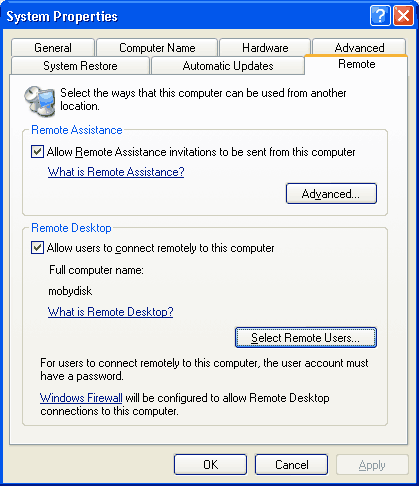
Read more: Moby Disk Consulting
Subscribe to:
Posts (Atom)

 Posts
Posts

