This is a mirror of official site: http://jasper-net.blogspot.com/

Windows 8 Announcement Executive Summary

| Wednesday, September 14, 2011
Well, the first day of the BUILD conference certainly started with a blast. I just came back to the hotel after sitting through a full day of keynote presentations introducing Windows 8 – the operating system, the development platform, and the user experience.

The purpose of this post is to summarize briefly the Windows 8 announcements and the way they reflect on existing and future development. This is just an executive summary – if you are looking for the nitty-gritty details, follow this space (and other spaces :-)) for future posts.

Windows 8 and Metro Apps

Windows 8 builds upon the success of Windows 7, and has complete application compatibility with Windows 7. Absolutely all applications and hardware designed for Windows 7 should work with Windows 8.

WinRT – the Windows 8 development framework – is an unmanaged library that wraps some (not all) Windows native APIs. WinRT has natural bindings to the major programming languages, including C++, C#/VB.NET, and JavaScript.

Windows 8 features two types of apps – Metro-style Windows 8 apps, and “standard” apps. (To appreciate the Metro-style UI, watch the keynote or the following 4-minute video: ) Metro-style apps as well as legacy apps can be delivered through the Windows Store. There is a paid, trial, and free model.

The Development Platform

Metro apps are built using XAML and a programming language of your choice (C++/C#/VB.NET/JS). Any WPF/SL developer will feel immediately at home. There are two development stacks – using standard .NET and native technologies like WPF, SL, MFC; or using WinRT bindings from C++, C#/VB.NET, and JavaScript.

The development concepts, user interface guidelines, styles, controls, and many other things are borrowed from or at least strongly influenced by Windows Phone 7. (This does not mean that Windows 8 apps will run on Windows Phone 7 without modification.) The development platform is Visual Studio 11 and Expression Blend.


Read more: All Your Base Are Belong To Us
QR: windows-8-announcement-executive-summary.aspx

Posted via email from Jasper-net

Hotfile Sues Warner Bros. For Copyright Fraud and Abuse

|
The Florida-based file-hosting service Hotfile has sued Warner Bros. for fraud and abuse. Hotfile accuses the movie studio of systematically abusing its anti-piracy tool by taking down hundreds of titles they don’t hold the copyrights to, including open source software. Among other things, Hotfile is looking for damages to compensate the company for the losses they suffered.

Earlier this year five major Hollywood movie studios sued the popular file-hosting service Hotfile for several copyright-related offenses. The case is ongoing and two weeks ago the MPAA studios scored a victory when Hotfile was ordered to share detailed information on the site’s users and affiliates.

Hotfile, on the other hand, is fighting back hard as expected. Yesterday the company filed a counterclaim accusing movie studio Warner Bros. of fraud and abuse. According to the complaint, Warner systematically misused the anti-piracy takedown tool (SRA) Hotfile had built for them.


Read more: TorrentFreak
QR: https://chart.googleapis.com/chart?chs=80x80&cht=qr&choe=UTF-8&chl=http://torrentfreak.com/hotfile-sues-warner-bros-for-copyright-fraud-and-abuse-110913/

Posted via email from Jasper-net

A tcpdump Tutorial and Primer

| Tuesday, September 13, 2011
tcp_header.gif

Table of Contents

tcpdump is the premier network analysis tool for information security professionals. Having a solid grasp of this über-powerful application is mandatory for anyone desiring a thorough understanding of TCP/IP. Many prefer to use higher level analysis tools such as Ethereal Wireshark, but I believe this to usually be a mistake.

In a discipline so dependent on a true understanding of concepts vs. rote learning, it's important to stay fluent in the underlying mechanics of the TCP/IP suite. A thorough grasp of these protocols allows one to troubleshoot at a level far beyond the average analyst, but mastery of the protocols is only possible through continued exposure to them.


Read more: danielmiessler.com
QR: https://chart.googleapis.com/chart?chs=80x80&cht=qr&choe=UTF-8&chl=http://danielmiessler.com/study/tcpdump/

Posted via email from Jasper-net

PostgreSQL 9.1 Released

|
The new version of open source database PostgreSQL was released. This version provides many important and interesting features such as synchronous replication, serializable snapshot isolation, support of per-column collations, K-nearest neighbor indexing, foreign data wrappers, support of SELinux permission controls and many others. The complete list of changes is available here

Read more: Slashdot
QR: https://chart.googleapis.com/chart?chs=80x80&cht=qr&choe=UTF-8&chl=http://www.postgresql.org/

Posted via email from Jasper-net

Creating an Animated 3D WebGL Demonstration

|
Step 1. HTML

Here are html source code of our demo. As you can see – just empty page.
index.html

<!DOCTYPE html>
<html lang="en" >
<head>
    <link href="css/main.css" rel="stylesheet" type="text/css" />
    <script type="text/javascript" src="js/glMatrix-0.9.5.min.js"></script>
    <script type="text/javascript" src="js/webgl-utils.js"></script>
    <script type="text/javascript" src="js/script.js"></script>
    <title>WebGL demonstration | Script Tutorials</title>
</head>
<body onload="initWebGl();">
    <div class="example">
        <h3>WebGL demonstration | Script Tutorials</h3>
        <canvas id="panel" width="500" height="333"></canvas>
        <div style="clear:both;"></div>
    </div>
</body>
</html>

Step 2. CSS

Here are used CSS styles.
css/main.css

body {
    background:#eee;
    font-family:Verdana, Helvetica, Arial, sans-serif;
    margin:0;
    padding:0
}
.example {
    background:#fff;
    width:500px;
    font-size:80%;
    border:1px #000 solid;
    margin:20px auto;
    padding:15px;
    position:relative;
    -moz-border-radius: 3px;
    -webkit-border-radius:3px
}


Read more: Script-tutorials
QR: https://chart.googleapis.com/chart?chs=80x80&cht=qr&choe=UTF-8&chl=http://www.script-tutorials.com/making-3d-webgl-demonstration/

Posted via email from Jasper-net

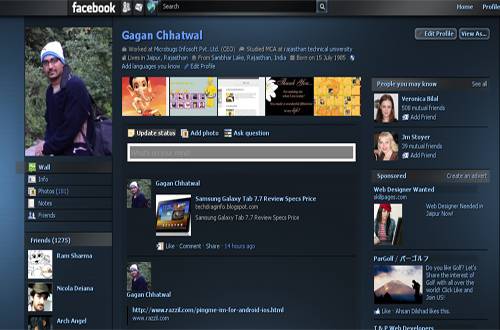
How To Change Your Facebook, Google Plus, Yahoo Theme !

| Monday, September 12, 2011
Dark-Optimized.jpg

Recently over 500 million users have joined Facebook, whereas around 10 million people have been welcomed by Google Plus since its launch.

Nowadays joining a social networking site is not only deemed the status quo, but it also allows users to find and stay connected with their friends, family and colleagues. Facebook, the social networking giant who holds the greater number of users on the internet, provides different types of applications and recently FB came out swinging full force against its competitor ( Google Plus ) by launching its new privacy features which rival those of Google Plus.

Amidst all of this ongoing hoopla that has been presiding amongst both rivaling Social Network Giants and the race in which will emerge as the winner of the social network game , there were several Developers on G+ who had begun creating various extensions which basically allowed modification of the G+ UI and overall design .

This allowed for easier readability and usability as well as enhancing and improving the stark white design of G+ . Users were implementing every extension which offered some type of improvement towards their G+ profile design . However, most of those extensions became buggy and broke every other day since Google continually kept upgrading and making changes to its UI . Thus , this left many users disheartened at having to part with the modified versions of their G+ design.

Read more: skytechgeek
QR: https://chart.googleapis.com/chart?chs=80x80&cht=qr&choe=UTF-8&chl=http://skytechgeek.com/2011/09/how-to-change-your-facebook-google-plus-yahoo-theme/

Posted via email from Jasper-net

Revolution

|

NHibernate Pitfalls Index

|

.NET Library for Google Data APIs version 1.9 Released

|
Google has released its .NET Library for Google Data APIs which is now available for download here

This version of the Google Data APIs removes the client library for the deprecated Google Base API and fixes 20 bugs that includes

    Feature request: New rating system (like/dislike) made available in .NET
    DocListExporter Export function crashes
    .NET file sizes limited to 2^32 (4GB) 10GB now supported
    ENHANCEMENT Request: Audit API in .NET
    Google_Data_API_Setup_1.8.0.0 error 2356
    and more…


Read more: Ginktage
QR: https://chart.googleapis.com/chart?chs=80x80&cht=qr&choe=UTF-8&chl=http://www.ginktage.com/2011/09/net-library-for-google-data-apis-version-1-9-released/

Posted via email from Jasper-net

Missing dots from email addresses opens 20GB data leak

|
Security researchers have captured 120,000 emails intended for Fortune 500 companies by exploiting a basic typo. The emails included trade secrets, business invoices, personal information about employees, network diagrams and passwords.

Researchers Peter Kim and Garrett Gee did this by buying 30 internet domains they thought people would send emails to by accident (a practice known as typosquatting).

The domain names they chose were all identical to subdomains used by Fortune 500 companies save for a missing dot.

Having purchased the domains they simply sat back and watched as users mistakenly sent them over 120,000 emails in six months.

Kim and Garrett have not identified their targets but have revealed that they were chosen from a list of 151 Fortune 500 companies they regarded as vulnerable to their variation of typosquatting. The list is jam-packed with household names like Dell, Microsoft, Halliburton, PepsiCo and Nike.

The emails they collected included some worryingly sensitive corporate information, including:

    Passwords for an IT firm's external Cisco routers
    Precise details of the contents of a large oil company's oil tankers
    VPN details and passwords for a system managing road tollways


Read more: Naked security
QR: delay-signing-a-c-cli-assembly.aspx

Posted via email from Jasper-net

Delay Signing a C++/CLI Assembly

|
This should be easy, right? Just set the link options to delay sign the assembly with an SNK file. There were two issues I ran into, which I’ll describe here.
Fixing Delay Signing in SP1

I used the /DELAYSIGN and /KEYFILE settings in the properties page for my C++/CLI project and everything compiled just fine. However, when I tried to use an object from this DLL, I got this message::

    CS1577: Assembly generation failed … does not have a strong name

This certainly wasn’t what I expected. My first step was to double-check the signing on the assembly. I used the following command-line command to check:

sn -T AssemblyName.dll


When I ran this command, it reported “AssemblyName.dll does not represent a strongly named assembly". Obviously the properties I set in the project settings dialog weren’t working. After quite a bit of searching, I found a blog post by Amit Mohindra that explained the problem, which is a change in Visual Studio 2010 SP1.

The blog post had suggestions on how to fix the problem, but it seemed like quite a bit of work. I tried another approach, which worked just fine.
Signing via AssemblyInfo.cpp

I added an new file called AssemblyInfo.cpp to my project, which has the following contents:

#include "stdafx.h"


using namespace System;
using namespace System::Reflection;


[assembly:AssemblyKeyFile("myKey.snk")];
[assembly:AssemblyDelaySign(true)];


Read more: John Socha-Leialoha's Blog
QR: delay-signing-a-c-cli-assembly.aspx

Posted via email from Jasper-net

Populating the TreeView Control With XMLDataSource

|
The TreeView is a .NET DataBound Control which is used to display hierarchical data. It can be bound with the The Nodes of this control with the help of XML, tabular or Relational Data. In this example we use XMLDataSouce to bind the TreeView.

XMLDataSouce implements the IHierarchicalDataSouce interface. It simply sets the DataSourceId property of the TreeView Control to the ID value of the data source control and the TreeView Control automatically binds to the specified data source Control.

The TreeView Control Contains a DataBindings property that is a collection of TreeNodeBinding objects that define the binding between a DataItem and a TreeNode.

Here I write a simple program to show the binding of XMLDataSource and Treeview.

Step 1: First we create a XML File.(in my case XMLFile.xml)

File :-> New :-> File :-> XML File

Step 2: Write the following code in it.

<?xml version="1.0" encoding="utf-8" ?>
<Customers>
  <Customer CustomerId="1" Name="Mahak">
    <Orders>
      <Order OrderId="1" ShipDate="06-09-2011">
        <OrderItems>
          <OrderItem OrderItemId="1" PartNumber="123" PartDesc="Large" Quantity="5" Price="22.00"></OrderItem>
          <OrderItem OrderItemId="2" PartNumber="1234" PartDesc="Small" Quantity="6" Price="99.00"></OrderItem>
        </OrderItems>
      
      </Order>
      <Order OrderId="2" ShipDate="09-12-2011">
        <OrderItems>
          <OrderItem OrderItemId="3" PartNumber="153" PartDesc="Medium" Quantity="7" Price="232.00"></OrderItem>
          <OrderItem OrderItemId="4" PartNumber="1236" PartDesc="Half" Quantity="8" Price="299.00"></OrderItem>
        </OrderItems>

      </Order>

    </Orders>
    <Invoices>
      <Invoice InvoiceId="5" Amount="99.23" />
      <Invoice InvoiceId="6" Amount="88.89" />
    </Invoices>

  </Customer>
  <Customer CustomerId="2" Name="Neha">
    <Orders>
      <Order OrderId="3" ShipDate="08-09-2011">
        <OrderItems>
          <OrderItem OrderItemId="11" PartNumber="1223" PartDesc="Large" Quantity="52" Price="22.00"></OrderItem>
          <OrderItem OrderItemId="22" PartNumber="12134" PartDesc="Small" Quantity="62" Price="99.00"></OrderItem>
        </OrderItems>


Read more: C# Corner
QR: https://chart.googleapis.com/chart?chs=80x80&cht=qr&choe=UTF-8&chl=http://www.c-sharpcorner.com/UploadFile/mahakgupta/9203/

Posted via email from Jasper-net

Access Controls in ViewModel using Attached Properties

|
Introduction

In MVVM, there are situations when we need to have the access of the particular controls in the ViewModel. For example, if I want to bind the IEnumerable to the DataGrid because I am not able to determine the fields till runtime. Now if I bind the IEnumerable and set AutogeneratedColumns = true then also DataGrid will not show the records because each row is returned as an “ExpandoObject” with dynamic properties representing the fields. In this case, I have to add the columns dynamically. To do that, I need the DataGrid control. Now to get the dataGrid control in the ViewModel we can use attached property. Let’s try.
Background

For better understanding of this article, I would recommend reading of the attached properties.
Using the Code

First of all, define the attached property for the control in the ViewModel.

Public static readonly DependecyProperty DataGridProperty = _
    DependencyProperty.RegisterAttached(“DataGrid”, typeof(DataGrid),
    typeof(MainWindowViewModel),
    New FrameworkPropertyMetadata(OnDataGridChanged));

public static void SetDataGrid(DependencyObject element, DataGrid value)
{
    element.SetValue(DataGridProperty, value);
}

public static DataGrid GetDataGrid(DependencyObject element)
{
    return (DataGrid)element.GetValue(DataGridProperty);
}

Assign the name property on the control. Now we need to bind the control with this attached property.

<Window x:Class="AccessControlsInViewModel.MainWindow"
        xmlns="http://schemas.microsoft.com/winfx/2006/xaml/presentation"
        xmlns:x="http://schemas.microsoft.com/winfx/2006/xaml"
        xmlns:local="clr-namespace:AccessControlsInViewModel"
        Title="Access Controls In ViewModel" Height="350" Width="525">
    <DockPanel>
        <StackPanel Orientation="Horizontal" DockPanel.Dock="Top" Margin="0,0,0,25">
            <Button Content="Add Columns" Command="{Binding AddCommand}" />
        </StackPanel>
        <DataGrid Name="accessGrid" ItemsSource="{Binding ListOfPerson}"
        local:MainWindowViewModel.DataGrid="{Binding ElementName=accessGrid}"  />
    </DockPanel>
</Window>

Here I have binded the control with the attached property using the ElementName binding.

The reason behind using attached property is here we need to bind the whole control with the property and there is no in-built property available for doing this.


Read more: Codeproject
QR: AccessControlsInViewModel.aspx

Posted via email from Jasper-net

Linux Foundation & Linux.com multiple server compromised

|
Linux-Foundation.jpg

The Linux Foundation has pulled its websites from the web to clean up from a “security breach". A notice posted on the Linux Foundation said the entire infrastructure including LinuxFoundation.org, Linux.com, and their subdomains are down for maintenance due to a security breach that was discovered on September 8, 2011.

Multiple Servers that are part of the Linux Foundation & Linux.com infrastructure were affected during a recent intrusion on 8 September which "may have compromised your username, password, email address and other information".

More from the Linux Foundation announcement:
We are in the process of restoring services in a secure manner as quickly as possible. As with any intrusion and as a matter of caution, you should consider the passwords and SSH keys that you have used on these sites compromised. If you have reused these passwords on other sites, please change them immediately. We are currently auditing all systems and will update this statement when we have more information.

Read more: The Hacker News
QR: linux-foundation-linuxcom-multiple.html

Posted via email from Jasper-net

How to surf T-Mobile without a data plan

|
smozzy-options1.jpg

The mother of all ingenious hacks has emerged: if you have an Android smartphone and a T-Mobile (US) unlimited messaging plan, you can now use an app called Smozzy to surf the web… for free.

Smozzy is basically just a wrapper around the standard Android browser, but instead of using a data (2.5, 3, 4G) connection, everything is funneled through SMS and MMS. Whenever you click a link, instead of firing off a packet to a remote web server, a web request is instead sent to Smozzy’s intermediate server via SMS. Smozzy forwards the request, downloads the web page you’re trying to visit, and then sends it along to your phone as MMS messages. Both SMS and MMS are completely free with T-Mobile’s unlimited messaging plan.

How can IP traffic be tunneled through SMS and MMS you ask? Well, web requests via SMS are easy enough — 160 characters is more than enough for most URLs, and multiple SMSes can be used if the contents of any cookies need to be sent. For returning complete web pages, though, things are a little trickier: we’re talking about kilobytes of data, after all. This is where Smozzy’s real hackery takes place: the entire remote resource is downloaded (HTML, images, CSS, JavaScript) and zipped up. The ZIP is then encoded as a PNG image file, with each RGB pixel representing three bytes of the ZIP. The resulting ZIP-cum-PNG is split into multiple parts and delivered via MMS — and the Smozzy Android app simply reverses the process.

Read more: ExtremTech
QR: 95457-how-to-surf-t-mobile-without-a-data-plan

Posted via email from Jasper-net

Chronon

| Sunday, September 11, 2011
chronon_systems_logo.jpg

Chronon Technology Overview

What does Chronon do?

    Chronon records every single line of code in your program, from the very begining to the end of the program.
    The recording is saved to a file on a disk.
    The recording file can then be transferred across machines and also shared among team members.
    The Chronon Time Travelling Debugger can then read the recording and allow you to debug the program using its unique abilities.

Does that mean the end of non-reproducible bugs?

Yes! You no longer need to ‘reproduce’ bugs, since the recording has captured all the execution and thus the bug with it. You can just play back the recording in the debugger and solve the bug. This is specially helpful with hard to reproduce bugs like race conditions, deadlocks, etc.

How does Chronon handle local vs remote debugging?

The cool thing about Chronon is that you no longer have to think in terms of local vs remote debugging.
The only thing you need to know is that you can record an application, anywhere. The application might be running on your local machine or on a remote machine elsewhere. In either case, you just run your application and interact with it normally. Once you see an error or a bug, just stop the application, transfer the recording to your local dev machine (if it was running remotely) and start debugging!

What about logging and all the log statements I put in my program?

With the new Post Execution Logging functionality in Chronon, you can add logging after your program’s execution and see results instantly! This also means you can get rid of all that logging statements cluttering up your code, resulting in faster development time.


What will the performance impact be and how much data will be generated for my million line program?

The performance impact and amount of data generated depends on the amount of time spent executing your code. You can have a multi-million line JavaEE program which spends most of its time waiting for I/O, so it wont generate much data and will have barely any affect on response time. On the other hand, you can have a small 10 line program that runs a super tight loop at 100% CPU usage. This will generate a lot more data.

Chronon is pretty smart about collecting data. During the recording phase it will collect the most minimal amount of data needed, to generate a small, highly compressed data file. Then right before you can start  debugging, the recording will be ‘unpacked’ to produce a much larger ‘unpacked recording’ which the time travelling debugger can query to quickly jump to points in time.

The ‘unpacking’ needs to be done only once. You can choose to share either the original ‘packed’ recording or the ‘unpacked’ recording with your team members.

Is my program actually being ‘run’ when I debug from the Time Travelling Debugger?

No. No code of your program is being executed when you replay your recordings. The Chronon debugger reads data from the recording file, almost like reading a database, to reproduce the state of a program at any point in time.

Read more: Chronon
QR: https://chart.googleapis.com/chart?chs=80x80&cht=qr&choe=UTF-8&chl=http://www.chrononsystems.com/

Posted via email from Jasper-net

How To Play Audio Through HDMI And Speakers Simultaneously In Windows 7

|
Sound.png

High-Definition Multimedia Interface (HDMI) is an audio/video interface for transmitting digital data which provides better quality output than analog. Normally, one can only select one device for audio playback in Windows. This causes a common annoyance of having to continually switch between the sound card and HDMI speakers. However, it is also possible to receive output from speakers and an HDMI device simultaneously to play audio from a single application at the same time. If you would like to get audio output from both an HDMI device and your speakers, read on after the break.

To get started, open Sound Properties from Control Panel. From the Playback tab, select speakers and click Set Default.

Read more: Addictive tips
QR: https://chart.googleapis.com/chart?chs=80x80&cht=qr&choe=UTF-8&chl=http://www.addictivetips.com/windows-tips/how-to-play-audio-through-hdmi-speakers-simultaneously-in-windows-7/

Posted via email from Jasper-net

$5M In Torrented Files Presented As Art

|
externalobserver.jpg

The Art 404 gallery is currently exhibiting a piece by Manuel Palou called '5 Million Dollars, 1 Terabyte' which is a 'sculpture' consisting of a 1 TB external hard drive containing $5,000,000 worth of illegally downloaded files. The hard drive is displayed on a pedestal at the gallery.

Read more: Slashdot
QR: 5M-In-Torrented-Files-Presented-As-Art

Posted via email from Jasper-net

Paper Camera For Android Makes Your Photos Look Sketched [Now Free On GetJar]

|
Paper-Camera-01_thumb.jpg

You would’ve come across various camera apps for your Android that do all sorts of things. Whether it be capturing snaps via voice commands with Say Cheese Camera or using LifeDropper app to identify various colors of life or simply capturing plain snapshots and applying filters. Paper Camera, though hardly unique, is a powerful & extremely well-crafted camera replacement app that makes your photos look as if they were sketched. And unlike other similar apps, it supports real-time preview of all of its 11 filters. Until now, Paper Camera was available for download on the Android Market and on the iTunes App Store for a price tag of $1.99 and $0.99 respectively. But now, it’s available for free on the GetJar Android store.

Read more: Addicitive tips
QR: https://chart.googleapis.com/chart?chs=80x80&cht=qr&choe=UTF-8&chl=http://www.addictivetips.com/mobile/paper-camera-for-android-makes-your-photos-look-sketched-now-free-on-getjar/

Posted via email from Jasper-net

Who Needs An API? Powerinbox Adds Google+ Client To Its Email Platform

|
powerinbox-chrome-gmail.jpeg?w=640&h=420

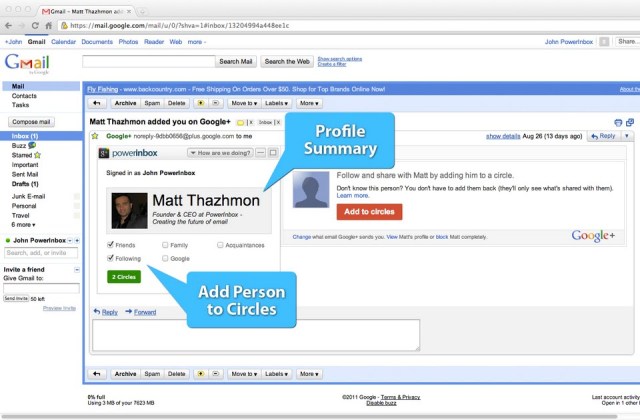
Powerinbox, the new email platform that lets you run apps for Facebook, Twitter, and Groupon inside your inbox has today added support for Google+. Despite not having access to an official Google+ API (application programming interface), the company was able to analyze the Google+ protocol by tracking the requests between the official Google+ client and server. Powerinbox then created its own internal API and built its Google+ client app on top of it.

Now, when you receive a Google+ notification via email, you can use the Powerinbox app to immediately add that person to one of your Google+ Circles. Support for commenting and status updates is coming next.

Read more: TechCrunch
QR: https://chart.googleapis.com/chart?chs=80x80&cht=qr&choe=UTF-8&chl=http://techcrunch.com/2011/09/08/who-needs-an-api-powerinbox-adds-google-client-to-its-email-platform/

Posted via email from Jasper-net