This is a mirror of official site: http://jasper-net.blogspot.com/

What every developer should know about fonts

| Wednesday, November 17, 2010
I originally thought using fonts would be pretty simple. However, proper handling of fonts has ended up being a significant effort in Windward Reports (our XML and SQL Reporting system). If you're going to do much more than place a line of text in a form, then the details start to matter.

Fonts & Glyphs
So what is a font? Fundamentally a font is a series of glyphs. What you think of as a character like the letter A is a glyph. A font is then a set of glyphs for all the letters in that font. If you get the Helvetica font, all their glyphs look one way. If you get the Times Roman font, they look another. Each is the set of glyphs from that font.

Now we need to introduce the concept of code pages. A code page is a mapping from a character number to a specific glyph. Programs originally stored each character as a byte. Then for Asian character sets there were the DBCS systems (some characters were 1 byte, some 2). Programs today mostly use Unicode, but web pages tend to be UTF-8 which is a multi-byte sequence that can be up to 4 bytes.

Why bring up encoding? Because each font has an encoding where character number 178 could return a very different glyph depending on the codepage used by the font. Most font files use Unicode so you have a standard there, but many programs still use specific code pages, where that page is mapped to the font. This is what occurs when you display ABC and the font is Wingdings so you get . So point one is you need to make sure that the encoding you use matches or is mapped to the encoding of the fonts you use.

And it gets even more complex. The characters with the values 0xE000 – 0xF8FF are undefined. Each font can make those anything they want (one use is to add the Klingon script). So a character with a value in this range is by definition tied to the font file it is using to display that font. This is how most symbol type fonts work.

Read more: Windward Wrocks

Posted via email from .NET Info

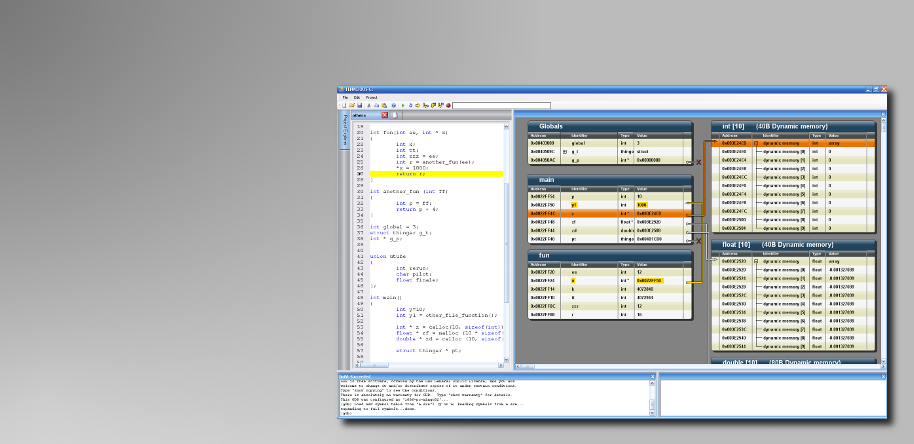
Tenacious C

|
good-screen1-9.png

Tenacious C presents pointers and memory in a visual format that makes the hard parts of C ridiculously easy.

Read more: Tenacious C

Posted via email from .NET Info

Difference between InnoDB and MyISAM in MySQL

|
MyISAM and InnoDB are two most commonly used storage engines of MySQL database. However, MyISAM is the default storage engine chosen by MySQL database, when creating a new table. The major differences between these two storage engines are :

InnoDB supports transactions which is not supported by tables which use MyISAM storage engine.
InnoDB has row-level locking, relational integrity i.e. supports foreign keys, which is not possible in MyISAM.
InnoDB ‘s performance for high volume data cannot be beaten by any other storage engines available.
Tables created in MyISAM are known to have higher speed compared to tables in InnoDB. But since InnoDB supports volume, transactions, integrity it’s always a better option which you are dealing with a larger database. It is worth mentioning that a single database can have tables of different storage engines.

File structure
MyISAM stores each table on disk with three files whose names begin with same as table name. These files have different extensions to differentiate their purpose. A .frm files stores the table format, and a .MYD (MYData) file stores the data of the table. If the table has indexes then these are stored in the .MYI (MYIndex) files.

Read more: digimantra

Posted via email from .NET Info

HTTP Error 404.3: WCF Hostes in IIS. Add a MIME type

|
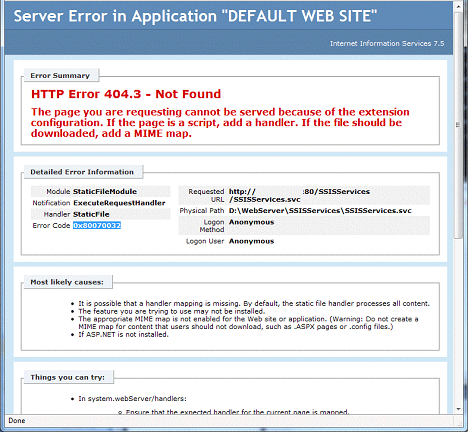
Normally when we host a WCF  Service in IIS and while browsing we get the following frustrating screen.

1.gif

The error message in the above screen is very clear. We need to add MIME type for .SVC extension.

To solve above problem

  • Open command prompt as Administrator 
  • Navigate to  C:Windows\Microsoft.Net\Framework\v3.0

Read more: C# Corner

Posted via email from .NET Info

How to Setup Your Java Development Environment in Ubuntu

|
In this post, I’m going to explain how you can setup a Java development environment (JDK + Eclipse) in Ubuntu. I’m using Ubuntu 10.10, but these steps should be applicable to majority of Ubuntu versions.

Let’s start with JDK first.

Install Sun JDK:

  • Download the Linux version of latest JDK binary from the Oracle website. For Java 6, the file name would be: jdk-6u22-linux-i586.bin
  • Copy the downloaded JDK file to a directory where you want to install the JDK. I use /home/<username>/java/jdk-6u22-linux-i586.bin
  • Open terminal window and navigate to the directory where you copied the downloaded file. Then type the command: sudo sh jdk-6u22-linux-i586.bin and press enter.
  • If it asks for root password, give it and JDK installation will begin. The JDK will be installed on the same directory where the binary is placed.

That’s it. JDK installation is done. But we still have one more step to complete. That is, setting up the JAVA_HOME environment variable.

Setting up JAVA_HOME environment variable:

  • Go to Nautilus file browser (Places -> Home Folder) and open this file: “.bashrc”. By default this file is hidden. So, press Ctrl + H which will show all hidden files and then you can see the .bashrc file.

Read more: Javalobby

Posted via email from .NET Info

List all Default Values in a SQL Server Database

|
I had earlier written a query to Find a Column Default value using T-SQL. Here’s how to find the default value of all columns in all tables of a database

SELECT obj.name as 'Table', col.name as 'Column',
object_definition(default_object_id) AS [DefaultValue]
FROM   sys.objects obj INNER JOIN sys.columns col
ON obj.object_id = col.object_id
where obj.type = 'U'

The sys.objects and sys.columns provides us with the metadata needed to find the default values of all columns in a database.

Read more: SQL Server curry

Posted via email from .NET Info

Why does Coded UI Test playback fail to scroll the Silverlight control into view?

|
Bringing the control into view is an essential part of the UITestAction during Playback since Coded UI Test performs actual Mouse/Keyboard actions on the control instead of programmatic action on the control. In case of failure to bring the control into view, the playback will throw a FailedToPerformActionOnBlockedControl exception or a PlaybackFailure exception.

The Coded UI Test playback engine attempts various approaches to bring the control into the physical screen view –

-          Bring the application window into the screen area
-          Set focus on the control.
-          Scroll the control into the view port of the container within which it resides.

This post focuses on the third approach and the assumptions made in the scrolling logic for Silverlight test automation in Coded UI Test.


To scroll a control into view,  the control (or its accessibility peer) should either support the scrolling capability natively,  or needs to be residing inside one or more scrollable containers which can then be scrolled in some sequence to bring the control into view.

Silverlight controls such as ListBoxItem or ComboBoxItem have their AutomationPeer implement IScrollItemProvider which is used to scroll the item into view. [The  ComboBox scroll into view in Coded UI Test is actually done through a select mechanism]

Read more: Tapas Sahoo's Blog

Posted via email from .NET Info

Top 7 Coding Standards & Guideline Documents For C#/.NET Developers

|
Some time back, I collated a list of 7 Must Read, Free EBooks for .NET Developers, and a lot of people found it useful. So, I thought about putting together a list of Coding Standard guidelines/checklists for .NET /C# developers as well.
As you may already know, it is easy to come up with a document - the key is in implementing these standards in your organization, through methods like internal trainings, Peer Reviews, Check in policies, Automated code review tools etc. You can have a look at FxCop and/or StyleCop for automating the review process to some extent, and can customize the rules based on your requirements.
Anyway, here is a list of some good Coding Standard Documents. They are useful not just from a review perspective - going through these documents can definitely help you and me to iron out few hidden glitches we might have in the programming portion of our brain.
So, here we go, the listing is not in any specific order.

1 – IDesign C# Coding Standards
IDesign C# coding standards is a pretty decent and compact (27 pages) Coding Standards Document. It covers a Naming conventions, Best practices and Framework specific guidelines

2 – Encodo C# Handbook
Encodo C# handbook is bit more recent, and has 72 pages of guidelines on Structure, Formatting, Naming. It also has a ‘Patterns and Best Practices’ section, which is a must read for any .NET/C# developer.

Read more: amazedsaint's #tech journal

Posted via email from .NET Info

10 Dirty Internet Explorer CSS Hacks You Might Not know

|
Introduction

Disclaimer: The intention of this article is not to encourage to apply this hack to your web projects but to understand what have been using by other web designers/developers. The best way to solve Internet Explorer's CSS layout issue is - create different style sheets for different versions of Internet explorers.

Alright, have ever found yourself in this situation, you were trying to update an existing old website, opened CSS file and you saw something that you think it's typo from previous CSS coder - but it's not. There was a CSS file I was trying to update and I saw some asterisks, underscores appear randomly as a prefix in some attributes. Did some search on Google and found out it's Internet explorer hacks!

So, the main purpose of this article, is not encourage you to use hacks, but to understand what hacks have been using by others so whenever you update someone else's project you can interpret the CSS file better. :) Alright, I have collected 10 of them start from IE8 to........ IE5.0!

1. IE 8

.color {color: #f00/;}  

2. IE 7

*+html .box {background:#fff;}  
*:first-child+html .box {background:#fff;}  

3. IE 7 and below

*:first-child+html {} * html {}  

4. IE 7 and below

.box {  
   *background: #f00;    
}  

5. IE 6 only

.box {  
   _background/**/:/**/ #f00;    
}  

Read more: Queness

Posted via email from .NET Info

Reversing the source of the ZeroAccess crimeware rootkit

|
We recently undertook a project to update the hands-on labs in our Reverse Engineering Malware course, and one of our InfoSec Resources Authors, Giuseppe "Evilcry" Bonfa, defeated all of the anti-debugging and anti-forensics features of ZeroAccess and traced the source of this crimeware rootkit:

Part 1

InfoSec Institute would classify ZeroAccess as a sophisticated, advanced rootkit. It has 4 main components that we will reverse in great detail in this series of articles. ZeroAccess is a compartmentalized crimeware rootkit that serves as a platform for installing various malicious programs onto victim computers. It also supports features to make itself and the installed malicious programs impossible for power-users to remove and very difficult security experts to forensically analyze.

At the conclusion of the analysis, we will trace the criminal origins of the ZeroAccess rootkit. We will discover that the purpose of this rootkit is to set up a stealthy, undetectable and un-removable platform to deliver malicious software to victim computers. We will also see that ZeroAccess is being currently used to deliver FakeAntivirus crimeware applications that trick users into paying $70 to remove the “antivirus”. It could be used to deliver any malicious application, such as one that steals bank and credit card information in the future. Further analysis and network forensics supports that ZeroAccess is being hosted and originates from the Ecatel Network, which is controlled by the cybercrime syndicate RBN (Russian Business Network).


Read more: Offensive Computing

Posted via email from .NET Info

Visual Guide to NoSQL Systems

|
There are so many NoSQL systems these days that it's hard to get a quick overview of the major trade-offs involved when evaluating relational and non-relational systems in non-single-server environments. I've developed this visual primer with quite a lot of help (see credits at the end), and it's still a work in progress, so let me know if you see anything misplaced or missing, and I'll fix it.

Without further ado, here's what you came here for (and further explanation after the visual).

Note: RDBMSs (MySQL, Postgres, etc) are only featured here for comparison purposes. Also, some of these systems can vary their features by configuration (I use the default configuration here, but will try to delve into others later).

Posted via email from .NET Info

How to make sharing code between .NET and Silverlight (a little) less painful

|
Windsor ships for both .NET and Silverlight. However working with the codebase in such a way that we can target both runtimes at the same  time with the least amount of friction possible proved to be quite a challenge.

Problem
We’re using single .sln and .csproj files to target both runtimes (actually 5 of them, as we ship for 3 versions of .NET and 2 versions of Silverlight, but I digress) with some heavy (and I mean-  really heavy) Jedi trickery in MsBuild by Roelof.

We’re using conditional compilation to cater for incompatibilities between frameworks. For example, SerializableAttribute and NonSerializedAttribute are not present in Silverlight, so many of our classes look like this:

#if !SILVERLIGHT
  [Serializable]
#endif
  public class ParameterModel
  {
     // some code here
  }

This is quite cluttering the code making it harder to read. It adds friction to the process, since I have to remember each time to exclude the attribute from Silverlight build. Even more annoying is the fact, that ReSharper is not very fond of pre-processor directives in code, and certain features, like code clean up and reordering don’t really work the way they should.

Solution
  I figured out a way to cut the need to use conditional compilation in this case. So that I can write the code like this:

[Serializable]
public class ParameterModel
{
  // some code here
}

and still have it compile properly under Silverlight, outputting exactly the same code as the first sample. How you ask? – using a not very well known feature of .NET BCL – ConditionalAttribute.

Read more: Krzysztof Kozmic

Posted via email from .NET Info

Automating Windows Applications Using the WCF Equipped Injected Component

|
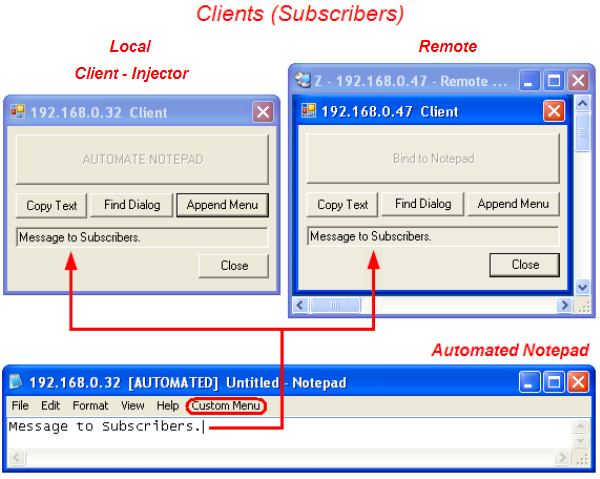
AutomatingWindowsApplicationsNET_Screen.png

Introduction

This article discusses a way to convert a Windows application that does not export any program interface to an automation server. Many very good publications have presented and discussed in depth various aspects of this problem. Most of these works dealt with techniques for injection of code into process to be automated (target process) and API hooking. This article demonstrates the injection to target process using remote thread and focuses on communication between injected code and outside world. Usage of Windows Communication Foundation (WCF) services for such communication is presented in this article.

Background

Actually this article is a continuation of my article Automating Windows Application describing injection of a COM object into target process. A well-known Notepad text editor was taken as an example target application for automation. The following approach was suggested. NotepadPlugin.dll was injected into Notepad.exe target process with the remote thread technique. The plug-in code subclasses both outer (frame) and inner (view) windows of Notepad application, installing custom handlers for several Windows messages (e. g., WM_CHAR). Prior to quit, the remote thread procedure posts a user-registered message WM_CREATE_OBJECT to, say, outer window. This message is handled by a subclass window procedure. The handler creates COM object which registers itself with Running Object Table (ROT) effectively exposing its direct interfaces outside target process, machine-wide. Clients bind to the object, use its direct interfaces to manipulate target application and implement its outgoing (sink) interfaces to subscribe to target applications events firing via connection point mechanism.

This technique works fine, but has a limitation: clients and target application should run on the same machine since ROT is available only locally. One possible way to overcome this limitation is suggested in this article.

To achieve this, the above technique is undergone a remarkable modification: instead of embedding of unmanaged true COM object into target process, this time a managed .NET object capable to communicate with outside world via WCF services is embedded into target process. This managed object is enveloped in COM Callable Wrapper (CCW) referred below to also as simply COM wrapper. The suggested technique is explained based on a code sample.

Injection Steps

The injection itself is remained almost unchanged with regard to the previous article. For the sake of simplicity we assume a single-threaded target application having an outer (frame) and an inner (view) windows. The following steps are taken to automate target application.

  • NotepadPlugin.dll in injected into the target process with remote thread technique by Injector COM object. This is a worker thread, and its function is DllMain() of NotepadPlugin.dll. Remote thread ends after DllMain() returns. Injector COM object is instantiated by AutomationClientNET application running as a local client. Its purpose is to find a running target Notepad process (or to start a new one if there is no already running Notepads) and to inject plug-in into the target process. After NotepadPlugin.dll injection, the Injector is no longer used and may be released. Injector is used by only one local client, below referred to as Client-Injector.
  • NotepadPlugin.dll subclasses outer and inner windows of target application with FrameWndProc() and ViewWndProc() window procedures respectively. These window procedures contain message handlers with new functionality for the target application. Function PluginProc() (called by DllMain()) of the NotepadPlugin.dll actually performs the subclassing. Both NotepadPlugin.dll and Injector use helper WindowFinder COM object to find Notepad windows.
  • Function PluginProc() of NotepadPlugin.dll running in remote thread, posts a user-registered WM_CREATE_OBJECT Windows message to the Notepad frame window. FrameWndProc() window procedure handles WM_CREATE_OBJECT message. The handler creates a managed NotepadHandlerNET object using its COM wrapper.
Read more: Codeproject

Posted via email from .NET Info

Extended WPF Toolkit–Updated ColorPicker control

|
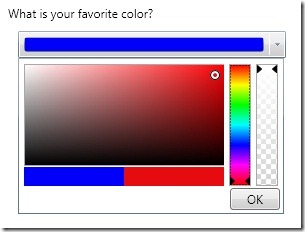
If you are using the Extended WPF Toolkit you have probably noticed the ColorPicker control.  If you are not familiar with the Color Picker control, it is simply a WPF editor control that allows a user to select a color.  If you are using release version 1.2 or less the color picker will look something like this:

color_picker_expanded_thumb.jpg

Read more: <elegantc*de>

Posted via email from .NET Info

בלעדי! כל הפרטים על התקנת DENALI!

|
עלק בלעדי.

בנקודה הזאת אני בטוח שכל אחד מכם כבר הוריד את Denali, התקין, ויודע בעל פה את הסינטקס של יצירת Availability groups.

לא?

אז לכל מי שהיה לו יותר חשוב להתעסק בלחפש כורסת טלוויזיה טובה עם מסז’ ולא לכלך את הידיים עם המוצר שבסך הכל הולך לקבוע את עתידו המקצועי ובעקבות כך הכלכלי, האישי והחברתי בשנים הקרובות, קבלו את ההתקנה בתמונות:

מסך ההתקנה הראשי, זה שאף ישראלי מעולם לא קרא:

Posted via email from .NET Info

Adobe Acrobat X

|
Adobe Acrobat X has just been released! And continuing in our tradition of providing the direct download links for major Adobe software such as CS5, Lightroom 3, and Elements 9, below you’ll find the direct links for the brand new Acrobat X (10)… We also have added the direct links (DDL) for the previous version Acrobat 9 as well, in case you need them for any reason.

The links given below go to the authentic and secure files residing on Adobe’s servers, are guaranteed genuine and will not change. They are especially useful when you are unable to download Adobe’s products via other means – often due to difficulties with the Akamai Down­load Manager (the Adobe DLM). With the links provided below, you can use your browser’s download capability, or another download manager of your choice.

The links are listed below. For Windows, the Acrobat X Pro download is in the form of a single .exe file. For the Mac, unfortunately, “a trial version of Acrobat X Pro for Mac OS is not available at this time” (however the full product is available for Mac, see the FAQ). There is no actual trial version of Acrobat X Standard, but Pro includes all Standard features – so you can try out Pro for free and then decide which version you want at the time of purchase.

Read more: ProDesignTools

Posted via email from .NET Info

Pure virtual destructors in C++

|
To work correctly, classes with virtual methods must also have virtual destructors. Interestingly, virtual destructors can be declared pure, which can be useful in some cases.

Imagine you have a base class you want to make abstract. In this base class all methods have meaningful default implementations, and you want to allow the derived classes to inherit them as-is. However, to make a class abstract, at least one of its methods must be made pure virtual, which means the derived classes must override it. How do you make the class abstract in this case?

The answer is: declare the destructor pure virtual. This will make your class abstract without forcing you to declare any other method pure virtual.

// Abstract base class - can't be instantiated
//
class Base
{
public:
   virtual ~Base() = 0;
   virtual void method();
};

Base::~Base()
{
 // Compulsory virtual destructor definition,
 // even if it's empty
}

void Base::method()
{
 // Default implementation.
 // Derived classes can just inherit it, if needed
}

// We can now derive from Base, inheriting the
// implementation of method()
//
class Derived : public Base
{
public:
   ~Derived()
   {}
};


While defining (providing an implementation) pure virtual methods is rarely useful, you must define a pure virtual destructor. This is because the destructor of a base class is always called when a derived object is destroyed. Failing to define it will cause a link error.

Read more: Eli Bendersky's Website

Posted via email from .NET Info

WPF - DoEvents like Windows Forms

|
בגלל ארכיטקטורה שונה אין ב WPF את הפונקציה DOEVENT

להלן הקוד ל WPF:

public static void DoEvents()
{

// Create new nested message pump.
DispatcherFrame nestedFrame = new DispatcherFrame();

// Dispatch a callback to the current message queue, when getting called,
// this callback will end the nested message loop.
// note that the priority of this callback should be lower than the that of UI event messages.
DispatcherOperation exitOperation = Dispatcher.CurrentDispatcher.BeginInvoke(DispatcherPriority.Background, exitFrameCallback, nestedFrame);

// pump the nested message loop, the nested message loop will immediately
// process the messages left inside the message queue.
Dispatcher.PushFrame(nestedFrame);

// If the "exitFrame" callback doesn't get finished, Abort it.
if (exitOperation.Status != DispatcherOperationStatus.Completed)
{

exitOperation.Abort();
}
}

Read more: Uzi Drori's Blog

Posted via email from .NET Info

Shared Application Settings in machine.config

|
Background

Application behavior frequently depends on exogenous parameters, such as a service URI or file paths, that are supplied by a developer or administrator. These inputs must be amenable to quick change without the need to refactor or recompile. A common answer to this requirement is to place such inputs in a configuration file: app.config for Windows applications or web.config for web applications. When settings are stored in an xml file, an administrator can easily edit them as needed.

This solution works well for a single application. .NET architecture also provides a way for multiple applications to access shared settings. As a simple example of when this may be desirable, suppose you have some functionality that needs to be exposed via a command-line interface, a GUI and a web app. Since only the interfaces are different but the functionality is the same, there is a good case to pool the settings into one place.

When the applications are on the same machine, their shared settings can be stored in the machine.config file. As you probably already know, you can add an <appSettings> element to a configuration file to contain custom data that your applications need. However, all data in appSettings is stored as strings and is exposed by the framework as a NameValueCollection, which is suboptimal for a number of reasons. In the next sections, I demonstrate a better solution.

Solution Overview

.NET already has a good alternative to appSettings, and it has a similar name: Application Settings. In contrast to appSettings, application settings are exposed as class properties, which permits them to be strongly typed, easily refactored and used in bindings. However, by default application settings are saved to app.config instead of machine.config and are accessible only within the assembly.

The solution is to move the settings out of app.config into machine.config and make the class that exposes them visible outside the assembly. Multiple applications can then access these settings by simply referencing the assembly.

Step-by-Step Guide

1. Create a new class library

For this example, I started with an empty Visual Studio solution and created a new class library project, which I named Netrudder, to serve as a base reference for projects in the same namespace.

2. Add settings

Add a new Settings template to the project. I named mine NetrudderSettings.
Open the new .settings file. The Settings Designer comes up.
Add your settings. Make sure to assign correct Type, and to change scope from User to Application.
Change Access Modifier to Public. This affects the visibility of the class whose properties map to the settings. It was created for us alongside the .settings file.
Save the project.

Read more: Codeproject

Posted via email from .NET Info

10 Best Server Monitoring Tools That Kick Ass

|
Blogger always prefer front end tools; Although Developers and designers are also worried about handling website. They have to make sure that website script looks fine from backend. Sometimes, it would be difficult to identify the problems. Most of the time physical machine is not optimized and use a lot of resources of website. It would be trouble to take full advantage for working effectively. A perfectly managed and healthy hosting server rests at the heart of any great website. As a Webmaster, You have to be alert and closely monitor the performance of your server to avoid any downtime or failures. We have identified few parameters that need to be monitored, that became the cause of the failure of server downtime.

CPU utilization
Server RAM
Physical temperature of the Server and its various components
Bandwidth usage
Disk space usage
Keeping these factors, we’ve collected 10 Top Monitoring Tools that will keep your server in perfect form and provide the security, healthy, resolve overloading server, low performance and configuration problems as well.

1) Load Impact : Load Impact is useful online tool to evaluate your site and server performance. You can test the amount of concurrent visitors and connections that is handling by your server. Sometimes, you have problem of downtime problem of from your server. This is a due to getting a sudden traffic from stumbleupon, digg, or reddit. This tool helps you to help move into new machine. This tool provide two types of services either you take fee or professional service from them.

2) Simple Server Monitor: It is another stunning tool for measuring the uptime or downtime of your website in percentage. If your server starts slowing or unresponsive, you will receive a message. You can check the performance of server like any failure or losses instant.


Read more: Smashinghub

Posted via email from .NET Info