This is a mirror of official site: http://jasper-net.blogspot.com/

Using POP3 with C# to download and parse your mail.

| Tuesday, June 28, 2011
Introduction

This article explains a simple way to add mail support in your application. Just use the classes:

POP3class methods:

    string DoConnect(String pop3host,int port, String user, String pwd)
    string GetStat()
    string GetList()
    string GetList(int num)
    string Retr(int num)
    string Dele(int num)
    string Rset()
    string Quit()
    string GetTop(int num)
    string GetTop(int num_mess, int num_lines)
    string GetUidl()
    string GetUidl(int num)
    string GetNoop()

MessageClass methods:

    string GetFrom(string messTop)
    string GetDate(string messTop)
    string GetMessID(string messTop)
    string GetTo(string messTop)
    string GetSubject(string messTop)
    string GetBody(string AllMessage)

Using the code

The following sample illustrates how to use the classes:


POP3class pop3;
pop3 = new POP3class();
pop3.DoConnect("your.mail.server",110,"username","password");
pop3.GetStat();
// and if we have mail:

MessageClass msg;
msg = new MessageClass();
string sMessageTop = msg.GetTop(1);
//OK, message is well, lets download it.


Read more: Codeproject
QR: karavaev_denis.aspx

Posted via email from Jasper-net

MMPPF - Getting started guide for the Silverlight Microsoft Media Platform

|
image%25255B8%25255D.png?imgmax=800

When Silverlight introduced it was considered as a Player Framework because of its capability to handle Rich media. This is one of the first technology to handle true 720p and 1080p HD media. Since its evolution, Silverlight 1 to Silverlight 5 the digital media experience improved a lot. So this post we will take a dig into media concepts and its integration with Silverlight along with various option available.

This post will focus extensively on the Microsoft Media Platform Framework from Microsoft, a open source player framework and its implementation.

Read more: Greg's Cool [Insert Clever Name] of the Day
Read more: Enhancing Media Experience in Silverlight with Microsoft Media Platform (MMPPF)
QR: mmppf-getting-started-guide-for.html

Posted via email from Jasper-net

HowTo: Generate QR code for your site

|
Everyone know that one of the keys to have a great SEO for your website is making sure you keep your website updated, new and fresh. Whether you do this with a blog, or you change your homepage with new offers, coupons or new products, it serves to show Google that your site is “alive.” For many small businesses in particular, this is a real challenge.

So you already have great, fresh content on your site – what’s next? Do you know what is coming that may benefit your business?

What are QR codes?

QR codes (abbreviation for Quick Response code) are a popular type of two-dimensional barcode. They are also known as hardlinks or physical world hyperlinks. QR Codes store up to 4,296 alphanumeric characters of arbitrary text. This text can be anything, for example URL, contact information, a telephone number, even a poem! QR codes can be read by an optical device with the appropriate software. Such devices range from dedicated QR code readers to mobile phones.

QR code for your site?

There are various QR code generators available  online but, generating QR code without using generators is also very easy. We will use Google Chart APIs to generate QR code for us.
Creating QR code

Google charts API allows us to generate QR code by passing various parameters to their API. Below is the short description of each parameter-

Name Required? Description
cht=qr Yes Specifies a QR code.
chs=<width>x<height> Yes Image size. (Remember it’s English alphabet ‘x’ and not cross ’X’ )
choe=<output_encoding> No How to encode the data in the chart. Here are the available values:
UTF-8 [Default]
Shift_JIS
ISO-8859-1

Read more: Tech Tutkiun 

howto-generate-qr-code-for-your-site.html&choe=UTF-8

Posted via email from Jasper-net

Fiddler and IPv6-only environments

|
I recently got a bug report from a user who was attempting to use Fiddler in a pure-IPv6 environment, where IPv4 is entirely disabled. On startup, he saw the following message:

The problem here is an obscure one, which makes it somewhat interesting. What’s happening is that Fiddler is trying to create an IPv4 listener socket listening on port 8888 locally. However, because this is a pure IPv6 environment, permission to create such a socket is denied.

By default, Fiddler will create an IPv4 listen socket unless the following three criteria are met:

    The computer supports IPv6 (Vista+ support it by default; various installs are required for XP)
    The Enable IPv6 option is ticked inside Tools > Fiddler Options > General
    The Allow remote computers to connect option is set inside Tools > Fiddler Options > Connections

Now, the first two requirements are somewhat self-explanatory, but the third bears some explanation. If only the first two requirements are met, Fiddler will be able to connect to IPv6 sites, but the browser will only be able to connect to Fiddler using IPv4.

The reason that the third requirement exists is that some clients (particularly IE6’s WinINET, and likely others) don’t support IPv6-literal proxy addresses, and hence attempting to poke [::1]:8888 into the system proxy settings would fail for such clients. So, Fiddler cannot safely bind to IPAddress.IPv6Loopback, and will bind to IPAddress.Loopback instead. However, if you enable the Allow remote computers to connect option, Fiddler will instead bind to IPAddress.IPv6Any which allows connecting on both IPv4 and IPv6 addresses on any adapter.

Read more: Fiddler Web Debugger

Posted via email from Jasper-net

הצפנת קבצים בודדים בתצורת EFS – Encrypted File System–חלק א'

|
שלום לכולם,

כאן דן ויזנפלד מצוות התמיכה של Microsoft.

כמעט כל אחד מאתנו עושה שימוש במידע אישי, שמסיבה כזו או אחרת, הוא אינו מעוניין לאפשר למשתמשים אחרים גישה אליו.

פתרונות האבטחה שמוצעים היום בשוק (חומות אש ותוכנות אבטחה שונות) יכולים לסייע לכם במצבים בהם קיימת כוונה של פורץ כזה או אחר לגשת למידע האישי שלכם מרחוק (וגם כן, לא בכל המצבים).

עם זאת, אף אחד מהפתרונות הללו לא יכול להגן עליכם במצב בו לאותו פורץ יש גישה פיזית ישירה למחשב שלכם.

Microsoft הציגה במערכות ההפעלה האחרונות (בכל הגרסאות העסקיות של מערכות ההפעלה החל מ-Windows 2000) יכולת הצפנה מתקדמת ביותר, הידועה בשם EFS – Encrypted File System.

במדריך הבא (המחולק לשני חלקים), אבקש להסביר לכם יותר על שיטת ההצפנה הזו – בטרם נלמד כיצד להפעילה וכיצד להשתמש בה.

למה חשוב להכיר את המנגנון לעומק?

1. בכדי למנוע מצבים טרגיים נפוצים בהם מצפינים קבצים מסוימים בצורה לא נכונה, ולאחר מכן לא ניתן לפתוח יותר את אותם הקבצים.

2. בכדי למנוע מצבים טרגיים לא פחות בהם ההצפנה בוצעה בצורה לא תקינה, ומידע שחשבתם שהוא מוצפן ומאובטח – בעצם גלוי לעיני כל.

טוב, אז לאחר שהבנו את חשיבות ההיכרות עם מנגנון ההצפנה, נלמד טיפה יותר על איך הוא עובד. אבל לפני שאגע ואסביר כיצד עובד המנגנון, חשוב להכיר כמה מונחים בסיסיים בתורת הקריפטוגרפיה:

הצפנה סימטרית –

שיטת הצפנה בה המפתח בו נעשה שימוש על מנת להצפין את המידע, הוא היחיד שגם יכול לשמש למטרת פענוח המידע שהוצפן.

כלומר, אם הצפנתי מידע באמצעות מפתח מסוים, עלי להעביר את אותו המפתח לנמען שלי יחד עם המידע שהוצפן, על מנת שהוא יוכל לפענח אותו.

הצפנה א-סימטרית –

שיטת הצפנה בה המפתח בו נעשה שימוש על מנת להצפין את המידע הוא אינו המפתח בו נעשה שימוש על מנת לפענח את המידע.

Read more: MS Support blog

Posted via email from Jasper-net

Modules in F#

|
Module is a simple container of values, types definition and sub modules. There are two types of modules. Local modules and top level ones. The following video clips show how to define them. You can find the source code as part of my F# Fundamentals course. Its community version is available for free personal usage at www.abelski.com.

Read more: Life Michael

Posted via email from Jasper-net

Detailed steps for configuring TeamCity to use MySQL as repository database on Windows

|
Introduction

I started recently setting up a TeamCity 6.5 server on a Windows 2008 R2 machine. The install was straight forward, but unfortunately TeamCity doesn’t use a mainstream database server out of the box. The good news is that you can configure TeamCity to use a different database server to run the TeamCity repository. I decided to use MySQL. This blog post has detailed steps for switching TeamCity to MySQL.
Why would someone want to switch to MySQL?
Performance

The most important reason is performance. Moving to a database server that is enterprise grade and located on a separate machine is boosting TeamCity response times significantly.
Integration

The second reason is integration. I am working on a prototype of a WordPress plug-in called LabPress that needs to be able to access TeamCity tables directly.
Step by step

Before we start here is a link to the TeamCity Documentation for switching the database engine.

Important Note: The following steps assume that you start from a clean TeamCity 6.5 system or you don’t need to migrate existing build configurations and projects to the new database.


Step 0

Install TeamCity 6.5 and MySQL, and optionally phpMyAdmin to administer MySQL via a web browser. The TeamCity install is straight forward. MySQL can be installed conveniently via the Microsoft Web Platform Installer.

Read more: Tellingmachine

Posted via email from Jasper-net

F# Object Oriented Capabilities

|
The F# programming language supports many of the well known object oriented possibilities we know in C#. The following video clips show some of these capabilities. You can find the source code as part of my F# Fundamentals course. Its community version is available for free personal use at www.abelski.com.

Read more: Life Michael

Posted via email from Jasper-net

Tracing in WCF: Understanding basic steps

|
Theory behind WCF Tracing is not an exception of classical definition of Tracing. Through Tracing an application provides information about itself. Information may vary from internal state of object to passed input parameter to method. This information should be logged, persisted or saved somewhere.

WCF Tracing can be used for the instrumentation of the WCF Service.

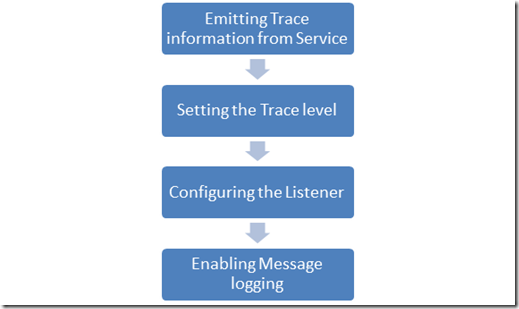
There are essentially four steps involved in WCF Tracing

image_thumb117.png?w=519&h=309

Emitting Trace information from Service

To emit trace information WCF provides different sources. However you have choice to create trace source using TraceSource class as well. You can choose any of WCF Assembly level trace source to emit the tracing information.

WCF Assembly level Trace Sources are as below,

    System.ServiceModel
    System.ServiceModel.MessageLogging
    System.ServiceModel.IdentityModel
    System.ServiceModel.Activation
    System.Runtime.Serilization
    System.IO.Log

Read more: DEBUG MODE……

Posted via email from Jasper-net

Workaround For Crash In Performance Profiling Tools for WPF

|
Introduction

Every WPF developer knows the situation where you have a large line-of-business application, you’ve implemented all the features and when you finally run it on real data – it runs s-l-o-w.
Optimization Time!

Optimization for performance is fun since a 1% change of code gets you 99% change in performance. However, finding the one location you should change can be a pain.

This is why we’ve invented performance profilers. Profilers can help you pin-point the problem.
WPF?

WPF applications performance problems can usually be categorized to several kinds, for example, layout related, rendering related, etc.
Following is a nice list of common places to optimize when you work with WPF applications.

Microsoft provides a profiler specifically tuned for finding WPF related issues. You can find the installation guidelines on MSDN.

Note: if this is the first time you use it, and you don’t get the data, try the patch mentioned in this post.

When the profiler does work, it produces very interesting information.
For example, in the following image we can see the visual tree on the left and in it the hot element (painted red) where a lot of CPU cycles went (either due to rendering or layout).

Read more: Arik Poznanski's Blog

Posted via email from Jasper-net

Digital Signing Demo

|
This post demonstrates the use of a digital signing function to ensure data within a table is unaltered outside a given set of stored procs. To understand how these and other crytographic functions can be employed to improve the security of database applications, please review this post.

The first step in the demonstration is to create an empty database within which sensitive data will be housed:

USE master;
GO
 
IF EXISTS (SELECT * FROM sys.databases WHERE name = ‘SigningFunctionDemo’)
   DROP DATABASE SigningFunctionDemo;
GO

CREATE DATABASE SigningFunctionDemo;
GO

Next, a table will be created to house some sensitive data.  It’s important to note that for this demonstration, the data is not being encrypted but it could be to make unauthorized access and modifications more challenging:

USE SigningFunctionDemo;
GO
 
CREATE TABLE dbo.MySensitiveData (
   Id INT NOT NULL IDENTITY(1,1),
   MyData NVARCHAR(25) NOT NULL,
   MySignature VARBINARY(256) NOT NULL
   );
GO

To support signing, an asymmetric key will be created along with two stored procedures making the signing and verification calls on behalf of the application:

CREATE ASYMMETRIC KEY MySigningKey
    WITH ALGORITHM = RSA_2048
    ENCRYPTION BY PASSWORD = N’asd!i36oheQ#wr8iW#%qwei4!orqhq9w7as’;
GO
 
CREATE PROC dbo.spPutData @MyData NVARCHAR(25)
AS
   INSERT INTO dbo.MySensitiveData (MyData, MySignature)
   SELECT
    @MyData,
    SIGNBYASYMKEY(
         ASYMKEY_ID(‘MySigningKey’),
         @MyData,
         N’asd!i36oheQ#wr8iW#%qwei4!orqhq9w7as’
         );
GO
 
CREATE PROC dbo.spGetData @Id int
AS
 SELECT
    MyData,
    VERIFYSIGNEDBYASYMKEY(
  ASYMKEY_ID(‘MySigningKey’),
  MyData,
  MySignature
  ) AS IsValid
 FROM dbo.MySensitiveData
 WHERE  Id = @Id;
GO

With this in place, data can now be placed into the database along with a signature:

EXEC dbo.spPutData N’This is my sensitive data’
GO

Accessing the table directly, the data and its signature can be seen:

SELECT * FROM dbo.MySensitiveData
GO

Read more: MSDN Blogs

Posted via email from Jasper-net

Daniel Moth: Blazing-fast code using GPUs and more, with C++ AMP

|
Herb Sutter recently announced C++ AMP at the AMD Fusion Developer Summit as part of his keynote. Here, Daniel Moth, a program manager on Microsoft's Parallel Computing Platform Team, digs deeper into C++ AMP with code samples and more. Please download the slides from the link below as the recording of this session doesn't do them justice.

Big thanks to AMD for providing Channel 9 with this excellent content!

To get full performance out of mainstream hardware, high-performance code needs  to harness, not only multi-core CPUs, but also GPUs (whether discrete cards or integrated in the processor) and other compute accelerators to achieve orders-of-magnitude speed-up for data parallel algorithms. How can you as a C++ developer fully utilize all that heterogeneous hardware from your Visual Studio environment? How can your code benefit from this tremendous performance boost without sacrificing your developer productivity or the portability of your solution? The answers will be presented in this session that introduces a new technology from Microsoft.

Read more: Channel9

Posted via email from Jasper-net

Visidon Applock sees your pretty face, grants you Android access (video)

|
In the event you got lulled into a groovy seat dance by that most excellent muzak above, let us repeat - this app does not protect your lockscreen. That said, Visidon's Applock will prevent the privacy-adverse from messing with your personally curated app collection. Have a nosy significant lover? No sweat -- snap a pick with your front-facing cam, enable the face-lock in your settings, and those sexts are as good as blocked. It's far from foolproof, however, as some comments indicate an extended bit of facial-wriggling tricks the app into unlock mode. Oh well, you're so vain, you'll probably think this Android market link is for you -- don't you?

Read more: Engadget
QR: https://chart.googleapis.com/chart?chs=80x80&cht=qr&choe=UTF-8&chl=http://www.engadget.com/2011/06/23/visidon-applock-sees-your-pretty-face-grants-you-android-access/

Posted via email from Jasper-net

Windows 8 for software developers: the Longhorn dream reborn?

|
images?q=tbn:ANd9GcQGGVP3wdbIPh2wZ9ZeOxD2-fy9HvDSF_yGtXRKzly8JtTI2r5S&t=1

A brave new world

Windows 8 will ship with a pair of runtimes; a new .NET runtime (currently version stamped 4.5), and a native code C++ runtime (technically, COM, or a derivative thereof), named WinRT. There will be a new native user interface library, DirectUI, that builds on top of the native Direct2D and DirectWrite APIs that were introduced with Windows 7. A new version of Silverlight, apparently codenamed Jupiter, will run on top of DirectUI. WinRT and DirectUI will both be directly accessible from .NET through built-in wrappers.

WinRT provides a clean and modern API for many of the things that Win32 does presently. It will be, in many ways, a new, modern Win32. The API is designed to be easy to use from "modern" C++ (in contrast to the 25 year old, heavily C-biased design of Win32); it will also map cleanly onto .NET concepts. In Windows 8, it's unlikely that WinRT will cover everything Win32 can do—Win32 is just so expansive that modernizing it is an enormous undertaking—but I'm told that this is the ultimate, long-term objective. And WinRT is becoming more and more extensive with each new build that leaks from Redmond.

WinRT isn't just providing a slightly nicer version of the existing Win32 API, either. Microsoft is taking the opportunity to improve the API's functionality, too. The clipboard API, for example, has been made easier to use and more flexible. There will also be pervasive support for asynchronous operations, providing a clean and consistent way to do long-running tasks in the background.

DirectUI is built around a core subset of current WPF/Silverlight technology. It includes support for XAML, the XML language for laying out user interfaces, and offers the rich support for layouts that Win32 has never had. This core will give C++ programs their modern user interface toolkit and, at its heart, it will be the same toolkit that .NET developers use too. (DirectUI is a name Microsoft has used before, internally, for a graphics library used by Windows Live Messenger. The new DirectUI appears to be unrelated.)

Jupiter is essentially Silverlight 6; a fully-featured, flexible toolkit for building applications. The exact relationship between DirectUI and Jupiter isn't entirely clear at the moment. It's possible that they're one and the same—and that DirectUI will grow in functionality until it's able to do everything that Silverlight can do. It's also possible that DirectUI will retain only core functionality, with a more complete framework built on top of its features. Another option is that Jupiter refers specifically to immersive, full-screen, touch-first applications.

Read more: Ars technica
QR: windows-8-for-software-developers-the-longhorn-dream-reborn.ars

Posted via email from Jasper-net

Providing a great Silverlight deployment experience

|
If you are doing Silverlight development, you are no doubt slapping in the tag or using the control (if in ASP.NET) to host your Silverlight content/application.  This is all great, but don't forget about deployment!

When I talk about Silverlight I like to relay a story I heard from one of the Silverlight program managers (PM) a while back.  The PM was pretty excited about a feature just completed in Silverlight and one of the samples that had been created.  He went home to show his wife and told her to 'go to 'dub-dub-dub-dot-something-dot-com' (yelling from the other room of course) and to tell him what she thought.  After a long pause of a few minutes he shouted back 'what do you think?'  Her response: 'It's lame.'  He was no doubt offended until he walked up to her machine and on the screen saw this:

?LinkID=92801&clcid=0x409

The Problem

You see, 'Get Silverlight' means nothing to your mother-in-law (or wife in this matter).  Technology means nothing to non-geek users.  Content is king.  And to your non-savvy users (and even your savvy ones), leaving this default experience isn't a wise one.  It doesn't convey that there is anything of value by installing something they might not have.  It doesn't even convey what the action is going to be when they 'Get Microsoft Silverlight.'  Leaving this experience unchecked leaves your users in the dark as well as a reputation rank downward in my opinion.

    NOTE: This site is likely riddled with these badges as seen above.  I'm claiming exempt status because they are samples :-).

While in Silverlight 1.0 creating a great install experience was possible, Silverlight 2 makes that process so much easier.  In Silverlight 1.0, the use of the silverlight.js file could aid in detection and direction to an alternate experience.  This method is still possible in Silverlight 2, and in fact might be a best practice still.  Most interactive developers using Flash use some method of script creation in instantiating the Flash host.  This is mostly due to the IE EOLAS "click to activate" issue that has been resolved and will remedy in an upcoming IE update.

Some Solutions

So that brings a few methods for instantiating the Silverlight control host.  You can still use a script method to do the check for you and provide alternate content or redirect to something.  You can also still simply include the tag itself.  My favorite is using the simple tag and tricking the HTML.  You see an object tag might look like this:


Some descriptive information


Read more: Method of ~ failed ~
QR: creating-a-great-silverlight-deployment-experience.aspx

Posted via email from Jasper-net

Behaviors and Triggers in Silverlight

|
1. Introduction

With the release of Silverlight 3, a lot of new cool features have been introduced. One of my favorite definitely is the support of behaviors and triggers. In WPF the triggers are extremely powerful. They allow you to declaratively associate an action with an event or property value. In the previous versions of Silverlight one of the things that were really missing were the triggers and the behaviors. It was not possible, for example, to add mouse-overs to objects declaratively (as in WPF). Currently it is still not possible, you have to write procedural code, but at least that code is separated, so the designer doesn’t have to write it or understand it. In that post I will focus exactly on that new feature in Silverlight and will show you how to create your own custom behaviors and triggers.

You can find the demos in the end of each section.

Download Source
2. Prerequisites

In order to write behaviors and triggers you need to have installed the Microsoft Expression Blend SDK on your machine. After that you need to add a reference to the System.Windows.Interactivity.dll assembly which is located in:

{Program Files}\Microsoft SDKs\Expression\Blend 3\Interactivity\Libraries\Silverlight

I don’t know why but this assembly currently is not part of the Silverlight SDK. You can download the Expression Blend product from here.
3. Behavior types

Currently you can use three types of bevahors: Behavour, TriggerAction and TargetedTriggerAction. The class diagram is shown on the next figure:

BehaviorClasses.png

4. Using the Behavior<T> class

For simple scenarios the generic Behavior<T> class is excellent choice. This class has only two overridable methods which notify the current behavior when an object is attached and detached from it. For my post I will create two behaviors: the first one just inverts the color of an image, when the image is clicked, and the second is little more complicated – it adds an animation and creates a magnifier when the mouse is over the image.

The first thing you should do when creating behaviors is to create a new class which inherits from the generic class Behavior<T>, where T is a dependency object. In the most cases you will inherit from the Behavior<FrameworkElement> or Behavior<UIElement>.

public class InverseColorClickBehavior :
    Behavior<FrameworkElement>
{
    public InverseColorClickBehavior() :
        base()
    {
    }
}

For that particular case I am interested in the mouse click event. That’s why in the OnAttached method I will attach to the MouseLeftButtonDown event of the associated with that behavior object. And respectively in the OnDetaching method I will detach from that event.

protected override void OnAttached()
{
    base.OnAttached();
    this.AssociatedObject.MouseLeftButtonDown +=
        new MouseButtonEventHandler( AssociatedObject_MouseLeftButtonDown );
}


protected override void OnDetaching()
{
    base.OnDetaching();
    this.AssociatedObject.MouseLeftButtonDown -=
        new MouseButtonEventHandler( AssociatedObject_MouseLeftButtonDown );

Read more: Silverlight Show
QR: Behaviors-and-Triggers-in-Silverlight-3.aspx

Posted via email from Jasper-net

How To Remotely Copy Files Over SSH Without Entering Your Password

|
banner-019.png

SSH is a life-saver when you need to remotely manage a computer, but did you know you can also upload and download files, too? Using SSH keys, you can skip having to enter passwords and use this for scripts!

This process works on Linux and Mac OS, provided that they’re properly configured for SSH access. If you’re using Windows, you can use Cygwin to get Linux-like functionality, and with a little tweaking, SSH will run as well.
Copying Files Over SSH

Secure copy is a really useful command, and it’s really easy to use. The basic format of the command is as follows:

    scp [options] original_file destination_file

The biggest kicker is how to format the remote part. When you address a remote file, you need to do it in the following manner:

    user@server:path/to/file

The server can be a URL or an IP address. This is followed by a colon, then the path to the file or folder in question. Let’s look at an example.

    scp –P 40050 Desktop/url.txt yatri@192.168.1.50:~/Desktop/url.txt

This command features the [-P] flag (note that it’s a capital P). This allows me to specify a port number instead of the default 22. This is necessary for me because of the way I’ve configured my system.

Read more: How-to geek
QR: https://chart.googleapis.com/chart?chs=80x80&cht=qr&choe=UTF-8&chl=http://www.howtogeek.com/66776/how-to-remotely-copy-files-over-ssh-without-entering-your-password/

Posted via email from Jasper-net

Windows 8 for software developers: the Longhorn dream reborn?

| Monday, June 27, 2011
images?q=tbn:ANd9GcQGGVP3wdbIPh2wZ9ZeOxD2-fy9HvDSF_yGtXRKzly8JtTI2r5S&t=1

A brave new world

Windows 8 will ship with a pair of runtimes; a new .NET runtime (currently version stamped 4.5), and a native code C++ runtime (technically, COM, or a derivative thereof), named WinRT. There will be a new native user interface library, DirectUI, that builds on top of the native Direct2D and DirectWrite APIs that were introduced with Windows 7. A new version of Silverlight, apparently codenamed Jupiter, will run on top of DirectUI. WinRT and DirectUI will both be directly accessible from .NET through built-in wrappers.

WinRT provides a clean and modern API for many of the things that Win32 does presently. It will be, in many ways, a new, modern Win32. The API is designed to be easy to use from "modern" C++ (in contrast to the 25 year old, heavily C-biased design of Win32); it will also map cleanly onto .NET concepts. In Windows 8, it's unlikely that WinRT will cover everything Win32 can do—Win32 is just so expansive that modernizing it is an enormous undertaking—but I'm told that this is the ultimate, long-term objective. And WinRT is becoming more and more extensive with each new build that leaks from Redmond.

WinRT isn't just providing a slightly nicer version of the existing Win32 API, either. Microsoft is taking the opportunity to improve the API's functionality, too. The clipboard API, for example, has been made easier to use and more flexible. There will also be pervasive support for asynchronous operations, providing a clean and consistent way to do long-running tasks in the background.

DirectUI is built around a core subset of current WPF/Silverlight technology. It includes support for XAML, the XML language for laying out user interfaces, and offers the rich support for layouts that Win32 has never had. This core will give C++ programs their modern user interface toolkit and, at its heart, it will be the same toolkit that .NET developers use too. (DirectUI is a name Microsoft has used before, internally, for a graphics library used by Windows Live Messenger. The new DirectUI appears to be unrelated.)

Jupiter is essentially Silverlight 6; a fully-featured, flexible toolkit for building applications. The exact relationship between DirectUI and Jupiter isn't entirely clear at the moment. It's possible that they're one and the same—and that DirectUI will grow in functionality until it's able to do everything that Silverlight can do. It's also possible that DirectUI will retain only core functionality, with a more complete framework built on top of its features. Another option is that Jupiter refers specifically to immersive, full-screen, touch-first applications.

Read more: Ars technica
QR: windows-8-for-software-developers-the-longhorn-dream-reborn.ars

Posted via email from Jasper-net

Visidon Applock sees your pretty face, grants you Android access (video)

|
In the event you got lulled into a groovy seat dance by that most excellent muzak above, let us repeat - this app does not protect your lockscreen. That said, Visidon's Applock will prevent the privacy-adverse from messing with your personally curated app collection. Have a nosy significant lover? No sweat -- snap a pick with your front-facing cam, enable the face-lock in your settings, and those sexts are as good as blocked. It's far from foolproof, however, as some comments indicate an extended bit of facial-wriggling tricks the app into unlock mode. Oh well, you're so vain, you'll probably think this Android market link is for you -- don't you?

Read more: Engadget
QR: https://chart.googleapis.com/chart?chs=80x80&cht=qr&choe=UTF-8&chl=http://www.engadget.com/2011/06/23/visidon-applock-sees-your-pretty-face-grants-you-android-access/

Posted via email from Jasper-net

Providing a great Silverlight deployment experience

|
If you are doing Silverlight development, you are no doubt slapping in the tag or using the control (if in ASP.NET) to host your Silverlight content/application.  This is all great, but don't forget about deployment!

When I talk about Silverlight I like to relay a story I heard from one of the Silverlight program managers (PM) a while back.  The PM was pretty excited about a feature just completed in Silverlight and one of the samples that had been created.  He went home to show his wife and told her to 'go to 'dub-dub-dub-dot-something-dot-com' (yelling from the other room of course) and to tell him what she thought.  After a long pause of a few minutes he shouted back 'what do you think?'  Her response: 'It's lame.'  He was no doubt offended until he walked up to her machine and on the screen saw this:

?LinkID=92801&clcid=0x409

The Problem

You see, 'Get Silverlight' means nothing to your mother-in-law (or wife in this matter).  Technology means nothing to non-geek users.  Content is king.  And to your non-savvy users (and even your savvy ones), leaving this default experience isn't a wise one.  It doesn't convey that there is anything of value by installing something they might not have.  It doesn't even convey what the action is going to be when they 'Get Microsoft Silverlight.'  Leaving this experience unchecked leaves your users in the dark as well as a reputation rank downward in my opinion.

    NOTE: This site is likely riddled with these badges as seen above.  I'm claiming exempt status because they are samples :-).

While in Silverlight 1.0 creating a great install experience was possible, Silverlight 2 makes that process so much easier.  In Silverlight 1.0, the use of the silverlight.js file could aid in detection and direction to an alternate experience.  This method is still possible in Silverlight 2, and in fact might be a best practice still.  Most interactive developers using Flash use some method of script creation in instantiating the Flash host.  This is mostly due to the IE EOLAS "click to activate" issue that has been resolved and will remedy in an upcoming IE update.

Some Solutions

So that brings a few methods for instantiating the Silverlight control host.  You can still use a script method to do the check for you and provide alternate content or redirect to something.  You can also still simply include the tag itself.  My favorite is using the simple tag and tricking the HTML.  You see an object tag might look like this:


Some descriptive information


Read more: Method of ~ failed ~
QR: creating-a-great-silverlight-deployment-experience.aspx

Posted via email from Jasper-net

Behaviors and Triggers in Silverlight

|
1. Introduction

With the release of Silverlight 3, a lot of new cool features have been introduced. One of my favorite definitely is the support of behaviors and triggers. In WPF the triggers are extremely powerful. They allow you to declaratively associate an action with an event or property value. In the previous versions of Silverlight one of the things that were really missing were the triggers and the behaviors. It was not possible, for example, to add mouse-overs to objects declaratively (as in WPF). Currently it is still not possible, you have to write procedural code, but at least that code is separated, so the designer doesn’t have to write it or understand it. In that post I will focus exactly on that new feature in Silverlight and will show you how to create your own custom behaviors and triggers.

You can find the demos in the end of each section.

Download Source
2. Prerequisites

In order to write behaviors and triggers you need to have installed the Microsoft Expression Blend SDK on your machine. After that you need to add a reference to the System.Windows.Interactivity.dll assembly which is located in:

{Program Files}\Microsoft SDKs\Expression\Blend 3\Interactivity\Libraries\Silverlight

I don’t know why but this assembly currently is not part of the Silverlight SDK. You can download the Expression Blend product from here.
3. Behavior types

Currently you can use three types of bevahors: Behavour, TriggerAction and TargetedTriggerAction. The class diagram is shown on the next figure:

BehaviorClasses.png

4. Using the Behavior<T> class

For simple scenarios the generic Behavior<T> class is excellent choice. This class has only two overridable methods which notify the current behavior when an object is attached and detached from it. For my post I will create two behaviors: the first one just inverts the color of an image, when the image is clicked, and the second is little more complicated – it adds an animation and creates a magnifier when the mouse is over the image.

The first thing you should do when creating behaviors is to create a new class which inherits from the generic class Behavior<T>, where T is a dependency object. In the most cases you will inherit from the Behavior<FrameworkElement> or Behavior<UIElement>.

public class InverseColorClickBehavior :
    Behavior<FrameworkElement>
{
    public InverseColorClickBehavior() :
        base()
    {
    }
}

For that particular case I am interested in the mouse click event. That’s why in the OnAttached method I will attach to the MouseLeftButtonDown event of the associated with that behavior object. And respectively in the OnDetaching method I will detach from that event.

protected override void OnAttached()
{
    base.OnAttached();
    this.AssociatedObject.MouseLeftButtonDown +=
        new MouseButtonEventHandler( AssociatedObject_MouseLeftButtonDown );
}


protected override void OnDetaching()
{
    base.OnDetaching();
    this.AssociatedObject.MouseLeftButtonDown -=
        new MouseButtonEventHandler( AssociatedObject_MouseLeftButtonDown );

Read more: Silverlight Show
QR: Behaviors-and-Triggers-in-Silverlight-3.aspx

Posted via email from Jasper-net

Windows 8 Style Ultimate Tile Theme Backgrounds [Wallpaper Pack]

|
sshot4e0460a5bc7b1.png

Are you excited about Windows 8? Then add a Windows 8 Tile look to your desktop with this awesome wallpaper pack!

Note 1: The wallpapers are set up in a .themepack format but can be easily opened/unzipped with a file zipping software such as IZarc, 7-Zip, PeaZip, etc.

Read more: How-to geek
Read more: DevianArt
QR: https://chart.googleapis.com/chart?chs=80x80&cht=qr&choe=UTF-8&chl=http://www.howtogeek.com/news/windows-8-style-ultimate-tile-theme-backgrounds-wallpaper-pack/5391/

Posted via email from Jasper-net

Sort C# Code Structure In Visual Studio 2010 With CodeSorter

|
code-sorter-2.png

One of the most tiring task you might have to perform over source code files everyday is code sorting. Since there aren’t any set conditions which one can instantly apply over source code file to make it look tidy and clean, users have to manually sort the code structure according to their requirements. If you’re looking for a relatively easy way to sort your C# code in Visual Studio 2010, you can try out CodeSorter to specify code sorting conditions, so that they can be applied with a single click over all the code files. The add-in only works with C# project files and may disturb code structure of other languages. The add-in has a host of different code sorting conditions which can be customized in numerous ways. It was developed to sort source code files by different conditions such as, names, types; including, class, struct, method, virtual modifiers; virtual overide, new, etc.

It adds two code sorting options in Tools menu – Sort Code and Sort All Files in Project. The Sort Code option sorts code structure of only currently open file whereas the latter option sorts all the files present in your project. Before sorting out code, you need to configure the code sorting conditions. Open Code Sorter Options from Tools menu.

Read more: Addictive tips
QR: https://chart.googleapis.com/chart?chs=80x80&cht=qr&choe=UTF-8&chl=http://www.addictivetips.com/windows-tips/sort-c-sharp-code-structure-in-visual-studio-2010-with-codesorter/

Posted via email from Jasper-net

Linux 3.0 Will Be Faster Than 2.6.39

|
While we were thinking that the announcement of 3.x branch was nothing more than Linus' mood swing, it seems there is more to it. Linus wrote on the Linux Kernel Mailing List, '3.0 will still be noticeably faster than 2.6.39 due to the other changes made (ie the read-ahead), so yes, the regression itself is fixed.'

Read more: Slashdot
QR: Linux-30-Will-Be-Faster-Than-2639

Posted via email from Jasper-net

UrtheCast to stream live HD footage of Earth from ISS, like Stickam for space

|
iss-tenth-anniversary-11-02-2010.jpg

Space nerds, get your browsers ready -- UrtheCast will soon be streaming HD video of Earth straight from the ISS. The system will actually consists of a pair of cameras, one still and one video, that will be mounted on the Russian arm of the station. The still shots will be very wide, covering about 30 miles with a resolution of 18-feet per pixel. Much more exciting will be the three feet per-pixel stream of 3.25fps video that will run 24 hours a day, seven days a week. You probably won't be able to see yourself waving as the ISS passes overhead, but you should be able to spot your cardboard box fort house. The feeds won't be your typical boring NASA fare either -- you'll be able to search, rewind, and tag objects or events, and UrtheCast is providing APIs for developers to build upon the service. The project won't be launching until June 28th, so bide your time by checking out the video and PR after the break.

Read more: Engadget
QR: https://chart.googleapis.com/chart?chs=80x80&cht=qr&choe=UTF-8&chl=http://www.engadget.com/2011/06/25/urthecast-to-stream-live-hd-footage-of-earth-from-iss-like-stic/

Posted via email from Jasper-net

Afghans Build Open Source Internet From Trash

|
Residents of Jalalabad have built the FabFi network: an open-source system that uses common building materials and off-the-shelf electronics to transmit wireless ethernet signals across distances of up to several miles.

Read more: Slashdot
QR: Afghans-Build-Open-Source-Internet-From-Trash

Posted via email from Jasper-net

How to unsubscribe from an Event which is registered to an anonymous method

|
Anyone who has been doing any type of .net development knows you can subscribe (MSDN on event subscription) to an event as follows:

Subscribe to an Non-Anonymous Method

...

// instance class w/ an event
myClass.DoSomething += HandleDoSomething
...

// the method which handles the event
privat evoid HandleDoSomething( object s, args e )
{

// Logic goes here
}

Subscribe to an Anonymous Method

...

// instance class w/ an event
myClass.DoSomething += (s, e) => {
         // logic goes here
    }

And to unsubscribe from a non-anonymous method you would do the following

...
// instance class w/ an event
myClass.DoSomething -= HandleDoSomething
...

Read more: Derik Whittaker
QR: how-to-unsubscribe-from-an-event-which-is-registered-to-an-anonymous-method.aspx

Posted via email from Jasper-net

Ref returns and ref locals

|
"Ref returns" are the subject of another great question from StackOverflow that I thought I might share with a larger audience.

Ever since C# 1.0 you've been able to create an "alias" to a variable by passing a "ref to a variable" to certain methods:

static void M(ref int x)
{
    x = 123;
}
...
int y = 456;
M(ref y);

Despite their different names, "x" and "y" are now aliases for each other; they both refer to the same storage location. When x is changed, y changes too because they are the same thing. Basically, "ref" parameters allow you to pass around variables as variables rather than as values. This is a sometimes-confusing feature (because it is easy to confuse "reference types" with "ref" aliases to variables,) but it is generally a pretty well-understood and frequently-used feature.

However, it is a little-known fact that the CLR type system supports additional usages of "ref", though C# does not. The CLR type system also allows methods to return refs to variables, and allows local variables to be aliases for other variables. The CLR type system however does not allow for fields that are aliases to other variables. Similarly arrays may not contain managed references to other variables. Both fields and arrays containing refs are illegal because making it legal would overly complicates the garbage collection story. (I also note that the "managed reference to variable" types are not convertible to object, and therefore may not be used as type arguments to generic types or methods. For details, see the CLI specification Partition I Section 8.2.1.1, "Managed pointers and related types" for information about this feature.)

As you might expect, it is entirely possible to create a version of C# which supports both these features. You could then do things like

static ref int Max(ref int x, ref int y)
{
  if (x > y)
    return ref x;
  else
    return ref y;
}

Read more: Fabulous Adventures In Coding
QR: ref-returns-and-ref-locals.aspx

Posted via email from Jasper-net

What happens when applications try to copy text by sending Ctrl+C

|
I'm stealing this story from one of my colleagues.

    I remember one app from a long time ago that had a feature where you could hit a global short cut key (or something like that) to launch the dictionary. It was also smart in that it would detect the current selected text and immediately search the dictionary for that term.

    One day I was running a Perl script that took several hours to run. It was nearly done and for whatever I decided to launch the dictionary. It sent a Ctrl+C to my Perl script and killed it.

    And that's why you don't send Ctrl+C to arbitrary applications.

Active Accessibility gives you access to the text under the cursor. There's also a newer interface known as UI Automation which has a handy method called IText­Provider::Get­Selection. (On the managed side, you have System.Windows.Automation.Text­Pattern.Get­Selection.)

Read more: The old new thing
QR: 10178000.aspx

Posted via email from Jasper-net

BuildAsSilverlight

|
Project Description
This is a Visual Studio add-in which builds Silverlight Library directly from standard .NET class library just by a simple right click. The idea is to simplify the management of two separate .csproj files pointing to same code base and soft linking between them.

This version of BuildAsSilverlight is tested with the following environment only:
.NET Runtime 4.0
Visual Studio 2010 Professional
Silverlight 4

Usage

Open any .NET Class library project. Right Click and click BuildAsSilverlight4 as shown below:

FileDownload.aspx?ProjectName=buildassilverlight&DownloadId=132243

Read more: Codeplex
QR: https://chart.googleapis.com/chart?chs=50x50&cht=qr&choe=UTF-8&chl=https://buildassilverlight.codeplex.com/

Posted via email from Jasper-net

HowTo: Generate QR code for your site

|
Everyone know that one of the keys to have a great SEO for your website is making sure you keep your website updated, new and fresh. Whether you do this with a blog, or you change your homepage with new offers, coupons or new products, it serves to show Google that your site is “alive.” For many small businesses in particular, this is a real challenge.

So you already have great, fresh content on your site – what’s next? Do you know what is coming that may benefit your business?

What are QR codes?

QR codes (abbreviation for Quick Response code) are a popular type of two-dimensional barcode. They are also known as hardlinks or physical world hyperlinks. QR Codes store up to 4,296 alphanumeric characters of arbitrary text. This text can be anything, for example URL, contact information, a telephone number, even a poem! QR codes can be read by an optical device with the appropriate software. Such devices range from dedicated QR code readers to mobile phones.

QR code for your site?

There are various QR code generators available  online but, generating QR code without using generators is also very easy. We will use Google Chart APIs to generate QR code for us.
Creating QR code

Google charts API allows us to generate QR code by passing various parameters to their API. Below is the short description of each parameter-

Name Required? Description
cht=qr Yes Specifies a QR code.
chs=<width>x<height> Yes Image size. (Remember it’s English alphabet ‘x’ and not cross ’X’ )
choe=<output_encoding> No How to encode the data in the chart. Here are the available values:
UTF-8 [Default]
Shift_JIS
ISO-8859-1

Read more: Tech Tutkiun 

howto-generate-qr-code-for-your-site.html&choe=UTF-8

Posted via email from Jasper-net

Fiddler and IPv6-only environments

|
I recently got a bug report from a user who was attempting to use Fiddler in a pure-IPv6 environment, where IPv4 is entirely disabled. On startup, he saw the following message:

The problem here is an obscure one, which makes it somewhat interesting. What’s happening is that Fiddler is trying to create an IPv4 listener socket listening on port 8888 locally. However, because this is a pure IPv6 environment, permission to create such a socket is denied.

By default, Fiddler will create an IPv4 listen socket unless the following three criteria are met:

    The computer supports IPv6 (Vista+ support it by default; various installs are required for XP)
    The Enable IPv6 option is ticked inside Tools > Fiddler Options > General
    The Allow remote computers to connect option is set inside Tools > Fiddler Options > Connections

Now, the first two requirements are somewhat self-explanatory, but the third bears some explanation. If only the first two requirements are met, Fiddler will be able to connect to IPv6 sites, but the browser will only be able to connect to Fiddler using IPv4.

The reason that the third requirement exists is that some clients (particularly IE6’s WinINET, and likely others) don’t support IPv6-literal proxy addresses, and hence attempting to poke [::1]:8888 into the system proxy settings would fail for such clients. So, Fiddler cannot safely bind to IPAddress.IPv6Loopback, and will bind to IPAddress.Loopback instead. However, if you enable the Allow remote computers to connect option, Fiddler will instead bind to IPAddress.IPv6Any which allows connecting on both IPv4 and IPv6 addresses on any adapter.

Read more: Fiddler Web Debugger

Posted via email from Jasper-net

הצפנת קבצים בודדים בתצורת EFS – Encrypted File System–חלק א'

|
שלום לכולם,

כאן דן ויזנפלד מצוות התמיכה של Microsoft.

כמעט כל אחד מאתנו עושה שימוש במידע אישי, שמסיבה כזו או אחרת, הוא אינו מעוניין לאפשר למשתמשים אחרים גישה אליו.

פתרונות האבטחה שמוצעים היום בשוק (חומות אש ותוכנות אבטחה שונות) יכולים לסייע לכם במצבים בהם קיימת כוונה של פורץ כזה או אחר לגשת למידע האישי שלכם מרחוק (וגם כן, לא בכל המצבים).

עם זאת, אף אחד מהפתרונות הללו לא יכול להגן עליכם במצב בו לאותו פורץ יש גישה פיזית ישירה למחשב שלכם.

Microsoft הציגה במערכות ההפעלה האחרונות (בכל הגרסאות העסקיות של מערכות ההפעלה החל מ-Windows 2000) יכולת הצפנה מתקדמת ביותר, הידועה בשם EFS – Encrypted File System.

במדריך הבא (המחולק לשני חלקים), אבקש להסביר לכם יותר על שיטת ההצפנה הזו – בטרם נלמד כיצד להפעילה וכיצד להשתמש בה.

למה חשוב להכיר את המנגנון לעומק?

1. בכדי למנוע מצבים טרגיים נפוצים בהם מצפינים קבצים מסוימים בצורה לא נכונה, ולאחר מכן לא ניתן לפתוח יותר את אותם הקבצים.

2. בכדי למנוע מצבים טרגיים לא פחות בהם ההצפנה בוצעה בצורה לא תקינה, ומידע שחשבתם שהוא מוצפן ומאובטח – בעצם גלוי לעיני כל.

טוב, אז לאחר שהבנו את חשיבות ההיכרות עם מנגנון ההצפנה, נלמד טיפה יותר על איך הוא עובד. אבל לפני שאגע ואסביר כיצד עובד המנגנון, חשוב להכיר כמה מונחים בסיסיים בתורת הקריפטוגרפיה:

הצפנה סימטרית –

שיטת הצפנה בה המפתח בו נעשה שימוש על מנת להצפין את המידע, הוא היחיד שגם יכול לשמש למטרת פענוח המידע שהוצפן.

כלומר, אם הצפנתי מידע באמצעות מפתח מסוים, עלי להעביר את אותו המפתח לנמען שלי יחד עם המידע שהוצפן, על מנת שהוא יוכל לפענח אותו.

הצפנה א-סימטרית –

שיטת הצפנה בה המפתח בו נעשה שימוש על מנת להצפין את המידע הוא אינו המפתח בו נעשה שימוש על מנת לפענח את המידע.

Read more: MS Support blog

Posted via email from Jasper-net

Modules in F#

|
Module is a simple container of values, types definition and sub modules. There are two types of modules. Local modules and top level ones. The following video clips show how to define them. You can find the source code as part of my F# Fundamentals course. Its community version is available for free personal usage at www.abelski.com.

Read more: Life Michael

Posted via email from Jasper-net

Detailed steps for configuring TeamCity to use MySQL as repository database on Windows

|
Introduction

I started recently setting up a TeamCity 6.5 server on a Windows 2008 R2 machine. The install was straight forward, but unfortunately TeamCity doesn’t use a mainstream database server out of the box. The good news is that you can configure TeamCity to use a different database server to run the TeamCity repository. I decided to use MySQL. This blog post has detailed steps for switching TeamCity to MySQL.
Why would someone want to switch to MySQL?
Performance

The most important reason is performance. Moving to a database server that is enterprise grade and located on a separate machine is boosting TeamCity response times significantly.
Integration

The second reason is integration. I am working on a prototype of a WordPress plug-in called LabPress that needs to be able to access TeamCity tables directly.
Step by step

Before we start here is a link to the TeamCity Documentation for switching the database engine.

Important Note: The following steps assume that you start from a clean TeamCity 6.5 system or you don’t need to migrate existing build configurations and projects to the new database.


Step 0

Install TeamCity 6.5 and MySQL, and optionally phpMyAdmin to administer MySQL via a web browser. The TeamCity install is straight forward. MySQL can be installed conveniently via the Microsoft Web Platform Installer.

Read more: Tellingmachine

Posted via email from Jasper-net

F# Object Oriented Capabilities

|
The F# programming language supports many of the well known object oriented possibilities we know in C#. The following video clips show some of these capabilities. You can find the source code as part of my F# Fundamentals course. Its community version is available for free personal use at www.abelski.com.

Read more: Life Michael

Posted via email from Jasper-net

Tracing in WCF: Understanding basic steps

|
Theory behind WCF Tracing is not an exception of classical definition of Tracing. Through Tracing an application provides information about itself. Information may vary from internal state of object to passed input parameter to method. This information should be logged, persisted or saved somewhere.

WCF Tracing can be used for the instrumentation of the WCF Service.

There are essentially four steps involved in WCF Tracing

image_thumb117.png?w=519&h=309

Emitting Trace information from Service

To emit trace information WCF provides different sources. However you have choice to create trace source using TraceSource class as well. You can choose any of WCF Assembly level trace source to emit the tracing information.

WCF Assembly level Trace Sources are as below,

    System.ServiceModel
    System.ServiceModel.MessageLogging
    System.ServiceModel.IdentityModel
    System.ServiceModel.Activation
    System.Runtime.Serilization
    System.IO.Log

Read more: DEBUG MODE……

Posted via email from Jasper-net

Digital Signing Demo

|
This post demonstrates the use of a digital signing function to ensure data within a table is unaltered outside a given set of stored procs. To understand how these and other crytographic functions can be employed to improve the security of database applications, please review this post.

The first step in the demonstration is to create an empty database within which sensitive data will be housed:

USE master;
GO
 
IF EXISTS (SELECT * FROM sys.databases WHERE name = ‘SigningFunctionDemo’)
   DROP DATABASE SigningFunctionDemo;
GO

CREATE DATABASE SigningFunctionDemo;
GO

Next, a table will be created to house some sensitive data.  It’s important to note that for this demonstration, the data is not being encrypted but it could be to make unauthorized access and modifications more challenging:

USE SigningFunctionDemo;
GO
 
CREATE TABLE dbo.MySensitiveData (
   Id INT NOT NULL IDENTITY(1,1),
   MyData NVARCHAR(25) NOT NULL,
   MySignature VARBINARY(256) NOT NULL
   );
GO

To support signing, an asymmetric key will be created along with two stored procedures making the signing and verification calls on behalf of the application:

CREATE ASYMMETRIC KEY MySigningKey
    WITH ALGORITHM = RSA_2048
    ENCRYPTION BY PASSWORD = N’asd!i36oheQ#wr8iW#%qwei4!orqhq9w7as’;
GO
 
CREATE PROC dbo.spPutData @MyData NVARCHAR(25)
AS
   INSERT INTO dbo.MySensitiveData (MyData, MySignature)
   SELECT
    @MyData,
    SIGNBYASYMKEY(
         ASYMKEY_ID(‘MySigningKey’),
         @MyData,
         N’asd!i36oheQ#wr8iW#%qwei4!orqhq9w7as’
         );
GO
 
CREATE PROC dbo.spGetData @Id int
AS
 SELECT
    MyData,
    VERIFYSIGNEDBYASYMKEY(
  ASYMKEY_ID(‘MySigningKey’),
  MyData,
  MySignature
  ) AS IsValid
 FROM dbo.MySensitiveData
 WHERE  Id = @Id;
GO

With this in place, data can now be placed into the database along with a signature:

EXEC dbo.spPutData N’This is my sensitive data’
GO

Accessing the table directly, the data and its signature can be seen:

SELECT * FROM dbo.MySensitiveData
GO

Read more: MSDN Blogs

Posted via email from Jasper-net

Workaround For Crash In Performance Profiling Tools for WPF

|
Introduction

Every WPF developer knows the situation where you have a large line-of-business application, you’ve implemented all the features and when you finally run it on real data – it runs s-l-o-w.
Optimization Time!

Optimization for performance is fun since a 1% change of code gets you 99% change in performance. However, finding the one location you should change can be a pain.

This is why we’ve invented performance profilers. Profilers can help you pin-point the problem.
WPF?

WPF applications performance problems can usually be categorized to several kinds, for example, layout related, rendering related, etc.
Following is a nice list of common places to optimize when you work with WPF applications.

Microsoft provides a profiler specifically tuned for finding WPF related issues. You can find the installation guidelines on MSDN.

Note: if this is the first time you use it, and you don’t get the data, try the patch mentioned in this post.

When the profiler does work, it produces very interesting information.
For example, in the following image we can see the visual tree on the left and in it the hot element (painted red) where a lot of CPU cycles went (either due to rendering or layout).

Read more: Arik Poznanski's Blog

Posted via email from Jasper-net

Creating a Radial Effect in Blend

| Sunday, June 26, 2011
Today i'm going to show you how to create the radial effect i use in my free game Apple Bin (shameless plug, check it out here ).

ScreenShot_Main.png

There are a couple of advantages in doing this in blend. Download size is a lot smaller and you can animate colours rotation scale etc.

I'm doing this on windows phone, but same technique can be used in WPF or Silverlight.

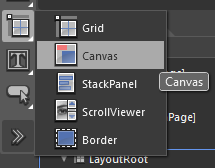
Fire up blend and add a canvas on your page.

Canvas.png

Read more: Escape development

Posted via email from Jasper-net

Implementing Data Validation in Silverlight with INotifyDataErrorInfo

|
Introduction

Data validation is an important aspect of any line of business application. It is used to make sure the data stored in the backend is valid and also to guide users in their data input tasks.

Several mechanisms already exist in client technologies to communicate to the application user when a particular piece of data is invalid and needs to be fixed. In some cases, data validation is closely working with data binding which is the ability to automatically push data between the user interface (UI) and the backend. Typically data is then validated as it is initially read to be displayed in a form, and reciprocally as new user input is flushed into the backend.

Both Microsoft Windows Forms (WF) and Windows Presentation Foundation (WPF) client technologies support the IDataErrorInfo interface which allows backend objects to communicate their error information to the UI layer. So far this interface has not been supported in Silverlight. But this is changing with the release of Silverlight 4 Beta. Its binding engine now takes full advantage of sources that implement IDataErrorInfo, just like the WPF binding engine does. Therefore business objects that were created for WF or WPF can now be reused in Silverlight applications without losing the benefits of their IDataErrorInfo implementation.

However IDataErrorInfo was originally designed for pure client environments such as WF and WPF and shows a limitation in a client-server technology like Silverlight: It does not include a means for notifying consumers that an error status has changed.

This is fine for pure client applications where the error status is known as soon as new data is pushed into the business object since the validation rules are applied locally. But for Silverlight applications where user-provided data often needs to be validated on a server, there really needs to be a mechanism for the binding source to advertise new errors asynchronously. Enters the new INotifyDataErrorInfo interface which was designed to fill this gap, in the Silverlight 4 Beta release.
A few words about Silverlight's new support for IDataErrorInfo

As in the .NET Framework 1.1 and subsequent releases, the IDataErrorInfo interface is defined in the System.ComponentModel namespace, in the System.dll assembly. The interface reference documentation can be found here: http://msdn.microsoft.com/en-us/library/system.componentmodel.idataerrorinfo.aspx. The Silverlight binding engine checks if the source of a binding is a property of an object that implements IDataErrorInfo when binding.ValidatesOnDataErrors is set to True. By default, Binding.ValidatesOnDataErrors is set to False. Because in Silverlight there is no concept of BindingGroup as in WPF, the binding engine will never access the IDataErrorInfo.Error property to report top-level validation errors. It only accesses the IDataErrorInfo.Item indexer for property-level errors.
Now to the new kid in town, INotifyDataErrorInfo

Let’s get straight to the interface definition:

namespace System.ComponentModel
{

using System;
using System.Collections;
public interface INotifyDataErrorInfo
{
// Returns True if the object has at least one property-level or top-level error.
bool HasErrors { get; }

// Returns the current set of property-level errors for the provided property name, or
// the current top-level errors if the argument is null or empty.
IEnumerable GetErrors(string propertyName);

// Raised when the set of errors for a particular property has changed, or when the
// top-level errors have changed.
event EventHandler ErrorsChanged;

}

public sealed class DataErrorsChangedEventArgs : EventArgs
{

// Constructor for the DataErrorsChangedEventArgs class. The provided argument can
// be null or empty for top-level object errors.
public DataErrorsChangedEventArgs(string propertyName);

// Returns the name of the property for which the errors have changed, or null/empty string
// when the notification is for the top-level errors.
public string PropertyName { get; }

}
}

Read more: Silverlight .NET

Posted via email from Jasper-net

LulzCheck

|
This summary is not available. Please click here to view the post.

25 Linux Server Hardening Tips

|
When it comes to having a Linux server hosted in a data center or it is not behind any kind of Firewall or NAT device there are a number of security requirements that need to be addressed. Linux servers generally come with no protection configured by default and depending on the hosting company or distro can come preconfigured with many services installed that are not required, including Web Servers, FTP Servers, Mail Servers and SSH Remote Access.

The following is a compilation of various settings and techniques you can employ to harden the security of your vulnerable Linux systems. While I have tried to put them in order of the most important features first I would recommend all of these options be used on your critical production servers.


TIP #1 – Strong Passwords

Always create long passwords that contain upper and lower case letters, numbers and non alpha-numeric characters. Enforce password ageing so users need to change their passwords regularly. Lock user accounts after a certain number of failed login attempts.


TIP #2 – Use Public/Private Keys

Make use of Public/Private SSH keys for login of remote users instead of passwords, this provides the benefit of turning off password authentication in SSH so that your server can’t be Brute-Force cracked. However this does introduce a new problem whereby a malicious person could compromise a user’s computer or steal their laptop and then have access to the server. This can be overcome by using a password on the client certificate which must be entered before connecting, a kind of two factor authentication.


TIP #3 – Disable Root Login

Disable the Root user from being able to login either via the console or remote SSH connections. Instead have users use Sudo to run programs that require root privileges, or use sudo su to change to the Root user once logged in. This provides an audit path to show which user installed a piece of software or ran a program.

Read more: monitis

Posted via email from Jasper-net

You had me at "SET DEVMGR_SHOW_NONPRESENT_DEVICES=1" (Environment variable to tell Device Manager to really show them all)

|
SNAGHTML1d55bfdf_thumb.png?imgmax=800

    I’ve been playing with the Microsoft Kinect SDK and I really like it. The speed with which it snaps on to people and tracks them is really impressive. However, I did have one bit of fun and games when I installed it. Like loads of other people I’ve been using other drivers with the hardware and although some of these have uninstall behaviours they don’t always get rid of the device drivers themselves. This can lead to problems when you try to install the “proper” drivers and the old ones load up and get in the way. So, to get rid of the Kinect drivers you can do this before you install the Microsoft Kinect SDK. First perform the uninstall on all the previous drivers. Now you need to get rid of anything left lying around:

    Open up a new command prompt running in Admin mode. The best way to do this is to click the Start button, type CMD into the search box and then hold down CTRL+SHIFT and press Enter. If you get this right you will be rewarded with a User Account Control dialogue box warning you that you are about to do something vaguely dangerous. Click OK.

    Now, in the command box give the command:

I've known about Device Manager's "Show hidden devices" for forever, but not that environment variable. On my Win7 x64 box that variable makes a huge difference in the devices shown...

Before (even with Show Hidden Enabled):

Read more: Greg's Cool [Insert Clever Name] of the Day
Read more: Using the Proper Kinect USB Drivers

Posted via email from Jasper-net

Calling Cross Domain WCF service using Jquery/Javascript

|
This post is about to call the cross domain WCF service from you page i.e Calling WCF service hosted on one domain and calling the service form jquery/javascript of page which is hosted on some other domain.

But before we start its better to get understand about the format of the data get exchange from one server to other server.

JSONP
Ajax allows to get data in the background without interfering with the display. Ajax call done by using XMLHttpRequest object, which is allow the client side javascript code to make HTTP connections.

But Ajax call does not allow to get data from cross-domain because of restrictions imposed by the browser. Security error get issued when requesting data from a other domain. one way to avoid security errors is to control remote server where data resides and every request goes to the same domain, that rise question what's the fun if data come form own server only? What to do if data require to get form the other server?

There is one way to come out form this limitation is to insert a dynamic script element in the Web page, one whose source is pointing to the service URL in the other domain and gets the data in the script itself. When the script loads, it executes. It works because the same-origin policy doesn't prevent dynamic script insertions and treats the scripts as if they were loaded from the domain that provided the Web page. But if this script tries to load a document from yet another domain, it will fail. Fortunately, you can improve this technique by adding JavaScript Object Notation (JSON) to the mix.

JSONP or "JSON with padding" is a complement to the base JSON data format, a pattern of usage that allows a page to request data from a server in a different domain. As a solution to this problem, JSONP is an alternative to a more recent method called Cross-Origin Resource Sharing.

Under the same origin policy, a web page served from server1.example.com cannot normally connect to or communicate with a server other than server1.example.com. An exception is the HTML <script> element. Taking advantage of the open policy for <script> elements, some pages use them to retrieve Javascript code that operates on dynamically-generated JSON-formatted data from other origins. This usage pattern is known as JSONP. Requests for JSONP retrieve not JSON, but arbitrary JavaScript code. They are evaluated by the JavaScript interpreter, not parsed by a JSON parser.

Calling Cross Domain WCF service
Now in following discuss I am going to show you how easily you can call the WCF service hosted on the other domain from the page hosted on the other domain.

Following is list of article you should look first before moving further

Create, Host(Self Hosting, IIS hosting) and Consume WCF servcie
Steps to Call WCF Service using jQuery

Read more: gMind solutions

Posted via email from Jasper-net

WSSX 4 U... Visual Studio Project Template for creating *.wssx packages (Think "Windows Home Server 2011/SBS 2011 Essentials/Storage Server 2011 Add-in Packages")

|
Windows Server Solutions Add-In Package Project (*.wssx) for Visual Studio 2010

Adds support to Visual Studio 2010 for *.wssx cabinet files required to distribute Windows Server Solutions SDK Add-Ins for Windows Home Server 2011, Windows Small Business Server 2011 Essentials, and Windows Storage Server 2008 R2 Essentials.

    Complete Visual Studio 2010 project type that fully automates creating *.wssx files
    Full makecab automation
    Full MSBuild support and integration points
    Automatic packaging of project reference outputs and content items
    Post-package signing support
    Includes templates for required Add-In metadata files

Read more: Greg's Cool [Insert Clever Name] of the Day
Read more: Windows Server Solutions Add-In Package

Posted via email from Jasper-net

WPF/Silverlight Data Binding Tip: FallbackValue

|
Consider the following piece of XAML (part of an Image Viewer application), that wants to set the Window title (in WPF) based on the currently loaded image file:

Title="{Binding ImagePath, StringFormat=Image Viewer ({0})}"

This assumes that a DataContext exists, and exposes a property named ImagePath. This works well if such an object actually exists. But what happens when the application starts up and there is no image loaded yet, meaning the DataContext remains null? The Title would show nothing, because the binding fails. How can we fix that?
One way would be to create a dummy DataContext with the ImagePath property set to some value we want. But that’s cumbersome and limiting. What if we wanted a completely different title when there is no image?

Read more: Pavel's blog

Posted via email from Jasper-net

C# - How to Insert paragraph to MsWord and save it as PDF

|
1. First you need to install the Add-In: 2007 Microsoft Office Add-in: Microsoft Save as PDF
2. You need to create Bookmark in msWord

Microsoft.Office.Interop.Word.Application ap = new Microsoft.Office.Interop.Word.Application();
Microsoft.Office.Interop.Word.Document doc1 = ap.Documents.Open(@"c:\test.docx", ReadOnly: false, Visible: false);
Object oBookmarkTOC1 = "BookMarkName";

object format = Microsoft.Office.Interop.Word.WdSaveFormat.wdFormatPDF;

//Update BookMark
doc1.Bookmarks.get_Item(ref oBookmarkTOC1).Range.Text = "Bla Bla 123";


Read more: Uzi Drori's Blog

Posted via email from Jasper-net

Encrypt the Data

|
SQL Server supports the encryption of data through a number of mechanisms.  These include:

   Cryptographic functions for the encryption and signing of individual values,
   The Transparent Data Encryption (TDE) feature through which the data and log files associated with a database are encrypted, and
   Support for SSL and IPSec to encrypt data as it is transmitted between the server and clients.

In addition, SQL Server supports an internally managed cryptographic key infrastructure but may also integrate with an externally managed infrastructure through its Extensible Key Management (EKM) interface.

To get a more in-depth and complete overview of the SQL Server cryptographic capabilities, please refere to this white paper.

Cryptographic Functions

With SQL Server 2005, a collection of cryptographic functions were introduced into the database product for the encryption and signing of individual values. Prior to the 2005 release, applications could store encrypted values and signatures within the database but relied on external functions to perform the encryption and signing work.  By moving the functions into the database engine, SQL Server provides greater and more consistent access to cryptographic functionality and allows an application to more easily leverage a centrally managed encryption key infrastructure.

The Encryption Functions

The encryption functions support encryption using either symmetric or asymmetric keys.  Symmetric key encryption has less  performance overhead while asymmetric key encryption provides stronger protection.

To perform symmetric key encryption, SQL Server provides two functions: EncryptByKey() and EncryptByPassPhrase().  The EncryptByKey() function leverages a symmetric key registered in advance with SQL Server.  With the EncryptByPassPhrase() function, a temporary symmetric key is generated using a passphrase supplied with the function. The choice of which function to employ comes down to the needs of the application and the availability of key management support within the organization.

Read more: MSDN Blogs

Posted via email from Jasper-net