The .NET Framework 4.5 includes new garbage collector enhancements for client and server apps
What makes managed code, “managed”? Most people would point to the garbage collector. Automatic memory management makes a tremendous difference in programmer productivity. And when garbage collection improves, all .NET applications benefit. Abhishek Mondal, the program manager for GC on the Common Language Runtime, and Maoni Stephens, the developer for GC on the CLR, authored this article. -- Brandon
In this post, we will look at how the CLR garbage collector (GC) has been changed in the .NET Framework 4.5 to meet the needs of large client and server apps. These improvements are in response to requests from developers who use the .NET Framework to build large-scale commercial apps. Some of these customers have already reported significant wins after deploying the .NET Framework 4.5 (currently available as an RC release) into production.
The needs of large-scale apps
Ever since the .NET Framework was introduced, developers have been using this technology to build client and server apps of increasing size and complexity. The larger an app gets, the more resources it will consume, and memory is one of the major resources. For example, some developers have built massive-scale websites and services that are used by millions of end-users. These sites typically need to deliver some combination of high throughput and low latency, and have to provide access to data in huge databases. Each year, the traffic to these sites grows and so does the amount of data they serve up. At the same time, these developers also strive to deliver increasingly better end-user experiences, which are sometimes defined by formal service level agreements (SLA). We have seen similar examples on the client.
Developers adopt new approaches and architectures in their apps to meet the increasing demands of customers. Newer .NET Framework features such as the async pattern can sometimes help. However, developers of large-scale apps have told us that they need changes in the GC to continue to grow the scale of apps effectively, particularly on the server. We have many partners within Microsoft, such as Exchange Server, SQL Server, Bing, Microsoft Dynamics CRM, and SharePoint, who build sites that serve millions of visitors and who have the engineering experience to help validate the changes that we made to the CLR GC. We used the combination of customer requests that we received and the partner experience within Microsoft to determine a set of important improvements in the GC for the .NET Framework 4.5.
We are happy to report that we’ve improved the GC to handle the latest trend of workloads we are seeing, with heap sizes in the tens of gigabytes, running on machines with ever increasing memory and cores, and using configurations such as non-uniform memory access (NUMA).
Key customer scenarios for the .NET Framework 4.5 GC
After we collected feedback from developers and our Microsoft partners, we determined a set of GC improvements that would satisfy a broad set of the requests and that would benefit both server and client apps. I’ve listed the requests below, described in terms of app requirements.
Server apps
My app requires shorter pauses.
My app requires higher throughput.
My app should scale on modern hardware.
Client and server apps
My app cannot tolerate pauses during a certain time window.
The large object heap takes up too much space.
My app works on large datasets (uses objects> 2 GB).
Read more: .NET Framework Blog
QR: 
NHibernate Cascade Options Explained
Posted by
jasper22
at
13:19
|
NHibernate offers several cascading options. Consider the behaviour of each, and choose the best option for your app.
- delete – If an object is deleted, delete all associated objects.
- delete-orphans – If an object is deleted, delete all objects associated to it. Also when an object is no longer associated with another object, delete it.
- all-delete-orhpans - If an object is saved, deleted, or updated, check associated objects and save, delete, or update them. Also when an object is no longer associated with another object, delete it.
- save-update – When an object is saved or updated, save or update any associated objects that are now dirty
- all – If an object is saved, deleted, or updated, check related objects and save, delete, or update them
- none – Let’s developers handle cascades by themselves.
Read more: <MCGUIRE::code>
QR: 
SharpKit
Develop large and complex web apps in teams, harnessing design-time features of Visual Studio, and the power of C# language.
Use classes, enums, interfaces, delegates, lambda expressions, extension methods, generics, ref and out parameters, anonymous objects, collection and object initializers, basically anything!
SharpKit is a powerful cross-compiler, that adapts any JavaScript syntax, to any library using simple and powerful metadata.
Read more: SharpKit
QR: 
IntroToRx.com
Posted by
jasper22
at
16:28
|
IntroToRx.com is the online resource for getting started with the Reactive Extensions to .Net. Originally starting life as a blog series, it has now flourished into an online book. You can read it online here via the website, or get a copy of the Kindle edition for reading offline.
While the content is complete, save some changes from my editor, the site is still under construction. Feel free however to start reading what is ready now. The targeted version is 1.0.10621.0 (NuGet: Rx-Main v1.0.11226). Note that Rx has a v2.0 Beta, which has some new cool features. Those features are largely an addition to the v1 functionality, so you are still best off learning v1 before getting too carried away with the v2 features.
While the site is getting its finishing touches, you can be assured that we are busily working away on getting content for the soon to be released version 2.0 of Rx.
If you have any comments or requests, feel free to add them on the official Rx forums at this post.
Read more: IntroToRx.com
QR: 
Reactive Extensions – Simple asynchronous repository
In Silverlight, all webservices calls are asynchronous. Therefore, when implementing a repository in Silverlight we have to do things a little bit differently as we would have done in Asp.Net or WPF.
Let’s take an example. We have a website exposing a list of customers through a WCF service. We want our Silverlight application to list all these customers inside a ListBox. The service can return tenth of thousands of customers. Because of that we cannot retrieve all of them within a single call.
Let’s see the definition of the Service :
[ServiceContract(Name = "CustomerService")]
public interface ICustomerService {
[OperationContract]
int Count();
[OperationContract]
IEnumerable<Customer> Get(int start, int count);
}
...
...
public class CustomerReactiveRepository {
public IObservable<Customer> GetAll()
{
return Observable.Create<Customer>(observer => OnSubscribe(observer));
}
private static Action OnSubscribe(IObserver<Customer> observer)
{
try {
var client = new CustomerServiceClient();
client.CountCompleted += (sender, e) =>
{
if (e.Result > 1000)
{
var state = new GetState { Count = e.Result, Offset = 0, Step = 500 };
((CustomerServiceClient)sender).GetAsync(state.Offset, state.Step, state);
}
else ((CustomerServiceClient)sender).GetAsync(0, e.Result);
};
client.GetCompleted += (sender, e) =>
{
foreach (var c in e.Result)
observer.OnNext(c);
var state = e.UserState as GetState;
if (state != null && state.Offset + state.Step < state.Count)
{
state.Offset += state.Step;
((CustomerServiceClient)sender).GetAsync(state.Offset, state.Step,
state);
}
else {
((CustomerServiceClient)sender).CloseAsync();
observer.OnCompleted();
}
};
client.CountAsync();
}
catch (Exception e)
{
observer.OnError(e);
}
return () => { };
}
private class GetState {
public int Offset { get; set; }
public int Step { get; set; }
public int Count { get; set; }
}
}
Metro Revealed: Building Windows 8 apps with XAML and C#
The key features for developing on Microsoft’s eagerly anticipated Windows 8 operating system are unveiled in this fast-paced 80-pageprimer. Windows 8 contains the revolutionary Metro application framework for building dynamic and responsive touch-enabled applications that target both desktops and mobile devices.
With the official release of Windows 8 looming ever closer, experienced author Adam Freeman invites you to take a crash course in Metro development. Using XAML and C#, he ensures you understand the changes that are being made to Windows development practices and puts you on the right course to creating innovative and elegant applications for this latest evolution of the world’s most successful operating system.
What you’ll learn
Create and configure Metro applications
Implement a touch-enabled user interface
Store data and application state using the Metro persistence model
Access remote data using Metro networking
Package and deploy your Metro application to the app store
Who this book is for
This book is for early-adopters of the Windows 8 operating system working with the Consumer Preview in order to be ahead of the curve in understanding the new ways of working that the operating system introduces.
Table of Contents
Creating the UI
Responding to the User
Storage and Persistence
NetworkingPackaging and Deployment
These chapters are supported by a substantial stand alone code sample.
-------
This email message and any attachments thereto are intended only for use by the addressee(s) named above, and may contain legally privileged and/or confidential information. If the reader of this message is not the intended recipient, or the employee or agent responsible to deliver it to the intended recipient, you are hereby notified that any dissemination, distribution or copying of this communication is strictly prohibited. If you have received this communication in error, please immediately notify the jjasper22@gmail.com and destroy the original message.
Apress.Metro.Revealed.XAML.and.Csharp.Jun.2012.pdf Download this file
0Apress.Metro.Revealed.XAML.and.pdf Download this file
Python Is Out For IOS
It looks like Python is the way to go if you want to use a scripting language in the mobile world. Python is out for iOS now, although its not free. It looks like it is a bit further along and more polished than the Android version Google has been working on for awhile now. Writing apps in Python over Java or Objective-C would make life much easier. I guess well see how bad the performance hit for using a scripting language in the mobile world is soon.
Read more: Programming mobile
QR: 
10 Illustrated Examples of Visual Studio 2012
Fresh from the 2012 MVP summit with lots of enthusiasm and grand ideas, I thought it would be worthwhile repeating my 25 illustrated examples of Visual Studio 2010 and .NET 4 post with the technologies of today (or should that be tomorrow?) albeit a few weeks later than I had planned. There are some very, very exciting new things in the pipeline which I’d like to share while they’re fresh in my mind and analogous with that post from two and a half years back, I’d like to actually show you what’s happening.
There’s so much great new stuff in Visual Studio 2012 that it deserves its own post! If I can create the time, I’ll also try and get around to covering ASP.NET specifically. Keeping in mind I’m a very web-centric guy, let me show you some of the features which have gotten me a bit excited about what’s coming in the very near future.
1. Its grey (and other UX changes)
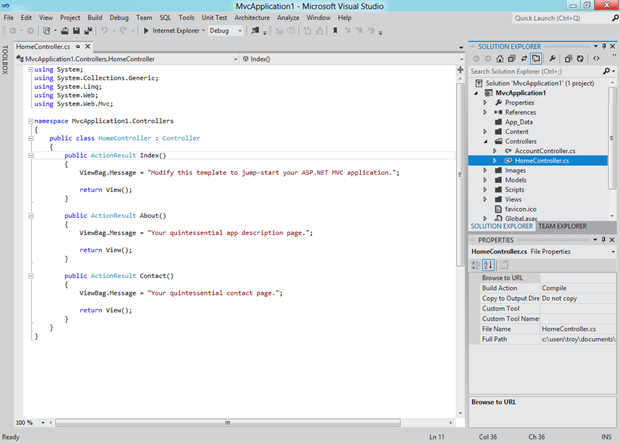
Let’s just get this out there right now; the new Visual Studio UX is polarising. Actually, polarising would suggest there are two different views of it. The reality is there is a strong chorus of “Ugh” at the moment. You see it’s all about Metro these days and that means VS 2012 now looks like this when running on Windows 8:

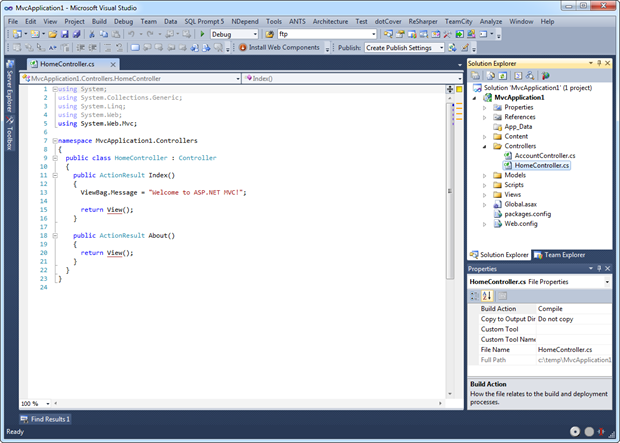
Just in case you need a little reminder of how things used to look, here’s VS 2010 on Win 7:

There are three things I want to call out in VS 2012 as they’re the three which are repeatedly brought up:
The greyness.
The capitals on panel titles.
The colons on the panels.
You can get a better idea of those last two items here:
Read more: DZone
QR: 
picotux — самый маленький компьютер с Linux в мире
Posted by
jasper22
at
10:21
|
Пока во всю идёт месячник Raspberry Pi, самое время рассказать о самом маленьком компьютере с Linux. Встречайте — picotux 100, детище немецкого гения. 

Общие характеристики
Размеры: 36x19x19 мм
Вес: 18 гр
Рабочая температура: -40°C to 85°C
Характеристики
Процессор: 32-bit ARM 7 Netsilicon NS7520, 55 МГц
Оперативная память: 8 Мб SDRAM
Флеш память: 2 Мб (720 Кб занято под ОС), можно расширить по 4-х
Сеть: 10/100 Mbit, HD and FD, auto sensing
Com-порт: есть контакты, скорость до 230.400 bps
Питание: 3.3 В, 250 мА
ОС: uClinux 2.4.27 (Big Endian native)
Shell: Busybox 1.0
Приложения: Webserver, Telnet
Поддерживаемые ФС: CRAMFS, JFFS2, NFS
Разработка с помощью: GCC + binutils + uClibc
Дата выпуска: 18.05.2005
Цена: 99 Евро
Также доступна прокачанная модель — picotux 112:
Read more: Habrahabr.ru
QR: 
ASP.NET Impersonation and Parallel.ForEach Issue
This week I ran into a very strange issue that has some pretty big implications.
The problem is this: if you use ASP.NET with impersonation, and you also use Parallel.ForEach, threads that run on other cores, lose the execution context.
Put another way, threads that run on other cores don’t respect your impersonation settings, and default to the unimpersonated calling context.
How to reproduce:
First, add impersonation to the web.config (within <system.web>) – for example:
<identity impersonate=“true“
userName=“mydomain\MyServiceAccount“
password=“GoodPassword“/>
Now, in code, I run this code synchronously:
protected void Page_Load(object sender, EventArgs e)
{
Debug.WriteLine(“Process starting as “ + WindowsIdentity.GetCurrent().Name);
List<String> items = new List<string>();
items.Add(“Item 1″);
items.Add(“Item 2″);
items.Add(“Item 3″);
items.Add(“Item 4″);
items.Add(“Item 5″);
items.Add(“Item 6″);
items.Add(“Item 7″);
foreach (String item in items)
{
DoWork(item);
}
}
private void DoWork(String itemName)
{
DebuWriteLine(“Executing “ + itemName + ” as “ + WindowsIdentity.GetCurrent().Name);
}
That results in output, like you might think:
Process starting as myDomain\MyServiceAccount
Executing Item 1 as myDomain\MyServiceAccount
Executing Item 2 as myDomain\MyServiceAccount
Executing Item 3 as myDomain\MyServiceAccount
Executing Item 4 as myDomain\MyServiceAccount
Executing Item 5 as myDomain\MyServiceAccount
Executing Item 6 as myDomain\MyServiceAccount
Executing Item 7 as myDomain\MyServiceAccount
Now, if you instead run that code as a Parallel.ForEach:
Parallel.ForEach(items, (item) =>
{
DoWork(item);
});
You will then see very strange results:
Process starting as myDomain\MyServiceAccount
Executing Item 2 as myDomain\rseder
Executing Item 1 as myDomain\MyServiceAccount
Executing Item 3 as myDomain\rseder
Executing Item 4 as myDomain\MyServiceAccount
Executing Item 6 as myDomain\MyServiceAccount
Executing Item 5 as myDomain\rseder
Executing Item 7 as myDomain\MyServiceAccount
What is happening? I’m not exactly sure. I read quite a few message board comments of people guessing. I spent a whole afternoon going to a zillion different pages, sorry I don’t have anything specific to reference here.
Anyhow, this code ran on a single processor, quad-core computer. It seems as though when code runs on the other cores, it loses execution context.
A Solution, not a great one though:
One solution I found (again, sorry, I couldn’t find link to credit the original idea) was to RE-impersonate the impersonated user, within our Parallel.ForEach. That looks something like this:
// Get a handle to the current, impersonated identity
WindowsIdentity identity = WindowsIdentity.GetCurrent();
Parallel.ForEach(items, (item) =>
{
// RE-impersonate the ASP.NET identity, within this separate task
using (WindowsImpersonationContext impersonationContext =
identity.Impersonate())
Read more: Rob Seder's Blog
.Net Framework Tilde Character DoS
Security Research - .Net Framework Tilde Character DoS
Website : http://soroush.secproject.com/blog/
I. BACKGROUND
---------------------
"The .NET Framework is a software framework developed by Microsoft that runs primarily on Microsoft Windows.
It includes a large library and provides language interoperability
across several programming languages." (Wikipedia)
II. DESCRIPTION
---------------------
Vulnerability Research Team discovered a vulnerability
in Microsoft .NET Framework.
The vulnerability is caused by a tilde character "~" in a Get request, which could allow remote attackers
to Deny the functionality of the server.
III. AFFECTED PRODUCTS
---------------------------
.Net Framework 1.0 Windows XP
.Net Framework 1.1 Windows 2003
.Net Framework 2.0 Windows 2003 R2
.Net Framework 3.0 Windows 2008
.Net Framework 3.5 Windows 2008 R2
.Net Framework 4.0 Windows 2008 R2,Windows 7
IV. Binary Analysis & Exploits/PoCs
---------------------------------------
In-depth technical analysis of the vulnerability and a functional exploit
are available through:
V. SOLUTION
----------------
There are still workarounds through Vendor and security vendors.
Read more: Soroush Secproject
Read more: ExploitDb
QR: 
NVIDIA Nsight Tegra — плагин VS для нативной разработки Android приложений
Posted by
jasper22
at
11:11
|
На прошедшем недавно мероприятии Google I|O компания NVIDIA представила интересный плагин к VisualStudio, позволяющий разрабатывать и дебажить приложения непосредственно из этой среды. 
1. Импорт существующих проектов в Visual Studio.
2. Управление нативными андройд проектами как обычными.
3. Сборка нативного кода Android проектов используя vs-android, ndk-build или make-файлы.
4. Параллельная компиляция как для файла так и для проекта.
5. Увеличение производительности нативного (C/C++) Android кода на 20-30%.
6. Улучшенная поддержка NEON.
7. Link-time optimization (LTO).
Read more: Habrahabr.ru
Read more: NVIDIA Nsight Tegra
QR: 
Cancelling Tasks Started with Parallel.Invoke
Posted by
jasper22
at
08:47
|
Cancelling Parallel.Invoke Tasks
Cancellation of tasks started using Parallel.Invoke uses the same cancellation token approach as when cancelling other parallel operations. Before you start the parallel execution, you must create a CancellationTokenSource object, from which you can request a CancellationToken. This token is passed to the Parallel.Invoke method's first parameter, with the Action array becoming the second parameter. However, the token cannot be provided directly as when creating cancellable Task objects. Instead, you must instantiate a ParallelOptions object and set its CancellationToken property to the generated token.
With the cancellation token provided, you can call its Cancel method from within any of the Action delegates. To avoid problems with early termination, cancelling the tasks does not immediately stop their execution. Any tasks from the array that have not already begun executing will not be started. Any tasks that have already started will continue to run until they complete normally or throw an exception. For particularly long-running tasks, you may also check the cancellation token source's IsCancellationRequested property. If this is true, you can gracefully exit from a task early to improve performance.
When the tasks are cancelled, an OperationCanceledException is thrown, as it would be when you cancel tasks manually. You should generally catch this exception to ensure that it does not cause your software to exit abnormally. Other exceptions will be wrapped in an AggregateException and should be handled appropriately.
To demonstrate cancellation, first we need a cancellation token source that is visible to the entire program. Add the following declaration to the class, outside of any member.
static CancellationTokenSource _tokenSource;
We'll also add a new method that cancels the operation. This will be called by one of the Action delegates.
static void CancellingTask()
{
Console.WriteLine("Cancelling {0}", Task.CurrentId);
_tokenSource.Cancel();
}
Read more: BlackWasp
QR: 
Decrypting SSL packet dumps
Posted by
jasper22
at
08:43
|
We all love transport security but it can get in the way of a good tcpdump. Unencrypted protocols like HTTP, DNS etc can be picked apart for debugging but anything running over SSL can be impenetrable. Of course, that's an advantage too: the end-to-end principle is dead for any common, unencrypted protocol. But we want to have our cake and eat it.
Wireshark (a common tool for dissecting packet dumps) has long had the ability to decrypt some SSL connections given the private key of the server, but the private key isn't always something that you can get hold of, or want to spread around. MITM proxies (like Fiddler) can sit in the middle of a connection and produce plaintext, but they also alter the connection: SPDY, client-certificates etc won't work through them (at least not without special support).
So here's another option: if you get a dev channel release of Chrome and a trunk build of Wireshark you can run Chrome with the environment variable SSLKEYLOGFILE set to, say, /home/foo/keylog. Then, in Wireshark's preferences for SSL, you can tell it about that key log file. As Chrome makes SSL connections, it'll dump an identifier and the connection key to that file and Wireshark can read those and decrypt SSL connections.
Read more: ImperialViolet
QR: 
#593 – AddHandler Method Can Add Handler for Any Event
If you’re adding an event handler from code, rather than specifying the handler in XAML, you can just use the += notation for an event that is defined for the control in question. For example, the Button control defines a Click control, so you can do the following:
myButton.Click += new RoutedEventHandler(Button_Click);
But let’s say that you want to add a handler for the Click event to a StackPanel control, which does not define the Click event, and you want to do it from code. You can then use the AddHandler syntax:
myStackPanel.AddHandler(ButtonBase.ClickEvent, (RoutedEventHandler)HandleTheClick);
Read more: 2,000 Things You Should Know About WPF
QR: 
Почему бы я не рекомендовал Atmel или о непонимании успеха Arduino
Posted by
jasper22
at
12:28
|
Хочу немного поделиться негативным опытом использования микроконтроллеров Atmel в промышленной разработке.
Atmel как целевую платформу выбрал заказчик, хотя мы его и отговаривали (еще даже не зная, что нам предстоит — интуиция, что ли?). Ну что же, «заказчик всегда прав».
В продукте было два контроллера — 32-битный UC3A3 и 8-битный ATMega164. В качестве дебаггера выбрали AVR One!, в качестве среды разработки — AVR Studio 5.0 (последняя версия на момент старта).
И началось!
У двух из трех купленных AVR One! в течении первого же месяца отвалились JTAG-коннекторы. У одного из них пропадал контакт питания. Каждый дебаггер, к слову, стоит около 600 евро!
При первом подключении дебаггера к компу с установленной AVR Studio 5.0 последняя захотела обновить ему прошивку. И не просто захотела, а отказывалась работать без этого. Процедура обновления прошивки благополучно зациклилась в «обновление — ожидание готовности устройства — обновление завершено неуспешно — обновление...», произвести ее удалось только после долгих танцев с бубнами.
На начальной стадии работа ведется на Evaluation платах. Были такие и у Атмела. Вот только на «готовых» эвалкитах к большинству пинов процессора банально не было доступа! А универсальный пакет STK600, позволяющий «воткнуть» в него практически любой контроллер при помощи переходника (решение реально супер, если бы не одно но), имел маленький недостаток — его схема была недоступна ни в открытом доступе, ни за деньги! Блин, вот реально — тулкит, предназначенный для экспериментов с платформой, поставлялся без схемы! И схема его охранялась очень и очень тщательно, судя по многочисленным веткам на AVR freaks. Поскольку мы не могли представить себе, как же можно работать без наличия схемы, мы разумно отказались от покупки этого тулкита (который ни разу не дешевый, к слову!).
Еще веселее стало, когда приступили собственно к написанию и отладке кода.
Самым веселым оказалось то, что пошаговая отладка оказалась в принципе невозможной. Дело в том, что поставив где-нибудь в коде брейкпоинт, дождавшись остановки программы в этом месте и выполнив «шаг вперед», ты оказывался… в обработчике прерывания! (Естественно, в прерывании при этом никаких брейкпоинтов не было!). А поскольку прерывания в системе были всегда (таймеры и т.п.), процесс отладки выглядел следующим образом: приходилось ставить следующий брейкпоинт на следующей строке и нажимать Run вместо Step Over. Особенно весело это было, когда надо было отследить if или switch. Или же выполнить Step Into, а не Step Over…
Read more: Habrahabr.ru
QR: 
ASP.NET MVC, Web API, Razor and Open Source
Microsoft has made the source code of ASP.NET MVC available under an open source license since the first V1 release. We’ve also integrated a number of great open source technologies into the product, and now ship jQuery, jQuery UI, jQuery Mobile, jQuery Validation, Modernizr.js, NuGet, Knockout.js and JSON.NET as part of it.
I’m very excited to announce today that we will also release the source code for ASP.NET Web API and ASP.NET Web Pages (aka Razor) under an open source license (Apache 2.0), and that we will increase the development transparency of all three projects by hosting their code repositories on CodePlex (using the new Git support announced last week). Doing so will enable a more open development model where everyone in the community will be able to engage and provide feedback on code checkins, bug-fixes, new feature development, and build and test the products on a daily basis using the most up-to-date version of the source code and tests.
We will also for the first time allow developers outside of Microsoft to submit patches and code contributions that the Microsoft development team will review for potential inclusion in the products. We announced a similar open development approach with the Windows Azure SDK last December, and have found it to be a great way to build an even tighter feedback loop with developers – and ultimately deliver even better products as a result.
Very importantly - ASP.NET MVC, Web API and Razor will continue to be fully supported Microsoft products that ship both standalone as well as part of Visual Studio (the same as they do today). They will also continue to be staffed by the same Microsoft developers that build them today (in fact, we have more Microsoft developers working on the ASP.NET team now than ever before). Our goal with today’s announcement is to increase the feedback loop on the products even more, and allow us to deliver even better products. We are really excited about the improvements this will bring.
Learn More
You can now browse, sync and build the source tree of ASP.NET MVC, Web API, and Razor on the http://aspnetwebstack.codeplex.com web-site.
The Git repository on the site is the live RC milestone development tree that the team has been working on the last several weeks, and the tree contains both the runtime sources + tests, and is buildable and testable by anyone. Because the binaries produced are bin-deployable, this allows you to compile your own builds and try product updates out as soon as they are checked-in.
You can also now contribute directly to the development of the products by reviewing and sending feedback on code checkins, submitting bugs and helping us verify fixes as they are checked in, suggesting and giving feedback on new features as they are implemented, as well as by submitting code fixes or code contributions of your own. Note that all code submissions will be rigorously reviewed and tested by the ASP.NET MVC Team, and only those that meet an extremely high bar for both quality and design/roadmap appropriateness will be merged into the source.
Read more: ScottGu's Blog
QR: 
Quake 3 Source Code Review
Posted by
jasper22
at
00:13
|
id Software has a history of releasing the source code for their older games under the GPL. Coder Fabien Sanglard has been taking it upon himself to go through each of these releases, analyze the source code, and post a detailed write-up about it. He's now completed a review of the Quake 3 source code, diving into the details of idTech3. It's an interesting read — he says he was impressed in particular by the 'virtual machines system and the associated toolchain that altogether account for 30% of the code released. Under this perspective idTech3 is a mini operating system providing system calls to three processes.
Read more: Slashdot
Security flaw in MySQL, MariaDB allows access with any password—just keep submitting it
When the latest release of MariaDB was announced in April by MontyProgram AB founder and MySQL creator Michael "Monty" Widenius, it came with a warning from Widenius that a severe security bug had been discovered in previous versions of both MariaDB and MySQL. Oracle subsequently released a patch for MySQL. Now the details of the flaw, and the extent of the vulnerability, have been revealed: it could allow anyone who knows a valid user account on the database to connect using any password with a brute-force attack.
The affected versions of both databases have a flaw in their authentication system caused by a variation in how the memcmp() function—which compares two values stored in memory to see if they are equal—is implemented in some Linux compilers. When a user connects to the database and submits a password, the authentication system of the databases creates a token from the submitted password using a Secure Hash Algorithm and a randomly generated string of text as the key. The resulting token is compared to a hash made from the stored password in the system using the memcmp function, which returns a value of zero if they're the same; if they're not, the function is supposed to return a positive or negative integer. A return of "0" would mean the password is correct.
But in the affected versions of MariaDB and MySQL, as MontyProgram's Sergei Golubchik wrote in a list posting on June 9, the database can be fooled into accepting a password even if it doesn't match. "Because of incorrect [type] casting [in the code]," he wrote, "it might've happened that the token and the expected value were considered equal, even if the memcmp() returned a non-zero value. In this case, MySQL/MariaDB would think that the password is correct even while it is not."
Because of the random key strings used, Golubchik said the probability of exploiting the flaw on any given attempt "is about 1/256"; with enough attempts, even using the same password over and over again, an attacker could gain access just by knowing a valid account name (such as "root"). Given that it takes less than a second to submit hundreds of login attempts, the hole essentially renders password protection worthless.
Read more: arstechnica
QR: 
New .NET Diagnostic info added to Process Explorer
Posted by
jasper22
at
12:14
|
In this post, we will look at a new feature in Process Explorer, the popular SysInternals tool, which enables developers and IT Pros to collect accurate stack traces for .NET applications.
Adding .NET Stack frames to Process Explorer
A few months ago, a few of us on the .NET Team were looking at how we could improve Process Explorer to provide better diagnostic information for .NET applications. Process Explorer is a very useful tool for investigating why something is going wrong. We know that millions of developers and IT Pros use Process Explorer, so it would seem that even small improvements for .NET would be pretty useful.
After a little conversation, we decided that adding support for .NET frames in Process Explorer’s Stack window would be the most valuable improvement that we could make. We reached out to Mark Russinovich to pitch the idea. For those of you that don’t know, Mark is the creator and maintainer of Process Explorer, and is a Technical Fellow at Microsoft. Mark was immediately supportive of the idea, and gave us the go-ahead to make the changes in the Process Explorer code. That work is now done, and available as part of Process Explorer v15.2 (or later).
What can you do with this new support?
Developers typically reach for Visual Studio when one of their applications starts doing the wrong thing. As the developer of an app, you can reproduce the issue on your own, attach to a badly behaving live repro or look at a dump. You have the source, and can easily go from there. Visual Studio 2012 is great for that scenario.
Sometimes you are a developer working with a customer on their machine and don’t have access to your tools or your application source. You could also be an IT Pro who supports an application that someone else built. In either case, Process Explorer can help you quickly collect diagnostic information, such as call stacks, that can give you an early lead.
Read more: .NET Framework Blog
QR: 
In the blink of an eye: There goes your AES key
Posted by
jasper22
at
10:55
|
In the blink of an eye: There goes your AES key
(DRAFT of 28 May 2012)
Sergei Skorobogatov
University of Cambridge
Cambridge, UK
e-mail: sps32@cam.ac.uk
Abstract—This paper is a short summary of a real world AES key extraction performed on a military grade FPGA marketed as 'virtually unbreakable' and 'highly secure'. We demonstrated that it is possible to extract the AES key from the Actel/Microsemi ProASIC3 chip in a time of 0.01 seconds
using a new side-channel analysis technique called Pipeline Emission Analysis (PEA). This new technique does not introduce a new form of side-channel attacks (SCA), it introduces a substantially improved method of waveform analysis over conventional attack technology. It could be used to improve upon the speed at which all SCA can be performed, on any device and especially against devices previously thought to be unfeasible to break because of the time and equipment cost. Possessing the AES key for the ProASIC3 would allow an attacker to decrypt the bitstream or authenticate himself as a legitimate user and extract the bitstream from the device where no read back facility exists. This means the device is wide open to intellectual property theft, fraud and reverse engineering of the design to allow the introduction of a backdoor or Trojan. We show that with a very low cost hardware setup made with parts obtained from a local electronics distributor you can improve upon existing SCA up to a factor of x1,000,000 in time and at a fraction of the cost of existing SCA equipment.
Read more: PDF
QR: 
How to call WinRT APIs from C# Desktop applications – list the installed Metro packages
Posted by
jasper22
at
10:51
|
As Jaime Rodriguez detailed in April, Windows 8 Excellence Labs are made to help Metro developers to get a token which allows them to submit their application to the Windows Store with high confidence. I’m lucky enough to be part of this Microsoft effort and I hope meeting some of you soon :^)
A tool has been built to help Microsoft engineers to more easily check some basics of a Metro App such as implemented contracts or logos. This is a WPF Desktop application written in C# and its first task is to enumerate the installed Metro App packages.
I can imagine other scenari where you will certainly be interested in automatically checking that your application is well installed. This post will detail how a .NET developer could leverage WinRT from his Desktop application.
How to see the WinRT APIs in VS/.NET Decompiler
When you create a blank Metro App in C# with VS 2012 RC, two references are added to the project:
The first one allows you to use .NET types and the second one is the .NET view of the WinRT APIs. When you display the properties of the latter:
you end up in the C:\Program Files (x86)\Windows Kits\8.0\References\CommonConfiguration\Neutral\ folder where Windows.winmd waits for you. As explained by Martyn Lovell during his Lap around the Windows Runtime BUILD session, the WinRT team decided to keep the metadata format used by .NET assemblies to define their types and members.
Read more: Anything about WinRT
QR: 
Visual Studio 2012 New Features: Quick Launch
Posted by
jasper22
at
10:38
|
In the past, finding things deep in the IDE has been a challenge. Visual Studio 2012 introduces search abilities at virtually every level of the product. Perhaps the biggest change is the introduction of Quick Launch (CTRL + Q) which specifically addresses how to dig inside Visual Studio to find features you need. Let’s take a look.
Quick Launch: Basic Use
You can find Quick Launch in the upper right corner of the IDE:
The most basic scenario for using Quick Launch is finding an item that you have forgotten (or don’t know) the location of. Let’s say you are interested in something deep in the menu system like viewing your white space. You know what it’s called but can’t remember where it is at. Just press CTRL + Q and enter the word white:
All searches are contains operations so the results will show anything that has the word white anywhere in it. The results are grouped into categories and you simply either select the item from the list using your keyboard, mouse or, if there is a keyboard shortcut listed, take advantage of the shortcut. In this case, you could press CTRL+R, CTRL+W to show the white space and then go on with your work.
Categories
There are four categories that your results will fall into when using Quick Launch. Let’s take a look at each of these categories.
QR: 
NHibernate 3.2 mapping by code
Posted by
jasper22
at
00:40
|
NHibernate 3.2 will come with its own embedded mapping by code.
If you want know it is not based in fluent-interface, instead it is based on “loquacious”. That said you should understand that it has nothing related with Fluent-NHibernate.
The main idea under the NHibernate’s “sexy mapping” came from my dear ConfORM. In the past year the no conformist red man was running a lot and now I’m ready to transfer most of ConfORM’s intelligence directly inside NHibernate. To continue reading this post you have to run this song.
It’s simple (I’m too sexy)
Simple model
public class MyClass
{
public int Id { get; set; }
public string Something { get; set; }
}
Simple mapping
var mapper = new ModelMapper();
mapper.Class<MyClass>(ca =>
{
ca.Id(x => x.Id, map =>
{
map.Column("MyClassId");
map.Generator(Generators.HighLow, gmap => gmap.Params(new { max_low = 100 }));
});
ca.Property(x => x.Something, map => map.Length(150));
});
It’s flexible (I’m too sexy for my application)
You can organize your mapping as you want, class-by-class, different concerns about a class in different places and so on… (yes!! if you are a ConfORM user you know the concept)
var mapper = new ModelMapper();
mapper.Class<MyClass>(ca =>
{
ca.Id(x => x.Id, map =>
{
map.Column("MyClassId");
});
ca.Id(x => x.Id, map =>
{
map.Generator(Generators.HighLow, gmap => gmap.Params(new { max_low = 100 }));
});
ca.Property(x => x.Something);
ca.Property(x => x.Something, map => map.Length(150));
});
Read more: HunabKu
QR: 
Foolish consistency is foolish
Once again today's posting is presented as a dialogue, as is my wont.
Why is var sometimes required on an implicitly-typed local variable and sometimes illegal on an implicitly typed local variable?
That's a good question but can you make it more precise? Start by listing the situations in which an implicitly-typed local variable either must or must not use var.
Sure. An implicitly-typed local variable must be declared with var in the following statements:
var x1 = whatever;
for(var x2 = whatever; ;) {}
using(var x3 = whatever) {}
foreach(var x4 in whatever) {}
And an implicitly-typed local variable must not be declared with var in the following expressions:
from c in customers select c.Name
customers.Select(c => c.Name)
In both cases it is not legal to put var before c, though it would be legal to say:
from Customer c in customers select c.Name
customers.Select((Customer c) => c.Name)
Why is that?
Well, let me delay answering that by criticizing your question further. In the query expression and lambda expression cases, are those in fact implicitly typed locals in the first place?
Hmm, you're right; technically neither of those cases have local variables. In the lambda case, that is a formal parameter. But a formal parameter behaves almost exactly like a local variable, so it seems reasonable to conflate the two in casual conversation. In the query expression, the compiler is going to syntactically transform the range variable into an untyped lambda formal parameter regardless of whether the range variable is typed or not.
Read more: Eric Lippert’s Blog
QR: 
Let the moose run free...! Mighty Moose, a Continuous Testing Tool, is now free (as in free)
Posted by
jasper22
at
12:06
|
As some of you may know Svein (@ackenpacken) and I have decided to make Mighty Moose free. This is not a decision that is being take lightly and much thought has gone into it. This post is to explain why we went free and the future
...
Mighty Moose is from this point forward free. Not “free in beta” or “free with a bunch of functionality turned off” but free (license is being updated as I write this). We announced this rather quietly at NDC.
Many people have asked me “why would you go free? you could charge for what you have.”. This is true. Continuous Testing tools will be taking off and yes we could charge for it however its not quite as simple as that.
Read more: Greg's Cool [Insert Clever Name] of the Day
QR: 
10 *MORE* Things you Probably Didn’t know about Windows 8
Posted by
jasper22
at
11:46
|
Introduction
Back in April 2012, I shared a list of “10 Things you probably didn’t know about Windows 8.” I had a lot of great feedback through Twitter and Facebook, so I decided to share 10 *MORE* things you probably didn’t know about Windows 8. So, in no particular order here we go again.
Grabbing the Bits First
Let’s get started:
1) If you’re not a fan of the lock screen or just want to quickly get past it and get to work, then you can hit keys on your keyboard such as the space bar or enter key to get to the sign on screen. This is a lot easier in my opinion, then swiping up with the mouse, if you are not on a touch-enabled pc. If you want to disable it altogether then just follow this guide.
2) If you move your mouse to the lower left-hand corner of your screen (in Metro or Desktop mode), then you will be presented with an icon of either Metro or Desktop screen (depending on what you are in). If you move your mouse upwards, then you can get a quick glimpse of all the applications currently running as shown below. This is an easy way to switch between applications.
Read more: Michael Crump
QR: 
What’s New in Visual Studio 2012 and C# 5.0
Posted by
jasper22
at
11:03
|
בתאריך 18.6.12 קיימנו במיקרוסופט יום עיון בנושא פיתוח אפליקציות באמצעות VS 2012 ו- C#5.
הגירסא הבאה של Visual Studio הבאה עלינו לטובה מכילה שיפורים רבים, החל ממשק המשתמש, דרך עבודה עם קוד ועד יכולות עריכה של מודלים תלת מימדיים וניפוי שגיאות.
בהרצאה זו התבוננו בחידושים ב-Visual Studio בסביבה, בעולם ה-Client, ה-Web ועוד. כמו כן הכרנו את החידושים בשפת C# 5.0, כשהעיקרי בהם היא תמיכה במודל תכנות אסינכרוני קל לשימוש, ללא המורכבויות המוכרות של התחלת פעולה, רישום לסיום, תפיסת שגיאות ועוד.
קהל יעד: מפתחי C# וראשי צוותים
רמה: 300
חלק ראשון - מה חדש ב- Visual Studio 2012
בחלק זה התבוננו בחידושים בסביבת הפיתוח המוכרת שעוברת מתיחת פנים כלפי חוץ, עם הרבה שיפורים קטנים בפנים, הבאים לידי ביטוי במגוון יכולות חדשות ומשודרגות.
Read more: Channel9 [Part1], Channel9 [Part 2]
QR: 
Generic Variance in C# 4.0
Posted by
jasper22
at
09:31
|
Although I’m not cool enough to actually go to PDC, I’ve been watching some of the things that have been announced. One of the things I’m most excited about is co- and contra-variance in generics, which is something that the CLR has lacked since generics were first introduced in 2.0. (Note: some of the examples on here are pulled from the excellent description of new features release by Microsoft.)
In versions of C# prior to 4.0, generics were invariant. For example, consider this simple type definition:
public class Foo<T>
{
//...
}
Since the generic type parameter T was not constrained, the compiler understands that T should be treated as type object. That means that since a string is an object, a Foo<string> is functionally equivalent to a Foo<object>. However, because of generic invariance, ian instance of Foo<string> cannot be assigned to a variable of type Foo<object>.
C# 4.0 introduces the ability to declare covariant and contravariant generics. For example:
public class Foo<out T>
{
//...
}
This class is covariant in T, meaning that if you create a Foo<string>, you can use it effectively as a Foo<object>, since a string is a subclass of object. The example given is the new IEnumerable<T> interface that comes with the BCL in C# 4.0:
public interface IEnumerable<out T> : IEnumerable
{
IEnumerator<T> GetEnumerator();
}
public interface IEnumerator<out T> : IEnumerator
{
bool MoveNext();
T Current { get; }
}
Since these interfaces are covariant in T, an IEnumerable<string> can be used as an IEnumerable<object>. The same is true for List<T>, so you’ll be able to do this, which was previously impossible:
IList<string> strings = new List<string>();
IList<object> objects = strings;
Note, however, that you can only declare that your type is covariant for generic type parameters that appear in output positions — basically, return values.
Like the out keyword, you can also use the in keyword:
public interface IComparer<in T>
{
int Compare(T left, T right);
}
Read more: Discord&Rhyme
QR: 
Using Custom Web.config Transformations in MSBUILD
Web.config transformations have been around for a while now, and a lot of developers use them in their staple day-to-day environment deployment strategies – hell, Scott Hanselman was spouting about them way back in the beginning on 2010 with his “Web Deployment Made Awesome: If you’re using XCOPY, you’re doing it wrong” post. As usual though, one size does not fit all – and in the case of Continuous Integration fans out there that may have specific build-configuration-based build and deployment scenarios (such as myself), there is the need to have finer grained control over the Web.config transformation process. If this sounds like you, then this post is aimed to deliver.
What a second… what the hell are “Web.config Transforms”?
ASP.net has had a few features that that been around for what seems like forever when it comes to abstracting away or alternating between different configuration data for your website (i’m talking about configSource functionality mostly). The features were very minimal and usually created a less-than-ideal solution for developers working on big websites in multiple environments. With the advent of Visual Studio 2010 Microsoft kindly helped us all out by taking note that “hey maybe not all websites are being built for a single server with a single configuration”… Smart guys. They created web.config transformations to help deal with this problem and Jokes aside, the feature is actually pretty cool and allows you to write a base web.config file as you normally would and then transform it for each of your environments.
Your base web.config:
<?xml version="1.0"?>
<configuration>
<appSettings>
<add key="ExampleApplicationSetting" value="Value being replaced by Transform"/>
</appSettings>
<connectionStrings>
<add name="MyConnectionString" connectionString="..." providerName="System.Data.SqlClient" />
</connectionStrings>
<system.web>
<customErrors mode="Off"/>
<compilation debug="true">
</compilation>
</system.web>
</configuration>
Your web.config transform (note the change to my connection string, my custom errors and my compilation mode):
<?xml version="1.0"?>
<configuration xmlns:xdt="http://schemas.microsoft.com/XML-Document-Transform">
<appSettings>
<add key="ExampleApplicationSetting"
xdt:Transform="SetAttributes(value)"
xdt:Locator="Condition(@key='ExampleApplicationSetting')"
value="The new value to replace after transform"/>
</appSettings>
<connectionStrings>
<add name="MySolutionDatabase" xdt:Transform="Replace" xdt:Locator="Condition(@name='MySolutionDatabase')"
connectionString="... My New Connection String ..." providerName="System.Data.SqlClient" />
</connectionStrings>
<system.web>
<customErrors xdt:Transform="Replace" mode="RemoteOnly" />
<compilation xdt:Transform="SetAttributes(debug)" debug="false" />
</system.web>
</configuration>
Read more: DZone
QR: 
How To Run Ubuntu Linux On Samsung Galaxy S III
The Galaxy S III is making some serious inroads with development that seems to be speeding up with every step. The latest big news to hit SGS3 users is Ubuntu and Backtrack Linux beeing booted onto the device. Honestly, I don’t personally see the point of using Linux on an Android device, but if it’s Android and you’re a true geek, having the option and being actually able to pull it off, is a feat on its own. As for the procedure, we have XDA-Developers forum member tiborri to thank for jotting up a tutorial, and of course, a few pieces of the tutorials have actually been borrowed from other tutorials. So if you have patience and are familiar with executing scripts, read on after the break to learn more about how you can get Linux running on your Galaxy S III.
All images below are courtesy of tiborr.
To start off, you will be needing an app called, Ubuntu Installer developed by zackthespack. This app once launched, will allow you to download and install 3 more apps that are required to get Ubuntu up and running on the device:
VNC Viewer
Android Terminal Emulator
Busybox
Needless to say your device needs to be rooted for this app to function properly. If you haven’t already done so, view our rooting guide for the Galaxy S III here. That done, to avoid any issues, install the Omega 5 ROM featured here. Make sure USB debugging is enabled on the device. Now run the app and download the Ubuntu file.
You will now need to run a script that was originally written by zacthespack (download). Once this is downloaded, copy this script (ubuntu.sh) and the ubuntu file downloaded via Ubuntu Installer onto the internal memory of the phone in a folder named Ubuntu.
With all the data in its place, you now need to run the Android Terminal, and enter the following commands:
su
cd /sdcard/ubuntu
sh ubuntu.sh
Read more: Addictive tips
Android FeelUX
As one of the leading handset manufacturers in Japan, Sharp recognized the need to address an expanding market of smartphone users. After conducting surveys in Japan and the US, the company wanted to create new Android handsets that would stand out in a crowded field and attract first-time buyers while catering to the needs of current Android customers.
Redefining the Android Mobile UI Paradigm
According to Google statistics, an estimated 850,000 devices are activated every day across the world, making Android the most popular smartphone platform. However, while many customers favor the platform’s openness, flexibility and diverse choice of handsets, an overload of branded phones without clear product differentiation can make selecting an Android device overwhelming. The traditional Android model had some fundamental usability issues, and an entirely fresh approach was the only solution to create a meaningful experience.
Sharp collaborated with frog’s team of designers and technologists to design a new mobile user-experience model, called “Feel UX”, that is uncluttered and effortless to organize and use. Unlike other handset manufacturers who historically customize Android by simply adding another layer on top of the platform, the frog team carefully curated the experience to create a new device that is straightforward for beginner Android users, yet has the flexibility in customization that advanced users love.
Read more: frog
QR: 
OpenNebula
Posted by
jasper22
at
16:36
|
About the OpenNebula.org Project
Mission
OpenNebula.org is an open-source project developing the industry standard solution for building and managing virtualized enterprise data centers and cloud infrastructures.
Vision
IaaS Cloud Computing is the next step in the evolution of the data center. Because no two data centers are the same, we do not think there's a one-size-fits-all in the cloud, and we do not try to provide a turnkey solution that imposes requirements on data center infrastructure. OpenNebula interoperability makes cloud an evolution by leveraging existing IT infrastructure, protecting your investments, and avoiding vendor lock-in. In contrast to other open-source management tools that only provide a special-purpose implementation of popular cloud interfaces on pre-defined environments, OpenNebula aims to provide a open, flexible, extensible, and comprehensive management layer to automate and orchestrate the operation of virtualized data centers by leveraging and integrating existing deployed solutions for networking, storage, virtualization, monitoring or user management.
Objectives
The OpenNebula.org project pursues the following objectives in order to lead innovation in enterprise-class cloud data center management:
Develop the most-advanced, highly-scalable and adaptable solution for building and managing virtualized data centers and cloud infrastructures
Assure the stability and quality of the software distribution
Collaborate with the most demanding users of cloud and data center management tools
Spread awareness of the Project
Support the ecosystem of open-source components being created around the Project
Support the community of users and developers contributing to the Project
Collaborate with other open-source projects and communities
Collaborate with the main research projects in cloud computing innovation
Core Values
The core values of the OpenNebula.org project are:
Openness of the processes and the technology
Excellence for being a project of the highest quality in every aspect of its operations
Cooperation with open-source efforts and research projects to advance cloud computing
Innovation in new technologies and methods to address needs of large-scale cloud deployments
Read more: OpenNebula
QR: 
ConfigSource attribute on system.serviceModel section
The configSource attribute was firstly introduced in .NET framework 2.0 to support external configuration files.
This attribute can be added to any configuration section to specify a an external file for that section. Using an external configuration source can be useful in many scenarios. For instance, you could place a section into an external configSource if you need an easy method to swap settings for the section depending on the environment (development, test, or production), or you need granular control over permissions.
Unfortunately, the system.serviceModel section group does not support this attribute. If you try to add it, you will receive the following exception:
The attribute 'configSource' cannot be specified because its name starts with the reserved prefix 'config' or 'lock'
What I found out is that you can use this attribute on the different sections under system.serviceModel such as services, behaviors or bindings.
For instance, the configuration file could look like this,
<configuration>
<system.serviceModel>
<services configSource="Services.config" >
</services>
<bindings configSource="Bindings.config">
</bindings>
<behaviors configSource="Behaviors.config">
</behaviors>
</system.serviceModel>
</configuration>
And then, each file contains the corresponding section.
Services.config
<services>
<service name="Microsoft.ServiceModel.Samples.CalculatorService"
behaviorConfiguration="CalculatorServiceBehavior">
<host>
Read more: Pablo M. Cibraro (aka Cibrax)
QR: 
ExecutionContext vs SynchronizationContext
’ve been asked a few times recently various questions about ExecutionContext and SynchronizationContext, for example what the differences are between them, what it means to “flow” them, and how they relate to the new async/await keywords in C# and Visual Basic. I thought I’d try to tackle some of those questions here.
WARNING: This post goes deep into an advanced area of .NET that most developers never need to think about.
What is ExecutionContext, and what does it mean to flow it?
ExecutionContext is one of those things that the vast majority of developers never need to think about. It’s kind of like air: it’s important that it’s there, but except at some crucial times (e.g. when something goes wrong with it), we don’t think about it being there. ExecutionContext is actually just a container for other contexts. Some of these other contexts are ancillary, while some are vital to the execution model of .NET, but they all follow the same philosophy I described for ExecutionContext: if you have to know they’re there, either you’re doing something super advanced, or something’s gone wrong.
ExecutionContext is all about “ambient” information, meaning that it stores data relevant to the current environment or “context” in which you’re running. In many systems, such ambient information is maintained in thread-local storage (TLS), such as in a ThreadStatic field or in a ThreadLocal<T>. In a synchronous world, such thread-local information is sufficient: everything’s happening on that one thread, and thus regardless of what stack frame you’re in on that thread, what function is being executed, and so forth, all code running on that thread can see and be influenced by data specific to that thread. For example, one of the contexts contained by ExecutionContext is SecurityContext, which maintains information like the current “principal” and information about code access security (CAS) denies and permits. Such information can be associated with the current thread, such that if one stack frame denies access to a certain permission and then calls into another method, that called method will still be subject to the denial set on the thread: when it tries to do something that needs that permission, the CLR will check the current thread’s denials to see if the operation is allowed, and it’ll find the data put there by the caller.
Things get more complicated when you move from a synchronous world to an asynchronous world. All of a sudden, TLS becomes largely irrelevant. In a synchronous world, if I do operation A, then operation B, and then operation C, all three of those operations happen on the same thread, and thus all three of those are subject to the ambient data stored on that thread. But in an asynchronous world, I might start A on one thread and have it complete on another, such that operation B may start or run on a different thread than A, and similarly such that C may start or run on a different thread than B. This means that this ambient context we’ve come to rely on for controlling details of our execution is no longer viable, because TLS doesn’t “flow” across these async points. Thread-local storage is specific to a thread, whereas these asynchronous operations aren’t tied to a specific thread. There is, however, typically a logical flow of control, and we want this ambient data to flow with that control flow, such that the ambient data moves from one thread to another. This is what ExecutionContext enables.
ExecutionContext is really just a state bag that can be used to capture all of this state from one thread and then restore it onto another thread while the logical flow of control continues. ExecutionContext is captured with the static Capture method:
// ambient state captured into ec
ExecutionContext ec = ExecutionContext.Capture();
and it’s restored during the invocation of a delegate via the static run method:
ExecutionContext.Run(ec, delegate
{
… // code here will see ec’s state as ambient
}, null);
All of the methods in the .NET Framework that fork asynchronous work capture and restore ExecutionContext in a manner like this (that is, all except for those prefixed with the word “Unsafe,” which are unsafe because they explicitly do not flow ExecutionContext). For example, when you use Task.Run, the call to Run captures the ExecutionContext from the invoking thread, storing that ExecutionContext instance into the Task object. When the delegate provided to Task.Run is later invoked as part of that Task’s execution, it’s done so via ExecutionContext.Run using the stored context. This is true for Task.Run, for ThreadPool.QueueUserWorkItem, for Delegate.BeginInvoke, for Stream.BeginRead, for DispatcherSynchronizationContext.Post, and for any other async API you can think of. All of them capture the ExecutionContext, store it, and then use the stored context later on during the invocation of some code.
Read more: Parallel Programming with .NET
Projection in Windows 8
בפוסט הקודם שעסק במה זה WinRT הזכרתי שאפשר לכתוב אפליקציות Metro במגוון שפות (C# & Xaml, C++ & Xaml, Js & HTML) ולעבוד מול ה-WinRT בצורה די שקופה. מי שמאפשר את זה היא ה-Language Projection.
מה היא ה-Language Projection
WinRT היא חלק מה-Windows Core, היא fully native code, והיא חושפת APIs אשר מולם אנחנו יכולים לעבוד.
כיוון ש-WinRT צריכה לשרת כמה שפות (C#, C++, js), דרושה שכבת תיווך שתחשוף אותה בצורה המותאמת לאותה שפה, וזו שכבת ה-Projection אשר מעליה נמצאת האפליקציה שלנו.
אובייקט WinRT מממש 2 ממשקים חשובים:
IUnknown – כיוון ש-WinRT עובדת מעל COM, כל אובייקט צריך לממש את Iunknown, זה ממשק שהיה קיים עוד לפני WinRT, והוא מסמל אובייקט שאנחנו לא יודעים עליו כלום.
IInspectable – כל אובייקט WinRT מממש IInspectable, זה ממשק חדש שמאפשר לחקור את האובייקט דרך ה-MetaData שלו וזה מה ששכבת ה-Projection עושה.
MetaData
ה-MetaData נמצא בתוך קובץ WinMD (Windows Meta Data)
אפשר לפתוח אותו עם ILDASM ולראות מה הוא מכיל:
Read more: Windows 8
QR: 
תמונה אחת שווה אלף מילים: כיצד מנהלי מוצר יכולים לשתף את חזונם באמצעות Storyboarding של Visual Studio 2012
Posted by
jasper22
at
20:03
|
התסריט הבא בהחלט לא דמיוני: מנהל המוצר הגדיר ביחד עם הלקוח את הדרישות, הצוות סיכם את ההבנות במסמך מפורט, וכעבור חצי שנה של עיצוב ופיתוח ,מוצגת ללקוח גרסה ראשונית של המוצר. "אבל לא כך התכוונתי שכך זה יראה" הלקוח מתעצבן וארשת של אכזבה עוטה את פניו.
ה- UI הוא שער הכניסה של המוצר שלנו, ולכן חשוב לשתף את הלקוח או השותפים שלנו בחזות שלו מוקדם כלל האפשר על מנת להקטין את האפשרות להפתעות הנובעות מהסובייקטיביות של הבנת הדרישות. אבל כיצד ניתן להציג את ה-UI עוד לפני שלב התכנון המוצר? ובכן, כלי ה-Storyboarding הכלול ב- 2012 Visutal Studio מאפשר בדיוק את זה.
יכולות ה- ALM של TFS מרחיבות את מעגל המשתתפים בתהליך הפיתוח ומאפשרים שיתוף פעולה בין הצוותים השונים על גבי פלטפורמה אחת אחודה. אם ב-Team System 2005 דיברנו על פלטפורמה אשר מיועדת בעיקר למפתחים, הרי שבגירסת 2008 הורחב המעגל למשתמשים מחוץ לצוותי הפיתוח עם ה-Team System Web Access , ובגירסת TFS 2010 הורחב המעגל לצוותי הבדיקות באמצעות ה-Test Manager. ב- VS 2012 שוב מרחיבים את המעגל וכוללים את מנהלי המוצר והמעצבים ונותנים להם כלי ייעודי בו יכלו לשתף את צוותי הפיתוח בחזונם.
כלי ה-Storyboarding הינו למעשה תוסף ל- PowerPoint, המאפשר ליצור אב-טיפוס של ה-UI תוך שימוש באלמנטים וקונטרולים של מערכת ההפעלה (גם PC וגם Mobile), אשר זמינים כחלק מגלריה עשירה של אלמנטים. כך באמצעות גרירה פשוטה של אלמנטים (בדומה לפעולה שנעשית ב-Visio) ניתן להגדיר את הממשק בצורה ברורה וחזותית. למעשה, עצם הבחירה בעבודה עם PowerPoint מאפשרת יתרונות רבים כמו זמינות, פשטות, וכמובן שיתוף בכלי ותיק ומוכר שמאפשר למשתמש היצירתי לחלוק את חזונו עם שותפיו.
התוצר הסופי משולב כחלק מתהליך הפיתוח (מקושר ל- User Story work item) ונותן רקע והקשר למשימות השונות. למשל, משימה לפיתוח קונטרול מסויים מקושרת לקובץ ppt של המסך הרלוונטי. המתכנת או המעצב מקבל תיאור מילולי של הדרישה בצירוף מקבץ תמונות שכותב הדרישה צירף וביתר קלות לממש אותה. וזאת ללא צורך ביכולת טכנית של כותב הדרישה. כמו כן, במהלך הפיתוח ניתן להשוות בין מה שפותח בפועל למה שתוכנן.
Storyboarding בתוך PowerPoint
כאמור ה-Storyboarding משולב כתוסף ל- PowerPoint. הוא מופיע בתפריט העליון כתפריט Storyboarding ותחתיו ribbon עם שלל אפשרויות.
Read more: בלוג MSDN ישראל
QR: 
WCF on TCP : Keep your connections alive
Posted by
jasper22
at
19:58
|
I recently had a customer coming in with question and request on WCF connection pooling, which is very valid. I was almost convinced that answer to his question would be 'by design' but what worried me was if there is a solution for his predicament. To my pleasant surprise, mighty WCF team did think about the scenario and 'by design' there was a solution to his exact problem.
He is using net.tcp port sharing on the server for two different WCF services configured with net.tcp binding. The client code is such that proxy is created every time, service called and proxy closed. This sequence could be done for two services in any required combinations, lets say by calling Service 1() and Service2(). If Service1() is called repeatedly, TCP connection created in first call is pooled and reused. This is nice and as expected to save on connection establishment costs every time. But as soon as Service2() is called, TCP connection used for Service1() is reset. This sounds inappropriate. Seems, cost of port sharing is that pooled connection for Service1 has to be replaced with new connection to Service2. Very inefficient in an enterprise scenario where client makes random calls to Service1 and Service2 in volume as connection will be reset each time.
Whoever plays with TCP connection pooling is almost certain to stumble upon this: http://kennyw.com/work/indigo/173
Solution to my customer's predicament lies in this line taken from above link "Our connection pool is configurable through TcpConnectionPoolSettings/NamedPipeConnectionPoolSettings. These settings include a GroupName that we use for isolation"
You may think of it like this. TCP connection pool in WCF is identified with 'Port Number' and 'GroupName' (possibly more but only these are relevant for our purpose). If you omit 'GroupName', WCF provides a default. If you are not explicitly providing 'connectioPoolSettings', you are in effect omitting 'GroupName'. Since both the endpoints (for Service1 and Service2) use same port and have same 'GroupName' (Default), implies both endpoints will use same connection pool Id. When Service2 needs to be reached, its connection pool is already in place at client side but WCF infrastructure need to reset the connection to same port.
Use 'GroupName' to isolate connection pools for two endpoints and you can have connections alive when switching from Service1 to Service2 in there own respective pools.
This does mean that you will need to resort to custom binding but that’s an acceptable cost for such a huge benefit. A typical client config to achieve desired behaviour with net.tcp transport will look like this:
<?xml version="1.0" encoding="utf-8" ?>
<configuration>
<system.serviceModel>
<bindings>
<customBinding>
<binding name = "bindingA">
<tcpTransport>
<connectionPoolSettings groupName="connectionPoolA"/>
</tcpTransport>
Read more: DistributedWorld
QR: 
Subscribe to:
Posts (Atom)