Assembly Language Megaprimer for Linux
In this video series, we will learn the basics of Assembly Language programming on Linux. This will help us in doing reverse engineering and writing exploits in later videos. I will be start from the absolute scratch, so no pre-requisites required.
Read more: Security Tube
QR: 
Wine Mono 0.0.4 Release - I'm serious now!
I have published version 0.0.4 of Wine Mono on Sourceforge. I fully intend to make this release a part of Wine.
The source tarball is at
The binary is at
For developers, the source repository is at
Changes since 0.0.2:
* With Wine 1.5.4 and Wine Mono 0.0.4, it's now possible to run mixed-mode assemblies.
* The random hang that was introduced in Mono 2.11 is now fixed (0.0.2 contained a hacky work-around).
* A replacement for XNA 4.0 based on MonoGame is now included, to be used if MS XNA 4.0 is not installed.
* Updated Mono from 2.11.0 to 2.11.1, bringing in the changes listed here: http://mono.1490590.n4.nabble.com/Mono-2-11-1-is-out-td4575466.html
* Changes from Hans Leidekker to make upgrading and removing the msi work better.
* Added more registry keys to prevent native .NET from trying to install while Wine Mono is installed.
* Various improvements to the build script.
Some programs that worked with the official Mono for Windows package will fail with this one because gluezilla (Mono's web browser component) is missing. In all other respects I expect this to work as well as or better than the official Mono for Windows package, and if not I'd like to hear about it.
Read more: WineHQ Mail list
QR: 
Test Scribe for Visual Studio 11 Beta
Posted by
jasper22
at
18:32
|
Test Scribe is a documentation power tool designed to construct documents directly from the TFS for test plan and test run artifacts for the purpose of discussion, reporting etc.
This is a popular extension for MTM, allowing users to export Test Documents, in previous posts I wrote about extending Test Scribe Template for MTM 10.
Test Scribe – Automatic Document Generating For Test Manager 2010
Test Scribe – Developer Guide
How To Change Test Scribe Template
And of course as we getting closer to VS 11 release here is Test Scribe for VS 11 Beta, Download Page
Read more: Shay Raiten
QR: 
Free set Windows Performance analysis tools. From boot perf analysis, to power use, memory leaks, CPU hogs, app crashes and many more...
Posted by
jasper22
at
13:37
|
In conjunction with my upcoming book and sessions at Briforum, I am releasing a number of new and updated tools involving Windows Performance analysis. These tools may be found in the Performance Tools section of the TMurgent website. These tools are generally free to download and use (the only restrictions are for ISVs that want to use them to show off how good they are).
Read more: Greg's Cool [Insert Clever Name] of the Day
Read more: New and Updated (Free) Tools
QR: 
AsyncCTP installation problems (and VS11)
Posted by
jasper22
at
13:21
|
The AsyncCTP is getting a bit long in the tooth. This post is to explain how, why, and what to do.
Common symptoms:
AsyncCTP fails to install -- i.e. it doesn't create the "Async CTP" folder inside "My Documents", and VS doesn't recognize the async keywords.
Installing VS11 causes AsyncCTP to stop working.
AsyncCTP doesn't work on Windows 8.
Explanation
The AsyncCTP is an update. It updates Visual Studio 2010 with modified versions of the VS IDE compilers that colorize the new keywords. It also updates the .NET4 framework with modified versions of the command-line csc.exe and vbc.exe compilers. But the AsyncCTP was never incorporated into Microsoft's official source code for VS2010 or .NET4, and was never meant to be -- it's just an experimental CTP.
And so, when Microsoft produces official updates to either VS or .NET4, and they touch the same files, then they tend to overwrite the AsyncCTP -- or prevent it from installing in the first place.
Also .NET45, which comes with VS11 and Win8, is an in-place update on top of .NET4, and so replaces the csc.exe and vbc.exe from the AsyncCTP with updated ones. As Stephen Toub explains, the new csc.exe and vbc.exe are incompatible with AsyncCTPLibrary.dll.
What to do
Best option is to upgrade to VS11 Beta and .NET45. It has much better async support (fewer bugs, more features, better debugging, better perf)
Failing that, if you're stuck with VS2010 + AsyncCTP, here are ideas:
If you already have VS2010 + AsyncCTP working, then don't install VS11.
If you have VS2010 SP1 but the AsyncCTP installer doesn't seem to have worked, the problem might be conflicting updates such as
KB2635973, KB2615527, KB2645410
Any update after October 11 is liable to conflict, though. Go to ControlPanel > AddRemovePrograms > WindowsUpdates and uninstall them if present.
Platforms:
Targeting .NET45 with async:
you have to use VS11 Beta, which works fine.
Read more: Lucian's VBlog
QR: 
Google hacking database
Posted by
jasper22
at
13:21
|
Welcome to the google hacking database
We call them 'googledorks': Inept or foolish people as revealed by Google. Whatever you call these fools, you've found the center of the Google Hacking Universe!
Google Hacking Database Categories
Footholds (23)
Examples of queries that can help a hacker gain a foothold into a web server
Files containing usernames (15)
These files contain usernames, but no passwords... Still, google finding usernames on a web site..
Sensitive Directories (65)
Google's collection of web sites sharing sensitive directories. The files contained in here will vary from sesitive to uber-secret!
Web Server Detection (72)
These links demonstrate Google's awesome ability to profile web servers..
Vulnerable Files (60)
HUNDREDS of vulnerable files that Google can find on websites...
Vulnerable Servers (70)
These searches reveal servers with specific vulnerabilities. These are found in a different way than the searches found in the "Vulnerable Files" section.
Read more: Exploit-db
QR: 
Obtaining mscordacwks.dll for CLR Versions You Don’t Have
Note: This blog post assumes that you can capture and analyze managed dumps in WinDbg using SOS, and have encountered a bizarre technical problem when using dumps from a production environment. If this assumption is incorrect, feel free to peruse my .NET Debugging Resources link post.
When debugging managed dumps in WinDbg, you will need to load the SOS version that is compatible with the CLR version in the dump. SOS, in turn, requires the CLR “data access DLL” (mscordacwks.dll), which is a debugging helper shipping with the .NET Framework. If SOS and/or mscordacwks.dll are missing or have the wrong version, you will receive an error similar to the following when trying to run most SOS commands:
Failed to load data access DLL, 0x80004005
Verify that 1) you have a recent build of the debugger (6.2.14 or newer)
2) the file mscordacwks.dll that matches your version of mscorwks.dll is in the version directory
3) or, if you are debugging a dump file, verify that the file mscordacwks_<arch>_<arch>_<version>.dll is on your symbol path.
4) you are debugging on the same architecture as the dump file. For example, an IA64 dump file must be debugged on an IA64 machine.
You can also run the debugger command .cordll to control the debugger's load of mscordacwks.dll. .cordll -ve -u -l will do a verbose reload. If that succeeds, the SOS command should work on retry.
If you are debugging a minidump, you need to make sure that your executable path is pointing to mscorwks.dll as well.
Some CLR versions have been indexed by the Microsoft public symbol server, so you can instruct the debugger to download everything automatically by setting your symbol path and image path to the Microsoft symbol server.
However, some CLR versions have not been indexed and cannot be retrieved automatically—and this is where you need to crawl the Web and find the binaries manually. Today I had the chance to encounter a CLR version, 2.0.50727.3607, which WinDbg couldn’t retrieve from the Microsoft symbol server:
mscordacwks_x86_x86_2.0.50727.3607.dll/4ADD5446590000/
mscordacwks_x86_x86_2.0.50727.3607.dll not found
Doug Stewart has been collecting updates to CLR 2.0 for several years now, and has an entry on his post for the 3607 CLR build, associated with KB article 976569.
Read more: All Your Base Are Belong To Us
QR: 
Ninite
Posted by
jasper22
at
14:27
|

Just pick your apps and click Get Installer. Ninite does the rest — fully automatic.
No Clicking Next, Next, Next
Ninite fully automates installers offscreen.
No Toolbars
Ninite automatically says "No" to toolbars and other junk.
Always Up-to-date
A Ninite installer always gets an app's latest version no matter when you made it.
It Updates Too
Just run your Ninite installer again and it will update the apps to their latest versions.
No Signup
Ninite just works. No account, signup, or client needed.
32 and 64-bit
Ninite installs the best version of an app for your PC.
International
Ninite installs apps in your PC's language.
Faster for Business
Ninite Pro is 3x faster and allows business use.
Works with RMMs
Kaseya, Labtech, Level Platforms, KACE, GFI, Naverisk, and more. Ninite Pro integrates with everything.
Read more: Ninite
QR: 
Windows 8 Comes with Built-in Option to Turn On/Off 16-Bit Application Support
Posted by
jasper22
at
14:21
|
UPDATE: This feature is only present in 32-bit edition of Windows 8 Developer Preview.
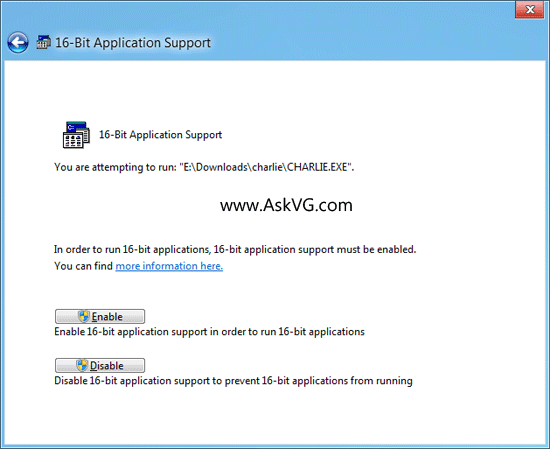
Time to share another interesting feature of Windows 8. Did you know Windows 8 comes with a built-in option to turn on or off 16-bit application support?
Our reader "Basil" has found a new applet "16-Bit Application Support" in Control Panel of Windows 8 Developer Preview. This new applet allows you to enable or disable 16-bit application support in Windows 8.

When you open the applet in Control Panel, Windows shows a dialog box to turn 16-bit application support on or off. Simply click on Enable button and you'll be able to enjoy 16-bit applications in Windows 8.
Read more: Tweaking with Vshal
QR: 
.Net 4.5 Gets Zippy... Zip support is baked into the .Net 4.5 Framework
Posted by
jasper22
at
13:53
|
One of the missing feature of .NET framework was a support for Zip file manipulation such as reading the zip archive, adding files, extracting files, etc. and we were using some third party libraries such as excellent DotNetZip. In .NET 4.5, we have an extensive support for manipulating .zip files.
First thing that you should do is to add System.IO.Compression assembly as reference to your project. You may also want to reference System.IO.Compression.FileSystem assembly to access three extension methods (from the ZipFileExtensions class) for the ZipArchive class: CreateEntryFromFile, CreateEntryFromFile, and ExtractToDirectory. These extension methods enable you to compress and decompress the contents of the entry to a file.
..."
System.IO.Compression Namespace
Read more: Greg's Cool [Insert Clever Name] of the Day
QR: 
Xceedium Xsuite
Posted by
jasper22
at
13:27
|
Xceedium Xsuite™ protects your organization from security threats associated with privileged users, individuals and applications that have unfettered administrative access to your most sensitive IT infrastructure and business data.
Xceedium’s highly scalable solution employs role-based privilege access control, ensuring that privileged users, such as network administrators, security staff and trusted third parties, have rights to access only the specific systems, devices and commands they require. In other words, it provides “least privilege” access.
But Xsuite goes far beyond the popular least privilege concept, enabling organizations to implement the entire set of security controls necessary to protect modern networks from insider threats. We call it Zero Trust access control.
Xsuite integrates three award-winning software modules: GateKeeper™ Administrator Access Control, Password Authority™ Admin Password Management, and A2A Authority™ Application Password Management on a single, hardened appliance.
Read more: Xceedium
QR: 
WCF: Serialization and Generics
Posted by
jasper22
at
13:12
|
Recently, I have been spending some time blogging about serialization. This is partially in an effort to go back over some of the basics prior to starting on WCF and P2P in a week or so. Today, I am continuing the serialization subject by taking a closer look at generics in regards to serialization.
This is actually a popular subject for a lot of newcomers to WCF. Many developers who are fond of generics will create a service that exposes some generic method. When they finally get ready to fire up the service and give it a trial run, they are quickly disappointed to discover that it doesn't work as expected.
So, what's the deal?
WCF does not support the use of generic methods for service operation. In other words, only concrete types can be used for service operations. Open generic types cannot be used. Now, it is important to clarify this is not a limitation of WCF. Rather, it is a limitation of WSDL, which is used to expose service metadata to consumers. There is no construct within WSDL to define a generic type. Generally speaking, I agree with this behavior
since it decreases the coupling between a client and service.
Although generic methods are not supported, it is possible to expose generic objects for the purpose of exchanging data. However, there are some limitations. Let's take a closer look:
Bounded Generics
In his book Programming WCF Services , Juval Lowy points out that it is possible to use "bounded generics." This is sometimes referred to as closed generics. Basically, it refers to defining a generic class for your data contract, but it is restricted to a specific type in the service operation. This may sound somewhat vague. So, here is an example to provide a better illustration:
[DataContract]
public class MyGenericObject<T>
{
private T _id;
private string _description;
public MyGenericObject()
{
}
[DataMember]
public T ID
{
get { return _id; }
set { _id = value; }
}
[DataMember]
public string Description
{
get { return _description; }
set { _description = value; }
}
}
Read more: Jeff W. Barnes
QR: 
Маленькие хитрости класса Enumerable
Posted by
jasper22
at
13:04
|
Сегодня речь пойдет о классе System.Linq.Enumerable. Enumerable – это один из основных классов Linq, так как содержит extension-методы, используемые при построении запросов. Мало кому известно (по крайней мере, мне так показалось), но данный класс может быть использован не только для построения Linq-запросов. Enumerable содержит несколько обычных статических методов, которые, я думаю, тебе могут пригодиться.
Enumerable.Empty<T>
Насколько часто тебе приходится создавать пустую коллекцию (IEnumerable<T>)? Обычно разработчики либо создают пустой список, либо массив, состоящий из нуля элементов.
IEnumerable<int> items = new List<int>();
...
IEnumerable<int> items = new int[]()
С этим кодом все в порядке, он работает, но, согласись, смотрится не очень эстетично. Более того, данный подход не всегда является оптимальным, если ты хочешь создать пару тысяч подобных объектов. Тут тебе может помочь метод Enumerable.Empty<T>. Задача этого метода – вернуть тебе пустую коллекцию (IEnumerable<T>).
IEnumerable<int> items = Enumerable.Empty<int>();
Согласись, подобный код смотрится немного более эстетично. Кроме того он и работает быстрее в том случае, если тебе понадобится создать пустую коллекцию несколько (сотен тысяч) раз. Прирост производительности возможен за счет того, что метод Empty<T> возвращает один и тот же объект для каждого запрашиваемого типа (паттерн Singleton): первый вызов метода инициализирует объект, поэтому он заметно медленнее, чем создание пустого массива или списка, зато следующие вызовы теоретически выполняются быстрее. Стоит отметить, что метода Empty<T> создает массив из нуля элементов.
Enumerable.Range
int[] items = new int[count];
for (int i = 0; i < count; i++)
{
items[i] = start + i;
}
Read more: Čivava's Blog
QR: 
В Diablo III можно поиграть и бесплатно! [Diablo 3 free]

Если вы не успели поиграть в DIABLO III во время народного теста (link) — не отчаивайтесь. Бесплатно поиграться можно будет уже с 15 мая! Благодаря специальной версии игры Diablo III Starter Edition.
В течение 30 дней после начала продаж игры стартовая версия Diablo III будет доступна по гостевому пропуску (Guest Pass). Эти специальные ключи входят в состав всех коробочных изданий Diablo III.
На пользователей, играющих на стартовой версии, накладываются следующие ограничения:
- Доступен только I акт вплоть до Короля скелетов
- Развитие ограничено 13 уровнем
- Подбор игроков возможен только среди игроков со стартовой версией
- Нет доступа к денежному аукциону
Read more: Habrahabr.ru
Read more: Battle.net
QR: 
Информационная анархия, или как победить торренты и легализовать копирайт
Posted by
jasper22
at
18:06
|
Часто можно услышать такие вопросы: «Как победить пиратство?», «Можно ли легализовать файлообмен?», «Как реформировать копирайт?»
Я думаю, адекватно ответить на эти отдельные вопросы невозможно, если не видеть большую картину, не понимать что происходит с информационным бизнесом в целом, и с его продуктами, с книгами, с периодикой — газетами, журналами, с музыкой, фотографиями, фильмами, играми, дизайном, софтом (далее в тексте — инфо-продукты).
Информационная революция
Мы являемся свидетелями двух революционных процессов:
1. Цифровые медиа: стремление к качеству и к охвату все большей аудитории привело к смене медиа (носителей) для информационных продуктов, от аналоговых медиа мы перешли к цифровым. Это дало изначальный рост доходов производителей (авторов, издательств, студий) в условиях старой бизнес-модели
2. Цифоровые каналы распространения: развитие телекоммуникаций, персональных гаджетов привело к тому, что старая бизнес-модель в распространении инфо-продуктов была убита феноменом интернета, точнее сочетанием цифровых медиа и цифровых каналов распространения.
Интернет убил старую бизнес-модель так быстро, что сейчас существует вакуум для современной бизнес-модели и в этой пустоте процветает анархия. То что мы видим — это анархия. Анархия — это распыление доходов, дисбалансы, падение производства и, потенциально, смерть бизнеса.
Информационная анархия
Инфо-продукты обладают уникальными базовыми свойствами: копирование (легкость получения копии товара высочайшего качества) и тиражирование (любая копия товара сама становится источником других копий).
Под действием этих свойств законные владельцы информационных продуктов не контролируют дальнейшую судьбу своих продуктов. В результате копирования и тиражирования создается два потока инфо-продуктов:
— первый поток условно-платных копий, который контролируется автором (это может быть не только абсолютная платность каждой копии, но и условно-платные бизнес-решения — shareware, freemium, микро-платежи, различные лицензии, закрепляющие право автора получать оплату за коммерческое использование продукта, право на бренд и рекламу, и многие другие формы относительной платности и полной бесплатности под контролем автора и/или владельца прав),
— второй поток условно-платных копий, который не контролируется автором (это все виды облачных хранений копий с общественным доступом и без общественного доступа, все торренты, все локальные копии файлов, созданные для личного пользования после официальной покупки и другие), при этом такие «левые»; копии также могут приносить доход своим новым владельцам (но не авторам), с помощью рекламы, или прямых продаж (смс за скачивание, копирование на физические носители, оплата подписки), или оказания каких-либо услуг с использованием инфо-продуктов (беслатное использование софта, видео-прокат и тд).
Информационную анархию создает именно второй поток, свободное распространение продуктов без ведома и без воли авторов и владельцев.
Read more: Habrahabr.ru
QR: 
TellYouLater
Posted by
jasper22
at
18:00
|
What kind of service is it?
This service lets you encrypt text messages so that they cannot be decrypted and read before a predefined date.
How secure is this kind of protection?
We use the encryption algorithms 1024-bit RSA and 128-bit AES, which are considered secure enough in most cases.
How does it work?
We use asymmetric encryption. It means that the data is encrypted using a public key, and can be decrypted only if you have the corresponding secret key. For each hour in the next few years, our system has a pair of keys, a public one and a secret one. While all public keys are openly available, the secret keys are posted only when the time comes. Select a moment in time; a respective open key will be retrieved from our web site, and your message will be encrypted. To decrypt your message, a secret key will have to be obtained from our server. If that key hasn't been published yet, the decryption of the message will be impossible.
Read more: TellYouLater.com
QR: 
Fluent Interfaces
Posted by
jasper22
at
17:58
|
What is a Fluent Interface?
When developing software, it is important that the code that you write is easy to understand in order that it can be maintained at a later date. There are many ways in which you can structure your classes in order to achieve this and various guidelines, such as the five SOLID principles. One way to achieve improved readability for your source code is to develop libraries with fluent interfaces.
Fluent interfaces allow code to be created that appears similar to natural language, when the symbols that decorate methods are ignored. This involves choosing member names that can be combined in ways that mirror words in a language such as English. The words are then combined using method chaining, where each method returns a result that can be acted upon by the next call in the sequence. However, fluent interfaces are not designed for method chaining alone.
To understand the difference between a fluent and non-fluent interface, let's look at an example. The code below uses method chaining but if the member names are read out loud, the meaning is not perfectly clear. The code calculates the date and time one week from the current date at 9:30am.
DateTime time = DateTime.Now.AddDays(7).Date.AddHours(9).AddMinutes(30);
This simple example is reasonably easy to understand for a developer but as the complexity grows it could become more difficult. If we convert the code to use a more fluent syntax, we can make its purpose clearer. The code below, read aloud, is "One week hence at 9:30".
DateTime time = 1.Week().Hence().At(9, 30);
Fluent interfaces are used widely in frameworks and library code. Two common examples that have been examined in earlier articles are Language-Integrated Query (LINQ) and Moq. You can create your own fluent interfaces by adding suitably named methods to your classes. You can also take advantage of C# 3.0's extension methods to add fluent-style methods to existing classes, including .NET framework types. We'll use this technique in the following sections to create a small fluent interface for date and time processing that supports the code example above.
Integer Extensions
In the fluent example code above, the first method used is "Week". This is an extension method of the integer type that creates a TimeSpan value representing the specified number of weeks. The code below shows how the method is created, as well as several other integer extension methods that create TimeSpans for days, hours and minutes.
public static class FluentTimeExtensions
{
public static TimeSpan Days(this int number)
{
return new TimeSpan(number, 0, 0, 0);
}
public static TimeSpan Hours(this int number)
{
return new TimeSpan(number, 0, 0);
}
Read more: BlackWasp
QR: 
The Task: Events, Asynchronous Calls, Async and Await
Posted by
jasper22
at
17:56
|
Almost any software application today will likely contain a long-running process. “Long-running” may be a relative term but in the Windows Runtime it is specifically anything that could take longer than 50ms to execute. That’s a fairly small window, and it means those operations will need to run concurrently to the main application thread. Concurrency is important in both client applications (to keep from blocking the UI) and server applications (to accommodate multiple simultaneous requests).
The new technology referred to as Visual Studio Asynchronous Programming provides a streamlined language syntax for asynchronous development. It does this by providing two new keywords: async and await. While these keywords may simplify asynchronous development, they can still be confusing to developers. There are a lot of materials out there but I thought it might help to take a very simple example and explore just what these keywords are and how they operate. In this post I’ll focus specifically on the .NET Framework 4.5 support. While they are also supported for Metro-style applications, the implementation is slightly different.
The Main Event
In the movie Mission Impossible II, the short-lived protagonist Dr. Nekhorvich says:
“…every search for a hero must begin with something every hero needs, a villain. So in a search for our hero, Bellerophon, we have created a more effective monster: Chimera.”
In the search for an elegant solution to asynchronous programming we must start with some of the rougher implementations that have plagued developers in the past.
The event-based pattern is probably one of the most well-known asynchronous patterns to .NET developers as it is prevalent throughout the base library. Let’s assume I have a method that multiplies two numbers and for some crazy reason (maybe I’m sending it over a 300 baud modem to my Commodore 64 to process the result on the 6502 chip … you know, using a bunch of ROR operations) it takes a bit longer to process than I’d like, so I want to make sure it executes asynchronously. The first thing I’ll do is create an event argument payload for the result:
public class MultiplyEventArgs : EventArgs
{
public int Result
{
get;
private set;
}
public MultiplyEventArgs(int result)
{
Result = result;
}
}
Next, I’ll define an interface:
public interface IMultiplierEvent
{
event EventHandler<MultiplyEventArgs> MultiplyCompleted;
void MultiplyAsync(int a, int b);
}
Finally, I’ll implement the class that executes the operation asynchronous and fires the completed event when done.
public class MultiplierEvent : IMultiplierEvent
{
public event EventHandler<MultiplyEventArgs> MultiplyCompleted;
private void RaiseCompleted(int result)
{
var handler = MultiplyCompleted;
if (handler != null)
{
handler(this, new MultiplyEventArgs(result));
}
}
public void MultiplyAsync(int a, int b)
{
Task.Run(() => RaiseCompleted(a * b));
}
}
Read more: C#:IMage
QR: 
Simplify Syntax with Extension Methods
Posted by
jasper22
at
17:36
|
Extension methods were first introduced with LINQ in C#3.0. They are just a syntactic construct, but as we’ll see in this post they can make a huge difference. What’s easier to read of these two?
string[] wishList1 =
Enumerable.ToArray(
Enumerable.Select(Enumerable.Where(Animals, a => a.StartsWith("A")),
a => string.Format("I want a {0}.", a)));
string[] wishList2 = Animals.Where(a => a.StartsWith("A"))
.Select(a => string.Format("I want a {0}.", a)).ToArray();
To me, the second alternative has several advantages:
Get rid of the name of the helper class declaring the method. Writing out the Enumerable class name doesn’t add any relevant information. On the contrary, it forces the reader to actively think of it to find out that it is irrelevant.
Left-to-right reading order instead of inside-out when following the evaluation order.
The method name and the parameters are written together. In the first example Select and the relevant code is splitted by the call to Enumerable.Where.
Extension methods creates a syntactic possibility to do two important things that are not allowed by the language.
Add methods to existing classes.
Add methods to interfaces.
Add Methods to Existing Classes
Sometimes it would be beneficial to extend existing classes with own methods. An example would be to add an IsEmail() method to the string class. The checking will be done using a regular expression, but using the name IsEmail makes the intent much more clear.
foreach (string s in strings)
{
if (s.IsEmail())
{
Debug.WriteLine("{0} is a valid email address", (object)s);
}
else
{
Debug.WriteLine("{0} is not a valid email address", (object)s);
}
}
Read more: Passion for Coding
QR: 
Интегрируем TortoiseSVN в Total Commander
Posted by
jasper22
at
16:58
|

Преамбула:
Имеем в наличии TortoiseSVN и Total Commander, и активно их используем в работе.
Практически все действия в Total Commander'e успешно совершаются одной только клавиатурой, без использования мышки, какими-либо горячими клавишами. Главное их найти/знать/привыкнуть, и работа становится в разы проще и быстрее.
TortoiseSVN же из коробки предоставляет нам только пункты в контекстном меню, до которого можно добраться двумя способами:
- Мышкой. При активной работе, тянуться каждый раз до мышки, реально начинает напрягать уже через пару дней/часов/минут работы (зависит от крепости нервов разработчика) и времени занимает это довольно много.
- Через клавишу контекстного меню + стрелок. Этот вариант конечно чем-то проще и быстрее (ибо не надо тянуться за мышкой), но всё так же не удобен и всё такой же медленный.
Хочется все действия с TortoiseSVN выполнять так же быстро, как и действия в самом Total Commander'e.
Т.е. через горячие клавиши, в одно нажатие.
Облазив просторы интернета, не смог найти ни одной инструкции, как можно по-человечески интегрировать TortoiseSVN в Total Commander и сделать это возможным.
Поэтому решил написать свой небольшой простенький мануал.
Реализация.
По факту, всё достаточно просто.
В комплекте с TortoiseSVN идёт exe'шник, как раз для автоматизации: TortoiseProc.exe
Он то нам и нужен. Полный список параметров для него доступен на официальном сайте.
В Total Commander'e, в свою очередь, имеется возможность создавать кастомные команды.
Сделать это можно несколькими способами:
Через меню настроек: Инструменты -> Список команд ТС…
Read more: Habrahabr.ru
QR: 
Subscribe to:
Posts (Atom)