Stylecop 4.7.14.0 has been released

Read more: Tatworth
QR: 
Why does holding the Ctrl key when selecting New Task from Task Manager open a command prompt?
Posted by
jasper22
at
11:56
|
Commenter Adam S wonders why holding the Ctrl key when selecting New Task from Task Manager will open a command prompt.
It's a rogue feature.
Windows XP introduced visual styles, and one of the tricky parts of debugging visual styles is that if the visual style engine goes berzerk, you can't see anything! One of the problems that the visual styles folks encountered when developing their feature was that sometimes they would get into a state where the Run dialog would stop working. And without a Run dialog, you couldn't install or launch a debugger to begin investigating what went wrong.
The solution: Add the rogue feature where holding the Ctrl key when selecting New Task from Task Manager opened a command prompt directly, without involving the Run dialog. From that command prompt, you can then install the debugger and start debugging. (This technique also took advantage of the fact that console windows were not themed in Windows XP. If the visual style system got all messed up, at least your console windows worked!)
Read more: The old new thing
QR: 
Weak Events in .Net, the easy way
Posted by
jasper22
at
11:55
|
I’ve written before about one kind of memory leak the .Net Garbage Collector cannot protect against: those caused by event handlers keeping objects alive beyond their best-before date. Daniel Grunwald has a very comprehensive article on CodeProject explaining the problem in depth, and giving a number of solutions, some of which I’ve used in the past.
Nowadays, my preferred solution is one made possible by the fabulous Reactive Extensions (Rx) framework.
Suppose, as one example, you want to subscribe to a CollectionChanged event, but don’t want your object to be kept alive by that subscription. You can just do:
collection.ObserveCollectionChanged().SubscribeWeakly(this, (target, eventArgs) => target.HandleEvent(eventArgs));private void HandleEvent(NotifyCollectionChangedEventArgs item){Console.WriteLine("Event received by Weak subscription");}
How it works
Like all remedies for un-dying object problems, the active ingredient in this one is the WeakReference class. It works like this
public static class IObservableExtensions{public static IDisposable SubscribeWeakly<T, TTarget>(this IObservable<T> observable, TTarget target, Action<TTarget, T> onNext) where TTarget : class{var reference = new WeakReference(target);if (onNext.Target != null){throw new ArgumentException("onNext must refer to a static method, or else the subscription will still hold a strong reference to target");}IDisposable subscription = null;subscription = observable.Subscribe(item =>{var currentTarget = reference.Target as TTarget;if (currentTarget != null){onNext(currentTarget, item);}else{subscription.Dispose();}});return subscription;}}
You can see that we hold the intended recipient of the notifications, target, as a WeakReference, so that if the Garbage Collector wants to sweep it up, this subscription won’t stand in its way. Then we subscribe a lambda function of our own to the observable. When we receive a notification from the observable, we check that target is still alive, and then pass along the message. If we discover that target has died, we mourn briefly, then cancel the subscription.
Notice though, that all our clever use of WeakReferences could be subverted if the onNext delegate refers to an instance method on the target. That delegate would then be smuggling in the implicit this pointer as a strong reference to the target. onNext is itself held strongly by the closure that is created for the lambda function, so the net effect would be that the target is kept alive by the subscription.
Read more: f(unctional) => f(un)
QR: 
Build an IDE with tmux and vim
Posted by
jasper22
at
11:04
|

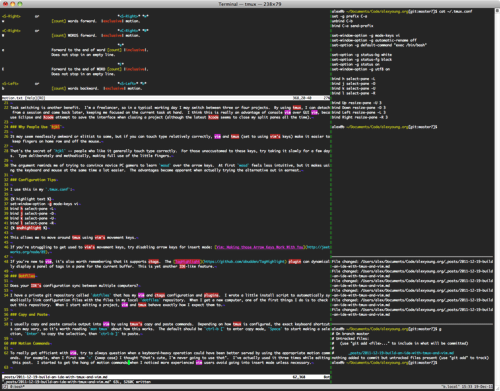
A friend of mine had visited an office where the employees used tmux and vim to edit Ruby projects. He wanted to know why people would work with the console version of vim, considering the loss of the convenience of mouse input.
I actually find this a good way to work, for several reasons. Originally, using console vim forced me to learn vim's motion commands properly. Combined with touch typing, this opened up a range of powerful ways to jump around files and lines arguably more efficiently than by using a mouse.
I like to tile terminals alongside my editor. My web development work usually requires a console for issuing ad-hoc commands, a database console, and a log viewer. Some of my projects have test suites that run automatically when files change, so I like to be able to see the status of my tests as well.
There are vim plugins that provide integration with these things, but I feel more comfortable with the vim/tmux combination. I think it's a visualisation thing.
By using command-line tools this way, we're effectively building a customised, lightweight IDE. I also find the idea of using Unix commands in my spare tmux console panes appealing, because it's easy to pipe commands together thereby performing complex scriptable operations without the bloat of an IDE.
Read more: alexyoung.org
QR: 
Сравнительный тест программ, предотвращающих атаку на ARP-таблицу
Posted by
jasper22
at
10:34
|
Не так давно большой интерес (1, 2) вызвала программа DroidSheep, перехватывающая аккаунты пользователей он-лайн сервисов, которые пользуются ими через общедоступный Wi-Fi. На исконно русский вопрос: «что делать?» кто-то предложит воспользоваться программами для защиты от подобного рода атак, написанными под Андроид. Вот их я и решил протестировать.
А тестировал я её давно (ещё в 2008 году) написанной мною программкой ARPBuilder, которая создавалась для проверки уязвимости различных МСЭ к ARP-спуфинг атакам (подробнее):

Собственно, мне удалось разыскать всего 2-х кандидатов на тесты: DroidSheepGuard и shARPWatcher (обе программы для полноценной работы требуют наличие root-доступа).
Read more: Habrahabr.ru
QR: 
RDPCheck.com - Quick check to see if your system is vulnerable to the recently patched RDP issue
Posted by
jasper22
at
10:03
|
CRITICAL RDP VULNERABILITY THREATENS PCS & NETWORKS WORLDWIDE.
THE THREAT OF AN THREAT OF RDP WORM LOOMS.
The MS12-020 vulnerability in Remote Desktop Protocol (a.k.a. RDP or Terminal Services) promises to cause some serious havoc... and many won't realise the risk until it is too late. RDPCheck is our humble attempt to make a positive difference to that...
RDPCheck helps individuals and businesses check their PC's and networks for exposure to attacks on the RDP vulnerability by hackers, bots or an RDP worm.
It's easy...
Enter your email address.
Click "Start The Test".
We'll run our test on the IP address you're visiting RDPCheck from. The test is quick, non-invasive, and does not put your PC, network or business at risk. If you need to test other addresses contact us.
Note: For your security we do NOT store your IP address/result combination.
A report will be emailed to you with the results and recommendations for what you should do next.
Ready? Ok.
Read more: Greg's Cool [Insert Clever Name] of the Day
Read more: http://rdpcheck.com/
QR: 
Пишем сайт на GWT: Часть 1

Добрый день дамы и господа,
На хабре есть не так много статей на тему GWT (Google Web Toolkit) и в большинстве своем написаны они в ключе «какая это бяка, ничего не умеет, ничего не понятно». Кроме того, как показывает мой опыт, большинство программистов о GWT вообще ничего не слышали, а те кто слышал, думают, что больше чем на „Hello World“он не способен. Я постараюсь показать вам, что с помощью этого замечательного Фреймворка можно делать такие вещи, которые большинству JavaScript программистам просто не по зубам.
Перед началом небольшое отступление, т.к. вопрос «а зачем?» обязательно прозвучит. Этот сайт я написал на GWT, т.к. у меня и выбора то не было. С HTML,CSS, PHP и JavaScriptом я знаком(был) весьма поверхностно( как собственно и большинство Java-программистов), а вот идея и желание были. А потому использовал я что имел и получилось вроде весьма не плохо.
Посмотрите на этот сайт. Да это не шедевр, но он показывает, что GWT может все, что может JavaScript и даже больше. Почему больше? Ответ на этот вопрос полностью совпадает с ответом на вопрос: «почему С++ может больше чем Assembler?». На эту тему я предлагаю подискутировать в комментариях. А мы возвращаемся к GWT. Нет ничего лучше( мое стойкое убеждение), чем объяснять что либо на примере, а посему я предлагаю вам препарировать этот сайт.
Итак, начали
Вешаем слушателей на элементы
Итак, любое GWT приложение состоит из как минимум одной HTML-страницы и кучи яваскриптов. Посмотрим на эту самую страничку. Как не сложно догадаться, все самое интересное будет происходить в диве „ content“. Весь хедер и футер сделаны хардкорно, т.е. статически, и по существу к GWT никакого отношения не имеют(выключите JavaScript и поймете о чем я ). Но вот клики на кнопки обрабатывает GWT. Как это сделано? На каждый див(кнопку) вешается слушатель:
final Element element = DOM.getElementById("homeSite");
DOM.sinkEvents(element, Event.ONCLICK);
DOM.setEventListener(element, new EventListener() {
public void onBrowserEvent(Event event) {
if (DOM.eventGetType(event) == Event.ONCLICK) {
// наша логика
}
}
});
Вот и все, вот так просто. Я думаю в этом коде все понятно, может быть только за исключением строки:
DOM.sinkEvents(element, Event.ONCLICK);
Эта строка обязательна, т.к. говорит браузеру, что с этого момента этот элемент реагирует на клик. Если эту строку выкинуть, то слушатель сигнала о событии не получит и ваша логика, соответственно, обработана не будет. Эту мелочь надо просто знать, как собственно, везде и всегда.
Загрузка статического HTML-файла.
Read more: Habrahabr.ru
QR: 
LLBLGen Pro v3.5 has been released!
Posted by
jasper22
at
14:09
|
Last weekend we released LLBLGen Pro v3.5! Below the list of what's new in this release. Of course, not everything is on this list, like the large amount of work we put in refactoring the runtime framework. The refactoring was necessary because our framework has two paradigms which are added to the framework at a different time, and from a design perspective in the wrong order (the paradigm we added first, SelfServicing, should have been built on top of Adapter, the other paradigm, which was added more than a year after the first released version). The refactoring made sure the framework re-uses more code across the two paradigms (they already shared a lot of code) and is better prepared for the future. We're not done yet, but refactoring a massive framework like ours without breaking interfaces and existing applications is ... a bit of a challenge ;)
To celebrate the release of v3.5, we give every customer a 30% discount! Use the coupon code NR1ORM with your order :)
Read more: Frans Bouma's blog
QR: 
Примеры использования Windows8 SDK. Часть 1. API системы
Posted by
jasper22
at
12:48
|

Во время хакатона по Windows8 многим участникам пришла в голову «гениальная» идея писать код, не изучив документацию по WinRT и Windows8 API с примерами из SDK.
Я решил больше не повторять этих ошибок и предварительно изучить весь интересный SDK, который я могу использовать, а уже потом садиться писать приложения.
В SDK очень много примеров, но не обещаю делать обзор по всем. Мне совершенно не интересен DirectX, слабо интересны примеры на HTML-JS-CSS. Я буду писать о примерах на C#.
В этой статье я расскажу и покажу примеры API системы, для работы с настройками приложения, поиском, профилем пользователя.
Во второй статье — примеры работы с датчиками и сенсорами (геокоординаты, акселерометр, камера). Статья будет опубликована во вторник или среду.
В 3 статье будут примеры, связанные с GUI интерфейсом.
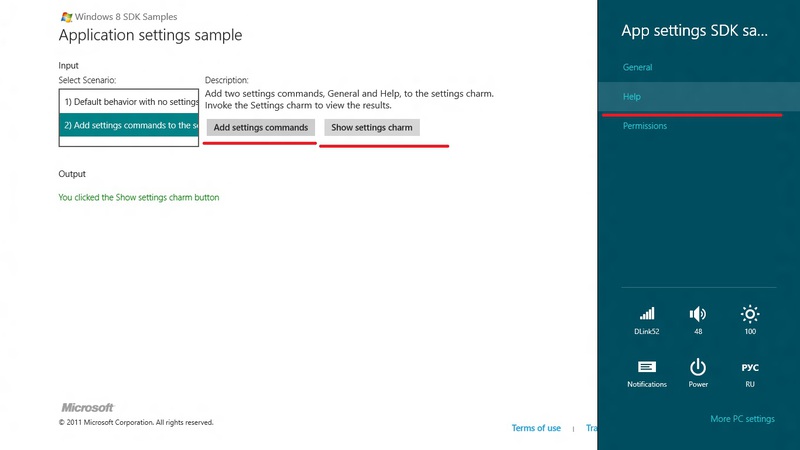
На основе личного опыта использования Win, я могу сказать, что пользователю первое время тяжело разобраться с приложением, т.к. он не знает, где искать его настройки. Есть несколько панелек, где они могут быть. Это боковая панель (App settings) и верхняя-нижняя панель (AppBar)
Работа с настройками App settings
Проект App settings sample
В боковой панели можно и нужно разместить настройки вашего приложения.
Из опыта общения с юзерами телефонов на WP7, IPhone, Android я понял, что пользователь достаточно быстро привыкает к шаблонам поведения приложения на каждой платформе и интуитивно ищет настройки приложения там, где он их видел в других приложениях. Windows8 приучит пользователя искать настройки в боковой панели, а значит, разработчик должен свои настройки вынести именно туда.
Как их туда добавить?
Read more: Habrahabr.ru
QR: 
Silverlight tutorial: Play HD YouTube videos with Silverlight
Posted by
jasper22
at
12:44
|
You can play HD YouTube videos with Silverlight 3 easily. Basically, since Silverlight 3 supports H.264 format you can create your own media player and play high definition video content directly from YouTube in your Silverlight application. Let me show you how you can do it…
Getting started
1. First step is to get URL to the desired video in HD format. YouTube encodes every video in several different formats and for this tutorial I wanted to use HD MP4 format.
2. There are several different ways you can try to obtain URL for the HD video from YouTube. I’ve used the famous Greasemonkey Firefox add-in and YouTube HD Ultimate script. Basic idea is that this scrip will allow you to download YouTube videos in different formats, one of them being the HD MP4.
Okay, I have URL, what’s next?
3. So, by now you have some video URL or you can cheat and use this one:
(It’s Star Trek trailer – yeah I’m a Trekkie wannabe)
4. The rest is very simple – you can just set this URL as a Source for your MediaElement and when you hit F5 you should be able to see and enjoy some HD sweetness in Silverlight.
5. If you are hungry for some XAML code, then it’s here, for your reference:
<MediaElement HorizontalAlignment="Left"
VerticalAlignment="Top"
Source=""/>
Can it be better?
6. Sure it can – instead of using the MediaElement control, I would suggest you to try using the fully blow MediaPlayer control. You will have it under Assets pane in Expression Blend 3 (I assume you are using this one, right?).
Read more: UX Passion
QR: 
Extension Methods in C#
Posted by
jasper22
at
12:41
|
The C# programming language allows us to add new methods to types that were already defined. These methods should be defined as static methods in a separated class and they are known as extension methods. The following clip explains how to define an extension method.
Read more: Life Michael
QR: 
6 Alternative Browsers Based on Google Chrome
Google Chrome is based on the open-source Chromium browser project. Anyone can take Chromium’s source code modify it to build their own browser. These browsers all build on the core browser and offer unique twists on Chrome.
Each alternative browser has its own focus, whether it’s security, social networking, privacy, additional features, or portability.
Comodo Dragon
Comodo Dragon is developed by Comodo, which develops Internet security, firewall and antivirus applications. Comodo touts Dragon as having “superior security and privacy” over Chrome.
Read more: How-to geek
QR: 
Diablo 3 To Be Released On May 15th
Posted by
jasper22
at
18:47
|

Read more: Slashdot
QR: 
Making Silverlight Apps for Google App Engine
Posted by
jasper22
at
14:51
|
.NET developers who know Silverlight might imagine that they can't take advantage of Google App Engine, which uses Python. But integrating the two environments is a lot easier than you think. Scott Seely, author of Effective REST Services via .NET, shows how to do it.
Programming with interoperable, human-readable protocols opens up lots of integration opportunities. The human-readable part is really important. People understand strings really well, which is why JSON and XML became so pervasive. Most languages and platforms have ways to process these text-based formats.
Why would I focus on interoperability as the first topic in an article about Silverlight and Google Application Engine (GAE)? I have talked to people about work I've done creating a GAE-based backend for Silverlight applications. In general, they seem surprised that a Google-based framework happily supports Silverlight. Google didn't do anything special to make this happen. Neither did Microsoft. Instead, both companies support various web and other open standards. Because of that choice, everything else just works.
NOTE
Google Application Engine is Google's cloud computing platform. It offers services for hosting web applications, storing data, and running worker tasks.
Silverlight is Microsoft's .NET-based Rich Internet Application (RIA) platform, which allows .NET developers to leverage their .NET skills within the browser.
As a demonstration of interoperability between GAE and Silverlight, I built a type of application that we've all seen at some point: a photo-management tool. The tool itself is simple. It allows the user to upload and delete images. For existing images, the user can add information about the picture: a caption and a description. Finally, users can choose to expose the image to everyone or just to themselves. To use the tool, users sign in. They manage their photos through a Silverlight interface.
Read more: ITInformit
QR: 
Windows 8 PC Settings [Complete Guide]
Posted by
jasper22
at
02:32
|

PC users have long been using Control Panel as the hub for controlling their system settings. With the introduction of Metro UI in Windows 8, this is going to change. While the Control Panel is still there for desktop mode, there has been a new hub introduced in Windows 8 called PC settings, that lets you change several important settings of your PC from a beautiful, streamlined, no-frills interface.
Today, with the release of Microsoft Windows 8 Consumer Preview, we are bringing you extensive coverage of all the new features in Microsoft’s latest operating system. This post is a part of our Windows 8 Week. To learn more, check out our complete coverage of Windows 8 Consumer Preview.
Read more: Addictive tips
QR: 
Transform The Location Bar Into A Breadcrumb Display [Firefox]
Posted by
jasper22
at
01:16
|

Location Bar Enhancer changes the location bar of Firefox into a Breadcrumb display, with rich and interactive features. This handy add-on displays the URL in a Breadcrumb trail manner, with visual tags for easy identification, and also provides an easy to access context menu for each part. With it, you can quickly access the original URL in plain text, either by clicking the right of the last part, or Ctrl+ hover your mouse over any part. Moreover, each part can be dragged and dropped to any location, for instance, the Bookmarks toolbar, Bookmarks folder, tab, desktop or any other folder. The add-on also Includes a feature for detecting and replacing gibberish parts of the URL with meaningful text. Furthermore, the options allow you to fully customize the add-on according to your preference.The context-menu can be opened by right-clicking any part of the breadcrumb display. This displays the related addresses and an option which can be used to copy the current address of the page, edit, delete or simply add another part after it. When you click on links that have further sub-categories, these are displayed in a context-menu. Select an option from the menu and the page will instantly be opened.
Read more: Addictive tips
QR: 
TweakNow PowerPack 2012: All-in-1 PC Maintenance Suite, Updated
Posted by
jasper22
at
01:08
|

Keeping your computer safe from crashes and random BSODs is very important in order to be productive and efficient in your work. Imagine how frustrated you would get if your PC stops responding or reboots randomly in the middle of making an important presentation or working on a report. As they say, prevention is better than cure, it’s better to regularly clean your PC without waiting for it to crash first. It will only take a little out of your time, and you wouldn’t have to miss any deadlines because of lost work. Previously, we covered a PC cleaning application called FixBee that lets you clean, defragment and repair errors from your PC. Today, we have a very comprehensive PC management application called TweakNow PowerPack 2012. It is a suite of utilities that lets you manage every aspect if your computer and tweak it according to your needs. Back in 2009, we covered TweakNow PowerPack 2009, an older versions of the same application. Read on to find out about the new features included in the suite.
Read more: Addictive tips
QR: 
6 Alternative Browsers Based on Mozilla Firefox
Posted by
jasper22
at
01:01
|
Mozilla Firefox is an open-source web browser, so anyone can take its source code and modify it. Various projects have taken Firefox and released their own versions, either to optimize it, add new features, or align it with their philosophy.
These projects all have to release the source code to their browsers and can’t call them Firefox or use official Mozilla branding, such as the Firefox logo.
Waterfox
Mozilla doesn’t provide official builds of Firefox compiled for 64-bit systems yet. Waterfox takes Firefox’s code and compiles it for 64-bit Windows, without adding additional features or making other changes. Many plugins, including Adobe Flash, now have 64-bit versions, so using a 64-bit browser for day-to-day browsing is very possible. If you’ve already got Flash installed, you may need to download its installer to get the 64-bit version, too. The current installers come with both 32 and 64-bit plugins.
Read more: How-to geek
QR: 
Iran Deleted From the World's Banking Computers
Posted by
jasper22
at
00:30
|
Iran is being deleted from the world banking system Society for Worldwide Interbank Financial Telecommunication (SWIFT) computers as of Saturday at 1600 UTC. Once the SWIFT codes for Iranian banks are deleted, Iranian banks will no longer be able to transfer funds to and from other worldwide banks, turning Iranian international commerce into a barter operation. SWIFT is taking the action at the request of EU members to comply with international sanctions against Iran due to its program to develop nuclear weapons. The effect will be to drastically hinder Iran's ability to execute international business transactions
Read more: Slashdot
QR: 
Download The Biggest Library of Windows 7 Shortcuts
Posted by
jasper22
at
00:23
|
We have created the biggest library of Windows 7 shortcuts. You've got almost everything you need and we are willing to expand it. Our collection now includes 129 Windows 7 shortcuts which you can download and use. They are all created in such a way that they work on every Windows 7 computer. Also, if you want a shortcut which is not in our collection, leave a comment and we will try to add it to the package.
Our collection started with 99 shortcuts and it has been expanded to 129 shortcuts, so that it includes the following:
- Administration Tools - Action Center, Backup and Restore, Character Map, Computer, Control Panel, Credential Manager, Default Programs, Device Manager, Disk Cleanup, Disk Defragmenter, Folder Options, Fonts, Indexing Options, Keyboard, Mouse, Parental Controls, Performance Information and Tools, Playback and Recording settings, Power Options, Private Character Editor, Region and Language, Services, Set the time and date, System Configuration, System Information, System Properties, System Restore, Task Manager (All Users), Task Scheduler, User Accounts, Windows Easy Transfer.
Read more: 7Tutorials
QR: 
Subscribe to:
Posts (Atom)