This is a mirror of official site: http://jasper-net.blogspot.com/

Android: Java Class for Blue-tooth BT Enabling

| Tuesday, August 2, 2011
This Java Class in Android Application Development is to show BT enabling progress

package com.android.bluetooth.opp;

import com.android.bluetooth.R;
import com.android.internal.app.AlertActivity;
import com.android.internal.app.AlertController;

import android.bluetooth.BluetoothAdapter;
import android.content.BroadcastReceiver;
import android.content.Context;
import android.content.Intent;
import android.content.IntentFilter;
import android.os.Bundle;
import android.os.Handler;
import android.os.Message;
import android.util.Log;
import android.view.KeyEvent;
import android.view.View;
import android.widget.TextView;

/**
* This class is designed to show BT enabling progress.
*/
public class BluetoothOppBtEnablingActivity extends AlertActivity {
private static final String TAG = "BluetoothOppEnablingActivity";

private static final boolean D = Constants.DEBUG;

private static final boolean V = Constants.VERBOSE;

private static final int BT_ENABLING_TIMEOUT = 0;

private static final int BT_ENABLING_TIMEOUT_VALUE = 20000;

@Override
protected void onCreate(Bundle savedInstanceState) {
super .onCreate(savedInstanceState);

IntentFilter filter = new IntentFilter(
BluetoothAdapter.ACTION_STATE_CHANGED);
registerReceiver(mBluetoothReceiver, filter);

// Set up the "dialog"
final AlertController.AlertParams p = mAlertParams;
p.mIconId = android.R.drawable.ic_dialog_info;
p.mTitle = getString(R.string.enabling_progress_title);
p.mView = createView();
setupAlert();

// Add timeout for enabling progress
mTimeoutHandler.sendMessageDelayed(mTimeoutHandler
.obtainMessage(BT_ENABLING_TIMEOUT),
BT_ENABLING_TIMEOUT_VALUE);
}

private View createView() {
View view = getLayoutInflater().inflate(
R.layout.bt_enabling_progress, null);
TextView contentView = (TextView) view
.findViewById(R.id.progress_info);
contentView
.setText(getString(R.string.enabling_progress_content));

return view;
}


Read more: nScraps
QR: 1249-java-class-for-bluetooth-bt-enabling.htm

Posted via email from Jasper-net

Attached Behavior base like it should have been

|
A while ago, I was reading this shocking blog post by Joost van Schaik. It explains that the Behavior.OnDetaching is not always invoked and thus can cause (big) memory issues. He gives a great solution and shows a save way to handle this. He also provides a code snippet to implement this behavior more easily. However, I don’t like writing code twice, even when it is being generated. Therefore, I have decided to continue is excellent work and write a BehaviorBase that completely handles all of this out of the box. In the end, this is what I came up with:

/// <summary>
/// Behavior base class that handles a safe unsubscribe and clean up because the default
/// behavior class does not always call <see cref="Behavior.OnDetaching"/>.
/// <para />
/// This class also adds some specific features such as <see cref="ValidateRequiredProperties"/>
/// which is automatically called when the behavior is attached.
/// </summary>
/// <typeparam name="T">The dependency object this behavior should attach to.</typeparam>
public abstract class BehaviorBase<T> : Behavior<T> where T : FrameworkElement
{

#region Variables

private bool _isClean = true;

#endregion

#region Constructor & destructor
#endregion

#region Properties

Posted via email from Jasper-net

Adobe Edge Preview

|
edge_557x200.gif

Motion and Interaction Design for HTML5

Adobe® Edge is a new web motion and interaction design tool that allows designers to bring animated content to websites, using web standards like HTML5, JavaScript, and CSS3.

Edge will be updated regularly to add new functionality, stay ahead of evolving web standards, and incorporate user feedback to provide the best functionality and experience possible. This is an early look at Edge with more capabilities to come.

For updates from the product team, like Edge on Facebook and follow Edge on Twitter.
Edge Preview Highlights

This version of Edge focuses primarily on adding rich motion design to new or existing HTML projects, that runs beautifully on devices and desktops.

    Create new compositions with Edge’s drawing and text tools.
    Import popular web graphics such as SVG, PNG, JPG or GIF files.
    Easily choreograph animation with the timeline editor. Animate position, size, color, shape, rotation and more at the property level.
    Energize existing HTML files with motion, while preserving the integrity of CSS-based HTML layouts.
    Copy and paste transitions, invert them, and choose from over 25 built-in easing effects for added creativity.


Read more: Adobe Edge
QR: ?v=2

Posted via email from Jasper-net

How To Disable the Java Security Manager

|
Suppose you have a type safety vulnerability in Java, you could use it to execute native code, but you can also simply disable the SecurityManager:


import java.io.*;
import java.lang.ref.*;
import java.lang.reflect.*;

class Union1 {
  ObjectStreamClass osc;
  Class c;
  AccessibleObject acc;
}

class Union2 {
  MyObjectStreamClass osc;
  MyClass c;
  MyAccessibleObject acc;
}

class MyObjectStreamClass {
  int i1;
  int i2;
  int i3;
  int i4;
  Object obj1;
  Object obj2;
  Long suid;
}

class MyClass {
  int i1;
  int i2;
  int i3;
  int i4;
  Object obj1;
  Object obj2;


Read more: IKVM.NET Weblog
QR: PermaLink.aspx?guid=4527a953-90d5-4b87-bd93-90f71690142a

Posted via email from Jasper-net

Streaming your music at home on the cheap… Using IIS to stream your music to your Windows Phone 7 (or iPhone/Android)

|
I have about 6 GB of audio collection saved under folder ("Songs") on my machine. I never felt it practical to sync my entire collection, however, every now and then I would miss listening to a song I hadn't synced yet ... so I had to find a solution to this problem... The answer to the above question is fairly simple - I used IIS
3 things I am using for this setup to work are: My laptop, Windows Phone 7 Device and a wireless router.
The laptop and HTC HD 7 are using the linksys router for obtaining an IP. Therefore they are pingable to each other. Once you confirm the ping, install IIS on your laptop or desktop machine in case you dont have it installed already. once IIS is installed, do the following:

Well, that's about it. You can now browse your website by opening up IE on WP 7 and accessing your machine IP address. Following are a few things you should know about what kind of files you can place in this folder as not all files that play on your machine will play on your windows phone 7.
a. MP3 will be streamed automatically from your machine to your windows phone 7 device. There is nothing you have to do to make this work.
b. WMV will be streamed by default as well. For details, check: http://msdn.microsoft.com/en-us/library/ff462087(v=VS.92).aspx
c. You are not using any dynamic technology here. You are *NOT* using silverlight or Flash. Therefore, your MP3 files will work perfectly on an iPhone or an Android device as well.
d. If you want to make the page look good, you can download various custom directory browsing modules available on the internet.
e. This setup will of course work only in your home network


Read more:  Greg's Cool [Insert Clever Name] of the Day
QR: streaming-your-music-at-home-on-cheap.html

Posted via email from Jasper-net

5 Ways to Boost MySQL Scalability

|
There are a lot of scalability challenges we see with clients over and over. The list could easily include 20, 50 or even 100 items, but we shortened it down to the biggest five issues we see.

1. Tune those queries

By far the biggest bang for your buck is query optimization. Queries can be functionally correct and meet business requirements without being stress tested for high traffic and high load. This is why we often see clients with growing pains, and scalability challenges as their site becomes more popular. This also makes sense. It wouldn't necessarily be a good use of time to tune a query for some page off in a remote corner of your site, that didn't receive real-world traffic. So some amount of reactive tuning is common and appropriate.

Enable the slow query log and watch it. Use mk-query-digest, the great tool from Maatkit to analyze the log. Also make sure the log_queries_not_using_indexes flag is set.  Once you've found a heavy resource intensive query, optimize it!  Use the EXPLAIN facility, use a profiler, look at index usage and create missing indexes, and understand how it is joining and/or sorting.

2. Employ Master-Master Replication

Master-master active-passive replication, otherwise known as circular replication, can be a boon for high availability, but also for scalability.  That's because you immediately have a read-only slave for your application to hit as well.  Many web applications exhibit an 80/20 split, where 80% of activity is read or SELECT and the remainder is INSERT and UPDATE.  Configure your application to send read traffic to the slave or rearchitect so this is possible.  This type of horizontal scalability can then be extended further, adding additional read-only slaves to the infrastructure as necessary.

3. Use Your Memory

It sounds very basic and straightforward, yet there are often details overlooked.  At minimum be sure to set these:

    innodb_buffer_pool_size
    key_buffer_size (MyISAM index caching)
    query_cache_size - though beware of issues on large SMP boxes
    thread_cache & table_cache
    innodb_log_file_size & innodb_log_buffer_size
    sort_buffer_size, join_buffer_size, read_buffer_size, read_rnd_buffer_size
    tmp_table_size & max_heap_table_size


Read more: SQL Zone
QR: 5-ways-boost-mysql-scalability

Posted via email from Jasper-net

ActiveX Controls for interactive Runtime Debugging of COM Objects

|
Overview

When developing COM Objects, I often wished to have something similar to VB's Properties- or Debug-window to retrieve or interactively change an object's current properties at runtime. There exists a small number of little demo apps (like the AtlCon sample in MSDN) about property browsing, but in general those were not functional enough for me - one cannot browse properties which take one or more extra parameters (not just setting/returning one value), one cannot invoke methods, one can only browse a COM object's default interface (although most objects do implement more than one interface), and one can only do the browsing during design time.

To circumvent those restrictions, I implemented three ActiveX controls doing the job for me (see screenshots above):
One for browsing through an object model hierarchy (example above: MS Word), one for browsing all implemented interfaces (restriction: only registered interfaces described in a typelib are listed) of a specified object (example above: a MS ProgressBar control on a VB-Form), and one for browsing an objects current property values and interactively change (i.e. invoke) the objects properties and methods (example above: MS Word's "Normal Template" object).

Furthermore, the source code for the controls shows how to retrieve Type Information via the Type Description Interfaces ITypeInfo, ITypeLib, etc. and the Type Information structures (see MSDN: PlatformSDK/Component Services/COM/Automation).


Control Description

1. Running Object Table Browser Control

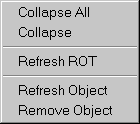
This control enables the browsing through an object model hierarchy similar to VB's Debug-window in a treeview. There are two 'categories' of objects to be browsed: objects registered in the "Running Object Table" (see MSDN) and objects added either programmatically or interactively through Drag 'n Drop from the "object browser control" or the "Invoke Dialog" (see "4. Drag and Drop" below). Clicking the right mouse button inside the control shows the following context menu:

ROTMenu.gif

Read more: Codeproject
QR: objectbrowser.aspx

Posted via email from Jasper-net

Digital Hit Men for Hire

| Monday, August 1, 2011
ddosservice2-300x243.png

Cyber attacks designed to knock Web sites off line happen every day, yet shopping for a virtual hit man to launch one of these assaults has traditionally been a dicey affair. That’s starting to change: Hackers are openly competing to offer services that can take out a rival online business or to settle a score.

There are dozens of underground forums where members advertise their ability to execute debilitating “distributed denial-of-service” or DDoS attacks for a price. DDoS attack services tend to charge the same prices, and the average rate for taking a Web site offline is surprisingly affordable: about $5 to $10 per hour; $40 to $50 per day; $350-$400 a week; and upwards of $1,200 per month.

...

From their ad (translated from Russian):

• 15-30 bots (!!!) knock off line a relatively small site.

• 250-280 bots – the average site.

• 750-800 bots – a large site.

• 2,000-2,500 bots – great site with Anti-DDoS protection

• 4,300-4,700 bots – a cluster of sites, even when using the Anti-DDoS protection, blocking, etc.

• 15-20 thousand bots – take offline virtually any site with any protection.

Read more: Krebs on security
QR: https://chart.googleapis.com/chart?chs=80x80&cht=qr&choe=UTF-8&chl=http://krebsonsecurity.com/2011/08/digital-hit-men-for-hire/

Posted via email from Jasper-net

Windows ThreadPool APIs

|
The ThreadPool APIs are pretty cool, but the docs are confusing at first blush and the sample code is horrible (just one sample, and suffers from kitchen-sink syndrome). But fear not! MSDN lets users comment, so I did :-) Repro'd here for posterity:

The sample is rather big and sprawling, making it hard to understand w/o knowing most of the API surface. To just execute a simple block of work, it's actually pretty simple:

#include <windows.h>
#include <stdio.h>

void NTAPI MyWorkCallback(PTP_CALLBACK_INSTANCE instance, void * context, PTP_WORK work)
{

printf("Hello %s", context);
}

int main()
{

TP_WORK * work = CreateThreadpoolWork(MyWorkCallback, "world", NULL);
if (work == NULL)
printf("Error %d in CreateThreadpoolWork", GetLastError());
else {
SubmitThreadpoolWork(work);
WaitForThreadpoolWorkCallbacks(work, FALSE);
CloseThreadpoolWork(work);
}
}

Posted via email from Jasper-net

Read and write Open XML files (MS Office 2007)

|
Introduction

With Office 2007, Microsoft decided to change the default application formats from old, proprietary, closed formats (DOC, XLS, PPT) to new, open, and standardized XML formats (DOCX, XLSX, and PPTX). The new formats share some similarities with the old Office XML formats (WordML, SpreadsheetML) and some similarities with the competing OpenOffice.org OpenDocument format, but there are many differences. Since the new formats will be default in Office 2007 and Microsoft Office is the most predominant Office suite, these formats are destined to be popular and you will probably have to deal with them sooner or later.

This article will explain the basics of the Open XML file format, and specifically the XLSX format, the new format for Excel 2007. Presented is a demo application which writes / reads tabular data to / from XLSX files. The application is written in C# using Visual Studio 2010. The created XLSX files can be opened using Excel 2007 or greater.


Microsoft Open XML format

Every Open XML file is essentially a Zip archive containing many other files. Office-specific data is stored in multiple XML files inside that archive. This is in direct contrast with the old WordML and SpreadsheetML formats which were single, non-compressed XML files. Although more complex, the new approach offers a few benefits:

    You don't need to process the entire file in order to extract specific data.
    Images and multimedia are now encoded in native format, not as text streams.
    Files are smaller as a result of compression and native multimedia storage.

In Microsoft's terminology, an Open XML Zip file is called a package. Files inside that package are called parts. It is important to know that every part has a defined content type and there are no default type presumptions based on the file extension. The content type can describe anything; application XML, user XML, images, sounds, video, or any other binary object. Every part must be connected to some other part using a relationship. Inside the package are special XML files with a ".rels" extension which define the relationship between the parts. There is also a start part (sometimes called "root", which is a bit misleading because the graph containing all parts doesn't have to be a tree structure), so the entire structure looks like in picture 1.

Read more: Codeproject
QR: OpenXML.aspx

Posted via email from Jasper-net

Using PriorityBinding in WPF – Screencast [HEB]

|
In the last screencasts we've seen how to use and implement IValueConverter and how to use Multi-Binding for advanced data binding scenarios.

This time we continue with advanced binding and explore the benefits of PriorityBinding, a useful binding gem feature that lets you define multiple sources for your binding target value, with priorities.

Please notice that the screencast was recorded in Hebrew, but the demo is clear enough to be watched without understanding a word.

Read more: Arik Poznanski's Blog
QR: using-prioritybinding-in-wpf-screencast-heb.aspx

Posted via email from Jasper-net

Internals of Dependency Property in WPF

|
WPF introduces new property system to us. Every WPF objects that is inherited from DependencyObject inherently supports Dependency property containers within it. That means you can define your own dependency property in your code which can take part in some of the interesting features of WPF like Binding, Styles, Triggers, Animation, Property Inheritence etc. Today I will concentrate on how Dependency Property system is actually built and what are the benefits we get instead of using CLR property system.

Note : If you are really new in WPF and don't know about Dependency Property, it would be nice to read my post on Dependency Property or you can also try WPF Tutorial series to start on.

internalsdp8.PNG

Read more: DOT NET TRICKS
QR: internals-of-dependency-property-in-wpf.html

Posted via email from Jasper-net

Visual Studio Gets Better SQL Server Tooling – ‘Juneau’

|
SQL Server Development Tools (SSDT) - ‘Juneau’ - brings testing, debugging, version control, refactoring, dependency checking, and deployment to database development in Visual Studio. It was previewed recently along with SQL Server ‘Denali’ CTP.

Some of the features in the preview are - 

    New Testing and Debugging method which works with a local database that’s created automatically for each database project
    Schema Compare – for comparing a SQL Server Project Schema to a target database and highlight differences
    Publish Database feature, that supports both onsite SQL Server as well as SQL Azure
    Declarative database development through Power Buffer
    Enhanced TSQL editor with features like IntelliSense, Go To Definition and Find All References, Refactor contextual menu and more, similar to C# and VB editors in

Visual Studio

There is a blog post from the SSDT team that outlines all the planned features in SSDT - one major feature missing in the preview is the Application Project and Database Integration, which is meant to give build-time dependency checking between Application and Database tiers. The preview also misses quite a few features present in Visual Studio Database Projects as noted by Milo Hoffman. Some of these missing features might eventually get added before SSDT is actually released.

Read more: InfoQ
QR: sql-server-tools-juneau

Posted via email from Jasper-net

Adding some spark to your WPF app UI's with WPFSpark (with details on just how the controls were built too)

|
ToggleSwitch2_thumb.png?imgmax=800

This is the second article in the WPFSpark series. WPFSpark is an open source project in CodePlex containg a library of user controls which can be used by the developer community. I was planning to write this article a few weeks ago, but I was preoccupied with creating a few more exciting controls for the WPFSpark library. I will be describing these controls in my forthcoming articles.

In this article, I describe in detail about the second control in this library which I have developed. It is called the ToggleSwitch control and it derives from ToggleButton and provides a rich user experience. It supports only two states : True or False.

Read more: Greg's Cool [Insert Clever Name] of the Day
QR: adding-some-spark-to-your-wpf-app-ui.html

Posted via email from Jasper-net

Using WPF Popup Controls with Hyperlink and TextBlock

|
image8.png

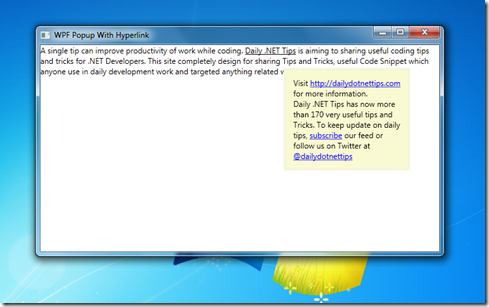
In this post I am going to describe how you can use WPF popup control with Hyperlink. Instead of showing the content with in Popup Control, we can use common Tool Tips as we can easily bind any WPF element within Tool Tips. But there are few advantages of Popup controls over default Tool tips where we can think to use Popup instead of Tool tips.

First of all, You must have to set IsOpen=True to Popup control to appear. Unlike ToolTips, Popup control never visible by default. Secondly, Tool Tips disappears automatically after a certain time, but for Popup Control you have to explicitly set StayOpen property to true or false.

Read more about WPF Popup Control .

Below image shown as example, where on mouse of underline text a popup appears with some details information.

Read more: Daily .Net Tips
QR: https://chart.googleapis.com/chart?chs=80x80&cht=qr&choe=UTF-8&chl=http://dailydotnettips.com/2011/07/31/using-wpf-popup-controls-with-hyperlink-and-textblock/

Posted via email from Jasper-net

#353 – Binding a Three-State CheckBox to a Nullable Bool

|
Because a three-state CheckBox can take on any one of three different values, its current value can’t be represented by a simple bool.  A bool can only take on true and false values.

A three-state CheckBox can instead be bound to a nullable bool (represented by bool?), which can take on three different values.

    true  (checked)
    false  (not checked)
    null  (indeterminate)

In the example below, we bind a CheckBox control’s IsChecked property to a nullable bool property.

        <CheckBox Content="Happy" IsChecked="{Binding IsHappy}" IsThreeState="True"/>


Read more: 2,000 Things You Should Know About WPF
QR: https://chart.googleapis.com/chart?chs=80x80&cht=qr&choe=UTF-8&chl=http://wpf.2000things.com/2011/07/29/353-binding-a-three-state-checkbox-to-a-nullable-bool/

Posted via email from Jasper-net

C#: Convert a string having comma separated integers to an array of integers

|
Today I saw a person on forums asking this "How to convert a string having comma separated integers to an array of integers" . He was having a string in this format "1,4,6,10,15,20" and he wanted to convert it into an array of integers. I decided to wrie a blog on this for converting the string to arrayof integers. Below is the code:

using System.Linq;

namespace MyConsole
{
    internal class Program
    {
        private static void Main(string[] args)
        {
            string myString = "1,4,6,10,15,20";

            int[] output = myString.Split(',')
                .Select(x => int.Parse(x)).ToArray();
           
            //Do your work with output
        }
    }
}


Read more: codeasp.net
QR: c-convert-a-string-having-comma-separated-integers-to-an-array-of-integers

Posted via email from Jasper-net

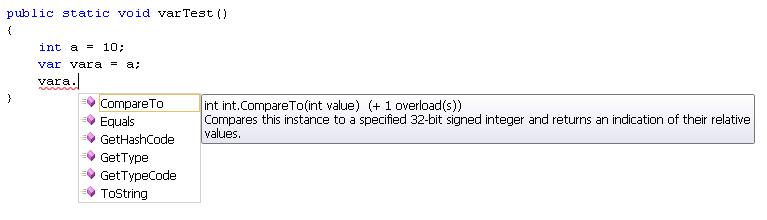
Difference between Object, Dynamic and Var

|
In this post I am going to write the points about the three type of the variable Object, Var and Dynamic. Most of the developer not able to get what is difference between this three kind of variable.

Object Dynamic Var
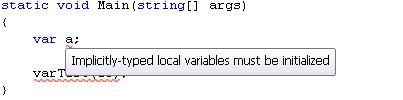
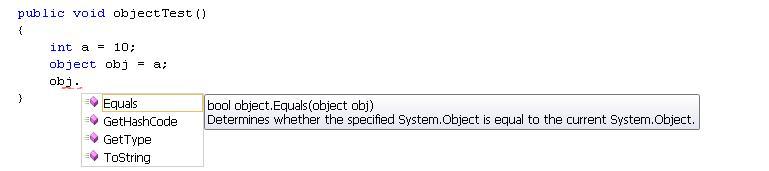
Can able to store any kind of value, because object is the base class of all type in .net framework. Can able to store any type of the variable, similar to old VB language variable. Can able to store any type of value but it require to initialize at the time of declaration.

Compiler has little information about the type

Compiler doesn’t have any information about the this type of variable.

It’s compiler safe i.e compiler has all information about the stored value, so that it doesn’t cause any issue at run-time.

(more.....)


Read more: Daily .Net Tips
QR: https://chart.googleapis.com/chart?chs=80x80&cht=qr&choe=UTF-8&chl=http://dailydotnettips.com/2011/07/29/object-dynamic-and-var-2/

Posted via email from Jasper-net

Как сделать красивую презентацию онлайн?

|
Презентация — неотъемлемая часть при демонстрации нового приложения, доклада, гаджета или любого другого продукта. Слайды могут наглядно показать достоинства продукта и помочь в рассказе о его характеристиках, функциях или других важных деталях. Презентации используются очень часто, и затронуть в них можно практически любые темы. Это означает, что уметь создавать простые, но красивые и понятные презентации должны практически все. К сожалению, поиск и установка специализированного программного обеспечения дело не из легких. К тому же, программа может обладать сложным набором функций и плохим интерфейсом, что только затруднит создание слайдов.

В этой статье мы расскажем о 10 бесплатных онлайн инструментах, которые помогут сделать красивую и информационную презентацию без лишних проблем и, что самое главное, за короткое время.


280 Slides
280 Slides — это бесплатный онлайн инструмент, с простым и понятным интерфейсом. При создании презентации вы можете загрузить необходимые файлы со своего компьютера или начать разработку презентации, выбрав готовые шаблоны и темы. Приложение позволяет добавлять в презентацию фотографии и ролики из Flickr и YouTube, писать форматируемые тексты, делать короткие заметки на русском языке и создавать различные геометрические фигуры. Готовую работу можно скачать в формате pptx (PowerPoint) или отравить ссылку по e-mail.
SlideRoket

SlideRoket
SlideRoket — веб-приложение, обладающее большим количеством разнообразных функций, и идеально подходящее для создания сложных и красивых презентаций. Как и в 280 Slides вы можете начать разработку загрузив свои файлы из PowerPoint или воспользоваться готовыми шаблонами. Кроме стандартного набора функций (рисование фигур, редактирование текста, добавление фото) приложение включает в себя возможность совместной разработки, создание подробных отчетов, добавление аудио, а также экспорт готового проекта, например, в pdf файл. Для начала работы необходимо зарегистрироваться и выбрать тарифный план (Lite — бесплатно или Pro — $240 в год), после чего можно приступать к работе над проектом.


Read more: WOMtec
QR: https://chart.googleapis.com/chart?chs=80x80&cht=qr&choe=UTF-8&chl=http://womtec.ru/2011/04/how-make-presentation-online/

Posted via email from Jasper-net

כיצד להשיב את הלחצן "הצג את שולחן העבודה"

|
שלום לכולם,

כאן דן ויזנפלד מצוות התמיכה של Microsoft.

הפוסט הבא מוקדש כולו למשתמשי Windows XP ומשתמשי Windows XP Mode.

וכמו פוסטים רבים שאני כותב, גם מקורו של פוסט זה הוא במחשב האישי של אימא שלי – ותקלות בהן היא נתקלת.

בתרחיש זה, המשתמש (ובמקרה הזה – אימא שלי) הסיר בשוגג את האפשרות "Show Desktop" (הצג את שולחן העבודה) מסרגל ההפעלה המהירה (Quick Launch).

מצב שנראה פחות או יותר כך:

--1_thumb_29C0A2D3.png

. לחלון ה-Notepad שנפתח, העתיקו את התוכן הבא:

[Shell]
Command=2
IconFile=explorer.exe,3
[Taskbar]
Command=ToggleDesktop

--4_thumb_0E1B5536.png

Read more: MS Support blog
QR: Show-Desktop-Icon-Restore.aspx

Posted via email from Jasper-net