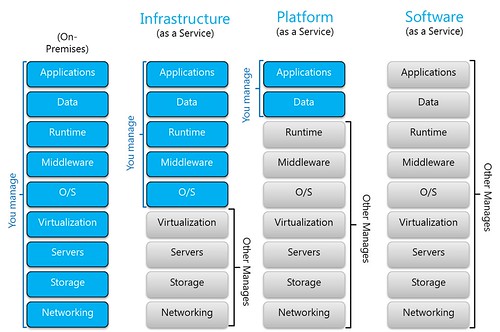
- On-Premises
- Infrastructure as a Service (IaaS)
- Platform as a Service (PaaS)
- Software as a Service (SaaS)
Types of Cloud Services
This is a nice representation of types of Cloud Services. What do you actually manange in each offering:Types of Cloud Services:
Tip of the day for NHibernate #2: show_sql and format_sql
Posted by
jasper22
at
14:16
|
As always with tips, either you already know this or it would be invaluable. This time I'm talking about 2 configuration properties: "show_sql" and "format_sql". To switch on these options, add the corresponding lines to your hibernate.cfg.xml file as in the following example: <?xml version="1.0" encoding="utf-8" ?>
<hibernate-configuration xmlns="urn:nhibernate-configuration-2.2">
<session-factory>
<property name="connection.connection_string">Data Source=.;Initial Catalog=NHibernateDemo;Integrated Security=True</property>
<property name="dialect">NHibernate.Dialect.MsSql2005Dialect</property>
<property name="proxyfactory.factory_class">NHibernate.ByteCode.LinFu.ProxyFactoryFactory, NHibernate.ByteCode.LinFu</property>
<property name="show_sql">True</property>
<property name="format_sql">True</property>
<mapping assembly="BusinessLogic"/>
</session-factory>
</hibernate-configuration>What is does?The “show_sql” property tells NHibernate to output all the SQL statements it executes onto the console. This way you can see exactly what NH is doing against your DB. The problem is that it sends every statement as a single line which can be very long and therefore difficult to understand. The “format_sql” solves this problem by formatting the same SQL into several lines in a much more readable fashion. Note that if your application is not a console app, then you can see the output while debugging in Visual Studio inside the “Output” pane (select “Debug” from the “show output from:” combo box)For example, without “format_sql”, the output would look like this: NHibernate: SELECT this_.OrderId as OrderId3_2_, this_.Date as Date3_2_, this_.CustomerSSN as Customer3_3_2_, this_.CashierSSN as CashierSSN3_2_, customer2_.SSN as SSN1_0_, customer2_.FirstName as FirstName1_0_, customer2_.LastName as LastName1_0_, Read more: ArnonA
<hibernate-configuration xmlns="urn:nhibernate-configuration-2.2">
<session-factory>
<property name="connection.connection_string">Data Source=.;Initial Catalog=NHibernateDemo;Integrated Security=True</property>
<property name="dialect">NHibernate.Dialect.MsSql2005Dialect</property>
<property name="proxyfactory.factory_class">NHibernate.ByteCode.LinFu.ProxyFactoryFactory, NHibernate.ByteCode.LinFu</property>
<property name="show_sql">True</property>
<property name="format_sql">True</property>
<mapping assembly="BusinessLogic"/>
</session-factory>
</hibernate-configuration>What is does?The “show_sql” property tells NHibernate to output all the SQL statements it executes onto the console. This way you can see exactly what NH is doing against your DB. The problem is that it sends every statement as a single line which can be very long and therefore difficult to understand. The “format_sql” solves this problem by formatting the same SQL into several lines in a much more readable fashion. Note that if your application is not a console app, then you can see the output while debugging in Visual Studio inside the “Output” pane (select “Debug” from the “show output from:” combo box)For example, without “format_sql”, the output would look like this: NHibernate: SELECT this_.OrderId as OrderId3_2_, this_.Date as Date3_2_, this_.CustomerSSN as Customer3_3_2_, this_.CashierSSN as CashierSSN3_2_, customer2_.SSN as SSN1_0_, customer2_.FirstName as FirstName1_0_, customer2_.LastName as LastName1_0_, Read more: ArnonA
eMarketer: Global Ad Spending On Facebook Will Reach $4B By Year’s End
Posted by
jasper22
at
14:01
|

eMarketer predicts that social network advertising will account for nearly 11% of all online ad spending in the United States by the end of this year. According to the research firm, US marketers will spend a little over $3 billion to advertise on social networking sites this year, up 55 percent from the $1.99 billion advertisers devoted to social networks in 2010. eMarketer projects this number will rise by a further 27.7% next year to reach nearly $4 billion.The 2011 forecast for online ad spending in the United States is $1 billion higher than eMarketer’s last estimate of US social network ad spending, made in August 2010. Read more: Techcrunch
How to Crack Just About Any Mac App (and How to Prevent It)
Posted by
jasper22
at
12:41
|
How I'd Crack Your Mac AppWell, not you specifically, but by you I mean the average Mac developer. It's too easy to crack Mac apps. Way too easy. By walking through how I can hack your app with only one Terminal shell, I hope to shed some light on how this is most commonly done, and hopefully convince you to protect yourself against me. I'll be ending this article with some tips to prevent this kind of hack. In order to follow along you're going to need a few command line utilities. You're going to need the Xcode tools installed. And, lastly, you're going to need an app to operate on. I chose Exces, a shareware App I wrote a long time ago. Let's start by making sure we have the two utilities we need: otx and class-dump. I like to use Homebrew as my package manager of choice. Note that I will use command line utilities only, including vim. If you prefer GUIs, feel free to use your code editor of choice, HexFiend and otx's GUI app. $ sudo brew install otx
$ sudo brew install class-dumpThe first step is to poke into the target app's headers, gentlemanly left intact by the unwitting developer.$ cd Exces.app/Contents/MacOS
$ class-dump Exces | vimBrowse around, and find the following gem:@interface SSExcesAppController : NSObject
{
[...]
BOOL registred;
[...]
- (void)verifyLicenseFile:(id)arg1;
- (id)verifyPath:(id)arg1;
- (BOOL)registred;Read more: Lifehacker
$ sudo brew install class-dumpThe first step is to poke into the target app's headers, gentlemanly left intact by the unwitting developer.$ cd Exces.app/Contents/MacOS
$ class-dump Exces | vimBrowse around, and find the following gem:@interface SSExcesAppController : NSObject
{
[...]
BOOL registred;
[...]
- (void)verifyLicenseFile:(id)arg1;
- (id)verifyPath:(id)arg1;
- (BOOL)registred;Read more: Lifehacker
Unsecured IP Cameras Accessible To Everyone
Posted by
jasper22
at
11:24
|
In the last couple of decades, we have become so accustomed to the idea that the public portion of our everyday life is watched and recorded — in stores, on the street, in institutions — that we often don't even notice the cameras anymore. Analog surveillance systems were difficult to hack into by people who lacked the adequate knowledge, but IP cameras — having their own IPs — can be quite easily physically located and their stream watched in real-time by anyone who has a modicum of computer knowledge and knows what to search for on Google Read more: Slashdot
Encrypt Your Smartphone — Or Else
Posted by
jasper22
at
11:15
|
Modern smartphones contain ever-increasing volumes of our private personal data — from text messages to images to emails — yet many smartphone security features can easily be circumvented by thieves or police officers equipped with off-the-shelf forensics equipment. Worse, thanks to a recent California Supreme Court ruling, police officers may be able to search your smartphone for hours without a warrant if you're arrested for any reason. Ars Technica has an article exploring the legal issues surrounding cell phone searches and explaining how you can safeguard your smartphone from the prying eyes of law enforcement officers. Read more: Slashdot
Windows 7 Update (KB 2454826) to Boost Graphics Performance
Posted by
jasper22
at
10:48
|
Microsoft just released an update designed to boost the performance of Windows 7's underlying graphics platform. This update contains the following new functionality, performance improvements, and solutions to issues:
Read more: WinMatrix
Read more: MS Download
- This update provides new functionality and performance improvement for the graphics platform.
- This update provides performance improvements when you print from XPS-based applications to GDI-based print drivers.
- This update resolves some streaming issues that are related to Media Foundation.
Read more: WinMatrix
Read more: MS Download
How Facebook Ships Code
Posted by
jasper22
at
10:23
|
I’m fascinated by the way Facebook operates. It’s a very unique environment, not easily replicated (nor would their system work for all companies, even if they tried). These are notes gathered from talking with many friends at Facebook about how the company develops and releases software. Seems like others are also interested in Facebook… The company’s developer-driven culture is coming under greater public scrutiny and other companies are grappling with if/how to implement developer-driven culture. The company is pretty secretive about its internal processes, though. Facebook’s Engineering team releases public Notes on new features and some internal systems, but these are mostly “what” kinds of articles, not “how”… So it’s not easy for outsiders to see how Facebook is able to innovate and optimize their service so much more effectively than other companies. In my own attempt as an outsider to understand more about how Facebook operates, I assembled these observations over a period of months. Out of respect for the privacy of my sources, I’ve removed all names and mention of specific features/products. And I’ve also waited for over six months to publish these notes, so they’re surely a bit out-of-date. I hope that releasing these notes will help shed some light on how Facebook has managed to push decision-making “down” in its organization without descending into chaos… It’s hard to argue with Facebook’s results or the coherence of Facebook’s product offerings. I think and hope that many consumer internet companies can learn from Facebook’s example. HUGE thanks to the many folks who helped put together this view inside of Facebook. Thanks are also due to folks like epriest and fryfrog who have written up corrections and edits.Notes:
Read more: FrameThink – Frameworks for Thinking People
- as of June 2010, the company has nearly 2000 employees, up from roughly 1100 employees 10 months ago. Nearly doubling staff in under a year!
- the two largest teams are Engineering and Ops, with roughly 400-500 team members each. Between the two they make up about 50% of the company.
- product manager to engineer ratio is roughly 1-to-7 or 1-to-10
Read more: FrameThink – Frameworks for Thinking People
Date Difference in SQL Server in Days, Hours, Minutes and Seconds
Posted by
jasper22
at
10:23
|
A lot of users often ask questions related to finding difference between two date. The results are expected in Days, Hours, Minute and Seconds. Here’s a query that shows how to find the difference between two dates in SQL Server Here’s the query in a readable format to try outDECLARE @Startdate DATETIME, @Enddate DATETIME
SET @Startdate = '2011-01-02 11:35:26'
SET @Enddate = '2011-01-06 03:15:31'-- Query by SqlServerCurry.com
-- Total seconds in a day
DECLARE @TotalSec int
SET @TotalSec = 24*60*60;-- Convert DateDiff into seconds
DECLARE @DiffSecs int
SET @DiffSecs = DATEDIFF(SECOND, @Startdate, @Enddate)SELECT
CONVERT(char(2), (@DiffSecs/@TotalSec))as [Days],
CONVERT(char(2), ((@DiffSecs%@TotalSec)/3600)) as [Hours],
CONVERT(char(2), (((@DiffSecs%@TotalSec)%3600)/60)) as [Minutes],
CONVERT(char(2), (((@DiffSecs%@TotalSec)%3600)%60)) as [Seconds]Read more: SQL Server curry
SET @Startdate = '2011-01-02 11:35:26'
SET @Enddate = '2011-01-06 03:15:31'-- Query by SqlServerCurry.com
-- Total seconds in a day
DECLARE @TotalSec int
SET @TotalSec = 24*60*60;-- Convert DateDiff into seconds
DECLARE @DiffSecs int
SET @DiffSecs = DATEDIFF(SECOND, @Startdate, @Enddate)SELECT
CONVERT(char(2), (@DiffSecs/@TotalSec))as [Days],
CONVERT(char(2), ((@DiffSecs%@TotalSec)/3600)) as [Hours],
CONVERT(char(2), (((@DiffSecs%@TotalSec)%3600)/60)) as [Minutes],
CONVERT(char(2), (((@DiffSecs%@TotalSec)%3600)%60)) as [Seconds]Read more: SQL Server curry
CUDA - A brief looksee into the world of generalised GPU computing
Posted by
jasper22
at
10:21
|
Code for this entry can be found on Github at: https://github.com/NeilRobbins/CudaHack/tree/master/1This weekend saw me ditch my normal routine and head into Belgium to visit @neilrobbins for a couple of days coding against an Amazon EC2 Cluster GPU Compute instance – this is big stuff for the future and it’s nice to do something different (I’ve spent the past few weeks chasing up leads on jobs and generally not writing much code except at work). Rather than do our knockabout in a “cool” language like Ruby, our daily-life language (C#) or something else, we opted to stay old school and do our work in C to get a better feel for what is actually going on when talking to the GPU – as I have previously written shader code against DirectX (SM1 and SM2) and wanted to see what is so different. NVCC and GCCCUDA C is a bit different from ordinary C, in that you use a different compiler (NVCC) which takes the special CUDA variant of C and compiles it into standard object files which can be linked ordinarily against your typical GCC created object files. In our experiments, we kept a single file (main.cu) which we compiled and linked using NVCC, and decided to write our standard C and CUDA c next to each other and get on with things. A simple C RoutineRather than parallelise anything to begin with, we opted to see what happens when writing a simple bit of code to execute on the GPU, and how you pass data to it. Consider the following: int addTwoNumbers(int x, int y)
{
return x + y;
}
Read more: <code of rob>
{
return x + y;
}
Read more: <code of rob>
Subterranean IL: Exception handling 2
Posted by
jasper22
at
10:20
|
Control flow in and around exception handlers is tightly controlled, due to the various ways the handler blocks can be executed. To start off with, I'll describe what SEH does when an exception is thrown. Handling exceptionsWhen an exception is thrown, the CLR stops program execution at the throw statement and searches up the call stack looking for an appropriate handler; catch clauses are analyzed, and filter blocks are executed (I'll be looking at filter blocks in a later post). Then, when an appropriate catch or filter handler is found, the stack is unwound to that handler, executing successive finally and fault handlers in their own stack contexts along the way, and program execution continues at the start of the catch handler. Because catch, fault, finally and filter blocks can be executed essentially out of the blue by the SEH mechanism, without any reference to preceding instructions, you can't use arbitary branches in and out of exception handler blocks. Instead, you need to use specific instructions for control flow out of handler blocks: leave, endfinally/endfault, and endfilter. Exception handler control flowtry blocks
catch blocks
You cannot branch into or out of a try block or its handler using normal control flow instructions. The only way of entering a try block is by either falling through from preceding instructions, or by branching to the first instruction in the block. Once you are inside a try block, you can only leave it by throwing an exception or using the leave <label> instruction to jump to somewhere outside the block and its handler. The leave instructions signals the CLR to execute any finally handlers around the block.Most importantly, you cannot fall out of the block, and you cannot use a ret to return from the containing method (unlike in C#); you have to use leave to branch to a ret elsewhere in the method. As a side effect, leave empties the stack.
catch blocks
The only way of entering a catch block is if it is run by the SEH. At the start of the block execution, the thrown exception will be the only thing on the stack. The only way of leaving a catch block is to use throw, rethrow, or leave, in a similar way to try blocks. However, one thing you can do is use a leave to branch back to an arbitary place in the handler's try block! In other words, you can do this:.try {// ...newobj instance void [mscorlib]System.Exception::.ctor()throwMidTry:// ...leave.s RestOfMethod}catch [mscorlib]System.Exception {// ...leave.s MidTry}RestOfMethod:// ...As far as I know, this mechanism is not exposed in C# or VB.
Turn MySQL to NoSQL [HandlerSocket]
Posted by
jasper22
at
10:19
|
Most of the scalable application on web use MYSQL+memcached as the back end for their applications. Recently some of them shifted to NOSQL for one of the biggest reason ‘performance’. Certainly, NOSQL performs better than MYSQL for simple queries and primary key look-ups. Most of the database queries of web applications are simple and related to primary key lookups. So, it seems to be intelligent decision of migrating to NOSQL from MYSQL.
NOSQL on MYSQL- Is it possible? Yoshinori Matsunobu recently launched a MySQL plug-in ‘HandlerSocket’ which implements protocol for MySQL. The plug-in allows applications to communicate directly with MySQL storage engines, without the overhead associated with using SQL. Operations such as parsing and optimizing queries, as well as table handling operations (opening, locking, unlocking, closing) are also included in this plug-in. As a result, HandlerSocket can provide much better performance for applications that using normal SQL application protocols for primary key lookups.How it Works?
Whenever a query is fired on a table in MySQL, MySQL servers upper layer parses the query. Then it opens a table for which query is fired. After performing operations on data table is closed and results are returned. So, for every single query MySQL Engine opens a new instance of table and closes it after performing operations. Opening and closing of tables is very costly as it causes mutex contensions and hampers performance. The biggest difference here in Handlersocket is, it doesn’t open/close tables everytime. It reuses the open table connections. Read more: Tutkiun!
NOSQL on MYSQL- Is it possible? Yoshinori Matsunobu recently launched a MySQL plug-in ‘HandlerSocket’ which implements protocol for MySQL. The plug-in allows applications to communicate directly with MySQL storage engines, without the overhead associated with using SQL. Operations such as parsing and optimizing queries, as well as table handling operations (opening, locking, unlocking, closing) are also included in this plug-in. As a result, HandlerSocket can provide much better performance for applications that using normal SQL application protocols for primary key lookups.How it Works?
Whenever a query is fired on a table in MySQL, MySQL servers upper layer parses the query. Then it opens a table for which query is fired. After performing operations on data table is closed and results are returned. So, for every single query MySQL Engine opens a new instance of table and closes it after performing operations. Opening and closing of tables is very costly as it causes mutex contensions and hampers performance. The biggest difference here in Handlersocket is, it doesn’t open/close tables everytime. It reuses the open table connections. Read more: Tutkiun!
Best Practices for .NET developers
Posted by
jasper22
at
10:19
|
This is something I'm doing for my team at work...thought you may like a look / comment etc...Know the SOLID principles…
See http://butunclebob.com/ArticleS.UncleBob.PrinciplesOfOod (the first 5). These are fundamental principles for good OO software design, know them…love them! If you don’t need it…delete it!
As for Code Comments below, never check in an Excluded Class to the source control system. It adds noise and is a great way to have hard to trace exceptions if they’re accidentally re-included. Code comments
I know it’s in the policy document but to be honest no-one uses generated docs when tests are a better alternative for learning code.Code comments should only be used to clarify complex algorithms, apart from that they just add cruft to code and make it harder to read. Method / parameter names should be descriptive (I frankly don’t care how long they are, that’s what intellisense is for!). If you can’t work out what a method does from its name…rename it. Or if a method does more stuff than you can reasonably fit in a name, you need to refactor the method. Keep classes compact
No hard and fast rule here but if you’re >200 lines in a single class think seriously whether you need to refactor. If you follow rule 1 of SOLID (Single Responsibility Principle) then this should rarely happen. Read more: mostlylucid
See http://butunclebob.com/ArticleS.UncleBob.PrinciplesOfOod (the first 5). These are fundamental principles for good OO software design, know them…love them! If you don’t need it…delete it!
As for Code Comments below, never check in an Excluded Class to the source control system. It adds noise and is a great way to have hard to trace exceptions if they’re accidentally re-included. Code comments
I know it’s in the policy document but to be honest no-one uses generated docs when tests are a better alternative for learning code.Code comments should only be used to clarify complex algorithms, apart from that they just add cruft to code and make it harder to read. Method / parameter names should be descriptive (I frankly don’t care how long they are, that’s what intellisense is for!). If you can’t work out what a method does from its name…rename it. Or if a method does more stuff than you can reasonably fit in a name, you need to refactor the method. Keep classes compact
No hard and fast rule here but if you’re >200 lines in a single class think seriously whether you need to refactor. If you follow rule 1 of SOLID (Single Responsibility Principle) then this should rarely happen. Read more: mostlylucid
Vingy - Visual Studio Instant Search Addin – Goes Open Source
Posted by
jasper22
at
10:17
|
Some time, back I created a web search plug-in for Visual Studio, so that I can search the web (mainly sites like StackOverflow, CodeProject, MSDN etc) in a non intrusive way, with out leaving the IDE.
About Vingy
You can install Vingy from the Visual Studio Gallery here
Searching with Vingy is pretty straight forward. You can initiate a Search in two ways.
Read more: amazedsaint's #tech journal
Searching with Vingy is pretty straight forward. You can initiate a Search in two ways.
- By typing the text in the Vingy search box and pressing ‘Enter’ or by clicking the ‘Go’ button
- By highlighting some text in the editor when you type in Visual Studio, and then pressing Ctrl + 1
Read more: amazedsaint's #tech journal
Visual Studio 2010 Intellisense Modes
Posted by
jasper22
at
10:16
|
Visual Studio 2010 includes some improvements to Intellisense. One new feature is the inclusion of two modes of operation. These are the original Intellisense completion mode and the new suggestion mode, which is ideal for test-driven development. Intellisense Completion Mode
The default type of Intellisense is Intellisense Completion Mode. This behaves in a similar manner to that of previous Visual Studio versions. When you begin typing the name of a token, such as a class, structure, method or property name, a list of existing items is displayed. The list includes tokens that contain the typed text or where the entered characters match the Pascal case initials of the token. When the list is visible, an item is always selected. If you press certain keys, such as space, tab, enter or the full stop character (period), the selected item is inserted into your code automatically. You can also select a suggestion from the list to have it added to your code.
The image below shows an example Intellisense list. Here the programmer has typed "Act" and a list of possible items has been displayed. "ActivationContext" is selected as the item that will be automatically inserted. Read more: BlackWasp
The default type of Intellisense is Intellisense Completion Mode. This behaves in a similar manner to that of previous Visual Studio versions. When you begin typing the name of a token, such as a class, structure, method or property name, a list of existing items is displayed. The list includes tokens that contain the typed text or where the entered characters match the Pascal case initials of the token. When the list is visible, an item is always selected. If you press certain keys, such as space, tab, enter or the full stop character (period), the selected item is inserted into your code automatically. You can also select a suggestion from the list to have it added to your code.
The image below shows an example Intellisense list. Here the programmer has typed "Act" and a list of possible items has been displayed. "ActivationContext" is selected as the item that will be automatically inserted. Read more: BlackWasp
Querying Visual Studio project files using T-SQL and Powershell
Posted by
jasper22
at
10:15
|
Earlier today I had a need to get some information out of a Visual Studio project file and in this blog post I’m going to share a couple of ways of going about that because I’m pretty sure I won’t be the only person that ever wants to do this. The specific problem I was trying to solve was finding out how many objects in my database project (i.e. in my .dbproj file) had any warnings suppressed but the techniques discussed below will work pretty well for any Visual Studio project file because every such file is simply an XML document, hence it can be queried by anything that can query XML documents. Ever heard the phrase “when all you’ve got is hammer everything looks like a nail”? Well that’s me with querying stuff – if I can write SQL then I’m writing SQL. Here’s a little noddy database project I put together for demo purposes:
XPath Visualizer
Posted by
jasper22
at
10:14
|
XPath Visualizer is a simple tool, that lets you execute a XPath query and see the results. The .Net 3.5 is required to use the tool .
Top 25 Android apps: The best of the best
Posted by
jasper22
at
10:13
|
The Android Market may not have as many apps as the iPhone App Store yet, but there are still enough to be overwhelmed, and it’s growing at a breakneck pace. To help you sort through them all, here’s my list of the best apps I’ve found on Android. Again, remember that this is a snapshot in time. The Android platform is developing so quickly right now that I guarantee my home screen look different a month from now. The best way to view my list of the top Android apps is in the screenshot gallery. However, you can also view my top 25 in the list below.Read more: ZDnet
Create a Google Chrome Extension in 7 Minutes
Posted by
jasper22
at
10:12
|
Here’s a presentation and screencast to create a simple Google Chrome extension that makes use of the Notifications API. The video should get you started rather quickly. You’ll need Google Chrome / Chromium installed and existing skills in HTML, JavaScript and CSS will be helpful. Read more: Inphina Thoughts
Subscribe to:
Posts (Atom)